
Every broken link, slow-loading image, and duplicate title tag on your website represents a potential lost customer. These on-page SEO issues can directly harm your search engine rankings, making it harder for your target audience to find your products or services. The first step to fixing these problems is identifying them. This guide explains how to use Screaming Frog for on-page optimization? to uncover the technical errors that are impacting your bottom line. By learning to run a crawl and analyze the results, you can create a clear roadmap for improvements that will strengthen your site’s foundation and drive meaningful business growth.
Key Takeaways
- Automate your technical audit: Use Screaming Frog to quickly crawl your site and find on-page SEO problems like broken links, duplicate content, and missing metadata without checking every page by hand.
- Focus on high-impact fixes first: After your crawl, concentrate on issues that directly affect user experience and rankings, such as 404 errors and incorrect metadata on key pages, to get the best results from your time.
- Know when to automate implementation: Finding issues is only the first step; fixing them manually takes significant time. Consider an automated service to handle implementation, allowing you to focus on strategy instead of repetitive tasks.
What Is Screaming Frog and Why Use It for On-Page SEO?
Screaming Frog is a website crawler, often called an "SEO spider," that explores your website much like a search engine does. Think of it as a diagnostic tool that scans every page, link, image, and piece of code on your site to create a detailed report of its health. For small business owners, this is incredibly valuable. Instead of guessing why a page isn't ranking or manually clicking through your site to find broken links, you can run a crawl to get a complete, data-driven overview.
This process helps you identify critical on-page SEO issues that might be holding your site back. From technical errors to content optimization opportunities, Screaming Frog gathers all the information you need to make informed decisions. It essentially gives you a roadmap for improving your site's visibility in search results. While it's a powerful piece of software, understanding its core functions is the first step to using it effectively.
Key features for on-page audits
The Screaming Frog SEO Spider is packed with features, but a few are essential for on-page audits. First, it crawls your website to analyze every URL, finding issues like broken links (404 errors) and improper redirects that can confuse both users and search engines. It also inspects your meta data, checking page titles and descriptions for problems like missing text, duplicates, or content that is too long or short. The tool reviews your on-page content, looking at headings (like H1s and H2s) to ensure your pages are structured logically. It even helps you create XML sitemaps, which guide search engines through your most important content.
Why it beats checking pages by hand
Using a crawler like Screaming Frog is far more efficient than checking pages manually. A manual audit of a 100-page website could take days and would likely miss subtle technical errors. Screaming Frog can crawl thousands of pages in minutes, providing a level of accuracy and scale that is impossible to achieve by hand. It organizes all the data into a single interface, allowing you to filter and export reports to pinpoint high-priority problems quickly. This systematic approach saves an enormous amount of time and ensures you don't overlook critical issues that could impact your search engine rankings and user experience.
How to Download and Set Up Screaming Frog
Getting started with Screaming Frog is a straightforward process. Before you can analyze your website's on-page SEO, you need to install the software and prepare it to crawl. This initial setup only takes a few minutes and lays the groundwork for all the insights you'll gather. Think of it as preparing your toolkit before a project. Once the application is running, you can point it at any website to begin collecting valuable data. Let's walk through the three simple steps to get you up and running.
Installing the software
First, you need to download the SEO Spider tool from the Screaming Frog website. The software is available for Windows, macOS, and Ubuntu, so you can run it on your preferred operating system. The free version is powerful enough for smaller sites, allowing you to crawl up to 500 URLs, which is perfect for an initial audit. For more detailed instructions, the official user guide provides a clear walkthrough for each system. The installation is standard, so just follow the on-screen prompts to complete the setup.
Configuring your first crawl
Once installed, open the application and prepare for your first crawl. While Screaming Frog has many advanced configuration options, you can leave most default settings as they are for a standard on-page audit. The main screen lets you control what the spider crawls, such as images, CSS, and JavaScript. For a basic check, the defaults work well. As you get more comfortable, you can explore different configurations to gather specific data. The key is to start simple to get the information you need without feeling overwhelmed by all the options.
Pointing the crawler to your site
With the software installed and open, you're ready to start your audit. You'll see a search bar at the top that says "Enter URL to spider." This is where you will point the crawler to your website. Simply type or paste your website's full homepage URL into this box, for example, https://www.yourwebsite.com. After entering the URL, click the "Start" button. The tool will immediately begin crawling your site, following links from page to page just like a search engine bot. You will see the crawl data populate in the main window in real time.
What On-Page Elements Can Screaming Frog Analyze?
Screaming Frog crawls your website just like a search engine would, collecting data on hundreds of on-page elements across every URL. This raw data is the foundation of a technical SEO audit, giving you a complete inventory of your site’s content and structure. Think of it as a comprehensive health check for your website's on-page SEO. Instead of manually clicking through every page, you get a detailed report that highlights opportunities and errors at scale.
By analyzing this information, you can pinpoint specific issues that might be holding your pages back in search results. The tool organizes this data into clear tabs and filters, so you can focus on the elements that matter most for on-page optimization. For small business owners and marketing teams wearing multiple hats, this level of detail is invaluable. It allows you to move from guessing what's wrong to having a clear, data-backed list of items to fix, from metadata and content structure to technical errors and internal linking. This systematic approach is the first step toward improving your site's performance in organic search.
Meta titles and descriptions
Your page's meta title and description are often the first things a user sees in search results, making them your first chance to make a good impression. Screaming Frog makes it easy to audit them at scale. The tool will flag titles that are too long (over 60 characters) or descriptions that exceed 160 characters, which can get cut off in search results. It also finds pages with missing or duplicate metadata, which can confuse search engines and lead to poor rankings. Having unique, compelling titles and descriptions for every important page is critical for earning clicks, so fixing these issues is a great place to start your optimization efforts.
Header tags and content structure
Header tags (H1, H2, H3) organize your content, making it easier for people and search engines to read. Every page should have a single, clear H1 tag that defines its main topic, followed by H2s and H3s to structure the subtopics. Screaming Frog can instantly show you which pages are missing an H1 or have more than one. You can also review all your H2s in one place to check for consistency and keyword usage. A logical content hierarchy not only improves readability but also helps search engines understand the context of your page, which is a key part of on-page SEO.
Images and alt text
Images can slow down your site and, without the right information, are invisible to search engines. Screaming Frog helps you find common image issues quickly. It can identify images with missing alt text, which is essential for accessibility and for helping search engines understand what an image is about. You can also filter for large image files that may be hurting your page load speed. Ensuring every image has descriptive alt text is a simple fix that improves both user experience and SEO. This is especially important for e-commerce sites or any business that relies on visual content to attract customers.
Internal and external links
The way you link between pages on your site sends strong signals to search engines about your most important content. Screaming Frog crawls every link, allowing you to analyze your internal linking strategy. You can review anchor text to see if it’s descriptive, check for broken links that lead to dead ends, and audit external links to see where you are sending users and authority. A strong internal linking structure helps users and crawlers navigate your site more effectively, spreading link equity and improving rankings for key pages. It's a foundational part of telling search engines which pages matter most.
Page response codes and technical errors
Technical errors can prevent users and search engines from accessing your content. Screaming Frog checks the server response code for every URL it finds. This allows you to quickly identify broken links that return a 404 "Not Found" error, which creates a poor user experience. You can also find redirect chains or loops that can waste crawl budget and slow down your site. Reviewing these HTTP status codes helps you clean up technical issues and ensure your site is accessible and running smoothly for everyone. Fixing these problems ensures that your SEO efforts aren't undermined by simple technical glitches.
How to Run Your First Screaming Frog Crawl
With the software installed, you’re ready to start your first site audit. The process is straightforward: you enter your website’s URL into the search bar at the top and click ‘Start.’ As the crawler explores your site, it will populate the main window with data in real time, moving from one page to another by following the links it discovers.
This initial crawl gives you a comprehensive snapshot of your site’s on-page SEO health. While the default settings are often sufficient for a general audit, you can fine-tune the crawl to focus on specific areas. For example, you might want to exclude certain subdomains or only analyze pages within a particular folder. Understanding these settings helps you get more targeted data, but for your first run, keeping it simple is the best approach. The real work begins after the crawl is complete, when you start analyzing the data to find actionable insights.
Adjusting your crawl settings
Before you hit ‘Start,’ take a moment to look at the configuration options. You can access these through the main menu under ‘Configuration.’ Here, you can tell the spider exactly what to check for. For instance, you can choose whether to crawl images, CSS, JavaScript, or external links. You can also set limits on the crawl depth or the total number of pages to analyze. For a first audit, the default settings are usually fine. As you get more comfortable, you can explore the spider configuration to run more specific diagnostics, like checking for pages blocked by your robots.txt file or analyzing specific subdomains.
Knowing your crawl limits
It’s important to know the limitations of the version you’re using. The free version of Screaming Frog is powerful, but it can only crawl up to 500 URLs in a single audit. This is often enough for smaller websites, blogs, or for auditing a specific section of a larger site. If your website has more than 500 pages, the crawl will stop once it hits that limit, leaving you with an incomplete picture. To analyze larger sites and access advanced features like Google Analytics integration or scheduling, you’ll need to purchase a license. Always check your site’s size before starting to ensure you can get a complete report.
Watching the crawl in action
Once you enter your URL and click ‘Start,’ you’ll see the crawl begin immediately. A progress bar at the top shows the overall completion percentage, along with a real-time count of the URLs found and analyzed. The main window will fill with data as the crawler works its way through your site. You can pause and resume the crawl at any time. Once it’s finished, it’s a good practice to save the crawl file. This allows you to reopen the audit later without having to run it again. You can also begin to export reports for specific issues, like all pages with missing meta descriptions or broken links.
How to Find Optimization Opportunities in Your Crawl Data
Once your crawl finishes, Screaming Frog presents you with a massive amount of data. This is where the real audit begins. The platform organizes everything into tabs and columns, giving you a comprehensive view of your site’s on-page SEO elements. At first, the sheer volume of information can feel overwhelming, especially for small business owners who wear multiple hats. The key is to approach it systematically.
Your goal is to move from raw data to actionable insights. Instead of trying to fix everything at once, you’ll learn to navigate the interface, filter for specific issues, and identify the problems that have the biggest impact on your site’s performance. By focusing on high-priority fixes first, you can make meaningful improvements without getting lost in the details. This process involves looking at everything from meta descriptions and header tags to response codes and internal links to build a clear picture of your website’s health.
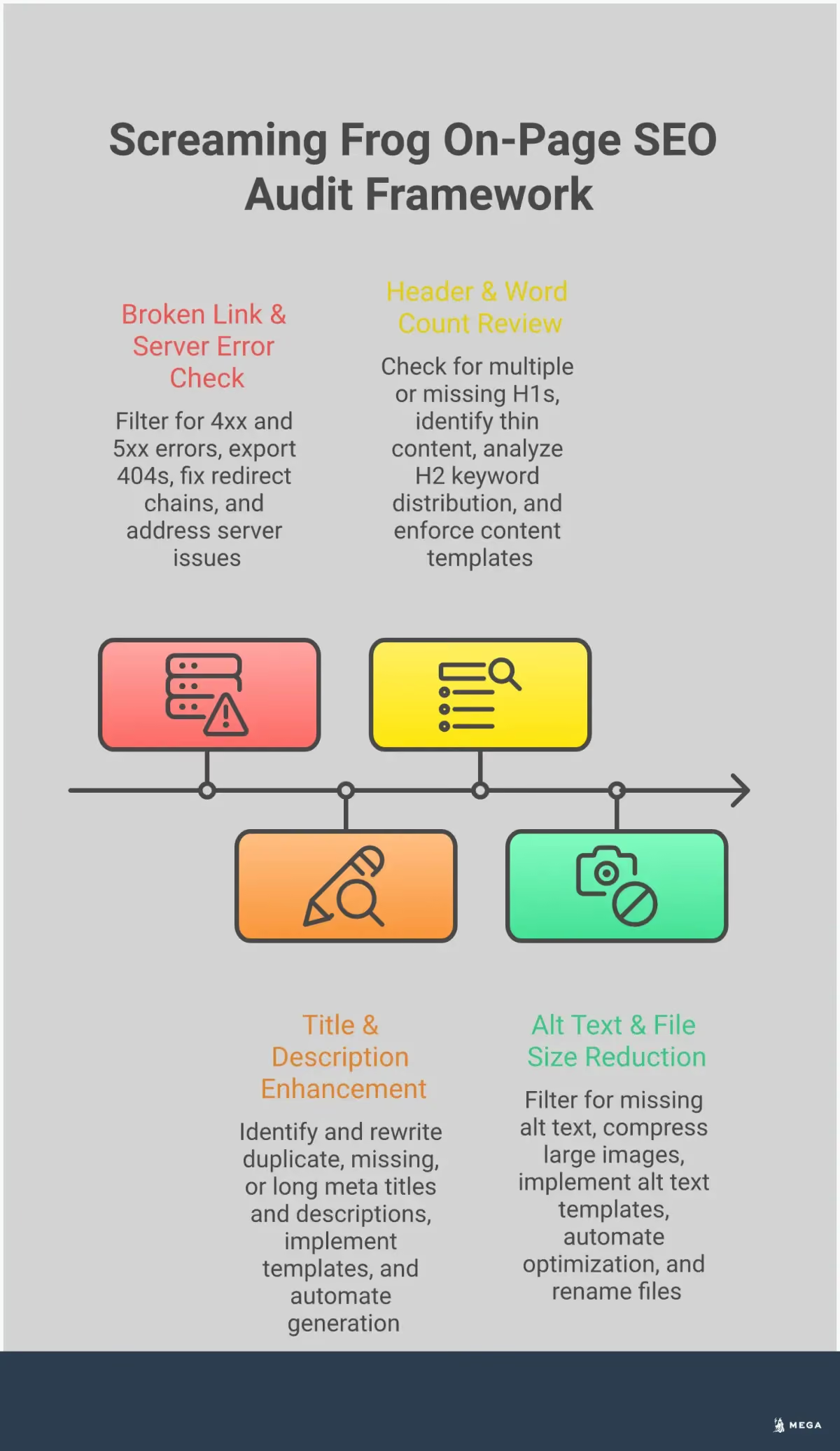
A quick tour of the main tabs
Screaming Frog organizes crawl data into different tabs, each focusing on a specific element of your site. To start, focus on the most critical ones for on-page SEO. The "Internal" tab shows every URL the crawler found on your site. From there, you can check tabs like "Page Titles," "Meta Description," "H1," and "Images" to analyze those specific elements across your entire site. For a more technical view, the "Response Codes" tab helps you find broken links or server errors. Getting familiar with these core tabs is the first step to making sense of your crawl. The official Screaming Frog user guide is a great resource for a deeper look at every feature.
How to filter and sort your results
With potentially thousands of URLs to review, filtering is essential. Screaming Frog has built-in filters that make it easy to isolate common problems. For example, in the "Page Titles" tab, you can use the filter menu to instantly see all pages with missing, duplicate, or overly long titles. You can also sort any column by clicking on its header. Sorting the "Word Count" column in the "Internal" tab, for instance, helps you quickly find pages with thin content. Using these features helps you cut through the noise and focus your attention on the URLs that need the most work.
Spotting high-priority issues
Not all SEO issues carry the same weight. Your first pass should focus on problems that can seriously harm your site’s visibility and user experience. Start with the "Response Codes" tab and filter for "Client Error (4xx)" to find all your broken links. These create a frustrating experience for users and stop search engine crawlers in their tracks. Next, look for "Server Error (5xx)" issues, which indicate significant technical problems. Other high-priority items include incorrect uses of "noindex" tags on important pages and long redirect chains that can dilute link equity and slow down your site. Addressing these critical errors first is a smart way to prioritize your efforts.
Common On-Page SEO Issues Screaming Frog Uncovers
Once your crawl is complete, the real work begins: interpreting the data to find and fix on-page SEO problems. Screaming Frog is great at flagging technical issues that are hard to spot manually. By working through the tabs, you can identify problems holding your site back in search results, from duplicate text to broken links.
Duplicate content and meta data
Look for quick wins in your metadata. Screaming Frog easily finds duplicate page titles, meta descriptions, and H1 tags. Each page needs unique text to avoid confusing search engines about which page to rank. Use the tool’s tabs to filter for duplicates or check for metadata that is too long, short, or missing. Fixing these issues helps improve your click-through rate from search results and clarifies your site structure.
Broken links and redirect chains
Broken links, or 404 errors, create a poor user experience and waste crawl budget. Screaming Frog quickly identifies these dead ends under the "Response Codes" tab. Fixing them involves updating the link or setting up a 301 redirect. The tool also uncovers redirect chains, which slow your site and dilute link equity. Always update the original link to point directly to the final destination to resolve these.
Missing alt text and image issues
Every image on your site needs descriptive alt text. This helps screen readers and gives search engines context about the image. In Screaming Frog, the "Images" tab shows all images missing alt text. While there, check for large image file sizes, as they can slow down your page load times. Optimizing images is an easy way to improve user experience and your technical SEO.
Thin content and poor header structure
Search engines prioritize pages with valuable content. Pages with very little text, or "thin content," are unlikely to rank well. Screaming Frog helps identify these pages by checking word count. The tool also lets you analyze your header structure. Every page should have a single, clear H1 tag. Multiple H1s can make it hard for search engines to understand the page’s main topic.
How to Prioritize Your Screaming Frog Fixes
A complete Screaming Frog crawl can feel overwhelming. You might have a spreadsheet with thousands of rows, each flagging a potential issue. The secret is not to fix everything at once. Instead, you need a system to identify what matters most. By prioritizing strategically, you can make meaningful progress without getting lost in the data. This approach involves focusing on high-impact changes, aligning your efforts with business goals, and building a clear plan of action.
Focus on high-impact changes first
Start with the issues that cause the most harm to your user experience and search engine visibility. These are your quick wins. Technical problems like broken links (404 errors) create dead ends for both users and search engine crawlers, so they should be at the top of your list. Similarly, long redirect chains can slow down your site and dilute link equity. Also, look for widespread duplicate title tags or meta descriptions on your most important pages, as fixing these can quickly improve how your site appears in search results. Addressing these high-impact SEO issues first ensures your effort delivers the most significant return.
Balance technical resources with business goals
Not every issue Screaming Frog finds requires immediate attention. As a small business or startup, your time and development resources are limited. It’s essential to weigh the effort required for a fix against its potential business impact. For example, optimizing the metadata on your core service or product pages will likely drive more value than correcting a minor image alt text issue on an old blog post. Always ask yourself: will fixing this help us achieve our primary business objectives? This mindset helps you align your SEO strategy with what truly matters, ensuring you invest resources where they can generate revenue or leads.
Create an actionable roadmap
Once you’ve identified your priorities, turn your findings into a structured plan. Export the relevant data from Screaming Frog and group similar tasks together. For instance, create one task for fixing all broken links and another for updating duplicate title tags. Assign a priority level (high, medium, or low) to each task group based on its impact and the resources required. This process transforms a daunting list of errors into a manageable project. By building an actionable roadmap, you create a clear path for your team to follow, track progress, and methodically improve your site’s on-page health over time.
Go Further with Advanced Screaming Frog Features
Once you have a handle on the basic reports, you can use Screaming Frog’s advanced features to get even more specific insights. These tools help you connect your technical SEO data with performance metrics and extract custom information that isn’t available in a standard crawl. Mastering these features will give you a much deeper understanding of your site’s on-page health and performance.
Use custom extraction and XPath
The standard crawl gives you a lot of information, but sometimes you need to find something very specific that isn’t a default field. This is where custom extraction comes in. Using a language called XPath, you can tell Screaming Frog to pull almost any piece of information from your site’s HTML. For example, you could extract author names from blog posts, product SKUs from ecommerce pages, or the publication date of an article. This feature is incredibly powerful for auditing content at scale or checking for specific elements across thousands of pages without having to inspect each one manually.
Connect Google Analytics and Search Console
Screaming Frog becomes even more useful when you connect it to your other SEO tools. By integrating with Google Analytics and Google Search Console, you can pull performance data directly into your crawl reports. This allows you to see metrics like clicks, impressions, click-through rate, and user sessions alongside technical data for each URL. You can quickly identify pages with technical issues that also have high traffic, or find pages with low impressions that might need content optimization. This integration helps you connect technical SEO fixes to real business outcomes by prioritizing work based on actual user engagement and search performance.
Export your data in bulk
A Screaming Frog crawl can contain hundreds of thousands of rows of data. To make sense of it all, you’ll often need to work with it outside of the tool. The software allows you to export your crawl data in formats like CSV or Excel. This bulk export feature is essential for creating custom reports, visualizing data in other programs, or sharing specific findings with your team. For instance, you could export all pages with missing meta descriptions and send the file directly to your content writer, or create charts to track your site’s technical health over time. It gives you the flexibility to analyze and present your findings however you need to.
The Challenge of Manual Audits: Time and Resources
Running a Screaming Frog crawl is a great first step, but the real work begins when you have the data. Analyzing thousands of rows, prioritizing fixes, and implementing changes takes significant time and expertise. For small businesses and startups, where resources are already stretched thin, the manual audit process can quickly become a bottleneck. While valuable for identifying issues, it’s important to understand the limitations of this approach, especially when it comes to scaling your efforts and maintaining long-term site health.
The complexity of ongoing optimization
An on-page audit provides a snapshot of your website's health at a single moment. However, your website is constantly evolving. New blog posts, product pages, and marketing campaigns add layers of complexity over time. To stay effective, SEO requires continuous monitoring. A technical issue that didn't exist last month could be hurting your rankings today. A manual check of your website needs to be repeated regularly, turning a one-off project into an ongoing operational task. This cycle of crawling, analyzing, and fixing is essential for growth but can be difficult to maintain without a dedicated team.
Why manual audits don't scale
For a website with only a few dozen pages, a manual audit is manageable. But as your business grows, so does your site. The Screaming Frog SEO Spider can crawl massive websites, but the human effort required to analyze that data grows exponentially. Exporting reports, cross-referencing spreadsheets, and creating action plans for developers can consume days of work. For busy founders and small marketing teams, this is time taken away from product development, customer service, and strategy. The manual process simply doesn't scale efficiently with your business's growth, creating a recurring resource drain.
When to consider an automated approach
If you find yourself spending more time diagnosing SEO problems than executing your business strategy, it’s time to consider automation. An automated approach moves beyond periodic checks to provide continuous analysis and implementation. Instead of just finding technical problems, an automated system can fix them, update content, and adapt to algorithm changes without constant manual oversight. This allows you to get all the benefits of a thorough technical audit while freeing up your team to focus on higher-level goals. Platforms with AI-powered SEO agents can manage these tasks autonomously, ensuring your site is always optimized for performance.
Move from Manual Audits to Automated Results
Using a tool like Screaming Frog is a major step up from checking pages by hand. It automates the discovery process, crawling your site to find technical issues much faster than any human could. This gives you a comprehensive list of potential problems, from broken links to missing meta descriptions, and helps you understand your site’s overall health. For many small businesses, this is the first real look they get under the hood of their website’s technical SEO.
But once the crawl is finished, the real work begins. The tool gives you the data, but it doesn’t interpret it for you or fix the problems it finds. You still need to sift through spreadsheets, prioritize which issues to tackle first, and then manually implement the changes. This could mean rewriting hundreds of title tags, optimizing images, or fixing redirect chains one by one. For busy founders and small marketing teams, this is a significant time commitment that pulls focus from other critical business areas.
This is where the difference between a tool and a fully autonomous service becomes clear. Instead of just identifying problems, an AI agent can manage the entire optimization process from start to finish. Our SEO agent doesn't just run the audit; it creates a strategy, executes the fixes, and continuously monitors your site for new opportunities. It handles the technical updates, content improvements, and keyword strategy for you. This approach allows you to move beyond manual analysis and implementation, freeing you up to focus on growing your business while an expert agent takes care of your SEO.