
Your competitors are not outranking you by accident. They have a strategy, and with the right tool, you can get a copy of their blueprint. Screaming Frog is a website crawler that maps out a competitor's entire on-page SEO strategy, from their site structure to their content hierarchy. It turns their website into a spreadsheet of actionable data. This guide will show you exactly how to use Screaming Frog for competitor analysis. We will walk through finding their weaknesses and uncovering opportunities you can use to build a smarter, more effective SEO plan for your own business.
Key Takeaways
- Map out your competitor's SEO blueprint: Use Screaming Frog to crawl a competitor's site and get a complete picture of their on-page strategy, from site architecture and internal linking to their content hierarchy.
- Pinpoint strategic weaknesses and opportunities: Analyze the crawl data to find specific issues like broken links, unoptimized images, and missing metadata that you can capitalize on for your own site.
- Turn raw data into an actionable strategy: Prioritize your findings based on impact and effort, then create a clear plan to fill content gaps, fix technical flaws, and build a stronger SEO foundation than your competition.
What is Screaming Frog?
Screaming Frog is a powerful piece of software known as a website crawler, or an SEO spider. Think of it as a tool that methodically browses a website just like a search engine would, but instead of indexing the pages for search results, it collects key data and organizes it for you. It’s designed to give you a comprehensive look at a website’s technical and on-page SEO health, essentially acting as your personal detective for all things on-site SEO. It digs through every page, image, and script to build a complete picture of how a site is structured and performing from a search engine's perspective.
This tool can analyze a website's SEO performance by checking for common issues like broken links, missing page titles, and duplicate content. It pulls all of this information into spreadsheets, allowing you to see everything from the length of a meta description to the status code of every URL on a site. For small business owners and marketing managers, it’s an effective way to conduct a technical audit without needing to manually check hundreds or thousands of pages. The data it provides is the foundation for identifying problems on your own site and, more importantly, for understanding what your competitors are doing right.
Why Use It for Competitor Analysis?
Using Screaming Frog for competitor analysis is like getting a blueprint of your rival’s online strategy. It allows you to conduct comprehensive audits of their on-page SEO, revealing how they structure their content, what keywords they target in their titles and headers, and how they use internal links to guide users and search engines through their site.
This process helps you move beyond guesswork and base your strategy on real data. You can see their content hierarchy, find out which pages they prioritize, and even analyze their backlink profiles to uncover opportunities you might be missing. By systematically crawling a competitor's website, you can pinpoint their strengths and weaknesses, giving you a clear roadmap for where to focus your own SEO efforts.
How to Set Up Screaming Frog
Getting started with Screaming Frog is a straightforward process. Before you can begin analyzing your competitors' websites, you'll need to download the software and adjust a few key settings to ensure your crawl is efficient and focused. This initial setup is crucial for gathering clean, relevant data that will inform your SEO strategy. Let's walk through the initial setup step by step so you can get crawling as quickly as possible.
Download and Install
First, you need to get the Screaming Frog SEO Spider onto your computer. It’s a desktop program, not a web-based tool, so you’ll have to install it. You can download the software directly from the official website. It’s compatible with most major operating systems, including Windows, macOS, and Ubuntu, so you should have no trouble getting it running. The installation process is standard for any software on your system. Once it's installed, you'll be ready to open the application and start configuring it for your first competitor crawl. This initial step is the foundation for gathering all the data you'll need for your analysis.
Choose Between the Free and Paid Versions
Screaming Frog offers two tiers: a free version and a paid one. The free version is quite generous and is a great starting point for small businesses. It allows you to crawl up to 500 URLs at a time, which is often enough to analyze a smaller competitor's website or a specific section of a larger one. However, if your competitors have large, complex sites, you'll quickly hit that limit. The paid license removes the 500 URL cap and unlocks advanced features, like the ability to save your crawls for later analysis and access more configuration options. For serious, ongoing competitor analysis, the investment in a paid license is usually worthwhile.
Configure Your Initial Settings
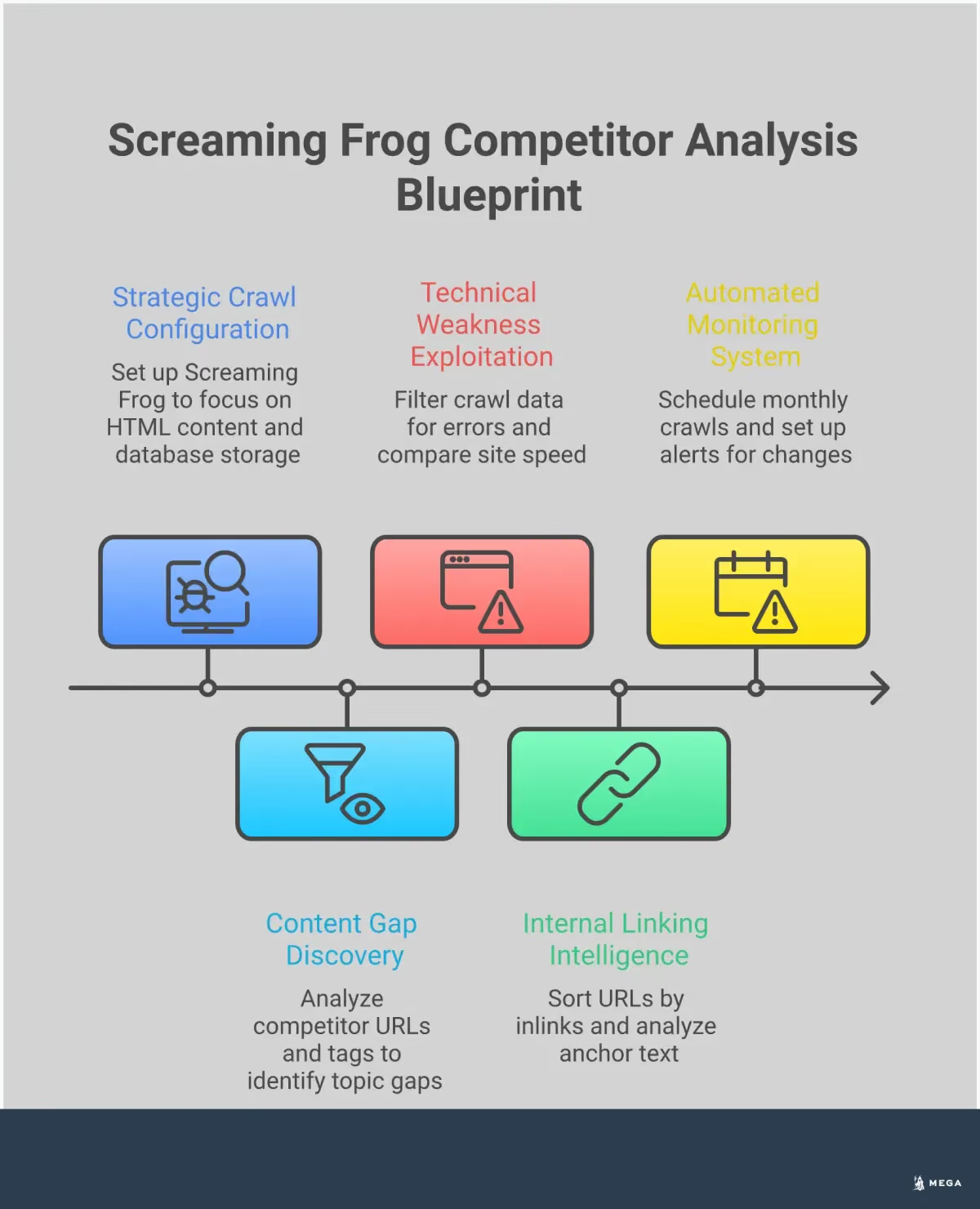
Before you type in a competitor's URL, it's wise to configure a few settings to make your crawl faster and more focused. For a typical competitor analysis, you're mainly interested in the HTML content, not the site's design elements. Navigate to the Configuration > Spider menu. In the settings, you can tell the tool to ignore certain resources. It's a good practice to uncheck boxes for CSS, images, and JavaScript. This prevents the spider from spending time and resources crawling files that aren't critical for your initial SEO analysis. By focusing the crawl on the core page elements, you'll get your results much faster and the data will be easier to manage.
How to Identify Your SEO Competitors
Before you can analyze your competition, you need to know who you’re up against. Your SEO competitors aren't always the same as your direct business competitors. An SEO competitor is any website that ranks for the keywords you want to rank for, even if they don't sell the same products or services. For example, a local bakery might find its top SEO competitor for "best sourdough bread recipe" is a national food blog, not the bakery down the street.
Identifying these players is the foundational step for any competitive analysis. The goal is to build a clear picture of the digital landscape you're operating in. By understanding who currently owns the top spots in search results, you can start to uncover their strategies, find their weaknesses, and identify opportunities for your own site to gain visibility. This process helps you focus your efforts where they will have the most impact, ensuring you're not just creating content blindly but are making strategic moves based on real-world data. This initial research will provide the list of URLs you'll eventually plug into Screaming Frog.
Find Competitors Based on Keywords
The most straightforward way to find your SEO competitors is to search for your main keywords on Google. Think like your customer: what terms would they use to find a business like yours? Type those into the search bar and see who shows up on the first page. These are your primary digital rivals. By looking at these top-ranking sites, you can find their weaknesses to use to your advantage and see what they do well to get ideas for your own website.
It's helpful to split competitors into 'realistic' ones you can aim for soon and 'ambitious' ones that will take more time and effort to beat. This all starts with a solid keyword strategy that defines the terms you want to own.
Select the Right Competitors to Analyze
Once you have a list of potential competitors, it’s time to narrow it down. Analyzing dozens of sites is overwhelming and inefficient. Instead, pick about 10 or fewer competitors to analyze closely. Focus on the ones that consistently appear for your most important keywords. This focused list will give you a clear and manageable dataset to work with in Screaming Frog.
For your most important keywords, pay close attention to the type of content Google shows. Is it a blog post, a product page, a video, or a local map pack? This tells you what Google thinks searchers are looking for, which is a concept known as search intent. Choosing competitors whose content matches the dominant search intent will give you the most relevant insights for your own strategy.
Key Features for Competitor Analysis
Screaming Frog is packed with features, but for competitor analysis, a few stand out. These tools help you move beyond guesswork and gather concrete data on your competitors’ SEO strategies. Understanding these core functions is the first step to uncovering valuable insights.
Site Crawling
At its heart, Screaming Frog is a site crawler. It systematically browses a website just like a search engine bot, mapping out every URL it can find. You can start a scan with a single homepage address or upload a list of specific pages. This function gives you a complete blueprint of a competitor's website architecture, showing you how many pages they have and how their site is structured. It’s the foundational step for any deep analysis, giving you a high-level overview.
On-Page Element Extraction
This feature saves you hours of manual work. Screaming Frog automatically pulls key on-page SEO elements from every URL it crawls. The data is organized into clear tabs, allowing you to see every page’s title tag, meta description, header tags, and word count at a glance. This lets you quickly analyze how competitors are targeting keywords and identify patterns in their on-page optimization strategy without clicking through hundreds of pages.
Technical SEO Data Collection
A polished website can hide technical issues. Screaming Frog uncovers these problems by collecting data on response codes, redirect chains, duplicate content, and site speed metrics. By crawling a competitor, you can pinpoint their technical weaknesses. Finding their broken links or slow pages reveals opportunities for you to provide a better user experience. While Screaming Frog finds these issues, an AI SEO agent can autonomously find and fix them on your own site.
Custom Extraction
For more advanced analysis, custom extraction is a powerful feature. It allows you to scrape specific information from a competitor's pages using CSSPath, XPath, or Regex. For example, you could extract product prices, author names from blog posts, or schema markup details. This lets you gather highly specific competitive intelligence that isn't available in standard reports. You can learn more about advanced crawling techniques to master this function.
How to Crawl a Competitor's Website
Once you have Screaming Frog set up, you’re ready to start the core of your analysis: crawling a competitor’s website. This process involves pointing the tool at their domain and letting it systematically browse the site, collecting data from every page it finds. The initial setup is simple, but a few key configurations can help you manage the scope of the crawl and ensure you get the most relevant data without overwhelming your computer or your schedule.
Enter Competitor URLs and Configure the Crawl
To begin your analysis, you first need to tell Screaming Frog which website to examine. The process is straightforward. You can simply enter your competitor's homepage URL into the search bar at the top of the application and hit "Start." The tool will then begin crawling the site, following links from the homepage to discover other pages.
Alternatively, if you want to focus on a specific part of their site, like their blog or product category pages, you can switch from "Spider" mode to "List" mode. This allows you to upload a list of specific URLs for a more targeted crawl. This approach is useful for saving time and focusing your analysis on the areas that matter most to your strategy.
Manage Crawl Depth and Limits
Before you start, it’s important to understand the tool's limitations, especially if you're using the free version. The free license allows you to crawl up to 500 URLs per website. For a small local business or a startup competitor, this might be plenty. However, for larger sites, you’ll quickly hit this cap.
The paid version removes this limit and gives you more control over the crawl configuration. For instance, you can set a specific "crawl depth," which tells the spider how many clicks deep from the starting page it should go. This helps you manage the scope of your analysis on massive websites. Consider the size of your competitor’s site to decide if the free version is sufficient or if a paid license is a necessary investment for a complete picture.
Analyze Large Websites
Crawling a large website with thousands of pages can be demanding on your computer's resources. If you have a paid license, you can make this process much smoother by changing the storage mode. Before starting your crawl, navigate to Configuration > System > Storage and switch from "Memory Storage" to "Database Storage." This setting saves crawl data directly to your hard drive instead of your computer's RAM, preventing the application from slowing down or crashing.
Once the crawl is complete, the amount of data can feel overwhelming. To get a quick, high-level summary of potential issues, start with the "Overview" and "Issues" tabs in the right-hand pane. These reports provide a prioritized look at problems like broken links, missing page titles, or redirect chains.
What to Look For in Your Competitor Crawl
Once your crawl is complete, you’ll have a spreadsheet full of data. This is where the real analysis begins. Instead of getting lost in the numbers, focus on a few key areas to understand your competitor’s strategy. By examining their on-page elements, you can uncover patterns and find opportunities to improve your own site. Think of it as a roadmap showing what’s working for them and where you can build a competitive edge. This process helps you conduct comprehensive audits of your competitors' on-page SEO so you can see what they do well and where you can outperform them.
Title Tags and Meta Descriptions
Title tags and meta descriptions are your first impression in search results, directly impacting click-through rates. In Screaming Frog, review the "Page Titles" and "Meta Description" tabs to see how your competitors approach them. Look for patterns in their title tag formulas. Do they lead with the keyword? Do they include their brand name? Analyze their meta descriptions for tone and calls to action. Are they writing compelling copy that makes you want to click? Understanding how they craft these elements helps you write more effective versions for your own pages, which can attract more organic traffic even without a change in rankings.
Header Structure and Content Hierarchy
Headers (H1s, H2s, etc.) provide structure and tell search engines what your content is about. A logical hierarchy makes your content easier for both people and crawlers to read. Use the "H1" and "H2" tabs in Screaming Frog to see how your competitors organize their key pages. Every page should have a single, clear H1 tag that includes the primary topic. Then, look at their H2s. These subheadings reveal how they break down a topic into smaller, digestible sections. This can give you a clear outline for creating content that is more thorough and better organized than theirs, helping you cover the topic more comprehensively.
Internal Linking Patterns
Internal links are essential for guiding users and search engines through your website. They also distribute authority across your pages. In your crawl data, look at the "inlinks" count for each of your competitor's URLs. Pages with a high number of inlinks are the ones they consider most important. This tells you which content they are prioritizing in their strategy. Also, pay attention to the anchor text they use. Are they using descriptive, keyword-rich phrases? A strong internal linking strategy signals to Google what your pages are about, and analyzing a competitor’s approach can reveal weaknesses in your own site’s architecture.
Image Optimization
Images play a big role in user experience and can even be a source of traffic from image search. However, unoptimized images can slow your site down. In Screaming Frog, navigate to the "Images" tab and filter for files that are missing alt text or have a large file size. Alt text is a key part of image optimization, as it helps search engines understand the image content and improves accessibility. If your competitors are neglecting alt text or using large, slow-loading images, you have a clear opportunity to do better and potentially gain a technical SEO advantage.
URL Structure
A clean and logical URL structure helps search engines understand your site’s hierarchy and makes your links more user-friendly. When you crawl a competitor's site, look at the list of their URLs. Are they short, readable, and descriptive? Do they include relevant keywords? Notice if they use subfolders (like /blog/ or /services/) to group related content. This can give you insight into their site architecture and how they organize topics. A well-planned URL structure is a foundational part of good technical SEO, and analyzing a competitor’s setup can inspire improvements for your own site.
Common Mistakes to Avoid
Screaming Frog provides a massive amount of data, but turning that data into a winning strategy requires careful analysis. It’s easy to get lost in the spreadsheets or focus on the wrong metrics. A few common missteps can lead you to draw the wrong conclusions about your competitors, wasting time and resources on tactics that don’t move the needle. For small businesses and founders, time is the most valuable resource, so making every minute of analysis count is critical. The goal isn't just to see what your competitors are doing; it's to find specific, exploitable weaknesses and replicable strengths that you can act on immediately.
This process is about more than just gathering intelligence. It's about creating a feedback loop where you identify an opportunity, implement a change on your own site, and measure the impact. By being aware of the most common pitfalls, you can make your competitor analysis more effective from the start. Avoiding these errors ensures you’re not just collecting data but are building a clear, actionable plan to improve your own site’s performance and gain a competitive edge in the search results. This section will walk you through the most frequent mistakes so you can sidestep them and get straight to the insights that matter.
Overlooking Technical SEO
It’s tempting to focus only on a competitor's keywords and content, but their technical foundation is often the secret to their success. A competitor might be outranking you simply because their website is technically sound. Overlooking this means you’re missing a huge piece of the puzzle. Use your crawl data to look beyond page titles and dig into their site architecture, page speed insights, use of canonical tags, and redirect chains. A comprehensive technical audit reveals if they have fewer crawl errors or a cleaner site structure, giving them an advantage with search engines. This information helps you identify foundational issues on your own site that could be holding you back.
Ignoring Advanced Features
Many users only scratch the surface of what Screaming Frog can do, sticking to the default crawl settings. This is a mistake because the tool’s advanced features are where the deepest insights are found. If you’re not using functionalities like custom extraction, JavaScript rendering, or API integrations, you’re leaving valuable data on the table. For example, custom extraction can pull specific information from a competitor's pages, like product prices or author names. Learning to use these advanced Screaming Frog tactics allows you to tailor your analysis and uncover strategic details that a basic crawl would completely miss, giving you a much clearer picture of what makes their SEO strategy work.
Failing to Compare Data
Analyzing a competitor’s website in isolation provides limited value. The real insights emerge when you compare their data directly against your own. A common mistake is to crawl a competitor, note their strengths, and then fail to benchmark those findings against your site's performance. Run a crawl of your own domain using the exact same settings you used for your competitor. This allows for an apples-to-apples comparison of everything from internal linking and URL structures to metadata optimization. This direct comparison is what highlights your specific weaknesses and their competitive advantages, turning a list of observations into a concrete list of action items for your own website.
Missing Content Gaps
A Screaming Frog crawl gives you a complete list of a competitor’s pages, which is a roadmap to their content strategy. A major mistake is not using this information to perform a content gap analysis. By sorting their URLs and reviewing their page titles and H1 tags, you can quickly see which topics they cover that you don’t. This process helps you identify valuable keywords and themes that are already proven to attract your target audience. Failing to find these content gaps means you’re missing opportunities to create new articles, landing pages, and resources that can capture traffic your competitors currently own. It’s one of the most direct ways to leverage their hard work for your own benefit.
Advanced Techniques for Deeper Insights
Once you have a handle on the basic crawl reports, you can use Screaming Frog’s more powerful features for deeper competitive intelligence. These advanced techniques require more setup but deliver a richer understanding of what your competitors are doing right. They help you analyze competitors at scale, combine different data sources for a holistic view, and track their strategies over time.
Use Custom Extraction for Specific Data
Custom extraction lets you pull specific information from a competitor's website code. It’s like a custom report for data Screaming Frog doesn't collect by default. For example, you can extract schema markup to see how competitors optimize for rich snippets, pull author names, or find specific call-to-action text. This technique is powerful for understanding the nuances of a competitor's on-page strategy. By identifying specific HTML elements, you can reverse-engineer their approach to structured data, content formatting, and conversion optimization.
Create Bulk Analysis Workflows
Instead of crawling one competitor at a time, analyze multiple sites at once to spot industry-wide trends. Using Screaming Frog’s list mode, you can upload competitor URLs and crawl them all in one session. This bulk analysis workflow is efficient for comparing key metrics like average word count or internal linking patterns across your competitive landscape. It helps you move from analyzing a single rival to understanding standard practices in your niche. This broader view makes it easier to identify where the biggest gaps and opportunities are.
Integrate with Other SEO Tools
Screaming Frog becomes more powerful when connected with other tools. You can integrate APIs from Google Analytics, Google Search Console, and Ahrefs to pull performance data into your crawl reports. This shows you not just what’s on a competitor's page, but how that page performs in terms of traffic, clicks, and backlinks. Combining crawl data with performance metrics gives you a clearer picture of which strategies are driving results. You can identify their most valuable pages and figure out what makes them successful.
Automate Your Reporting
Competitor strategies are always changing, so a one-time analysis isn't enough. To stay on top of their moves, automate your reporting by scheduling regular crawls. Set Screaming Frog to crawl your top competitors weekly or monthly, then export the data to compare reports and flag significant changes. Did a competitor overhaul their title tags, add a new site section, or change their internal linking? Automated monitoring ensures you catch these updates quickly, allowing you to react to their strategic shifts.
How to Turn Data into Actionable Insights
Running a crawl is the easy part. Now you have rows upon rows of data, and the real work begins: turning that information into a smart SEO strategy. This is where many business owners get stuck. Sifting through thousands of URLs to find meaningful patterns requires time and a sharp eye for detail. The goal is to move from raw data to a clear action plan that helps you outrank your competition.
This manual analysis—identifying content gaps, spotting technical flaws, and finding link opportunities—is the core of any effective SEO campaign. It’s also the kind of detailed, ongoing work that can pull you away from running your business. While tools like Screaming Frog give you the data, an AI-powered SEO agent can take over the entire process, from analysis to execution, ensuring these insights don't just sit in a spreadsheet. Let's look at the four key areas where you can turn your competitor crawl into a winning strategy.
Identify Content Opportunities
Your competitor’s most successful content is a roadmap for your own. In your crawl data, look at which of their pages have the most internal links pointing to them. This often signals which content they consider most important. Pay close attention to the topics covered on these high-value pages. Are they publishing in-depth guides, case studies, or resource hubs? This analysis helps you understand what resonates with your shared audience. You can then create content that covers the same topics but does it better—making it more comprehensive, up-to-date, or engaging. This is a straightforward way to build a content strategy that’s already proven to work.
Discover Technical Improvements
A technically sound website provides a better user experience and is easier for search engines to crawl and index. By crawling a competitor's site, you can spot technical weaknesses that you can capitalize on. Look for issues like broken links (404 errors), slow page load times, or improper use of redirects. For example, if their key pages are slow to load, you can gain an advantage by ensuring your own site is optimized for speed. Every technical issue you find on their site is an opportunity for you to do better. Run a similar technical SEO audit on your own website to fix any corresponding problems and create a superior experience for your visitors.
Find Keyword Gaps
Understanding the keywords your competitors are targeting can reveal gaps in your own strategy. While Screaming Frog doesn't show keyword rankings directly, you can infer a competitor's keyword focus by analyzing their page titles, meta descriptions, and H1 tags from the crawl data. Look for recurring themes and specific phrases. Are they targeting long-tail keywords you’ve overlooked? Are they optimizing for local search terms? To get a more complete picture, you can integrate Screaming Frog with APIs from tools like Google Search Console or Ahrefs. This allows you to pull in keyword data directly, making it easier to spot terms they rank for that you don’t.
Spot Link Building Prospects
Backlinks are a crucial part of SEO, and your competitor’s link profile is a great place to hunt for opportunities. One effective technique is broken link building. Use Screaming Frog to crawl your competitor's website and check the External tab for broken outbound links (any links with a 404 status code). These are links on their site pointing to pages that no longer exist. You can then reach out to the websites that were linking to those broken resources and suggest they link to your relevant content instead. This is a win-win: you help them fix a broken link on their site, and you get a valuable backlink in return. It’s a simple way to build a high-quality backlink profile.
How to Implement Your Findings
A Screaming Frog crawl gives you a mountain of data, but data alone doesn't improve your rankings. The next step is to translate your findings into a clear strategy. This is where you turn competitor weaknesses into your strengths and their successful tactics into inspiration for your own site.
Prioritize Opportunities
Your crawl report will likely reveal dozens of potential actions, and trying to tackle everything at once can be overwhelming. Instead, prioritize your tasks based on their potential impact and the effort required. Create a simple list and categorize each item. High-impact, low-effort tasks are your quick wins—think fixing broken internal links or optimizing title tags on your most important pages.
High-impact, high-effort projects, like building out a new content category to fill a gap you discovered, should be planned as longer-term initiatives. By sorting your opportunities, you can focus your resources where they’ll make the most difference first and build momentum for bigger projects down the line.
Create an Action Plan
Once you have a prioritized list, it’s time to build an action plan. For each task, define the specific steps needed to complete it, who is responsible, and a target deadline. For example, if you found a competitor earning traffic from a data-driven blog post, your action item might be to brainstorm a similar story with your own unique data.
Executing this plan requires time and often technical expertise. For small businesses focused on growth, handling this manual work can be a major drain on resources. This is where an autonomous SEO agent can take over, implementing technical fixes, generating content, and managing the entire optimization process for you.
Monitor Competitors Over Time
Competitor analysis is not a one-and-done activity. The digital landscape is constantly shifting—your rivals will update their sites, launch new products, and adjust their content strategies. Because your competitors will change as your own website grows, it’s important to perform these checks regularly.
Set a schedule to re-crawl your main competitors every quarter or after a major Google algorithm update. This ongoing monitoring allows you to spot new threats and opportunities as they emerge, ensuring your strategy remains relevant and effective. Consistent analysis helps you adapt quickly and maintain your competitive edge over the long term.