
Your biggest online competitor might not be the business you think it is. In the world of search, your rivals are any websites ranking for the keywords your customers use. Identifying these players is the first step to building a winning SEO strategy. Tools like KWFinder are designed to give you a clear view of this digital playing field. This post offers a practical guide on how to use KWFinder for competitor analysis. We will show you how to pinpoint your true SEO competitors and uncover the exact keywords that are driving traffic to their sites.
Key Takeaways
- Focus on attainable keywords: Use KWFinder's difficulty score to identify low-competition terms, allowing you to target keywords you can realistically rank for and attract relevant visitors without wasting resources.
- Uncover content gaps by analyzing search intent: Look beyond the keyword list and use the SERP overview to see what type of content is already successful, revealing opportunities to create a more valuable resource than your competitors.
- Make competitor analysis a routine: SEO is not a one-time task, so schedule regular check-ins to monitor your competitors' strategies, which helps you adapt to market changes and discover new ranking opportunities.
What is KWFinder and Why Use It for Competitor Analysis?
If you're looking for a straightforward way to understand your competition's SEO strategy, KWFinder is a great place to start. It's a keyword research tool designed to help you find keywords that are actually within your reach to rank for. Instead of guessing what topics will bring traffic to your site, you can use KWFinder to see exactly what's already working for others in your niche. This is especially useful for small businesses and startups that need to make every piece of content count. By analyzing your competitors, you can uncover valuable insights that inform your own content plan, saving you time and helping you focus on what truly drives results.
A Look at KWFinder's Core Features
KWFinder provides several key features that make competitor analysis simple. The tool displays important data for every keyword, including search volume, cost-per-click (CPC), and a Keyword Difficulty (KD) score that estimates how hard it will be to rank. The most powerful feature for this task is "Search by Domain." You can enter a competitor's website address to see a list of the keywords they rank for. This gives you a direct look into their content strategy. Another helpful tool is the Keyword Gap Analysis, which shows you keywords your competitors rank for that you currently don't, highlighting immediate opportunities.
Why Competitor Analysis Matters for Small Businesses
For a small business, competitor analysis isn't about copying what others are doing. It's about making smarter, data-informed decisions with your limited resources. When you perform a competitor keyword analysis, you learn which search terms are already proven to attract your target audience. This knowledge helps you build a more effective content strategy, create articles that answer real customer questions, and ultimately drive more qualified traffic to your website. It allows you to find weaknesses in your competitors' strategies and discover underserved topics where you can become the go-to authority, helping you compete even with larger, more established brands.
How to Identify Your Competitors with KWFinder
Before you can analyze what your competitors are doing, you first need a clear picture of who they are. Your biggest competitor online might not be the business you expect. In the world of SEO, your competitors are any websites that rank for the keywords your target customers use. This could include direct business rivals, but it might also be bloggers, affiliate sites, or major publications that you hadn't considered. KWFinder provides two simple yet powerful methods to identify these players, forming the foundation of your competitive analysis.
For startups and small businesses, this step is critical. It helps you understand the digital landscape, find gaps in the market, and avoid going head-to-head with giants on highly competitive terms. By pinpointing your true SEO rivals, you can build a smarter, more effective strategy from the ground up. This initial research sets the stage for everything that follows, from content creation to link building. It ensures your efforts are focused on the right targets, saving you time and resources instead of wasting them on battles you can't win. Identifying your competitors is the first step toward understanding their strengths and weaknesses, which you can then use to inform your own approach.
Find Competitors Through Keyword Research
The most direct way to find your search competitors is to start with your core keywords. Think about the main product or service you offer. If you're a local bakery, you might start with "custom cakes in San Diego." When you enter this term into KWFinder, the tool shows you the top-ranking websites for that exact phrase. These are your direct digital competitors. This method is perfect for understanding the competitive landscape for your most important search terms, giving you a clear list of sites to analyze first as part of your competitor keyword analysis.
Use Domain Analysis to Discover Competitors
You can also work backward by starting with a competitor you already know. Enter their website address into KWFinder's domain analysis tool. The platform will then show you all the keywords that site is ranking for, revealing their entire organic search strategy. This is a great way to find new keyword ideas and see the full scope of their content. For an even clearer picture, run your own domain through the tool. This will highlight which websites consistently appear for the same keywords you do, helping you uncover competitors you may not have been aware of. This process is a key part of a comprehensive SEO plan.
Analyze Competitor Keywords Step-by-Step
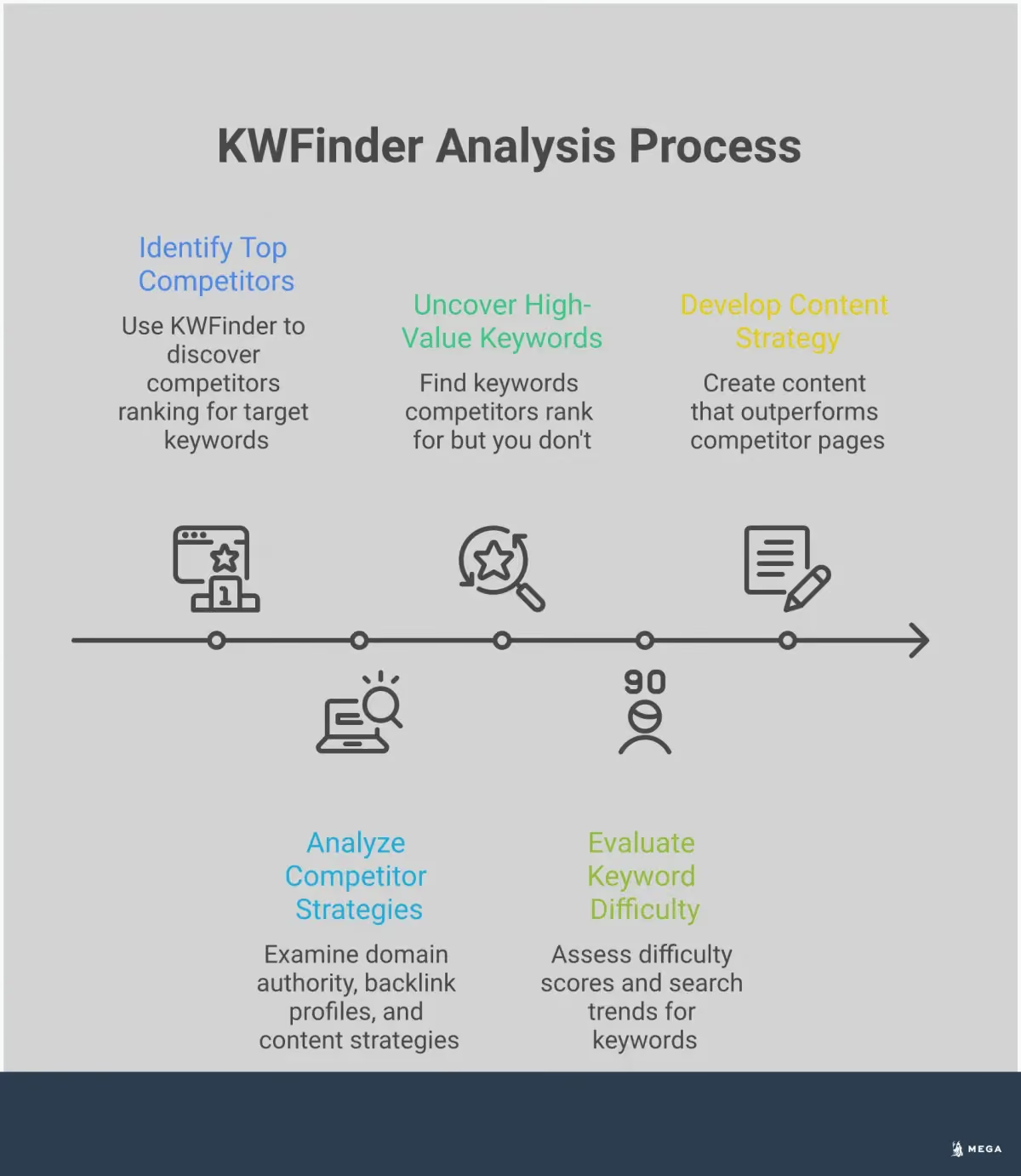
Once you have a list of your key competitors, you can start the detective work. This is where you dig into their strategies to find the exact keywords that are driving traffic to their sites. By analyzing their keyword portfolio, you can uncover valuable opportunities for your own business, find gaps in your content strategy, and make more informed decisions about where to focus your SEO efforts. The following steps will walk you through how to use KWFinder to systematically break down your competitors' keyword performance.
Set Up Your KWFinder Account
First things first, you'll need access to the tool. The good news is that you can get started without any upfront cost. KWFinder offers a free account that lets you explore its main features, and you don't need to provide a credit card to sign up. This trial is a great way to get comfortable with the interface and run a few initial searches to see what kind of data you can uncover. Just head over to their site, create your login, and you’ll be ready to begin your analysis in a matter of minutes. This initial step gives you a risk-free way to see if the tool is the right fit for your business needs.
Enter Competitor Domains
Once you're logged in, it's time to start investigating. If you already have a list of your top competitors, you can enter their website addresses directly into KWFinder. The tool will then generate a list of all the organic keywords that domain ranks for. If you're not sure who your main online competitors are, you can start by typing your primary service or product keywords into the search bar. KWFinder will show you the top-ranking websites for those terms, giving you a clear list of rivals to analyze. This competitor keyword research feature is the foundation of your entire analysis.
Interpret the Keyword Results
After you enter a competitor's domain, KWFinder will present you with a table full of data. It can look like a lot at first, but focus on a few key metrics. You'll see search volumes, which tell you how many people search for a term each month, and a keyword difficulty score, which estimates how hard it will be to rank for that keyword. The tool also provides an estimate of the monthly visits a keyword drives to your competitor's site. This data helps you prioritize which keywords are worth pursuing based on their potential traffic and your ability to compete. Understanding these numbers is essential for making smart strategic choices.
Use the SERP Overview Feature
One of the most useful features for planning your content is the SERP overview. For any keyword you're considering, KWFinder shows you a snapshot of the top 10 search results currently ranking on Google. This is incredibly valuable because it reveals what kind of content is already succeeding. You can see the titles, URLs, and authority scores of the top pages. By analyzing these results, you can understand the search intent behind the keyword and determine what it will take to create a piece of content that can effectively compete for a top spot. This insight helps you move from just finding keywords to creating content that actually ranks.
What Metrics Matter Most in Competitor Analysis?
When you look at a competitor's keyword data in KWFinder, you'll see a lot of numbers. It's easy to get lost in the details, but for a small business, only a few key metrics truly matter for making smart decisions. Focusing on the right data points helps you cut through the noise and find actionable insights you can use to shape your own SEO strategy. Think of these metrics as the vital signs of a keyword’s health and potential. By understanding them, you can prioritize your efforts on terms that will actually help your business grow, instead of chasing keywords that look good on paper but don't deliver results. Let's break down the three most important metrics to watch.
Search Volume and Traffic Potential
The first metric you'll notice is search volume. This number tells you, on average, how many times people search for a specific keyword each month. It’s a direct indicator of a topic's popularity and the potential audience size you can reach. A keyword with a high search volume means more people are looking for it, which translates to a greater opportunity for traffic. However, it's important to see this as a starting point. While a high volume is attractive, it often comes with more competition. For small or local businesses, a keyword with a lower, more targeted search volume can sometimes be more valuable if it attracts the right kind of visitor.
Keyword Difficulty Scores
Next, pay close attention to the Keyword Difficulty (KD) score. KWFinder calculates this metric to estimate how hard it will be to rank on the first page of Google for a particular keyword. The score runs from 0 to 100, with higher numbers indicating tougher competition from established websites. As a small business, you can use the KD score to find strategic openings. Instead of trying to compete for highly difficult keywords right away, look for terms with a lower KD score. These are your "quick win" opportunities where you have a realistic chance to rank and start attracting traffic sooner. This metric helps you manage your resources effectively by focusing on attainable goals.
Cost-Per-Click and Commercial Intent
Finally, look at the Cost-Per-Click (CPC) value. This metric shows how much advertisers are willing to pay for a single click on an ad for that keyword. While it’s a paid search metric, it gives you powerful clues about a keyword's commercial intent. A high CPC suggests that the people searching for that term are likely looking to make a purchase. These are valuable keywords because they attract users who are further along in the buying cycle. Targeting keywords with strong commercial intent means the traffic you do get is more likely to convert into leads and sales, directly impacting your bottom line.
How to Find Content Gaps and Keyword Opportunities
Once you know which keywords your competitors are targeting, the real work begins. Your goal is to find the gaps, the strategic openings where you can create better content and win over their audience. A content gap is simply a topic or keyword that your competitors rank for, but you don’t. For a small business or startup, these gaps are golden opportunities. They show you exactly what potential customers are searching for and provide a clear roadmap for your content strategy.
Instead of guessing what to write about, you can use KWFinder to build a data-driven plan. This process helps you find keywords that are not only relevant but also achievable to rank for. By focusing on these opportunities, you can save time and resources, creating content that directly contributes to your business goals. Think of it as finding a side door to your competitor’s traffic. They’ve already done the hard work of figuring out what resonates with the audience; now you just need to find the topics they haven’t covered perfectly and make them your own. This approach is especially powerful for lean teams who need every piece of content to count. It shifts your focus from creating more content to creating the right content, ensuring your efforts translate into measurable growth like increased traffic and leads.
Identify Keywords Missing from Your Strategy
The first step is to pinpoint the exact keywords your competitors are ranking for that are completely missing from your website. These are terms your target audience is actively using, but your site is invisible in the search results. KWFinder’s competitor analysis features are designed to uncover these opportunities. By simply entering your domain and a competitor’s domain, you can generate a list of keywords that are driving traffic to their site but not yours.
This analysis gives you a list of proven topics to target. Instead of starting from scratch, you can see what’s already working in your niche. The KWFinder guide provides a great overview of how to use these features to build a more robust keyword list and ensure you’re not leaving any valuable search traffic on the table.
Find Low-Competition Keywords
As a small business, you likely don’t have the resources to compete with industry giants for highly competitive keywords. That’s where finding low-competition keywords, or "low-hanging fruit," becomes essential. These are search terms that have a reasonable amount of search volume but are easier to rank for. KWFinder excels at this by providing a Keyword Difficulty (KD) score for every term. This metric estimates how hard it will be to rank on the first page of Google.
Your goal is to find keywords with a lower KD score, as these present a more realistic opportunity for your site to gain visibility quickly. Focusing on these terms allows you to build momentum and start attracting organic traffic without getting stuck in an unwinnable fight. It’s a smarter, more efficient way to approach your SEO strategy.
Use Keyword Gap Analysis
Putting it all together is the keyword gap analysis. This is the specific action of comparing your domain against several competitors at once to find shared and unique keywords. Most tools, including KWFinder, have a dedicated feature for this. You can input your website and up to five competitors to see a comprehensive breakdown of your keyword landscape. The tool will show you which keywords all your competitors rank for, which ones only a few rank for, and most importantly, which ones they rank for that you don’t.
This process of competitor keyword research is more than just finding terms; it’s about understanding market demand. If all your top competitors are ranking for a specific keyword, it’s a clear signal that it’s important to your audience. This analysis helps you prioritize your content efforts on the topics that matter most.
Advanced KWFinder Features for Deeper Analysis
Once you have a handle on the basics, KWFinder’s advanced features can give you a much clearer picture of the competitive landscape. These tools help you move beyond a simple list of keywords and start thinking strategically about location, timing, and opportunity. For small and local businesses, these deeper insights are where you can find a real advantage. Instead of just seeing what your competitors rank for, you can understand how and why they succeed in specific markets, allowing you to build a smarter, more targeted SEO plan.
Location-Based Competitor Research
If you run a local business, your biggest competitors are often right down the street. KWFinder allows you to zero in on these local rivals by filtering keyword research for specific locations. You can choose from thousands of cities to see what terms are popular in your service area. Simply enter a competitor’s domain and set the location to your city. This shows you the exact keywords driving their local traffic, helping you build an effective local SEO strategy. This feature is perfect for discovering phrases like “best pizza in Brooklyn” that your customers are actually searching for.
Historical Data and Trend Analysis
Timing can be just as important as knowing the right keywords. KWFinder provides historical data showing a keyword’s search trend over the past year, which is useful for identifying seasonal patterns. For example, a retail store can see when searches for “winter coats” start to spike and plan their content accordingly. By analyzing these trends, you can anticipate customer needs and create relevant content before your competitors do. This data helps you build a proactive content calendar that captures interest when it’s highest.
Filtering and Sorting Options
A competitor analysis can generate a massive list of keywords. KWFinder’s filtering and sorting options help you cut through the noise. You can refine your results by setting a minimum search volume or a maximum keyword difficulty to find easier ranking opportunities. You can also include or exclude keywords containing certain words to focus on specific products or services. This level of control allows you to quickly prioritize keywords that align with your business goals, whether you’re looking for quick wins or long-term growth.
How to Apply Your Findings to Your SEO Strategy
You've done the research and gathered a ton of data on your competitors. Now comes the important part: turning those insights into a concrete plan that gets you more traffic and customers. This is where your analysis translates into action. An effective SEO strategy isn't just about finding keywords; it's about using them to create content that connects with your audience and outperforms the competition. By systematically applying what you've learned, you can build a roadmap for content creation, optimize your existing pages, and prioritize your efforts for the best possible results. This process ensures your hard work pays off, moving you from simply collecting data to making strategic decisions that grow your business. For startups and small businesses, this focused approach is key to competing effectively without wasting time or resources.
Build Your Target Keyword List
Your first step is to consolidate all the promising keywords you've found into a master list. Analyzing your competitors' keywords reveals opportunities and gaps in your own approach. As you build your list, think beyond just copying what others are doing. Look for themes and topic clusters that are relevant to your business. You can organize this list in a simple spreadsheet, grouping keywords by search intent (informational, commercial, etc.) or by the product or service they relate to. This organized list becomes the foundation of your content plan, helping you differentiate your content and capture targeted traffic.
Plan Content Based on Your Analysis
With your keyword list ready, it's time to plan your content. The goal is to ensure your website effectively incorporates these terms. High-quality content that aligns with your target keywords is essential for improving your search rankings. Start by mapping each keyword to a specific page on your site. Does an existing page fit the keyword, or do you need to create a new blog post or landing page? This process forms the core of your content strategy. Make sure your web pages are set up correctly for search engines, focusing on fundamentals like title tags, meta descriptions, and clear headings to maximize your content's impact.
Prioritize Keywords for Maximum Impact
You can't target every keyword at once, so prioritization is critical. Finding keywords that your competitors rank for but you do not is a great place to start. Use the filter options in KWFinder to narrow down your list to the most valuable opportunities. Look for a sweet spot: keywords with reasonable search volume, a low-to-moderate difficulty score, and clear relevance to your offerings. This approach helps you target valuable keywords that can enhance your visibility without requiring a massive budget or years of effort to rank. For small businesses, focusing on these high-impact, achievable keywords is the smartest way to gain traction.
Common KWFinder Mistakes to Avoid
KWFinder gives you a powerful lens into your competitors' strategies, but it's easy to get lost in the data. To get the most out of your analysis, you need to avoid a few common pitfalls that can send your SEO strategy in the wrong direction. Focusing on the right metrics and understanding the context behind the numbers is key to gathering actionable insights that lead to real growth for your business.
Over-Relying on High-Volume Keywords
It’s tempting to see a keyword with thousands of monthly searches and add it to your list. But chasing high-volume keywords is often a trap, as they are broad, competitive, and attract traffic that isn't ready to buy. For example, a local accounting firm targeting "small business taxes" will face huge competition. A better approach is to focus on specific, long-tail keywords like "tax preparation for startups in Austin." The volume is lower, but the traffic is more relevant and likely to convert. Use KWFinder’s Keyword Difficulty score to find a balance between search volume and achievability.
Ignoring Search Intent
A keyword represents a user's need. Failing to understand the search intent behind a competitor's keywords means you'll create content that misses the mark. Before targeting a keyword, use KWFinder’s SERP overview to see what’s ranking. Are they blog posts, product pages, or service pages? If your competitor ranks for "best running shoes for beginners" with an in-depth guide, a simple product page won't work. You need to match the content type users expect, whether it's informational, commercial, or transactional.
Failing to Monitor Competitor Changes
Competitor analysis isn't a one-time task. The digital market is always shifting, with competitors launching new campaigns and targeting new keywords. If you only check their keywords once, you’ll be working with outdated information within months. Make it a habit to regularly monitor your competitors to spot new opportunities and threats. Set a quarterly schedule to re-run your analysis in KWFinder. Look for new keywords they’re ranking for, as this could signal a new product or service launch. Staying current keeps your strategy agile and effective.
How to Scale Your Competitor Analysis Process
Competitor analysis isn't a one-and-done task. It's an ongoing process that helps you adapt to market changes and stay ahead of the curve. For a small business or startup, finding the time to consistently track competitors can feel like a huge challenge. The key isn't to work harder, but to work smarter by creating a scalable system.
Scaling your process means you can gather valuable insights efficiently without dedicating all your time to manual research. By establishing a regular review cycle and combining KWFinder’s data with other tools, you can build a repeatable workflow that uncovers opportunities consistently. This approach turns competitor analysis from a daunting project into a manageable and highly effective part of your regular marketing activities. It ensures you’re always aware of what your rivals are doing and can react strategically to protect and grow your market share.
Create a Systematic Review Schedule
One of the biggest mistakes businesses make is treating competitor analysis as a one-time project. Your competitors’ strategies are always evolving, so your analysis should be a continuous effort. To make this manageable, set up a systematic review schedule. A good starting point is to conduct a quick monthly check-in to spot any major changes, like new high-performing keywords or a sudden shift in their content focus.
Then, plan a more in-depth analysis every quarter. During this deep dive, you can use KWFinder to fully reassess their keyword portfolio and identify new content gaps. A consistent review cadence helps you spot trends over time and reveals opportunities you might otherwise miss. This proactive approach ensures you’re never caught off guard by a competitor’s new move.
Integrate KWFinder Data with Other SEO Tools
KWFinder provides excellent insights into your competitors' keyword strategies, but it becomes even more powerful when you combine its data with other tools. To get a complete picture, you should integrate your findings with data from your own analytics platforms, such as Google Search Console and Google Analytics. For example, you might discover a competitor ranks for a certain keyword in KWFinder. You can then check your Google Search Console data to see if you’re getting any impressions for that same term.
This cross-referencing helps you validate opportunities and prioritize your efforts based on real-world performance data. Relying on a single tool can sometimes give you a limited view. By creating a more holistic analysis, you can build a more resilient and effective SEO strategy that is grounded in multiple data sources.