
Your website might look great to visitors, but search engine crawlers see it very differently. They follow links, read code, and look for signals that tell them what your content is about and how authoritative it is. A tool like Screaming Frog lets you see your site from that technical perspective. Understanding how to use Screaming Frog for content marketing is key to finding problems that crawlers see but humans often miss. In this post, we will cover how to run a crawl, analyze the data, and use those insights to ensure your content is structured for success.
Key Takeaways
- Diagnose your content's technical health: Use Screaming Frog to crawl your site and create a comprehensive list of technical issues, such as broken links, duplicate pages, and thin articles that can hold back your content's performance.
- Prioritize fixes with performance data: Integrate Screaming Frog with Google Analytics and Search Console to see which technical problems affect your most important pages, allowing you to focus on changes that will have the greatest impact on traffic.
- Establish a routine for content maintenance: Move beyond a single audit by setting a regular schedule to crawl your site, which helps you monitor its health, measure the results of your updates, and consistently improve your content strategy.
What is Screaming Frog and Why Should Content Marketers Care?
Think of the Screaming Frog SEO Spider as a tool that lets you see your website the way a search engine does. It’s a website crawler that methodically visits every page, link, image, and file on your site to create a comprehensive map of its structure and health. For content marketers, this might sound a bit technical, but it’s incredibly important. Your best blog posts and landing pages can fail to perform if they’re held back by technical issues you can’t easily see.
Screaming Frog helps you find problems that hurt your content's ability to rank, like broken links, missing page titles, or duplicate articles. It gives you a clear, data-driven list of what needs fixing. By running a crawl, you can spot opportunities to make your existing content stronger and ensure new pieces are set up for success from the start. While the tool is excellent for diagnosis, an automated SEO agent can take these findings and implement fixes across your site, handling everything from technical updates to content optimization. This combination of deep analysis and automated execution is key to an effective content marketing program.
What Are Screaming Frog's Core Functions?
At its heart, Screaming Frog is designed to audit your website for common SEO issues. It can find pages that Google might not have discovered yet, identify articles with too few words, and spot pages that don't have any internal links pointing to them. You can customize a crawl to check specific elements like images, external links, or page response times. For content marketers, its most useful functions include analyzing page titles and meta descriptions, checking for duplicate content, and mapping out your site’s internal linking structure. This helps you get a complete picture of your content's on-page and technical health.
How Screaming Frog Fits into Your Content Strategy
A good content strategy prevents you from just creating content on the fly; it helps you get better results with a clear plan. Screaming Frog provides the data you need to build that plan. Instead of guessing which articles need an update, you can use crawl data to identify underperforming pages. When you publish a new blog post, you can use Screaming Frog to find older, relevant articles on your site and add internal links from them to your new piece. This simple action helps search engines find your new content faster and passes authority from your established pages, giving your new article a better chance to rank.
How to Set Up Screaming Frog for Content Marketing
Getting started with a powerful tool like Screaming Frog can feel intimidating, but a proper setup is the key to getting clean, actionable data for your content strategy. By configuring a few key settings from the start, you can run focused crawls that give you exactly the information you need without the noise. This initial setup ensures your time is spent on analysis and improvement, not on sifting through irrelevant data. Think of it as calibrating your compass before you start your journey. A few minutes of setup can save you hours of work down the line and help you pinpoint exactly where your content marketing efforts should go.
Install and Configure the Basics
First things first, you need to get the software running on your computer. You can download Screaming Frog for Windows, macOS, or Linux, and the installation is very straightforward. Once it’s installed, the basic functions are intuitive: you enter a website URL to start a crawl, save your progress, and export the data into spreadsheets for a closer look. Getting comfortable with these core actions is the foundation for everything else. This initial step puts a powerful website auditing tool at your fingertips, ready to help you understand your site’s content structure and health from a search engine’s perspective.
Adjust Key Settings for Content Analysis
To get the most out of Screaming Frog for content marketing, you’ll want to customize your crawl settings. By default, the tool crawls almost everything, but you can make the process faster and more focused by telling it what to look for. In the configuration menu, you can choose to check specific elements like images, JavaScript, and CSS, or limit the crawl depth to focus only on your most important pages. For a content audit, you might want to ensure you’re crawling things like page titles, meta descriptions, and word counts. Tailoring these settings helps you gather the precise data needed to evaluate your content without getting bogged down by purely technical details.
Connect to Google Analytics and Search Console
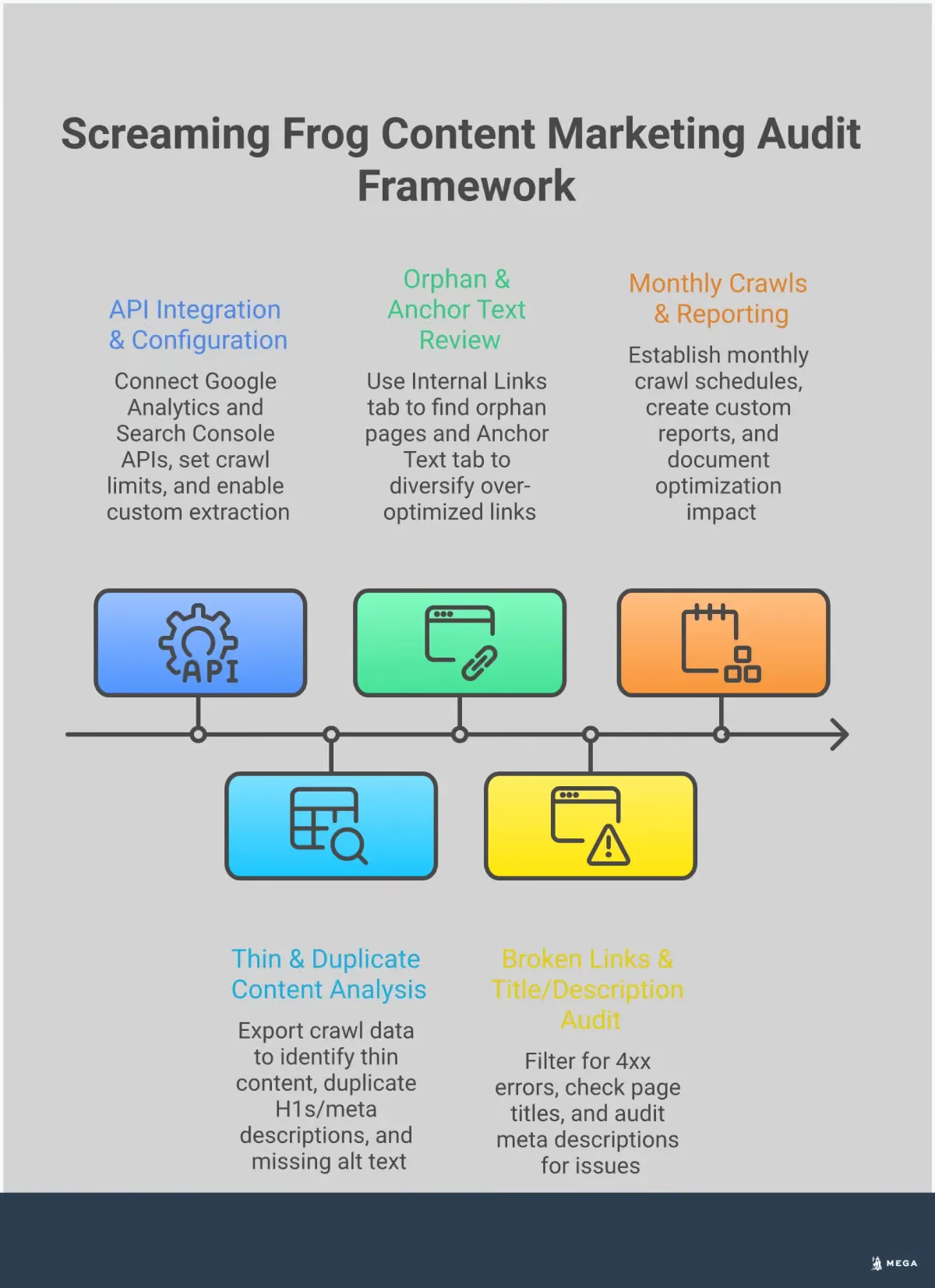
This is where Screaming Frog truly shines for content marketers. By connecting the tool to your Google Analytics (GA4) and Google Search Console (GSC) accounts via the API settings, you can pull performance data directly into your crawl results. This integration allows you to see metrics like clicks, impressions, and user sessions alongside technical data for each URL. You can quickly identify pages with technical issues that also have high traffic or find content that isn't performing well in search. This connection turns a technical audit into a strategic content review, giving you the insights needed to prioritize your efforts effectively. Once you identify these opportunities, a platform like MEGA AI can help you implement SEO fixes and update content automatically.
How Screaming Frog Improves Your Content Audit Process
A content audit is a systematic review of all the content on your website. The goal is to understand what you have, how well it’s performing, and what you should do with it next. This process can feel like a massive undertaking, but a tool like Screaming Frog makes it manageable. Instead of manually clicking through hundreds of pages, you can run a crawl to gather all the data you need in one place.
This gives you a clear, objective look at your content's health. You can spot everything from high-performing blog posts to forgotten pages that are hurting your SEO. A thorough audit helps you make informed decisions about where to focus your efforts, whether that’s updating old articles, removing thin content, or finding new topics to cover. It’s the foundational step for building a content strategy that actually works for your business. Once you have this data, you can create a clear action plan.
Find Content Gaps and Opportunities
One of the most powerful ways to use Screaming Frog is to find your "low-hanging fruit." By connecting the tool to your Google Search Console and Google Analytics accounts, you can pull in performance data for every page. This allows you to identify pages that get a lot of impressions in search results but have a low click-through rate. These pages are already visible to your audience; they just need a little push. A simple title tag update or meta description rewrite could be all it takes to attract more clicks. This is a core part of any effective content gap analysis.
Analyze Key Page Performance Metrics
Beyond finding opportunities, Screaming Frog helps you assess the performance of every single page. You can sort your content by clicks and impressions to see what’s driving traffic and what’s falling flat. This analysis helps you categorize your content and decide on next steps. Pages with zero traffic might be candidates for removal or redirection. Pages that perform reasonably well could be updated with new information or optimized for better keywords. This data-driven approach ensures you’re not just creating new content but also getting the most value from what you already have.
Uncover Technical Content Issues
Content quality isn't just about the words on the page; technical issues can also hold you back. Screaming Frog is excellent at flagging problems like duplicate content, thin pages with very little text, and even spelling and grammar errors. These issues can harm user experience and signal low quality to search engines. Identifying them is the first step, but fixing them can be time-consuming for busy teams. Once you have your list of issues, a service that performs technical SEO audits can execute the fixes, from correcting canonical tags to cleaning up duplicate pages, without you having to do it manually.
Key Screaming Frog Features for Content Optimization
Screaming Frog is often seen as a tool for technical SEO specialists, but it’s just as powerful for content marketers. Once you get past the initial setup, you can use its features to perform a deep content audit, find optimization opportunities, and make data-driven decisions for your strategy. It helps you move from guessing what content needs work to knowing exactly where to focus your efforts. Let's look at a few key features that directly impact content performance. While finding these issues is the first step, an automated platform like MEGA AI's SEO agent can handle the implementation and ongoing maintenance for you.
Analyze Title Tags and Meta Descriptions
Your page titles and meta descriptions are your first impression on the search results page. Screaming Frog lets you see all of them in one place. You can quickly filter for titles that are too long, too short, or missing entirely. The same goes for meta descriptions. This bulk analysis is a huge time-saver compared to checking each page manually. By ensuring every page has a unique and compelling title tag, you can improve your click-through rate from search. Finding these issues is the first step; the next is fixing them, which can be a time-consuming process across a large site.
Assess Content Length and Word Count
While word count isn't a direct ranking factor, it can be a sign of content quality. Pages with very little text, often called thin content, may not provide enough value to users or search engines. In Screaming Frog, you can crawl your site and sort pages by word count to find these potential problem areas. This helps you identify articles that need more depth, product pages with sparse descriptions, or service pages that could be more comprehensive. You can then prioritize which pieces of content to expand or consolidate to better serve your audience and improve your rankings.
Review Your Internal Linking Structure
Internal links are the pathways that guide users and search engine crawlers through your website. A strong internal linking structure helps distribute authority across your pages and shows how your content is related. Screaming Frog can help you find "orphan pages"—pages that have no internal links pointing to them, making them difficult for anyone to find. You can also analyze the anchor text you're using for your links. A solid internal linking strategy ensures your most important content gets the attention it deserves and helps users discover more of your valuable information.
Check Image Optimization and Alt Text
Images make your content more engaging, but they need to be optimized correctly. Large image files can slow down your site, and missing alt text is a missed opportunity for both SEO and accessibility. Screaming Frog’s ‘Images’ tab lets you find all images on your site and filter for issues like missing alt text or large file sizes. Writing descriptive alt text helps search engines understand what an image is about and makes your content accessible to users with visual impairments. Regularly auditing your images ensures they are helping, not hurting, your content's performance.
What Content Marketing Tasks Can You Do with Screaming Frog?
Screaming Frog is more than just a tool for technical SEO specialists. For content marketers, it’s a powerful ally that helps you look under the hood of your website to see how your content is actually performing. It crawls your site just like a search engine would, giving you a clear picture of what’s working and what needs attention. By running a crawl, you can move beyond simple page views and get to the heart of your content’s structural health, identifying issues that could be holding you back from reaching a wider audience. Think of it as a diagnostic tool for your entire content library.
While tools like MEGA AI can automate technical fixes and content updates, understanding the "why" behind these changes is valuable. Using a crawler like Screaming Frog helps you manually audit your content and gain a deeper appreciation for the technical details that influence performance. It’s a great way to get hands-on experience with the data that drives a successful content strategy, allowing you to spot opportunities for improvement and better collaborate with your team or automated tools.
Find Broken Links That Hurt User Experience
Nothing frustrates a visitor more than clicking a link and landing on a "Page Not Found" error. These broken links, or 404 errors, create a poor user experience and can signal to search engines that your site is poorly maintained. Manually checking every link on your site is impossible, but Screaming Frog automates the process. After a crawl, you can navigate to the “Response Codes” tab and filter for “Client Error (4xx)” to get a complete list of broken links. Fixing these is a quick and effective way to improve your site’s usability and SEO health. It’s a simple task that shows both users and search engines that you care about their experience.
Detect Duplicate Content Issues
Duplicate content happens when the same or very similar content appears on multiple URLs. This can confuse search engines, forcing them to choose which version to rank and often diluting the authority of your pages. Screaming Frog is excellent at spotting these issues. During a crawl, it flags pages with identical content, allowing you to address the problem directly. Once you’ve identified duplicate pages, you can decide on the best course of action, whether that’s implementing a canonical tag to specify the preferred version, using a 301 redirect, or rewriting the content to make it unique. This helps ensure each piece of content has a clear purpose and the best possible chance to rank.
Analyze Site Architecture for Better Content Flow
How your content is organized and linked together, known as site architecture, has a huge impact on how easily users and search engines can find what they’re looking for. A logical structure helps distribute page authority throughout your site and guides visitors to your most important content. Screaming Frog allows you to visualize your site architecture and analyze key metrics like crawl depth, which tells you how many clicks it takes to reach a specific page. This helps you identify important pages that are buried too deep or find "orphaned" pages that have no internal links pointing to them. A well-structured site makes for a better user journey and stronger SEO performance.
Identify Thin Content Pages
Thin content refers to pages that offer little to no value to the reader. This could be a blog post with only a few sentences, a product page with a sparse description, or an auto-generated page with no unique information. Search engines prioritize high-quality, helpful content, so pages with thin content can drag down your site’s overall authority. Screaming Frog helps you find these pages by allowing you to sort all your URLs by word count. By identifying pages with a very low word count, you can create a list of content that needs to be improved, expanded, or removed. This ensures your website is filled with valuable resources that serve your audience and meet Google’s quality guidelines.
How to Use Screaming Frog Data to Build a Better Content Strategy
Once your crawl is complete, you’re left with a massive amount of data. This is where the real work begins: turning that raw information into a clear, actionable content strategy. A tool like Screaming Frog is excellent for gathering information about your website's health and content performance. The next step is to interpret that data, prioritize your tasks, and build a plan that moves your business forward. This process helps you focus your limited time and resources on the changes that will make the biggest difference.
While a manual audit gives you a solid to-do list, executing it can be time-consuming. This is where an automated platform can help. Once you identify the issues, MEGA AI’s SEO agent can handle the implementation, from updating content and fixing technical errors to building out your keyword strategy, freeing you up to focus on your business.
Interpret Crawl Results and Key Metrics
The first step is to make sense of what you’re seeing. Screaming Frog’s tabs organize data by category, like page titles, meta descriptions, and response codes. Instead of getting lost in every detail, focus on the metrics that directly impact your content’s performance. Look for pages with thin content (low word count), missing or duplicate title tags, and images without alt text. These are often quick fixes with a noticeable impact. By connecting Screaming Frog to Google Analytics and Search Console, you can also see which pages get clicks and impressions, helping you understand what’s already working.
Prioritize Content Fixes by Impact
You can’t fix everything at once, so prioritization is key. Start with the low-hanging fruit: high-impact issues that are easy to resolve. For example, updating a vague title tag on a page that already gets decent traffic can quickly improve its click-through rate. Other priorities should include fixing broken internal links to improve user experience and identifying important pages that aren't getting any internal links. You can also find pages that get no traffic, which you might decide to update or remove to clean up your site. This approach ensures your efforts are focused where they matter most.
Create an Action Plan from Your Data
To make your findings useful, you need a concrete plan. Export the relevant data from Screaming Frog into a spreadsheet. Create columns for the URL, the issue you identified, the proposed solution, and a priority level (high, medium, or low). This simple document transforms a data dump into a working roadmap for your content improvements. Based on your findings, you can plan to update page titles, add more substance to thin pages, or refresh old content. This organized approach makes it easier to track your progress and systematically improve your site’s content over time.
Common Screaming Frog Mistakes to Avoid
Screaming Frog is an incredibly powerful tool, but its depth can also be its downfall if you’re not careful. It’s easy to get lost in the data or focus on the wrong metrics. By understanding a few common pitfalls, you can make your content audits more efficient and impactful, ensuring you spend your time on changes that truly matter.
Ignoring Duplicate Content
It’s easy to focus on creating new articles, but overlooking duplicate content can quietly undermine your efforts. When search engines find identical or very similar content across multiple URLs, it can dilute your page authority and confuse which page to rank. Screaming Frog is excellent at flagging these content issues, from exact duplicates to pages with thin or low-quality content. Running a crawl to check for duplicate title tags, meta descriptions, and H1s is a simple first step. Addressing these issues helps ensure each piece of content has a clear purpose.
Underusing Custom Filters
A standard crawl can return thousands of URLs, which can feel overwhelming. One of the most common mistakes is trying to analyze everything at once instead of using custom filters to focus your audit. For content marketers, this feature is a game-changer. You can set up filters to isolate specific sections of your site, like your blog, or to find pages that contain certain keywords. For example, you could create a filter to find all pages that mention a specific service. This approach turns a mountain of data into a manageable list for more effective content audits.
Overlooking Technical SEO Problems
As a content marketer, you might think technical SEO is someone else’s job, but technical issues can prevent your great content from ever being seen. Problems like broken internal links create a poor user experience, while missing meta descriptions can hurt click-through rates. Screaming Frog uncovers hundreds of potential SEO issues that directly impact content performance. While you might not fix them all yourself, identifying them allows you to collaborate with a developer or use a service like MEGA AI’s SEO agent to resolve them, ensuring your content has a solid technical foundation.
Failing to Connect Data to Strategy
The ultimate goal of a content audit isn't just to find and fix problems; it's to gather insights that inform your broader content strategy. A frequent mistake is treating the crawl data as a simple to-do list without asking what it means for the bigger picture. For example, if you find that your top-performing articles are all over 2,000 words, that insight should guide future content creation. True data-driven content decisions come from connecting the dots between what the crawl tells you and your business goals.
Advanced Screaming Frog Tactics for Content Marketers
Once you’re comfortable with the basics, you can start using some of Screaming Frog’s more powerful features to get even deeper insights into your content. These advanced tactics move beyond simple audits and help you connect technical data with actual content performance. This is where you can find the specific, data-backed opportunities that lead to meaningful improvements in traffic and engagement. While these steps require a bit more setup, the payoff is a much richer understanding of your site’s content ecosystem. For small teams, mastering these features can provide the kind of detailed analysis that larger competitors might have. It’s about using the tool not just to find problems, but to build a smarter, more effective content strategy from the ground up.
Use Custom Extraction for Deeper Analysis
Custom extraction is a powerful feature that lets you pull almost any piece of information from your site’s HTML during a crawl. Think of it as creating your own custom filter. For example, you could extract the author's name from every blog post, check for the presence of specific schema markup, or see which pages are missing a key call-to-action button. This allows you to perform a much more in-depth content analysis tailored to your specific goals, helping you spot patterns and opportunities you’d otherwise miss.
Check Readability Scores
Great content isn't just about keywords; it needs to be clear and easy for your audience to read. Screaming Frog can analyze your content for spelling and grammar issues, giving you a high-level view of your site's editorial quality. By identifying pages with potential readability problems, you can prioritize which articles to edit for clarity. Improving readability helps keep users engaged and makes your content more accessible, which is a win for both user experience and SEO.
Integrate with Google Analytics for Performance Data
One of the most valuable things you can do is connect Screaming Frog to your Google Analytics and Search Console accounts. This integration overlays performance data—like sessions, bounce rate, and conversions—directly onto your crawl data. This context is critical for making smart decisions. For instance, you can easily find pages with high impressions but low clicks, or identify thin content pages that get zero traffic. This is the foundation for data-driven content pruning and optimization efforts.
Create Custom Visualizations and Reports
A raw data export from Screaming Frog can be overwhelming. To make sense of it all and share your findings with others, it’s helpful to create custom reports. You can export your crawl data to a CSV and use tools like Google Sheets or Looker Studio to build charts and dashboards. Visualizing the data makes it much easier to spot trends, such as a decline in word count across a specific blog category or a poor internal linking structure. These custom visualizations are perfect for communicating your strategy to stakeholders.
Best Practices for Using Screaming Frog in Your Workflow
To get the most out of Screaming Frog, you need to integrate it into your regular workflow rather than using it for a one-time audit. A consistent process helps you catch issues before they become major problems and allows you to track the impact of your content efforts. While manual audits are powerful, they can be time-consuming for small teams. For businesses looking to automate this process, platforms like MEGA AI offer full-service SEO management that includes technical audits and content updates, freeing you up to focus on strategy. Adopting a few best practices will help you turn crawl data into a sustainable system for content improvement.
Set a Regular Crawling and Monitoring Schedule
Think of a Screaming Frog crawl as a regular health check for your website's content. Just as search engines constantly re-evaluate your site, you should regularly monitor its technical and content health. A one-off audit is useful, but a recurring schedule—monthly or quarterly—is what helps you maintain performance. Regular crawls allow you to spot new broken links, identify redirect chains, or find pages that have accidentally been de-indexed. This proactive approach ensures your content remains optimized. A consistent content audit schedule helps you stay on top of your site's performance and address small issues before they grow.
Collaborate with Your Technical SEO Team
Screaming Frog is often seen as a tool for technical SEOs, but its data is incredibly valuable for content creators. The most effective content strategies are built when content and technical teams work together. If you're a content marketer, share your crawl reports with your web developer or SEO specialist. Discuss findings like thin content pages, slow-loading articles, or poor internal linking. Your technical counterpart can help diagnose the root cause, while you provide the content goals. This collaboration ensures that technical fixes support your content's performance and that your content is created on a technically sound foundation.
Measure Content Improvements Over Time
A single crawl gives you a snapshot of your site's health, but the real insights come from tracking changes over time. Use your initial crawl as a baseline. After you've updated title tags, added internal links, or fleshed out thin content, run another crawl a month or two later. Compare the new data to your baseline to see the direct impact of your work. You can track if pages with low word counts have decreased or if your internal linking has improved. By connecting Screaming Frog data with Google Search Console, you can also measure performance metrics like clicks and impressions to see if your changes are driving tangible results.
Start Your First Screaming Frog Content Audit
Kicking off a content audit can feel like a big project, but with the right tool, it’s a manageable and incredibly insightful process. The Screaming Frog SEO Spider is designed to crawl your website just like a search engine would, giving you a clear map of your content and highlighting areas for improvement. Think of it as a health check for your website’s content.
First, you’ll want to configure the crawl to focus on the information that matters most for your content strategy. The tool has many options for how it crawls a website. You can customize the settings to specify what it checks, such as images or external links, how many pages it looks at, and how deep into your site it goes. For a content audit, you’ll want to ensure you’re capturing all your blog posts, articles, and key landing pages.
To get the most out of your audit, connect Screaming Frog to your Google Analytics and Google Search Console accounts. This step is crucial because it layers performance data—like clicks, impressions, and user engagement—on top of the technical data from the crawl. This integration allows you to see not just what content you have, but how it’s actually performing.
Once the crawl is complete, export the data into a spreadsheet. This is where you’ll spend most of your time analyzing the results. Your spreadsheet will show you important details for each page, including titles, meta descriptions, word counts, and the performance metrics you pulled from Google. From here, you can start to identify content issues like duplicate pages, thin content with low word counts, or pages with missing meta descriptions. Based on these findings, you can build a clear action plan to update titles, enrich thin content, or remove pages that no longer serve your audience.
While a manual audit provides deep insights, it can be time-consuming for busy small business owners. For those looking to streamline this work, MEGA AI’s SEO agent performs these technical audits automatically, identifying and fixing issues to keep your content optimized without the manual effort.