Ever wondered why some YouTube thumbnails pop while others fall flat? The secret often lies in a small but mighty detail: the aspect ratio. What is the aspect ratio of a YouTube thumbnail, and why does it matter so much? It's the proportional relationship between the width and height of your thumbnail image, essentially a recipe for its dimensions. Mastering this seemingly technical aspect can significantly impact your video's success. A thumbnail with the right aspect ratio not only looks professional but also ensures compatibility across various devices, maximizing visibility and attracting more clicks. In this guide, we'll break down the ideal YouTube thumbnail aspect ratio, dimensions, and design tips to help you create thumbnails that shine.
Key Takeaways
- Nail the aspect ratio: A 16:9 aspect ratio (1280 x 720 pixels) ensures your YouTube thumbnails look sharp and professional on any screen.
- Design eye-catching thumbnails: High-quality images, clear text, and a balanced design are key to attracting clicks.
- Keep your branding consistent: Use your logo and color scheme to make your videos instantly recognizable on YouTube.
What Is a YouTube Thumbnail Aspect Ratio?
The aspect ratio of a YouTube thumbnail is key to getting your videos noticed. It describes the proportional relationship between its width and height—like a recipe for your thumbnail's dimensions. The recommended aspect ratio for YouTube thumbnails is 16:9, the same widescreen format used by most videos. This ensures your thumbnail looks great and displays correctly on various devices, from smartphones to large screens.
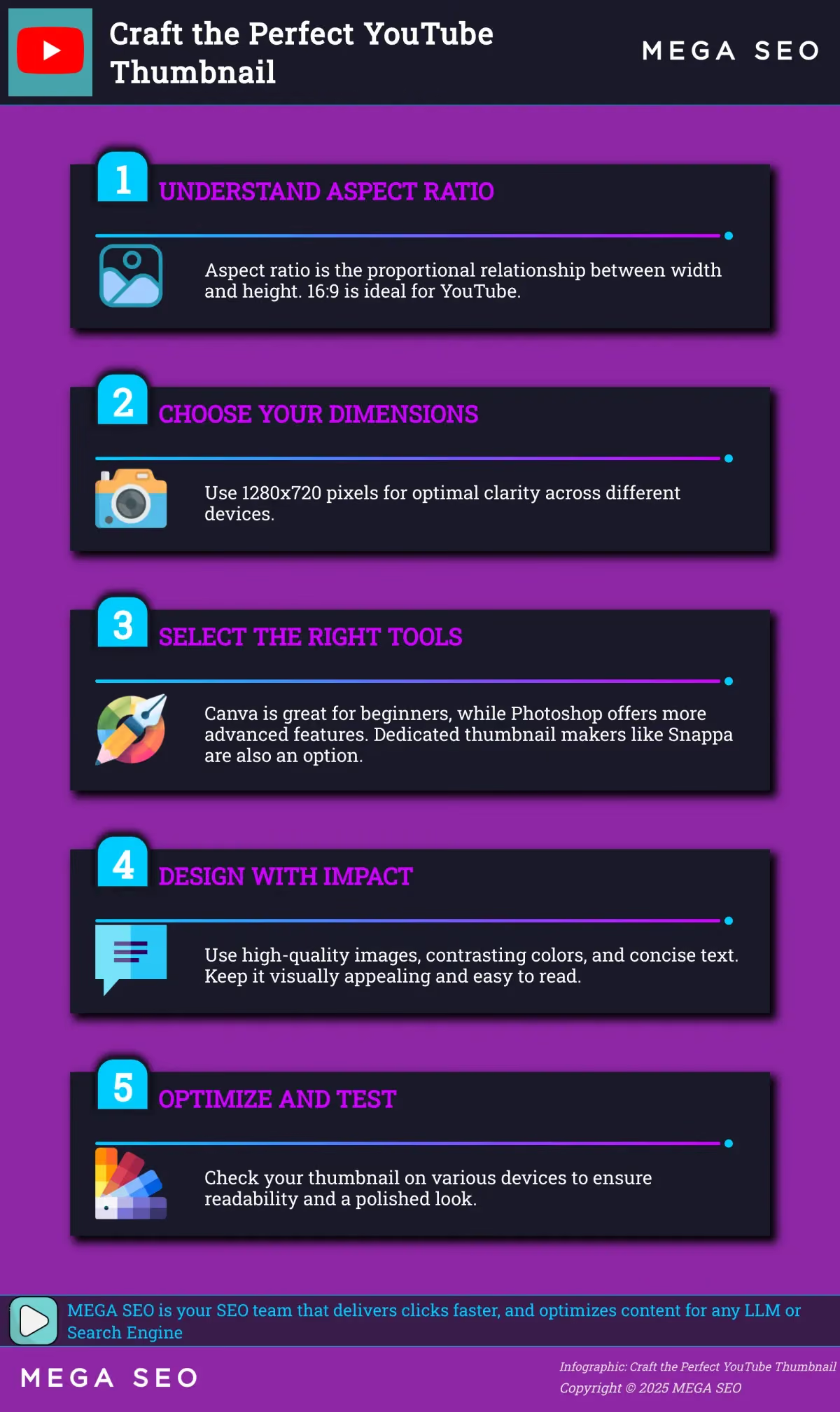
Why is 16:9 so important? It maximizes visibility. YouTube uses this ratio throughout its platform, from the video player to search results. A 16:9 thumbnail fits seamlessly into these spaces, giving viewers a clear preview of your video. A different aspect ratio can lead to cropping or black bars, making your thumbnail look less professional and potentially deterring viewers. For optimal clarity, Snappa recommends 1280 x 720 pixels, which maintains that crucial 16:9 aspect ratio. This size balances visual detail and file size, ensuring quick loading and a sharp image.
Adobe Express and TechSmith reinforce these recommendations, highlighting the importance of 1280 x 720 for a polished look. The correct aspect ratio and dimensions not only improve your videos' visual appeal but also ensure compatibility across YouTube and various devices. It's a simple yet effective way to enhance your video's presentation and attract more clicks.
Why Are Aspect Ratios Important for YouTube Thumbnails?
Your YouTube thumbnail is the first impression viewers have of your video content. A compelling thumbnail significantly impacts viewer engagement and click-through rates, ultimately affecting your video's success. Getting the aspect ratio right is a fundamental step in creating effective thumbnails.
How Aspect Ratios Affect Viewer Engagement and Click-Through Rates
The ideal YouTube thumbnail size is 1280 x 720 pixels, which maintains a 16:9 aspect ratio. This is the same aspect ratio as YouTube's video player. When your thumbnail matches this aspect ratio, it appears clear and professional in search results and alongside related videos. A blurry or distorted thumbnail can deter viewers, signaling a lack of quality. A well-designed thumbnail, with the correct aspect ratio, acts as a visual hook, enticing viewers to click and watch. A compelling thumbnail can dramatically increase your video's click-through rate.
Maintaining Consistency Across Devices and Platforms
Using the correct aspect ratio ensures your thumbnail looks consistent across different devices. Whether viewers are watching on a desktop, laptop, tablet, or smartphone, your thumbnail will appear as intended. This consistency is crucial for a positive user experience. No one wants to click a thumbnail that looks great on their computer only to find it cropped or distorted on their phone. Maintaining the 16:9 aspect ratio guarantees optimal visibility and a professional appearance on virtually any screen. This cross-platform consistency contributes to a polished brand image and seamless viewing experience. Using correct image sizes is crucial for a professional look and better visibility on YouTube.
YouTube Thumbnail Dimensions and Specifications
This section covers the technical must-haves for YouTube thumbnails. Getting these details right is the first step in attracting more viewers to your videos.
Ideal Pixel Dimensions and Aspect Ratio
The ideal YouTube thumbnail size is 1280 x 720 pixels, or a 16:9 aspect ratio. This is the standard for most online video platforms. The minimum width for your thumbnail image is 640 pixels. Sticking to these dimensions ensures your thumbnail looks sharp and professional, no matter where viewers encounter it.
File Formats and Size Limits
YouTube accepts thumbnails in JPG, GIF, and PNG formats. Keep your file size under 2MB. Larger files can cause upload issues or slow down loading times for your video page, impacting the viewer experience.
Create Clear Thumbnails
A blurry or pixelated thumbnail reflects poorly on your content. Use high-quality images. If possible, take your own photos instead of using stock images. Contrasting colors will make the text and graphics on your thumbnail pop, improving visibility and encouraging clicks. A well-designed thumbnail significantly increases the chances of someone watching your video.
Create Thumbnails with the Correct Aspect Ratio
A thumbnail with the right aspect ratio is essential for grabbing attention and enticing viewers to click. Now that you understand its importance, let's discuss how to create thumbnails with the correct dimensions.
Recommended Tools and Software
Creating compelling thumbnails doesn't require advanced design skills. Plenty of user-friendly tools are available, from basic image editors to dedicated YouTube thumbnail creators. Canva is an excellent option for beginners, offering a range of templates and design elements to get you started. For more advanced editing, consider Adobe Photoshop, which provides greater control over image manipulation and design. You can also explore dedicated YouTube thumbnail makers like Snappa for quick and easy thumbnail creation.
Design Elements to Consider
Effective thumbnails use high-quality images that are visually appealing. If possible, take your own photos to ensure originality and relevance to your content. Incorporating contrasting colors will make your text and graphics stand out, capturing viewers' attention as they browse search results. Remember, a well-designed thumbnail significantly increases the chances of someone clicking on your video and watching it.
Balance Text and Images
Finding the right balance between text and imagery is key to a successful thumbnail. Keep the text concise and to the point, focusing on keywords that accurately reflect your video's content. Strong visuals should be the primary focus, so avoid overcrowding the thumbnail with too much text or distracting elements. Ensure the text is clear, legible, and easily readable on smaller screens since many viewers browse YouTube on mobile devices. Test your thumbnail on different devices before uploading to check for blurriness or readability issues.
Design Effective YouTube Thumbnails
Attractive, informative thumbnails are key to attracting viewers to your YouTube videos. Compelling visuals can significantly increase your video’s click-through rate. This section covers best practices for creating thumbnails that grab attention and accurately represent your content.
Optimize for Different Devices
Your YouTube thumbnails will appear on a range of devices, from large desktop monitors to small smartphone screens. Design with this variety in mind. The ideal YouTube thumbnail size is 1280 x 720 pixels, with a 16:9 aspect ratio. This size ensures your design maintains clarity and readability, even when scaled down for smaller screens. Test your thumbnails on different devices to confirm they remain visually appealing and easy to understand.
Use Contrast and Color Theory
Color and contrast play a crucial role in grabbing a viewer’s attention. Use contrasting colors to make text and graphics pop against the background. This ensures your thumbnail stands out in a sea of search results. At the same time, ensure the text and background have enough contrast for easy readability. Consider using a color palette that aligns with your brand and creates a visually appealing experience.
Incorporate Branding
Consistent branding across your thumbnails helps build brand recognition and makes your videos easily identifiable. Develop a consistent, recognizable style for your channel. This could include using a specific font, color scheme, or logo placement. Maintaining a consistent style strengthens your channel’s identity and encourages viewers to explore more of your content.
Avoid These YouTube Thumbnail Mistakes
Creating compelling YouTube thumbnails is crucial for attracting viewers. However, even a small mistake can negatively impact your video's performance. Let's explore some common pitfalls to avoid.
Aspect Ratio Errors
One of the most frequent mistakes is using the wrong aspect ratio. Your thumbnail image should be 1280 x 720 pixels, maintaining a 16:9 aspect ratio. This ensures your thumbnail displays correctly across various devices. Using an incorrect aspect ratio can lead to cropping or distortion, making your thumbnail look unprofessional. For more information on YouTube thumbnail dimensions, check out these guides from TechSmith and Shopify.
Design Pitfalls
Beyond aspect ratio, several design choices can impact your thumbnail's effectiveness. Avoid cluttered designs. A simple image with a concise title can be highly effective. Create titles easily using MEGA SEO's custom post feature. Use vibrant colors that accurately reflect your video's content. Misleading visuals can harm your channel's credibility. Ensure any text is clear and legible. Snappa provides excellent tips on creating visually appealing thumbnails. Remember, your thumbnail is often the first impression viewers have of your video.
How Aspect Ratios Affect Viewers
The aspect ratio of your YouTube thumbnail significantly impacts how viewers find and interact with your videos. It directly influences click-through rates and audience retention, two key factors in a video's overall success on the platform.
How Aspect Ratios Affect Click-Through Rates
Thumbnails act like mini billboards for your videos. They're often the first impression viewers have of your content while browsing YouTube. A compelling thumbnail significantly increases the likelihood of someone clicking to watch. The correct aspect ratio ensures your thumbnail displays correctly and looks professional, drawing viewers in and improving your click-through rate. A distorted or poorly cropped thumbnail, however, can make your video seem amateur and may discourage potential viewers. Consider your YouTube thumbnail like a book cover—it needs to be eye-catching and accurately represent what's inside.
How Aspect Ratios Influence Audience Retention
A great thumbnail is crucial for attracting those initial clicks, but the aspect ratio also plays a role in keeping viewers engaged. A well-designed thumbnail sets expectations for the viewing experience. When the aspect ratio remains consistent from thumbnail to video, it creates a smooth transition and avoids a jarring shift that might cause viewers to click away. This consistency reinforces a sense of quality and builds trust with your audience, encouraging them to watch more of your videos. A visually appealing and representative thumbnail can significantly increase the chances of someone clicking on your video and continuing to watch.
Troubleshoot Thumbnail Display Issues
So, you’ve crafted the perfect thumbnail, but it’s not displaying correctly on YouTube. Frustrating, right? Don’t worry, it happens. Let’s troubleshoot some common thumbnail display issues and get your visuals back on track.
Resolve Aspect Ratio Problems
One of the most frequent culprits behind wonky thumbnails is an incorrect aspect ratio. Think of the aspect ratio as the proportional relationship between the width and height of your image. YouTube prefers a 16:9 aspect ratio, which translates to 1280 x 720 pixels. Why is this specific size so important? It ensures your thumbnail looks its best across a range of devices, from smartphones to widescreen monitors. A mismatch can lead to those dreaded black bars or cropped-out visuals. Sticking to the recommended 1280 x 720 pixels will keep your thumbnails looking sharp and professional.
Address Upload and Processing Errors
Beyond aspect ratio issues, you might encounter upload or processing errors. One common reason is file size. YouTube sets a 2MB limit for thumbnails. If your image exceeds this, you’ll need to compress it. However, be mindful of how you resize and compress. Doing it incorrectly can compromise image quality, making your thumbnail appear pixelated or distorted. While 1280 x 720 is the recommended size, consider uploading a slightly larger image, such as 1920 x 1080. This can sometimes help preserve image quality after YouTube’s compression process. If you’re still running into problems, double-check the file format. YouTube accepts JPG, GIF (non-animated), BMP, or PNG files.