
You've already done the hard work. Your video library—full of webinars, tutorials, and interviews—is a goldmine of valuable content. The real challenge isn't creating more, it's adapting what you have for different channels, like your email newsletter. This is where you can use AI to repurpose video content. Think of it as a content assistant that transcribes, summarizes, and drafts polished newsletter copy from your videos. This guide gives you a step-by-step process to build a simple, automated system. You'll learn how to get more value from the work you've already done.
Key Takeaways
- Maximize your existing content: Use AI to efficiently convert your video assets into newsletters. This strategy allows you to get more value from the content you already have, saving hours of manual work.
- Streamline your workflow with AI: An AI-powered system can handle the entire repurposing process, from automatically transcribing your video to drafting newsletter sections, headlines, and calls to action.
- Combine AI with human oversight: For the best results, establish a simple review process. This ensures the AI-generated content is accurate, high-quality, and consistently aligned with your brand’s unique voice.
Why Should You Repurpose Video for Your Newsletter?
If you’re a small business owner, you know the pressure of creating fresh, engaging content for your newsletter. Coming up with new ideas and writing from a blank page takes time you often don't have. Repurposing your existing video content is a smart way to work more efficiently. Instead of starting from scratch, you can transform a single video into multiple newsletter editions, saving valuable time and resources.
This approach also helps you connect with more of your audience. Some people love watching videos, while others prefer to read an email on their commute. By offering the same core message in different formats, you meet your customers where they are. Using AI to handle repetitive tasks like summarizing or reformatting frees you up for more strategic work. This allows you to build a consistent content engine without burning out your team.
Ultimately, repurposing content is about getting more value from the work you’ve already done. It’s a strategy that can help drive buyers down the sales funnel more quickly by reinforcing your message across different channels. AI tools can automate much of this process, streamlining your marketing workflow and turning a time-consuming task into a simple one. This lets you focus on building relationships with your subscribers instead of just trying to fill the content calendar.
Why Creating Newsletter Content from Scratch is So Difficult
Let’s be honest: staring at a blank page is one of the biggest hurdles in marketing. You know a newsletter is a powerful way to connect with your audience, but the pressure to fill it with fresh, engaging content week after week is intense. For small businesses and startups, where everyone wears multiple hats, this task can feel especially draining. The reality is that creating content from scratch is a time-consuming process that pulls you away from other critical parts of your business.
The challenge isn't just about finding the time. It's also about consistency. To keep your audience engaged and your brand top-of-mind, you need to show up in their inbox regularly. This constant demand for new ideas, drafts, and designs can feel like a treadmill. Many small businesses face resource limitations, making it difficult to dedicate a person solely to creating newsletter content. This often leads to a difficult trade-off between quality and quantity. Do you rush to send something out, or do you wait until you have the time to create something truly valuable?
Your audience has high expectations. They want relevant, insightful content, not just another promotional email. When you’re forced to start from zero every time, it’s tough to consistently meet that standard. This cycle of brainstorming, writing, and editing from scratch isn't just inefficient; it can lead to burnout and inconsistent marketing efforts that don't deliver the results you need. There has to be a more sustainable way to work.
How AI Can Repurpose Video into a Newsletter
If you’ve ever stared at a blank screen trying to write a newsletter, you know how challenging it can be. The good news is that you likely already have a goldmine of content in your existing videos. The problem has always been the time and effort required to extract that value. This is where AI changes the game. It acts as a bridge, transforming your spoken words from a video into structured, well-written content perfect for an email newsletter.
Instead of manually transcribing, re-watching clips to find key points, and then writing everything from scratch, AI automates the entire workflow. It handles the tedious parts, so you can focus on strategy and final touches. Think of it as having an assistant who can watch your videos, take perfect notes, identify the most important ideas, and then draft the newsletter for you. This process breaks down into three main stages: getting the raw text, finding the highlights, and creating the final copy.
Create Short-Form Social Media Clips
While your primary goal is to generate newsletter text, the same AI-driven process can also produce valuable assets for your social media channels. Many AI tools can analyze your long-form video, identify the most compelling moments, and automatically repurpose your content into short, shareable clips. This allows you to create a steady stream of content for platforms like Instagram Reels, TikTok, and YouTube Shorts without any extra filming or editing. By turning one webinar or interview into five or ten short videos, you extend the life of your original content and reach audiences who prefer quick, visual information. This automated approach saves hours of manual video editing and helps you maintain a consistent and engaging presence across all your marketing channels.
Let AI Transcribe Your Video to Text
The first step is turning your video’s audio into text. Manually transcribing even a short video can take a long time, but AI makes this process incredibly fast and simple. Modern AI transcription tools use advanced speech recognition to automatically convert spoken words into a written document with a high degree of accuracy. You just upload your video file, and within minutes, you have a complete, time-stamped transcript. This text becomes the raw material for your newsletter, giving you a solid foundation to work from without having to type a single word yourself.
Identify Key Moments and Insights Automatically
Once you have the raw transcript, you need to find the most valuable information for your audience. Reading through pages of text to find the best quotes or key takeaways can be just as time-consuming as transcribing. AI can analyze the entire transcript in seconds. It can automatically summarize long discussions, pull out the most compelling quotes, identify action items, and even detect the main themes. This allows you to quickly see the core message of your video and decide which points will be most interesting and useful for your newsletter subscribers.
Create First Drafts for Your Newsletter Sections
With the key insights identified, the final step is to turn them into polished newsletter content. This is where AI moves from analysis to creation. Instead of just giving you a summary, AI can generate complete drafts for different sections of your newsletter. For example, it can take a key point from your video and write an introductory paragraph, expand a tutorial into a step-by-step guide, or format a Q&A section based on an interview. An AI assistant can help you save time reviewing lengthy transcripts and enhance your content creation, turning your video’s highlights into ready-to-send copy that matches your brand’s voice.
Key AI Features for Video Editing and Repurposing
Beyond transcribing and summarizing, AI offers a suite of features that can fundamentally change how you edit and prepare your video content for different platforms. These tools are not designed for professional videographers with years of experience; they are built for business owners and marketers who need to create high-quality content efficiently. Instead of spending hours in complex editing software, you can use AI to handle the technical work, like reformatting a video for a new platform or adding captions. This allows you to focus on the message itself, not the mechanics of video production. It makes the entire process of adapting a single video for multiple channels much more manageable.
Think of these features as a way to multiply the impact of every video you create. With a few clicks, you can prepare your content for any context, ensuring it looks professional and is easy for your audience to consume. Key capabilities include automatically resizing videos for social media, generating accurate subtitles to improve engagement, and even editing the video by simply editing its text transcript. You can also apply pre-set brand kits to maintain a consistent visual identity across all your content. These tools work together to create a streamlined system for turning one piece of content into many, all while saving you a significant amount of time and effort.
Automatic Resizing and Reframing
One of the most time-consuming parts of repurposing video is adapting it for the unique format of each social media platform. A horizontal YouTube video won't look right on a vertical platform like TikTok or Instagram Reels. AI tools can repurpose video by automatically resizing and reframing your content. The software intelligently identifies the main subject in your video—like a person speaking—and keeps them centered in the new vertical frame. This means you don't have to manually adjust each clip to make sure the important action isn't cut off. It’s a simple way to turn a single long-form recording into multiple, perfectly formatted clips ready for every channel.
Automated Subtitles and Captions
Adding subtitles to your videos is critical for both accessibility and engagement, as many people watch content with the sound off. Manually transcribing and timing captions is a tedious process that can take hours. AI automates this entirely by generating accurate, time-stamped subtitles in minutes. You can then quickly review and edit the text for any minor corrections. This not only makes your content accessible to a wider audience but also provides a clean, accurate transcript. That transcript becomes the foundation for other repurposed content, such as the summaries and key takeaways you'll use in your newsletter or blog posts.
Editing Video by Editing Text
For those who find traditional timeline-based video editors intimidating, some of the most innovative AI tools offer a completely new way to work. These platforms allow you to edit your video by simply editing the text transcript. If you want to remove a section where you stumbled over your words, you just delete that sentence from the transcript, and the AI automatically cuts the corresponding video and audio segment. This approach lowers the barrier to video editing, making it as easy as editing a document. It allows you to clean up interviews, remove filler words, and create concise clips without ever touching a complex timeline.
Applying Brand Kits and Templates
Maintaining a consistent brand identity is essential for building recognition and trust with your audience. AI-powered video tools can help you maintain this consistency with minimal effort. You can upload your brand kit—including your logo, brand colors, and specific fonts—and the AI will automatically apply it to your video clips. This ensures that every piece of content you share has a professional, uniform look that aligns with your brand. Using a video repurposing tool with this feature means you don't have to manually add your logo or adjust colors for every clip, saving time and ensuring your content is always recognizable.
How to Repurpose Video with AI: A Step-by-Step Guide
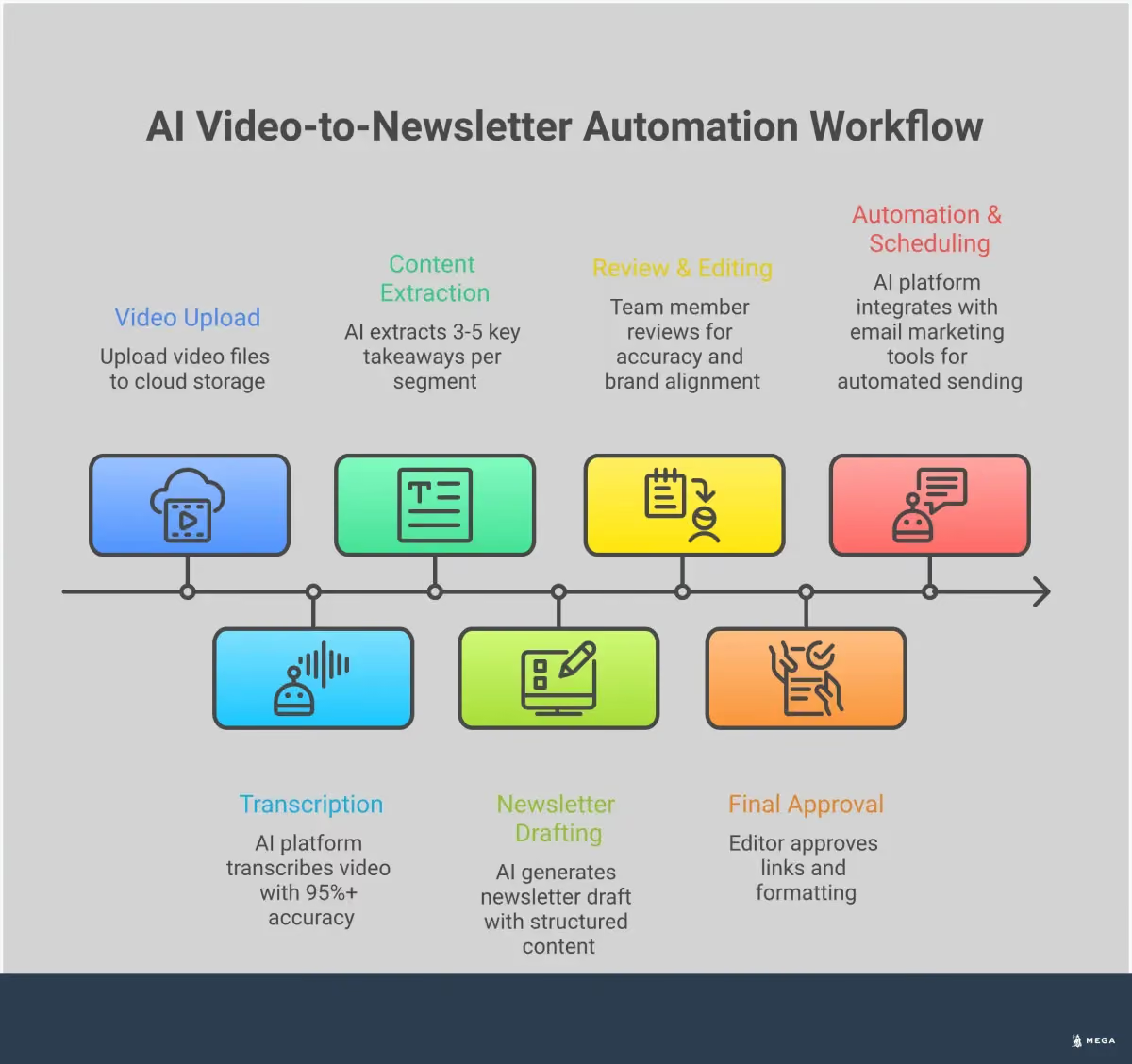
Turning a single video into a polished newsletter might seem like a lot of work, but an AI-powered workflow breaks it down into a few simple stages. This process handles the heavy lifting, from transcribing your video to drafting the final copy. For small businesses and local service providers, time is the most valuable resource. The constant need to create fresh, engaging content for different channels can feel overwhelming, often pushing marketing tasks to the bottom of the priority list. This is where repurposing comes in, and AI makes it more efficient than ever.
Instead of starting from scratch for every newsletter, you can leverage the high-quality video content you’ve already produced. Whether it’s a webinar, a product demo, or an interview, that video is packed with valuable insights your audience will appreciate. An AI agent acts as your content assistant, systematically deconstructing the video and reassembling its key components into a new format. It can transcribe the audio, identify the most important points, draft summaries, and even suggest compelling subject lines. This not only saves hours of manual work but also ensures your messaging stays consistent across platforms. The following steps outline a clear, repeatable process for transforming your video assets into engaging newsletters that connect with your subscribers.
Upload Your Video for Processing
The first step is to get your video into an AI platform. This is usually as simple as uploading the file from your computer or pasting a link from a hosting site like YouTube or Vimeo. Once uploaded, the AI gets to work on the initial processing. The core of this stage is transcription, where the tool automatically converts all the spoken words from your video into a written text document. Advanced AI transcription tools can handle this in minutes, providing a full script that becomes the foundation for your newsletter content. This initial text is the raw material the AI will use for every subsequent step.
Review and Edit the AI-Generated Transcript
While AI transcription is incredibly accurate, it’s always a good idea to give the output a quick review. The AI might misinterpret unique names, industry-specific jargon, or moments with background noise. A quick scan allows you to correct any small errors and ensure the text flows naturally. This isn’t about rewriting the whole thing; it’s a light touch-up to guarantee quality. Think of it as a final polish before the AI starts extracting the key messages. This human-in-the-loop step ensures the final content is professional and error-free, which is a key part of any good transcript processing guide.
Pull Out Key Points for Your Newsletter
With a clean transcript, you can now use AI to pull out the most valuable information. Instead of reading through pages of text, you can ask the AI to identify the main takeaways, find memorable quotes, or summarize key arguments. For example, you could instruct it to create a bulleted list of the top three tips from a tutorial video or pull a powerful statement from an interview. This is where MEGA AI’s content generation capabilities shine, transforming a long script into concise, engaging snippets perfect for different sections of your newsletter. It’s the fastest way to get to the core message.
Write Subject Lines, Headlines, and CTAs with AI
Your newsletter’s content needs the right packaging to get noticed. AI can be a great creative partner here, generating a variety of subject lines and headlines designed to capture attention. You can ask for several options, from straightforward to more intriguing, and choose the one that best fits your audience. The same goes for calls-to-action (CTAs). An AI agent can draft clear, compelling CTAs that guide your readers on what to do next. By training the AI on your brand, you can ensure all suggestions align with your established tone and style. You can see how this works by booking a demo of an AI agent in action.
Format and Export for Your Email Tool
The final step is preparing the content for your email marketing software. AI can help with this, too. You can ask it to structure the text with clear headings, bolded keywords, and bullet points to make it easy for your audience to scan. Some tools can even generate simple HTML for you to copy and paste directly into your email platform. This ensures your newsletter looks clean and professional without you needing to spend time on manual formatting. The goal is to simplify the entire content creation workflow, from the initial idea to the final send, so you can focus on growing your business.
AI vs. Manual Repurposing: What’s the Difference?
If you’ve ever repurposed a video by hand, you know the drill. You sit down with a great webinar recording, press play, and start the painstaking process of transcribing, pulling out key quotes, and trying to stitch it all into a coherent newsletter. It’s a time-consuming task that often gets pushed to the bottom of the to-do list. This manual approach is not just slow; it’s a drain on your most valuable resource: your time.
AI changes the entire equation. Instead of spending hours on tedious labor, you can get a polished newsletter draft in minutes. The core difference lies in speed, consistency, and strategic focus. AI transcription tools can automatically convert spoken language into accurate text almost instantly, saving you the headache of manual typing.
Beyond just speed, AI helps you maintain a unified brand voice across all your communications. When different team members repurpose content manually, the tone and style can vary. An AI trained on your brand guidelines ensures every piece of content sounds like it came from the same person. This frees your team from repetitive tasks, allowing them to focus on more strategic work like analyzing campaign performance or planning future content. For small businesses, this efficiency isn't just a nice-to-have; it directly impacts the bottom line. In fact, many owners find that using AI to repurpose content helps increase sales by getting valuable information in front of customers more quickly.
Accelerate Your Content Creation
The most significant advantage of using AI is the sheer speed it brings to your workflow. Manually turning a one-hour webinar into a newsletter, social media clips, and a blog post could take an entire day. AI-powered tools can create content up to ten times faster than manual editing by automating the most time-consuming tasks. Instead of you having to re-watch footage, the AI identifies the most engaging moments and extracts them for you. This means a single video can be quickly transformed into dozens of new assets, from short, vertical clips for social media to detailed, text-based guides for your newsletter, all in a fraction of the time.
Expand Your Audience Reach
Your audience doesn’t consume content in just one way. Some people prefer watching long-form videos, while others want quick, scannable emails or short social media clips. Repurposing allows you to meet your audience on their preferred channels without creating new content from scratch. By turning one video into multiple formats, you can share your content across platforms like your blog, newsletter, and social media channels. This strategy reinforces your message through repetition and ensures you connect with different segments of your audience, ultimately broadening your influence and keeping your brand top-of-mind.
Improve Your Search Engine Optimization (SEO)
Repurposing video content also has direct benefits for your SEO. When you convert a video into a text-based format like a newsletter or blog post, you create a new asset that search engines can crawl and index. This text can be optimized with relevant keywords to help you rank for new search terms. Furthermore, creating short video clips from a longer recording can help your website show up higher in search results, as search engines often feature video content. For small businesses, this is a powerful way to build authority. Tools like MEGA AI can take this a step further by using a Maintenance Agent to automatically update this repurposed content, improving its click-through rate and rank over time.
Repurposing Different Video Formats with AI
Not all videos are created equal, and your repurposing strategy should reflect that. An AI agent can adapt its approach based on the type of video you provide, whether it’s a detailed tutorial or a casual interview. By understanding the unique value of each format, you can generate newsletter content that perfectly matches your audience's expectations and moves them to act.
Repurposing Educational and Tutorial Videos
Educational videos are packed with valuable, step-by-step information. The goal here is to make complex topics simple and actionable for your newsletter readers. An AI tool can process a long tutorial and convert the transcript into easily digestible insights, like a bulleted list of key takeaways or a concise how-to guide. This transforms your expert knowledge into a practical resource your audience can save and reference later, establishing your authority and providing genuine value in every email.
Repurposing Product Demos and Webinars
Product demos and webinars are designed to guide potential customers toward a purchase. When repurposing these, your focus should be on highlighting the most compelling features and benefits. AI can identify the key moments in a demo and generate short, persuasive summaries for your newsletter. This approach helps create targeted snippets that drive buyers down the sales funnel more effectively. By automating the repetitive task of reformatting content, your team is freed up to focus on more strategic work, like crafting the perfect call to action.
Repurposing Interviews and Podcasts
Interviews and podcasts are all about capturing expert opinions and compelling stories. For your newsletter, the aim is to pull out the most memorable quotes and powerful insights. AI tools can scan an hour-long conversation and instantly extract noteworthy quotes or summarize the main arguments in seconds. This allows you to streamline your B2B marketing workflow by quickly creating an "Expert Q&A" or "Top Takeaways" section for your newsletter. It’s an efficient way to share valuable perspectives without asking your audience to commit to a full-length audio or video file.
Common Challenges When Using AI to Repurpose Video
Using AI to repurpose video content can feel like a superpower for busy teams. It saves time and helps you get more mileage from your best content. However, like any powerful tool, it comes with a few challenges you should be aware of. Knowing these potential hurdles ahead of time helps you create a process that avoids them, ensuring your final newsletter is polished, accurate, and perfectly on-brand.
Keeping Your Brand Voice Consistent
One of the biggest challenges is ensuring the AI-generated text sounds like you. Without proper guidance, AI can produce generic or robotic-sounding content that doesn't match your company's personality. To maintain a cohesive brand voice, you need a clear strategy and a bit of human oversight. Start by creating a simple brand voice guide that outlines your tone, style, and key messaging. This document becomes a reference point for the AI and any team member involved, keeping everyone aligned and ensuring your newsletter consistently reflects your brand identity.
Checking for Accuracy and Quality
While AI is excellent at summarizing content and pulling out key themes, it isn't infallible. There's a risk of the AI misinterpreting nuanced topics, getting technical details wrong, or generating factual errors. This introduction of potential misinformation means human review is essential. Think of the AI as a talented assistant who creates the first draft. It’s still your job to fact-check the output, verify statistics, and confirm that the key takeaways accurately reflect the original video's message. This step protects your credibility and ensures you're sending high-quality content to your subscribers.
Fitting AI into Your Team's Workflow
Adopting a new tool is one thing; making it a seamless part of your daily operations is another. The goal is to integrate AI in a way that genuinely simplifies your content creation process, not complicates it. This requires more than just subscribing to a platform. You need to establish a clear, repeatable workflow that defines who does what and when. For small businesses, this might involve using a checklist for each newsletter, outlining steps for transcription, AI-drafting, human review, and final formatting. A structured process ensures accuracy and consistency without slowing you down.
Solving Common AI Repurposing Challenges
Using AI to repurpose video is a huge time-saver, but it’s not always a perfect, one-click process. The initial output might miss the mark on tone, or a key detail from your video might get lost in translation. These are common hurdles, but they are easy to clear with a bit of planning. By setting up a simple system, you can guide your AI to produce high-quality newsletter content that consistently reflects your brand and connects with your audience. The goal is to create a reliable workflow that combines the speed of AI with the strategic touch of a human expert.
Teach the AI Your Brand Voice
One of the biggest challenges with AI-generated content is making sure it sounds like you. An AI tool that hasn't learned your style can produce generic text that feels disconnected from your brand. The solution is to train it. You can do this by providing the AI with examples of your existing content, like blog posts, past newsletters, or website copy. Many platforms can analyze these materials to learn your specific tone, vocabulary, and sentence structure. This helps you align AI to your brand voice and ensures the repurposed content maintains the authenticity your audience expects.
Set Up a Human Review Process
Think of AI as a highly efficient assistant, not a replacement for your expertise. It does the heavy lifting of transcription and drafting, but a final human review is essential for quality control. A quick read-through allows you to catch any inaccuracies, refine the messaging, and add a personal touch. This human-in-the-loop approach ensures your content avoids a robotic personality and meets your strategic goals. Spending just a few minutes on a final review can make the difference between content that’s simply done and content that truly performs.
Create Checklists for Quality Control
A human review process works best when it’s structured. Creating a simple quality control checklist makes your final review fast, consistent, and effective. Your checklist can include items like: Does the headline grab attention? Is the brand voice consistent? Are the key takeaways from the video clear? Is the call-to-action compelling? Using a checklist turns the review into a systematic task rather than an open-ended edit. This simple step helps you and your team use AI content tools to maintain high standards without slowing down your workflow.
Building Your Video-to-Newsletter System
Creating a repeatable system is the key to turning video repurposing from a time-consuming task into a streamlined part of your marketing operations. Instead of starting from scratch every time, you can build a process that consistently produces high-quality newsletters with minimal effort. This setup involves three core components: selecting the right technology, defining your review process, and creating clear brand guidelines.
For small businesses and startups where every minute counts, investing a little time upfront to build this system pays off quickly. A well-defined process ensures your content remains consistent, on-brand, and effective, even when you’re short on resources. The goal is to create a workflow where AI does the heavy lifting, and your team provides the final strategic oversight. Platforms like MEGA AI are built to act as an end-to-end growth agent, simplifying this entire process by integrating multiple steps into a single, autonomous system. By setting up your system correctly, you can put your newsletter creation on a path toward automation.
Choose the Right AI Tool
The foundation of your system is the AI platform you use. Not all tools are created equal, so look for one that specializes in the entire content lifecycle, not just one piece of it. Your ideal platform should offer highly accurate AI transcription tools to convert your video’s audio into clean text. From there, it needs strong summarization and content generation capabilities to transform that transcript into engaging newsletter copy. An end-to-end platform that handles transcription, content creation, and even publishing to your CMS will save you the most time. This eliminates the need to juggle multiple subscriptions and manually move content between different tools.
Prioritize Ease of Use and Accessibility
The main reason to use AI is to make your work easier, so the tool you choose should be intuitive and simple. You shouldn't need a background in video editing or complex software to get results. Look for a platform with a clean interface that lets you repurpose your content in just a few clicks. The best tools are designed to do the heavy lifting for you, handling tasks like transcription and summarization automatically. This approach allows you to repurpose video without a steep learning curve, making it a practical addition to your workflow instead of another complicated program you have to master.
Ensure Secure Platform Integrations
As you build your content system, you'll need to connect different platforms, from where you host your videos to your email marketing service. Security is essential here. A trustworthy AI platform will connect to your accounts using official, approved methods, often called APIs, which keep your data and login credentials protected. It's a good sign when a tool is an official partner with major platforms like YouTube or Meta. This partnership indicates that they meet high security and compliance standards, giving you confidence that your business accounts are safe while you automate your content workflow.
Map Out Your Content Approval Workflow
Even with the best AI, human oversight is essential for maintaining quality and brand integrity. A content approval workflow is a simple set of steps to ensure every newsletter is polished and on-brand before it reaches your audience. Your process can be straightforward: the AI generates the first draft, a designated team member reviews it for tone and accuracy, and a final check confirms all links and calls-to-action are correct. This review step is crucial for catching nuances the AI might miss and ensuring the content truly reflects your brand’s voice. Establishing a clear content approval process keeps your team aligned and your final output consistent.
Develop Templates and Brand Guides
To make your workflow efficient and scalable, you need templates and brand guides. A newsletter template defines the structure of your email, including sections for an introduction, key takeaways from the video, and a call-to-action. This gives the AI a clear format to follow. A brand guide is just as important. This document outlines your tone of voice, preferred writing style, and specific phrases to use or avoid. You can feed this information to your AI platform to train it on your unique voice, making its drafts better over time. A simple brand style guide ensures both the AI and your human editors are always aligned with your brand identity.
Automating Publishing and Distribution
Once your newsletter content is drafted and approved, the final steps are publishing and distribution. Manually moving text from your AI tool to your email platform, scheduling the send, and then saving all the assets can be a tedious, multi-step process. This is another area where automation can streamline your work. By connecting your AI content system to your other marketing tools, you can create a hands-off process that ensures your newsletter gets out on time and your valuable content is securely archived for future use. This final stage of automation is what transforms your video repurposing effort into a truly efficient, sustainable content engine.
Create "Set It and Forget It" Workflows
A "set it and forget it" workflow allows you to automate the entire publishing process. Once you’ve defined how and where you want your content shared, the system handles the rest. For example, an AI-powered platform can take your approved newsletter text and automatically push it to your email marketing service as a draft, ready for you to schedule. This eliminates the need to manually copy, paste, and reformat content between different applications. An end-to-end AI system can manage the entire journey, from transcribing your video to drafting the final newsletter and preparing it for publication, freeing you to focus on strategy instead of repetitive tasks.
Automatically Back Up Your Content
Beyond publishing, automation can also handle the crucial task of backing up your content. A well-designed system can automatically save your original video files, the AI-generated transcripts, and the final newsletter copy to a secure cloud storage location like Google Drive or Dropbox. This creates a reliable archive of all your assets, providing peace of mind and making it easy to find and reuse content in the future. This automated process is a simple way to handle digital asset management without needing complex software. By using AI to manage these repetitive administrative tasks, you ensure your valuable information is never lost and you can dedicate your time to more strategic work, like planning your next video.