
You spend hours scripting, shooting, and editing a video you know your audience will love. You hit publish, and then you hear crickets. It's a frustrating experience for any business owner trying to grow their brand on YouTube. The good news is that getting views isn't about luck or chasing viral trends. Success on the platform comes from understanding how its recommendation system works. The algorithm simply rewards content that satisfies viewers. This article will demystify that process, providing a clear blueprint for creating videos that get discovered. We'll cover the key metrics that signal value and show you how to optimize for long-term growth.
Key Takeaways
- Prioritize audience retention and engagement: The algorithm rewards videos that keep viewers on the platform. Structure your content to hold attention from start to finish and actively encourage comments and likes to signal viewer satisfaction.
- Earn the click, then deliver the value: Use keyword-optimized titles and compelling thumbnails to improve your click-through rate. Once a viewer clicks, hook them within the first 15 seconds to ensure your content delivers on its promise and improves watch time.
- Treat every video launch as a campaign: A video's success is heavily influenced by its first 24 hours. Promote new content across all your channels to drive initial engagement, then use analytics to see what worked and inform your next video.
How the YouTube Algorithm Works
Think of the YouTube algorithm not as a gatekeeper, but as a matchmaker. Its primary goal is to connect each viewer with videos they are most likely to watch and enjoy. When viewers are happy, they stay on the platform longer, which is good for YouTube, for creators, and for advertisers. To achieve this, the algorithm constantly analyzes viewer behavior and video performance to personalize the experience for billions of users.
The system works by observing every user's individual watch history. It pays attention to the videos you watch, the ones you skip, how long you watch them, and whether you like, dislike, or comment. Based on this data, it builds a profile of your interests and uses it to recommend content it thinks you’ll find engaging. This is why your YouTube homepage looks completely different from anyone else's. For your business, this means the key to success is creating content that genuinely resonates with your specific target audience.
Your videos are surfaced in two main ways: through search results and as recommended videos. Search is straightforward—a user types in a query, and the algorithm provides the most relevant results. Recommendations are more complex, appearing on the homepage, in the "Up Next" sidebar, and in notifications. While you provide initial information through your video’s metadata—like its title, description, and tags—the algorithm ultimately relies on viewer behavior to decide if a video is worth recommending. The practice of YouTube SEO involves optimizing these elements, but true success comes from satisfying the viewer once they click play.
Why Optimizing for YouTube Matters for Small Businesses
For small businesses, YouTube is more than just a video-sharing site; it’s the world's second-largest search engine. Your potential customers are actively searching for answers, tutorials, and product reviews on the platform every single day. When you optimize your videos, you’re not just trying to get more views. You’re making sure your business shows up when a potential customer is looking for a solution you provide. This puts your brand directly in front of an engaged audience at the exact moment they need you.
Effective optimization starts with understanding what your target viewers want. The process of researching keywords and analyzing popular videos in your niche gives you direct insight into your customers' pain points and interests. This allows you to create content that genuinely helps them, building trust and establishing your business as an authority in its field. Instead of guessing what content might perform well, you can make data-informed decisions that align with actual user search behavior.
Ultimately, a well-optimized YouTube channel drives tangible business results. Increased visibility leads to more brand awareness, while helpful content builds a loyal community around your brand. You can also direct viewers to your website or product pages through links in your video descriptions, turning your channel into a consistent source of traffic and leads. By tracking your performance with tools like YouTube Analytics, you can see which videos are resonating with your audience and refine your strategy to focus on what works best for your business goals.
Core Ranking Factors for YouTube Videos
While the exact formula for YouTube’s algorithm is a closely guarded secret, we know which metrics matter most. Think of it less like a single score and more like a collection of signals that tell YouTube your video is valuable and worth showing to more people. When you understand these core factors, you can create content that aligns with what the platform and its viewers want to see.
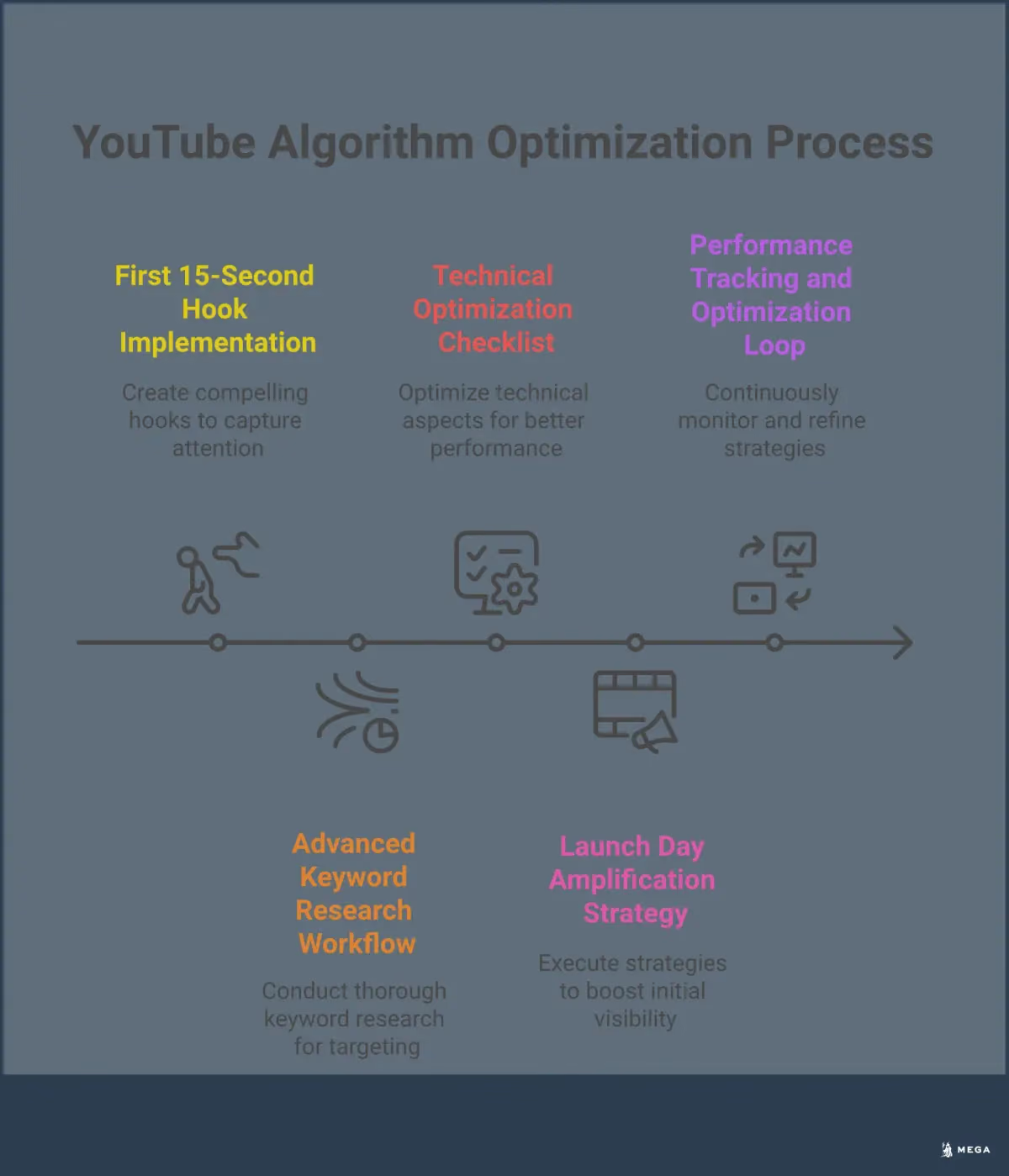
Focusing on these four areas will give your videos the best chance to perform well in both search results and recommendations. Each one builds on the others, creating a positive feedback loop that can help your channel grow. It all starts with getting the viewer to click, holding their attention, encouraging them to interact, and making a strong first impression.
Watch Time and Audience Retention
YouTube wants to keep people on its platform for as long as possible. That’s why two of the most important metrics are watch time (the total accumulated minutes people have spent watching your video) and audience retention (the percentage of your video that people watch). A video with high audience retention signals to YouTube that the content is engaging and satisfying viewer expectations. If people consistently click away in the first few seconds, the algorithm learns that the video isn't delivering on its promise. Your goal should be to create content that not only earns a click but also holds the viewer's attention from start to finish.
Click-Through Rate (CTR)
Before anyone can watch your video, they have to click on it. Your click-through rate (CTR) is the percentage of people who click to watch your video after seeing its thumbnail on their homepage, in recommendations, or in search results. A high CTR tells YouTube that your video’s topic, title, and thumbnail are compelling and relevant to the audience. This is your first chance to make an impression. A low CTR can signal a mismatch between your content and what viewers are looking for, which may cause YouTube to show it to fewer people over time.
Viewer Engagement Signals
YouTube doesn't just look at what viewers watch; it also looks at how they interact with it. Viewer engagement signals include likes, dislikes, comments, shares, and subscribes generated from a video. These actions are strong indicators that your content is sparking a reaction, creating a conversation, or providing enough value that a viewer wants to see more from your channel. A video with lots of comments and shares is seen as more valuable than one with the same number of views but little interaction. Encouraging this type of engagement is a key part of a successful YouTube strategy.
Video Freshness and Initial Performance
The first 24 to 48 hours after you publish a video are critical. The algorithm pays close attention to a video's initial performance to decide if it's worth recommending to a broader audience. If a video quickly gets a lot of views, high audience retention, and strong engagement signals from your subscribers and initial viewers, YouTube is more likely to push it into the recommendation engine. This "freshness" factor means that having a plan to promote your video immediately upon launch can have a significant impact on its long-term success and reach.
How YouTube Recommends Videos
The YouTube algorithm isn't a single, mysterious gatekeeper. It's a sophisticated recommendation system designed to match each viewer with videos they are most likely to watch and enjoy. The platform’s main goal is to keep people watching for as long as possible, so it prioritizes content that satisfies viewers. Understanding how this system works is the first step to creating a strategy that gets your videos seen by the right audience. The system surfaces content in two primary ways: through search results and through recommendations. Recommendations appear on the homepage, in the "Up Next" sidebar, and within the app's suggestions. While both are important, they function differently and require distinct approaches.
Discovery vs. Search: What's the Difference?
Search is what happens when a user types a query into the search bar; it’s driven by intent. Discovery, on the other hand, is when YouTube’s system recommends content based on a user’s past behavior. As industry expert Neil Patel explains, "If you're sitting there with zero subscribers, your best friend is going to be search." For new channels without an established audience, optimizing for search is critical. It allows you to attract initial viewers, which generates the watch history data YouTube needs to start recommending your content to a wider audience. This initial traction from search is what fuels the discovery engine later on.
The Impact of Session Duration
Beyond how long someone watches your specific video, YouTube also cares about session duration—the total amount of time a viewer spends on the platform in a single visit. If your video is the one that starts a long viewing session, the algorithm sees that as a positive signal. Conversely, if viewers consistently leave YouTube after watching your video, it suggests your content isn't helping the platform's goals. You can improve your contribution to session duration by creating playlists and using end screens to guide viewers to other relevant videos on your channel, keeping them engaged on the platform longer.
Key Signals for Viewer Satisfaction
Ultimately, YouTube wants to recommend videos that viewers find satisfying. The platform measures this using a variety of signals that indicate a viewer enjoyed the content. These behavioral signals—like how long people watch, whether they comment, or if they share—carry serious weight. Likes and even responses to post-watch surveys all feed into the algorithm's understanding of your video's quality. Success for YouTube means users find videos that interest them and actually click to watch. Every interaction a viewer has with your video helps tell the algorithm whether you delivered on the promise of your title and thumbnail.
What Are the Best Tools for YouTube Keyword Research?
Finding the right keywords is the foundation of a successful YouTube strategy. It’s how you connect your content with the audience that’s actively looking for it. Without proper keyword research, even the most well-produced video can get lost in the noise. The goal is to understand the exact phrases and questions your potential customers are typing into the YouTube search bar. This insight allows you to create videos that directly address their needs, which helps your content rank higher and get recommended more often.
Fortunately, you don’t have to guess what people are searching for. A variety of tools can give you the data you need to make informed decisions about your content. Whether you’re working with a tight budget or are ready to invest in more advanced software, there’s a solution that fits your needs. These tools help you assess search volume, understand keyword difficulty, and discover new content ideas you might not have thought of on your own. Using them effectively will save you time and guide your video production efforts toward topics that have a built-in audience.
Free Keyword Research Methods
If you're just starting out, you can gather valuable keyword insights without spending any money. The simplest method is to use the YouTube search bar's autocomplete feature. Start typing a topic related to your business, and YouTube will suggest popular searches. This gives you a direct look into what real users are looking for.
For more structured data, tools like Keyword Tool Dominator offer a limited number of free searches per day, which is perfect for brainstorming initial ideas. You can also use Google Trends to compare the popularity of different search terms over time and identify topics with growing interest. These free methods provide a solid starting point for any small business looking to build a presence on YouTube.
Premium Tools Worth the Investment
When you’re ready to get more serious about your YouTube strategy, premium tools can provide deeper insights and a competitive edge. Platforms like TubeBuddy and vidIQ are popular among creators for a reason. They integrate directly into your YouTube dashboard and offer robust keyword explorer features. These tools help you find effective keywords and tags by providing detailed data on search volume, competition, and overall keyword scores.
They also offer keyword suggestions and show you what topics are currently trending in your niche. While these tools come with a subscription fee, the investment can quickly pay for itself. The data they provide helps you optimize your videos for better discoverability, which leads to more views, subscribers, and potential customers for your business.
Analyze Competitor Keywords
One of the smartest ways to find effective keywords is to see what’s already working for others in your industry. Analyzing your competitors’ videos shows you which topics and keywords are resonating with your target audience. Start by identifying the top-performing channels in your niche and look closely at their content. Pay attention to the keywords they use in their video titles, descriptions, and tags.
This process helps you understand what your viewers want so you can create videos they’ll actually search for. Many premium tools have built-in features for competitor analysis, but you can also do this manually. This research doesn’t just give you a list of keywords; it provides a blueprint for content that already has proven demand.
How to Optimize Titles and Descriptions
Your video's title, description, and tags are some of the most important pieces of metadata you can control. They tell both viewers and the YouTube algorithm what your content is about, directly influencing your click-through rate and discoverability in search results. Neglecting to optimize these elements is a common mistake that can prevent your videos from reaching their full potential. Think of them as the packaging for your content; even the best video will go unwatched if the packaging isn't compelling.
Properly optimizing this metadata ensures that the effort you put into keyword research pays off. By strategically placing keywords where they matter most, you provide clear signals to YouTube, helping it categorize your video and show it to the right audience. This process is fundamental to building a successful channel and is a critical step before you even think about promotion.
Write Better Video Titles
A great video title strikes a balance between being keyword-rich for the algorithm and enticing for a human viewer. Start with your primary keyword to signal relevance to YouTube immediately. Then, add a compelling hook or benefit that tells people why they should click. For example, instead of "Small Business Accounting," try "Small Business Accounting: 5 Common Mistakes to Avoid." This format targets your keyword while creating curiosity. When you optimize video titles, you make it clear what value the viewer will get, which is essential for improving your click-through rate. Keep titles concise—under 60 characters is ideal to avoid them being cut off in search results.
Follow Description Best Practices
Your video description is a powerful tool for both search ranking and audience engagement. The first two or three lines are the most critical because they appear in search results and above the "Show more" fold on the video page. Place your most important keywords and a clear summary of the video here. A well-written description can help your video show up in search results on both YouTube and Google. Use the rest of the space to provide more context, add timestamps for longer videos, and include links to your website, products, or social media channels. This is also a great place to add secondary keywords you discovered during your research.
Select and Implement the Right Tags
Tags are another way to give YouTube context about your video's topic, helping it associate your content with similar videos. Think of them as behind-the-scenes keywords. Use a mix of broad and specific tags to cast a wide net. For a video on accounting mistakes, you might use broad tags like "small business" and "accounting," along with more specific ones like "bookkeeping errors" and "quickbooks tips." Using a tool like a YouTube keyword explorer can help you find high-traffic search terms and analyze the tags your competitors are using. This gives you a data-driven way to refine your tag strategy and improve your video’s chances of being recommended alongside popular content.
Create Content That Drives Engagement
The YouTube algorithm is designed to serve viewers content they will enjoy, keeping them on the platform longer. It measures this enjoyment through engagement signals. If your video can capture and hold a viewer's attention, the algorithm is more likely to recommend it to a wider audience. Creating engaging content isn't about chasing trends; it's about understanding what makes viewers click, watch, and interact. By focusing on a strong opening, encouraging conversation, and maintaining viewer interest throughout your video, you send powerful positive signals to the algorithm.
Hook Viewers in the First 15 Seconds
You have a very small window to convince a viewer that your video is worth their time. The first 15 seconds are the most critical part of your content. A strong start immediately tells the algorithm that your video is delivering on the promise of its title and thumbnail. Instead of a long, branded intro, jump directly into the value. Start with a compelling question, a surprising fact, or a quick preview of the final outcome. This initial burst of interest is a key factor in your video’s performance during its first 24 hours, which heavily influences its long-term reach.
Encourage Comments and Interaction
Engagement goes beyond just watching. The algorithm pays close attention to likes, shares, and especially comments. These actions are clear indicators that your content is resonating with people. The easiest way to get more comments is to ask for them. Pose a direct question to your audience within the video, prompting them to share their own experiences or opinions. You can also use YouTube’s features like polls and community posts to foster interaction. When you build a community around your channel, you create a loyal audience that will consistently engage with your content, signaling its value to YouTube.
Build Watch Time Throughout Your Video
While a strong hook is important, keeping viewers engaged until the end is what truly demonstrates your video's quality. The total time people spend watching your video, known as watch time, is a major ranking factor. To keep your audience from dropping off, structure your content to maintain momentum. Use visual changes like new camera angles, B-roll footage, or on-screen graphics to keep things interesting. Tell a story, even in an instructional video, to create a narrative that holds attention. Regularly check your Audience Retention reports in YouTube Analytics to pinpoint where viewers lose interest and use that data to improve your future videos.
How to Maximize Your Video's First 24 Hours
The first day your video is live on YouTube is its most important audition. The algorithm pays close attention to how viewers interact with your content right after you hit "publish." Strong initial performance—views, watch time, and engagement—sends a powerful signal that your video is worth showing to a wider audience. Videos that do well in this initial window often see sustained visibility long after their launch.
Think of it less like an upload and more like a launch event. A successful first 24 hours requires a plan to get your video in front of the right people as quickly as possible. This initial momentum can be the difference between a video that gets a few hundred views and one that reaches thousands. By focusing on a few key strategies, you can give your content the best possible start and set it up for long-term success.
Leverage Your Existing Audience
Your most loyal followers are your launch day MVPs. These are the people who have already subscribed to your channel and are most likely to watch, like, and comment on your new content. Engaging this core group immediately is crucial. YouTube sees this early activity from your subscribers as a positive sign, which can help your video rank higher in search results.
Before you publish, you can build anticipation by announcing the upcoming video on your YouTube Community tab. Once the video is live, pin a comment to start a conversation and make a point to reply to early comments. This not only fosters a sense of community but also keeps the engagement signals flowing, telling the algorithm that your audience finds the content valuable and interesting.
Promote Your Video on Other Platforms
Don’t just rely on YouTube to distribute your video. Your launch plan should include promoting your new content across all the channels where your business has a presence. As soon as your video is live, share it with your email list, on your social media profiles, and in relevant online communities. A simple email blast or a post on your company's LinkedIn page can drive a significant amount of initial traffic.
This cross-platform promotion ensures your video reaches people who may not have seen a notification from YouTube. For an even greater impact, you can use paid ads to target specific audiences on platforms like Meta or Google. A small, targeted ad spend can amplify your reach and get your video in front of hundreds or thousands of potential viewers right when it matters most.
Use Launch-Day Engagement Tactics
The content of your video plays a direct role in how much engagement it receives. To get more interaction, you need to ask for it. Create videos that encourage comments by asking your viewers direct questions. For example, you could ask for their opinion on the topic, what they want to see next, or to share their own experiences related to your video's subject.
When people leave comments, it signals to YouTube that your video is sparking a conversation. You can also encourage likes and shares by mentioning how it helps your channel. Responding to comments quickly on launch day shows both your audience and the algorithm that you are actively engaged. These interactions are vital metrics that contribute to your video’s initial performance and its potential to be recommended to new viewers.
Technical SEO for YouTube Videos
Beyond creating great content, technical SEO is about making sure your videos are properly packaged for discovery. Think of it as the behind-the-scenes work that helps both viewers and the YouTube algorithm understand what your video is about and why it’s worth watching. These technical elements send strong signals about your video's quality, relevance, and professionalism. When you get them right, you make it easier for your content to rank in search results and get recommended to new audiences.
Optimizing these technical aspects is a foundational step. It ensures that your creative efforts aren't wasted because of a poor first impression or a missed opportunity to provide context. From the thumbnail that earns the click to the captions that make your content accessible, each component plays a role in your video's performance. Getting these details right helps build momentum from the moment you hit "publish."
Design Clickable Thumbnails
Your video thumbnail is its billboard. It’s often the single deciding factor in whether a potential viewer clicks on your video or scrolls past it. A strong thumbnail grabs attention and accurately sets expectations, which directly impacts your click-through rate (CTR)—a key signal for the YouTube algorithm. To create effective thumbnails, focus on clear, high-contrast visuals that are easy to understand even at a small size. Including a human face with a clear expression can also draw the eye and create a connection. Keep any text minimal, bold, and easy to read. A consistent thumbnail design helps build brand recognition and makes your videos stand out on a crowded homepage.
Choose the Right Video Length
There is no single "perfect" video length; the ideal duration depends entirely on your topic and your audience's expectations. The goal is to hold viewer attention for as long as possible. A 20-minute deep dive can perform exceptionally well if it keeps viewers engaged, while a three-minute video can fail if people drop off after 30 seconds. Focus on creating content that is as long as it needs to be to deliver its promised value, and no longer. You can monitor your audience retention in YouTube Analytics to see where viewers lose interest. This data can help you refine your content structure and pacing to keep people watching until the end.
Find the Best Time to Upload
When you publish your video can influence its initial momentum. Uploading at a time when your target audience is most active gives your content a better chance of picking up early views, likes, and comments. These initial engagement signals tell the YouTube algorithm that your video is resonating with viewers. The best way to find your optimal upload time is to check your channel’s analytics. The "Audience" tab in YouTube Studio shows you the days and hours when your viewers are most frequently on the platform. Publishing consistently during these peak times helps your video get in front of your subscribers right away and builds a predictable schedule for your audience.
Add Closed Captions for Accessibility
Adding accurate closed captions to your videos serves two important purposes. First, it makes your content accessible to viewers who are deaf or hard of hearing, as well as those who watch videos with the sound off. This immediately broadens your potential audience. Second, captions provide a text-based transcript of your video that search engines can crawl. This gives YouTube more detailed context about your video's topic, which can help it rank for relevant keywords. While YouTube’s auto-generated captions are a start, they often contain errors. Taking the time to edit them for accuracy or uploading your own caption file ensures a better viewer experience and provides cleaner data for the algorithm.
Scale Your YouTube Strategy with AI and Automation
Managing a YouTube channel on top of running a business can feel like a full-time job. This is where AI and automation come in. By using the right tools, you can streamline your workflow, from planning content to analyzing its performance, without needing a dedicated marketing team. Automation handles the repetitive tasks, freeing you up to focus on creating great videos that connect with your audience.
For small businesses, this efficiency is a game-changer. Instead of spending hours manually researching keywords, scheduling social media posts, and compiling performance reports, you can use AI-powered platforms to do the heavy lifting. An autonomous agent like MEGA AI’s Lindsay can manage your entire content strategy, from optimization to link building, ensuring your videos are set up for success from the start. Similarly, an agent like Erle can handle your cross-platform ad campaigns, getting your content in front of the right people at the right time. This approach allows you to implement a sophisticated YouTube strategy that drives real results, saving you time and resources that you can reinvest back into your business. It bridges the gap between hiring an expensive agency and trying to do everything yourself.
Use Tools for Content Planning and Optimization
A successful YouTube strategy starts with knowing what your audience wants to watch. AI-powered tools can remove the guesswork from this process. Platforms like TubeBuddy and vidIQ offer keyword research features that show you what people are searching for on YouTube. This helps you find effective keywords and tags to improve your video's visibility and ranking.
By conducting YouTube keyword research, you can create videos that directly address the needs and interests of your target viewers. These tools analyze search volume, competition, and related terms, giving you a clear roadmap for your content calendar. Instead of creating videos you think will perform well, you can create videos based on data, ensuring your efforts are more likely to pay off with higher views and engagement.
Automate Cross-Platform Content Distribution
The first 24 hours after you publish a video are critical for its long-term success. The YouTube algorithm pays close attention to initial engagement signals. To maximize your video's early performance, you need to promote it across all your channels as soon as it goes live. Manually posting on every platform is time-consuming and inefficient.
Automation tools allow you to schedule and distribute your content across social media, email newsletters, and other platforms simultaneously. This ensures your existing audience knows about your new video right away, driving immediate views and engagement. You can also use paid advertising agents like MEGA AI’s Erle to create and manage campaigns that put your video in front of a wider, targeted audience on platforms like Google and Meta.
Integrate Analytics to Track Performance
To grow your channel, you need to understand what’s working and what isn’t. YouTube Analytics is a powerful tool, but integrating its data with your other marketing efforts can be challenging. Using a centralized platform helps you measure the success of your strategy and make informed decisions.
Look at key metrics like views acquired from YouTube search to see how well your video SEO is performing. By tracking audience retention, click-through rates, and engagement over time, you can identify trends and refine your approach. An AI agent can monitor this data for you, providing insights and even making adjustments automatically. This data-driven approach ensures your YouTube strategy continuously improves, helping you reach your business goals more effectively.