
Integrating various large language models into your application can feel like trying to conduct an orchestra where every musician is playing from a different sheet of music. Each model has its own API, quirks, and performance metrics. Managing them all separately leads to chaos and inefficiency. You need a single conductor to bring it all together. Keywords AI serves as that conductor, providing a unified platform to manage your entire LLM stack. It streamlines everything from prompt engineering and A/B testing to real-time performance tracking, ensuring every component works in harmony to deliver the best possible results.
Key Takeaways
- Simplify LLM operations: Keywords AI offers a unified platform to manage interactions with multiple LLMs, streamlining development and freeing you from infrastructure complexities.
- Gain actionable insights: Monitor performance, trace LLM agent interactions, and use A/B testing to refine prompts and optimize outputs for better results.
- Start quickly and easily: Integrate Keywords AI with just two lines of code and explore its features with a free trial and generous credits.
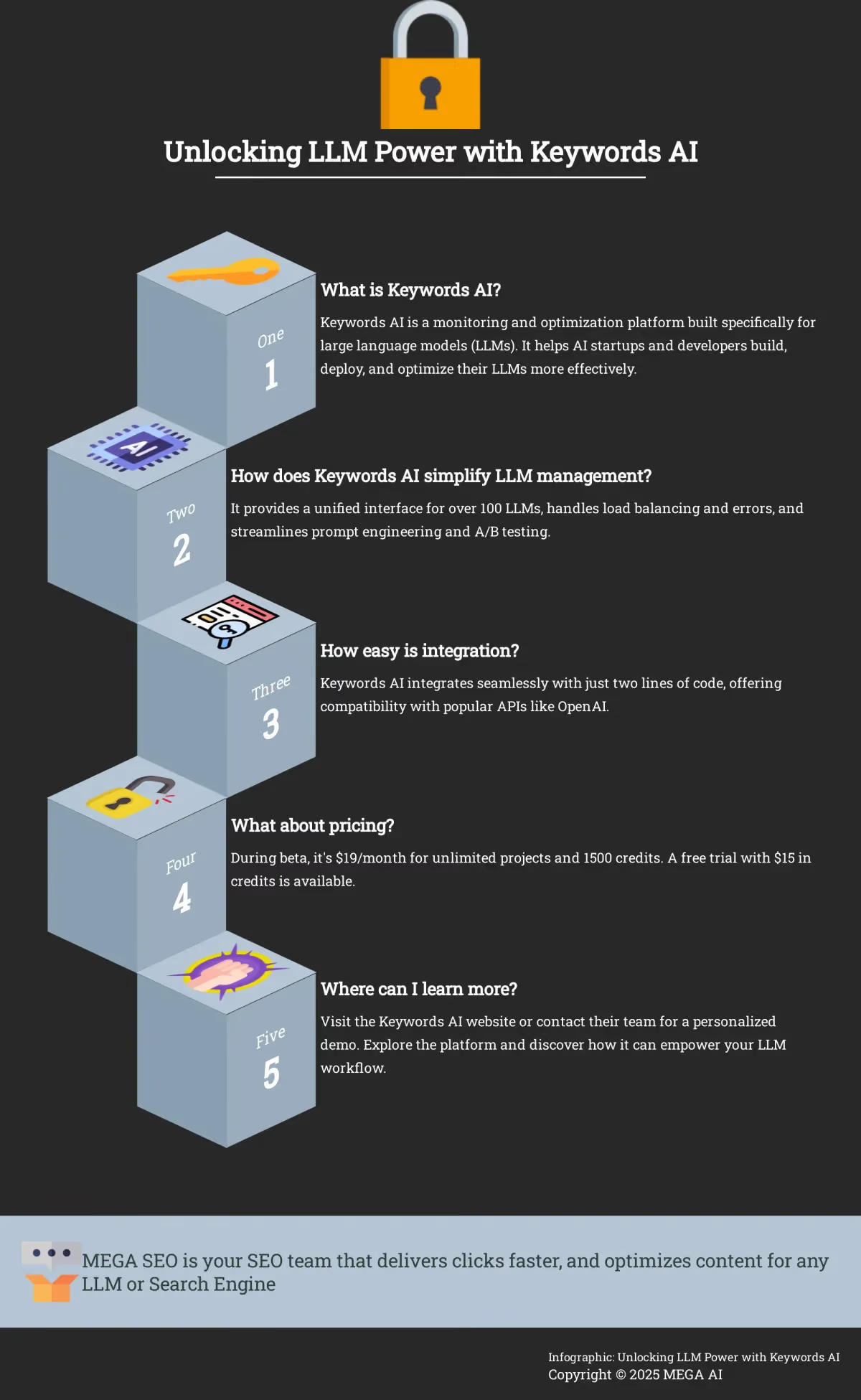
What is Keywords AI?
Keywords AI is a monitoring platform built specifically for large language model (LLM) applications. Think of it as Datadog for LLMs. It helps AI startups build, deploy, and optimize their LLMs more effectively, providing essential tools to track performance, troubleshoot issues, and improve LLM effectiveness.
Company Background and Vision
Founded in 2023 by Raymond Huang and Andy Li, Keywords AI was created to address the growing complexities of building applications with large language models. The platform acts as a central hub for managing the entire AI development lifecycle. Its vision is to provide developers with a unified system to build, deploy, and improve AI applications without getting bogged down by infrastructure management. By offering a single place to handle different AI models and workflows, Keywords AI helps teams focus on creating innovative products. The company is a Y Combinator alumnus and is based in San Francisco.
Platform Scale and Adoption
Keywords AI has quickly demonstrated its value within the developer community, processing over one billion LLM calls each month. This high volume highlights the platform's reliability and its capacity to handle demanding workloads for growing applications. Its practical approach has led to significant adoption, particularly among emerging tech companies. More than 70 Y Combinator startups currently use Keywords AI to manage their LLM operations. This widespread use underscores its effectiveness as a go-to solution for developers who need a dependable way to scale their AI applications and work with various models seamlessly.
What Does Keywords AI Actually Do?
Keywords AI offers a centralized platform to manage and monitor your LLM operations. It streamlines workflows with a unified interface for interacting with different LLMs, like OpenAI and Anthropic. This eliminates the need for separate API clients, simplifying development and saving you time. The platform’s core functionality provides comprehensive monitoring, robust analytics, and tools for experimentation and optimization. This allows developers to understand LLM behavior and make data-driven decisions to enhance performance. You can explore the platform’s capabilities on the Keywords AI website.
Breaking Down the Platform's Components
Several key components make Keywords AI a powerful tool. The unified interface lets you work seamlessly with multiple LLMs. Comprehensive dashboards visualize key metrics and request logs, providing a clear picture of your LLM’s performance. A dedicated playground facilitates prompt and model experimentation, including A/B testing to fine-tune prompts and optimize outputs. Keywords AI collects data from your production environment, giving you insights to refine your models and improve real-world performance.
Get Started with Just Two Lines of Code
One of the most appealing aspects of Keywords AI is its ease of integration. You can integrate the platform with just two lines of code, making it simple to start monitoring and optimizing your LLMs. Whether you use Python or JavaScript, Keywords AI offers compatibility with popular APIs like OpenAI, ensuring a smooth implementation process.
Explore the Features and Benefits of Keywords AI
Keywords AI offers a powerful suite of features designed to streamline LLM operations and boost performance. Let’s explore some of the key benefits:
A Single Interface for All Your LLMs
Keywords AI provides a single, unified interface for managing interactions with a wide range of large language models (LLMs). This simplifies development by handling the complexities of integrating with different APIs. It supports over 100 LLMs and handles essential tasks like load balancing, error management, and request routing automatically. This means less time spent on infrastructure and more time spent building your AI-powered application. For developers working with OpenAI, integration is remarkably simple, requiring just two lines of code.
Get Clear Insights with Monitoring and Analytics
Understanding how your LLMs are performing is crucial for optimization. Keywords AI offers robust monitoring and analytics features, including detailed request logging with full-text search. This allows you to quickly pinpoint specific requests and analyze their behavior. The platform also provides LLM agent tracing, giving you a granular view of agent interactions with the models. A comprehensive metrics dashboard tracks key performance indicators like usage, cost, latency, and even product growth, enabling data-driven decisions to improve efficiency and reduce expenses.
Automatic Hallucination and Mistake Detection
One of the biggest hurdles with LLMs is their tendency to produce incorrect or nonsensical information, a problem often called hallucination. Keywords AI addresses this directly by helping your team understand what went wrong during AI agent runs. Instead of just seeing a flawed output, you can trace the process to identify the specific point of failure. This insight is incredibly valuable because it allows you to improve your prompts based on real-world mistakes. This approach is often simpler and more effective than engaging in complex and costly model retraining, providing a direct path to making your AI more reliable and accurate for your users.
Track User-Focused Data
Technical performance metrics like latency and cost are essential, but they don't reveal how users actually feel about your product. Keywords AI provides this crucial context by tracking user-focused data. The platform monitors how many users you have and, more importantly, how often they return, giving you a clear picture of engagement and retention. It even helps you gauge user sentiment and their overall feelings about the product. This combination of quantitative and qualitative feedback allows you to move beyond technical optimization and make improvements that truly resonate with your audience, ensuring you’re building an application that people value and enjoy using.
Manage Prompts as a Team
Building and refining effective prompts is essential for getting the desired output from your LLMs. Keywords AI provides tools for collaborative prompt management, allowing teams to work together on prompt development, version control, and optimization. This fosters a more efficient and iterative workflow, leading to better prompts and improved LLM performance.
Optimize Your Prompts with A/B Testing
Keywords AI simplifies the process of experimenting with different prompts and models. The platform’s A/B testing capabilities allow you to compare the performance of different variations side-by-side, making it easier to identify the most effective strategies. This data-driven approach eliminates guesswork and ensures you’re always using the best-performing prompts and models. A dedicated model playground provides a safe and controlled environment for testing new ideas.
Track Performance as It Happens
Keywords AI offers real-time visibility into your LLM performance through intuitive dashboards. These dashboards visualize key metrics and request logs, providing immediate insights into how your LLMs are functioning. This real-time monitoring allows you to quickly identify and address any performance issues, ensuring smooth and efficient operation.
Optimize Costs with High-Quality Data Collection
High-quality data is the foundation of any effective and efficient AI model. Keywords AI helps you collect this crucial data directly from your product. This process ensures your models are trained and evaluated on relevant, clean information, which directly translates to better performance and lower operational costs. By refining your models with superior data, you can reduce unnecessary expenses associated with running less accurate LLMs. It’s a strategic approach that helps you get the most out of your AI investment without overspending on infrastructure or compute time.
A User Interface Designed for Developers
Developer tools don't have to be clunky or difficult to use. The team at Keywords AI understands this and has prioritized creating a smooth and intuitive user experience. They believe that a well-designed interface can significantly streamline workflows, making it easier for developers to navigate complex integrations and monitor performance. The platform's consistent and thoughtful design reduces the learning curve, allowing you to focus on what matters most: building great applications. This commitment to a user-friendly environment is evident throughout the product, making it a more enjoyable and efficient tool for your entire team to use. You can see their focus on design on their LinkedIn page.
Full-Screen Mode for Easy Log Reading
When you're trying to troubleshoot an issue, the last thing you want is to struggle with reading long, wrapping lines of text in a small window. Keywords AI addresses this common developer frustration with a simple but powerful feature: a full-screen mode for logs. This enhancement makes it significantly easier to read and debug extensive messages by providing an unobstructed, focused view. It’s a practical detail that shows a deep understanding of the day-to-day challenges developers face. By improving the log reading experience, the platform helps you identify and resolve issues faster, increasing productivity and reducing the time spent on tedious debugging tasks.
Save and Reuse Filters with Views
Analyzing large datasets often involves applying the same set of filters repeatedly to find specific information. To make this process more efficient, Keywords AI introduced a feature called "Views." This function lets you save a combination of filters and instantly apply them across the platform with a single click. Whether you're tracking specific trends, isolating issues from a particular user group, or organizing data for a report, Views helps you get to the insights you need quickly. This feature is vital for developers who need to analyze performance data efficiently, as it streamlines the analytical workflow and eliminates the need to manually recreate complex queries every time.
Keywords AI vs. The Competition
When choosing a platform for building and managing LLM apps, comparing available options is crucial. This section analyzes Keywords AI against competitors, highlighting its unique strengths.
A Side-by-Side Feature Comparison
Keywords AI stands out as a comprehensive platform offering a suite of tools specifically designed for LLM development. Many platforms offer basic monitoring and logging, but Keywords AI goes further with specialized tools for LLM agent tracing and performance analysis. Similarly, some platforms offer basic data management, but Keywords AI excels in providing tools specifically for collecting and curating data for fine-tuning LLMs. This specialized focus makes Keywords AI a powerful choice for developers looking to streamline their LLM workflows. Y Combinator describes Keywords AI as a “one-stop shop for all things LLM development,” emphasizing its comprehensive nature (Keywords AI).
Comparing Keywords AI to New Relic
New Relic is a well-established name in application performance monitoring, but its focus on AI is still emerging. While it offers tools to monitor the LLM layer of your tech stack, its specialization doesn't match the depth of a purpose-built platform. Keywords AI is designed exclusively for LLM operations, providing granular insights that general APM tools often miss. For instance, beyond tracking basic metrics like latency and errors, Keywords AI offers collaborative prompt management and A/B testing environments. This allows your team to refine the quality of LLM outputs directly, a function that falls outside the scope of traditional application monitoring.
Comparing Keywords AI to Dynatrace
Dynatrace provides powerful, broad-spectrum observability for complex enterprise environments. However, its strengths lie in monitoring traditional application architectures. Keywords AI differentiates itself by focusing on the unique challenges of LLM development, particularly in data collection and model fine-tuning. While Dynatrace can identify performance bottlenecks in your application, Keywords AI helps you understand and improve the LLM's behavior itself. It provides specialized tools to collect and curate high-quality data from production, which is essential for fine-tuning models to perform specific tasks more accurately and efficiently. This focus on the model's core performance is a key distinction from a general APM solution.
Comparing Keywords AI to AppDynamics
Like its competitors, AppDynamics offers robust APM capabilities for monitoring application health and performance. But when it comes to LLM-powered applications, the critical insights are often found within the model's interactions, not just the surrounding infrastructure. Keywords AI provides specialized features like LLM agent tracing, which maps out the step-by-step decision-making process of an AI agent. This level of detail is crucial for debugging complex agentic workflows and understanding why a particular output was generated. A traditional APM tool can trace a request through microservices, but it lacks the context to trace an agent's "thought process."
Comparing Keywords AI to Prometheus
Prometheus is a powerful open-source tool for metrics collection and alerting, but it's fundamentally a DIY solution. To get meaningful insights, you need to pair it with other tools like Grafana for visualization and invest significant effort in configuration and maintenance. Keywords AI, on the other hand, offers an integrated, out-of-the-box platform. It provides a single, unified interface designed specifically for LLM workflows, complete with pre-built dashboards, prompt management tools, and cost tracking. While you could use Prometheus to track basic metrics like API call latency, Keywords AI delivers a much richer, context-aware view of your LLM's performance without the setup overhead.
What Makes Keywords AI Stand Out?
Keywords AI offers several distinct advantages. Its comprehensive monitoring and debugging capabilities, including request logging with full-text search and a metrics dashboard, empower developers to track usage, cost, latency, and product growth. This detailed insight simplifies problem identification and resolution. Furthermore, Keywords AI’s robust data management features streamline the process of collecting and curating data for fine-tuning models, leading to improved performance and cost savings.
Founder-Level Support and Community Access
Beyond its technical features, Keywords AI distinguishes itself with exceptional user support. One user noted they switched from a competitor due to receiving "founder-level support" even late at night. This level of direct access and responsiveness to customer feedback is a significant advantage for developers who need quick, expert assistance. In addition to direct support, Keywords AI fosters a collaborative environment through its community. Developers can join the community Discord server to connect with other AI builders, share insights, and solve problems together. This combination of dedicated support and a strong community network creates a supportive ecosystem for building and scaling LLM applications.
Why Simple Integration Matters for Your Team
One of Keywords AI’s most compelling features is its ease of integration. With compatibility across various APIs, including OpenAI, and support for Python and Javascript, integrating Keywords AI into existing projects is remarkably simple, often requiring just two lines of code. This streamlined integration process, combined with the platform’s focus on speed and efficiency, significantly accelerates development and reduces debugging time, allowing developers to focus on building and deploying high-performing LLM applications.
How to Maximize LLM Performance with Keywords AI
Keywords AI offers a comprehensive suite of tools to optimize your large language models (LLMs). Let’s explore how Keywords AI helps you monitor performance, iterate through A/B testing, make data-driven decisions, and manage infrastructure complexities.
Strategies for Effective Monitoring
Gaining insights into your LLM’s performance is crucial. Keywords AI provides dashboards to visualize key metrics and request logs, making it easy to track performance and identify areas for improvement. You can quickly pinpoint any anomalies or unexpected behavior, allowing for proactive intervention and optimization. This ensures your LLM operates at peak efficiency.
Using A/B Tests to Continuously Improve
Keywords AI offers a dedicated playground for experimenting with prompts and models. The platform’s A/B testing capabilities empower you to compare different versions of your prompts and models side-by-side. This iterative approach allows you to fine-tune your LLMs and identify the most effective strategies. By rigorously testing different approaches, you can continuously improve the accuracy, relevance, and overall performance.
Make Smarter Decisions with Your Data
Getting Started with Keywords AI
Keywords AI offers a comprehensive suite of tools to optimize your large language models (LLMs). Let’s explore how Keywords AI helps you monitor performance, iterate through A/B testing, make data-driven decisions, and manage infrastructure complexities.
How to Monitor Your LLMs Effectively
Gaining insights into your LLM’s performance is crucial. Keywords AI provides dashboards to visualize key metrics and request logs, making it easy to track performance and identify areas for improvement. You can quickly pinpoint any anomalies or unexpected behavior, allowing for proactive intervention and optimization. This ensures your LLM operates at peak efficiency.
Using A/B Testing for Better Results
Keywords AI offers a dedicated playground for experimenting with prompts and models. The platform’s A/B testing capabilities empower you to compare different versions of your prompts and models side-by-side. This iterative approach allows you to fine-tune your LLMs and identify the most effective strategies. By rigorously testing different approaches, you can continuously improve the accuracy, relevance, and overall performance.
Making Data-Driven Decisions
Keywords AI simplifies the process of collecting and curating data for fine-tuning your models. Effective data management is essential for improving LLM performance and reducing costs. With Keywords AI, you can easily gather the data you need to train and refine your models, leading to more accurate and efficient LLMs. This ensures your LLMs are constantly learning and adapting to your specific needs.
Handle Load Balancing and Errors with Ease
Integrating Keywords AI with your existing infrastructure is remarkably simple. With just two lines of code, you can connect to OpenAI and over 100 other LLMs. Keywords AI automatically handles load balancing, error management, and routing, freeing you from these complex tasks. This streamlined integration allows you to focus on developing and optimizing your LLMs, rather than managing the underlying infrastructure.
Finding the Right Plan: A Look at Pricing
Keywords AI currently offers a simple pricing plan. During the beta period, access all features for just $19/month. This includes unlimited projects and 1500 credits for platform operations. This price will increase to $29/month after beta. Check the Keywords AI pricing page for the latest information and future updates.
Try It Out: Free Trial and Credit Details
Want to try before committing? Keywords AI offers a free trial with $15 in credits. Explore the platform, experiment with features, and experience the benefits without an initial investment. It’s a great way to see how Keywords AI fits into your workflow.
Your Step-by-Step Setup Process
Integrating Keywords AI is remarkably simple. Connect to OpenAI with just two lines of code. Keywords AI supports over 100 LLMs and handles technical complexities automatically. Features like load balancing, error handling, and routing are built-in, saving developers time.
Set Up Dashboards in Two Minutes
Getting a clear view of your LLM's performance shouldn't be a complicated process. With Keywords AI, you can set up monitoring dashboards in just a couple of minutes. These intuitive dashboards give you real-time visibility into how your models are functioning, visualizing key metrics and request logs so you can get immediate insights. You can see detailed information about every user session and AI request, all presented in an easy-to-understand format. This quick setup means you can spend less time on configuration and more time analyzing performance, identifying issues, and optimizing your LLM applications for better results.
Best Practices for a Smooth Implementation
Keywords AI addresses common LLM developer pain points. From streamlining infrastructure setup to simplifying prompt engineering, Keywords AI optimizes your LLM workflow. The platform also tackles performance monitoring and simplifies data creation for fine-tuning. Keywords AI empowers developers to focus on building and deploying LLMs.
What Users Are Saying: Success Stories
The proof is in the user feedback. Users consistently praise Keywords AI for its exceptional user experience and reliability. Rahul Behal, Co-founder of AgentHub (YC W24), raves about Keywords AI’s UX/DX, stating, “Keywords AI legit has some of the best UX/DX I’ve ever seen in my life… I truly don’t think I’ve ever integrated a product that was as easy.” This positive feedback underscores Keywords AI’s commitment to providing a user-friendly and dependable platform. It’s not just about functionality; it’s about creating a tool that empowers users to achieve their goals efficiently and effectively.
The Future of AI Monitoring and Keywords AI
As AI becomes increasingly integrated into business operations, robust monitoring and management tools are critical. This section explores emerging trends in AI, the Keywords AI product roadmap, and how these advancements impact businesses using AI.
What's Next in AI Monitoring Trends?
The rise of large language models (LLMs) transforms digital marketing, offering companies new ways to engage with customers and optimize campaigns. AI-powered tools are essential for tasks like content generation and keyword research, allowing marketers to create more effective, targeted content. This shift toward AI-driven strategies requires a corresponding shift in organizational culture as businesses adapt to integrate these new technologies. Successfully implementing AI involves not just adopting the technology, but also fostering a data-driven culture and providing teams with the training and resources they need. For more information, check out this insightful article on the role of AI in digital marketing.
A Look at the Keywords AI Roadmap
Keywords AI is at the forefront of this evolution, providing a platform for developers to build, deploy, and manage LLM applications more efficiently. The platform’s comprehensive monitoring and debugging features—including request logging, LLM agent tracing, and a metrics dashboard—empower developers to track key metrics like usage, cost, latency, and product growth. This focus on observability is crucial for optimizing LLM performance and ensuring AI-driven applications meet business objectives. Future Keywords AI developments include enhanced prompt management capabilities and deeper integration with popular LLM platforms, further streamlining development.
How This Will Impact Businesses Using AI
For businesses utilizing AI, robust monitoring solutions like Keywords AI are essential to address critical challenges such as data privacy and security. By providing real-time insights into LLM performance and behavior, Keywords AI helps businesses mitigate risks and ensure responsible AI usage. The platform’s comprehensive approach streamlines the entire LLM application lifecycle, from setup to ongoing monitoring and improvement. This allows businesses to focus on leveraging AI’s power to drive innovation and achieve their strategic goals. This Forbes article details the hurdles companies face with AI and how to overcome them.
Is Keywords AI Right for You?
Keywords AI is a powerful tool, but it’s not one-size-fits-all. This section helps you determine if Keywords AI aligns with your needs and resources.
How to Assess Your AI Monitoring Needs
Consider your current LLM monitoring setup. Are you relying on manual processes, basic logging, or disjointed tools? Centralizing your monitoring with Keywords AI could streamline your workflow. The platform is purpose-built for AI startups looking to simplify building, deploying, and optimizing large language model (LLM) applications. If you’re spending excessive time debugging, struggling with prompt management, or lacking performance insights, Keywords AI addresses these pain points.
How Keywords AI Stacks Up Against Alternatives
As AI becomes increasingly integrated into business operations, robust monitoring and management tools are critical. This section explores emerging trends in AI, the Keywords AI product roadmap, and how these advancements impact businesses using AI.
Emerging Trends in AI Monitoring
The rise of large language models (LLMs) transforms digital marketing, offering companies new ways to engage with customers and optimize campaigns. AI-powered tools are essential for tasks like content generation and keyword research, allowing marketers to create more effective, targeted content. This shift toward AI-driven strategies requires a corresponding shift in organizational culture as businesses adapt to integrate these new technologies. Successfully implementing AI involves not just adopting the technology, but also fostering a data-driven culture and providing teams with the training and resources they need. For more information, check out this insightful article on the role of AI in digital marketing.
What's on the Keywords AI Roadmap?
Keywords AI is at the forefront of this evolution, providing a platform for developers to build, deploy, and manage LLM applications more efficiently. The platform’s comprehensive monitoring and debugging features—including request logging, LLM agent tracing, and a metrics dashboard—empower developers to track key metrics like usage, cost, latency, and product growth. This focus on observability is crucial for optimizing LLM performance and ensuring AI-driven applications meet business objectives. Future Keywords AI developments include enhanced prompt management capabilities and deeper integration with popular LLM platforms, further streamlining development.
The Impact on AI-Powered Businesses
For businesses utilizing AI, robust monitoring solutions like Keywords AI are essential to address critical challenges such as data privacy and security. By providing real-time insights into LLM performance and behavior, Keywords AI helps businesses mitigate risks and ensure responsible AI usage. The platform’s comprehensive approach streamlines the entire LLM application lifecycle, from setup to ongoing monitoring and improvement. This allows businesses to focus on leveraging AI’s power to drive innovation and achieve their strategic goals. This Forbes article details the hurdles companies face with AI and how to overcome them.
Comparing Keywords AI to New Relic
New Relic’s observability platform integrates AI to enhance application performance monitoring. It delivers real-time insights into application health and user experience, enabling teams to quickly identify and resolve performance issues. New Relic’s AI-driven features automate anomaly detection and offer predictive insights—critical for optimizing LLM performance.
Comparing Keywords AI to Dynatrace
Dynatrace leverages AI to deliver full-stack observability, allowing organizations to seamlessly monitor applications, infrastructure, and user experience. Its AI engine, Davis, automatically detects anomalies and provides root cause analysis, essential for maintaining optimal performance in AI-driven applications. Dynatrace is well-equipped for monitoring cloud-native environments and offers valuable insights into AI model performance.
Comparing Keywords AI to AppDynamics
AppDynamics specializes in application performance management, providing AI-driven insights to help organizations understand application behavior and user interactions. Its AI capabilities enable automatic baselining and anomaly detection, crucial for ensuring LLMs perform efficiently under varying loads. AppDynamics also offers detailed transaction monitoring, useful for optimizing AI workloads.
Comparing Keywords AI to Prometheus
Prometheus is a popular open-source monitoring system known for its robust metrics collection and querying capabilities. While it doesn’t have native AI features, it integrates with various machine learning tools to enhance monitoring for AI applications. Prometheus is particularly effective for monitoring containerized environments and can track LLM performance by collecting relevant metrics and alerting on anomalies.
While platforms like Datadog, New Relic, and Dynatrace offer general application performance monitoring, Keywords AI focuses specifically on LLMs. It provides specialized tools like LLM agent tracing and prompt management, which are crucial for optimizing LLM performance and are not typically found in general-purpose monitoring platforms.
How easy is it to integrate Keywords AI into my existing workflow?
Keywords AI is designed for simple integration. You can connect to OpenAI and many other LLMs with just two lines of code. The platform handles technical complexities like load balancing and error management automatically, minimizing setup time and effort.
What is the pricing structure for Keywords AI?
Keywords AI offers a simple pricing plan. During the beta period, it’s $19/month for unlimited projects and 1500 platform credits. This price will increase to $29/month after beta. A free trial with $15 in credits is also available.
What if I need help getting started or have specific questions?
Keywords AI offers a free trial to explore the platform and its features. You can also contact their team for a personalized demo and discuss your specific needs and how Keywords AI can best support your LLM workflow.