
As a small business, you have to be smart about where you focus your marketing. While competitors fight over traditional keywords, a huge opportunity is growing in voice search. People use voice assistants to find local businesses, and being the top result often means being the only result. The good news is you don't need a massive budget to compete. By using Voice Search Analytics, you can understand the data you already have. This guide offers a practical framework for voice search optimization, helping you find conversational keywords and capture high-intent local traffic.
Key Takeaways
- Target How People Talk, Not How They Type: Center your keyword strategy on long-tail, conversational questions. Use your site search data and Google Search Console to find queries starting with "who," "what," and "where," then create content that provides direct answers.
- Use Analytics to Isolate Voice Search Behavior: Create custom segments in Google Analytics to filter for mobile users arriving via long, question-based keywords. This allows you to analyze their specific on-site behavior and measure how well your content meets their needs.
- Build a Strong Technical Foundation: Prioritize a fast, mobile-responsive site and implement schema markup. A technically sound website is more likely to be selected by search engines as the source for an instant voice search answer.
The State of Voice Search: A Look at the Numbers
Voice search is no longer a novelty; it's a fundamental part of how consumers find information and interact with brands. The technology has matured, and the numbers show a clear trend toward voice-first interactions. For small and local businesses, understanding this shift is the first step toward capturing a new and growing stream of high-intent customers. The data highlights not just growth, but specific behaviors and preferences that you can use to inform your SEO strategy.
Market Growth and Future Projections
The economic impact of voice technology is expanding at a remarkable pace. What began as a simple tool on our phones has evolved into a significant market. The smart speaker market alone was valued at $6.4 billion in 2023 and is projected to skyrocket to $110 billion by 2033. More importantly for businesses, this adoption is directly translating into commercial activity. By 2025, the global market for voice commerce—people buying things using their voice—is expected to reach an estimated $150.3 billion. This shows a clear movement toward transactional voice commands, creating a direct line from a customer's spoken query to a potential sale for your business.
Voice Assistant Adoption and Usage
As the technology improves, more people are making voice search a part of their daily lives. In the United States, nearly 60% of people have used voice search, and this number is set to grow. Smart speaker ownership in U.S. homes is expected to reach 75% by 2025, up from just 28% in 2018. This widespread presence means your customers have constant access to voice assistants. By 2027, an estimated 162.7 million Americans will use voice assistants regularly. This isn't a future trend to watch; it's a present-day reality that shows voice has become a mainstream channel for information discovery.
Who is Using Voice Search?
While voice technology is being adopted across all age groups, younger generations are leading the charge. Millennials are the largest group of monthly users, with Gen Z following closely behind. In fact, about a third of internet users aged 16-64 in the U.S. use a voice assistant every week. This frequent usage is even more pronounced among young adults aged 25-34, where 58% use voice search daily. However, the habit is not limited to younger demographics. Half of all U.S. consumers now use voice search every day, indicating that this behavior is becoming ingrained across a wide customer base.
Device and Platform Popularity
Understanding where people use voice search is critical for optimizing your presence. While smart speakers are popular, the smartphone remains the dominant device for voice commands, with 56% of users initiating searches from their phones. This mobile-first behavior underscores the importance of a mobile-friendly website and local SEO. When a customer asks their phone for "coffee shops near me," your site's mobile performance and local business information are critical factors in whether you are chosen as the answer. Smart speakers and TVs follow as popular devices, but the central role of the smartphone makes mobile optimization a non-negotiable part of any effective voice search strategy.
What is Voice Search Analytics?
Voice search analytics is the process of collecting and analyzing data about how people use voice commands to find information online. Think of it as looking under the hood of searches made through smart speakers, smartphones, and other voice-activated devices. The goal is to understand the specific questions people ask, the conversational language they use, and their underlying intent so you can adjust your content to meet their needs more effectively.
This analysis is the foundation for voice search optimization, which is the practice of making your website’s content and structure more likely to appear in voice search results. It’s not about learning a whole new set of rules from scratch. Instead, it’s about refining your existing SEO strategy to better answer the natural, conversational questions your audience is asking out loud. By digging into voice search data, you can uncover valuable patterns and opportunities. This allows you to create content that provides direct, helpful answers, making your site the go-to source for voice assistants like Siri, Alexa, and Google Assistant. Ultimately, it's about ensuring your brand is visible and helpful in the moments your customers are speaking their needs into existence.
How Are People Using Voice Search?
The biggest difference between voice and text search is how we phrase our queries. When we type, we use short, fragmented keywords like "weather New York." But when we speak, we're more conversational. A voice search is more likely to be a full question, such as, "What's the weather like in New York today?". These voice searches are typically longer and use natural language. In fact, the average voice search query is around 29 words long, while a typical typed search is only three to four words. People are having a conversation with their devices, asking for directions, recommendations, and quick facts in the same way they might ask a friend.
Common Daily Tasks
People are weaving voice search into the fabric of their everyday lives for a wide range of tasks. It has become the go-to for simple requests like checking the weather, which 75% of users do, or playing music, a task for 71% of users. It's also a primary tool for settling debates or satisfying curiosity, with 68% using it to find quick facts. For local businesses, the most significant statistic is that nearly half of users (46%) conduct daily voice searches to find businesses near them. This behavior presents a massive opportunity. When a potential customer asks their phone for "the best coffee shop near me," being the top, audible answer can directly lead to foot traffic.
Why Users Prefer Voice Over Typing
The shift toward voice is driven by a simple human preference for ease and efficiency. The data shows that an overwhelming majority of people find voice search easier (90%), more convenient (89%), and faster (87%) than typing. This isn't just a minor preference; 71% of people say they would rather use voice search than a traditional keyboard to ask a question. The hands-free nature of voice commands allows users to multitask, whether they're driving, cooking, or working out. Understanding this motivation is key. Your audience is looking for the quickest, most direct path to an answer, and optimizing your content to provide that immediate value is how you win in a voice-first world.
Why Does Voice Search Matter for SEO?
Optimizing for voice search is essential because it aligns your business with modern user behavior. People use voice search for its speed and convenience, especially when they're on the go. When your website provides the quick, direct answers they’re looking for, you create a better user experience that encourages them to return. Many voice queries have local intent, with users frequently searching for businesses "near me." Having accurate, optimized local business information is critical for capturing this traffic. Furthermore, voice assistants often pull answers directly from Google's "featured snippets"—the answer boxes at the top of search results. Earning these snippets not only makes you a prime candidate for a voice search answer but also positions your site as an authoritative source in your field.
The Link Between Voice Search and Top Rankings
The connection between voice search and top search rankings is becoming stronger every day. When a user asks a voice assistant a question, the device typically provides a single, definitive answer. This answer is almost always pulled from one of the top-ranking results on Google. The global market for voice-based shopping is projected to hit $150.3 billion by 2025, which shows just how much consumer behavior is shifting. For local businesses, this trend is particularly important. Searches including the phrase "near me" have skyrocketed, indicating that users are relying on voice commands to find services and products in their immediate area. To capture this traffic, your website needs to be the most relevant and authoritative source for these conversational queries.
The Importance of Featured Snippets
If you want to win at voice search, you need to aim for the "featured snippet." This is the answer box that appears at the very top of Google's search results, providing a direct answer to a user's query. According to research, over 40% of voice search answers are sourced directly from these snippets. Why? Because they offer a concise, easy-to-digest response that's perfect for a voice assistant to read aloud. To capture a featured snippet, you need to structure your content to directly answer common questions. Think in terms of Q&A formats, using clear headings, and creating numbered or bulleted lists. When you optimize for voice search this way, you're not just helping users; you're making it easy for Google to recognize your content as the best possible answer.
How to Track Voice Search with Google Analytics for Voice Search
Google Analytics is a powerful tool for understanding your website traffic, but it doesn’t come with a built-in “voice search” filter. However, with a few smart configurations, you can uncover valuable insights into how people find your site using voice commands. By adjusting your setup, you can start to build a clear picture of your voice search audience, their behavior, and the content they want.
This process is about looking at your existing data through a new lens and focusing on the signals that point to conversational queries. The following steps will guide you through setting up Google Analytics to better track and analyze your voice search performance. We’ll cover how to create focused reports, listen to what users are asking on your site, and isolate potential voice search traffic for a deeper look. These foundational steps will give you the data you need to build a more effective voice search strategy.
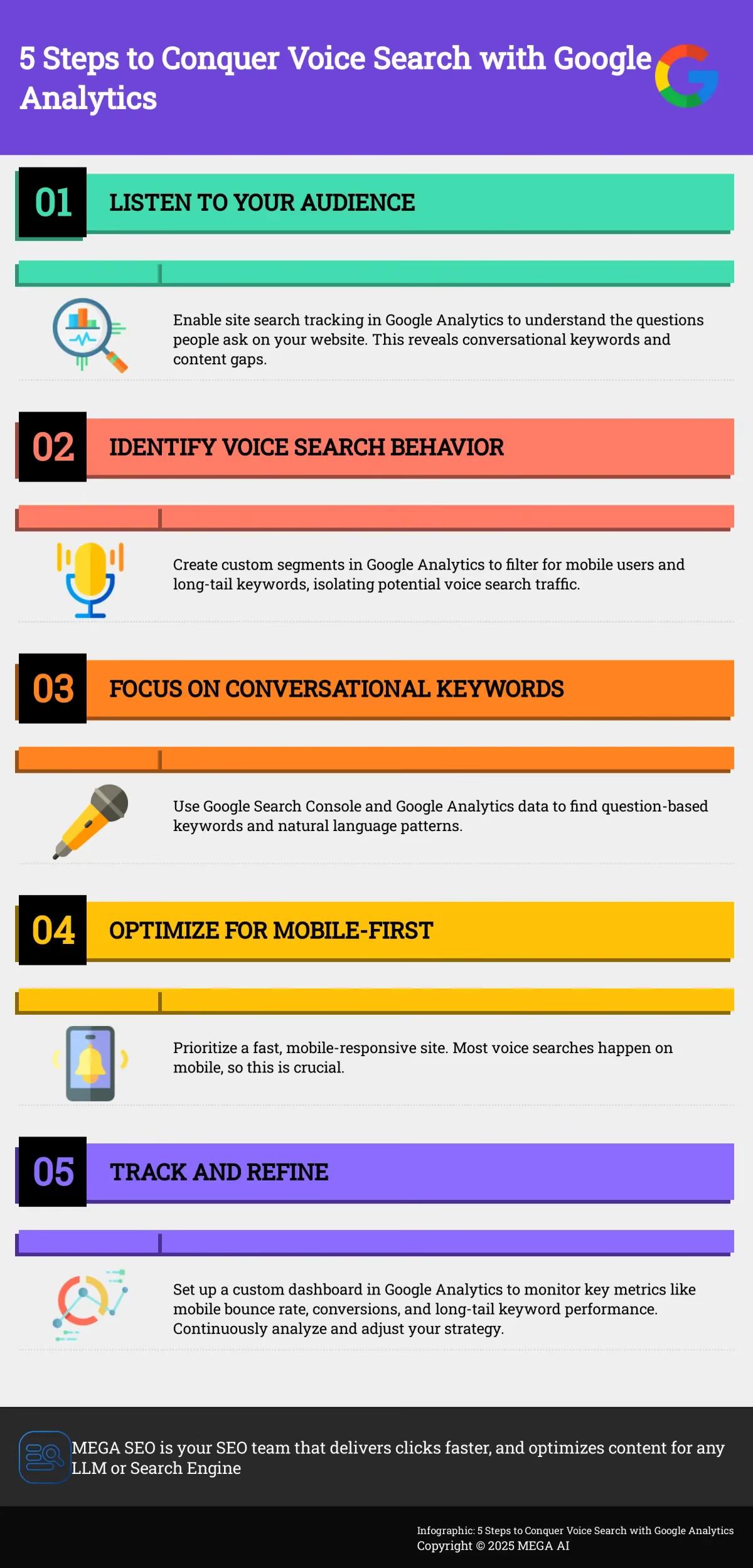
How to Set Up Custom Reports
Google Analytics offers a massive amount of data, and it’s easy to feel overwhelmed. Custom reports help you filter out the noise and concentrate on the metrics that are most relevant to voice search. You can build a dedicated dashboard that pulls in specific data points, such as traffic from mobile devices, the performance of long-tail keywords, and user engagement on your FAQ pages. This provides a clear, at-a-glance view of your performance. By creating a custom report in Google Analytics, you can track trends over time and quickly spot opportunities to better serve users arriving via voice queries. Think of it as your personal voice search command center.
Activate Site Search Tracking
What are people asking once they’re already on your website? The site search tracking feature in Google Analytics can tell you. When you enable this, you capture the exact words and phrases visitors type into your site’s search bar. This data is incredibly valuable because these internal queries are often conversational and question-based, mirroring the structure of voice searches. Analyzing these terms can reveal content gaps on your site and give you direct insight into your users' needs. If you haven't already, enabling site search is a simple but powerful step toward understanding the language your audience uses and optimizing your content accordingly.
Create a Segment for Voice Search Traffic
While Google Analytics doesn't explicitly label traffic as "from voice search," you can create segments to isolate visitors who exhibit voice search-like behaviors. A segment is a filter that lets you analyze a specific subset of your audience. For voice search, you could create a segment for users on mobile devices who landed on your site using long, question-based queries from Google Search Console. By creating a custom segment, you can compare this group’s behavior—like bounce rate, pages per session, and conversion rates—to your overall traffic. This helps you understand if your site is effectively meeting the needs of users who are likely using voice search.
What Voice Search Metrics Should You Track?
Once you have your analytics set up to isolate voice search traffic, you need to know what to look for. Tracking the right metrics helps you understand if your optimization efforts are working and where you can make improvements. It’s not just about seeing an increase in traffic; it’s about understanding the quality of that traffic and how users interact with your site. By focusing on a few key performance indicators (KPIs), you can get a clear picture of your voice search performance and make data-driven decisions to guide your content creation.
Using tools like Google Analytics and Google Search Console, you can move beyond vanity metrics and dig into data that reveals user intent and behavior. This allows you to see which voice queries bring people to your site, how they engage with your content, and whether they complete the actions you want them to. Monitoring these metrics consistently will help you refine your SEO strategy and ensure your content effectively meets the needs of voice search users. The goal is to connect with your audience by providing direct, relevant answers the moment they ask. This approach transforms your website from a passive resource into an active participant in the user's conversational search journey.
Analyze Query Types and Search Patterns
Voice search queries are fundamentally different from typed ones. They are typically longer, more conversational, and often phrased as questions. Your first step is to identify these patterns. Use Google Search Console to see the exact queries people use to find your site. Look for phrases that start with "who," "what," "where," "when," "why," and "how." These question-based keywords are strong indicators of voice search. Analyzing these queries gives you direct insight into your audience's needs, helping you create content that provides the specific answers they are looking for.
Understand User Behavior and Engagement
After a user lands on your site via voice search, what do they do next? User behavior metrics in Google Analytics tell this story. Pay attention to engagement rate, session duration, and conversions for your voice search segment. A low engagement rate might mean your page provides a quick answer, which can be good, but it could also signal that the content doesn't match the user's intent. By reviewing user behavior, you can determine if your landing pages are effectively serving voice search users or if they need adjustments to better meet their expectations.
Check Your Mobile Performance
Most voice searches happen on mobile devices, so your site’s mobile performance is critical. A slow or clunky mobile experience can cause users to leave immediately, no matter how great your content is. In Google Analytics, compare metrics like mobile bounce rate, page load times, and mobile conversion rates for your voice search segment against your overall traffic. If you see poor mobile performance, prioritize technical improvements. Ensuring your website is fast and mobile-responsive is a foundational step for any successful voice search optimization strategy.
Track Conversions from Voice Search
Ultimately, the goal of attracting traffic is to drive business results. Tracking conversions helps you measure the quality and value of your voice search visitors. Set up goals in Google Analytics to monitor key actions, such as newsletter sign-ups, contact form submissions, or product purchases. By filtering for your voice search segment, you can see how many of these users are converting. This data demonstrates the direct impact of your voice search efforts on your bottom line and helps you justify further investment in your SEO strategy. It answers the crucial question: are voice search users just visiting, or are they becoming customers?
How to Do Keyword Research for Voice Search
Keyword research for voice search is less about single words and more about entire conversations. When people use voice assistants, they speak in full sentences and ask direct questions. Your goal is to anticipate these natural language queries and create content that answers them clearly. This approach differs from traditional SEO, which often focuses on shorter, typed phrases. Instead of targeting "best coffee," you might target "What's the best coffee shop near me that's open now?"
Understanding this distinction is the first step toward an effective voice search strategy. The process involves digging into how your audience actually talks about their problems and needs. By focusing on conversational phrases, question-based queries, and user intent, you can align your content with the way people use voice search in their daily lives. This not only improves your chances of appearing in voice results but also helps you create more useful, user-friendly content overall. MEGA AI's automated keyword research tools can help you uncover these conversational queries at scale, saving you time while identifying high-value opportunities.
Focus on Long-Tail and Conversational Keywords
Long-tail keywords are longer, more specific phrases that users are likely to use when they are closer to a point of purchase or when using voice search. Because voice queries are conversational, they naturally fall into this category. Think about how you talk versus how you type. You might type "weather NYC," but you would ask your smart speaker, "What's the weather like in New York City today?"
To find these phrases, look for long-tail keywords that sound like natural questions people would ask. You can find inspiration in Google's "People also ask" section, forums related to your industry, or by analyzing your own site search data in Google Analytics. The key is to shift your focus from short, broad terms to longer, more descriptive phrases that capture a user's specific intent.
Target Question-Based Queries
A significant portion of voice searches are phrased as questions. People are looking for quick, direct answers to their problems. Your keyword research should reflect this by targeting queries that start with words like "who," "what," "where," "when," "why," and "how." These are the building blocks of informational searches and are prime targets for voice search optimization.
You can use tools like Google Search Console to find keywords that begin with these question words. Once you identify relevant questions your audience is asking, you can create content that answers them directly. For example, if you find people are searching "how to clean coffee stains from a rug," you can create a blog post or a dedicated FAQ page that provides a clear, step-by-step solution.
Identify Natural Language Patterns
Voice searches are almost always conversational. People talk to their voice assistants as if they were talking to another person. This means your keyword strategy needs to account for natural speech patterns, including slang, colloquialisms, and full sentences. As Circles Studio notes, voice searches are usually longer and more like natural conversations.
To understand how your audience speaks, listen to them. Pay attention to the language they use in customer service calls, emails, social media comments, and product reviews. This will give you direct insight into their phrasing and vocabulary. By incorporating this natural language into your content, you make it more relatable and more likely to match a voice query.
Map Keywords to User Search Intent
Behind every search query is an intent—the user's ultimate goal. For voice search, intent is often immediate and action-oriented. Many queries have a local intent, such as "find a pizza place near me," which shows the user is ready to make a purchase. Others have an informational intent, like "how tall is the Eiffel Tower," where the user just wants a quick fact.
Understanding the intent behind different queries helps you create the right kind of content to meet the user's needs. For local searches, optimizing your Google Business Profile is critical. For informational queries, a clear and concise answer in a blog post or FAQ page can help you capture a featured snippet, which is often the source for voice search answers. By optimizing for local search, you can connect with customers who are nearby and ready to act.
How to Use Analytics Data to Optimize Content
Once you have your analytics data, you can start making informed decisions to improve your content. The metrics you track in Google Analytics provide a clear roadmap for what to optimize. Instead of guessing what users want, you can see exactly which questions they’re asking and how they’re interacting with your site. This data-driven approach helps you refine your content to better match the conversational nature of voice search queries.
Each optimization you make should be tied to a specific insight from your analytics. For example, if your Site Search report shows users are frequently asking a specific question, that’s a signal to create a clear, concise answer for it. If mobile bounce rates are high on certain pages, it’s time to investigate their mobile experience. Using an SEO automation platform can streamline this process by identifying these opportunities and even updating content for you, ensuring your articles are always optimized for the latest search trends and user behaviors. The following strategies will help you turn your analytics insights into tangible content improvements.
Find and Target Featured Snippet Opportunities
Featured snippets are the answer boxes that appear at the top of Google’s search results, and they are often the direct source for voice search answers. Your goal is to have your content appear in these snippets. Use the queries you identified in Google Analytics to find common questions your audience is asking. Then, write short, clear, and direct answers to these questions within your content. Place the question in a heading (like an H2 or H3) and provide the answer directly below it in a concise paragraph or a bulleted list. This structure makes it easy for Google to pull your content as a featured snippet.
Review Your Local Search Performance
Voice search is heavily used for local queries like "coffee shop near me." In fact, research shows that 58% of consumers use voice search to find local business information. If you have a physical location or serve a specific area, your local search performance is critical. Start by ensuring your Google Business Profile is completely filled out and accurate. This includes your business name, address, phone number, hours of operation, and photos. Encourage customer reviews, as these also play a role in local search visibility. Your analytics can show you how many users are finding you through local queries, helping you measure the impact of your optimization efforts.
Structure Your Content for Easy Answers
A well-structured article is easier for both users and search engines to understand. Voice assistants prefer content that is organized logically because it allows them to find answers quickly. Use clear, descriptive headings and subheadings (H2s, H3s) to break up your text. Incorporate bullet points and numbered lists to present information in a scannable format. This not only improves readability for your human visitors but also helps search engines parse your content and identify key information. A clean structure increases the likelihood that your content will be selected for featured snippets and other rich results.
Adopt a Mobile-First Strategy
Since most voice searches happen on smartphones, your website must perform flawlessly on mobile devices. A mobile-first strategy means designing for mobile users from the start, not as an afterthought. Your site should have a responsive design that looks and works great on any screen size. Page speed is also a major factor. Voice search users expect immediate answers, so your pages should load quickly, ideally in under three seconds. You can use Google's Mobile-Friendly Test to check your pages and get recommendations for improvement. Your analytics will confirm the importance of this, likely showing that the majority of your traffic comes from mobile users.
The Impact of Voice Search on Businesses
Voice search is more than just a convenient way to check the weather; it's fundamentally changing how customers find and interact with businesses. When someone asks their phone or smart speaker a question, they expect a single, correct answer delivered instantly. This winner-take-all environment means that being the top result is more critical than ever. For small and local businesses, this shift presents a massive opportunity. While larger competitors might dominate traditional text-based search, voice search levels the playing field by prioritizing content that provides direct, conversational answers to specific user needs. It’s a move away from keyword stuffing and toward genuine, helpful communication.
Understanding this impact is the first step toward leveraging it for growth. The data shows a clear trend: consumers are increasingly relying on voice commands to discover local services, make purchases, and manage daily tasks across a wide range of industries. From finding a nearby restaurant to booking a doctor's appointment, voice search is becoming an integral part of the customer journey. By optimizing for these conversational queries, you position your business not just as a search result, but as a helpful solution in the exact moment your customer needs you. This builds trust and drives real-world actions, turning spoken questions into tangible business outcomes.
Why Voice Search is Critical for Local Businesses
For local businesses, voice search isn't a future trend—it's a present-day reality that directly impacts foot traffic and sales. The rise of "near me" searches is a testament to this, with almost half of all voice queries being for local information. When a potential customer asks, "Where can I find a coffee shop near me?" or "What time does the local hardware store close?", they are demonstrating immediate, high-value intent. This connection between a voice query and a real-world action is incredibly strong. According to industry statistics, 76% of people who own smart speakers perform local searches at least once a week, and a staggering 78% of local searches on mobile devices result in a purchase at a physical store. This data paints a clear picture: optimizing for voice search directly translates to more customers walking through your door.
The Growth of Voice Shopping (V-Commerce)
Voice commerce, or v-commerce, is the rapidly expanding practice of buying products and services using voice commands. This market is experiencing explosive growth, jumping from $4.6 billion in 2021 to over $19.4 billion in 2023. This isn't just about reordering household staples; it's about a new, frictionless path to purchase that consumers are quickly adopting. For small businesses, this means thinking about how your products can be discovered through conversation. A user might ask, "Where can I buy organic dog treats?" or "Find a local florist that delivers." By optimizing your product descriptions and site content for these natural language queries, you can capture a piece of this growing market. This behavior highlights a key aspect of v-commerce: it often starts with a search for information that leads to a transaction.
Trends Across Different Industries
The influence of voice search extends far beyond retail, touching nearly every industry. In healthcare, for instance, 68% of providers believe voice search will be a significant tool for patients, who can use it to find nearby clinics or ask about symptoms. Similarly, the automotive sector is deeply integrated with voice technology. With 39% of Americans using voice assistants in their cars, drivers frequently search for nearby businesses or get directions, making in-car voice optimization crucial for any business that relies on local customers. Even the banking and finance sector is seeing a shift, with 35% of customers using voice assistants for tasks like checking account balances or finding the nearest ATM. This demonstrates that no matter your industry, your customers are likely using their voice to find information, and being prepared to answer them is key.
Advanced Methods for Voice Search Tracking
Going beyond standard reports is where you'll find the most valuable insights. Basic metrics give you a surface-level view, but advanced tracking methods help you understand the nuances of how people use voice search to find your business. By digging deeper into your analytics, you can connect specific user behaviors to your content strategy and measure the true impact of your optimization efforts. These methods involve setting up more sophisticated tracking to isolate voice search traffic, understand user intent, and attribute conversions accurately. This approach transforms your data from a simple scorecard into a strategic guide for creating content that answers your audience's spoken questions.
Go Deeper with Custom Dimensions and Segments
Custom dimensions and segments in Google Analytics let you slice your data in ways that are specific to your business goals. For voice search, you can create a segment that filters for users who land on your site via long-tail, conversational keywords. Integrating Google Analytics with Google Search Console is the first step, as it gives you access to the query data you need. Once connected, you can build a segment that isolates traffic from queries containing question words like "how," "what," or "where." This gives you a dedicated view of your voice search audience, allowing you to analyze their behavior, demographics, and conversion paths separately from your other organic traffic.
Set Up Goals and Track Attribution
Voice search queries often show strong user intent, so it's important to measure whether your content is meeting that need. Setting up SEO-related goals in Google Analytics allows you to track actions beyond just pageviews. Think about what a successful voice search interaction looks like for your business. It could be a click-to-call from a local search, a form submission for a demo, or a download of a resource. By defining these actions as conversion goals, you can measure the quality of your voice search traffic, not just the quantity. This helps you understand which conversational keywords are driving valuable actions and where to focus your optimization efforts for the best return.
Track User Activity Across Different Devices
Voice search doesn't happen in a vacuum; it's part of a larger customer journey that often spans multiple devices. A user might ask their smart speaker a question, then continue their research on a laptop or visit your physical store using their phone for directions. Google Analytics can help you piece this journey together by tracking user activity across devices. By analyzing reports like the Audience overview, you can see how users interact with your site on mobile versus desktop. This insight is key for ensuring a seamless experience and tailoring your content to fit the context of each device, which is fundamental for a successful voice search strategy.
Establish Your Performance Benchmarks
To know if your voice search strategy is working, you need to establish a baseline. Start by identifying your current top-performing pages for conversational queries. These are often pages that have already earned featured snippets. Use this data as your benchmark. From there, you can set realistic performance goals, like increasing traffic from question-based keywords by 15% over the next quarter. Regularly reviewing your top-performing pages and updating their content is essential for maintaining their rank, especially since the competition for voice search answers is high. This creates a cycle of continuous improvement, where you monitor, analyze, and refine your content based on performance data.
Using SEO Tools for Voice Search Analysis
While Google Analytics provides a solid foundation, dedicated SEO tools offer a more granular view of voice search opportunities. These platforms are built to analyze search queries at scale, helping you spot the conversational, long-tail questions that signal voice search intent. Voice search analytics is the process of collecting and analyzing data about how people use spoken commands to find information, and these tools excel at uncovering those patterns. By digging into this data, you can identify question-based keywords and natural language phrases that your audience uses. This process, which can be automated with platforms like MEGA AI, allows you to create content that provides direct, helpful answers, making your site the go-to source for voice assistants.
Understanding Different Voice Assistant Ecosystems
It's important to remember that not all voice assistants pull from the same place. Google Assistant primarily uses Google Search results, which is why earning featured snippets is so important. However, Amazon's Alexa often relies on Bing for search results and Yelp for local business information, while Siri uses a combination of sources. For a small or local business, this means a comprehensive strategy is key. Since 58% of consumers use voice search to find local business information, optimizing your Google Business Profile is critical for Google users, but maintaining an updated Yelp profile is just as crucial for reaching customers using Alexa. This multi-platform approach ensures you're visible no matter which assistant a potential customer uses to find you.
Building Your Voice Search Analytics Dashboard
Once you’ve identified your key metrics, you need a central place to monitor them. A dedicated voice search analytics dashboard consolidates all your important data, making it easier to track performance, spot trends, and make informed decisions. Instead of digging through different reports, you can get a clear, high-level view of how your voice search strategy is working. This dashboard becomes your command center for all things voice search, helping you see the direct impact of your optimization efforts. Building one in a tool like Google Analytics 4 allows you to customize the view to fit your specific business goals.
What Should Your Dashboard Include?
To effectively monitor voice search, your dashboard should pull data from both Google Search Console and Google Analytics 4. This combination gives you a full picture, from the queries users speak to how they behave on your site. Focus on including widgets that highlight longer, conversational queries, as this is a hallmark of voice search behavior. Key components to add include a list of top question-based keywords from GSC, mobile organic traffic trends, page load times for key landing pages, and conversion rates segmented by mobile users. This setup helps you analyze how people are discovering your content through voice and whether your site is delivering a good experience once they arrive.
Start with Custom Report Templates
Standard reports often don’t provide the specific insights needed for voice search. Creating a custom dashboard is essential for focusing on the most relevant SEO metrics for your business. Start with a blank template in GA4 and add widgets for the components mentioned above. You can build custom reports that filter for queries containing words like "how," "what," and "where" to isolate question-based searches. You can also create a dedicated view that only shows data from mobile organic traffic. Tailoring your reports this way gives you a much clearer view of your performance and helps you identify specific areas for improvement without the noise of irrelevant data.
Apply Data Visualization Best Practices
When designing your dashboard, clarity is your main goal. A cluttered dashboard is an ineffective one. Include only your most critical numbers, or Key Performance Indicators (KPIs), to avoid overwhelming your team with too much information. Use simple scorecards to display top-level metrics like total mobile sessions or voice-related conversions. Bar charts are great for comparing performance across different landing pages, while line charts can effectively show trends over time. The objective is to present data in a way that is easy to understand at a glance, allowing for quick and accurate decision-making.
Develop a Strategy for Monitoring Performance
A dashboard is most useful when paired with a proactive monitoring strategy. Instead of checking it manually every day, set up custom alerts in Google Analytics. You can create alerts that notify you of significant changes, such as a sudden increase in organic traffic from question-based queries or a drop in mobile conversion rates. This approach allows you to stay informed without being tied to your analytics platform. Additionally, tracking your internal site search can reveal what users are looking for once they land on your website. This data provides valuable insights into new keyword opportunities and potential content gaps you need to fill.
Technical SEO Checklist for Voice Search
Beyond creating the right content, you need to make sure your website is technically sound. Technical SEO helps search engines find, understand, and rank your content more effectively. For voice search, this means ensuring your site is fast, accessible, and easy for bots to interpret. When a user asks a question, search engines need to pull an answer from a reliable, quick-loading source. These technical adjustments ensure your site is a top contender.
Many of these optimizations are foundational for good SEO in general, but they carry extra weight for the instant-gratification nature of voice queries. Think of it as preparing your website to have a clear, quick conversation with both search engines and users. With a platform like MEGA AI, you can automate many of these technical SEO improvements, letting you focus on the bigger picture while the AI handles the backend details.
Implement Schema Markup for Better Context
Schema markup, or structured data, is a type of code you add to your website to help search engines understand your content on a deeper level. Instead of just seeing a block of text, search engines can identify specific elements like a recipe, an event, or a frequently asked questions section. This clarity is crucial for voice search, as it helps Google and other assistants pull direct answers.
Using specific types like FAQ schema for question-and-answer pages or "how-to" schema for instructional content can make your pages eligible for rich results and featured snippets, which are often the source for voice search answers. This code essentially tells search engines, "Hey, this content directly answers a user's question," making it an ideal candidate for a voice response.
Check and Improve Your Site Speed
Voice search users expect answers instantly. A slow-loading website creates a poor user experience and can cause you to lose out on traffic from impatient users. Page speed is a confirmed ranking factor, and its importance is amplified for voice queries. If your page takes too long to load, a search engine will likely find a faster alternative to serve the user.
You can check your website’s performance using Google’s PageSpeed Insights or by reviewing the Site Speed report in Google Analytics. These tools will show you how quickly your pages load and offer specific recommendations for improvement. Fixing slow pages should be a priority, as a fast website not only helps with voice search but also improves user experience and conversion rates across the board.
Ensure Your Site is Mobile-Responsive
A significant portion of voice searches happen on mobile devices. Because of this, your website must be fully responsive and provide a seamless experience on screens of all sizes. A mobile-friendly website is no longer a suggestion; it's a requirement for modern SEO. This means text should be readable without zooming, buttons should be easy to tap, and the site should load quickly on a mobile connection.
Your goal should be to have your website load in under three seconds on a mobile device. A responsive design ensures that your content is accessible and easy to interact with, regardless of how a user finds it. This focus on the mobile experience directly supports your voice search optimization efforts by catering to the devices where these queries are most common.
Monitor Key User Experience Metrics
Technical optimization isn't a one-and-done task. It's important to continuously monitor how users interact with your site to identify areas for improvement. Tools like Google Analytics and Google Search Console provide valuable data on user behavior, including bounce rates, time on page, and click-through rates. High bounce rates, for example, might indicate that your content isn't matching user intent or that the page is difficult to use.
One particularly useful tactic is to track internal site search queries. Seeing what users are searching for on your own website can reveal content gaps and new keyword opportunities. If people are consistently searching for a topic you haven't covered, creating a page to answer that question can directly address a known user need.
Automating Technical SEO with AI Platforms
Manually managing all the technical details of SEO can be time-consuming, especially for a small business. This is where AI-powered platforms can make a significant difference. Instead of manually checking for schema errors, monitoring site speed, or running mobile-friendly tests, you can use a tool to handle these tasks automatically. With a platform like MEGA AI, you can automate many of these technical SEO improvements, letting you focus on the bigger picture while the AI handles the backend details. These systems can continuously scan your site, identify issues, and even implement fixes, ensuring your technical foundation is always optimized for search engines and ready for voice queries.
Broader Considerations: Accessibility and Privacy
As voice search becomes more integrated into our daily lives, it's important to look beyond the marketing metrics and consider its wider impact. On one hand, voice technology offers incredible benefits for accessibility, breaking down barriers for millions of users. On the other hand, the "always-on" nature of smart speakers raises valid questions about user privacy. Understanding both sides of this coin is crucial for any business operating in the digital space. It’s not just about optimizing for a new type of search; it’s about participating responsibly in a technology that is reshaping how people interact with information and the world around them.
As a business owner, being aware of these considerations helps you build a more inclusive and trustworthy brand. When you optimize for voice search, you are also, by extension, making your content more accessible to users with disabilities. At the same time, being transparent about data and privacy can build stronger relationships with your customers. Navigating this landscape requires a thoughtful approach that balances business goals with ethical responsibilities. The following sections explore these two critical aspects of voice technology, offering a more complete picture of its role in our society.
Voice Search as an Accessibility Tool
Voice search is more than just a convenience; it's a powerful accessibility tool. For many people, it provides a vital bridge to the digital world. As SiteImprove notes, it's very helpful for the 61 million adults in the US with disabilities, such as those with vision problems, learning difficulties, or limited movement. The hands-free and screen-free nature of voice commands allows individuals who cannot easily type or read a screen to access information, services, and products. By optimizing your content for voice search, you are inherently making it more available to this large and often underserved audience, which is a win for both social responsibility and business.
Navigating User Privacy Concerns
The convenience of voice assistants comes with a trade-off: privacy. Smart speakers are designed to listen for a "wake word," which means their microphones are technically always on. This has led to concerns about what data is being collected and how it's being used. As Quartz reported, companies like Google keep records of your searches, including voice searches, to help them sell ads. While these recordings are used to improve the service and personalize experiences, users should be aware that their spoken words are often stored and analyzed. For businesses, this means being transparent and building trust is key, as consumers are becoming more conscious of how their personal data is being handled.