
Running a successful blog on Blogger involves more than just creating great content; it's also about providing a seamless user experience. One of the most effective ways to improve user experience and boost your SEO is by creating a comprehensive FAQ section. This guide will walk you through everything you need to know about creating, optimizing, and maintaining an effective FAQ section for your Blogger site. We'll explore how FAQs can improve user engagement, boost your search rankings, and simplify content management. Whether you're a seasoned blogger or just starting, this guide will provide valuable insights into leveraging the power of faq blogger.
Key Takeaways
- Well-crafted FAQs enhance your blog's user experience and SEO. Anticipate your audience's questions to provide helpful information and improve search visibility. Implement FAQ schema for even better search performance.
- Building an effective FAQ section is straightforward. Organize questions logically, write clear and concise answers, and use a natural, conversational tone. Explore available tools and plugins to simplify the process on Blogger.
- Regularly review and refine your FAQs to maximize their impact. Track page views and gather user feedback to understand what resonates with your audience. Use this data to improve clarity, address emerging questions, and ensure your FAQs remain a valuable resource.
What is an FAQ Section and Why Does it Matter for Blogger?
A Frequently Asked Questions (FAQ) section is a dedicated area on your blog that addresses common questions your audience has about your topics, products, or services. Think of it as a self-service resource, providing quick answers and improving the overall user experience. For bloggers using platforms like Blogger, a well-crafted FAQ section can be a powerful tool for engagement and SEO.
What are FAQs?
FAQs are simply a collection of questions and answers presented in a clear, concise, and easy-to-understand format. They anticipate the information your audience needs and provides it upfront. Instead of searching through multiple blog posts or contacting you directly, readers can quickly find solutions in your FAQ section. As Tempesta Media notes, creating an FAQ section with dedicated pages for each Q&A makes each answer searchable, both on your site and in Google searches.
How FAQs Improve User Experience
A comprehensive FAQ section significantly improves user experience. By anticipating and answering common questions, you guide readers toward the information they need. This can lead to more time spent on your blog, lower bounce rates, and higher reader satisfaction. AdLift suggests featuring your FAQ section prominently across your website, especially in areas where users might look for help, such as headers, footers, and customer support interactions.
SEO Benefits of FAQs
Beyond user experience, FAQs offer substantial SEO benefits. By using relevant keywords in your questions and answers, you can improve your blog's visibility in search results. Adding FAQ schema markup can further enhance your search listings. This structured data allows search engines to better understand and present your content to potential readers. Digital Nomads emphasizes how FAQ schema benefits Blogger sites, increasing visibility and user engagement by displaying FAQs directly in search results.
How to Create an FAQ Section on Blogger
This section provides a practical guide to setting up a well-structured, optimized FAQ section on your Blogger site. We'll cover planning, implementation, and best practices for structuring your FAQs.
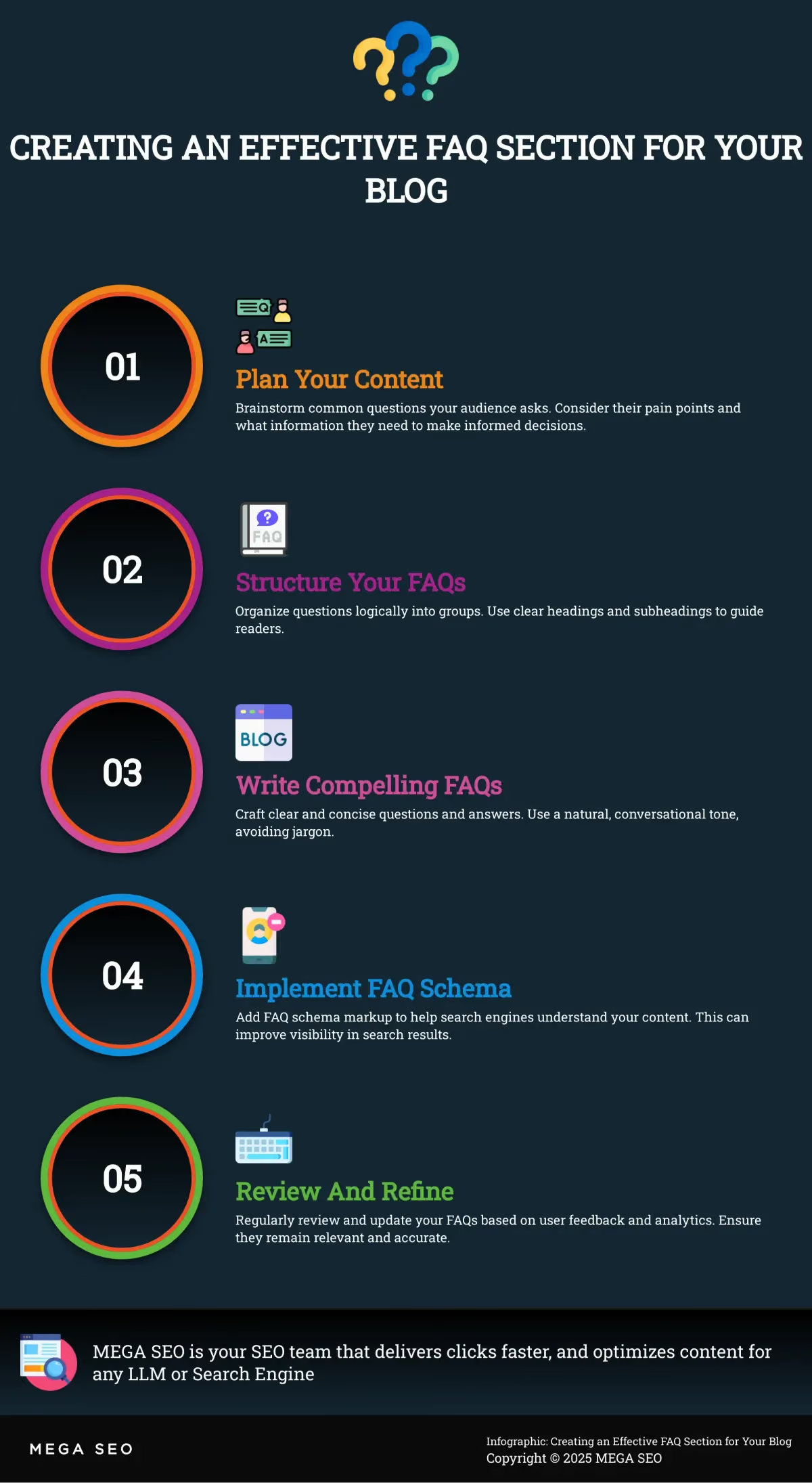
Plan Your FAQ Content
Before diving into the technicalities, take some time to brainstorm the actual questions and answers. Think about common questions your audience asks. What are their pain points? What information do they need to make informed decisions? Building a comprehensive FAQ resource with dedicated pages for each question offers several advantages. As this article suggests, structuring your FAQ section so each query links to a separate page makes each answer searchable on your site and Google. This approach improves SEO and provides a more user-friendly experience. MEGA SEO's free keyword research tools can help you uncover relevant questions your audience is searching for, ensuring your FAQ section addresses their specific needs.
Add an FAQ Section (Step-by-Step)
Adding an FAQ section to Blogger is straightforward. First, decide where your FAQs should live. You can create a dedicated FAQ page or incorporate them within existing blog posts. For a dedicated page, create a new page in Blogger and title it "Frequently Asked Questions" (or something similar). If you're adding FAQs to a blog post, simply add a new section towards the end. Implementing FAQ schema on your Blogger site is crucial for visibility and user engagement. This structured data allows your FAQs to appear directly in search results, giving users a quick overview of your content and improving their experience.
Structure Your FAQs
Once you have your questions and answers, organize them logically. Group related questions and use clear headings and subheadings. Consider adding a link to your FAQ section in your website's header or footer to promote discoverability. For blog posts, using accordion-style dropdowns for your FAQs, as this article suggests, lets readers quickly scan for answers while keeping the full article accessible. This keeps your content clean and easy to read. MEGA SEO's customized posts feature can help you create visually appealing and well-structured FAQ sections that seamlessly integrate with your Blogger design.
How to Write Great FAQs
A well-crafted FAQ section can be a powerful tool for user engagement and SEO. Here's how to create FAQs that are both helpful and effective:
Write Clear Questions
Start with the questions your audience actually asks. Think about the common queries you receive through customer support, social media, or even in-person interactions. Frame your questions clearly and concisely, using language that your audience understands. Each question should represent a single, specific query. For maximum searchability, consider structuring your FAQ section so that each question links to a separate page, making each answer easily discoverable by search engines. This also offers the opportunity to delve deeper into each topic and provide truly comprehensive information.
Write Concise Answers
While it's important to provide thorough information, keep your answers concise and to the point. No one wants to wade through walls of text to find the information they need. Each FAQ item should consist of a question and its corresponding answer. Focus on delivering the core information clearly and efficiently. You can always offer additional resources or links for readers who want to explore a topic further. Adding multiple question-answer pairs creates a comprehensive FAQ resource for your users.
Use Natural Language
Write your FAQs in a conversational, natural tone. Avoid jargon or overly technical language that might confuse your audience. Imagine you're speaking directly to a customer – how would you explain the answer? This approach makes your FAQs more approachable and easier to understand. Integrating your FAQ content into your customer support interactions by sharing relevant links when responding to inquiries can also streamline your support process and improve customer satisfaction.
Update Your FAQs
Your FAQ section isn't a "set it and forget it" element. Regularly review and update your FAQs to ensure they remain relevant and accurate. As your business evolves or you receive new customer questions, add, revise, or remove FAQs as needed. Promoting your FAQ section throughout your website, especially in areas where users are likely to have questions, such as product pages or contact forms, can significantly improve user experience. Consider including a prominent link in your website's header or footer. This keeps your information fresh and reinforces its value to your audience.
How to Implement FAQ Schema Markup
What is FAQ Schema Markup?
FAQ schema markup is a type of structured data that helps search engines understand the questions and answers in your FAQ section. Think of it as a way to speak directly to Google, telling it exactly what questions you're addressing and what the corresponding answers are. By implementing this markup, you give search engines a clearer picture of your content. This can enhance your site's visibility in search results, sometimes even allowing your FAQs to appear directly in the search engine results pages (SERPs) as rich snippets. This gives users quick access to relevant information and improves the overall user experience.
Add Schema Markup to Blogger
Adding FAQ schema markup to your Blogger site involves creating a structured data format that encompasses each question and its respective answer. Each FAQ item should consist of a question and its corresponding answer. You can add multiple question-answer pairs to build a comprehensive FAQ section. Key2Blogging offers a helpful guide on how to add this structured data to your Blogger posts. Accuracy is key. Ensure the information you provide is relevant and correct to maintain user trust and encourage engagement. This structured approach makes it easier for search engines to parse and understand your content, improving your site's visibility and encouraging users to engage with your content more effectively.
SEO Benefits of FAQ Schema
Implementing FAQ schema markup offers several SEO benefits. While not a direct ranking factor, FAQ schema can improve click-through rates from search results. When your FAQs appear as rich snippets, they take up more real estate in the SERPs, making them more noticeable and enticing to users. This increased visibility can lead to more organic traffic to your site. Additionally, a well-structured FAQ page can improve user engagement and reduce bounce rate, signaling to search engines that your site provides valuable content.
How to Enhance Your FAQ Section with Tools
Once you’ve got a basic FAQ section up and running, you can explore different tools and techniques to make it even better. Think about how you can make your FAQs easier to find, more engaging for readers, and ultimately more helpful for your audience. This can involve using plugins, customizing your design, and finding ways to make your FAQs more interactive.
FAQ Plugins and Tools for Blogger
Blogger offers several plugins and tools to create stylish and functional FAQ sections. You can find plugins specifically designed for FAQs, often featuring accordion-style dropdowns. This simplifies the process, especially if you're not comfortable working directly with HTML or CSS. These tools often provide a visual interface for adding, organizing, and styling your FAQs. This makes it easy to create a professional-looking FAQ section without any coding. Remember, you can use these tools to create both stand-alone FAQ pages and incorporate FAQs into individual blog posts.
Custom HTML and CSS for FAQs
For more control over the appearance and functionality of your FAQs, consider using custom HTML and CSS. This approach lets you tailor your FAQ section to match your blog's design perfectly. Structuring your FAQ section with hyperlinks to separate pages for each question makes each answer searchable, both on your site and by Google. This can significantly improve your site's SEO. While this method requires some coding knowledge, the benefits in terms of design flexibility and SEO can be worthwhile.
Interactive FAQs
Think outside the box to create a truly engaging experience for your readers. Interactive FAQs can transform how users interact with your content. Consider incorporating search functionality within your FAQ section, allowing users to quickly find what they need. Make your FAQ section easy to find with a prominent link in your website's header or footer. Integrating your FAQs into your customer support process is also helpful. Provide relevant links when responding to inquiries. This gives quick answers and directs users to a valuable resource on your site.
How to Optimize Your FAQ Section for Mobile and Desktop
Your FAQ section should look great and be easy to use on any device. A clunky mobile experience can frustrate visitors and hurt your SEO. Here’s how to make sure your FAQs are optimized for both mobile and desktop:
Responsive Design for FAQs
Start with a responsive design. This means your FAQ section automatically adjusts to different screen sizes. Each question in your FAQ section should ideally have its own page. This makes each answer individually searchable, both on your site and on Google, giving your content more visibility. Consider building your FAQ section with dedicated pages for each Q&A, structuring it so that each query is hyperlinked to a separate page.
Accordion-Style FAQs
Consider using accordion-style dropdowns, especially within blog posts. These dropdowns keep your content concise and organized. Readers can quickly scan the questions and click to reveal only the answers they need. You can improve your blog posts by adding FAQ sections at the bottom using accordion-style dropdowns. This gives your readers quick answers while keeping the full article available for detailed reading.
Test and Improve FAQ Performance
Promote your FAQ section throughout your website. Include a link in your header, footer, or anywhere users might be looking for answers. Think strategically about where your visitors are most likely to have questions and place links to your FAQs in those areas. If someone reads your FAQ blog post about your product features, they might be encouraged to visit your pillar page to learn more. This keeps visitors within your site and helps improve SEO results by reducing bounce rates and increasing time on the site. Regularly test and refine your FAQs based on user behavior and feedback.
How to Measure and Improve Your FAQ Performance
After setting up your FAQ section, continually measure and improve its performance. This ensures your FAQs stay relevant, helpful, and contribute to a positive user experience.
Track Key FAQ Metrics
One of the most effective ways to understand what resonates with your audience is to track which FAQs they access most often. By structuring your FAQ section so each question links to a separate page, each answer becomes searchable on your site and Google. This improves the user experience and lets you monitor page views for each FAQ. This data provides insights into what your audience wants to learn. MEGA SEO can automate creating individual pages for each FAQ, simplifying your workflow and maximizing SEO benefits.
Use Analytics to Refine FAQs
Beyond page views, integrating FAQ schema markup allows you to use analytics tools to understand user behavior. FAQ schema helps your frequently asked questions appear directly in search results, giving users a content preview and potentially increasing click-through rates. Monitoring this data helps you identify which FAQs drive traffic and engagement, and which ones might need improvement. This data-driven approach helps refine your FAQs to better meet audience needs. MEGA SEO can help you implement and manage FAQ schema, further streamlining your optimization efforts.
Gather User Feedback
Direct user feedback is invaluable for improving your FAQs. Make your FAQ section easily accessible with a prominent link in your website's header or footer. Also, integrate your FAQs into customer support interactions. Share links to relevant FAQs when responding to inquiries. This provides immediate assistance and creates an opportunity to gather feedback. Add a simple feedback form at the bottom of each FAQ page, asking users if the information was helpful. This direct feedback helps you identify areas where your FAQs could be clearer or more comprehensive. MEGA SEO offers solutions for managing customer interactions and gathering feedback.