Instagram thrives on visuals. But how many photos can you actually include in an Instagram post? Knowing this is key to planning effective content. Whether it's a single stunning image or a multi-photo carousel, we'll break down the rules. This guide covers Instagram's photo limits, offering practical tips for creating eye-catching visuals and engaging captions. We'll also dive into hashtags and content planning to help you maximize your impact on Instagram.
Key Takeaways
- Know your limits: Instagram allows up to 20 photos or videos in a carousel post, giving you plenty of room to share visual stories. Experiment to find the ideal length for your audience, as shorter carousels can sometimes be more engaging.
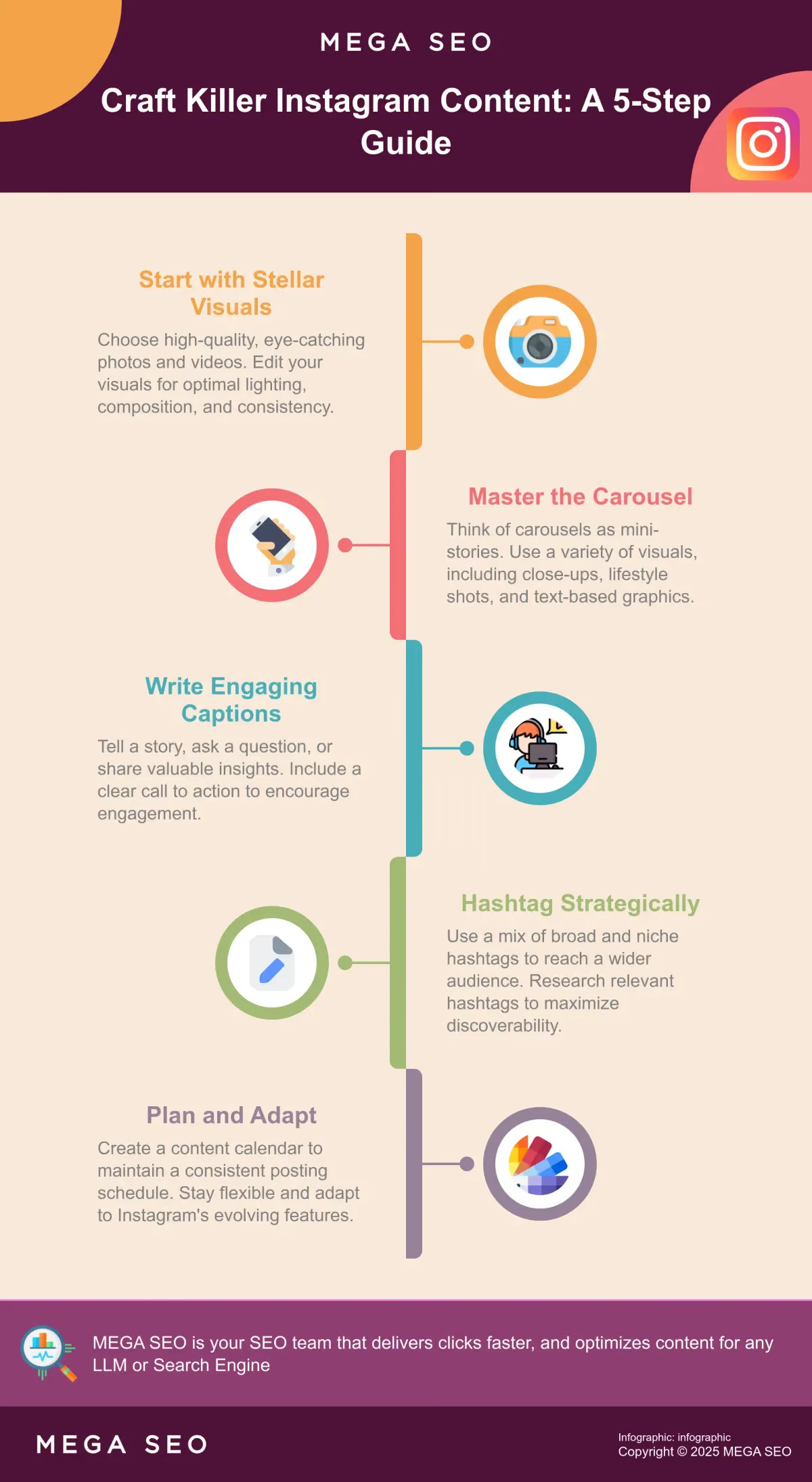
- Create compelling content: High-quality images, thoughtful captions, relevant hashtags, and a consistent visual style are key for capturing attention. Use captions to tell stories and include clear calls to action.
- Plan strategically: A content calendar and a mix of post types (single image, carousel, video, Stories) will keep your feed dynamic and engaging. Stay flexible and adapt to Instagram’s evolving features, leveraging tools like MEGA SEO to streamline your content and optimization efforts.
How Many Photos Can You Post on Instagram?
Want to share a burst of photos from your latest product launch or a behind-the-scenes peek at your studio? Knowing Instagram’s photo limits lets you plan your content effectively. Let’s break down the current restrictions and how to work with them.
Instagram Photo Limits: Single & Carousel Posts
As of August 2024, Instagram allows you to include up to 20 photos or videos in a single carousel post. This is a significant jump from the previous limit of 10, giving you more flexibility to showcase your brand story. You can still create single-photo posts for those hero shots that deserve their own spotlight.
Single Photo Posts
Sometimes, a single image speaks volumes. For those powerful photographs that deserve undivided attention, the single-photo post remains a classic choice. Think of it as your hero image, the star of the show. Whether it's a stunning product shot, a breathtaking landscape, or a striking portrait, a single image can convey a message with impact and clarity. It allows your audience to focus on the details and appreciate the artistry without distraction. Remember, quality over quantity can be a powerful strategy.
Carousel Posts (Multiple Photos)
Want to tell a richer story? Instagram allows you to include up to 20 photos or videos in a single carousel post, offering exciting opportunities for brands and creators. This expanded capacity (previously capped at 10) lets you showcase a product from multiple angles, share a step-by-step tutorial, or document an event in detail. You can create a mini-narrative within a single post, keeping your audience engaged. Experiment with different carousel lengths—sometimes shorter is more effective. This update is useful for showcasing a series of events, a detailed project, or a large collection of related images. Consider using MEGA SEO's Customized Posts feature to easily create engaging carousels.
Creating Multi-Photo Posts on Instagram
Creating a multi-photo post on Instagram is straightforward. Open the Instagram app and head to your profile. Tap the plus icon (+) in the top right corner, select “Post,” and then tap the layered squares icon to select multiple photos and videos from your camera roll. Select up to 20 assets to share in a single engaging post. Remember, variety keeps things interesting, so mix photos and videos to maximize engagement.
Step-by-Step Guide to Adding Multiple Photos to a Post
Ready to create a captivating carousel? Here’s how to add multiple photos to an Instagram post:
- Open the Instagram app and go to your profile.
- Tap the plus icon (+) in the top right corner.
- Select “Post.”
- Tap the layered squares icon (it looks like two overlapping squares) to choose multiple photos and videos from your camera roll. You can select up to 20 assets for a single post.
Arranging and Filtering Photos in Your Carousel
Once you’ve selected your photos, arrange them in the desired order for your carousel. Press and drag a photo to change its position. Apply a consistent filter to all photos, or edit each photo individually. This creates a cohesive aesthetic or highlights individual elements within the carousel.
Removing a Photo from a Carousel
Changed your mind about a photo? Tap the “X” icon on the photo to remove it before posting. This allows you to curate the perfect image collection for your Instagram carousel. For more information, visit Instagram's Help Center.
Consider using MEGA SEO's customized posts to automate and streamline your Instagram content and optimization efforts.
Do Photo Limits Vary by Instagram Account Type?
While the official limit is 20, some users have reported variations in the number of photos they can include in a carousel. Some accounts can add up to 15 photos, while others are capped at 10. This discrepancy might be due to A/B testing by Instagram or other factors. If you encounter a lower limit, you can still create compelling content within those boundaries. Consider breaking up larger collections into multiple posts or using Instagram Stories for additional sharing.
How to Maximize Engagement With Instagram Photos
Want to capture your audience’s attention on Instagram? Eye-catching photos are just the beginning. Let’s explore how to truly maximize engagement.
Carousel Content Best Practices for Instagram
Carousel posts offer a dynamic way to showcase multiple photos and videos. Think of them as mini-stories within your feed. Instagram allows up to 20 photos or videos in one carousel, giving you ample space to share a product launch, event recap, or a deep dive into a specific topic. This expanded capacity, as reported by Business Today, offers more flexibility for content creators. When building carousels, consider a narrative flow. Each visual should build on the previous one, creating a cohesive experience. Don’t forget to use a mix of visuals, including close-ups, lifestyle shots, and text-based graphics.
Ideal Carousel Length for Maximum Impact
Instagram offers the flexibility of up to 20 photos or videos in a single carousel, but that doesn’t mean you should always use all 20. Think quality over quantity. While it might be tempting to include as much as possible, shorter carousels can be more engaging. People have short attention spans, so consider what information is truly essential. Experiment to find what works best for your audience. Try a series of shorter carousels (3-5 slides) and see how your audience responds. Then, test longer carousels (7-10 slides) with a different narrative. Track your Instagram analytics to see which length performs best regarding reach, engagement, and saves.
Timing Your Carousel Content
Just like any other Instagram post, timing matters for carousels. Posting when your audience is most active increases your reach. Experiment with different posting times and days to see what resonates with your followers. Resources like MEGA SEO can help you analyze your audience’s behavior and suggest optimal posting times. Consistency is key. Establish a regular posting schedule to keep your audience engaged and returning for more.
Content Ideas to Make Your Carousels Shine
Need carousel inspiration? Think beyond just product photos. Carousels are perfect for step-by-step tutorials, behind-the-scenes glimpses of your process, user-generated content, or breaking down a complex topic into digestible pieces. Consider creating a carousel showcasing customer testimonials or highlighting different ways to use your product. Provide value and keep your audience entertained and informed. High-quality images, thoughtful captions, relevant hashtags, and a consistent visual style are essential for capturing attention.
When to Use Stories Instead of Carousels
While carousels are great for polished, curated content, Instagram Stories have a different appeal. Use Stories for spontaneous, behind-the-scenes content, quick polls and Q&As, or time-sensitive announcements. Stories are a way to connect with your audience more personally. If you have content that doesn’t fit a carousel format, use Stories to supplement your posts. This keeps your main feed focused and allows you to share more without overwhelming your followers. If you encounter limitations with carousel photo counts, Stories can be a valuable alternative.
How Many Photos Should Be in an Instagram Post?
While you can include up to 20 photos in a carousel, that doesn’t mean you always should. The optimal number depends on your content and audience. If you’re sharing a step-by-step tutorial, a longer carousel might be perfect. But for a simple product showcase, a few high-quality images might be more effective. Test different lengths and track your engagement to find what resonates. Pay attention to how many people swipe through your entire carousel. This provides valuable insights into their attention span. Learn more about optimizing content.
Write Engaging Captions & Use Hashtags on Instagram
Even the most stunning photos need a compelling caption. Think of your caption as an opportunity to tell a story, ask a question, or offer valuable information. Encourage your audience to like, comment, share, or visit your website. Calls to action are key for driving engagement, as highlighted by iDigic. Hashtags are another powerful tool for increasing visibility. Use relevant hashtags to connect with a wider audience. Experiment with a mix of broad and niche hashtags to find the sweet spot. MEGA SEO can generate customized captions and hashtags to elevate your Instagram strategy.
Planning Your Instagram Posting Strategy
A well-defined Instagram posting strategy is key for consistent engagement and growth. Think about your overall goals, your target audience, and the kind of content that resonates with them. This long-term vision will guide your daily posting decisions and help you build a cohesive and engaging presence on Instagram.
Understanding Instagram's Photo Posting Limits
As of August 2024, you can include up to 20 photos and videos in a single Instagram post. While this large capacity offers flexibility, resist the urge to always max it out. Overloading your audience with too much content at once can be counterproductive. Consider using MEGA SEO’s customized posts to help you create the right content for your audience.
Is There a Limit to the Total Number of Instagram Posts?
While there's a limit to how many photos you can include in a single Instagram post (up to 20 photos or videos in a carousel), there's no cap on the total number of posts you can share on your profile. You can post as many photos and videos as you want. Some Instagram accounts have millions of posts, so you don't have to worry about hitting a limit. This means you have ample opportunity to connect with your audience and share your brand's story through visuals. Focus on creating high-quality content that resonates with your followers.
This unlimited posting potential offers a significant advantage for businesses and creators. You can build a comprehensive archive of your work, document your progress, and create a valuable resource for your followers. Think of your Instagram profile as an evolving portfolio, showcasing your creativity and expertise. With no limit to the total number of posts, the possibilities for growth and engagement are vast. Consider using MEGA SEO to help you manage and optimize your content, ensuring your visuals and messaging are always effective.
Managing Your Instagram Content Calendar
Planning your Instagram content in advance is essential for maintaining a consistent posting schedule. A content calendar helps you visualize your feed, ensuring a good mix of content types and topics. However, keep in mind that Instagram’s feature rollout can be unpredictable. What’s available to you today might change tomorrow, so stay flexible and adapt your calendar as needed. MEGA SEO offers tools to help you plan and automate your content.
Balancing Your Instagram Post Types
While carousel posts allow for multiple photos and videos, consider your followers’ time. An article on optimal Instagram practices suggests limiting carousels to a maximum of five photos or videos. A shorter carousel is more likely to keep your audience engaged. Balance these multi-photo posts with single-image posts and videos to keep your feed dynamic.
Exploring Instagram's Photo Features & Updates
Recent Changes to Instagram Posting Limits
Instagram recently expanded how many photos and videos you can include in a single post. The previous limit of 10 has been increased to 20, giving you more flexibility for sharing richer content and creating more dynamic storytelling within your feed. This is especially helpful for sharing collections, like product showcases or event recaps. This expanded capacity also changes how users share content, streamlining the process and eliminating the need for multiple posts when working with larger sets of photos or videos.
The 20-Photo/Video Limit Rollout
In August 2024, Instagram rolled out a significant update, increasing the number of photos and videos you can include in a single carousel post from 10 to 20. This change offers content creators and businesses more flexibility in sharing their stories and engaging with their audience. Now, you can showcase a broader range of products, share more detailed tutorials, or provide a more immersive look into events, all within a single post. This expanded capacity simplifies content creation, allowing for richer storytelling and eliminating the need for multiple posts when showcasing larger collections.
Implications for Content Creators and Businesses
This update, available worldwide, offers a powerful new way to share more comprehensive visual stories. The ability to include up to 20 photos and videos in a single post creates exciting opportunities. Businesses can highlight product features, share customer testimonials, or offer a behind-the-scenes glimpse into their operations. Content creators can leverage this expanded capacity to craft more engaging narratives, share step-by-step guides, or offer a deeper dive into their creative process. For more insights into optimizing your Instagram strategy, explore MEGA SEO's resources.
Potential Downsides of Increased Photo Limits
While the increased photo and video limit offers exciting new possibilities, it's crucial to use this feature strategically. A higher limit doesn't mean you should always max it out. An article on best practices for Instagram suggests that shorter carousels, ideally around five photos or videos, are often more effective at maintaining audience engagement. Lengthy carousels can overwhelm viewers, leading to drop-off before they see all of your content. Consider your audience's attention span and the complexity of your message when determining the ideal length for your carousel posts. Experiment with different lengths and track your engagement metrics to find what works best for your audience. MEGA SEO offers free tools to help you analyze content performance and refine your approach.
New Photo Sharing Features on Instagram
This increased limit isn’t just about quantity; it creates new ways to share. Larger carousels offer opportunities for more immersive storytelling and deeper engagement. Instagram recognizes the trend of “photo dumps,” where users share collections of related images in a single post, and this update makes curating and sharing these visual narratives easier. Now you can create more comprehensive photo sets, showcasing a wider range of perspectives or details within a single post.
Sharing Your Instagram Photos Effectively
Sharing photos on Instagram isn’t just about uploading snapshots; it’s about creating a visual experience that resonates with your audience. A well-executed Instagram strategy involves understanding your followers, using high-quality visuals, and leveraging the platform’s features to maximize engagement.
Choosing High-Quality Images for Instagram
First impressions matter. On a visual platform like Instagram, high-quality images are crucial. Blurry, poorly lit, or uninspired photos won’t cut it. Think of your Instagram feed as your online portfolio—you want to showcase your best work. Invest in good photography equipment or learn some basic photo editing skills to ensure your images are sharp, well-composed, and visually appealing. As noted by experts, high-quality visuals enhance engagement and reflect the professionalism of your brand.
Maintaining a Consistent Instagram Aesthetic
Consistency is key to building a recognizable brand on Instagram. Develop a visual style that reflects your brand’s personality and stick to it. This could involve using a consistent color palette, filters, or editing style. A cohesive aesthetic makes your feed more visually appealing and helps followers instantly recognize your content. This consistency in your visual branding builds brand recognition and trust, a key factor for top-performing brands, with research showing 60% of them maintaining a consistent look.
Leveraging Instagram Stories for Photos
While your main feed should showcase polished, high-quality content, Instagram Stories offer a chance to connect with your audience more personally. Use Stories to share behind-the-scenes glimpses, quick updates, or interactive polls and quizzes. The informal and interactive nature of Stories can significantly boost engagement. Experiment with different Story formats like videos, boomerangs, and live sessions to keep your content fresh and dynamic. Don’t forget features like stickers, GIFs, and music to make your Stories even more engaging.