
If your ad campaigns have hit a plateau, the problem might not be your creative or budget, but your audience. While basic targeting gets you started, true growth comes from more advanced strategies. This is where effective Custom Audience Targeting comes in. It moves you from targeting people who might be interested to reaching those who are a perfect fit. By using your own data to create Lookalike Audiences, you can find new users who mirror your most profitable customers and make your ad spend more efficient. This guide covers these advanced techniques.
Key Takeaways
- Match your audience type to your campaign goal: Use Custom Audiences to re-engage people who already know your brand, Lookalike Audiences to find new high-intent customers, and Saved Audiences to test new markets with interest and demographic targeting.
- Build Lookalikes from your best customers: The effectiveness of a Lookalike Audience depends entirely on its source. Start with a high-quality list of your most valuable purchasers or users to ensure Facebook finds new people who are genuinely similar.
- Refine your targeting with testing and exclusions: Don't let your audiences go stale. Continuously monitor performance, use exclusions to avoid showing ads to existing customers, and A/B test different audience segments to ensure your budget is always focused on what works best.
What is a Facebook Audience?
A Facebook Audience is the specific group of people you target with your ads on Meta's platforms, including Facebook and Instagram. Instead of showing your ads to everyone, you can define a precise audience based on who they are, where they live, what they're interested in, and how they behave online. Think of it as the difference between shouting from a rooftop and having a direct conversation with someone who is already interested in what you have to say.
You create and manage these groups within your Meta Ads Manager, which serves as your command center for all advertising activities. Getting your audience right is the foundation of a successful ad campaign. It ensures your message, creative, and budget are all working together to reach people who are most likely to become customers. Before you can automate and scale your campaigns, you need a solid grasp of who you're trying to reach.
The Building Blocks of a Facebook Audience
Facebook provides three primary building blocks for creating your target groups. These are the main types of audiences you can work with, and each serves a different strategic purpose.
- Custom Audiences: These are groups of people who have already interacted with your business in some way, like visiting your website, using your app, or engaging with your Facebook page.
- Lookalike Audiences: These are new audiences that Facebook builds for you by finding users who share similar characteristics with your existing customers or website visitors.
- Saved Audiences: These are audiences you define and save for future use based on demographics, interests, and behaviors.
Understanding how to combine these components allows you to build a comprehensive targeting strategy.
Why Your Business Needs Facebook Audiences
With billions of users on its platforms, showing your ads to the right slice of that massive pie is critical. Effective audience targeting is what makes your ad spend work harder for you. When you show your ads only to people who are likely to be interested in your business, you increase your chances of getting clicks, leads, and sales. This precision prevents you from wasting your budget on people who will never convert.
For startups and small businesses, where every dollar counts, this is especially important. Mastering audience targeting helps you connect with future customers more effectively, leading to a higher return on your investment. It’s the first and most crucial step toward building a predictable and profitable advertising engine for your business.
Types of Facebook Audiences You Can Create
Facebook’s ad platform gives you several powerful ways to group and target users. Understanding the main audience types is the first step toward building a campaign that reaches the right people at the right time. Each type serves a different purpose, from re-engaging past customers to finding brand new ones. Think of them as different tools in your marketing toolkit, ready to be deployed based on your specific campaign goals. Let's walk through the four primary types of audiences you can create.
Custom Audiences: Targeting People You Already Know
Custom Audiences are your warm leads. These are groups of people who have already shown interest in your business because they’ve interacted with you in some way. You can create a Custom Audience from several sources, including a list of your existing customers, people who have visited your website (tracked via the Meta Pixel), or users who have engaged with your content on Facebook or Instagram. Because these individuals are already familiar with your brand, they are often the most effective group to target for conversions, making them perfect for retargeting campaigns designed to bring back interested shoppers or re-engage past purchasers.
Lookalike Audiences: Reaching New, Similar People
A Lookalike Audience is your secret weapon for scaling your business. This feature allows you to reach new people who are likely to be interested in your products or services because they share similar characteristics with your best existing customers. To create one, you first need a source audience, like a Custom Audience of your highest-value purchasers. Facebook’s algorithm then analyzes the traits of that group and finds other users who "look like" them. Your source audience must contain at least 100 people. For even better results, you can create a value-based lookalike to find people who mirror your most profitable customers.
Saved Audiences: Reusing Your Best Targeting Setups
A Saved Audience is what most people think of when it comes to ad targeting. This is an audience you build manually by defining a specific set of criteria. You can layer different targeting options to get as broad or as specific as you need. The settings are based on user demographics (age, gender, language), location, interests (pages they’ve liked, hobbies), and behaviors (purchase history, device usage). Once you’ve dialed in the perfect combination of attributes for a campaign, you can save that configuration to easily reuse it in the future. This saves you time and ensures consistency across your ad sets, making it a go-to for many marketers.
Core Audiences: Targeting by Demographics and Interests
Core Audiences are the building blocks of manual targeting on Facebook. The term refers to the broad set of targeting options you use to define an audience directly within your ad set. You select criteria based on location, demographics, interests, and behaviors to reach a precise group of people. Essentially, a Saved Audience is just a Core Audience that you’ve saved for later use. This type of targeting is fundamental for prospecting campaigns where your goal is to introduce your brand to new potential customers. By carefully selecting your target audience attributes, you can effectively reach people who have never heard of you but fit your ideal customer profile.
How Facebook Audience Targeting Works
Facebook provides a powerful suite of tools to help you connect with the right people. By understanding the different targeting options, you can build campaigns that speak directly to your ideal customers. The platform offers three primary audience types—Saved, Custom, and Lookalike—which you can build using a combination of demographic, interest, behavioral, and location-based data. Getting specific with these settings is the key to moving beyond generic ads and creating campaigns that truly resonate with the people you want to reach. This approach not only improves your ad performance but also ensures your marketing budget is spent as effectively as possible.
Using Demographics to Refine Your Audience
Demographic targeting allows you to define your audience based on fundamental, objective criteria. You can narrow your reach by factors like age, gender, education level, job title, and relationship status. This is a foundational step in building any audience. For example, a company selling high-end business software might target users with specific job titles or who work in certain industries. Facebook lets you create these groups, known as Saved Audiences, which you can use across multiple campaigns. This method helps ensure your ad is shown to people who are most likely to fit your customer profile from a purely statistical standpoint.
Using Interests to Connect with Your Audience
Going beyond demographics, you can target people based on their hobbies and interests. Facebook’s detailed targeting feature lets you include or exclude individuals based on the pages they’ve liked, the groups they’re in, and the content they engage with. If you sell sustainable yoga mats, you could target users interested in yoga, wellness, and environmentalism. This layer of targeting helps you connect with people based on their passions and lifestyle choices, making your ads feel more relevant and less intrusive. It’s a great way to find users who have already expressed an interest in your niche or a related field.
Using Behaviors to Find Active Buyers
Behavioral targeting focuses on what people do, both on and off Facebook. This includes their purchase history, device usage, and travel habits. For instance, you can target people who have recently made an online purchase or who are frequent international travelers. Facebook gathers this information from its own platform and through third-party data partners. Using Audience Insights helps you understand these patterns, allowing you to create marketing messages that align with your customers' recent actions and purchasing habits. This makes your ads timely and highly relevant to their current needs.
Using Location to Target Local Customers
Geographic targeting is essential for both local and global businesses. You can define your audience based on their location, ranging from a broad country level down to a specific city, neighborhood, or even a single zip code. A local coffee shop could target users within a five-mile radius, while an ecommerce store could target entire countries where they ship their products. This ensures your ads are only shown to people in the specific areas you serve, which increases relevance and prevents you from wasting your ad spend on an audience that can’t access your products or services.
Combining Targeting Options for Precision
Once you’ve mastered the basics, you can explore more advanced strategies to refine your campaigns. Lookalike Audiences, for example, allow you to find new people who share similar characteristics with your existing customers. By uploading a source audience, like a customer list or website visitors, Facebook can identify users with comparable traits. Continuously testing and evaluating your targeting strategies is crucial for maximizing your return on investment. Effective lookalike audience strategies can significantly improve a campaign’s performance by ensuring your message reaches a highly relevant and receptive audience, optimizing your ad spend along the way.
How to Create Effective Custom Audiences
Custom Audiences are your direct line to people who have already shown an interest in your business. Think of them as your warm leads—they’ve visited your website, subscribed to your newsletter, or engaged with your content. Because they are already familiar with your brand, they are often more receptive to your ads, leading to higher conversion rates and a better return on your ad spend. This is where you can move beyond broad targeting and speak directly to a group that knows you.
Creating these audiences involves using data you already own. You can build them from several sources, each offering a unique way to segment and retarget. Whether you’re using information from your website traffic, a customer email list, or engagement on your Facebook page, the goal is the same: to deliver a more relevant and personalized ad experience. By focusing your efforts on these high-intent groups, you can create more effective campaigns that resonate with the right people at the right time.
Create an Audience from Your Website Visitors
To create an audience from your website visitors, you first need to install the Meta Pixel. This small piece of code tracks how people interact with your site, such as which pages they view, what items they add to their cart, or if they complete a purchase. With this data, you can build highly specific audiences. For example, you could target everyone who visited your pricing page in the last 30 days or retarget users who abandoned their shopping cart. This allows you to tailor your ad creative and messaging based on the specific actions a user took on your site.
Create an Audience from Your Customer List
Your existing customer list is one of your most valuable marketing assets. You can upload a file with customer information, like email addresses or phone numbers, and Facebook will match that data to user profiles. This allows you to create a Custom Audience of your current customers. You can use this audience to encourage repeat purchases, introduce new products, or promote a loyalty program. It’s a powerful way to nurture your existing customer relationships and increase their lifetime value, as you’re reaching people who have already made a purchase from your business.
Recommended List Sizes and Match Rates
When you upload a customer list, its size and quality directly impact your campaign's effectiveness. While a larger list provides more data for the platform to work with, you also need to meet certain thresholds. To protect user privacy, platforms often require a Custom Audience to contain at least 100 matched users before it can be used for targeting. The percentage of your list that successfully matches with platform profiles is known as the "match rate." This rate is rarely 100% because customers may use different email addresses for social media than they do for shopping. A good match rate typically falls between 30% and 70%. To improve your results, provide as much clean data as possible, including both phone numbers and email addresses for each contact.
How Platforms Use Data Hashing for Privacy
Sharing your customer data can feel like a big step, but platforms use a critical security measure called hashing to protect everyone's information. Before your list is uploaded, the customer data on it is converted into a unique, irreversible string of code on your own browser. This means the platform never sees the raw personal information, like the actual email addresses or phone numbers. Instead, it only receives the scrambled, or "hashed," version. This is a standard industry practice where your customer data is kept private (hashed) before being sent. The platform then compares this hashed data to its own hashed user data to find matches, ensuring the entire process remains secure and anonymous.
Create an Audience from App Activity
If you have a mobile app, you can create Custom Audiences based on how people use it. By integrating Facebook's SDK into your app, you can track in-app events, such as completing a level in a game, making a purchase, or adding an item to a wishlist. This lets you re-engage users with targeted ads. For instance, you could show an ad to users who haven't opened your app in a while to encourage them to return, or you could promote a special offer to your most active users to reward their loyalty.
Create an Audience from Post Engagement
An Engagement Custom Audience is made up of people who have interacted with your content on Facebook or Instagram. This includes actions like liking a post, commenting, sharing, or saving it. These users have already shown they are interested in what you have to say, making them a great group to target with ads. You can create audiences based on engagement with specific posts, videos, or your Page as a whole. This strategy helps you connect with a warm audience that is already familiar with your brand and more likely to respond to your message.
Create an Audience from Video Views
Video is a powerful tool for capturing attention, and you can create Custom Audiences based on how much of your video content people have watched. For example, you can group users who watched at least 50% of your video or those who completed it entirely. This is an effective way to identify highly engaged individuals. You can then retarget these viewers with a follow-up video or a direct call-to-action, knowing they have already shown a strong interest in your content. It allows you to guide interested viewers further down your marketing funnel.
Create an Audience from Offline Activity
Your marketing efforts aren't limited to your online channels, and your audience targeting shouldn't be either. You can create a Custom Audience from offline activities, which bridges the gap between your real-world interactions and your digital advertising. This includes data from in-store purchases, sign-ups at a local event, or even phone consultations. By collecting customer information like email addresses or phone numbers during these interactions, you can upload a list directly to Facebook. The platform then matches this data to user profiles, allowing you to retarget people who have engaged with your business in person. This is a powerful way to stay top-of-mind with customers who may not have visited your website but have already demonstrated real-world interest in what you offer.
Create an Audience from Engagement
An Engagement Custom Audience is composed of people who have already interacted with your content on platforms like Facebook or Instagram. These are users who have liked, commented on, shared, or saved your posts, indicating a genuine interest in your brand's message. Because they've already raised their hand, so to speak, they represent a warm audience that is more likely to be receptive to your ads. You can create audiences based on interactions with specific posts, videos, or your page as a whole. This strategy is perfect for nurturing your existing community, promoting new content to your most loyal followers, or announcing special offers to a group you know is already listening.
Targeting Specific Engagements on Pinterest
The strategy of building audiences from engagement isn't exclusive to Meta's platforms. It's also highly effective on visual discovery engines like Pinterest, where users are actively planning and seeking inspiration. You can create an Engagement audience on Pinterest by targeting people who have interacted with your Pins through actions like clicks, saves, or comments. For example, a user who saves a Pin of your product to a "Dream Home" board is sending a strong signal of purchase intent. Targeting these engaged users allows you to reach people at a critical moment in their decision-making process, making your ads feel less like an interruption and more like a helpful suggestion. This is especially valuable for businesses in home decor, fashion, food, and other visually-driven industries.
How to Succeed with Lookalike Audiences
Lookalike Audiences are one of the most powerful tools in a digital marketer’s toolkit. They help you reach new people who are likely to be interested in your business because they're similar to your best existing customers. As AdRoll notes, "Lookalike audiences are essentially groups of users who share similar characteristics, behaviors, or interests with your existing customer base." Instead of starting from scratch, you give Facebook a blueprint of your ideal customer, and its algorithm goes to work finding more people just like them.
This approach allows you to scale your campaigns beyond your current followers and customer lists, tapping into a much larger, yet highly relevant, pool of potential customers. When used correctly, Lookalikes can significantly improve your campaign performance by connecting you with a high-intent audience that is more likely to convert. The key is to be strategic about how you create and manage them.
How to Choose the Right Source Audience
The quality of your Lookalike Audience depends entirely on the quality of your source audience. Think of it as giving Facebook the best possible ingredients to work with. Your source audience should be a group of your most valuable users. This could be a Custom Audience created from your customer list, website visitors who made a purchase, or users who have a high lifetime value. A small, high-quality source audience of 1,000 to 5,000 people is often more effective than a large, broad one. The more specific and valuable your source, the more precise your Lookalike Audience will be.
Understanding Source Audience Exclusion
When you create a Lookalike Audience, your goal is to find new people. It's a common misconception that Facebook automatically removes your original source audience from the new Lookalike group. It doesn't. This means you could waste money showing acquisition ads to people who have already bought from you. To prevent this, you need to manually exclude your source audience from the campaign's targeting settings. This simple step ensures your ad spend is more efficient and that your budget is focused entirely on acquiring new customers, not retargeting existing ones.
Finding the Sweet Spot for Audience Size
When you create a Lookalike Audience, Facebook asks you to choose a size, ranging from 1% to 10% of the total population in your chosen country. A 1% Lookalike includes the people who are most similar to your source audience, offering the highest precision. As you increase the percentage, your audience size grows, but the similarity to your source decreases. It’s a trade-off between reach and relevance. For best results, start with a 1% Lookalike and test larger audiences as you scale. As Lunio suggests, "Only select one Lookalike Audience per ad set, and don't change the other targeting settings unless you have good reason to, as this can limit performance."
How to Create Value-Based Lookalikes
To take your targeting a step further, create value-based Lookalikes. This feature allows Facebook to find people similar to your highest-spending customers. Instead of treating all customers in your source audience equally, you can provide data on customer lifetime value (LTV). Facebook’s algorithm then prioritizes finding new users who share characteristics with those who spend the most with your business. As Adnabu explains, "You can create a value-based lookalike audience using sources like a mobile app, Meta pixel, SDK, catalog, or a custom audience with customer lifetime value." This is an excellent way to focus your ad spend on acquiring customers who are likely to be more profitable over time.
Why You Should A/B Test Your Audiences
Don't assume your first Lookalike Audience will be your best. Continuous testing is crucial for finding what works. You should experiment with different source audiences. For example, test a Lookalike based on your email subscribers against one based on recent purchasers. You can also test different audience sizes, like a 1% Lookalike versus a 3-5% Lookalike. "Effective lookalike audience strategies can elevate a campaign’s performance by ensuring relevance and optimizing ad spend," as noted by Uphex. By running A/B tests, you can gather data on which audiences deliver the best results for your specific goals, whether it's conversions, leads, or engagement.
How to Monitor Lookalike Audience Performance
Creating your audiences is just the beginning. Once your campaigns are live, you need to monitor their performance closely. Keep an eye on key metrics like cost per acquisition (CPA), return on ad spend (ROAS), and conversion rate. Audience performance can change over time due to market shifts or ad fatigue, so what works today might not work next month. Uphex rightly states, "Marketers must continuously evaluate their spending strategies to ensure optimal return on investment (ROI) in lookalike audience campaigns." Regularly reviewing your results helps you make informed decisions, like reallocating your ad budget to top-performing audiences or pausing those that are underperforming.
Platform-Specific Custom Audience Rules
While the concept of a Custom Audience is similar everywhere, the specific rules and minimums can vary significantly from one platform to another. What works on Meta might not meet the threshold for a campaign on TikTok. Understanding these differences is key to running successful multi-channel ad campaigns and managing your budget effectively. For businesses advertising on multiple platforms, keeping track of these nuances can be complex, which is where tools that help you manage paid ads from a central dashboard can simplify the process. Let's break down the requirements for some of the major ad platforms.
Meta (Facebook & Instagram)
Audience Size and Account Limits
Meta is quite flexible when it comes to audience size. You can create a Custom Audience from a list of contacts, website traffic, or app activity, and there isn't a strict minimum number of people required to create the audience itself. However, for a Custom Audience to be effective in a campaign, it needs to be large enough for the algorithm to work properly. For Lookalike Audiences, your source audience must contain at least 100 people from a single country. While you can start with that, a larger, high-quality source of a few thousand of your best customers will almost always yield better results. Most businesses will find the limit of 500 Custom Audiences per ad account more than sufficient for their needs.
TikTok
Minimum Audience Size for Campaigns
TikTok has a higher entry barrier for using Custom Audiences compared to other platforms. To use a Custom Audience in a campaign, your list must result in at least 1,000 matched users. This means after you upload your customer data, TikTok needs to successfully match at least 1,000 of those contacts to active user profiles on its platform. This requirement is important for small businesses or startups with smaller customer lists to consider. If your list is not large enough to meet this threshold, you may need to focus on growing your customer base before you can effectively use this targeting feature on TikTok.
X (formerly Twitter)
Audience Minimums and Privacy Considerations
X, formerly known as Twitter, offers a more accessible minimum for Custom Audiences. Your audience list must have at least 100 matched X users before it can be used in a campaign. If your list is smaller than this, your audience manager will show a status of "Audience too small." This lower threshold makes it easier for small businesses to get started with retargeting on the platform. To protect user privacy, X uses a process called hashing, which scrambles your customer data before it's sent to their servers for matching. This ensures that the raw data is never shared, and the platform only identifies matches without revealing personal information. You can learn more about their Custom Audiences on their business site.
Audience Processing Times and Data Restrictions
On Pinterest, you can upload a list of your existing customers using their email addresses or mobile ad IDs. To use this list for ad targeting, you need a minimum of 100 matched users. It's also important to plan ahead, as it can take 24 to 48 hours for Pinterest to process your list and find matches. This processing time means you can't create and launch a campaign with a new customer list instantly. Additionally, Pinterest has strict rules about the data you can use, prohibiting the use of sensitive information for targeting. This ensures that the audience targeting remains respectful of user privacy.
Understanding Persona Audiences
Beyond standard Custom Audiences, Pinterest offers a unique feature called Persona audiences. These are pre-built targeting groups based on user behavior within the platform's top categories. For example, you can target personas like "home decor lovers," "beauty enthusiasts," or "foodies." This is a fantastic option for businesses that may not have a large customer list yet but sell products that align with these popular interest areas. Using Persona audiences allows you to tap into highly engaged groups of users who are actively searching for and saving ideas related to your niche, giving you another way to reach relevant customers.
Engagement Retargeting and Third-Party Audiences
Reddit’s Custom Audience options are well-suited to its community-focused environment. You can create audiences by retargeting users who have visited your website or engaged with your Reddit ads. This is particularly effective because Reddit users are often deeply involved in specific subreddits, so an engaged user is likely a high-intent one. In addition to your own data, Reddit also allows you to leverage third-party data for targeting. This can help you reach specific demographic or interest-based segments that are active on the platform, allowing you to find niche communities that align perfectly with your brand without needing a pre-existing customer list.
Expected Match Rates for Customer Lists
When you upload a customer list to Reddit, it's helpful to have realistic expectations about the final audience size. According to Reddit, you can typically expect a match rate of 35-45% for direct email uploads. This means if you upload a list of 1,000 customer emails, your resulting Custom Audience will likely contain between 350 and 450 matched Reddit users. Knowing this benchmark is crucial for planning. It helps you determine if your initial list is large enough to create a viable audience for your campaigns and allows you to forecast your potential reach more accurately.
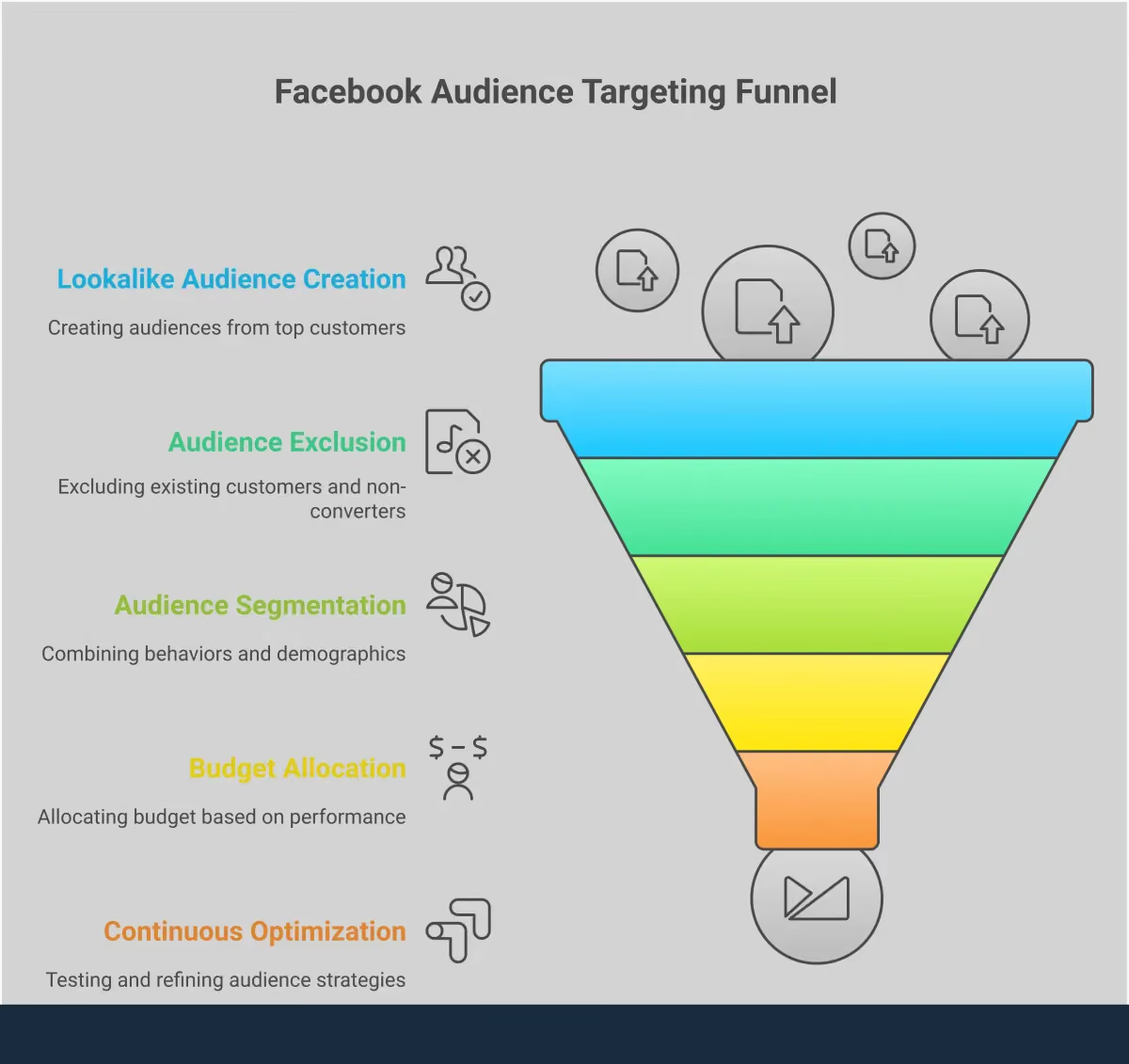
Advanced Strategies for Facebook Audience Targeting
Once you have a solid grasp of the different audience types, you can start using more advanced strategies to refine your targeting. These techniques help you reach the most relevant people, make your ad spend more efficient, and improve your overall campaign performance. By moving beyond basic targeting, you can connect with potential customers in a much more meaningful way. These strategies focus on precision, ensuring your message lands with the people most likely to act on it.
How to Layer Audiences for Better Targeting
Layering involves combining multiple targeting options to create a highly specific audience. For example, you could target users who are interested in "yoga" AND "sustainable fashion." While this can be a powerful way to narrow your focus, it's important to be careful not to make your audience too small. When working with Lookalike Audiences, it's often best to select one Lookalike Audience per ad set without adding other targeting layers. Adding extra criteria can sometimes limit your reach too much and prevent Facebook's algorithm from finding the best people. Start simple, then test adding layers incrementally to see how it affects performance.
When and How to Exclude Audiences
Just as important as who you target is who you don't target. Exclusions prevent you from wasting money on people who are unlikely to convert. For instance, you should exclude existing customers from campaigns aimed at acquiring new ones. As marketing experts note, "If you try to reach everyone, you may end up reaching no one." By not clearly defining your audience, you dilute your message. Use exclusions to remove converters from retargeting campaigns or to stop showing ads to people who have already taken the desired action. This sharpens your focus and makes your budget work harder.
How to Handle Audience Overlap
Audience overlap happens when you have the same people in different ad sets. When this occurs, your ads essentially compete against each other, which can drive up your costs and lead to ad fatigue. Effective lookalike audience strategies are crucial for ensuring relevance and optimizing ad spend, and managing overlap is a key part of this. You can use Facebook's Audience Overlap tool to see how much overlap exists between your audiences. If you find significant overlap, consider consolidating your ad sets, refining your targeting, or using exclusions to create more distinct audience pools.
How to Allocate Your Budget Across Audiences
Strategic budget allocation is essential for maximizing your return. You should dedicate more of your budget to the audiences that are performing the best. As you gather data, you'll see that some audiences, like a 1% Lookalike of your best customers, will likely outperform broader interest-based audiences. Marketers must continuously evaluate their spending strategies to ensure an optimal return on investment. Consider using Facebook's Campaign Budget Optimization (CBO) to automatically distribute your budget to the top-performing ad sets, or manage it manually to maintain full control over your spending priorities.
Tips for Optimizing Your Audience Strategy
Creating your audiences is just the beginning. Continuous testing and optimization are what truly drive success. Common mistakes include neglecting audience segmentation, failing to test ad creatives, and not monitoring performance metrics. Regularly test different audience combinations, from lookalike percentages to interest layers. Pay close attention to your results and be ready to make adjustments based on the data. Platforms like MEGA AI can help automate this process, using its Paid Ads tools to move budget around automatically and ensure your spend is always placed where it will have the most impact.
Staying Compliant with Privacy and Data Rules
Running ads means handling data, and doing it responsibly is non-negotiable. As consumers become more aware of their digital footprint, navigating privacy and data protection isn't just about avoiding penalties; it's about building trust. When people feel their data is respected, they're more likely to engage with your brand. While Meta provides tools designed to protect user privacy by aggregating data, the responsibility ultimately falls on you, the advertiser, to use them correctly. This means understanding your legal obligations, adhering to platform-specific rules, and adopting best practices that put the user first.
Getting this right ensures your campaigns are not only compliant but also more effective. Respectful targeting often leads to higher engagement and better conversion rates because you're reaching people who are genuinely interested in what you offer, without being intrusive. It’s a critical piece of a sustainable advertising strategy that respects both your customers and your brand's reputation. Think of it as the foundation of your relationship with your audience. By prioritizing privacy from the start, you create a stronger basis for long-term growth and customer loyalty, making every ad dollar work harder.
How to Meet Compliance Requirements
First things first, you need to follow the law. Regulations like GDPR in Europe and CCPA in California set strict rules for how businesses collect and use personal data. When you upload a customer list to create a Custom Audience, for example, you must have the proper consent from those individuals. The good news is that Meta's tools are designed with privacy in mind. As Meta explains, their insights show "information about groups of people, not about individual users," which helps anonymize data. However, it's still your job to ensure the data you provide to Facebook was collected legally and ethically. Always be transparent with your audience about how you plan to use their information for advertising purposes. Understanding data privacy laws is a crucial first step for any marketer.
Following Facebook's Data Policies
Beyond general data laws, you also have to play by Meta's rules. The platform has extensive Advertising Policies that govern what you can advertise and how you can target users. For instance, there are restrictions on targeting for special ad categories like credit, employment, and housing to prevent discrimination. You also can't use Custom Audiences to target people with sensitive information like health conditions or religious beliefs. Failing to follow these policies can get your ads rejected or even your ad account disabled. Properly segmenting your audience isn't just a performance tactic; it's a core part of complying with these rules and ensuring your ads are shown to a relevant and appropriate group.
Facebook's Sensitive Data Policy Update
It's also important to be aware of upcoming changes to Facebook's policies. Starting September 2, 2025, Meta will block audiences that suggest sensitive information, such as health conditions, financial status, or religious beliefs. This means you need to be extra careful with the data you use for your Custom Audiences. When you upload a customer list, you are responsible for ensuring you have the proper consent and that your list doesn't inadvertently target people based on these sensitive attributes. Failing to follow these guidelines can lead to your ads being rejected or, in more serious cases, your ad account being disabled. Staying on top of these updates is key to running sustainable and effective campaigns.
Data Privacy Best Practices for Advertisers
Compliance is the baseline, but best practices are what set great advertisers apart. This means using targeting features thoughtfully to create a positive experience for users. For example, when using Lookalike Audiences, a common best practice is to "only select one Lookalike Audience per ad set" and avoid adding too many other targeting layers that could limit performance. Effective strategies focus on relevance to optimize ad spend and respect the user's time. Regularly review and refresh your audiences, and use exclusions to avoid showing acquisition ads to existing customers. These small adjustments show respect for your audience's journey and lead to better campaign outcomes.
Managing and Maintaining Your Audiences
Creating your Facebook audiences is a great start, but it’s not a one-and-done task. The most successful advertisers understand that audience management is an ongoing process. People’s interests evolve, they move through your sales funnel, and market dynamics are always in flux. An audience that delivered fantastic results last quarter might underperform today. This is why actively managing and maintaining your audiences is just as important as creating them in the first place. It’s the key to sustaining campaign performance and ensuring your ad budget is always working as hard as it can for your business.
Effective audience maintenance involves a cycle of monitoring, testing, and refining. You need to keep a close eye on your campaign metrics to see which groups are responding and which are not. This means regularly refreshing your customer lists, testing new Lookalike percentages, and experimenting with different interest layers to discover new opportunities. A crucial part of this process is using exclusions to prevent ad spend from being wasted on people who have already converted or are no longer relevant. By treating your audiences as dynamic assets rather than static lists, you can adapt to changes quickly and keep your campaigns optimized for the best possible return.
Keeping Audience Lists Fresh to Avoid Stale Data
Your audience lists are not meant to be set in stone. Over time, they can become stale, leading to wasted ad spend and diminished returns. Audience performance can change due to ad fatigue or shifts in the market, so what works today might not work next month. To prevent this, you must continuously monitor performance and keep your lists fresh. This involves regularly updating your customer data and using exclusions to avoid showing acquisition ads to people who have already made a purchase. By filtering out existing customers, you ensure your budget is focused squarely on finding new ones. Regularly A/B testing different audience segments also helps you identify what’s currently resonating, allowing you to make data-driven adjustments and keep your targeting sharp.
How to Measure and Optimize Audience Performance
Launching your campaigns with well-defined audiences is a great start, but it’s not the final step. The real magic happens when you consistently measure, analyze, and refine your targeting based on real-world data. Think of it as a conversation with your audience; their actions and engagement are their way of telling you what works and what doesn’t. This continuous feedback loop is what separates good campaigns from great ones.
Monitoring performance helps you understand which audience segments are most responsive, which ad creatives resonate, and where your budget is making the biggest impact. Neglecting this step is one of the most common pitfalls in Facebook advertising. By regularly checking your metrics and making data-driven adjustments, you can improve your return on investment, lower your customer acquisition costs, and build a more effective advertising strategy over time. This process ensures your ad spend is always working as hard as possible to reach the right people.
Which Metrics Should You Track?
To understand how your audiences are performing, you need to focus on the right numbers. Don’t get lost in vanity metrics; instead, track the key performance indicators (KPIs) that directly impact your business goals. Start with these essentials:
- Return on Ad Spend (ROAS): This tells you how much revenue you’re generating for every dollar spent on ads. It’s the ultimate measure of profitability.
- Cost Per Acquisition (CPA): This is the average cost to acquire a new customer. Your goal is to keep this number as low as possible while maintaining quality.
- Click-Through Rate (CTR): This metric shows the percentage of people who saw your ad and clicked on it, indicating how compelling your creative and messaging are.
- Conversion Rate: This is the percentage of users who completed a desired action (like a purchase) after clicking your ad.
Using Facebook's Analytics Tools
Facebook Ads Manager is your command center for performance data. It offers powerful analytics tools that let you see exactly how your campaigns are doing. Use the "Breakdown" feature to get a granular view of your audience’s performance. You can analyze results by age, gender, location, and placement to see which segments are driving the best results. For example, you might find that your ads perform exceptionally well with women aged 25-34 on Instagram Stories. This kind of insight allows you to refine audience targeting and allocate your budget more effectively, ensuring you focus your resources where they’ll have the greatest impact.
How to Troubleshoot Common Audience Issues
Even the best campaigns run into challenges. One of the biggest mistakes is not defining your audience clearly enough. As the saying goes, if you try to reach everyone, you end up reaching no one. If your audience is too broad, your message won't resonate. Try layering interests or behaviors to narrow your focus. Another common issue is audience fatigue, which happens when the same people see your ads too often. If you notice your CTR dropping, it might be time to refresh your ad creatives or target a new audience segment to keep your campaigns feeling fresh and engaging.
Actionable Strategies for Continuous Optimization
Optimization is an ongoing process of testing and refining. A/B testing is a great way to start. Pit two different audiences against each other with the same ad creative to see which one performs better. For example, you could test a 1% Lookalike Audience against an interest-based audience. Using effective lookalike audience strategies can significantly improve campaign performance by reaching people who are genuinely similar to your best customers. Once you identify a winning audience, you can allocate more of your budget to it. This data-driven approach ensures you’re always putting your money behind the strategies that deliver the best results for your business.
Automate Facebook Audiences with MEGA AI
Managing Facebook audiences can feel like a full-time job. Between creating new segments, monitoring performance, and shifting budgets, it’s easy to get lost in the details. This is where automation becomes a game-changer. Using an AI-powered platform simplifies the entire process, from creation to optimization, allowing you to achieve better results with less manual effort. It takes the guesswork out of targeting and replaces it with data-backed precision, so you can be confident your message is reaching the right people.
MEGA AI’s Paid Ads tools are designed to handle the heavy lifting for you. Instead of manually sifting through data to find your ideal customer, our platform uses AI to build, test, and refine your targeting strategy automatically. It handles the repetitive tasks that consume your time, freeing you up to focus on the bigger picture, like creative strategy and campaign goals. By integrating AI into your workflow, you can run more sophisticated, effective campaigns that consistently reach the right people at the right time. This approach not only saves you time but also ensures your ad spend is working as hard as possible to grow your business.
How to Create Audiences with AI
Building the right audience is the foundation of any successful Facebook campaign. Instead of manually piecing together demographics and interests, AI can analyze your existing customer data to find people with similar characteristics. This is especially powerful for creating Lookalike Audiences, which target users who mirror your best customers. MEGA AI automates this process by connecting to your data sources and identifying the key attributes of your converters. The platform then generates highly targeted Lookalike Audiences, giving you a direct path to new customers who are more likely to be interested in what you offer.
Intelligently Track Your Audience Performance
Once your campaigns are live, you need to know what’s working. AI-driven tools can track how these audiences perform in real time, moving beyond surface-level metrics to uncover deeper insights. MEGA AI provides an intelligent analytics dashboard that monitors your audience performance around the clock. The system identifies which segments are driving the best results and flags underperforming ones. This continuous analysis allows you to make quick, data-driven decisions to refine your targeting and improve campaign effectiveness without having to spend hours digging through reports yourself.
Automate Your Budget Management
Allocating your budget effectively across multiple audiences is crucial for maximizing your return on ad spend. Manually shifting funds can be inefficient and slow. With automatic budget management, AI can handle this for you by analyzing performance data to determine where your money is best spent. MEGA AI’s platform constantly monitors your campaigns and reallocates your budget to the highest-performing audiences and ad sets. If one audience starts delivering a lower cost per conversion, the system will automatically assign more of the budget to it, ensuring your spend is always optimized for the best possible results.
Set Up Continuous Audience Optimization
Facebook advertising isn't a "set it and forget it" activity. Achieving an optimal return on investment requires ongoing adjustments and refinements. AI can assist by providing insights and recommendations for continuous improvement. The MEGA AI platform is built for this kind of ongoing optimization. It learns from your campaign performance over time, suggesting new audience segments to test and identifying opportunities to refine your existing ones. This ensures your targeting strategy evolves with market trends and audience behavior, keeping your campaigns relevant and effective long after their initial launch.