
WordPress is free, but building a website isn't. A WordPress site has hidden costs that can add up quickly. Think hosting, domains, themes, and plugins. Security and ongoing maintenance also impact WordPress costs. This guide breaks down those expenses, helping you budget effectively and avoid surprises. We'll cover everything from essential plugins to e-commerce add-ons, giving you a clear picture of what to expect. Plan carefully, and your WordPress site can thrive without breaking the bank.
Key Takeaways
- Factor in all WordPress costs: Remember that expenses like hosting, themes, plugins, security, and ongoing maintenance add up. Plan your budget accordingly.
- Choose hosting wisely: Shared hosting is budget-friendly, but managed hosting offers better performance and less hassle. Select the option that aligns with your website’s needs.
- Plan and prioritize: Outline your must-have features, explore long-term cost-saving strategies, and decide which tasks you can handle yourself versus outsourcing to professionals.
Is WordPress Free? Understanding the True CostWordPress? (Free Software, Hidden Costs)
WordPress is free, open-source software you can use to build and manage a website. It’s popular because you don’t need to be a coding whiz to create a functional website. This makes WordPress appealing to people and businesses who want an online presence without spending a lot of money upfront. As one expert puts it, “First of all, it’s free…it’s free and open source so you’re essentially told that you don’t need to pay for this, unlike other platforms” (Authority Hacker).
However, running a WordPress site often comes with hidden costs. These can add up quickly, including expenses for premium themes, plugins, web hosting, and ongoing maintenance. The same expert continues, “My counter-argument…is actually WordPress is almost more expensive to run now than these other platforms because of all the extra tools you need to buy and how much they cost.”
So, what might seem inexpensive at first can become comparable to other platforms once you factor in all the necessary tools and services. “When you add up all these things…in many cases, the price is quite comparable to…more modern platforms…that give you more opportunities,” he explains. This makes considering the total cost of ownership essential when choosing a platform.
WordPress.com vs. WordPress.org: Two Different Cost Structures
Understanding the difference between WordPress.com and WordPress.org is crucial for budgeting. WordPress.com is a hosted platform, meaning they handle everything for you, from hosting to security. WordPress.org requires you to find your own hosting and manage more technical aspects yourself. This fundamental difference significantly impacts each platform's cost structure.
WordPress.com Pricing Plans: A Detailed Breakdown
WordPress.com offers various plans, from free to enterprise-grade. Pricing depends on the plan and billing cycle (monthly, yearly, bi-annually, or tri-annually). Paying annually typically offers the best value. Here’s a summary of their annual pricing:
- Free: This plan provides basic features and limited storage (1GB), suitable for simple blogs or testing.
- Personal: At $48/year, this plan includes 6GB of storage, a free domain for one year, ad-free browsing, dozens of premium themes, and basic support.
- Premium: For $240/year, you get 13GB of storage, all premium themes, ad-free browsing, faster support, and the ability to collect payments via PayPal.
- Business: At $480/year, this plan offers 50GB of storage, all premium themes, 24/7 priority support, credit/debit card payment collection, plugin installation, and developer tools.
- Commerce: This $840/year plan includes 50GB storage, all premium and store themes, 24/7 priority support, WooCommerce integration for online and in-person payments (with a compatible card reader), and advanced eCommerce tools.
- Enterprise (WordPress VIP): Starting at $25,000/year, this high-end solution caters to large businesses needing scalability, security, and data-driven capabilities. For more details, see the WordPress.com pricing page.
WordPress.org Costs: Hosting, Themes, Plugins, and More
While the WordPress.org software itself is free, related expenses can accumulate. Here’s a cost breakdown, referencing information from Hostinger:
- Hosting: Ranges from $2.99 to $29.99/month, depending on the hosting provider and plan. Some plans include a free domain for a year and a free SSL certificate.
- Domain Name: Costs between $0.99 and $39.99 annually, depending on the domain extension.
- SSL Certificate: While often free with hosting plans, premium SSL certificates can cost up to $1000/year.
- Premium Themes: Prices vary from $2 to $200 annually, with some lifetime licenses costing up to $1000.
- Premium Plugins: Expect to pay anywhere from $2 to $1000 per plugin annually.
The total monthly cost for a self-hosted WordPress.org site can range from approximately $7 to $283, depending on your choices. For those seeking to streamline their WordPress SEO, consider MEGA SEO for automated solutions. We offer tools for keyword research, content generation, and more. Book a demo to see how MEGA SEO can simplify your content strategy.
Calculating WordPress Hosting Costs
Hosting is the foundation of your WordPress site, and understanding its cost is crucial for accurate budgeting. Let’s break down the different types of hosting and the factors influencing their prices.
Shared vs. Managed WordPress Hosting: Which is Right for You?
Shared hosting is like renting an apartment in a large building. You share resources (server space, bandwidth) with other websites. It’s the most affordable option, typically ranging from $1 to $12 per month, especially with introductory offers that can save you 40–75%. This makes shared hosting attractive for new websites with limited traffic. However, shared resources can sometimes mean slower speeds if another site on your server experiences a traffic surge.
Managed WordPress hosting, on the other hand, is like living in a townhouse. You still share some infrastructure, but you have more dedicated resources and a hosting provider handling maintenance, security, and updates. This convenience and performance come at a premium, with prices starting around $15 and going up from there. Managed hosting is a good choice for growing businesses that need reliable performance and don’t want to handle technical details.
Hosting Cost Details and Recommendations: SiteGround, Hostinger, and More
Hosting is a major expense. It's typically an annual cost, ranging from $25 to $150 or more per year. This translates to roughly $2 to $12.50 or more monthly. A recent Reddit discussion highlighted the range of hosting costs users have encountered. Choosing a provider that balances affordability with your needs is essential, since these costs are recurring. Hostinger and SiteGround are two popular providers known for their balance of features and price. They offer various plans to suit different budgets and website requirements.
When choosing your hosting provider, consider factors like storage space, bandwidth, customer support, and the provider's reputation. Reading reviews and comparing different plans can help you make an informed decision. If you anticipate significant growth in traffic or require specialized features, investing in a more robust hosting plan from the start might be a wise choice.
Renewal Costs and Long-Term Hosting Expenses
Those enticing introductory offers for hosting can be tempting, but it's important to look beyond the initial price and consider long-term costs. Renewal rates often increase after the first year. Hostinger's pricing page, for example, details how their plans range from $2.99/month to $29.99/month, with renewals varying based on the plan and subscription length. Factoring in these renewal costs when budgeting is key to avoiding surprises.
Beyond hosting itself, ongoing maintenance and security are crucial for running a WordPress website. These costs can range from $5 to $1500 per month, depending on your site’s size and complexity, according to this resource. This includes tasks like backups, security updates, and SEO. Some hosting providers include basic maintenance in their plans, while others offer it as an add-on. If you're comfortable handling these tasks yourself, you can save money. But for a hands-off approach, professional maintenance services offer peace of mind. Consider tools like MEGA SEO to automate and streamline many of these tasks, potentially reducing your long-term expenses.
An Authority Hacker video points out that WordPress' total cost of ownership, including all these additional elements, can be comparable to other platforms. A holistic view of your website's expenses, from initial setup to ongoing maintenance, is essential for a sustainable and informed decision.
What Factors Influence WordPress Hosting Costs?
Several factors influence your overall hosting expenses. The size and complexity of your website play a significant role. A simple blog with a few pages will require fewer resources than a complex e-commerce site with thousands of products and high traffic. WPBeginner offers a helpful overview of how factors like themes, plugins, and other tools can impact your budget, with costs ranging from $100 to $30,000 depending on your needs. Other factors include the level of support you need, the features offered (like automatic backups and staging environments), and the hosting provider’s reputation.
WordPress vs. Other Platforms: Comparing Hosting Costs
Before committing to WordPress, it’s wise to compare its hosting costs with other website platforms. While WordPress itself is free, the associated costs, including hosting, domain registration, and potential themes and plugins, can add up. HostingAdvice.com provides reviews and comparisons of different WordPress hosting providers, allowing you to evaluate features, pricing, and uptime. Consider factors like ease of use, scalability, and the level of control you have over your website’s design and functionality when making your decision. Exploring alternative platforms like Squarespace or Wix can give you a broader perspective on the overall cost and complexity of building and maintaining a website.
Free Hosting Alternatives for Simple WordPress Websites
If you're working with a tight budget or just starting out and want to explore options before committing to paid WordPress hosting, several free alternatives exist. These options can be a good starting point for simple websites, but it's important to be aware of their limitations. Free hosting often comes with restrictions on storage, bandwidth, and features. You might also encounter ads on your site or have limited customization options. However, for basic projects or testing purposes, free hosting can be a viable solution.
Biz.nf offers free hosting specifically for WordPress and Joomla, including an automatic installation wizard and PHP 7, even on the free plan. They also provide features like a 99.9% uptime guarantee, 24/7 support, and server monitoring. If you're open to exploring beyond WordPress, consider free and open-source content management systems (CMS) like Drupal, which offers similar flexibility and functionality for building and managing various websites.
For those prioritizing simplicity, website builders like SITE123 offer user-friendly interfaces and pre-designed templates for creating simple websites, even one-page sites. These platforms often include drag-and-drop functionality, making it easy to get a site up and running quickly. Numerous modern, free, and open-source alternatives to WordPress are available, each with its own strengths and weaknesses. Exploring these different options can help you find the platform that best suits your needs and technical skills.
Essential WordPress Components: Budgeting for Themes, Plugins, and More
Beyond hosting, several key components contribute to the overall cost of a WordPress website. Let’s explore these elements and their associated expenses.
Choosing Premium WordPress Themes: Design on a Budget
Premium WordPress themes offer a polished look and often include advanced features. They’re designed to be responsive, adapting seamlessly to different screen sizes, which saves you the hassle of ensuring your website displays correctly on various devices. While free themes are available, investing in a premium theme can save you time and ensure a professional appearance. Premium themes typically range from $50 to $200, a one-time cost. Consider this investment against the potential cost of hiring a developer to customize a free theme.
Essential WordPress Plugins: Free vs. Paid Options
Plugins extend the functionality of your WordPress site, adding features like contact forms, SEO tools, and e-commerce capabilities. Many plugins are free, but premium plugins often offer advanced features, priority support, and regular updates. A premium plugin might enhance your site’s performance and security, a worthwhile investment. The cost of premium plugins varies widely, from a few dollars a month to several hundred per year, depending on the plugin’s complexity and features.
Specific Plugin Examples and Costs
Let's look at some specific examples. For SEO, Yoast SEO offers both free and premium versions. The free version covers basic SEO needs, while the premium version, starting at around $99 per year, provides advanced features like keyword optimization, internal linking suggestions, and content insights. This investment in a premium plugin might enhance your site’s performance and security.
If you’re focused on building an email list, OptinMonster is a popular choice for lead generation. Their plans range from approximately $14 to $46 per month, offering features like pop-up forms, A/B testing, and detailed analytics. For e-commerce functionality, WooCommerce is a free plugin, but extensions for features like advanced shipping calculations, subscriptions, and dynamic pricing can add to your costs. Many plugins are available for free, but premium options can range from $30 to $300 per year, depending on the features and support provided.
Choosing the right plugins involves balancing cost with functionality. Think about your website’s specific needs and prioritize plugins that directly support your goals. Remember, the costs of premium plugins can vary, so research and compare options before making a purchase. Premium plugins often offer advanced features, priority support, and regular updates.
WordPress Page Builders: Streamlining Design (At What Cost?)
Page builders empower you to create custom layouts without writing code. They offer drag-and-drop interfaces and pre-built modules, simplifying the design process. Many page builders offer free versions, but premium versions unlock additional features and design flexibility. This can be especially helpful if you want a unique website without hiring a developer. Similar to themes, premium page builders often involve a one-time purchase or an annual subscription, with prices ranging from around $50 to $300 or more. Factor these costs into your budget when planning your WordPress site.
E-commerce on WordPress: Calculating WooCommerce Costs
Want to launch an online store? This section helps you understand the costs of using WooCommerce with WordPress and how those costs compare to other e-commerce platforms.
WooCommerce Setup: Planning for Plugin Expenses
While WordPress itself is free, transforming it into a fully functional online store with WooCommerce introduces additional expenses. WooCommerce is free to install, but many extensions that add essential e-commerce features, like advanced shipping calculations or subscription management, often require yearly subscriptions. Think about features like streamlined checkout processes, dynamic pricing, and abandoned cart recovery—these often come with a price tag. As Authority Hacker points out, essential plugins and popular page builders often require yearly subscriptions, so factor these costs into your budget. Careful planning is key to managing your WordPress costs. Understanding the various expenses associated with plugins and services, as highlighted by Simple Programmer, will prevent unexpected costs.
WooCommerce vs. Other Platforms: E-commerce Cost Comparison
How does WooCommerce compare to other e-commerce platforms? When evaluating platforms, consider hosting costs. WordPress hosting typically ranges from $1 to $12 per month, according to HostAdvice. Many providers offer significant discounts on their WordPress hosting plans, making it a competitive option. However, remember that the overall cost of setting up an e-commerce site can vary—from $100 to $30,000, depending on your needs, as explained by WPBeginner. While WordPress is free, you’ll still need hosting and a domain name, just like any other online store. Factor in the cost of premium themes and essential plugins when comparing WooCommerce with hosted platforms like Shopify, which bundle many of these features into their monthly fees. Consider your technical skills and comfort level with managing a WordPress site. If you anticipate needing extensive technical support or prefer a more hands-off approach, a hosted platform might be a better fit, even with a higher monthly fee.
WordPress Security, Maintenance, and Performance: Managing Costs
Keeping your WordPress site secure, well-maintained, and performing at its best requires ongoing attention. While some tasks can be handled in-house, others might benefit from professional support. Let’s explore how to manage these costs effectively.
Protecting Your WordPress Site: Security and Backup Costs
Security should be a top priority for any website owner. Investing in robust security measures and reliable backup solutions is crucial for protecting your WordPress site from potential threats like malware and data breaches. Regular backups ensure that you can quickly restore your site if something goes wrong, minimizing disruptions and lost revenue. Security plugins offer an additional layer of protection, helping identify and mitigate vulnerabilities. Think of these measures as insurance—they might seem like an added expense now, but they can save you significant costs associated with data recovery and site downtime later.
Website Maintenance Cost Breakdown
Maintaining a WordPress site means paying for things that keep it secure, fast, and working well. Here's a cost breakdown:
1. Ongoing Maintenance: Regular maintenance keeps your website running smoothly. Costs range from $5/month for a personal website to $1500/month for larger e-commerce sites. This usually covers SEO, security updates, and developer fees. If you're looking to automate your SEO, check out MEGA SEO to potentially lower these costs.
2. Security and Backups: Protecting your WordPress site with robust security and reliable backups is crucial. Think of it like locking your doors at home – it's essential for online safety. These measures protect you from malware and data breaches. Regular backups mean you can quickly restore your site if anything goes wrong, minimizing lost revenue and disruptions.
3. Performance Optimization: A fast website is key for happy visitors and good search engine rankings. Investing in performance optimization, like caching solutions, CDNs, and performance audits, ensures your site loads quickly and efficiently.
4. Technical Support: If you're not tech-savvy, you might need to hire professionals for troubleshooting, updates, and customizations. Professional support adds to your monthly expenses, especially if you need ongoing help. Budgeting for this is a good idea if you're not comfortable handling technical tasks.
5. Total Cost of Ownership: WordPress itself is free, but the total cost of ownership can add up when you include all the necessary tools and services. Consider the long-term costs of running a WordPress site, including maintenance, security, and updates, not just the initial setup.
Optimizing WordPress Performance: How Much Does It Cost?
Performance directly impacts your bottom line. A slow website can lead to frustrated visitors and lost sales. Optimizing your site’s performance is essential for reducing operational costs. Implementing caching solutions and optimizing images can significantly decrease server load and improve site speed, potentially lowering your hosting fees. Regularly monitoring your website’s performance can also help identify areas where you can cut costs, such as unnecessary plugins or inefficient code. Tools like Google PageSpeed Insights can provide valuable performance data and offer specific recommendations for improvement. Addressing these issues proactively creates a faster, more efficient website and lower operating costs.
Hiring WordPress Experts: When and Why?
While managing a WordPress site can often be done independently, sometimes bringing in professional help is the most cost-effective approach. If you’re facing persistent security issues, struggling with performance optimization, or simply lack the time or expertise to handle complex tasks, consider hiring a professional. Experts can quickly diagnose and resolve issues that might take you hours or even days to figure out on your own. While there’s an upfront cost, professional services can save you money in the long run by preventing costly downtime, security breaches, and performance issues. Think of it as an investment in your peace of mind and the long-term health of your website. If your website consistently underperforms or faces recurring security issues, investing in professional services can ensure your site runs smoothly and securely.
Hidden WordPress Costs: What You Might Be Missing
Beyond the apparent costs of web hosting and premium themes, several frequently overlooked expenses can impact your WordPress budget. Understanding these hidden costs will help you plan and avoid unexpected financial strain.
Domain Registration and Renewal: Factoring in the Costs
While WordPress itself is free to use, your domain name isn’t. You’ll need to register a domain, which acts as your website’s address. This registration involves a fee, and it needs to be renewed annually. When budgeting for your WordPress website, remember that domain registration and renewal are recurring expenses.
SSL Certificates and Other Essential WordPress Expenses
An SSL certificate is essential for website security, encrypting data transmitted between your site and visitors. This small but crucial detail is often missed when budgeting. Many hosting providers offer free SSL certificates, but if yours doesn’t, factor this into your expenses. Beyond SSL certificates, additional costs can arise from essential plugins for security, backups, or SEO, as well as potential fees for themes or other tools that enhance your website. Careful planning and managing receipts are key to reducing and managing these WordPress costs.
Strategies for Managing and Reducing WordPress Costs
Once you understand the various costs associated with a WordPress site, you can start thinking about how to manage and reduce them. It’s a balancing act—you want to keep costs down, but not at the expense of your site’s functionality or security.
Prioritizing WordPress Features: Balancing Needs and Budget
Think about your website’s core purpose. What absolutely must it do? Do you really need all those fancy plugins, or is a simpler setup sufficient? Focus on the features essential for user experience and achieving your business goals. As experts suggest, reducing WordPress costs starts with better planning, so define your needs first. This will prevent you from overspending on unnecessary bells and whistles. A streamlined site is often a faster, more cost-effective site. Consider using MEGA SEO’s Free Tools to help you prioritize keywords and content that will have the biggest impact on your site’s visibility.
Long-Term Cost Savings for Your WordPress Site
Take a deep dive into your website’s expenses. Analyze everything: hosting, plugins, themes, security, and ongoing maintenance. A comprehensive evaluation, including factors like bandwidth and storage, can reveal hidden cost-saving opportunities. For example, are you paying for a high-bandwidth hosting plan when your traffic doesn’t justify it? Could you switch to a more affordable theme or find free plugins that offer similar functionality? These small changes can add up to significant savings over time. Remember, there are always strategies to save money while maintaining a professional website. MEGA SEO can help automate many of these tasks, from keyword research to content generation, freeing up your time and resources.
Leveraging MEGA SEO for Cost-Effective SEO and Content Creation
Managing and reducing WordPress costs often involves strategic planning and smart choices about where you invest your resources. Content creation and SEO are two areas where you can significantly impact your budget. Creating high-quality content and implementing effective SEO strategies can be time-consuming and expensive, especially if you're outsourcing these tasks. This is where MEGA SEO can help.
MEGA SEO offers tools designed to automate and streamline your SEO and content creation processes. From automated keyword research and content generation to technical SEO improvements and ongoing content optimization, MEGA SEO can reduce your costs. Automating tasks like keyword research and content creation frees up your time to focus on other business aspects. This is particularly beneficial for startups and small businesses with limited resources.
MEGA SEO's Maintenance Agent helps you get more from your existing content. By automatically updating articles to improve click-through rates and identifying opportunities to add new content to existing posts, MEGA SEO helps optimize your content for better search engine rankings. This ongoing optimization saves you money by maximizing the impact of your content marketing efforts. Instead of constantly creating new content, you can refine and optimize what you already have, leading to more effective and cost-efficient SEO.
For agencies managing multiple client websites, MEGA SEO offers a scalable solution for optimizing content across various platforms. Whether you need to adapt content after a Google update, optimize for different search engines, or tailor content for specific platforms, MEGA SEO provides the tools to do so efficiently. This streamlines the optimization process, reducing the need for manual adjustments across multiple sites, and ultimately saving you money.
DIY vs. Professional WordPress Help: Making the Right Choice
WordPress offers a lot of DIY opportunities, which can be tempting when you’re on a budget. However, sometimes hiring a professional is the smarter choice. Consider your own skills and time constraints. If you’re spending hours wrestling with a technical issue that a professional could fix in minutes, you might be losing money in the long run. Managing a WordPress site can be expensive, especially for small businesses and startups, so finding the right balance between DIY and professional services is key. Perhaps you can handle routine updates yourself, but outsource more complex tasks like site migrations or custom development. This approach can help you control costs without compromising quality. For ongoing content optimization and maintenance, consider MEGA SEO’s Maintenance Agent, which can help improve your site’s performance and search engine ranking without the need for constant manual intervention.
Creating a WordPress Budget: A Step-by-Step Guide
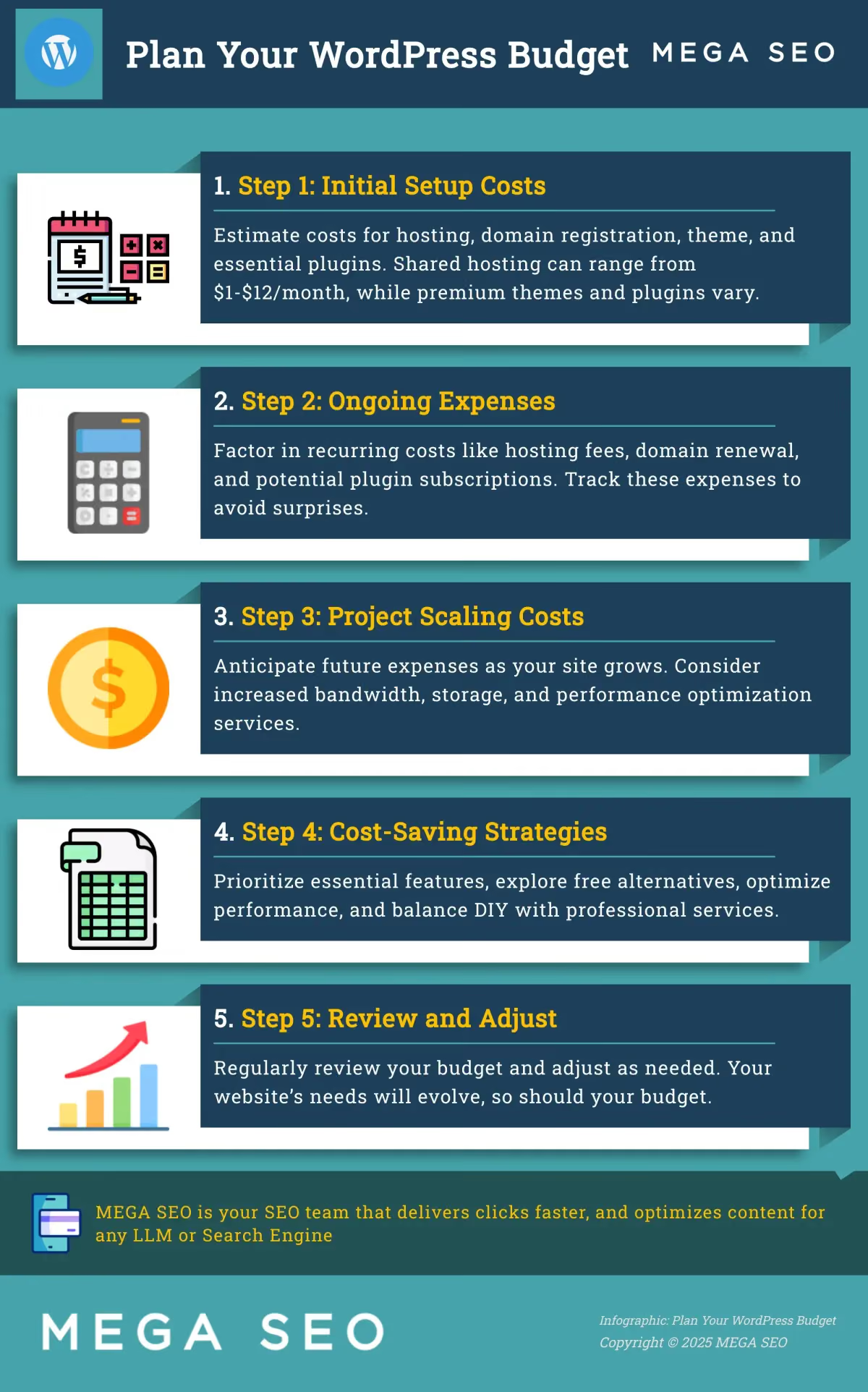
A well-defined budget is essential for any successful WordPress website. Let’s break down how to plan for the costs associated with building and maintaining your site.
Estimating Initial WordPress Setup Costs
Your initial WordPress setup costs will depend on your chosen hosting plan and whether you opt for premium themes or plugins. WordPress hosting can range from $1 to $12 per month, with many providers offering significant discounts on longer-term plans, sometimes saving you 40–75%. While WordPress itself is free, remember to factor in the cost of your domain name, which typically runs around $10–$15 per year. If you choose a premium theme or initial plugins, add those costs to your initial budget.
Cost Estimates for Different Website Types
When planning your WordPress website, it’s essential to understand the varying costs associated with different types of sites. A simple blog has lower startup and maintenance costs than a complex e-commerce site. Here’s a breakdown of estimated initial and ongoing costs for various website types:
- Blog: For a simple blog, the initial setup cost is approximately $173, with ongoing monthly expenses around $12. This budget typically covers basic hosting, a domain name, and essential plugins. For a more professional look and enhanced functionality, consider premium themes and plugins, which will increase your initial investment but can save you time and effort in the long run. A blog is a great option for hobbyists or individuals sharing their thoughts and ideas.
- Small Business Website: A small business website typically requires a more robust setup. This often includes a professional theme and potentially some premium plugins for added functionality, like contact forms or SEO tools. Expect initial costs to be around $403, with monthly expenses of about $27. This investment provides a professional online presence to showcase your products or services and connect with customers. If you're comfortable managing technical aspects yourself, WordPress offers a flexible and cost-effective solution for building a small business website.
- E-commerce Website: Venturing into e-commerce adds complexity and cost. The initial setup for an e-commerce site can be significantly higher, estimated at $673, with ongoing monthly costs around $41. This budget accounts for the additional functionalities required for online sales, such as payment processing, inventory management, and enhanced security measures. If you’re building an e-commerce site with WordPress, WooCommerce is a popular choice. Be sure to factor in the costs of essential WooCommerce extensions, which can add to your ongoing expenses. Consider platforms like Shopify if you prefer a more streamlined, all-in-one solution, but be prepared for potentially higher monthly fees.
These estimates highlight the importance of planning your budget according to your website’s specific needs. While WordPress itself is free, associated costs vary widely based on the complexity and functionality of your site. Consider your long-term goals and projected growth when making decisions about your initial investment. MEGA SEO can help streamline your content creation and SEO processes, potentially reducing some of your ongoing marketing expenses. Explore our free tools to see how we can help you optimize your WordPress site for success.
Ongoing WordPress Expenses: Planning for Maintenance
Once your site is up and running, you’ll have ongoing expenses. These recurring costs primarily include your hosting fees and domain name renewal. Additional expenses can arise from plugin subscriptions, security services, and ongoing maintenance. Careful planning and expense tracking are key to managing these costs. Consider using budgeting tools or spreadsheets to stay organized.
Scaling Your WordPress Site: Projecting Future Costs
As your website traffic and content grow, so will your expenses. This is where understanding fixed and variable costs becomes crucial. Fixed costs, like your hosting fee and domain name, remain constant regardless of your site’s performance. Variable costs, on the other hand, fluctuate with your site’s growth. These might include increased bandwidth usage, additional storage, or performance optimization services. Projecting these scaling costs will help you prepare for future expenses and ensure your budget remains sustainable as your site expands.
Is WordPress a Good Investment? Weighing the Costs and Benefits
WordPress is a popular choice, but is it right for you? Like any website platform, WordPress has pros and cons. Deciding whether it’s worth the investment depends on your specific needs and budget. Let’s break down the costs compared to other platforms and evaluate WordPress’s value for different business needs.
WordPress Costs vs. Other Platforms: A Comprehensive Comparison
WordPress itself is free, but related expenses add up. Hosting, your domain name, themes, and plugins all contribute to the total cost. WordPress hosting typically costs between $1 and $12 per month, with many providers offering significant discounts. Factor in the initial investment for setup, which can range from $100 to $30,000 depending on the complexity of your site, as explained by WPBeginner. For simple sites, affordable hosting plans exist, starting as low as $2.95 per month.
Compared to website builders like Wix or Squarespace, WordPress often has a higher upfront cost. These platforms offer all-inclusive subscriptions covering hosting, design, and basic features. However, WordPress offers greater flexibility and control, valuable as your site grows. While website builders offer convenient, fixed-price plans, they can limit customization and scalability. With WordPress, you have more control over your site’s design and functionality, but you’re responsible for managing individual components and their associated costs.
WordPress for Your Business: Evaluating the Value Proposition
WordPress’s value proposition varies depending on your business goals. For small businesses and startups, WordPress can be a cost-effective way to establish a professional online presence. As CodeCraftWP points out, several strategies exist to save money while building a professional WordPress site. However, ongoing management, security, and performance optimization can become significant expenses, especially as your site grows. Reducing these management costs is crucial for maximizing your return on investment.
For larger businesses or those with complex needs, WordPress offers the scalability and flexibility to handle high traffic and advanced features. While the initial investment and ongoing maintenance might be higher, the control and customization options can outweigh the costs. Simple Programmer provides valuable advice on reducing common WordPress expenses through careful planning. Consider your long-term goals and technical expertise when evaluating WordPress against other platforms. If you have the resources to manage or outsource maintenance and updates, WordPress can be a powerful platform for growth. If you prefer a simpler, more hands-off approach, a website builder might be a better fit.