

A technical SEO audit is the first step in understanding your website's health from a search engine's perspective. It examines the technical foundation of your site to ensure search engines can find, crawl, and index your pages without any issues. Think of it as checking the foundation of a house before you start decorating. By reviewing how your site is crawled, indexed, and structured, you can find technical problems that might be holding back your performance. This guide covers the key areas of a technical audit, including site speed, mobile-friendliness, and crawlability, to ensure your site is accessible and performs well for both search engines and visitors.
Key Takeaways
- Use audits to prepare for algorithm shifts: Regular audits are your best defense against ranking fluctuations. They help you find and fix technical and content issues before a Google update turns them into major problems.
- Audit both technical SEO and content: A successful audit requires a two-part approach. You need to fix foundational technical issues so search engines can crawl your site, and you need to refresh your content so it meets user needs.
- Turn your audit report into an action plan: An audit's true value is in the follow-through. Prioritize the findings, fix the most critical issues first, and track key metrics to measure the impact of your work.
What Is a Website Audit?
A website audit is a comprehensive analysis of your site's overall performance. Think of it as a complete health check-up for your online presence. The primary goal is to identify problems, uncover opportunities, and find areas for improvement across your entire site, from its technical foundation to its content. By regularly checking your website's health, you can address weaknesses before they become major issues and ensure your site is helping you meet your business goals.
A thorough audit examines your site from multiple angles. It looks at technical SEO elements like site speed, mobile-friendliness, security certificates, and how easily search engines can crawl and index your pages. It also involves a deep dive into your content to see if it meets user needs, aligns with search intent, and is structured for readability. While the process can feel complex, it’s a critical step for maintaining a strong online presence. A complete SEO audit gives you a clear roadmap for making strategic improvements that lead to better rankings and a better user experience.
How Audits Prepare You for Google Updates
Google updates can feel like a black box, causing rankings to shift without warning. But you don't have to be a passive observer. Regular website audits are your best defense, helping you prepare for whatever changes come next.
Think of it this way: Google assigns a "quality score" to every website. This score is a mix of many factors, including the quality of your content, your backlink profile, your site's technical health, and signals of expertise and trustworthiness. When an update rolls out, this score heavily influences whether your site's rankings rise or fall. A comprehensive website audit is the most effective way to proactively improve this score. By regularly reviewing your site, you can find and fix issues before they become problems during an update.
A strong technical SEO audit lays the foundation for stable, long-term performance. It helps you uncover hidden problems with how search engines crawl and index your site. By addressing issues with site speed, mobile-friendliness, and security, you ensure your site is optimized for both search engines and your users. This process helps you identify significant weaknesses and understand how your site compares to the competition. Instead of waiting for an update to tell you what's wrong, an audit puts you in control. MEGA AI's SEO tools can automate this process, continuously monitoring your site's health to build a resilient site that can weather algorithmic shifts.
What to Include in a Technical SEO Audit
A technical SEO audit is the first step in understanding your website's health from a search engine's perspective. It examines the technical foundation of your site to make sure search engines can find, crawl, and index your pages without any issues. Think of it as checking the foundation and framework of a house before you start decorating. By reviewing how your site is crawled, indexed, and structured, you can find technical problems that might be holding back your performance in search results. A thorough audit covers several key areas to ensure your site is accessible and performs well for both search engines and visitors.
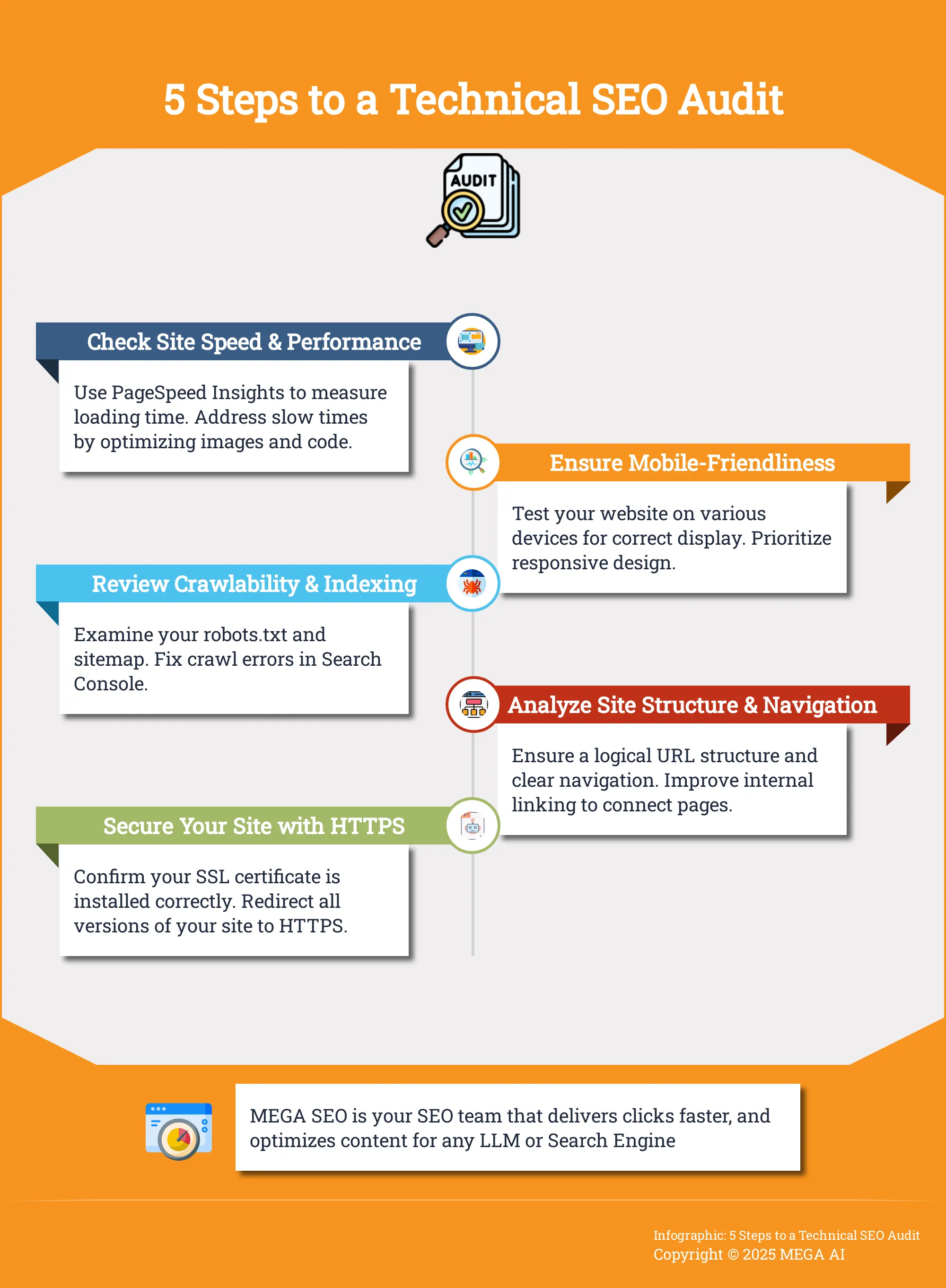
Site Speed and Performance
How quickly your pages load is a critical factor for both user experience and search rankings. If your site is slow, visitors are more likely to leave, and search engines may rank it lower. Your audit should measure page speed and identify what’s slowing things down. Common culprits include large image files, inefficient code, or slow server response times. Tools like Google's PageSpeed Insights can give you a detailed performance report and actionable suggestions. Addressing these issues creates a better experience for your users and sends positive signals to search engines about your site's quality.
Mobile-Friendliness
With Google using mobile-first indexing, your website must perform flawlessly on mobile devices. This means your site's content and layout should adapt to fit any screen size, from desktops to smartphones. A technical audit should involve testing your site on various devices to check for readability and usability issues. Are the buttons easy to tap? Is the text readable without zooming? A mobile-friendly design is no longer optional; it's essential for reaching the majority of users and maintaining your visibility in search results.
Crawlability and Indexing
If search engines can't crawl and index your site, your content won't appear in search results. Crawlability refers to a search engine's ability to access the content on your pages, while indexability is its ability to add that content to its database. Your audit needs to check for anything that might block search engine bots. This includes reviewing your robots.txt file, checking for crawl errors in Google Search Console, and ensuring you have a clean XML sitemap. The goal is to remove any barriers that prevent your site from being properly indexed and shown to users.
Site Structure and Navigation
A logical site structure helps users and search engines find content easily. Your audit should evaluate how your pages are organized and linked together. A clear navigation menu, logical URL structures, and the use of breadcrumbs can significantly improve how easily your site is understood. A well-organized site allows search engine crawlers to discover your most important pages more efficiently. It also helps distribute page authority throughout your site via internal linking, which can improve the rankings of individual pages. This clear structure is fundamental to a user-friendly and SEO-friendly website.
Check Your Structured Data
Structured data, or schema markup, is code you add to your site to help search engines better understand your content. This can lead to rich snippets in search results, like star ratings, prices, or event dates, which can make your listings more attractive to users. During your audit, you should check that your structured data is implemented correctly and is free of errors. Many site audit tools can help you identify structured data issues across your entire site. Fixing these problems can improve how your pages are represented in search, potentially leading to higher click-through rates.
Security and HTTPS
Website security is a top priority for search engines and users. A secure site, indicated by HTTPS, encrypts the data shared between a user's browser and your website, protecting their information. Google has confirmed that HTTPS is a ranking signal, so it's a non-negotiable part of modern SEO. Your audit should confirm that your SSL certificate is installed correctly and that all versions of your site redirect to the secure HTTPS version. You should also check for other security-related issues, such as broken links or server errors (4xx and 5xx status codes), as these can harm both user trust and your SEO performance.
How to Conduct a Content Refresh Audit
A technical audit gets your site’s foundation right, but a content audit ensures what you’ve built on top is still valuable. It’s about checking if your articles, blog posts, and landing pages are still accurate, relevant, and performing well. This process helps you pinpoint which pieces need a simple update, a complete overhaul, or even deletion. Think of it as spring cleaning for your website—clearing out the clutter and making sure every page serves a purpose for both your audience and your business goals. By regularly refreshing your content, you keep it valuable for readers and signal to search engines that your site is an active, authoritative resource. MEGA AI's Maintenance Agent automates much of this by identifying what to add to existing articles to improve their rank.
Identify Outdated Content
The first step is to find content that is no longer serving its purpose. This could be due to outdated statistics, old product information, or shifts in your industry. A comprehensive website audit helps identify these issues and areas for improvement so they can be addressed. Use your analytics tools to look for pages with declining traffic, high bounce rates, or low time on page. These metrics are often red flags indicating that the content is no longer meeting user expectations. Create a spreadsheet to list these underperforming pages, noting their URL, primary keyword, and key performance data. This document will become your roadmap for the refresh process, giving you a clear and prioritized list to work from.
Improve Content Quality and Relevance
With your list of pages to refresh, you can begin making improvements. This process goes beyond fixing typos; it involves updating facts, replacing old examples, and adding new information that reflects the current landscape. You might need to expand sections to provide more depth or rewrite paragraphs for better clarity. By reviewing how your content is structured and presented, you can find hidden opportunities that impact your visibility in search results. The goal is to transform each piece into the best possible resource on the topic once again. MEGA AI can help you re-optimize existing content for any platform, ensuring it meets current standards and continues to perform well.
Enhance the User Experience
Even the most well-researched content will fail if it’s difficult to read. Enhancing the user experience means making your information as accessible and digestible as possible. Break up long walls of text with shorter paragraphs, clear subheadings, and bulleted lists. Add relevant images, videos, or infographics to illustrate key points and keep readers engaged. It's also important to consider the behind-the-scenes elements that power your organic growth, such as site architecture and mobile optimization. A slow-loading page or a layout that looks broken on a phone will send visitors away, no matter how great your content is. A positive user experience keeps people on your site longer, signaling quality to search engines.
Optimize for Search Intent
Search intent—the "why" behind a user's search—can change over time. A keyword that once led to informational blog posts might now be dominated by product pages or video tutorials. A key part of your content audit is to check if your page still aligns with what users want to find. Start by searching for your target keyword and analyzing the top-ranking results. What kind of content are they? Are they how-to guides, listicles, or reviews? By addressing technical issues, you can ensure your site is optimized for users and search engines, but matching intent is just as critical. If your content format is out of sync with what’s currently ranking, it may be time for a significant rewrite.
Analyze Internal and External Links
Links are the pathways that guide users and search engines through your site and across the web. During your content audit, it's essential to check for any broken links. According to Semrush, broken internal links are among the most serious website issues you can have, as they create dead ends for both users and search crawlers. Beyond fixing what's broken, look for new linking opportunities. Add internal links from your refreshed article to other relevant pages on your site to improve navigation and spread authority. Also, review your external links. Do they still point to reputable, high-quality sources? A clean and strategic linking structure reinforces your content's credibility and improves the overall health of your website.
The Best Tools for Your Website Audit
A thorough website audit is a detailed process, but you don’t have to do it manually. The right tools can make the process much more efficient by automating data collection and highlighting critical issues. Your audit will likely cover three main areas: technical performance, content quality, and user experience. Because each area is so different, you’ll probably need a few specialized tools to get a complete picture of your website’s health. This isn't about finding one magic tool, but about building a small, effective tech stack that gives you a 360-degree view of your site's performance.
Think of your toolkit as a team of specialists. Technical SEO tools act like inspectors, checking the foundation and structure of your site for hidden problems. Content analysis tools are like editors, reviewing your articles and pages for quality and relevance. Finally, user experience tools are like observers, showing you how real people interact with your site. Using a combination of these tools helps you uncover issues and find opportunities you might otherwise miss. While many standalone tools are effective, platforms like MEGA AI are designed to handle many of these functions in one place, simplifying your workflow and connecting technical fixes directly to content improvements. This integration is key for small teams and agencies looking to work efficiently.
Technical SEO Tools
Technical SEO tools are your first stop for an audit. They crawl your website much like a search engine does, helping you find technical problems that can harm your visibility. A strong technical SEO audit examines how your site is crawled, indexed, and structured. These tools check for broken links, slow page speeds, improper redirects, and missing security protocols like HTTPS.
Google Search Console is an essential free tool that shows you how Google sees your site, pointing out indexing errors and security issues. For a deeper dive, tools like Screaming Frog can crawl your entire site and give you a detailed report on everything from meta tags to response codes. Using these tools helps you build a solid foundation for your other SEO efforts.
Content Analysis Tools
Once your technical foundation is solid, it’s time to look at your content. Content analysis tools help you evaluate the quality and performance of your blog posts, landing pages, and product descriptions. The main goal is to identify what’s working, what’s not, and where you have gaps in your strategy. These tools can analyze your pages for keyword optimization, find duplicate content, and compare your articles against top-ranking competitors.
Tools like Semrush and Ahrefs offer features that let you perform a comprehensive analysis of your site’s content. They can pinpoint pages with low traffic or engagement that may need a refresh. This is also where MEGA AI’s Maintenance Agent comes in, automatically identifying what new information to add to existing articles to improve their rank and relevance.
User Experience Tools
User experience (UX) tools help you understand how visitors interact with your website. Technical health and great content don’t matter much if users find your site confusing or difficult to use. These tools give you insights into user behavior, so you can make data-driven decisions to improve your site’s design and navigation. They can show you where people are clicking, how far they scroll, and where they get stuck.
There are many powerful website audit tools available, but for UX, tools like Hotjar or Crazy Egg provide heatmaps and session recordings to visualize user activity. Google Analytics is also critical for tracking key UX metrics like bounce rate, session duration, and conversion rates. By analyzing this data, you can identify points of friction and make changes that create a smoother, more intuitive experience for your visitors.
How to Perform a Website Audit, Step by Step
A systematic approach to your website audit will help you stay organized and ensure you don’t miss anything critical. Breaking the process down into distinct phases—planning, technical analysis, content review, and prioritization—makes the entire task more manageable. This step-by-step method turns a potentially overwhelming project into a clear action plan for improving your site's performance and search visibility.
Plan Your Audit
Before you dive into any tools, start with a clear plan. A website audit is a "comprehensive analysis of a website's performance, structure, and content." Its main purpose is to find issues and opportunities for improvement so you can address them effectively. Define your primary goals. Are you trying to recover from a traffic drop, prepare for a site migration, or simply increase organic leads? Your objectives will shape the focus of your audit. Create a simple checklist of the areas you plan to investigate, from technical health to content quality. This initial planning phase ensures your audit is targeted and that you know what success looks like.
Run the Technical SEO Audit
Next, focus on your site's foundation. A technical SEO audit is a systematic review of your website's infrastructure to find issues that might prevent search engines from properly crawling, indexing, or ranking your pages. This isn't about your keywords or blog posts; it's about the nuts and bolts. A strong technical audit "lays the groundwork for long-term website performance" by uncovering hidden problems. You’ll look at site speed, mobile-friendliness, crawl errors, and site structure. Tools like MEGA AI can automate your technical SEO, quickly identifying issues that are holding your site back from its full potential.
Perform the Content Refresh Audit
With your technical foundation checked, it’s time to review your content. A content audit evaluates every piece of content on your site to see if it’s still relevant, accurate, and performing well. One of the best ways to prepare for algorithm changes is to "do a complete website audit and do this periodically since you have no idea when the next Google update will hit." Look at your analytics to identify pages with low traffic, high bounce rates, or outdated information. This audit helps you decide whether to update, consolidate, or delete content to improve overall site quality. MEGA AI's Maintenance Agent can even identify what new content to add to existing articles.
Analyze and Prioritize Findings
Once you’ve gathered all your data from the technical and content audits, it’s time for analysis. By running these comprehensive checks, you can identify "significant weaknesses and areas of improvement." This is where you connect the dots between a technical issue, like slow page speed, and a content problem, like a high bounce rate on that page. Create a master list of all the issues you’ve found. Then, prioritize them. A simple way to do this is to categorize each issue by its potential impact and the effort required to fix it. This creates a practical roadmap for what to tackle first. Seeing how an end-to-end platform handles this can help, so you can always book a demo to see it in action.
How to Use Your Audit Findings
An audit report full of data is just the starting point. The real work begins when you translate those findings into action. Prioritizing your next steps is key to making meaningful progress without feeling overwhelmed. Focus on three main areas: fixing the technical foundation, refreshing your content, and improving the overall user experience. By tackling your audit results this way, you can create a clear plan that addresses your site’s most critical needs first and builds a stronger foundation for growth.
Fix Technical SEO Issues
Your technical audit likely uncovered issues that prevent search engines from properly crawling, indexing, and understanding your website. These are the first things you should address. Problems like broken links, slow page speed, or incorrect site structure can undermine all your other marketing efforts. A strong technical SEO audit lays the groundwork for your site's performance by finding these hidden problems that impact your visibility.
Start by creating a list of all technical errors, from critical crawl errors to duplicate content warnings. Work through them methodically, starting with the issues that have the biggest impact on your site’s visibility. Fixing these foundational problems ensures that both users and search engine bots can access and navigate your site without running into dead ends or slow-loading pages.
Update and Optimize Content
With your technical foundation solid, it's time to focus on your content. Your audit should have identified pages with outdated information, low engagement, or declining traffic. This is your opportunity to refresh that content to better meet your audience's needs and align with current search intent. A website audit is a comprehensive analysis that points you directly to these areas for improvement.
Go beyond simple proofreading. Ask if the content is still accurate and relevant. Can you add new information, data, or examples to make it more valuable? MEGA AI’s Maintenance Agent automates this by identifying what new content to add to existing articles, helping to improve click-through rates and search rankings without requiring you to manually track every page.
Improve User Experience Metrics
Every fix you make, whether technical or content-related, should ultimately contribute to a better user experience (UX). Technical SEO includes many behind-the-scenes elements like mobile optimization and site architecture that directly affect how a visitor interacts with your site. A fast, intuitive, and mobile-friendly website keeps users engaged longer and encourages them to return.
Use your audit findings to view your site from a user’s perspective. Is the navigation clear? Do pages load quickly on a phone? Addressing these points can directly influence important metrics like bounce rate and time on page. Tools like Google Analytics and Google Search Console are great for tracking these metrics and measuring the impact of your changes over time, helping you maintain optimal performance.
How to Measure Your Audit's Impact
After you’ve put in the work to complete your audit and implement fixes, the next step is to measure the results. This isn't just about seeing if your changes worked; it's about understanding their specific impact on your site's performance, user experience, and bottom line. A successful audit should produce tangible improvements that you can track over time, turning abstract findings into concrete wins. This measurement phase is what validates the entire audit process, showing you exactly what moved the needle.
By monitoring the right metrics, you can demonstrate the value of your efforts and make smarter decisions for future optimizations. This process also gives you a clearer picture of how your website fares against competitors, helping you identify new opportunities to gain an edge. Think of measurement as the final, crucial phase of the audit process. It’s what turns your one-time analysis into a repeatable strategy for growth and proves the return on your investment. Without this step, you're essentially working in the dark, unsure if your changes are helping, hurting, or having no effect at all. It closes the loop on your strategy, providing the data needed to refine your approach for the next quarter and beyond.
Key Metrics to Track
To gauge the success of your audit, focus on a few core metrics. Start by monitoring your organic traffic to see if more users are discovering your site through search engines. Next, track your keyword rankings for your most important terms to confirm your content is gaining visibility. An increase in click-through rate (CTR) from search results indicates your title tags and meta descriptions are more compelling. Also, keep an eye on user engagement signals like bounce rate and time on page. Finally, measure your conversion rate to see if technical and content improvements are leading to more sign-ups, leads, or sales.
Use MEGA AI for Continuous Optimization
A website audit is a snapshot in time, but SEO is an ongoing effort. The digital landscape is always changing, and manual optimization can be a long and complex process. Instead of treating your audit as a one-off project, use it as a foundation for continuous improvement. MEGA AI’s SEO tools are designed for this exact purpose. Our Maintenance Agent automates the work that follows an audit, like improving the CTR of existing articles and identifying new content to add to your posts. It keeps your content fresh, relevant, and optimized, ensuring your audit's positive impact lasts.
How to Prepare for Future Google Updates
Google updates are a constant in the world of SEO. Instead of scrambling to react after an update rolls out, the best approach is to be proactive. A proactive strategy means you’re always working to keep your site healthy, relevant, and aligned with search engine best practices. This makes your website more resilient and less likely to be negatively impacted by algorithm changes. Building this resilience comes down to two key practices: performing regular audits and staying current on industry trends. By integrating these habits into your workflow, you can maintain your rankings and prepare your site for whatever comes next.
Set a Regular Audit Schedule
Think of a website audit as a regular health check-up for your site. You wouldn't wait for a major health issue to see a doctor, and you shouldn't wait for a ranking drop to audit your website. As SEO expert Matt Diggity notes, one of the best ways to prepare is to "do a complete website audit and do this periodically since you have no idea when the next Google update will hit." Setting a recurring schedule—whether quarterly or bi-annually—helps you systematically find and fix issues before they become significant problems. A consistent audit process allows you to address technical glitches, content decay, and shifting user intent, keeping your site in top shape and ready for any algorithm shift.
Stay Informed on SEO Trends
The SEO landscape is always changing because user expectations are always changing. Staying informed about these shifts is just as important as the technical work. Following industry news and understanding the direction Google is heading helps you anticipate what to focus on in your audits. For example, if the conversation turns to AI-generated content or new structured data types, you know to prioritize those areas in your next review. This knowledge helps you adapt your strategy from a position of strength. Combining regular audits with a continuous SEO education ensures your efforts are always relevant, effective, and aligned with long-term growth.
Common Website Audit Pitfalls to Avoid
A website audit is a detailed project, and a few common missteps can undermine your efforts. Knowing what to look out for helps you create a more effective and actionable plan. It's not just about running a tool and getting a score; it's about understanding the "why" behind the data and making strategic improvements. One of the biggest mistakes is simply rushing the process. A proper audit is a long and complex process that requires patience. Skimming the surface might catch obvious errors, but the most impactful issues are often hidden deeper. Another pitfall is focusing too heavily on content while ignoring the technical foundation. Your content can be brilliant, but if search engines can't crawl or index your site properly, it won't matter. A strong technical SEO audit is the groundwork for all your other marketing efforts.
It's also easy to get lost in technical details and forget about the actual user. Your website needs to work for people, not just for search engine bots. An audit should evaluate the user experience, from navigation clarity to mobile usability. Finally, small errors can add up to big problems. Things like common hreflang issues, broken internal links, or conflicting canonical tags can confuse search engines and hurt your rankings. Using an automated tool like MEGA AI's SEO platform can help you catch these granular details without having to manually check every line of code, ensuring your audit is both comprehensive and efficient.
Related Articles
- What's in an SEO Audit? A Comprehensive Guide
- How to Prepare for Google’s Latest Algorithm Updates
- SEO Tech Audit: A Comprehensive Guide for 2024
- Content Maintenance: The Ultimate Guide
- Top SEO Site Audit Tools for 2024: Free & Paid
Frequently Asked Questions
How often should I conduct a website audit? A good rule of thumb is to perform a comprehensive audit at least twice a year. If you manage a large, complex site or operate in a highly competitive industry, a quarterly audit is a better approach. You should also plan for an audit after any significant event, such as a site migration, a major redesign, or an unexpected drop in traffic.
What is the difference between a technical audit and a content audit? A technical audit focuses on your website's foundation to ensure search engines can crawl and index it correctly. It looks at elements like site speed, mobile-friendliness, and security. A content audit evaluates the quality and performance of your actual pages, checking for outdated information, relevance to search intent, and overall user engagement. Think of it this way: a technical audit makes sure your house is structurally sound, while a content audit makes sure the rooms are useful and welcoming.
I’ve finished my audit and have a long list of issues. What should I fix first? Start with the critical technical errors that have the biggest impact on your site's accessibility and user experience. This includes fixing crawl errors that prevent search engines from seeing your pages, addressing major site speed problems, and securing your site with HTTPS. Resolving these foundational issues first ensures that any content improvements you make later will have a much greater effect.
Can a website audit really protect my site from Google updates? While no site is completely immune to algorithm changes, regular audits make your website far more resilient. The process helps you proactively align your site with Google's quality guidelines by finding and fixing weaknesses before an update occurs. When your site is technically sound, has high-quality content, and provides a good user experience, it is in a much stronger position to withstand algorithmic shifts.
Is it better to use one comprehensive tool or multiple specialized tools for an audit? Using several specialized tools can give you a very deep and granular view of specific areas like backlink profiles or page speed. However, for most businesses and agencies, using an integrated platform is more efficient. A single, end-to-end tool connects technical issues directly to content performance, which simplifies the process of analyzing findings and turning them into a clear action plan.


