
Want to create stunning TikTok videos that grab attention and boost engagement? TikTok overlay PNGs are a versatile tool that can help you achieve just that. These transparent images allow you to seamlessly add text, graphics, logos, and other visual elements to your videos, enhancing their aesthetic appeal and delivering information effectively. This guide provides a deep dive into the world of TikTok overlay PNGs, covering everything from basic definitions and types to advanced techniques and troubleshooting tips. We'll explore how to find free resources, create custom overlays, and incorporate them seamlessly into your video editing process. By the end of this guide, you'll have a solid understanding of how to use TikTok overlay PNGs to elevate your TikTok content and captivate your audience.
Key Takeaways
- TikTok overlays elevate your videos: From simple text captions to interactive elements and branding, overlays add a professional touch and boost engagement. Experiment to find what resonates with your audience.
- Finding and creating overlays is simple: Explore free online resources or design custom overlays tailored to your brand using Canva or similar tools. Choose high-quality graphics that complement your video’s theme.
- Strategic use maximizes impact: Avoid overwhelming viewers with too many overlays. Optimize for mobile viewing and ensure overlays enhance, not obstruct, your content. Track performance and adapt your strategy based on viewer engagement.
What are TikTok Overlay PNGs?
TikTok overlay PNGs are simply images with transparent backgrounds that you layer over your video content. Think of them as a secret weapon for grabbing attention and making your videos pop. From simple text to interactive elements, overlays add a professional touch and boost engagement. They're a subtle yet effective way to reinforce your brand identity on TikTok.
Definition and Purpose
A PNG (Portable Network Graphics) file supports lossless data compression and transparency, making it the perfect format for overlays. This transparency allows you to add graphics, text, logos, or other visual elements without obscuring the underlying video. Unlike a JPG, the transparent background of a PNG lets the video content show through, creating a seamless layered effect. Using TikTok overlay PNGs elevates your videos, adding that extra something special that captures viewers' attention and encourages interaction.
Types of TikTok Overlays
Several types of TikTok overlays cater to different creative needs. The most common type is the text overlay, which allows you to add captions, titles, or call-to-actions directly onto your video. Music overlays let you add musical notes or sound waves to enhance the audio-visual experience. Sticker overlays offer a fun way to incorporate emojis, graphics, or playful elements. Another useful option is the TikTok UI PNG overlay. This lets you preview how your content will look within the TikTok app interface before you even post it. You can find free and premium TikTok UI PNG options, or even design your own.
Find and Create TikTok Overlay PNGs
TikTok Overlay PNGs are simply images with transparent backgrounds that you layer over your video content. From simple text to interactive elements, overlays add a professional touch and boost engagement. Think of them as your secret weapon for grabbing attention and making your videos pop. They're also a subtle yet effective way to reinforce your brand identity on TikTok. Incorporate your logo, brand colors, or a consistent visual style across all your videos.
Free Overlay Resources
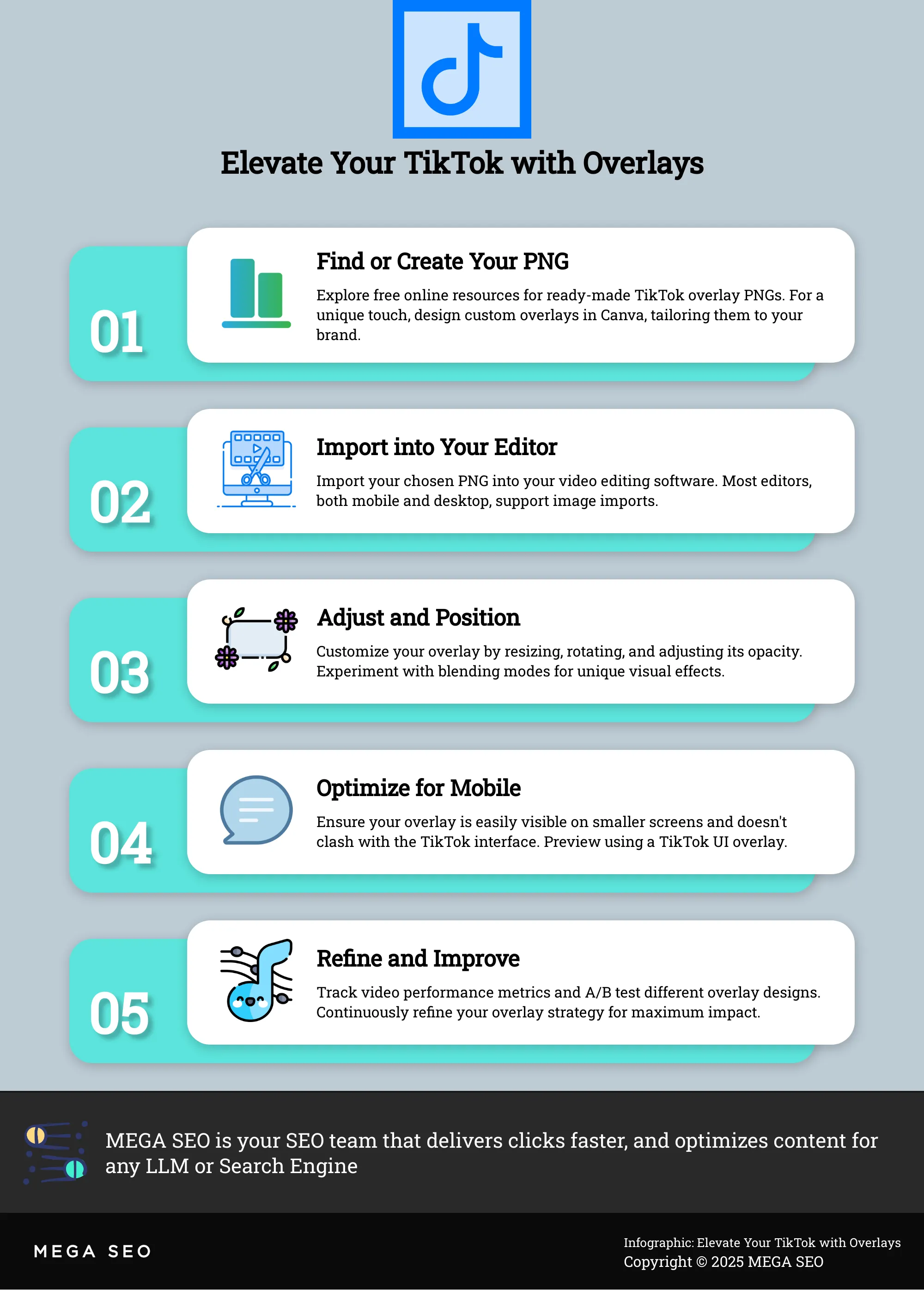
Finding high-quality, free PNGs is easier than you think. Several websites offer free downloads, giving you a starting point for experimenting with overlays. Free overlay PNG websites often categorize their offerings, making it simple to find graphics related to specific themes or styles. You can also find free TikTok interface graphics to help you preview how your content will look in the app. Using a TikTok UI PNG overlay is a simple trick to see exactly how your video will appear before posting, ensuring your key visuals and text remain visible within the TikTok app's layout. Remember to check the terms of use for any restrictions before using free PNGs in your videos.
Create Custom Overlays
While free resources are great, creating custom overlays allows you to truly personalize your TikTok content. Design tools like Canva or Photoshop allow you to design unique overlays tailored to your brand. You can incorporate specific fonts, colors, and graphics to maintain a consistent brand identity. Designing your own TikTok UI overlays is also a great way to strategically plan your videos. If you're not a designer, consider hiring a freelancer to create a set of custom overlays. This investment can significantly elevate your TikTok presence and create a cohesive brand experience for your followers.
Use TikTok Overlay PNGs in Video Editing
Once you've found or created your perfect TikTok overlay PNGs, it's time to put them to work in your videos. This section walks you through importing, applying, and optimizing your overlays for maximum impact.
Import and Apply Overlays
Getting your PNG overlays into your video editor is the first step. Most video editing software, whether you're using a mobile app or desktop software, allows you to import images. Simply select the overlay PNG file from your device and add it to your project timeline. Think of your video as a layered cake, and the overlay is the icing—it sits on top of your video layer. Position the overlay where you want it to appear in the frame. From simple text to interactive elements, overlays add a professional touch and increase engagement.
Adjust Overlay Properties
Now that your overlay is in place, you can customize its appearance. Most video editors offer a range of adjustment options for image overlays. You can adjust the opacity to make the overlay more transparent, allowing your video to show through. Resizing and rotating tools help you fit the overlay perfectly within the frame. You can also experiment with blending modes to create different visual effects. Subtle yet effective, overlay PNGs can reinforce your brand identity on TikTok, making your videos stand out.
Optimize for Mobile Viewing
Remember, TikTok is primarily a mobile platform, so optimizing your overlays for mobile viewing is crucial. Ensure your overlays are easily visible on smaller screens and don't obstruct important parts of your video. Using a TikTok UI overlay gives you a preview of how your content will appear in the app, preventing key visuals or text from being obscured by interface elements. Test your video on different mobile devices to ensure it looks good across various screen sizes and resolutions. This creates a seamless viewing experience for your audience.
Best Practices for Effective TikTok Overlays
Creating eye-catching TikTok overlays is just the first step. Knowing how to use them effectively is what truly elevates your content. These best practices will help you make the most of TikTok overlays:
Match Overlays to Video Themes
Overlays, whether simple text or interactive elements, should always complement your video's theme. Using a playful, animated overlay in a serious video about a sensitive topic would feel jarring. Think about the mood and message of your video. Choose overlays that enhance, not distract from, your content. A cohesive visual experience keeps viewers engaged and reinforces your message. For example, if you're creating a cooking video, food-themed overlays like ingredient lists or cooking timers would be a natural fit. Learn more about matching overlays to themes.
Balance Overlay Usage
Less is more when it comes to TikTok overlays. A cluttered screen can quickly overwhelm viewers and obscure your message. Resist the urge to cram in too many elements. Prioritize minimalist design with clean lines, simple graphics, and plenty of white space. This ensures your core message remains clear and easy to understand. A few well-placed overlays are far more effective than a chaotic jumble. Explore minimalist design principles for TikTok.
Incorporate Branding
TikTok overlays offer a subtle yet powerful way to reinforce your brand. Think of them as mini billboards within your videos. Subtly incorporate your logo, brand colors, or a consistent visual style across your videos. This creates a cohesive brand identity and helps viewers recognize your content instantly. Even a simple text overlay in your brand's signature font can make a difference. Consistent branding builds recognition and strengthens your presence on the platform. Discover how overlays can boost your brand.
Common Mistakes to Avoid with TikTok Overlays
Even with the best TikTok overlays, a few simple missteps can lessen their effectiveness. Let's explore some common pitfalls and how to avoid them.
Avoid Overusing or Misplacing Overlays
Too many overlays can clutter your video and distract viewers. A cluttered video can quickly become overwhelming. Remember, overlays should enhance, not overpower, your content. Think strategically about placement. An overlay shouldn't obscure important visuals or text. Generic, unengaging videos can be the result of not customizing the effect.
Respect Video Resolution and Aspect Ratio
TikTok has specific dimensions. Ignoring them can lead to parts of your overlay being cut off or hidden. Using a TikTok UI overlay gives you a crucial preview of how your content will appear in the app. This prevents key visuals or text from being hidden by interface elements. Always preview your video with the overlay to ensure it fits correctly within the frame.
Consider Copyright
Using copyrighted material as overlays without permission can lead to legal issues. Overlay PNGs are a subtle yet effective way to reinforce your brand identity on TikTok. Incorporate your logo, brand colors, or a consistent visual style. Stick to royalty-free resources or create your own custom overlays to avoid copyright infringement. This protects you legally and allows you to fully control your brand's visual representation.
Advanced Techniques for TikTok Overlays
Once you’ve mastered the basics of using TikTok overlay PNGs, you can explore more advanced techniques to create even more dynamic and engaging content. These techniques can help your videos stand out and capture your audience's attention.
Animate Overlays
Static overlays are great, but animated overlays can add another layer of polish and professionalism to your TikTok videos. Think subtle animations like pulsing text, moving graphics, or transitions between overlays. These small additions can make a big difference in how viewers perceive your content. Animation software or even some video editing apps offer tools to create simple yet effective animations. Remember, the goal is to enhance your video, not distract from it, so keep animations clean and concise.
Combine Multiple Overlays
Don’t be afraid to experiment with combining multiple overlays. Layering different PNGs, like text over a graphic element, can create a richer, more visually appealing experience. This technique can also help reinforce your brand identity. A consistent use of branded overlays can make your videos instantly recognizable. For example, you could use a subtle logo overlay in the corner of your videos, paired with a text overlay that reflects your brand’s voice. This creates a cohesive look and feel.
Create Interactive Elements
Interactive elements encourage viewers to participate with your content. Consider using overlays to create polls, quizzes, or clickable calls to action. You can also use overlays to highlight specific parts of your video or direct viewers' attention to certain details. For instance, a well-placed arrow or a highlighted text box can draw attention to a product you're showcasing or a link in your bio. Using a TikTok UI overlay can help you preview how these elements will appear within the app's interface, ensuring your interactive components are visible and effective.
Measure and Improve Overlay Performance
Once you’ve started using TikTok overlay PNGs, how do you know if they’re actually working? Tracking their performance and making adjustments to your strategy is essential. This data-driven approach will help you refine your overlay usage and maximize their impact on your TikTok content.
Analyze Viewer Engagement
Keep a close eye on your TikTok analytics. Are your videos with overlays getting more views, likes, comments, and shares? Increased engagement suggests that your overlays resonate with your audience. Pay attention to which types of overlays perform best. Do viewers respond more favorably to text overlays, graphic elements, or interactive features? Understanding these nuances will inform your future overlay choices. Well-designed overlays can add a professional touch and boost engagement.
A/B Test Overlay Effectiveness
A/B testing is a valuable technique for optimizing your overlay strategy. Create two versions of a video, each with a different overlay design or placement. Then, compare their performance metrics. This direct comparison reveals which overlay performs better and provides insights into audience preferences. Think of TikTok overlay PNGs as your secret weapon for grabbing attention. A/B testing helps you discover which overlays truly capture your audience's attention.
Adjust Your Strategy
Based on your analysis and A/B testing results, refine your overlay approach. If certain overlays aren’t performing well, consider revising their design, placement, or even removing them altogether. Consistency is key for brand recognition. Incorporate your logo, brand colors, or a consistent visual style across your videos. This cohesive branding strengthens your online presence and helps viewers connect with your content. Remember, your overlay strategy should evolve as your content and audience grow. Regularly review and adjust your approach to ensure your overlays continue to enhance your TikTok videos.
Troubleshoot Common Overlay Issues
Even with careful planning, you might encounter a few bumps in the road when using TikTok overlay PNGs. This section helps you troubleshoot common issues, ensuring your overlays enhance, rather than detract from, your videos.
Fix Transparency Problems
One of the biggest advantages of PNG files is their transparency support. This lets your overlays blend seamlessly with your video content. If your overlay isn't displaying correctly, double-check that you’re using a PNG file and not another format like a JPEG, which doesn't support transparency. A quick guide to image file types can help clarify this. Also, ensure your editing software is properly handling the PNG's transparency. Some software might require specific settings to display transparency correctly, so refer to your software's documentation if you're unsure.
Address Compatibility Concerns
It's essential to ensure your overlays work well within the TikTok app. A TikTok UI overlay acts like a preview, showing you precisely how your video will appear in the app. This prevents important visuals or text from being hidden by interface elements like buttons or icons. If your overlay clashes with the TikTok interface, adjust its size and position until it fits comfortably within the visible area.
Resolve Sizing and Positioning
Overlays should complement your videos, not overpower them. A large overlay can distract viewers and hide important content. A tiny overlay might be too small to see. Find the right balance by adjusting the overlay's size in your editing software. This guide on TikTok overlays offers tips on optimal sizing. Similarly, proper positioning is key. An overlay in the wrong spot can obscure crucial visuals. Experiment with different positions until you find what works best for your video. The goal is to enhance your content, not obstruct it.
How TikTok Overlays Enhance Your Content
Using TikTok overlays can significantly improve your videos. They offer several benefits that can help elevate your content and attract more viewers. Let's explore how overlays enhance your TikTok presence:
Enhance Visual Appeal and Professionalism
Think of TikTok overlay PNGs as your secret weapon for grabbing attention. Overlays add a polished look to your videos, instantly boosting their visual appeal. From simple text additions to interactive elements, overlays give your content a professional touch that sets it apart. This can be especially helpful for businesses and creators looking to establish a strong brand presence. They can transform simple videos into dynamic, eye-catching content that keeps viewers engaged.
Improve Information Delivery
TikTok overlays can also be practical tools for improving how you communicate information. A TikTok UI PNG overlay lets you preview how your content will appear in the app. This helps you avoid critical design errors, like having important text or visuals hidden by interface elements. By using overlays strategically, you can ensure your message is clear, concise, and easily digestible for your audience. This is particularly useful for educational content or videos with lots of text.
Strengthen Brand Identity
Beyond aesthetics and functionality, TikTok overlays offer a powerful way to reinforce your brand identity. By incorporating your logo, brand colors, or a consistent visual style across your videos, you create a cohesive and recognizable brand experience. These subtle yet effective branding elements can significantly impact how viewers perceive your content and your brand as a whole. Overlays can help build brand recognition and loyalty over time.
Related Articles
- Exploring Different Image File Formats: JPEG, PNG, SVG, and WebP, and Their Impact on SEO - MEGA SEO | Blog
- Mastering Social Media: Turbocharge Your Podcast's Growth with Expert SEO Tips - MEGA SEO | Blog
- YouTube SEO: Crafting Video Titles for Maximum Discoverability - MEGA SEO | Blog
- Mastering YouTube SEO with Semrush: Insider Tips to Elevate Your Channel's Rankings - MEGA SEO | Blog
- How to Create SEO-Friendly Content: Multimedia Integration for Startups - MEGA SEO | Blog
Frequently Asked Questions
What exactly are TikTok overlay PNGs, and why should I use them? TikTok overlay PNGs are images with transparent backgrounds that you layer over your videos. They enhance your videos visually, add professionalism, and help deliver information more effectively. Think of them as a design tool to make your content more engaging and appealing.
Where can I find TikTok overlay PNGs, and can I create my own? You can find free TikTok overlay PNGs on various websites. However, for a truly unique look, create your own using design software like Canva or Photoshop. This allows you to tailor your overlays to your specific brand and content. You can also hire a freelance designer if you need help.
How do I add and adjust overlays in my videos? Most video editing software lets you import images directly onto your timeline. Once imported, you can adjust the overlay's size, position, opacity, and blending mode to seamlessly integrate it with your video. Remember to optimize for mobile viewing since TikTok is primarily a mobile platform.
What are some common mistakes to avoid when using overlays? Avoid overusing overlays, as this can clutter your videos and distract viewers. Ensure your overlays are the correct size and resolution for TikTok, and always respect copyright laws when using external resources. Misplaced overlays can obscure important parts of your video, so plan their placement carefully.
How can I tell if my TikTok overlays are effective? Track your video's performance metrics like views, likes, comments, and shares. If these metrics improve after using overlays, it's a good sign they're resonating with your audience. A/B testing different overlay designs can also help you determine what works best. Use this data to refine your overlay strategy over time.


