
Every element of your website should contribute to your business goals, and site navigation is no exception. It's a powerful lever for influencing key performance indicators, from how long visitors stay to how many pages they explore during their session. When users can move through your site effortlessly, they are naturally inclined to delve deeper into your offerings, leading to increased engagement and more opportunities for conversion. The question many businesses ask is, what are the tangible benefits of site navigation improvement for increased page views? This exploration is vital because more page views often correlate with greater brand exposure and a higher likelihood of achieving desired outcomes, such as lead generation or sales. This article will break down how strategic navigation enhancements directly impact user behavior and improve critical site metrics.
Key Takeaways
- Prioritize Intuitive Navigation: Craft clear and logical pathways on your site to ensure visitors can effortlessly find information, leading to a more satisfying experience and encouraging them to explore further.
- Enhance SEO Through Smart Structure: Organize your website with a clear hierarchy and effective internal linking, as this helps search engines crawl and index your content efficiently, improving your site's visibility.
- Iterate for Optimal Performance: Regularly analyze user behavior, use clear and concise labels, ensure your navigation works seamlessly on all devices, and avoid common design errors to continuously improve how users move through your site.
What is Website Navigation? Why It's Essential
Think of your website's navigation as its roadmap. It guides visitors to where they want to go and helps them understand what your site offers. Getting this roadmap right is fundamental because it directly influences how people interact with your content and whether they find what they need. A clear and intuitive navigation system is more than just a set of links; it's a cornerstone of a successful online presence.
Defining website navigation and its value
Website navigation refers to the system of links and menus that users interact with to move between different pages and sections of your website. Its value cannot be overstated; it's crucial for a positive user experience, keeping visitors engaged, and even plays a role in your search engine optimization efforts. A poorly designed system can quickly turn visitors away.
A well-thought-out navigation system is arguably more important than flashy design elements. Its primary purpose is to help users find information quickly and without confusion. This is especially true for websites with a substantial amount of content, where getting lost can be easy if the pathways aren't clear. Essentially, good site structure makes your website accessible and user-friendly.
How navigation impacts user experience
The way your website's structure is designed has a profound effect on the overall user experience, which in turn influences bounce rates and conversion rates. In fact, a study highlighted by Forbes found that an overwhelming 94% of people consider an easy-to-use structure the most important website feature. This statistic alone underscores how critical it is to get your site's flow right.
When users can't easily find what they're looking for, frustration often sets in. This frequently leads to them leaving your site quickly—increasing your bounce rate—and can even negatively affect your SEO rankings. Conversely, straightforward site organization encourages visitors to explore more of your website. This increases the time they spend on your site and their interaction with your content. A well-structured system not only improves usability but also ensures search engines can efficiently crawl your site.
Improve User Experience with Smart Navigation
When users land on your website, their first interaction often involves figuring out where to go next. Smart, intuitive site navigation is the key to making this a smooth and positive experience, acting as a roadmap for visitors. If users can easily find what they're looking for, they're more likely to stay, engage with your content, and ultimately convert into customers or leads. This isn't just about making your site look pretty; it's about core functionality that directly impacts how users perceive your brand and the value you offer. A well-structured navigation system demonstrates professionalism and a commitment to user satisfaction from the very first click.
For businesses, especially startups and small to medium-sized enterprises aiming to enhance their online presence, focusing on a user-friendly navigation structure is a foundational step toward better engagement and achieving business objectives. It’s an integral part of the overall user journey, influencing everything from bounce rates to conversion rates. Clear navigation helps search engines understand your site's structure too, which can positively affect your search rankings. Platforms like MEGA AI can assist in optimizing your site's overall SEO performance, and effective navigation is a crucial component of that comprehensive strategy, ensuring that both users and search engine crawlers can efficiently access your content.
Cut down user frustration and effort
Think about the last time you visited a website and couldn't find what you needed. It's frustrating, right? A poorly designed navigation system can quickly lead to this kind of annoyance, causing visitors to leave your site. The goal is to help users find information quickly and easily. When your site's layout is clear and predictable, users don't have to work hard to understand where to click. This ease of use is critical; in fact, a study highlighted by Forbes found that an overwhelming 94% of people consider easy navigation the most important website feature. By minimizing confusion, you reduce bounce rates and create a more welcoming environment for everyone who visits.
Encourage longer site visits and content exploration
When users can effortlessly move through your website, they're more likely to stick around and explore more of what you offer. An intuitive site structure with clear navigation paths acts like a friendly guide, encouraging visitors to discover more content. This naturally leads to increased interactions and more pages viewed per session. A well-thought-out navigation system doesn't just help users find a specific piece of information; it invites them to discover related content they might not have initially searched for. This deeper engagement is valuable because it gives you more opportunities to showcase your expertise and guide users toward your conversion goals, whether that's making a purchase, signing up for a newsletter, or learning more about your services.
Build user satisfaction and a positive brand image
A website that's easy to use does more than just provide information; it shows visitors that you value their time and experience. This attention to user-friendliness contributes significantly to a positive brand image, making your business appear more professional and trustworthy. When users have a seamless experience, their satisfaction levels increase, and they're more likely to remember your brand favorably. As noted by Abmatic, a user-friendly website signals that you care, which can be a powerful differentiator. Ultimately, thoughtful navigation is a key component in building lasting relationships with your audience and fostering loyalty.
Get More Page Views with Better Navigation
When users land on your website, their first interaction often involves figuring out where to go next. This is where your site navigation plays a crucial role. Think of it as the roadmap you provide for every visitor. A clear, intuitive roadmap doesn't just help them find a specific piece of information; it invites them to explore, discover, and spend more time engaging with your content. This increased engagement directly translates to more page views, a key indicator of a healthy and effective website.
Effective navigation is about more than just a menu bar. It’s about understanding your user's journey and anticipating their needs. When you make it easy for people to move from one piece of relevant content to another, they are naturally inclined to do so. This seamless flow reduces frustration and encourages deeper dives into what your site offers. For businesses, especially startups and small enterprises, maximizing page views means more opportunities to convey your message, showcase your products or services, and guide users towards conversion goals. Well-thought-out navigation can significantly improve user flow and keep visitors clicking, ultimately contributing to your site's overall success and search engine performance. Platforms like MEGA AI can assist in optimizing your site's structure, which is foundational to good navigation, ensuring that both users and search engines can easily understand and traverse your content.
Guide users to explore more content
One of the primary ways good navigation increases page views is by actively guiding users to explore more of your content. When your site structure is logical and navigation paths are intuitive, visitors are more likely to click beyond their initial landing page. For instance, clear calls-to-action within your navigation, or well-placed links to related articles or products, can pique their interest. This isn't about tricking users into clicking; it's about making relevant content easily discoverable. Improving your site structure ensures that users can effortlessly find what they need, which naturally increases their interactions and the number of pages they visit per session. Think about how you can use navigation to tell a story or lead users on a journey through your expertise.
Lower bounce rates and keep users on your site
A high bounce rate often signals that visitors aren't finding what they expect or are getting frustrated with your site. Excellent website navigation is a powerful antidote to this. When users can quickly understand how to find information, they are less likely to abandon your site. A well-structured navigation system not only improves usability but also helps search engines efficiently crawl your site, which can contribute to better rankings and more qualified traffic. By providing a clear and predictable path, you build user confidence and encourage them to stay longer, reducing bounce rates and increasing overall engagement with your content. This sustained engagement is a positive signal to search engines about your site's quality.
Make valuable information easy to find
Ultimately, your website has goals, whether it's generating leads, making sales, or providing information. Smart navigation plays a key role in directing users towards these valuable actions. If a user can't easily find your pricing page, contact form, or key service descriptions, you're missing out on potential conversions. A well-designed navigation system makes it simpler for visitors to locate the information they are looking for, which can lead to increased satisfaction and improved conversion rates. By strategically placing links to your most important pages within your navigation, you create clear pathways for users to take the next step, turning casual visitors into engaged prospects or customers.
What Makes Website Navigation Work Well?
Good website navigation feels effortless for your visitors. When it’s done right, people can find what they need without a second thought, leading to a much better experience on your site. This isn't just about looking good; it's about creating a clear pathway through your content that helps users and search engines alike. Well-thought-out navigation is a cornerstone of a successful online presence, directly impacting how easily users can interact with your offerings and how effectively search engines can understand and rank your pages.
Clear menus that make sense
Your website's menu is like a roadmap for your visitors. For it to be effective, it needs to be straightforward and logical. Think about the main sections of your site and organize them into clear, concise menu items. Effective website navigation is absolutely key for a good user experience, as it helps people find information quickly. When users can easily understand where to click, they're more likely to stay, explore, and ultimately, convert. Keep labels simple and use terms your audience will recognize. This clarity ensures that your site is usable and welcoming from the first click, reducing frustration and encouraging deeper engagement with your content.
Helpful search bars and filters
For websites with a lot of content, a search bar isn't just a nice-to-have; it's essential. A prominent and functional search bar allows users to quickly find specific information without having to browse through multiple pages. To make it even more effective, consider adding filters, especially for ecommerce sites or blogs with many categories. Filters help users narrow down search results, making their journey to the right content much smoother. Providing these intuitive navigation paths means users can easily locate what they need, which often leads to them spending more time interacting with your site and discovering more of what you offer.
Using breadcrumbs and site maps effectively
Breadcrumbs and site maps are two features that significantly aid navigation, especially on larger websites. Breadcrumbs show users their current location on your site and provide a clear trail back to previous pages. This simple trail can greatly improve findability and help users understand the site's structure as they explore. A site map, on the other hand, offers a complete overview of your website's pages. This is helpful for both users trying to find specific sections and for search engines to crawl your site more efficiently. Implementing these tools makes your website more transparent and easier to get around, contributing to a better overall user journey.
Navigation that works on any device
In a world where people access websites on various devices, from desktops to smartphones, your navigation must perform flawlessly on all of them. This means adopting a responsive design that adjusts to different screen sizes. For mobile users, common patterns like the hamburger menu can save space while keeping navigation accessible. A well-designed navigation system ensures that visitors have a consistent and positive experience, no matter how they access your site. Prioritizing mobile-friendly navigation is crucial for reaching a wider audience and keeping them engaged, as a poor mobile experience can quickly lead to lost visitors.
How Navigation Affects Your SEO and Site Performance
Good website navigation does much more than just help your visitors find what they're looking for; it's a cornerstone of how search engines understand and ultimately rank your website. Think of your site's navigation as a detailed roadmap. For your users, this map guides them smoothly to their desired destinations, whether that's a product page, a blog post, or contact information. For search engine bots, this same map is crucial for them to explore and comprehend the full scope of your site's content. When this roadmap is clear, logical, and easy to follow, it allows these bots to efficiently discover every piece of valuable information you offer, even pages tucked away deeper within your site structure.
This thorough discovery process is fundamental for effective SEO efforts. If search engines can't find your content, they can't index it, and if they can't index it, your pages won't appear in search results. Furthermore, a well-organized navigation system signals to search engines that your site is user-friendly, well-maintained, and provides a quality experience. This can indirectly influence your rankings, as search engines prioritize sites that offer value to users. Essentially, strong navigation supports all your other SEO activities, from content creation to technical optimization, by ensuring your hard work gets seen. It’s not just a design feature; it’s a critical component of your online visibility and success.
What search engines look for in site structure
Search engines like Google aim to deliver the most relevant and accessible results to their users. A significant part of achieving this is understanding the structure of the websites they crawl. They favor sites with a clear, logical organization because it often indicates a positive user experience and well-thought-out content hierarchy. When your navigation is intuitive, it helps search engines quickly grasp how your content is arranged and how different pages relate to one another. A well-structured navigation system not only makes it easier for your human visitors to find information quickly but also ensures that search engine crawlers can efficiently map out your site, understanding the theme and purpose of each page within the broader context of your website.
Help search engines crawl and index your site
Before your website's pages can appear in search results, two key things need to happen: search engines must "crawl" your site to discover its content, and then "index" that content by adding it to their vast database. Your website's navigation plays a vital role in both these processes. Clear menus, logical pathways, breadcrumbs, and an up-to-date sitemap all act as signposts for search engine bots. These elements allow them to easily move through your site, systematically finding new pages and updates to existing ones. If these pathways are confusing or broken, bots may struggle to find all your content, potentially leaving valuable pages unindexed and invisible in search results.
Strengthen internal links with smart navigation
Internal links are simply links that connect one page on your website to another page on the same site. Your main navigation menu is one of the most prominent forms of internal linking. These links are incredibly important for SEO because they help distribute "link equity" or "page authority" throughout your site. Think of it as passing strength from one page to another. When you optimize your navigation, you are essentially creating strong, consistent internal links to your most important pages. This signals to search engines which content you deem significant, helping those pages to rank more effectively for their target keywords and improving the overall SEO health of your website.
Actionable Ways to Improve Your Site Navigation
Improving your website's navigation is a direct path to a better user experience and stronger site performance. When visitors can easily find what they're looking for, they're more likely to engage with your content and achieve their goals—and yours. Here are some practical steps to refine your site navigation.
Understand your users with research and testing
Before making any changes, it's essential to understand how people currently use your site and what they expect. User research, such as analyzing heatmaps or conducting usability tests, can reveal pain points in your current navigation. "Improving site structure and providing intuitive navigation paths ensures that users can easily find what they need, ultimately increasing their interactions and pages per session." You can gather feedback through surveys or A/B test different menu labels to see what resonates best with your audience. This data-driven approach helps you design navigation that truly serves your users' needs.
Build a logical site structure that can grow
A clear and logical site structure forms the foundation of good navigation. Organize your content hierarchically, starting with broad categories and narrowing down to more specific topics. This helps users orient themselves and find information efficiently. "Effective website navigation is crucial for enhancing user experience and optimizing conversions. A well-structured navigation system improves usability, helps users find information quickly, and ensures search engines can crawl your site efficiently." Consider how your site might expand in the future and design a structure that can accommodate new content without becoming cluttered. Tools like MEGA AI's SEO services can help analyze and optimize your site's architecture.
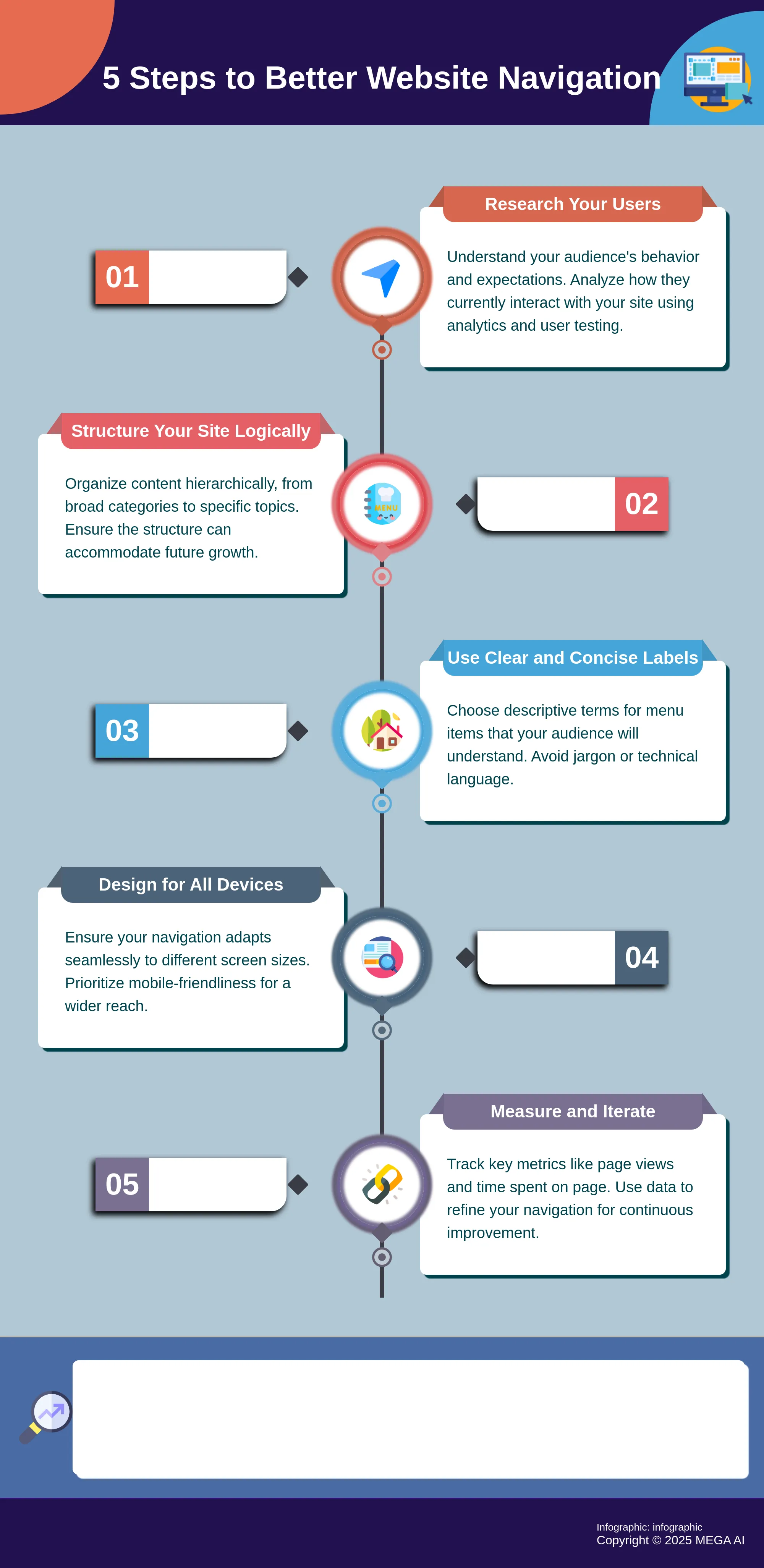
Use clear labels and categories
The words you choose for your navigation labels are incredibly important. Opt for simple, descriptive terms that your audience will immediately understand. Avoid jargon or internal company language that could confuse visitors. "Good website navigation can provide several benefits, including improved user experience, increased engagement, and better website performance." Each label should clearly indicate the content a user will find if they click on it. When users can predict the outcome of their clicks, they feel more confident exploring your site, leading to a more positive experience.
Design for desktop and mobile users
Your website navigation must be seamless across all devices. A menu that works well on a large desktop screen might be cumbersome on a mobile phone. Implement responsive design principles to ensure your navigation adapts appropriately. "To optimize site navigation, various techniques can be implemented to enhance the user experience and drive engagement." This might mean using a hamburger menu for smaller screens or simplifying the number of primary navigation items. The key is to provide a consistent and user-friendly experience no matter how someone accesses your site.
How to Measure Your Navigation's Success
So, you've put time into designing your website's navigation, but how can you be sure it’s truly guiding your visitors effectively and helping your business? It’s one thing to have menus and links; it’s another for them to create an intuitive journey that leads people smoothly to what they’re looking for. When your navigation works well, visitors are more likely to stay longer, explore more content, and ultimately take the actions you want them to, whether that’s making a purchase, signing up for a newsletter, or booking a demo.
To figure out what’s working and what’s not, you need to measure. By tracking specific aspects of how users interact with your navigation, you can uncover valuable insights. This isn't just about collecting numbers; it's about understanding the story behind them. This understanding allows you to make informed, data-driven adjustments, continually refining the user journey. This process ensures your site not only meets user expectations but also supports your broader business objectives, like improving conversion rates or increasing engagement. We'll look at the essential metrics to monitor, the tools that can provide these crucial insights, and how to apply this data for ongoing optimization, making your site work harder for you.
Key metrics for tracking navigation performance
To get a clear picture of your navigation's effectiveness, let's focus on a couple of essential metrics. First, keep an eye on page views. This tells you how many times each page on your site gets loaded. As the folks at Hotjar explain, these "Page views help you understand if your individual web pages are getting clicks and how popular they are." If key pages linked in your navigation aren’t getting much traffic, it’s a good sign people might be struggling to find them.
Another important piece is the time users spend on each page. This metric offers clues about how engaging your content is. Analico Digital suggests you should "Analyze the number of views each page receives and the time users spend on them" for insights into content engagement. If visitors quickly leave a page reached via navigation, the content might not be what they expected, or the link label wasn't clear.
Tools to see how users interact with your navigation
Gathering this data requires some helpful tools. A great starting point for many is Google Analytics. It’s a robust platform for digging into website traffic and user behavior. LambdaTest rightly calls "Google Analytics one of the best web analytics tools" for its deep insights into traffic sources, user actions, and bounce rates. You can use it to map common navigation paths and spot where visitors might be getting stuck.
Beyond standard analytics, tools for website traffic analysis are also very useful for monitoring visitors, page views, and bounce rates. As Analytify mentions, this tracking helps you "understand audience behavior." For a more visual understanding, consider heatmap tools or session recordings. These show exactly where people click and how they move, offering direct feedback on your navigation's performance.
Use data to keep making your navigation better
Collecting data is important, but the real value comes from using those insights to consistently improve your navigation. Once you understand how people move through your site, you can refine its structure and pathways. OpenSend makes a great point that "Improving site structure and providing intuitive navigation paths ensures that users can easily find what they need." This cycle of analyzing data and making adjustments is key to a better user experience.
And remember, strong navigation isn't just about user convenience. It also significantly impacts your site's overall performance, especially its search engine optimization (SEO). As Tetra Web Design notes, "Website navigation plays a pivotal role in user satisfaction and SEO." When you use data to inform your navigation design, you’re helping users and showing search engines your site is well-structured and valuable.
Common Navigation Pitfalls (And How to Sidestep Them)
Even the most well-intentioned website can fall into a few common traps when it comes to site navigation. These issues can frustrate users and make it harder for them to find what they need. The good news is that these pitfalls are often easy to recognize and fix, helping you create a smoother experience for your visitors. Let's look at some frequent missteps and how you can steer clear of them.
Avoid confusing menus and too much information
A cluttered or overly complex menu is a quick way to overwhelm your visitors. When faced with too many choices, people can experience decision fatigue, making it difficult for them to find what they're looking for. The goal is to improve site structure and provide intuitive paths so users can easily discover content.
To sidestep this, aim for simplicity and clarity in your menus. Group related items logically, perhaps using well-organized dropdowns for subcategories, but avoid nesting them too many levels deep. Regularly review your menu items: are they all essential for top-level display, or could some be consolidated? Prioritizing key information helps users interact more effectively with your site.
Keep navigation consistent everywhere
Imagine trying to find your way through a building where the signs change on every floor. That's what inconsistent website navigation feels like to a user. When menus, search bars, or link styles shift from page to page, it creates a disorienting experience. A well-structured and consistent navigation system not only improves usability but also helps users find information quickly.
The solution is straightforward: maintain uniformity. Your main navigation bar should appear in the same location with the same design across all pages of your site. This predictability allows users to learn how your site works once and then apply that knowledge everywhere. Take a moment to check various sections of your website—does the navigation look and behave consistently from your homepage to your deepest content pages?
Steer clear of vague labels and jargon
The words you choose for your navigation labels matter immensely. Using internal company jargon, overly creative terms, or ambiguous phrases can leave users guessing what's behind a click. If a label isn't clear, visitors might miss important sections or become frustrated trying to decipher your site's layout. Clear labels contribute to a positive user experience by helping people find what they need without unnecessary effort.
Opt for straightforward, descriptive language that accurately reflects the content of the linked page. Put yourself in your user's shoes—what terms would they search for or expect to see? It’s often helpful to test your labels with individuals unfamiliar with your site to ensure they are universally understood. This simple step can significantly reduce user confusion.
Make your navigation accessible to everyone
An often-overlooked aspect of site navigation is its accessibility. If your navigation isn't designed for users with disabilities, you're unintentionally excluding a segment of your audience. This includes ensuring it can be operated with a keyboard, has sufficient color contrast for readability, and works well with screen readers. Improving site navigation to help all customers locate what they are looking for can lead to increased customer satisfaction.
To make your navigation more inclusive, familiarize yourself with the Web Content Accessibility Guidelines (WCAG). Simple actions like ensuring all interactive elements are keyboard-focusable and providing descriptive text for links can make a big difference. Regularly test your site's accessibility, perhaps by trying to move through it using only your keyboard, to identify areas for improvement.
What's Next for Website Navigation and User Experience?
The way we interact with websites is always evolving, and how we move through them is a key part of this change. We're seeing a shift towards more intuitive and intelligent methods for users to locate what they need. Several exciting developments point to a future where getting around a website feels even more seamless. Let's look at a few key trends shaping what's next.
Personalized navigation with AI
Imagine a website that adapts to you each time you visit, highlighting what you're most likely interested in. This is the core of personalized site experiences driven by Artificial Intelligence. These smart systems learn from individual user preferences and past actions to customize menu options and content suggestions. For instance, if someone often views specific product types, AI can make those links more prominent. This makes discovering information faster and the experience feel more relevant, often leading to deeper engagement. Companies like MEGA AI already apply AI to understand user intent for SEO, and similar intelligence can make site interactions very responsive.
Using voice and gestures to get around sites
Typing and clicking have long been standard, but they might soon be joined by more natural interaction methods. Incorporating voice commands and gesture controls is a fascinating development. Consider how easily you ask a smart speaker for information; that same simplicity could apply to finding things on a website. As StrikePoint Media notes, these technologies let users interact in more intuitive ways, which is especially helpful for those who find traditional inputs challenging. This shift could make websites more accessible, allowing people to complete tasks or find content simply by speaking or with a simple hand movement.
New UX design ideas for better site exploration
Beyond specific new technologies, there's a continuous push for fresh user experience (UX) design thinking to improve how people explore websites. The aim is to create intuitive pathways that guide users smoothly through your content. This involves examining everything from clearer visual organization to more interactive elements that encourage discovery. When your site's structure and the way people move through it are well-designed, users are more likely to explore further, leading to longer visits and more interaction with your valuable information. It’s about making the journey through your site feel effortless, ensuring users can readily find what they’re looking for and perhaps discover something new.
Related Articles
- Site Navigation Benefits: Lower Your Bounce Rate
- Enhance Mobile Navigation for Better SEO & Engagement
- Boost Mobile SEO: Improve Navigation for Better Engagement
- Examine Techniques to Improve Navigation on Mobile Sites to Boost SEO and User Engagement - MEGA SEO | Blog
- Why 301 Redirects Matter for SEO and User Experience
Frequently Asked Questions
My website looks great, so why should I worry so much about navigation? A visually appealing website is a great start, but if visitors can't easily find what they're looking for, that beautiful design won't keep them around. Think of navigation as the practical framework that makes your site usable. It guides people smoothly to the information or products they need, which directly impacts their overall experience and whether they see your business as helpful and professional.
What are some clear signs that my website's navigation might be frustrating users? You can spot potential navigation issues by looking at how people interact with your site. For instance, if visitors quickly leave important pages, or if they spend very little time on pages they’ve navigated to, it might mean they aren't finding what they expect. Another indicator is if users aren't reaching key pages, like your contact or service pages, suggesting the path to them isn't clear.
If I want to improve my site navigation, where’s the best place to start? The most effective starting point is to understand how people are currently using your website. Before you change any menus or links, look into your website analytics to see which paths users take and where they might be dropping off. Gathering feedback directly from users can also provide valuable insights into what they find confusing or helpful. This information will help you make informed decisions.
How does improving my website navigation actually help with search engine rankings? Good navigation makes a significant difference to search engines. When your site is logically structured with clear navigation, search engine crawlers can more easily discover and understand all of your content. This helps them index your pages correctly. Plus, clear navigation often involves well-organized internal links, which distribute authority across your site and signal to search engines which pages are most important.
My site has tons of pages. What’s a simple way to keep my navigation from becoming a huge, confusing list? When you have a lot of content, keeping navigation manageable is key. Focus on organizing your information into clear, logical categories that make sense to your audience. Use straightforward labels for these categories in your main menu. For deeper content, well-structured dropdown menus can work, or you can rely on a prominent and effective search bar to help users pinpoint specific information quickly.