

If a potential client’s server goes down, their first action isn't to look through a business directory. They search online for immediate help. Showing up in that critical moment is what separates a thriving IT business from one that struggles to find new work. Search engine optimization is the process of ensuring your website is visible to these high-intent customers. It builds credibility, establishes you as a local authority, and generates leads more cost-effectively than traditional advertising. This guide is designed to demystify SEO for IT Support Professionals, providing a practical roadmap to improve your rankings, attract more local clients, and build a resilient business.
Key Takeaways
- Balance the three pillars of SEO: A successful plan for IT services combines on-page content, off-page authority, and technical health, with a strong focus on local search to attract nearby clients.
- Establish your expertise with helpful content: Create articles and guides that solve specific client problems to build trust, earn valuable backlinks, and position your business as a credible authority.
- Simplify your workflow with automation: AI-powered tools can manage time-consuming tasks like keyword research, content creation, and technical monitoring, allowing you to maintain a consistent strategy while focusing on your clients.
Why SEO Matters for IT Support Professionals
If a local business owner suddenly faces a network outage or a critical data loss, their first move isn't to check the Yellow Pages. They pull out their phone and search for "emergency IT support near me." Search engine optimization (SEO) is what determines if your business shows up in that moment of need. It’s the process of making your website more visible to people actively looking for the solutions you provide.
A strong SEO strategy does more than just increase website traffic. It helps you attract visitors who are actively searching for IT support, making them far more likely to become clients. When your website ranks highly for terms like "managed IT services" or "small business cybersecurity," you are connecting with potential customers who have a specific problem and are ready to hire someone to solve it. This targeted approach generates higher-quality leads than most traditional advertising methods.
Appearing at the top of search results also builds significant trust and credibility. People tend to view the top-ranking sites as the most reputable and authoritative options in any field. For an IT professional, where trust is the foundation of any client relationship, this digital endorsement is invaluable. A high ranking positions your business as a reliable expert before you’ve even had the first conversation.
Finally, SEO is a long-term investment in your business’s growth. Unlike paid ads, which disappear the moment you stop paying, a well-executed SEO strategy builds momentum over time. The content you create and the authority you build become assets that can generate a consistent stream of organic traffic and leads for years. It’s one of the most cost-effective ways to ensure your IT support business has a sustainable pipeline of new clients.
What Goes Into a Winning SEO Strategy for IT Services?
A winning SEO strategy is built on three core pillars: on-page, off-page, and technical SEO. Think of it as a three-legged stool. If one leg is weak, the whole thing becomes unstable. You need a balanced approach that addresses all three areas to consistently attract new clients. On-page SEO covers the content and structure of your website itself. Off-page SEO involves building your site's authority and reputation across the web. Finally, technical SEO ensures your website's foundation is solid, making it easy for search engines to find and understand your content.
For an IT support business, this means creating content that speaks directly to the problems your local clients face, like "emergency data recovery" or "small business network setup." It also means establishing your business as a credible local authority and ensuring your website runs smoothly on any device. Mastering these three areas is the key to showing up in search results when potential customers need your expertise the most. A comprehensive SEO strategy doesn't have to be overly complicated, but it does require attention to each of these fundamental components.
Master On-Page SEO
On-page SEO includes everything you can directly control on your website to improve its ranking. This starts with understanding your audience and the specific terms they use when searching for IT help. Are they looking for "managed IT services," "cybersecurity consulting," or "computer repair near me"? Your goal is to create service pages and blog posts that use these keywords naturally and provide genuinely helpful information. Structure your content logically, with clear headings and easy-to-read paragraphs. Each page should focus on a specific topic, answering the questions your potential clients have and showing them why you are the right person to solve their problem.
Build Authority with Off-Page SEO
Off-page SEO refers to all the actions you take outside of your website to build its credibility. The most significant factor here is acquiring high-quality backlinks. A backlink is a link from another website to yours, and search engines view them as votes of confidence. For an IT professional, this could mean writing a guest article for a local business journal's website, getting featured in a tech blog, or creating a valuable resource, like a cybersecurity checklist for small businesses, that other sites want to link to. Earning links from other reputable websites signals to search engines that your business is a trusted authority in the IT support field.
Get Your Technical SEO in Order
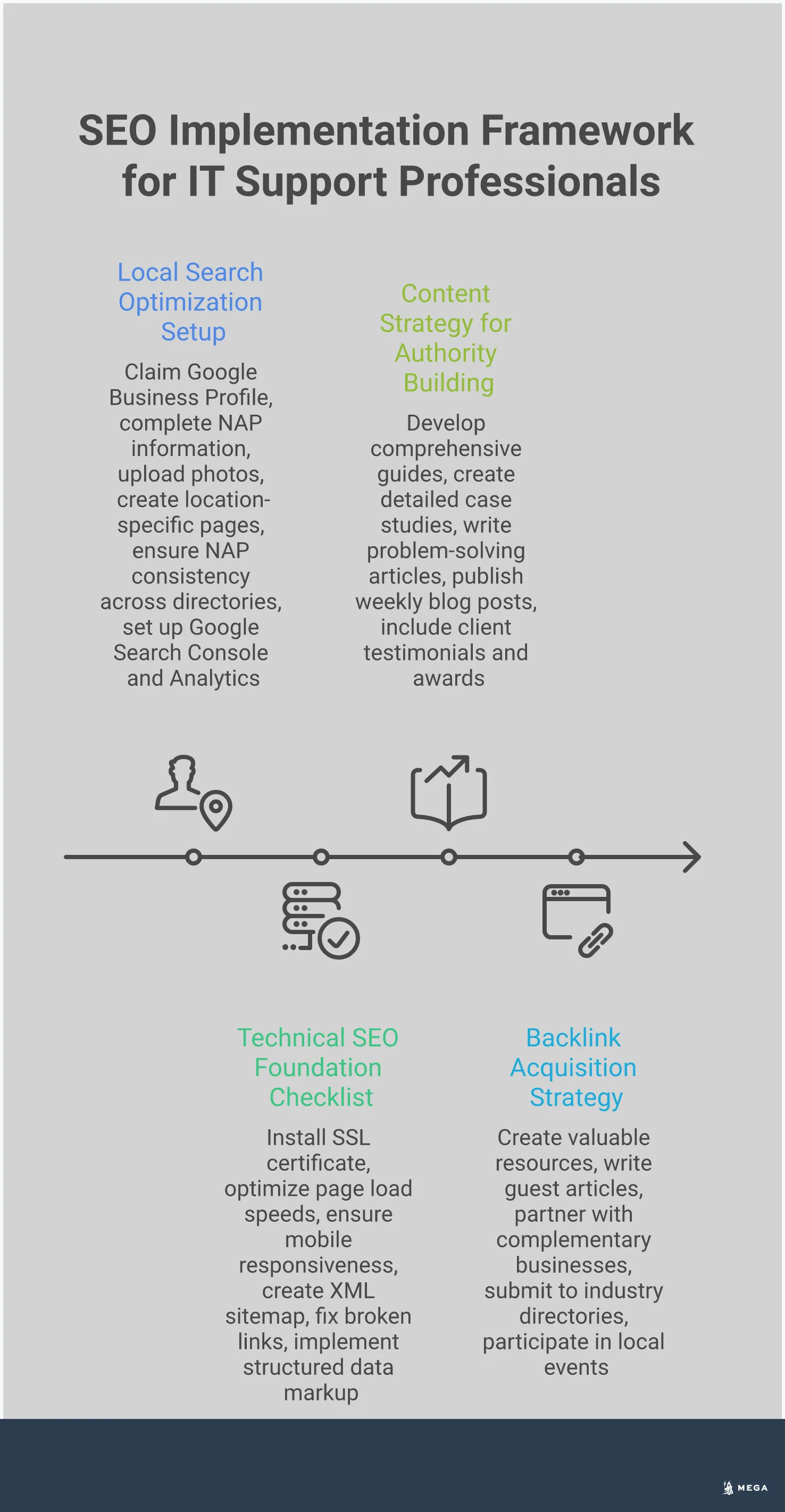
Technical SEO is the foundation that your entire digital presence is built on. If search engines can't properly crawl, render, and index your website, all your great content may go unseen. Key elements include making sure your website loads quickly, is mobile-friendly, and is secure with an SSL certificate. Regularly running a site audit can help you find and fix technical issues, such as broken links or problems with your site's structure. A technically sound website provides a better user experience for visitors and makes it easier for search engines to reward your content with higher rankings.
How to Optimize Your Website Content
Once your website is technically sound, your content does the heavy lifting. It’s how you show potential clients that you understand their problems and have the right solutions. Effective content acts as a bridge, connecting a user’s search query about a frustrating tech issue directly to your IT support services. Optimizing your content isn't just about pleasing search engines; it's about clearly communicating your expertise and value to the people who need your help. This is where you turn abstract technical knowledge into tangible solutions that resonate with business owners who are looking for a reliable partner.
This process comes down to three core activities: finding the right keywords, creating content that showcases your services, and making sure local customers can find you. Each step builds on the last to create a strong foundation that attracts and converts the right kind of clients. While this requires a thoughtful strategy, the goal is to create a system that consistently brings in new business without needing constant manual effort. An AI-powered SEO agent can handle the entire process, from research to writing and optimization, so you can focus on your clients.
Find the Right Keywords for IT Services
Keywords are the search terms people type into Google when they need help. Your goal is to figure out what those terms are and build your content around them. Start by mapping keywords to your main service pages. If you offer data backup services, you’ll want to target phrases like “small business data backup solutions.”
Focus on long-tail keywords, which are longer, more specific phrases like “managed IT support for dental offices in [Your City].” These searches show clear intent and often come from people who are ready to hire someone. Creating a list of relevant, low-competition keywords gives you a clear roadmap for your content and ensures you’re attracting visitors who are a good fit for your business.
Create Content That Highlights Your Services
With your keywords ready, it’s time to create content that proves your expertise. Instead of writing generic blog posts, develop in-depth articles and guides that solve specific problems for your target audience. For example, you could write a detailed guide on choosing the right cybersecurity plan for a small business or a case study on how you resolved a complex network issue for a client.
This type of content establishes you as an authority. You can further build trust by displaying certifications, client testimonials, and any industry awards on your site. When a potential customer sees that you not only understand their problem but also have a proven track record of solving it, they are much more likely to reach out.
Optimize for Local Search
For most IT support companies, local clients are the main source of business. Optimizing for local search is essential for getting in front of them. The first step is to claim and completely fill out your Google Business Profile. This is a free listing that appears in Google Maps and local search results, and it’s often the first impression a potential client will have of your business.
Next, ensure your business Name, Address, and Phone number (NAP) are identical across all online directories, like Yelp, Bing Places, and industry-specific sites. Consistency is key, as it sends strong trust signals to search engines, helping them confirm that you are a legitimate local operation. This simple housekeeping can significantly improve your visibility when someone nearby searches for IT help.
Essential Technical SEO Checks for Your IT Website
Technical SEO is the foundation that your entire digital marketing strategy is built on. Think of it as the work you do behind the scenes to ensure your website is structured in a way that search engines can easily crawl and understand. For an IT professional, a technically sound website isn't just good for SEO; it's a direct reflection of your expertise. If your own site is slow, insecure, or broken on mobile, potential clients might question your ability to manage their tech infrastructure. A flawless user experience on your site acts as a powerful, unspoken testimonial to your skills.
Getting these elements right ensures that all your hard work on content and keywords actually pays off. A clean technical setup helps search engines reward you with better visibility, bringing more local businesses to your digital doorstep. It involves optimizing your site’s architecture, speed, mobile-friendliness, and security. While it sounds complicated, breaking it down into manageable checks makes it much more approachable. Many of these checks can be complex and time-consuming, but they are critical for long-term success. This is where an automated SEO tool can handle the heavy lifting, running audits and fixing issues so you can focus on your clients.
Improve Site Speed and Performance
How quickly your website loads is a major factor in both user experience and search engine rankings. If a potential client clicks on your site and has to wait more than a few seconds for it to load, they’re likely to hit the back button and go to a competitor. This bounce sends a negative signal to Google, which can hurt your rankings over time. A website that loads quickly feels professional and keeps visitors engaged.
To improve your site’s speed, you can implement strategies like image compression, browser caching, and using a Content Delivery Network (CDN). These tools help reduce the amount of data a user’s browser has to download, making your site feel snappy and responsive. Regularly testing your site speed gives you a benchmark to work from and helps you identify any performance bottlenecks before they become a problem.
Ensure Your Site is Mobile-Friendly
More and more potential clients are searching for IT support services on their phones and tablets. If your website isn't designed to work well on these devices, you're missing out on a huge segment of your audience. A mobile-friendly website automatically adjusts its layout to fit any screen size, providing a seamless experience for every visitor. Google uses mobile-first indexing, which means it primarily looks at the mobile version of your site to determine its rankings.
Ensuring your website works well on phones is no longer optional. Check that your text is readable without zooming, buttons are easy to tap, and navigation is straightforward on a smaller screen. A responsive design shows that you are modern and attentive to the needs of your clients, no matter how they find you.
Secure Your Site with SSL
Security is paramount in the IT industry, and your website is no exception. Securing your site with an SSL certificate (which enables HTTPS) is a fundamental step. HTTPS encrypts the data exchanged between a user's browser and your website, protecting sensitive information like contact form submissions. Search engines like Google favor secure sites and may even flag non-HTTPS sites as "not secure," which can instantly erode trust with a potential client.
Enforcing HTTPS across your entire site is a clear signal to both users and search engines that you take security seriously. For an IT support business, this is a critical piece of building credibility. It’s a simple but powerful way to show that you practice what you preach when it comes to digital safety and best practices.
What Common SEO Mistakes Should IT Professionals Avoid?
Getting your SEO strategy off the ground is a big step, but a few common missteps can slow your progress or even harm your search rankings. As an IT professional, you’re focused on providing excellent service, not necessarily on the finer points of digital marketing. It’s easy to fall into traps that seem logical but go against what search engines actually reward.
Many of these mistakes come from outdated advice or a simple misunderstanding of how search engines work. By learning to spot them, you can ensure your time and effort are spent on activities that genuinely attract new clients. Let’s look at three of the most common SEO mistakes IT service providers make and how you can steer clear of them. Avoiding these pitfalls will help you build a stronger foundation for sustainable growth.
Over-Optimizing with Keywords
It’s tempting to pack your website with as many relevant keywords as possible, but this approach can backfire. This practice, known as keyword stuffing, involves repeating the same phrases unnaturally in an attempt to rank higher. Search engines are wise to this tactic and may penalize sites that do it. Instead of forcing keywords, focus on creating high-quality content that naturally addresses your clients' problems. A page about "small business IT support" should thoroughly explain your services, benefits, and process. When you write for your human audience first, the right keywords will naturally fall into place, creating a better experience and earning more trust from search engines.
Neglecting Local Search Signals
If your IT support business primarily serves a specific city or region, local SEO is your most powerful tool for attracting qualified leads. A common mistake is building a generic website that doesn’t signal your service area to search engines. You need to make it clear where you operate. Start by claiming and fully optimizing your Google Business Profile. Ensure your business name, address, and phone number are consistent across your website and other online directories. Creating content around local keywords, like "managed IT services in [Your City]," helps you appear in front of potential clients who are actively searching for help nearby.
Ignoring the User Experience
Search engines want to send users to websites that are helpful, fast, and easy to use. A website that is slow to load, difficult to read on a phone, or has a confusing layout creates a poor user experience. Visitors who get frustrated will leave quickly, sending a signal to Google that your site isn’t a quality result. Focus on the fundamentals: ensure your site loads quickly, is mobile-friendly, and has clear navigation so visitors can easily find what they need. A positive user experience not only supports your SEO efforts but also plays a critical role in converting a visitor into a paying client.
How to Build Authority with Content and Backlinks
Search engines like Google want to recommend the most trustworthy and knowledgeable sources to their users. In the world of SEO, this is called "authority." For an IT support professional, building authority means proving to both search engines and potential clients that you are an expert in your field. When Google sees your website as an authoritative source for topics like "small business cybersecurity" or "managed IT services," it's more likely to rank you higher in search results, putting you in front of local businesses looking for help.
Authority isn't built overnight. It’s the result of consistently creating high-quality content and earning endorsements from other reputable websites in the form of backlinks. Think of it as building a strong professional reputation, but online. Every helpful article you publish and every quality link you earn acts as a vote of confidence in your expertise. This process requires a steady, long-term commitment to creating valuable resources and building relationships. For a busy IT professional, dedicating hours each week to writing, outreach, and link building can feel impossible. This is why many businesses turn to automated solutions. An SEO agent can handle the heavy lifting of content creation and backlink acquisition, allowing you to focus on serving your clients while your online authority grows consistently in the background.
Create Helpful, Educational Content
The foundation of your authority is content that genuinely helps your audience. Instead of only writing about your services, create articles that answer the common questions and solve the pressing problems of your ideal clients. Write content that demonstrates your expertise, not just general information. For example, you could publish a guide on "How to Choose the Right Cloud Backup Solution for a Small Law Firm" or a checklist for "Onboarding a New Employee's IT Setup." This type of educational content positions you as a helpful expert before a potential client ever needs to hire you. It builds trust and shows that you understand their specific challenges, making them more likely to turn to you when they need professional support.
Develop Go-To Industry Resources
Take your content strategy a step further by creating in-depth resources that people will want to save and share. This could be a comprehensive whitepaper on data privacy regulations, a detailed case study of how you resolved a major security breach for a local business, or a series of video tutorials on using specific business software. Content that educates, informs, and solves problems is highly effective for building authority. These "go-to" resources become valuable assets that attract visitors and earn backlinks naturally over time. They establish your website as a destination for reliable information, setting you apart from competitors who only provide a simple list of services.
Acquire High-Quality Backlinks
Backlinks are links from other websites to yours, and they are a powerful signal of authority to search engines. However, quality is far more important than quantity. A single backlink from a well-respected tech industry blog or a local chamber of commerce website is worth more than hundreds of links from low-quality directories. You can earn these valuable links by creating the great resources mentioned above, guest posting on relevant industry blogs, or getting featured in articles about local businesses. Actively acquiring high-quality backlinks is a core part of any serious SEO strategy. It’s also one of the most challenging and time-intensive tasks, which is why a fully managed SEO service that includes backlink acquisition can be a game-changer for a busy IT professional.
Can AI-Powered Tools Simplify Your SEO?
Managing SEO can feel like a full-time job, especially when you’re already busy running an IT support business. Between finding the right keywords, creating content, and fixing technical website issues, the tasks can quickly become overwhelming. This is where AI-powered tools come in. They are designed to handle the heavy lifting, automating the repetitive and time-consuming parts of SEO so you can focus on serving your clients.
Think of an AI tool not as another piece of software you have to learn, but as an autonomous agent working on your behalf. These systems can develop a strategy and execute the tasks needed to reach your goals, from content creation to technical optimization. Instead of spending your weekends trying to understand the latest algorithm update, you can rely on an AI-powered platform to manage your online presence effectively. This approach makes it possible for small businesses to achieve consistent growth without needing a large marketing team. It bridges the gap between DIY efforts that fall short and hiring an expensive agency, offering a practical path to getting real results. These tools work continuously in the background, ensuring your marketing is always on, even when you're focused on other priorities.
Automate Keyword Research and Content Creation
One of the first hurdles in SEO is figuring out what your potential clients are searching for. AI tools can automate this entire process. They analyze search data to find low-competition keywords and identify content gaps your competitors have missed, ensuring you target the most effective terms for your IT services. This data-driven approach removes the guesswork and saves you hours of manual research.
Beyond research, AI can help you create and maintain your website's content. These tools can generate outlines or even full drafts for blog posts and service pages. They can also monitor your existing content, identifying articles that could perform better with a few updates. An AI SEO agent can automatically refresh older posts to improve their click-through rates, helping them move up in search rankings and attract more traffic.
Monitor and Optimize Technical SEO
Technical SEO refers to the behind-the-scenes optimizations that help search engines find, crawl, and index your website. While it sounds complex, AI tools can manage many of these tasks for you. They continuously scan your site for issues that could hurt your rankings, like broken links, duplicate content, or slow page speeds.
When an issue is found, the tool can often fix it automatically. For example, it can optimize your page titles and meta descriptions to make them more appealing in search results, which can lead to more clicks. By handling these technical details, an AI agent ensures your website maintains a strong, healthy foundation, allowing your content to perform at its best without requiring you to become a technical SEO expert.
Track Performance with Automated Reports
How do you know if your SEO efforts are actually paying off? Sifting through analytics data can be confusing and time-consuming. AI-powered tools simplify performance tracking by delivering clear, automated reports. You can easily see how your site is performing on key metrics like organic traffic, keyword rankings, and how many visitors are contacting you for your services.
These reports give you a straightforward view of your progress, so you can understand the return on your investment without getting lost in complicated dashboards. This continuous feedback loop helps you see what’s working and what isn’t. If you want to see how an AI agent can provide these kinds of insights, you can book a demo to see it in action.
What to Look For in an SEO Tool
As an IT professional, your time is best spent solving technical problems for your clients, not wrestling with complex marketing software. The right SEO tool should feel like a capable team member who handles the heavy lifting of getting your business found online. Instead of adding another complicated system to your plate, it should simplify your workflow and deliver measurable results. A great tool doesn't just give you data; it takes action on your behalf.
When evaluating your options, focus on three critical areas: how easily it connects to your website, how much of the work it can automate, and how clearly it shows you the results. The goal is to find a platform that can autonomously plan and execute your SEO strategy, allowing you to focus on running your business. Look for a solution that integrates smoothly, automates the tedious tasks of content creation and technical maintenance, and provides straightforward reports that connect SEO efforts to actual business growth.
Simple Integration with Your CMS
Your website is the hub of your digital presence, so any SEO tool you choose must connect to it seamlessly. Look for a platform that offers simple, direct integration with your content management system (CMS). Whether you use WordPress, Webflow, Ghost, or another popular platform, the tool should be able to publish content and make updates without requiring you to manually copy and paste text. This direct connection saves a significant amount of time and reduces the risk of formatting errors, ensuring your site stays professional and up-to-date with minimal effort from you.
Automation for Content and Technical Tasks
The most time-consuming parts of SEO are often content creation and technical upkeep. A powerful SEO tool automates these processes. It should be able to conduct keyword research to find what your potential clients are searching for and then generate high-quality, relevant articles that answer their questions. Beyond content, look for a tool that can handle technical SEO tasks automatically, such as fixing broken links, optimizing page titles for better click-through rates, and ensuring your site is well-structured for search engines. This level of automation allows you to maintain a competitive online presence without needing a dedicated marketing team.
Clear Reporting and Analytics
If you can't measure it, you can't improve it. An effective SEO tool must provide clear, easy-to-understand reports that show you what’s working. Instead of overwhelming you with raw data, it should present key metrics in a clean dashboard. You should be able to quickly see your search rankings, website traffic, click-through rates, and most importantly, how many leads or conversions your SEO efforts are generating. Tools like Google Search Console are essential for tracking performance, and your SEO platform should make this data accessible and actionable, proving its value and helping you make informed business decisions.
How Long Does It Take to See SEO Results?
When it comes to SEO, patience is a key part of the process. You can generally expect to see measurable results within three to six months. More significant gains, like a steady flow of new client inquiries, often become apparent after six to twelve months of consistent work. This isn't just a guess; it's an industry benchmark. Experts at LinkGraph note that while initial results appear in 3-6 months, "more significant gains" take longer. Even Google's own Search Central documentation advises that it can take "about four months to a year" to see the full benefits of your changes.
This timeline isn't set in stone. Several factors can affect how quickly you see progress. The competitiveness of your local market, the current technical health of your website, and the quality of your content all play a role. A brand-new website will naturally take longer to gain traction than an established one with some existing authority. The biggest variable, however, is the speed of execution. Traditional SEO involves manual audits, research, and content creation, which can stretch out the initial months.
This is where an automated approach can make a difference. An AI-powered SEO agent like Lindsay gets to work immediately, handling keyword research, content generation, and technical fixes from day one. Because the system can start publishing and optimizing daily within 24 hours, it helps compress the timeline and build momentum much faster than a manual process. While SEO is always a long-term strategy, automating the foundational work helps you start climbing the ranks sooner.
Start Your IT Support SEO Strategy
A good SEO strategy starts with a clear plan. Before you dive into optimizing your website, it’s important to lay the groundwork. This means getting clear on who you want to reach and what you want to achieve. For an IT support business, this process helps you attract local clients who are actively searching for the solutions you provide, turning your website into a reliable source of new leads.
First, get to know your ideal customer. Who are they? Are they small businesses needing managed services, or residential clients with computer repair issues? Understanding their specific pain points is the first step to creating a strategy that meets their needs. Once you know your audience, you can map relevant keywords to your main service pages. Think about the exact phrases a potential client would type into Google, like “outsourced IT support for law firms” or “data recovery service near me.”
Next, focus on creating content that showcases your expertise and provides a great user experience. Write helpful articles that answer common IT questions, and make sure your website is easy to navigate. A clean, professional site builds trust and encourages visitors to contact you. To measure what’s working, set up analytics tools like Google Search Console. Monitoring key metrics will show you how people find your site and which pages perform best, allowing you to refine your approach over time. Remember, SEO is a long-term investment. It often takes six to twelve months to see significant results, so patience and consistency are key.
Related Articles
- A Guide to Creating Content for IT Support Pros
- How to Do SEO for Tech Support: Drive More Leads
- SEO Strategy: Overcome Invisible Barriers & Drive Growth
- SEO for Tradesmen: Dominate Local Search in 2024
Frequently Asked Questions
I'm busy running my IT business. How much time does SEO actually take? A consistent SEO strategy does require a significant time investment, especially at the beginning. Between keyword research, content creation, technical maintenance, and building links, it can easily become a part-time job. This is why many IT professionals choose to automate the process. An AI-powered tool can handle the daily tasks of content generation and technical optimization, allowing you to get the benefits of SEO without sacrificing the time you need to serve your clients.
My clients are all local. Do I really need a complex SEO strategy? Yes, but your strategy should be focused on local search. For a local IT business, appearing in searches like "emergency IT support near me" is critical. This involves optimizing your Google Business Profile, ensuring your business information is consistent across online directories, and creating content that targets keywords specific to your service area. While the strategy is targeted, it still requires attention to on-page, off-page, and technical elements to be effective.
What's the difference between using an AI SEO tool and hiring a marketing agency? The main differences are speed, cost, and control. An AI SEO agent can begin executing tasks like content creation and technical fixes almost immediately, often at a lower price point than a traditional agency. Agencies provide a high level of human strategy and client management, which comes at a premium. An AI tool offers a more direct, automated approach that handles the foundational work continuously, making it a practical choice for businesses that need consistent execution without the overhead of a full agency retainer.
I'm convinced I need SEO, but where do I even start? The single most important first step is to claim and fully optimize your Google Business Profile. This is a free listing that directly impacts your visibility in local search results and on Google Maps. Fill out every section completely with accurate information, high-quality photos, and your primary services. This simple action creates a strong foundation for all your other local SEO efforts and can start bringing in traffic quickly.
How will I know if my SEO efforts are actually bringing in new clients? You can track your progress through a combination of analytics tools and real-world results. Key metrics to watch include your website's organic traffic, your rankings for important keywords, and the number of phone calls or contact form submissions you receive. A good SEO tool will provide clear reports that connect these metrics, showing you not just how many people are visiting your site, but how many are converting into tangible leads for your business.


