

Manually checking every page of your website for SEO errors is simply not feasible, especially if you manage multiple locations or work for an agency with many clients. This is where a powerful website crawler becomes essential for working at scale. Screaming Frog automates the discovery process, crawling thousands of pages in minutes to give you a complete technical overview of your site’s health. Instead of spending hours clicking through pages, you can get a comprehensive report on everything from page titles to structured data. We’ll show you how to use Screaming Frog for local SEO to audit sites efficiently, identify critical issues quickly, and build a scalable process for maintaining site health.
Key Takeaways
- Configure Your Crawl for Local Data: Go beyond the default settings to find what matters for local search. Use custom extraction to verify NAP (Name, Address, Phone) consistency and configure the spider to analyze structured data for a clear view of your site's local health.
- Prioritize Key On-Page Local Factors: Use the crawl data to find and fix issues that directly impact local search visibility. Focus on correcting inconsistent NAP information, validating local business schema, and ensuring your page titles and H1s include local keywords.
- Connect Data to Performance for a Smarter Strategy: A crawl report is just a list of issues until you add context. Integrate Screaming Frog with Google Analytics and Search Console to see which technical problems affect your most important pages, helping you prioritize fixes based on real user behavior.
What is Screaming Frog?
Screaming Frog is a powerful website crawler that you install on your computer. Think of it as your own personal search engine spider. It works by exploring your website just like Google or Bing would, following links from page to page to gather data. This process, known as a "crawl," allows you to analyze your site's structure and identify technical SEO issues that could be holding back your performance in search results.
The Screaming Frog SEO Spider is a desktop application available for Windows, macOS, and Linux. It’s known for its detailed reports and extensive configuration options, which let you customize your crawl to find exactly what you’re looking for. While it might seem complex at first, it’s an essential tool for anyone serious about SEO. You can start with a free version, which is perfect for smaller websites or for getting familiar with the tool, as it allows you to crawl up to 500 URLs. To analyze larger sites and use all of its advanced features, you’ll need a paid license.
Why Use Screaming Frog for Local SEO?
Screaming Frog is a website crawler, or "spider," that explores your website just like a search engine would. It’s an essential tool for any local SEO audit because it quickly uncovers technical issues that can hurt your visibility in local search results. Instead of manually checking every page for problems, you can run a single crawl to get a complete picture of your site’s health.
The main advantage is its ability to perform a comprehensive site audit. It identifies critical problems like broken links, redirect chains, and duplicate content that can confuse search engines and frustrate users. Even if you're new to technical SEO, the software provides clear data and guidance. Screaming Frog's own getting started guide is a great resource for learning the ropes. This allows you to find and fix issues that could be holding back your local landing pages or service area pages from ranking.
Beyond finding errors, Screaming Frog is incredibly efficient. It can crawl thousands of pages in minutes, giving you immediate insights into page speed, structured data validation, and sitemap management. This speed allows you to spend less time diagnosing problems and more time implementing solutions. You can also analyze competitor websites to understand their on-page strategy and find opportunities to outperform them in your local market. The tool also offers extensive configuration options, letting you fine-tune the crawl to focus on specific areas of your site, like location-specific subdirectories, which is perfect for a targeted local SEO analysis.
How to Set Up Screaming Frog for a Local SEO Audit
Getting your Screaming Frog settings right from the start is the key to an efficient and effective local SEO audit. A proper configuration ensures you crawl only the data you need, saving you time and helping you find actionable insights faster. This detailed, manual approach is excellent for deep-dive analysis. For ongoing optimization, AI-driven platforms can automate SEO tasks like keyword research and content updates, freeing you up to focus on high-level strategy after your initial audit.
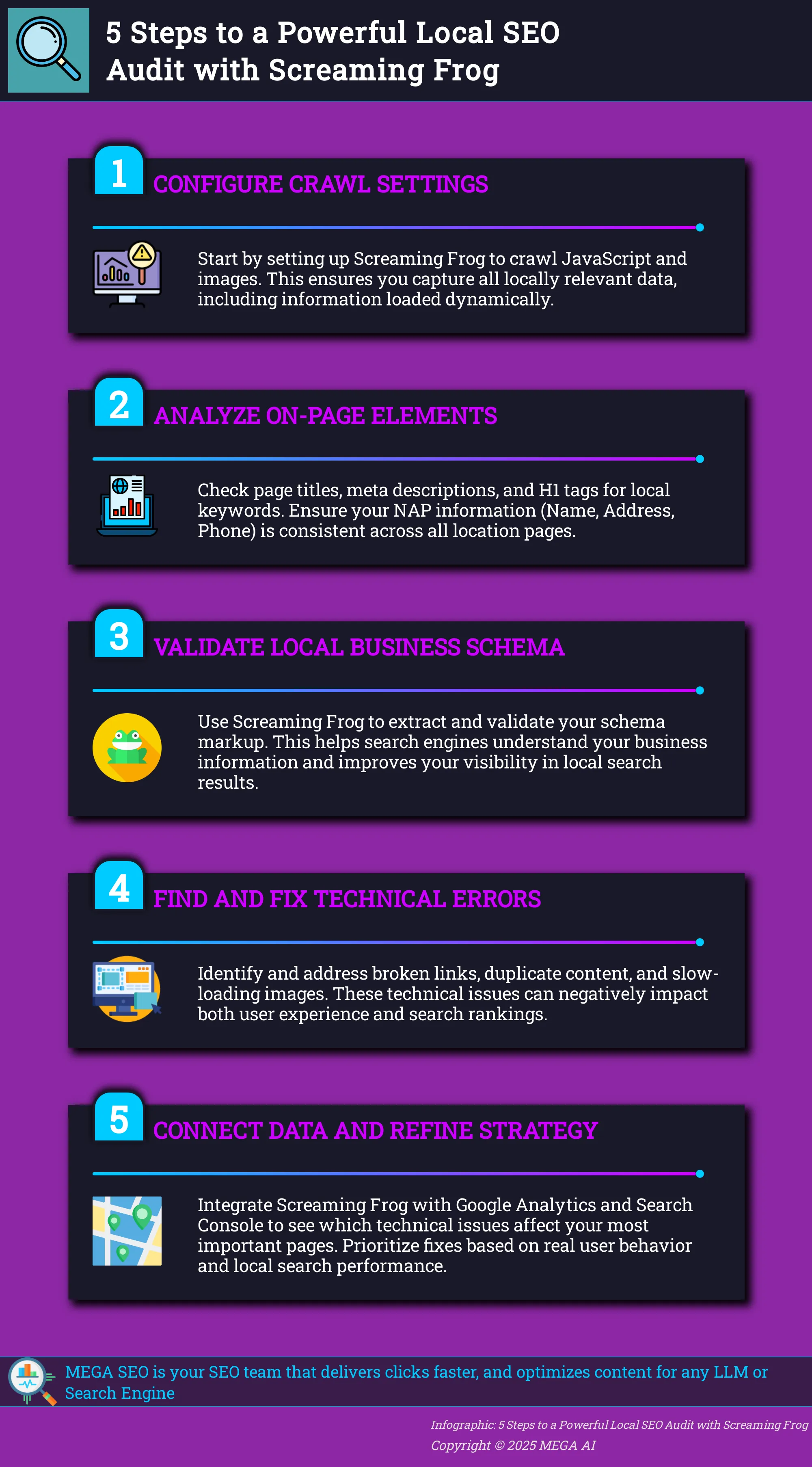
Think of this setup process as creating a specific lens to view your website. You want to filter out the noise and focus on the elements that matter most for local search rankings. This includes checking for NAP (Name, Address, Phone Number) consistency across your site, validating local business schema, and ensuring your on-page signals are correctly optimized for your target locations. A well-configured crawl gives you a clean dataset, making it much easier to spot issues and opportunities without getting lost in thousands of irrelevant data points. A focused audit is an actionable audit. Let’s walk through how to configure the tool for this specific purpose.
Configure Basic Settings
Before you can analyze anything, you need to get the basic setup right. This initial configuration tells Screaming Frog where to look and how to behave, much like giving a search engine bot its first instructions.
First, download the software for your operating system and follow the installation instructions. If you have a paid license, you can activate it by entering your username and key. The free version is great for smaller sites, but a license is necessary for crawling more than 500 URLs and accessing advanced features.
Once installed, you have two main modes. For a full site audit, you’ll use Spider mode. Just enter your website’s homepage URL into the top bar and click "Start." If you only need to check a specific list of pages—like your location pages or key service pages—you can switch to List mode and upload your URLs.
Customize Crawl Options for Local SEO
Screaming Frog’s default settings are designed to mimic Google’s crawlers, but for a local SEO audit, you’ll want to fine-tune the crawl. You can access these options under Configuration > Spider. Customizing these settings helps you focus on local-specific data and avoid collecting unnecessary information.
Here are a few key areas to adjust in the Spider Configuration menu:
- Crawl Behavior: Ensure you’re crawling images, CSS, and JavaScript. This is critical for a local audit, as it allows you to check for local alt text on images and find contact information that might be loaded with JavaScript.
- Crawl Limits: Use the "Limits" tab to set a maximum crawl depth or total number of URLs. This helps you manage the scope of your audit, which is especially useful for large sites.
- Rendering: Go to the "Rendering" tab and switch from "Text Only" to "JavaScript." This lets the crawler see the page as a user would, ensuring it can extract all locally relevant content.
Key Local SEO Elements to Analyze
Once your crawl is complete, you have a treasure trove of data. The next step is to analyze the key elements that directly impact your local search performance. This is where you’ll find the specific, actionable insights needed to improve your rankings and attract more local customers. We’ll focus on three critical areas: on-page signals, citation consistency, and structured data.
On-Page Factors and Technical SEO
Your website's on-page and technical health is the foundation of your local SEO. Use your crawl data to check that your page titles, meta descriptions, and H1 tags include your target local keywords (e.g., "vintage furniture Boston"). Screaming Frog is excellent for spotting site-wide issues. One of the most important things to look for is duplicate content, which can confuse search engines and weaken your site's authority.
The tool is built for comprehensive technical SEO audits, letting you analyze URL structures, find broken links, and check metadata across your entire site. Once you identify these problems, you can use automated SEO tools to implement fixes and maintain your site's technical health without manual effort.
Local Citations and NAP Consistency
Consistency in your Name, Address, and Phone number (NAP) across the web is a major local ranking factor. While Screaming Frog can't crawl external citation sites, it's invaluable for ensuring consistency on your own domain. You can use the custom extraction feature to pull every instance of your address and phone number from your site to confirm they match perfectly. This is also a great way to find orphaned pages, like old landing pages from a previous address, that could be sending conflicting signals to search engines. Ensuring your internal NAP information is uniform is a critical first step before you tackle external citations.
Schema Markup Validation
Local business schema is a type of code that gives search engines explicit information about your business, like your hours, location, and services. This helps you show up in rich results, such as map packs. You can configure Screaming Frog to specifically find and analyze pages with structured data. In the configuration menu, go to Spider > Extraction and select the structured data options to see which pages have schema and if it contains errors. Using these advanced configurations is key to a thorough audit. You can also integrate the tool with the Google Analytics API to see if pages with correct schema markup get more traffic, helping you prove its value.
Find and Fix Common Local SEO Issues
Once your crawl is complete, Screaming Frog presents you with a wealth of data. The next step is to find and fix the technical issues that can hold back your local search performance. Focusing on a few key areas can make a significant impact on how easily local customers find you online. By systematically addressing broken links, duplicate content, and unoptimized images, you build a stronger foundation for your local SEO strategy. This process ensures potential customers have a smooth, helpful experience when they land on your site.
Address Broken Links and 404 Errors
Broken links leading to 404 error pages create a frustrating experience for visitors and can harm your search rankings. Leaving these errors unchecked hurts both user experience and your site's performance. To find them, go to the ‘Response Codes’ tab in Screaming Frog and filter for ‘Client Error (4xx)’. This report shows you every broken link on your site. For pages that have moved permanently, you should implement a 301 redirect to guide both users and search engines to the new, correct page. Regularly cleaning up these errors keeps your site healthy and user-friendly, ensuring potential customers don't hit a dead end.
Correct Duplicate Content and Meta Tags
Duplicate content is a significant issue that can confuse search engines and dilute your site's authority, making it harder for your local business to rank. This often happens with page titles and meta descriptions. In Screaming Frog, check the ‘Page Titles’ and ‘Meta Description’ tabs and use the filter to view anything marked ‘Duplicate’. Each page, especially your core service and location pages, needs unique content. Writing compelling, distinct meta descriptions for each page helps search engines understand its purpose and encourages users to click through from search results.
Optimize Images for Local Search
Images play a big role in local SEO, affecting page speed and user engagement. Properly optimized images can enhance local search visibility, but large files can slow your site down, a major issue for mobile users. Screaming Frog helps find these problems in the ‘Images’ tab. Use the filters to find images ‘Over 100kb’ or those with ‘Missing Alt Text’. Your goal is to compress large images without losing quality and to write descriptive alt text for every image. Good alt text improves accessibility and gives search engines more context about your business, products, and services.
Use Advanced Screaming Frog Features for Local SEO
Once you have the basics down, you can use Screaming Frog’s advanced features to get a much deeper understanding of your local SEO performance. These tools go beyond a standard crawl by pulling in external data and letting you customize what information you collect. By combining data from different sources, you can build a comprehensive picture of your site’s local health, identify opportunities you might otherwise miss, and create a more effective optimization strategy.
Extract Custom Local Data
The custom extraction feature lets you pull specific information directly from your website’s HTML. For local SEO, this is incredibly useful for checking Name, Address, and Phone Number (NAP) consistency across all your location pages. You can configure the crawler to find and extract the exact text for your business hours, specific service offerings, or any other unique detail on your local landing pages. This allows you to conduct a technical SEO audit at scale, ensuring every location page has accurate and uniform information without having to check each one by hand.
Generate and Analyze XML Sitemaps
Screaming Frog can both analyze your existing XML sitemap and generate a new one based on your crawl. This is essential for ensuring all your important location pages are included and easily discoverable by search engines. If you find key pages are missing, you can generate a new XML sitemap directly in the tool. You can also create specialized sitemaps, like an image sitemap, which is great for local businesses that rely on visuals, such as restaurants or retail stores. Regularly analyzing your sitemap helps maintain good site health and makes sure search engines can efficiently crawl your local content.
Connect with Google Analytics and Search Console
Integrating Screaming Frog with your Google Analytics and Google Search Console accounts adds a powerful layer of performance data to your audit. By connecting these tools, you can pull metrics like clicks, impressions, click-through rate, and user sessions directly into your crawl data. This allows you to see which location pages are performing well and which are underperforming in search results. For example, you can identify local pages with high impressions but low clicks, signaling a need to optimize their title tags and meta descriptions. This versatile integration helps you prioritize your efforts based on real-world user data.
Analyze Crawl Data for Your Local Strategy
Once your crawl is complete, you have a wealth of data at your fingertips. The next step is to translate that information into a clear, strategic roadmap for your local SEO. This involves looking beyond individual errors to see the bigger picture of how your site performs for local customers. By connecting technical issues to on-page elements and user behavior, you can build a plan that addresses the most impactful problems first. This process helps you track your progress and ensures your efforts are focused where they matter most.
Interpret Data for Local Insights
Start by viewing your crawl data through a local lens. Go through the main tabs like Page Titles, Meta Descriptions, and H1s, but analyze them for local relevance. Are your target city or service areas mentioned? Do your location pages have unique and descriptive titles? The custom extraction feature is especially useful here for pulling specific local information, like addresses or phone numbers, from every page to check for consistency. This process gives you all the tools you need to keep your site in top shape by connecting on-page factors to your local performance. For a more automated approach, MEGA AI's SEO tools can analyze your content for local relevance and suggest optimizations.
Prioritize Issues and Create Actionable Reports
Not all SEO issues carry the same weight. A broken link on your main services page is more urgent than a missing alt tag on a blog post from five years ago. To prioritize effectively, integrate Screaming Frog with your Google Analytics and Search Console accounts. This allows you to evaluate user data and cross-reference technical issues with actual behavior. For example, you can identify pages with high traffic but also high bounce rates, signaling a potential problem worth investigating immediately. Focus on fixing significant issues like duplicate content and broken internal links first. Create a simple report that lists each task, its priority level, and who is responsible for the fix.
Best Practices for Your Local SEO Audit
Once you have the technical steps down, you can refine your process. A local SEO audit isn't just a one-time task; it's a core part of a living, breathing marketing strategy. Following a few best practices ensures your audits are efficient, insightful, and consistently drive results for your business. By making audits a regular habit and customizing them to your specific needs, you move from simply fixing errors to proactively improving your local search presence.
Run Regular Audits and Focus on Mobile
An effective SEO campaign is a long-term process. As Screaming Frog notes, websites naturally experience peaks and troughs, which is why a robust measuring and reporting process is essential for monitoring performance accurately. Schedule your local SEO audits quarterly or bi-annually to catch issues before they grow. This regular cadence helps you adapt to algorithm changes and stay ahead of competitors. Since most local searches happen on phones, always approach your audit with a mobile-first mindset. Check mobile usability, page speed on mobile devices, and how your local business information appears on smaller screens. Regular checks help you avoid common content audit mistakes and keep your strategy sharp.
Tailor Settings for Specific Local Needs
Screaming Frog’s power lies in its flexibility, so don't stick to the default settings. Tailor your crawl to focus on the data that matters most for local SEO. Using advanced configurations allows you to zero in on specific elements, like crawling pages that contain structured data to ensure your local business schema is correctly implemented. You can also customize your crawl to extract specific text, like phone numbers or addresses, to check for NAP consistency across your site. For deeper insights, integrate Screaming Frog with your Google Analytics API. This lets you pull and evaluate user data across different segments, helping you understand how users from your target locality behave on your site.
Handle Common Screaming Frog Challenges
Screaming Frog is a fantastic tool for deep technical analysis, but it’s not without its learning curve. Many marketers, especially those new to technical SEO, find themselves facing a few common hurdles. The two biggest challenges are often dealing with the massive amount of data the tool provides and figuring out how to get meaningful results from the free version.
Instead of getting discouraged, think of these as opportunities to become a more strategic auditor. Learning to work with the tool’s complexities will make your insights more valuable. And if you prefer to skip the manual work, an automated SEO platform can handle these technical checks for you, delivering prioritized action items without the steep learning curve. Let’s look at how to approach these challenges head-on.
Manage Data Overload and the Interface
Screaming Frog is an industry-standard tool, but its interface can feel overwhelming when you're just starting. The sheer volume of data from a single crawl often leaves new users unsure where to begin, and the default settings can cause you to miss important issues. To make it more manageable, focus your analysis on a few key tabs at a time, such as Response Codes, Page Titles, and Meta Descriptions. You can also use the configuration settings to customize your crawl before you even start. This helps narrow the scope and reduces the data you have to sift through. Properly conducted content audits are essential for site health, and learning to filter the noise in Screaming Frog is a key step.
Get the Most from the Free Version
The free version of Screaming Frog limits you to 500 URLs, but you can still accomplish a lot with it. Instead of crawling your entire site, focus on specific sections by entering a subdirectory as the starting URL, like yourwebsite.com/blog. This is perfect for targeted audits on smaller sites or key areas of larger ones. The free tool is powerful enough to identify several common content issues, including duplicate content and multiple canonical tags on a single page. To stay within the crawl limit, use the "Exclude" feature in the configuration settings to tell Screaming Frog to ignore unimportant URLs. This strategic approach helps you get valuable insights without needing a paid license.
Measure and Report Local SEO Improvements
Your local SEO audit is complete, and you’ve implemented the necessary fixes. But the work doesn’t stop there. An effective SEO campaign is a long-term process, and you’ll need a robust way to monitor performance to understand what’s working and demonstrate value. Websites naturally experience peaks and troughs, so consistent measuring of your SEO efforts is essential for accurately tracking your progress toward success.
After your initial audit, set a baseline for key local metrics. This will be your starting point for measuring improvement. Key performance indicators (KPIs) to watch include:
- Local Pack Rankings: Track your position for target keywords in the map pack.
- Google Business Profile Insights: Monitor views, clicks to your website, direction requests, and phone calls.
- Organic Traffic: Segment your traffic by geographic location in Google Analytics to see if you’re attracting more local visitors.
- Citation Consistency: Periodically check your NAP (Name, Address, Phone Number) consistency across key directories.
- Conversion Rate: Measure how many local visitors complete a desired action, like filling out a contact form or making a purchase.
You can use Screaming Frog to schedule follow-up crawls to verify that your technical fixes remain in place. By connecting it with Google Analytics and Search Console, you can pull user data directly into your analysis. For ongoing content optimization and rank tracking, platforms like MEGA AI can automate the process, using AI-powered SEO to update articles and monitor performance changes, ensuring your content continues to perform well after the initial technical audit.
Track Progress and Communicate Results
Reporting your findings is about more than just presenting data; it’s about telling a story of progress. Your reports should clearly connect the technical changes you made to tangible business outcomes. Start by summarizing the initial audit findings and the actions you took. Then, present the "before and after" data for your key metrics, using visuals like charts and graphs to make the improvements easy to understand. This helps stakeholders see the direct impact of your work.
A regular SEO audit is an invaluable part of maintaining your website’s health and should be a recurring part of your strategy. When communicating results, translate technical fixes into business benefits. For example, instead of saying "corrected 100 duplicate meta descriptions," explain that you "improved the clarity of 100 pages for search engines, which can lead to a better click-through rate from search results." This approach ensures everyone understands the value of your local SEO efforts.
Fit Screaming Frog into Your Local SEO Toolkit
Screaming Frog is an indispensable diagnostic tool, but it’s important to remember that it’s just one part of a complete local SEO strategy. Think of it as your website’s x-ray machine. It excels at showing you what’s happening under the surface—from broken links to missing meta descriptions—but it doesn’t manage your Google Business Profile, build local citations, or respond to customer reviews. Its power lies in how you integrate its findings with your other marketing efforts. For example, after optimizing your GBP listing, you can use Screaming Frog to ensure the linked landing pages are technically sound and offer a great user experience.
The true value of a Screaming Frog audit is turning raw data into an actionable plan. The tool provides the "what," but your expertise determines the "why" and "how." An effective SEO campaign is a long-term commitment, so using a tool for measuring performance is essential for monitoring your efforts accurately. By running regular crawls, you can establish a baseline, track improvements over time, and demonstrate tangible progress to clients or stakeholders. This allows you to track and monitor your progress and adapt your strategy based on solid data.
Once Screaming Frog helps you identify site issues, the next step is implementation. Manually fixing hundreds of title tags, optimizing images, or updating content for better CTR can be a significant resource drain. This is where automation platforms can bridge the gap between diagnosis and execution. For instance, MEGA AI’s SEO tools can take the insights from your audit and apply fixes at scale, automatically updating content and re-optimizing pages to improve rank. By pairing Screaming Frog’s deep analytical capabilities with an automation engine, you can streamline your workflow and focus on strategic growth.
Related Articles
- How to Use Screaming Frog: Mobile Optimization Guide
- Affordable Ahrefs Alternatives: Cost-Effective SEO Solutions
- Best SEO Tracking Tools to Boost Your Rankings
- Top 15 Automatic SEO Tools for Agencies (2025)
Frequently Asked Questions
Screaming Frog found hundreds of issues. Where should I start? It's easy to feel overwhelmed by the amount of data. The best approach is to connect Screaming Frog to your Google Analytics and Search Console accounts. This allows you to see which pages have technical issues and also get significant traffic. Prioritize fixing major problems like broken links or duplicate content on your most important service and location pages first, as these fixes will have the greatest impact.
Is the free version of Screaming Frog good enough for a local SEO audit? The free version is an excellent starting point, particularly for smaller websites under 500 URLs. If your site is larger, you can still get a lot of value by running targeted crawls. Instead of auditing the entire site at once, you can crawl specific sections, such as your blog or your location pages, individually to stay within the limit.
Can Screaming Frog check my business listings on sites like Yelp or Google Maps? Screaming Frog is built to crawl your own website, so it cannot analyze your business information on external citation sites like Yelp or other directories. Its role is to help you ensure the Name, Address, and Phone Number (NAP) information on your own domain is perfectly consistent. This is a critical first step before you begin auditing your listings across the web.
How often should I perform a local SEO audit? A deep local SEO audit should be part of your regular marketing schedule, ideally performed once or twice a year. Websites change, new content is added, and search engine algorithms evolve. Regular audits help you catch technical problems before they become serious and ensure your site remains optimized for local search over the long term.
What is the single most important setting to enable for a local SEO audit? One of the most critical settings to change is the rendering mode. You should switch from the default "Text Only" to "JavaScript" rendering. Many modern websites use JavaScript to load important local information like addresses, phone numbers, or hours of operation. Enabling this setting ensures the crawler sees the complete page content, just as a user would.


