

Your website works hard, but over time, some of its valuable connections can break. These broken links, pointing to pages that no longer exist, are like lost treasure chests, full of SEO value you once earned but are no longer benefiting from. Instead of constantly searching for brand new treasure, what if you could simply recover what's already yours? Link reclamation is the map to finding these lost assets. This guide will show you exactly how to use Screaming Frog for link reclamation?, turning you into an expert at uncovering and restoring these valuable connections, ensuring your site reaps the full rewards of its established authority and user trust.
Key Takeaways
- Maintain SEO Performance Through Link Reclamation: Actively recover lost "link juice" by identifying and repairing broken links pointing to your website, which is crucial for preserving your site's authority and search rankings.
- Use Screaming Frog to Pinpoint Issues: Learn to configure and run Screaming Frog crawls, focusing on the 'Response Codes' and 'Inlinks' data to efficiently find broken links and their origins within your site.
- Establish an Ongoing Reclamation Strategy: Move beyond one-time fixes by creating a repeatable process for prioritizing valuable broken links, conducting effective outreach, and regularly auditing your backlink profile for sustained SEO health.
What is Link Reclamation and Why Does It Matter?
Every link pointing to your website acts as a pathway for potential customers and a signal to search engines about your site's authority and relevance. But links can break or disappear over time, and when they do, you could be losing out. That's where link reclamation comes into play. It’s a crucial process for maintaining your website's overall health and ensuring your search engine performance doesn't suffer. Think of it as a regular check-up for your site's existing connections, making sure you're not unknowingly missing out on valuable opportunities that you've already earned.
Defining Link Reclamation and Its SEO Impact
Link reclamation is the practice of finding and fixing broken links that point to your website. This covers both links from other websites, known as external links, and links within your own site, which are internal links. The main objective here is to regain lost SEO value, often called "link equity" or "link juice." When a link breaks, any authority or ranking power it once passed to your page effectively vanishes.
By repairing these broken connections, you help preserve your current SEO standing. It’s often a more straightforward task than trying to build entirely new links from the ground up. Reclaiming what was already yours ensures that the effort previously invested in acquiring those links continues to support your site's visibility in search engine results.
Which Links Can You Reclaim?
There are several types of links you can reclaim. The most common are broken backlinks, which happen when an external site links to a page on your website that no longer exists or has been moved. You might also encounter lost backlinks, where a link to your site was simply removed, perhaps during a website update on the linking domain. Some link reclamation strategies also involve finding unlinked brand mentions, where your brand is discussed online but without a direct, clickable link back to your site.
Links can disappear for various reasons: pages get deleted or relocated, leading to those familiar 404 errors; website redirects might break over time; or webmasters might manually remove links. Identifying and addressing these issues is a smart way to strengthen your existing link profile and support your site’s ability to rank effectively on search engines.
How to Start Using Screaming Frog for Link Reclamation
Getting started with a new tool can sometimes feel a bit daunting, but Screaming Frog is a powerful ally in your SEO toolkit, especially for link reclamation. Let's walk through the initial steps to get you up and running so you can begin finding those valuable link opportunities.
Download, Install, and Configure Screaming Frog
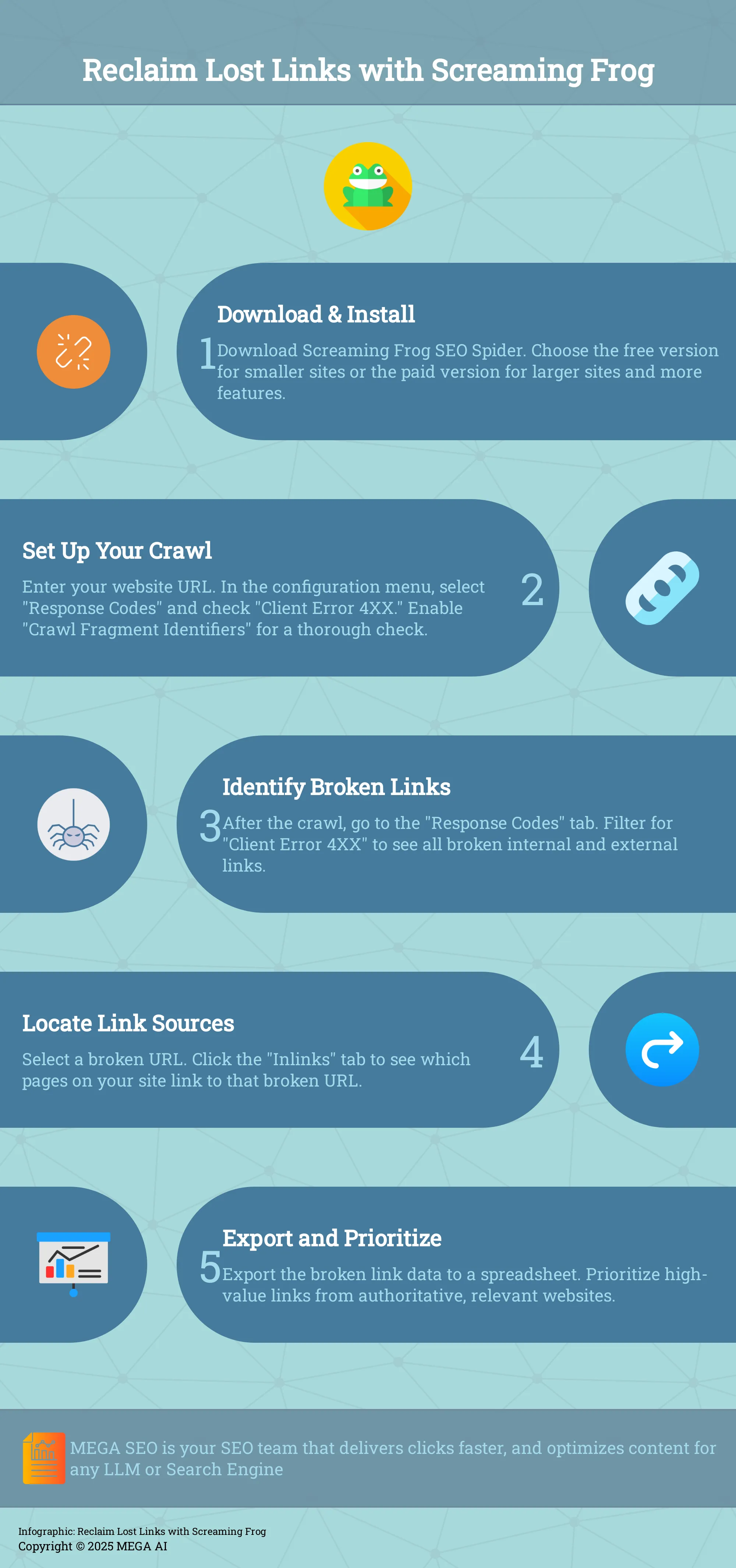
First things first, you'll need to get the Screaming Frog SEO Spider software onto your computer. You can download it directly from their website. They offer both free and paid versions; the free one is quite capable for smaller sites, while the paid version offers more features and higher crawl limits. Once downloaded, the installation process is straightforward. After it's installed, open it up. The initial configuration for a basic crawl is minimal – you'll primarily need your website's URL to begin. For link reclamation, we'll refine settings later, but for now, just getting the tool ready is the main goal.
Explore the Screaming Frog User Interface
When you first open Screaming Frog and run a crawl, the amount of data can seem extensive. Take a moment to familiarize yourself with the layout. At the top, you'll enter the URL to crawl, and the main window will populate with data as the crawl progresses. Key tabs you'll use often include 'Internal,' 'External,' and importantly for link reclamation, 'Response Codes.' This tab is where you'll find broken links, such as 404 errors. The 'Issues' tab also provides a helpful summary of problems found. Don't worry about understanding everything at once; focus on these areas. Consistent use helps many master SEO tools more effectively.
Key Screaming Frog Features for Reclaiming Links
Screaming Frog has several features particularly useful for link reclamation. Once you've identified a broken link (a 404 error, for example), the 'Inlinks' tab at the bottom of the interface is quite helpful. When you select a broken URL in the main window, 'Inlinks' shows you all the pages on your site that are linking to that broken URL. This helps you find exactly where to fix the internal link. You can also export data to a spreadsheet, which is incredibly helpful for tracking your fixes and outreach. Another useful feature is its ability to find broken "jump links" (links to specific sections within a page). To use this, ensure 'Crawl Fragment Identifiers' is enabled in the crawl configuration settings.
Set Up Your Screaming Frog Crawl for Link Reclamation
Alright, now that you understand what link reclamation is and why it's a valuable part of your SEO toolkit, let's get practical. Setting up your Screaming Frog crawl correctly is the foundation for successfully finding those broken links. It might seem a bit technical at first, but once you walk through these steps, you'll see it's quite straightforward. We'll cover how to input your site details, tweak the settings for the best link-finding results, and then kick off the crawl. This process, while manual, is a great way to understand the mechanics of site auditing.
Enter Your Website URL and Adjust Settings
First things first, you'll need to have the Screaming Frog SEO Spider tool downloaded and installed on your computer. Once you open the application, the initial step is to tell it which website you want to examine. You'll see a prominent field at the top where you can enter your website's URL. Simply type or paste your full website address here. This action tells Screaming Frog where to begin its analysis. Initiating the crawl from this point allows the software to start mapping out your site and identifying pages, which is the first step toward finding those elusive broken links that could be harming your SEO and user experience. You can find detailed guides on how to check for broken links directly from Screaming Frog.
Configure Crawl Options for the Best Results
To make sure your crawl is laser-focused on finding opportunities for link reclamation, you'll want to adjust a few settings before you hit 'Start'. After entering your URL, head over to the configuration menu. A key area for link reclamation is the 'Response Codes' tab. Here, you should ensure that the tool is set to report on 'Client Error 4XX' status codes; these are the codes, like the common 404 error, that indicate a broken link. For an even more thorough check, consider enabling the 'Crawl Fragment Identifiers' option. This setting helps Screaming Frog find broken jump links (those links that point to a specific section within a page), which are often missed but can still lead to a frustrating experience for your visitors. Properly configuring these options ensures you get the most accurate data.
Start the Crawl
With your website URL entered and your crawl options configured, you're ready to begin. Click the 'Start' button, and Screaming Frog will begin to systematically work its way through your website, following links from one page to another, much like a search engine bot would. You can monitor the progress in real-time. Once the crawl is complete, or even while it's running, you can navigate to the 'Response Codes' tab. Here, you'll want to filter the results to show only 'Client Error 4XX'. This filtered list will display all the broken internal and external links the spider has found. For easier management and tracking of your reclamation efforts, it's a good idea to export this list of broken links, perhaps into a spreadsheet.
Find Broken Links Using Screaming Frog
Once your Screaming Frog crawl is complete, you'll have access to a comprehensive dataset. The key to efficient link reclamation is knowing precisely where to look and how to filter this information effectively. This powerful tool makes it straightforward to pinpoint those troublesome broken links that can negatively impact user experience and your site's search engine optimization. Broken links, essentially dead ends on the web, can frustrate visitors leading to higher bounce rates, and signal to search engines that your site might not be well-maintained, potentially affecting your search rankings. Finding them is the first critical step in fixing them.
Screaming Frog helps you uncover both internal broken links (links from one page on your site to another page on your site that no longer exists) and external broken links (links from your site to pages on other websites that are broken). By systematically working through the data Screaming Frog provides, you can identify opportunities to either repair these internal links, ensuring smooth navigation for your users, or reclaim valuable external links that are pointing to non-existent pages on your site. This process is fundamental for maintaining a healthy website and a positive user experience. Let's walk through how to use Screaming Frog's features to find these broken links efficiently, so you can start cleaning up your site and improving its overall health.
Use the 'Response Codes' Tab and Filters
Your primary destination for locating broken links within Screaming Frog is the 'Response Codes' tab. Once the crawl finishes, this section neatly organizes all discovered URLs by their HTTP response status. To isolate broken links, you'll want to apply a filter specifically for 'Client Error 4XX' codes. These 4xx errors, including the well-known 404 'Not Found' error, clearly indicate that the page a link is attempting to reach cannot be found. For another convenient way to see these problematic URLs, Screaming Frog also lists them under the 'Issues' tab. This focused approach helps you quickly gather all the broken internal and external links identified during the crawl, making your next steps clearer.
Analyze the 'Inlinks' Column to Find Link Sources
Identifying a broken link is just the first part of the puzzle; you also need to pinpoint where that broken link originates on your website. When you select a broken URL (one showing a 4xx error) in Screaming Frog's main window, direct your attention to the 'Inlinks' tab located at the bottom of the interface. Clicking this tab reveals a list of all the pages on your own site that are currently linking to that problematic, broken URL. This information is invaluable because it tells you exactly which pages require editing to correct the broken link. Understanding the source of these internal links helps you maintain a healthy site structure and ensures your visitors have a smooth browsing experience.
Use 'Custom Search' and the 'External' Tab
There might be times when you have a specific list of URLs you want to check, perhaps from a previous audit or a list of backlinks you're investigating. Instead of running a full site crawl, Screaming Frog’s 'Custom Search' feature offers a more direct approach. You can upload your list of URLs directly into the tool for analysis, which can be a significant time-saver. If you're looking for broken external links found during a regular crawl, you'll want to navigate to the 'External' tab. From there, you can switch to the 'Response Codes' tab and apply the familiar 'Client Error (4XX)' filter. This will show you any outbound links from your site that are leading to error pages, helping you clean up your external linking hygiene or spot potential reclamation opportunities.
Discover More Links with Advanced Techniques
Once you've gotten comfortable with the basics of finding broken links using Screaming Frog, you're ready to explore some advanced techniques. These methods help you uncover a broader range of link reclamation opportunities that go beyond straightforward 404 errors. Think of it as taking your link audit from a quick check-up to a thorough examination. By digging a little deeper, you can find valuable links that, once reclaimed, can make a real difference to your website's SEO performance and overall authority.
Screaming Frog is a robust tool for this kind of detailed work, offering features that allow for more precise analysis and targeted searches. While it's excellent for helping you identify broken links and their sources, its capabilities extend much further. We'll look at how to use specific panes for in-depth URL information, apply sophisticated filters to pinpoint specific link types, and even find those often-overlooked unlinked brand mentions. These approaches might require a bit more setup, but the potential rewards in reclaimed link equity are significant.
Use the 'URL Details' Pane for Deeper Analysis
The 'URL Details' pane in Screaming Frog offers a closer look at each URL found during a crawl. When you select a URL in the main results window, this pane, usually found at the bottom of the interface, fills with specific data. You can see information like the status code, content type, indexability, and response time. For link reclamation, the 'Inlinks' tab within this pane is particularly useful. It lists all the internal pages that link to the selected URL, showing the anchor text used and whether the link is a follow or nofollow. This insight helps you understand the context of internal links and identify opportunities, such as updating links that point to redirected pages so they go directly to the final destination.
Apply Regex and Custom Filters for Specific Links
To refine your search for particular link reclamation chances, Screaming Frog supports regular expressions (Regex) and custom filters. Regex is a sequence of characters that specifies a search pattern, allowing you to find very specific strings of text within URLs or page content. For instance, you could use Regex to locate all URLs containing an old product name that has since been rebranded, or to find links with particular anchor text variations. Custom filters enable you to segment your crawl data based on rules you define. You might, for example, want to filter for client error (4XX) response codes and then further narrow this list to show only those originating from specific high-value domains. This targeted approach helps you concentrate your efforts where they'll have the most impact.
Find Unlinked Brand Mentions
Unlinked brand mentions occur when your brand name, products, or even key team members are mentioned on other websites without a hyperlink back to your site. These are excellent link reclamation targets because the publisher is already aware of your brand and has found it relevant enough to mention. While Screaming Frog doesn't directly scan the web for these mentions, it can be a valuable tool once you've found them using services like Google Alerts or other brand monitoring platforms. After identifying an unlinked mention, you can use Screaming Frog to analyze the linking website's SEO health or to help find appropriate contact information if it's available on their site. Turning these mentions into live links through effective link reclamation is a smart way to enhance your site's authority and online visibility.
Export and Analyze Your Link Data
Once Screaming Frog finishes its crawl, you'll have plenty of data. The next step is exporting this information so you can analyze it effectively. This phase is about transforming raw data into a clear roadmap for your link reclamation. You'll organize what you've found, determine your priorities, and build an actionable plan. A solid approach here makes your outreach much more efficient.
Choose Export Formats and Organize Your Data
Screaming Frog makes it straightforward to get your data out. You'll typically want to export your broken link data into a spreadsheet format, like a CSV file. This allows use of programs like Microsoft Excel or Google Sheets, perfect for sorting, filtering, and adding notes. Think of this as your command center for link reclamation. You can add columns for outreach status, contact information, or notes on linking site quality. Organizing from the start saves time and smooths the process.
Prioritize Links for Your Reclamation Efforts
With your data organized, decide which broken links deserve attention first. Not all links are equal, so focus on high-quality backlinks initially. These are links from authoritative, industry-relevant websites with good reputations. Reclaiming a link from a respected site often has a more significant positive SEO impact than one from a lower-quality source. Review metrics like the linking domain's authority and page relevance. This strategic approach helps ensure your efforts yield the best results.
Create Actionable Reports
With your prioritized list, the final analysis step is creating reports to guide outreach. This means taking your spreadsheet and clearly identifying 404 errors and specific URLs needing updates. Your report should make it easy to see which website owner to contact and what information they’ll need. Remember, utilizing a web crawling tool like Screaming Frog is invaluable for pinpointing these issues. The goal is a clear, actionable list so you can efficiently email website owners to update links, turning analysis into SEO improvements.
Develop Effective Link Reclamation Outreach Strategies
After identifying broken links and unlinked mentions with Screaming Frog, your next step is outreach. Contacting website owners to request link updates or new links is crucial. While effective outreach requires a thoughtful approach, it significantly improves your success rate by making it easy for them to agree.
Craft Personalized Outreach Messages
Mass emails often go ignored, so personalization is vital for your outreach to stand out. Link reclamation aims to recover value from lost links or gain credit for existing mentions; a personal touch demonstrates your diligence. Address the site owner or editor by name. Clearly state the specific page on their site with the issue, providing both the old/incorrect URL and the new/correct one.
Frame your request as beneficial to them—fixing a broken link enhances their user experience, while linking to your resource adds value for their readers. Keep messages concise, polite, and professional. While email templates offer a starting point, always customize them.
Follow Up and Track Responses
Don't be discouraged by initial silence; people are busy. A polite follow-up after about a week can often secure a response, but limit follow-ups to one or two to avoid seeming intrusive. Tracking your outreach is essential. Use a spreadsheet or CRM to log contacts, dates, link issues, and responses.
This organization prevents duplicate outreach and helps manage your efforts effectively. Remember, monitoring your backlinks is an ongoing task. Links can break or new mentions may surface, so a consistent system is key for long-term success in maintaining and improving your site’s link profile.
Tools to Support Your Screaming Frog Outreach
Screaming Frog excels at finding opportunities, but other tools can aid your outreach. Email platforms like Hunter.io or BuzzStream help find contacts and manage campaigns, especially for numerous prospects, offering features for scaled personalization and tracking. The data from Screaming Frog underpins your efforts.
High-quality, technically sound content on your site makes requests more persuasive. Platforms like MEGA AI can help automate on-page SEO, including content optimization, ensuring pages you want linked offer real value. This comprehensive strategy improves your chances of successful link reclamation.
Measure Success and Optimize Your Process
Successfully using Screaming Frog to find and begin reclaiming lost links is a significant achievement in your SEO efforts. However, the journey doesn't end with sending out those initial outreach messages. To truly capitalize on your hard work and ensure long-term benefits, it's crucial to measure the success of your reclamation activities and continuously optimize your process. This means more than just counting recovered links; it involves understanding their impact on your site's performance, establishing a sustainable system for ongoing link health, and refining your workflow for maximum efficiency.
Think of it as tending a garden. You've planted the seeds by identifying and reaching out about broken links. Now, you need to monitor their growth (the impact of reclaimed links), regularly weed out new problems (perform link audits), and improve your gardening techniques (streamline your workflow). This systematic approach not only helps you recover valuable link equity but also builds a more robust and resilient SEO foundation. By diligently tracking results and optimizing your methods, you'll gain clearer insights into what strategies yield the best returns, allowing you to allocate your resources more effectively and demonstrate the tangible value of your link reclamation efforts. Let's explore how you can effectively measure your progress and keep your link reclamation strategy sharp and productive.
Monitor Reclaimed Links and SEO Improvements
Once you've successfully reclaimed a link, it's important to monitor its impact. Keep a detailed list of the links you've managed to get reinstated or fixed. Over time, tracking these reclaimed backlinks helps you demonstrate the value of your link reclamation efforts, especially when reporting to stakeholders or clients. Look for improvements in key SEO metrics for the pages that have had links pointed back to them.
Are you seeing an increase in organic traffic to those pages? Have their keyword rankings improved? Tools like Google Analytics and various rank trackers can help you measure these changes. Also, pay attention to referral traffic from the reclaimed links. This data not only proves the direct benefit of your work but also helps you understand which types of reclaimed links provide the most value, guiding your future efforts.
Establish a Regular Link Audit Schedule
Link reclamation shouldn't be a one-off task. The web is dynamic; websites change, content gets updated, and new broken link opportunities can emerge without warning. It's a sound practice to regularly check for broken links, with many experts suggesting a quarterly audit as a reasonable frequency for most websites. This proactive approach helps you identify and address issues before they can negatively affect your SEO performance or user experience for an extended period.
Make this a recurring item in your SEO calendar. During these scheduled audits, you can repeat the Screaming Frog crawl process to find any newly broken internal or external links pointing to your site. Consistent checks ensure you maintain a healthy backlink profile and continuously capture the value of links that might otherwise be lost. This ongoing vigilance, combined with efforts to build new, high-quality links, will yield the best long-term results for your website's authority.
Tips to Streamline Your Link Reclamation Workflow
As you gain more experience with link reclamation, you'll naturally discover ways to make the process more efficient. One of the most significant improvements comes from mastering your tools. Using a web crawling tool like Screaming Frog is invaluable for quickly identifying broken links and other issues within your backlink profile; really get to know its advanced filters and export options to access the data you need faster.
Consider creating templates for your outreach emails. While personalization is always key for better response rates, having a solid base template can save considerable time. Organize your reclaimed link data systematically, perhaps in a spreadsheet, noting the date identified, outreach date, response, and date fixed. For larger sites or agencies looking to scale their efforts, exploring how to automate SEO tasks can free up valuable time for more strategic activities. Regularly review your process: what’s taking the most time? Are there steps you can combine or other tools that could help you work smarter?
Address Common Link Reclamation Challenges
Link reclamation is a powerful technique, but like any valuable SEO task, it can come with a few hurdles. Knowing what to expect can help you prepare and tackle these challenges effectively. Let's look at some common issues you might encounter and how to manage them, so you can keep your website healthy and your SEO efforts strong.
Handle Large Websites and Data Overload
If you're working with a substantial website, you're likely dealing with a significant amount of data. When you crawl large sites, it naturally takes more time for tools like Screaming Frog to gather all the necessary information. Patience is certainly helpful here, but so is having a robust tool.
Screaming Frog is quite capable of handling extensive datasets and is designed to help you maintain your website's integrity, even at scale. For businesses looking to streamline these processes further, platforms like MEGA AI offer automated SEO solutions that can simplify the management of large-scale data analysis and content optimization, making the task feel much more manageable.
Address Technical Knowledge Gaps
Fixing broken links and reclaiming lost link equity sometimes requires a bit of technical know-how. It can feel like a challenging process if you're not deeply familiar with website structures or server response codes. Please don't let this discourage you.
Taking the time to learn how to use a web crawler like Screaming Frog can significantly bridge these knowledge gaps. Many resources are available to help you understand how to identify and fix common technical issues. For those who prefer a more guided approach, MEGA AI's platform is built to simplify complex SEO tasks. This allows users of all expertise levels to effectively manage their website's technical health, and you can always book a demo to see how it works.
Integrate Link Reclamation into Your SEO Strategy
Link reclamation shouldn't be a one-off task you check off a list. Instead, think of it as an ongoing part of your broader SEO strategy. Effective link reclamation enhances your site's authority and visibility because search engines tend to favor websites with strong, reliable backlink structures.
Regularly using a tool like Screaming Frog is invaluable for identifying issues within your backlink profile and discovering new opportunities. By making link audits a consistent part of your routine, you ensure your site remains healthy and authoritative. This aligns well with how MEGA AI approaches SEO, focusing on continuous optimization and maintenance to help your content rank higher and maintain its performance over time.
Related Articles
- Link Building 101: Definition, Types & Best Practices
- Link Building Strategies: The Complete Guide
- Mastering SEO Content: Best Practices for Effective Linking
- Deep Linking SEO: A Complete Guide for 2024
- How to Use Screaming Frog: Mobile Optimization Guide
Frequently Asked Questions
Why should I bother with link reclamation if I'm already building new links? Think of link reclamation as protecting the hard work you've already put in. While building new links is essential for growth, reclaiming lost or broken links ensures you're not losing the SEO value and authority those existing connections once provided. It's often a quicker win because the link or mention was already there, making it a smart complement to your new link-building efforts.
Screaming Frog looks complicated. Is it really necessary for finding broken links? Screaming Frog can seem a bit much at first glance because it offers so much data, but for thoroughly finding broken links, it's incredibly effective. While simpler tools exist, Screaming Frog gives you a comprehensive view of your site's health, helping you pinpoint exactly where links are broken and where they're coming from. Once you get the hang of the basic functions for link reclamation, it becomes a very powerful ally.
How often do I need to perform link reclamation for my website? The ideal frequency can depend on your website's size and how often you update content, but a good rule of thumb is to conduct a link audit, including checks for reclamation opportunities, about once a quarter. This regular schedule helps you catch new issues before they significantly impact your site's performance or user experience, keeping your link profile healthy.
What's the difference between a broken link and a lost link in reclamation? A broken link usually points to a page on your site that no longer exists or has moved, resulting in something like a 404 error. You'd typically fix this by redirecting the old URL or updating the link on the linking site. A lost link is one that used to point to your site but has been removed entirely from the linking page. Reclaiming a lost link often involves reaching out to the site owner to see if they'd be willing to reinstate it.
What should I do if a website owner doesn't reply to my request to fix a link? It's quite common for initial outreach emails to go unanswered, as people are often busy. A polite follow-up message after about a week can sometimes prompt a response. However, if you still don't hear back after a gentle nudge, it's usually best to move on. Focus your energy on other opportunities, as persistently contacting someone who isn't responsive can be counterproductive.


