
For startups and small businesses, every SEO effort needs to be efficient and impactful. Broken link building offers a fantastic way to earn valuable backlinks without a massive budget, but the discovery phase can be a hurdle. This is where understanding how to use Screaming Frog for broken link building becomes a game-changer. This powerful desktop crawler can automate the search for dead links, saving you precious hours. Our guide is designed to help digital marketers and small teams leverage Screaming Frog effectively, walking you through setup, analysis, and how to turn those broken links into growth opportunities for your online presence.
Key Takeaways
- Pinpoint Opportunities with Screaming Frog: Efficiently use the crawler to identify broken external links on websites, creating a clear list for your outreach efforts.
- Streamline Analysis with Smart Configuration: Adjust Screaming Frog’s crawl settings and apply filters (like 4xx client errors) to quickly isolate the most relevant broken link data.
- Convert Data into Backlinks via Strategic Outreach: Carefully analyze broken link contexts, personalize your outreach with suitable content replacements, and track your results to refine your approach.
What is Screaming Frog and How Does It Help with Broken Link Building?
If you're working in SEO, you've likely come across Screaming Frog. It's a robust desktop program, often referred to as the Screaming Frog SEO Spider, that crawls websites much like search engine bots do. As it explores a site, it gathers a wealth of information about various on-page SEO elements, such as page titles, meta descriptions, heading tags, response codes, and, importantly for this discussion, all the links on a page.
So, how does this connect to broken link building? Broken link building is a popular and effective outreach strategy. It involves finding external links on other websites that point to pages that no longer exist—these are the links that result in a 404 error. Once you identify these dead links, the next step is to contact the website owner or editor. You inform them about the broken link on their site and then suggest your own relevant, high-quality content as a suitable replacement. This approach benefits both parties: the website owner can fix an error, improving their site's user experience and SEO, and you have an opportunity to gain a valuable backlink.
Screaming Frog excels at the initial, often time-consuming, step of this process: locating those broken outbound links. It can efficiently scan a target website and compile a list of all its external links, clearly highlighting any that are broken. This means you can quickly pinpoint potential opportunities for your broken link building campaigns without manually checking each link on a site. The tool automates the discovery phase, providing you with a targeted list of websites to approach.
How to Set Up Screaming Frog for Broken Link Analysis
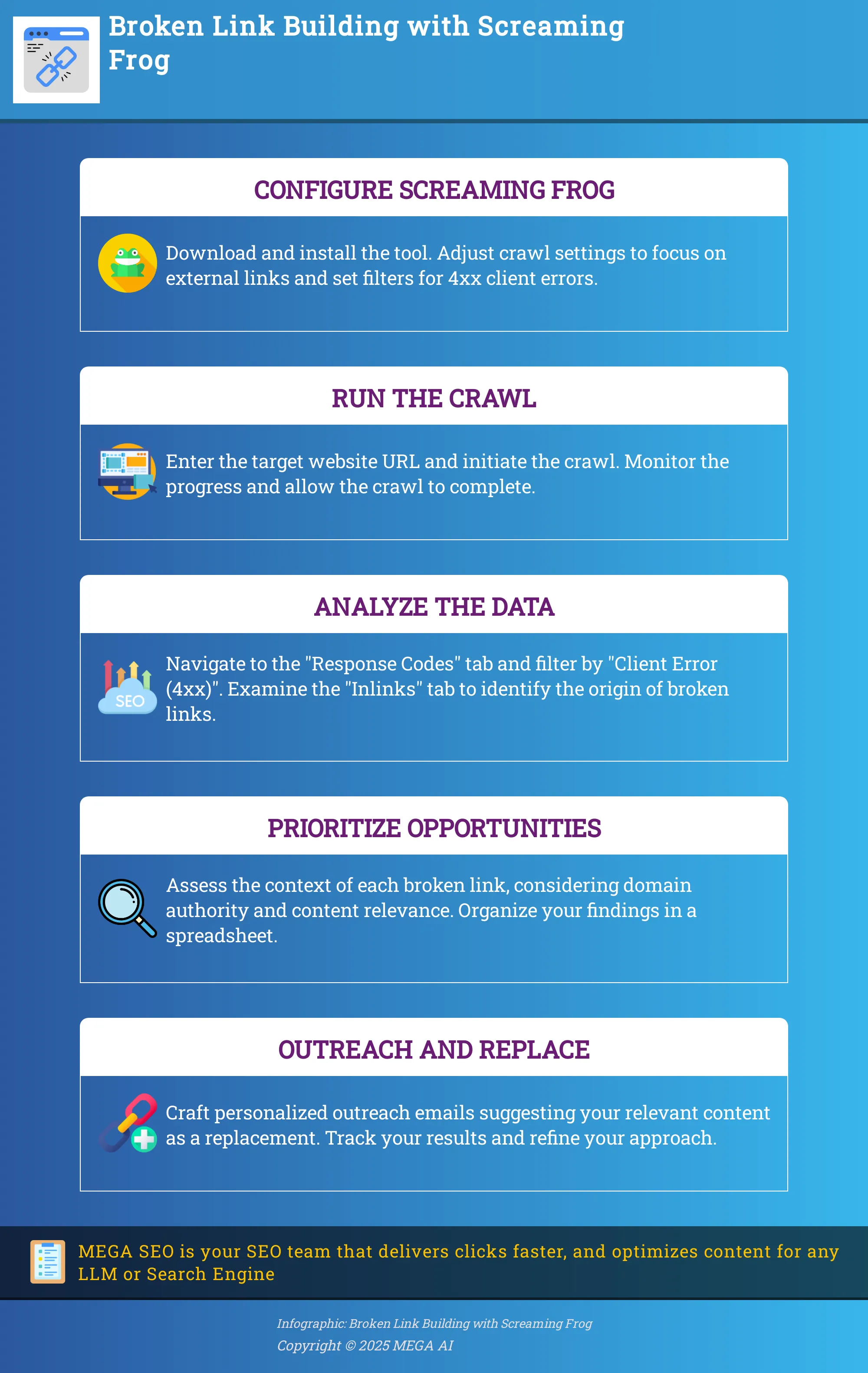
Getting Screaming Frog ready to find those elusive broken links involves a few key steps. Properly configuring the tool from the start ensures you get accurate data, making your broken link building efforts much more effective. Think of it as prepping your workspace before a project; the right setup makes the whole process smoother. We'll walk through downloading the software, tweaking essential crawl settings, and applying filters so you can zero in on what matters most.
Download and Configure Screaming Frog
First things first, you'll need to download Screaming Frog if you don't have it already. You can find it on their official website. The free version is quite generous, allowing you to crawl up to 500 URLs, which is often sufficient for smaller websites or when you're just starting out. If the site you're analyzing has more pages, you might consider upgrading to the paid version to crawl an unlimited number. Once downloaded, the installation process is standard. Take a few moments to get acquainted with the interface; it can seem a bit technical initially, but you'll quickly learn where the important features are located.
Adjust Crawl and Spider Settings
Before you initiate your crawl, it's a good idea to review your settings to ensure they match your broken link analysis objectives. In the 'Configuration' menu, you'll find options like 'Spider' and 'Robots.txt'. For broken link building, you'll generally want to make sure you are set to crawl external links. Pay attention to the 'Spider' settings, where you can manage aspects like crawl depth and whether to crawl elements such as images, CSS, or JavaScript. While extensive customization isn't always needed for basic broken link discovery, ensuring you have the right settings for your content audit goals is important. For more advanced analyses, remember that without using features like custom extraction, you might miss some valuable data.
Set Up Filters and Exclusions
To make your analysis more targeted, Screaming Frog’s filters are incredibly useful. For identifying broken links, you'll primarily be interested in client-side errors. After a crawl, you can navigate to the 'Response Codes' tab and use the filter for 'Client Error (4XX)' to display broken links. This action helps you concentrate specifically on links generating errors, such as the common 404 'Not Found' pages. Additionally, you can use the 'Include' and 'Exclude' features found under 'Configuration'. These allow you to specify URL patterns that Screaming Frog should either crawl or ignore, which can help streamline the analysis process when working with large sites or specific sections.
How to Conduct a Broken Link Audit
Alright, let's get into the practical steps of finding those pesky broken links using Screaming Frog. This process is all about systematically checking your website to ensure all your links, both internal and external, are leading where they should. A clean bill of link health means a better experience for your users and can positively influence how search engines view your site. Think of this audit as a regular health check-up for your website's pathways.
When links on your site don't work, it can frustrate visitors and might even make them leave. For search engines, broken links can be a sign that a site isn't well-maintained, which isn't great for your SEO efforts. Using a tool like Screaming Frog helps automate this detection process, saving you a ton of manual effort. It crawls your site, just like a search engine would, and reports back on what it finds. This tool is incredibly versatile, but for now, we're focusing on its ability to act as a powerful broken link checker. By identifying and fixing these broken links, you're essentially tidying up your site, making it more efficient and user-friendly. We'll walk through how to start the crawl, understand the data Screaming Frog provides, and then pinpoint those specific 404 errors and broken external links that need your attention. This methodical approach will help you maintain a polished and professional online presence, ensuring your audience and search engines alike have a smooth experience.
Start and Monitor Your Crawl
First things first, you'll need to get the Screaming Frog SEO Spider tool. If you don't have it already, head over to their website and download the version that suits your operating system. Installation is pretty straightforward. Once it's up and running, you'll see a field at the top where you can enter your website's URL – make sure to use the full address, like "https://www.yourwebsite.com".
After you've entered your URL, simply hit the 'Start' button. Screaming Frog will then begin to crawl your website, much like a search engine bot would, following links from one page to another. You can watch the progress in real-time, seeing the URLs being discovered and analyzed. Depending on the size of your site, this might take a few minutes or a bit longer, so feel free to step away for a moment while it works its magic.
Interpret Crawl Data
Once Screaming Frog has finished its crawl, it's time to look at what it found. The interface presents a lot of information, but for broken links, we're interested in specific areas. Head over to the 'Response Codes' tab. This section categorizes all the URLs crawled by the HTTP response code they returned.
You'll want to use the filter here to narrow down the results. Look for an option to filter by 'Client Error (4xx)'. These are the codes, like the common 404 'Not Found' error, that indicate a broken link. The 'Issues' tab also provides a summary of problems found during the crawl, and broken links will be flagged here too, offering another quick way to assess your site's link health. This initial interpretation helps you quickly gauge the extent of any broken link issues on your site.
Identify 404 Errors and Broken External Links
To specifically zero in on those 404 errors, make sure your filter in the 'Response Codes' tab is set to 'Client Error (4xx)'. This lists all internal URLs on your site that are broken. For each broken link, select it and then click the 'Inlinks' tab at the bottom. This tab reveals all pages on your site linking to that broken URL, showing you exactly where to make fixes.
Screaming Frog also helps find broken external links. In the main navigation, select 'External' to view all outbound links. Check their 'Status Code' column; any showing a 4xx error are broken and need updating or removal. If you have a specific list of URLs to check, Screaming Frog's 'List' mode allows you to upload and crawl only those URLs, which can be very efficient.
How to Analyze and Prioritize Broken Links for Outreach
Once your Screaming Frog crawl finishes, you'll have a list of broken links. The next step is to sort through these and decide which ones are truly worth your outreach time. Not every broken link is a hidden gem, so a bit of careful analysis and prioritization will make your broken link building efforts much more effective. This process helps you focus your energy where it counts, ultimately helping you secure more valuable backlinks. Think of it as sifting through data to find the opportunities that will give you the best return.
Examine the Context and Value of Broken Links
Before you start drafting outreach emails, take a closer look at each broken link Screaming Frog has found. The tool gives you some handy information here. The "From" column tells you the specific page where the broken link is located, while the "To" column shows the broken URL itself. Also, pay attention to the anchor text used for the link, and if it’s an image, check the alt text. These details offer clues about the original content the link was pointing to. This context is vital because your aim is to offer a relevant and high-quality piece of your own content as a suitable replacement.
Ask yourself a couple of key questions: Is the topic of the original, now broken, link something that aligns with your website's content or your area of expertise? And, importantly, is the website that hosts this broken link a reputable one and relevant to your industry? A broken link on a well-regarded site in your niche generally offers more value than one on an obscure or unrelated blog. Understanding this context helps you judge if offering your content makes sense and increases the chances of the webmaster accepting your suggestion to secure high-quality backlinks.
Organize Data for Strategic Outreach
With your initial analysis complete, it’s time to get your findings in order. A raw list of URLs from Screaming Frog can feel a bit much, so structuring this information is a key step for an efficient outreach campaign. A good approach is to export the broken link report into a spreadsheet. Here, you can add extra columns to help you prioritize, such as the website's domain authority (you can find tools to check this), how closely the broken link's topic matches your content, and a space for the webmaster's contact information, which you'll gather in a later step.
This organization allows you to sort your list strategically, focusing on the most promising opportunities first. For instance, you might decide to prioritize websites with higher authority scores or those where the broken content is a near-perfect match for a resource you already have. Having a clear link-building outreach plan makes the entire process much smoother and more manageable. This systematic approach not only helps you target effectively but also allows you to track your communications and their outcomes.
How to Export and Use Broken Link Data
Once your Screaming Frog crawl is complete and you've identified potential broken links, the next step is to get that data out of the tool and into a format you can work with. This is where Screaming Frog’s export features really shine, making it much simpler to manage your findings and prepare for outreach. Properly exporting and organizing this information is key to an efficient broken link building campaign. Think of it as setting up your command center before you launch your mission. A little organization here goes a long way in streamlining your efforts and making your outreach more effective. Let's look at how you can pull this valuable data and get it ready for action.
Use Screaming Frog's Export Features
Screaming Frog makes it straightforward to export your findings. You can directly export broken link data into a spreadsheet, which is incredibly helpful for keeping track of everything in one place. This gives you a clear, manageable list of all the broken links the crawl identified, making it easier to address them systematically.
For a more comprehensive view, especially when planning outreach, use the "Bulk Export > All External Links" option. This creates a spreadsheet that conveniently lists the source URLs alongside their corresponding broken external links. Having this information side-by-side is a huge time-saver when you’re trying to organize your outreach efforts and understand the context of each broken link without constantly switching between different views or reports.
Format Data for Outreach Campaigns
After you’ve exported your list of links, the next step is to prepare it for your outreach. Open the spreadsheet and your first task will be to filter the data. Focus on the status codes to pinpoint the broken links – you're primarily looking for 4XX errors, like the common 404 "Not Found" error.
It’s also a smart move to check for 3XX redirect codes. While these aren't broken yet, temporary redirects can sometimes lead to broken links down the line, or they might indicate a less-than-ideal user experience. By identifying these issues and offering solutions, you’re not just creating an opportunity to secure valuable backlinks; you’re also genuinely helping webmasters improve their sites, which builds goodwill and strengthens your professional relationships.
How to Craft a Successful Broken Link Building Strategy
Once Screaming Frog has helped you uncover those broken link opportunities, the next crucial step is your outreach. Simply finding a broken link isn't enough; how you approach the website owner can make all the difference between gaining a valuable backlink and your email getting ignored. A thoughtful strategy here is key to turning those dead ends into new pathways for your site. It’s about providing genuine value and making it easy for webmasters to see why linking to your content benefits them.
Personalize Your Outreach Messages
When you reach out about a broken link, remember that there's a real person on the other side. Generic, mass emails rarely get a positive response. Taking the time to personalize your outreach significantly increases your chances of success. Start by clearly mentioning the specific broken link you found on their site – this shows you’ve actually looked at their content.
Explain briefly how your content can serve as a fitting replacement, and perhaps even mention something specific you appreciate about their website or their work. Keep your message concise and focused. Your goal is to make it easy for them to understand the issue (the broken link) and the solution you're offering (your excellent content). A little bit of genuine effort in your communication can go a long way.
Suggest Relevant Content as Link Replacements
The core of broken link building is to offer a solution. You're not just pointing out a problem; you're providing a high-quality fix. When you contact a webmaster, your primary aim is to suggest your content as the ideal replacement for their dead link. This approach helps them improve their site's user experience and SEO, while you earn a relevant backlink.
Before you even draft that email, take a moment to analyze the content that the broken link originally pointed to. Understanding what was there before helps you propose a replacement from your own site that is genuinely relevant and, ideally, even more valuable. If you can show that your content closely matches the topic and offers substantial information, webmasters will be much more inclined to update the link in your favor.
Advanced Screaming Frog Techniques and Best Practices
Once you're comfortable with the fundamentals of using Screaming Frog to find broken links, you can explore more advanced features to really sharpen your strategy. Moving beyond basic crawls allows you to work more efficiently, especially when dealing with extensive websites, and gather richer data for your outreach. These advanced techniques are key to pinpointing the most valuable opportunities and making your broken link building efforts significantly more impactful. By customizing how Screaming Frog crawls and by integrating its findings with other analytical tools, you can gain much deeper insights.
This isn't just about finding a list of broken links; it's about understanding their context, the potential value they hold, and how to best approach fixing them for mutual benefit. For instance, you can learn to identify not just the broken link, but also precisely where it originates and what anchor text was used. This level of detail is crucial for effective outreach. Adopting these practices can transform your broken link building from a numbers game to a strategic acquisition of high-quality backlinks. Mastering these methods will help you save time, focus your efforts on the most promising prospects, and ultimately improve your SEO performance more effectively by building a stronger, more authoritative backlink profile. It’s about working smarter, not just harder, to achieve your link building goals.
Use Custom Filters and Regular Expressions
Screaming Frog becomes even more powerful when you tailor its crawling and reporting. Using custom filters is a fantastic way to zero in on exactly what you need. For instance, you can filter your crawl results to show only 404 errors, or perhaps broken links pointing to a specific competitor's domain you're targeting. This is incredibly helpful for managing large crawls without getting overwhelmed by data.
When you're examining the results, pay close attention to columns like 'From', which shows you the page with the broken link, and 'To', which displays the broken URL itself. Screaming Frog also provides details like the anchor text used for the link, giving you valuable context for your outreach. For more complex scenarios, learning to use regular expressions in your filters can help you match specific URL patterns, further refining your search for link building opportunities.
Integrate with Other SEO Tools for Deeper Analysis
Screaming Frog is a robust tool on its own, but its true potential shines when you combine it with other SEO software. For example, by integrating Screaming Frog data with Google Analytics, you can identify broken links on pages that receive significant traffic or have high bounce rates. This helps you prioritize fixing links that are most detrimental to user experience and SEO.
This kind of deeper analysis isn't just for seasoned pros; it offers a practical way for everyone, from SEO beginners to experts, to effectively identify and prioritize broken link opportunities. Consider also cross-referencing your Screaming Frog finds with data from backlink analysis tools to understand the authority of pages linking to broken resources. This holistic view ensures you're targeting the most valuable link placements.
How to Measure and Optimize Your Broken Link Building
Finding broken links and reaching out to website owners is a significant part of the process, but your work doesn’t stop there. To truly make your broken link building efforts effective, you need to understand what’s working and what isn’t. This involves consistently monitoring your results and being flexible enough to adjust your tactics along the way. Think of it as a continuous cycle: you plan your strategy, execute your outreach, measure the outcomes, and then refine your approach based on what you’ve learned. This ongoing loop of improvement is fundamental to getting the most value from any SEO activity, including this one. By regularly evaluating your performance, you can transform good efforts into great results, securing those valuable backlinks that help your website’s authority and visibility.
Set and Track Key Performance Indicators (KPIs)
Before you send out your first outreach email, it’s helpful to define what success will look like for your broken link building campaign. Key Performance Indicators, or KPIs, are the specific metrics you’ll use to measure your progress and effectiveness. A primary KPI is, naturally, the number of high-quality backlinks you acquire. This directly tells you if your core activity is yielding the desired connections.
Another important metric to watch is your outreach success rate: what percentage of your emails actually result in a link? This helps you understand how effective your messaging and targeting are. You might also track the average domain authority or rating of the websites that link to you, as this indicates the quality and potential impact of the links. Ultimately, these efforts should contribute to an improvement in your website's search rankings and overall online presence.
Refine Your Approach Based on Results
Once you begin tracking your KPIs, you’ll start to gather useful data. It’s important to use this information to sharpen your broken link building technique. For instance, if you observe a low response rate to your outreach, it might be time to review your email templates. Are they personalized enough? Is the replacement content you’re suggesting genuinely a strong and relevant fit for the other website? You could try A/B testing different subject lines or variations in your email copy to see what resonates best with webmasters.
Analyze which types of websites or content areas are more receptive to your requests. You might discover that certain industries are more open to fixing broken links, or that webmasters of particular kinds of sites are more appreciative of your assistance. This insight allows you to concentrate your efforts where they are most likely to be successful. Regularly reviewing your performance and making data-driven adjustments will help you improve your outreach plan and achieve better outcomes with each campaign you run.
Common Mistakes to Avoid in Screaming Frog Broken Link Building
Screaming Frog is a fantastic tool for uncovering broken link building opportunities, but like any powerful software, there are a few common pitfalls you'll want to sidestep. Being aware of these can save you a lot of time and help you get much better results from your efforts. Let's walk through some of these so you can approach your broken link building with confidence and make the most of this versatile crawler.
Overlooking Crawl Settings, Especially for Large Sites
When you're dealing with a massive website, just hitting "start" without tweaking your settings can lead to a crawl that takes ages or even causes the tool to struggle. To avoid this, it's crucial to manage your crawl settings effectively before you begin. You can configure Screaming Frog to limit crawl depth, exclude irrelevant URL parameters, or focus on specific subdomains. Taking a few moments to tailor these configurations ensures you gather the precise information you need efficiently, without bogging down your system or sifting through unnecessary data later.
Not Using Filters Effectively
Screaming Frog provides an enormous amount of data, and without its filtering capabilities, pinpointing actual broken links can be challenging. A frequent oversight is not applying the correct filters to isolate client errors. You'll want to specifically set the filter to 'Client Error (4xx)' in the 'Response Codes' tab to quickly view all 404s and other relevant client-side issues. Using filters properly streamlines your analysis, allowing you to concentrate your efforts on URLs that genuinely represent outreach opportunities, rather than manually sifting through thousands of functional links.
Failing to Prioritize Broken Links Strategically
Discovering a list of broken links is an important first step, but knowing which ones to pursue is where effective strategy comes in. A common mistake is attempting to address every single broken link identified, which can be an inefficient use of your time. Instead, you need a clear system to prioritize these outreach opportunities. Consider factors like the linking domain's authority, the relevance of the page where the broken link is located, and how naturally your content can serve as a suitable replacement. Focusing your efforts on high-value opportunities will significantly improve the success rate of your outreach.
Related Articles
- How to Use Screaming Frog: Mobile Optimization Guide
- Affordable Ahrefs Alternatives: Cost-Effective SEO Solutions
- Best SEO Tracking Tools to Boost Your Rankings
- How to Use Moz for Broken Link Building: A Full Guide
- Link Building Strategies: The Ultimate Guide (2024)
Frequently Asked Questions
I've run a crawl and found some broken links. What's the real advantage of using Screaming Frog for this over just manually checking sites? Screaming Frog automates the discovery of broken outbound links on a website, saving you a significant amount of time compared to manual checks. It systematically scans a site and provides a clear list of these broken links, allowing you to quickly identify potential outreach opportunities for your content.
The crawl report shows many broken links. How do I decide which ones to focus on for my outreach efforts? It's best to examine the context of each broken link. Consider the relevance of the original content to what you offer and the authority of the website hosting the link. Prioritizing links on reputable, relevant sites where your content is a strong replacement will make your outreach more effective.
Does Screaming Frog automatically suggest my content as a replacement when it finds a broken link? Screaming Frog is excellent at identifying broken links, but it doesn't handle the outreach or content suggestion part. Your role is to analyze the broken link opportunities it finds, then craft personalized messages to website owners suggesting your relevant content as a replacement.
What's a simple tip to make my outreach emails more successful when I suggest a replacement link? Personalization is key. Always mention the specific broken link you found on their site and briefly explain why your content is a good fit as a replacement. Showing you've done your homework and are offering genuine value makes a big difference.
I'm analyzing a very large website. Are there any settings in Screaming Frog I should pay special attention to for broken link building? For large sites, it's wise to configure your crawl settings before you start. You can adjust settings like crawl depth or tell Screaming Frog to focus only on external links. This helps make the crawl more manageable and ensures you get the most relevant data for finding broken link opportunities without overwhelming the tool or your analysis.