

Think of your backlink analysis tools like different types of maps. Platforms like Moz or Semrush provide a satellite view, showing you the vast network of roads leading to your website. This is essential for understanding the big picture. Screaming Frog, however, is like sending a ground-level inspection crew to every single one of those roads. It checks the pavement quality, reads the street signs, and reports back with detailed findings. This guide answers the question of how to use Screaming Frog for backlink analysis, transforming it from a simple crawler into a precision instrument for auditing your links one by one.
Key Takeaways
- Get direct control over your backlink data: Use Screaming Frog to crawl each linking page yourself. This provides raw, real-time data on link status and anchor text, giving you a level of detail that summary tools do not offer.
- Prepare your data for an accurate crawl: Your analysis is only as good as your input. Combine backlink exports from tools like Ahrefs or Google Search Console into a single file, then use 'List' mode in Screaming Frog to crawl only those specific URLs.
- Turn your crawl data into a strategic plan: Prioritize fixing broken links to reclaim lost value. Then, analyze your anchor text distribution for a natural profile and evaluate the quality of linking domains to guide your future outreach and cleanup efforts.
What Is Screaming Frog for Backlink Analysis?
Screaming Frog SEO Spider is a versatile website crawler that acts as a foundational tool for technical SEO audits. It’s a desktop program you can run on Windows, macOS, or Linux. While its primary function is to crawl websites for SEO issues, you can also use it effectively for backlink analysis. By providing the tool with a list of your backlinks, you can instruct it to visit each linking page and gather specific data. This process gives you a detailed, ground-level view of your backlink profile, helping you understand the quality and context of each link pointing to your site.
Key Features for Analyzing Backlinks
The real power of Screaming Frog for backlink analysis lies in its specific features. One of the most powerful is its custom extraction capability, which lets you pull almost any piece of data from the source code of a linking page. This feature allows you to check if links are live, identify their anchor text, and see if they have a 'nofollow' attribute. This level of detail is critical for a thorough audit. Additionally, Screaming Frog efficiently identifies broken external links, flagging any that result in 4xx or 5xx errors, which helps you find opportunities for link reclamation.
Why Choose Screaming Frog Over Other Tools?
While many platforms are built specifically for backlink monitoring, the Screaming Frog SEO Spider offers a unique level of control and customization. It doesn't replace tools like Ahrefs or Semrush, which provide massive backlink indexes, but rather supplements them. Think of it as the difference between seeing a list of your backlinks and actually visiting each page to inspect the link yourself, but at scale. Because of its versatility and the depth of analysis it provides, it’s a preferred choice for technical SEOs who need to conduct granular audits and get raw data to inform their link-building strategy.
How to Set Up Screaming Frog for Backlink Analysis
Getting your setup right from the start is the key to a successful backlink audit. A proper configuration ensures you’re pulling the most accurate data, which saves you time and helps you make better strategic decisions. While tools like MEGA AI can automate SEO tasks end-to-end, manual tools like Screaming Frog are excellent for deep, granular analysis. This initial investment of time in setup pays off by giving you a clear and reliable picture of your backlink profile, which is the foundation for any effective link-building or cleanup campaign.
Download and Configure the Tool
First, you'll need to get the Screaming Frog SEO Spider. You can download the tool directly from their website for Windows, macOS, or Ubuntu. Before you begin analyzing your backlink profile, it's essential to set up Screaming Frog correctly. This initial configuration ensures you gather the most accurate and useful data for your audit. The free version lets you crawl up to 500 URLs, which is great for smaller projects. For a comprehensive backlink analysis, especially with a large list of URLs, the paid license is necessary as it removes the crawl limit and unlocks advanced features.
Optimize Your Settings for Crawling Backlinks
Once installed, you need to adjust a few settings for a backlink audit. Before you start crawling, you need to make sure you have the right settings for your content audit goals. For backlink analysis, you’ll primarily use 'List' mode, which allows you to upload a list of URLs to crawl. You can find this under the 'Mode' menu. To get richer data, connect Screaming Frog to APIs from tools like Ahrefs or Majestic. If you don't use custom extraction and API integration, you might miss valuable data that could help you improve your content strategy.
How to Prepare and Upload Your Backlink Data
Your backlink analysis is only as good as the data you feed it. Before you can start the crawl, you need to give Screaming Frog a clean list of URLs to check. Taking a few minutes to prepare this list correctly ensures the crawl runs smoothly and gives you the accurate results you need to make strategic decisions. Think of it as setting the foundation for a successful audit.
Gather and Format Your Backlink List
First, you need to collect all the backlinks pointing to your site. You can export this data from Google Search Console or use third-party tools like Ahrefs or Moz to get a comprehensive list. Your goal is to combine these exports into a single master file.
Once you have your list, format it as a simple .txt or .csv file. Each URL should be on its own line. It’s critical that every URL is complete, meaning it must start with the http:// or https:// prefix. Screaming Frog needs the full page address to find and crawl the link, so a list of root domains won’t work for this process.
Import Your Backlinks into Screaming Frog
With your formatted list ready, you can now import it into Screaming Frog. The process is straightforward. Open the application and change the mode from the default ‘Spider’ to ‘List’ via the main menu. This tells the tool to only crawl the specific URLs you provide, rather than discovering links on its own.
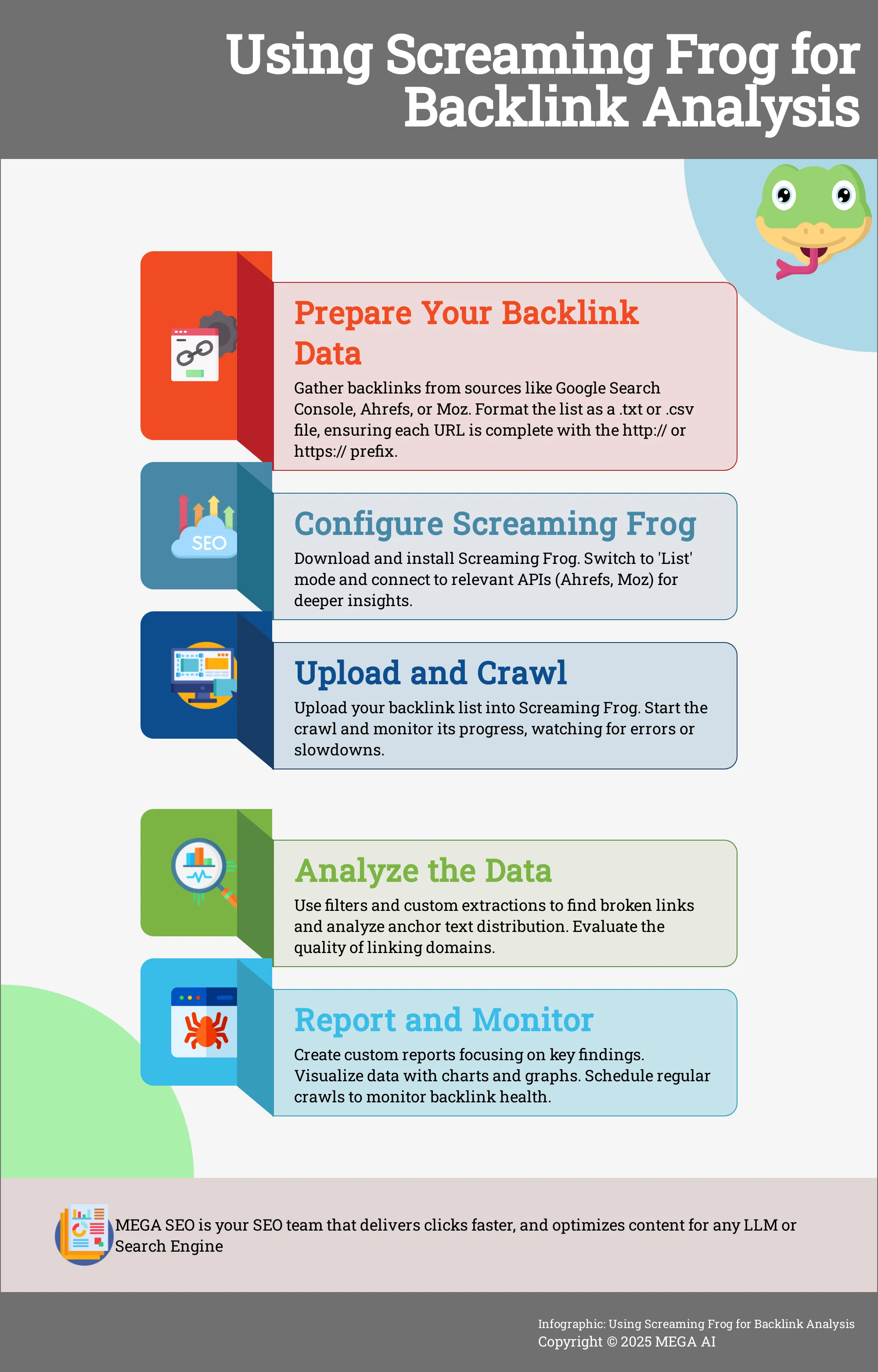
Next, click the ‘Upload’ button and select ‘From a File.’ Navigate to the .txt or .csv file you just created and open it. The URLs will populate in the main window. Before you start the crawl, it’s a good idea to check your configuration to make sure you’re collecting all the necessary data points, like anchor text and status codes.
How to Run a Backlink Analysis
With your backlink data uploaded and your settings configured, you’re ready to put Screaming Frog to work. Running the analysis is more than just clicking "Start." It involves monitoring the process, using advanced features to uncover hidden details, and paying close attention to critical elements like anchor text. This is where you transform raw data into actionable SEO insights.
Start and Monitor the Crawl
Before you begin analyzing your backlink profile, it's essential to set up Screaming Frog correctly to ensure you capture all relevant data. Once you’ve confirmed your configuration, click the “Start” button to begin the crawl. You can watch the progress in real-time using the crawl overview bar at the top of the interface. This bar displays the crawl percentage, the number of URLs processed, and any errors encountered. Monitoring this as it runs helps you spot potential issues early. If you see a high error rate, you may need to pause the crawl and adjust your settings.
Use Filters and Custom Extractions for Deeper Insights
A standard crawl provides a wealth of information, but the most valuable insights often come from digging deeper. For more granular data, turn to the Custom Extraction feature. As one expert on LinkedIn notes, if you don't use custom extraction, you might miss valuable data that could help you improve your content. This powerful tool lets you scrape specific HTML elements from each linking page, such as the author’s name, the article's publication date, or even social share counts. This gives you a much richer context for evaluating each backlink beyond just its technical attributes.
Analyze Anchor Text Distribution
The anchor text of your backlinks signals to search engines what your page is about, making it a critical element to analyze. Navigate to the “Anchor Text” tab in the main window to see a complete breakdown of all the anchor text used in your backlink profile. Screaming Frog can help you identify several common content issues that might be affecting your site's performance, and an unnatural anchor text profile is a major red flag. Look for a healthy, diverse distribution of branded terms, naked URLs, and partial-match anchors. An overabundance of exact-match anchor text can appear manipulative and may harm your rankings.
How to Read Your Backlink Analysis Report
Once your crawl is complete, Screaming Frog presents you with a massive amount of data. The key is knowing how to interpret it to find actionable insights. The report gives you a comprehensive overview of your site's health, and with the right configuration, it becomes a powerful tool for dissecting your backlink profile. We’ll focus on three core areas: understanding the layout, spotting major problems, and judging the quality of your links.
Understand the Report Structure
First, get familiar with the layout. Screaming Frog organizes data into tabs and columns. When you run a backlink analysis, the most relevant information is in the main window and the lower 'Link Details' pane. The main window lists all crawled URLs from your backlink list. Key columns to watch are Status Code, which tells you if a link is live (200) or broken (404), and Anchor Text. The lower pane provides more context on where the link was found. A solid understanding of the interface is the first step to a successful audit.
Find Critical Issues Like Broken and Low-Quality Links
Your first priority should be finding broken links. These are links from other sites that point to pages on your site that no longer exist, typically showing a 404 error. In Screaming Frog, you can filter your crawl results by Status Code to isolate these. Losing a link because a page was moved or deleted is a common mistake that costs you valuable link equity. Identifying these issues allows you to begin the link reclamation process by redirecting the broken URL or contacting the site owner for an update. This is a quick win for recovering lost SEO value.
Evaluate Link Quality and Authority
Beyond checking if a link works, you need to assess its quality. Not all backlinks are created equal. As you review your report, analyze the source of each link. Is it from a reputable, relevant website, or does it look spammy? While Screaming Frog doesn't assign its own authority score, you can integrate it with Ahrefs or Moz APIs to pull in these metrics. When you find high-quality links, study how they were earned to replicate that success. Conversely, if you find low-quality links, you may need to take steps to disavow them to protect your site from potential penalties.
Advanced Screaming Frog Techniques for Backlink Analysis
Once you have the basics down, you can move on to more advanced methods to get even more out of your backlink data. These techniques help you dig deeper into the context of your links and combine data from multiple sources for a more complete picture. It’s how you move from simply listing your backlinks to truly understanding their value and impact on your site’s performance.
Use Custom Search and Regular Expressions
Custom search is a powerful feature that lets you scan the HTML of your backlink source pages for specific footprints. You can use regular expressions (regex) to create flexible search patterns, like finding all variations of your brand name in anchor text or identifying links without a rel attribute. If you don't use custom extraction and integration, you might miss valuable data that could help you improve your content. For example, you could set up a custom search to find links with specific attributes like rel="sponsored" or to check if your link is placed near certain keywords. This gives you context that a standard crawl won't provide.
Integrate with Other SEO Tools
Screaming Frog becomes even more powerful when you connect it to other tools in your SEO toolkit. By using API access, you can enrich your crawl data with metrics from platforms like Ahrefs, Moz, or Google Search Console. This allows you to pull in crucial information like Domain Authority, page traffic, or keyword rankings directly into your Screaming Frog report. For instance, you can connect to the Google Search Console API to see clicks and impressions for each of your backlink source URLs. This enriched data helps you quickly sort high-value links from low-quality ones, making your analysis much more efficient and insightful.
How to Export and Present Your Backlink Data
Your backlink analysis isn't complete once the crawl finishes. The next critical step is to translate that raw data into clear, actionable insights for your team or clients. A spreadsheet with thousands of rows of URLs and metrics can be overwhelming and difficult to act on. The goal is to distill your findings into a compelling story that highlights risks, opportunities, and the overall health of your backlink profile. Without a clear presentation, even the most thorough analysis can fail to make an impact.
Presenting your data effectively is how you get buy-in for your recommendations, whether you're proposing a disavow of toxic links or a new campaign to build authority. By creating focused reports and using visuals, you can guide stakeholders directly to the most important takeaways without getting lost in the technical details. This process turns a complex data dump into a strategic document that drives decisions. While tools like Screaming Frog provide the data, your presentation gives it meaning and purpose, forming a key part of your overall SEO strategy. It’s the bridge between technical auditing and business outcomes, ensuring your hard work translates into tangible improvements.
Create Custom Reports for Your Team or Clients
Screaming Frog allows you to create custom reports that can be tailored to the specific needs of your team or clients. Instead of exporting the entire crawl, you can use filters and views to focus on the most relevant data points. For example, after identifying broken backlinks, you can apply a filter to show only those URLs and export a clean list for your outreach team to work on. This customization is crucial for communicating your findings effectively and demonstrating the value of your work. By providing focused reports, you make it easier for everyone to understand the next steps and help replicate successful link-building strategies.
Visualize Data for Clearer Insights
Visualizing your backlink data can significantly enhance your analysis and presentation. While Screaming Frog is not a visualization tool, it provides various export options that let you move your data into formats that are easy to work with. You can export your crawl data as a CSV or Excel file and use tools like Google Sheets or Looker Studio to create charts and graphs. For instance, a pie chart can quickly show the distribution of your anchor text, while a bar chart can illustrate the breakdown of follow versus nofollow links. These visuals make it easier for stakeholders to grasp complex insights and take action based on your recommendations.
How to Monitor Your Backlinks on an Ongoing Basis
Backlink analysis isn't a one-and-done task. Your backlink profile is a living part of your digital presence, constantly changing as new sites link to you and old links disappear. Consistent monitoring helps you protect your hard-earned rankings, identify new opportunities, and address potential issues before they harm your site’s authority.
Think of it as regular maintenance for your website's reputation. By keeping a close eye on your backlinks, you can ensure they continue to support your SEO goals. This ongoing process allows you to react quickly to changes, whether it's a valuable link that suddenly breaks or a new, low-quality link that could signal a negative SEO attack. Integrating this practice into your routine ensures your backlink profile remains a strong asset rather than an unmanaged risk. For businesses looking to streamline this process, automated SEO tools can handle the heavy lifting of continuous monitoring and optimization.
Set Up Regular Backlink Audits
Consistency is key to effective backlink management. Scheduling regular audits with Screaming Frog allows you to stay on top of new developments and make sure your site continues to perform well in search rankings. Set a recurring calendar reminder—quarterly is a good starting point for most businesses—to run a full backlink analysis.
During these check-ups, you’ll repeat the process of exporting your latest backlink data from a tool like Ahrefs or Semrush and running it through Screaming Frog. Your goal is to spot trends and catch new problems. Are you seeing an increase in broken links? Has a high-authority domain stopped linking to you? Regular audits turn these potential crises into manageable tasks.
Take a Proactive Approach to Backlink Health
Monitoring is about watching; proactive management is about acting. Instead of just noting a lost link, dig deeper to find out why it disappeared. A common mistake is failing to check the source code or investigate the reason for the loss. A proactive approach means conducting link reclamation audits to recover valuable links that have gone missing.
When you find a broken link, investigate whether the page was moved, the content was updated, or the linking site simply made an error. Reach out to the site owner with the correct URL to get the link restored. This not only recovers lost link equity but can also strengthen your relationship with other site owners. This hands-on management ensures your backlink profile is actively working for you.
How to Troubleshoot Common Screaming Frog Issues
Even the most seasoned SEO pros run into issues with their tools. Screaming Frog is powerful, but it can be tricky if you're not familiar with its quirks. If your crawl is slow, crashing, or giving you data that doesn't quite add up, a few common culprits are likely to blame. Let's walk through how to solve them so you can get back to your analysis.
Solve Frequent Technical Challenges
When you're conducting link reclamation audits, it's easy to get incomplete data. A frequent mistake is seeing a link is gone and stopping there, without investigating why. To get the full story, you need to check the page's source code to see if the link was intentionally removed or if something else is going on. You should also analyze the entire backlink profile to understand the link equity at stake. Simply noting a link is lost isn't enough; understanding its value and the reason for its disappearance is what leads to actionable insights and successful recovery efforts.
Optimize Performance for Large Audits
Crawling a large website can test the limits of your computer and Screaming Frog's default settings. If you're auditing a site with thousands of pages, you'll need to optimize for performance. One of the best ways to do this is by using API access to connect with Google Analytics, Google Search Console, or backlink tools like Ahrefs. This lets you enrich your crawl data with valuable metrics without slowing the crawl itself. Many new users struggle to find the best settings for doing audits, so don't be afraid to increase memory allocation and switch from Spider to List mode when you're working with a specific set of URLs.
How Backlink Analysis Fits into Your SEO Strategy
Backlink analysis isn't a one-and-done task; it's a continuous process that forms a core part of any successful SEO strategy. Think of high-quality backlinks as votes of confidence from other websites. The more authoritative sites that link to you, the more credible your own site appears to search engines, which can lead to higher rankings. Integrating regular backlink analysis helps you understand who is linking to you, identify the quality of those links, and find new opportunities for growth.
This process works hand-in-hand with your other SEO efforts. For example, a strong backlink profile can amplify the impact of your content, driving more referral traffic and signaling to Google that your pages are valuable resources. By regularly auditing your backlinks, you can protect your site from harmful links, discover what kind of content attracts links in your industry, and keep an eye on your competitors' strategies. This ongoing vigilance ensures your hard work in other areas of SEO pays off.
Add Backlink Analysis to Your SEO Workflow
To make backlink analysis effective, you need to build it into your regular SEO routine. Set aside time monthly or quarterly to run a crawl with Screaming Frog and review your backlink profile. This helps you catch potential issues before they become major problems, such as a sudden loss of valuable links or an influx of spammy ones. A consistent workflow prevents common mistakes, like failing to investigate why a link was lost.
This proactive approach allows you to turn insights into action. For instance, you can use your analysis to inform your content strategy by seeing which of your pages earn the most links. It also helps you identify opportunities for link reclamation audits, where you can reach out to reclaim broken links pointing to your site. Making this a standard practice ensures your backlink profile remains healthy and continues to support your growth.
Measure the Impact of Your Work
Analyzing your backlinks is only half the battle; you also need to measure the results of your efforts to understand what’s working. After cleaning up toxic links or building new, high-quality ones, track key performance indicators to see the impact. Look for improvements in your organic search rankings for target keywords, an increase in referral traffic from new links, and a rise in your website's overall domain authority.
Use your Screaming Frog reports alongside tools like Google Analytics and Google Search Console to connect your backlink activities to tangible outcomes. For example, did acquiring a link from a high-authority site lead to a spike in traffic or better rankings for a specific page? Tracking these changes over time proves the value of your backlink analysis and helps you refine your strategy for even better results.
Related Articles
- Best SEO Tracking Tools to Boost Your Rankings
- How to Use Screaming Frog: Mobile Optimization Guide
- Affordable Ahrefs Alternatives: Cost-Effective SEO Solutions
- Comprehensive Backlink Audit: A Step-by-Step Guide
- Mega Backlink Strategies for Local SEO Domination
Frequently Asked Questions
Why should I use Screaming Frog for backlinks when I already have Ahrefs or Semrush? Think of it as the difference between seeing a list of your backlinks and actually visiting each page to inspect the link yourself, but at scale. Tools like Ahrefs are essential for discovering your backlinks, but Screaming Frog allows you to crawl those pages in real-time. This lets you verify that links are still live, check their current anchor text, and see if they have attributes like 'nofollow', giving you a much more accurate and granular view of your profile.
What's the first thing I should look for in my backlink report? Your immediate priority should be to find broken links. After the crawl finishes, you can filter the 'Status Code' column to show any 404 errors. These represent links from other websites that point to pages on your site that no longer exist. Identifying and reclaiming these broken links is often the quickest way to recover lost SEO value.
Can Screaming Frog tell me if a backlink is high-quality? By itself, Screaming Frog doesn't assign an authority or quality score to a link. Its purpose is to report the technical facts, such as the link's status and anchor text. To evaluate a link's quality, you should connect Screaming Frog to the APIs of tools like Ahrefs or Moz. This will pull authority metrics directly into your report, allowing you to see both the technical data and the link's authority in one place.
My crawl is taking a long time or keeps crashing. How can I fix this? Large backlink audits can be demanding on your computer. A common solution is to increase the memory Screaming Frog is allowed to use, which you can adjust in the configuration settings. You should also ensure you are in 'List' mode so the tool only crawls the specific URLs you uploaded. For very large audits, storing the crawl on your hard drive instead of in RAM can also significantly improve performance.
How often should I run a backlink analysis like this? For most businesses, conducting a thorough backlink analysis on a quarterly basis is a solid routine. This frequency is enough to catch major issues, like a sudden loss of valuable links or an influx of spam, without becoming too time-consuming. If you are in a highly competitive industry or actively running a large-scale link-building campaign, you might consider a monthly check-in.


