

Think of your website as a large building and a search engine crawler as a visitor on a guided tour. Your robots.txt file is the map you give them at the entrance, with certain areas like "Staff Only" or "Under Construction" clearly marked as off-limits. The crawler uses this map to avoid wasting time in places you don't want it to go. The noindex tag is a different kind of instruction. It’s a sign inside a specific room that says, "You can look around in here, but don't mention this room in the public tour guide." The robots vs noindex choice depends entirely on what you want to achieve. Do you want to block access entirely or just keep a page out of the public directory? This article will explain how to use both types of signs effectively.
Key Takeaways
- Use robots.txt to manage crawler access, not indexing: This file tells search engine bots which sections of your site to avoid visiting. It’s best used to preserve your crawl budget by blocking low-value areas like admin pages, but it won't guarantee a page stays out of search results.
- Apply noindex tags to control search visibility: A noindex tag is a direct command that prevents a specific page from appearing in search results. For this tag to be effective, search engines must be allowed to crawl the page to see the instruction.
- Never block a page you want to noindex: The most common mistake is using robots.txt to block a page that also has a noindex tag. This is counterproductive because if a crawler can't access the page, it can't read the noindex command, and the page may still get indexed.
Robots.txt vs. Noindex: What’s the Difference?
Understanding how to guide search engines on your website is a fundamental part of technical SEO. Two of the most common tools for this are the robots.txt file and the noindex tag. While they both influence how search engines interact with your site, they serve very different purposes. Using the wrong one can hide important content or accidentally expose pages you wanted to keep private. Let's break down what each one does and how they differ so you can make the right choice for your website.
What is a Robots.txt File?
Think of a robots.txt file as a set of instructions for visiting search engine crawlers. It’s a simple text file that lives in your site's root directory and tells bots like Googlebot which pages or sections of your website they are not allowed to access. It’s essentially a "staff only" sign for your site. For example, you might use it to block crawlers from accessing admin login pages, internal search results, or duplicate content in your shopping cart. A robots.txt file is a suggestion, not a strict command, but major search engines respect its directives.
What is a Noindex Tag?
A noindex tag is a meta tag you place in the HTML head of a specific webpage. Unlike robots.txt, which blocks crawlers from accessing a page, the noindex tag allows them to crawl the page but tells them not to include it in search engine results. This is useful for pages you want Google to see and follow links on, but that you don't want users to find through a search. Examples include "thank you" pages after a form submission, thin content pages that offer little value, or campaign-specific landing pages. The crawler can still access and read the page's content, it just won't show up on the results page.
Key Differences for Controlling Search Crawlers
The primary difference comes down to access versus visibility. Use a robots.txt file when you want to prevent search engines from crawling specific files or directories altogether, often to manage your crawl budget. Use a noindex tag when you want to prevent a page from appearing in search results but still allow search engines to crawl it and follow the links on it.
It's critical to remember that these two directives don't work together on the same page. If you block a page with your robots.txt file, a search engine will never be able to crawl it. This means it will never see the noindex tag you placed in the page's HTML. The page might still get indexed if other sites link to it, but without the content, it will appear as a less-than-ideal result. Getting these technical SEO details right is essential for maintaining a healthy site.
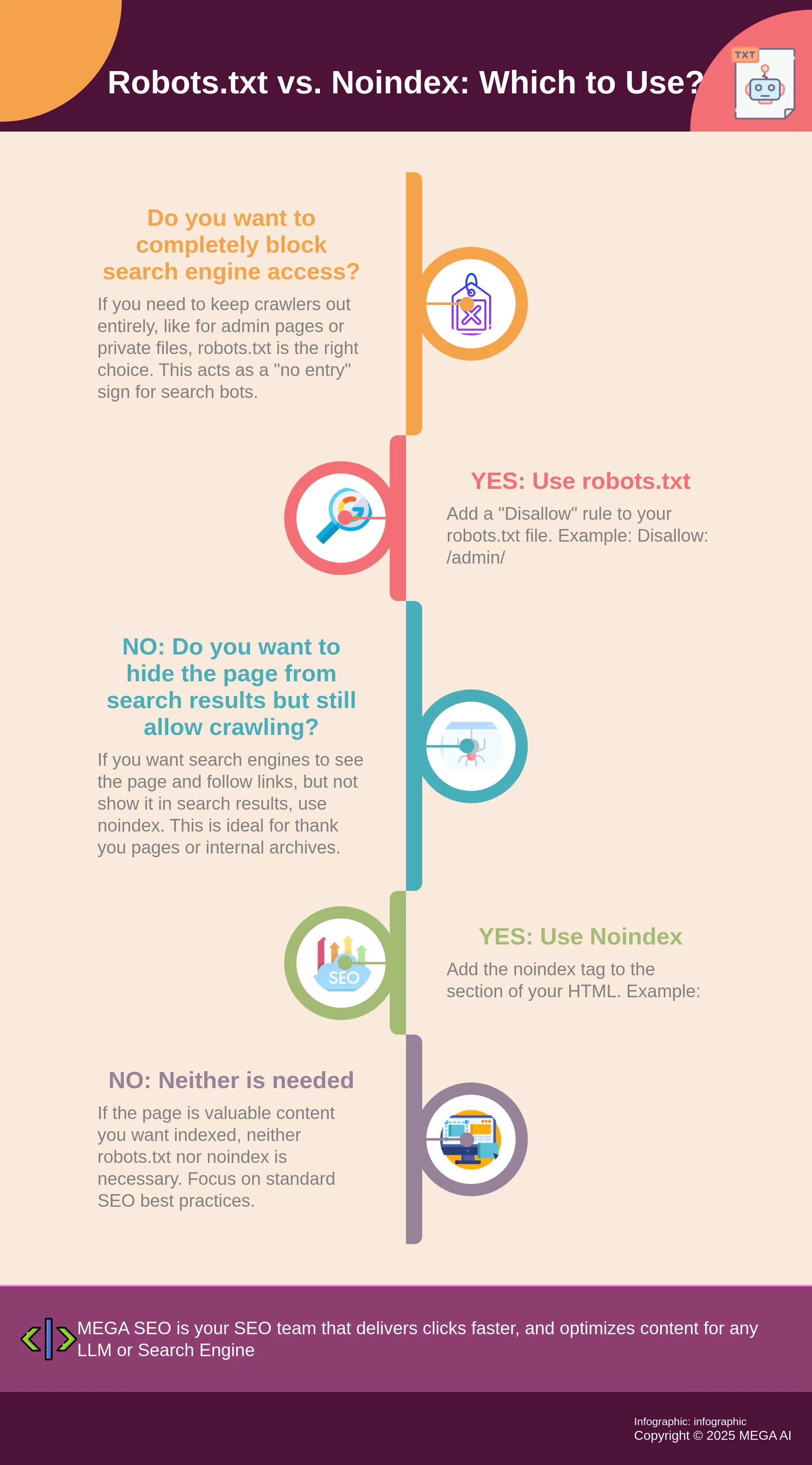
When to Use Robots.txt vs. a Noindex Tag
Deciding between robots.txt and a noindex tag comes down to your specific goal. Are you trying to keep search engine crawlers out of a certain area, or do you just want to keep a specific page out of the search results? Your answer will determine which tool is right for the job.
When to Use Robots.txt
Think of your robots.txt file as a set of "No Entry" signs for your website. You use it to tell search engine crawlers which sections or files they should not access. This is the best choice when you want to prevent crawlers from visiting parts of your site that don't need to be seen by the public or could waste your crawl budget.
Use robots.txt to block access to areas like your admin login pages, internal search results pages, or directories containing scripts and other non-public files. By disallowing these sections, you guide crawlers to focus on your valuable content, which is a core part of good technical SEO. It’s about managing access, not directly managing what appears in search results.
When to Use a Noindex Tag
A noindex tag works differently. It allows search engines to crawl a page but tells them not to include it in their search index. This is a more precise instruction placed directly in the HTML of a specific page. It’s like letting a guest into your house but asking them not to mention a particular room to others.
This is the perfect tool for pages you want to exist but not show up in search results. Common examples include thank-you pages after a customer makes a purchase, landing pages for specific ad campaigns, or internal archives. Using a noindex tag is also a great way to handle thin or duplicate content without removing the pages entirely.
Common Mistakes to Avoid
The most frequent error is using a disallow rule in robots.txt for a page that also has a noindex tag. This creates a conflict. If you block a crawler from a page with robots.txt, it can never see the noindex instruction you placed in the page’s HTML. The crawler is stopped at the door and can't read the note you left inside.
This can cause the very problem you were trying to prevent. If another website links to your blocked page, search engines might still index the URL without ever visiting it. This leads to a weak, unhelpful listing in search results. The rule is simple: to use a noindex tag, you must allow crawling for that page.
How to Correctly Implement Robots.txt and Noindex
Getting your robots.txt file and noindex tags right is fundamental to guiding search engines through your site. When used correctly, they are powerful tools for managing how your content is crawled and indexed. Misusing them, however, can make important pages invisible to search engines or waste your crawl budget on pages that don’t matter. Here’s how to implement them correctly to support your SEO goals.
Best Practices for Your Robots.txt File
A well-structured robots.txt file helps search engines crawl your site efficiently. This is important because they have a limited amount of time, or "crawl budget," for each site. By telling them not to waste time on unimportant pages, like internal test areas or duplicate content, you guide them to the pages you actually want to rank.
Always place your robots.txt file in the root directory of your website. When writing your Disallow rules, be as specific as possible to avoid accidentally blocking important content. Remember, robots.txt is a guideline, not a command. Search engines can sometimes still find and index pages even if you've disallowed them, so it isn't a foolproof way to keep a page out of search results.
Best Practices for Implementing Noindex Tags
The 'noindex' tag is a direct command that tells search engines not to show a specific page in their results. Unlike robots.txt, this is a directive that reputable crawlers will follow. You can use this for pages you want to keep out of search results but still need users to access, such as thank-you pages after a form submission or internal search result pages.
You add the noindex tag directly into the HTML <head> section of the page. A critical point to remember is that if a page is blocked by your robots.txt file, the search engine will never see the noindex command. The crawler can't read a command on a page it's been told not to visit, which is a key difference between the two.
How to Control Indexing Without Hurting SEO
So, how do you put this all together without causing issues? It’s simple. To prevent a page from appearing in search results, use only the 'noindex' tag. Don't add a Disallow rule for that same page in your robots.txt file unless you also want to prevent crawlers from accessing it entirely.
This is the most common mistake people make. Blocking a page with robots.txt and adding a noindex tag is counterproductive. The crawler obeys the robots.txt file first, never visits the page, and therefore never sees your noindex instruction. The page might still get indexed if it's linked to from other sites. Proper technical SEO management ensures these signals work together correctly to achieve your goals.
Advanced Strategies for Crawl and Index Control
Once you understand the basic functions of robots.txt and noindex tags, you can use them to build a more sophisticated SEO strategy. These tools aren't just for blocking pages; they're for guiding search engines to see your site the way you want it to be seen. By strategically controlling what gets crawled and what gets indexed, you can improve your site’s overall performance, focus on your most important content, and adapt to the ever-changing digital landscape. This proactive approach ensures your best pages get the attention they deserve from search engines and users alike.
Manage Your Crawl Budget with Robots.txt
Every website has a "crawl budget," which is the amount of time and resources a search engine like Google will dedicate to crawling your site. A well-structured robots.txt file helps you make the most of this budget. By using the Disallow directive, you can prevent search engines from wasting time on unimportant pages, such as internal search results, admin login pages, or duplicate content areas. This ensures crawlers focus their limited time on the valuable pages you actually want to rank. An efficient crawl helps your key content get discovered and indexed faster, which is a critical step in any successful SEO strategy.
Use Noindex to Support Your Content Strategy
The noindex tag is a powerful tool for refining what appears in search results. Unlike robots.txt, which blocks crawling, noindex allows search engines to see a page but tells them not to include it in their index. This is perfect for pages that are useful for visitors but don't offer unique value for search rankings. Good candidates for a noindex tag include thank-you pages after a form submission, thin content pages, or promotional landing pages for short-term campaigns. Using noindex strategically helps you avoid cluttering search results and ensures that your content strategy presents only the highest-quality pages to potential customers.
Adapt Your Strategy After Search Engine Updates
SEO is not a one-and-done task. Search engines constantly update their algorithms, which means the strategies that work today might need adjustments tomorrow. After a major update, it’s wise to review your robots.txt and noindex rules. A page you previously devalued might now align with new ranking factors, or you may find new types of pages that should be excluded. Staying adaptable is key. Regularly auditing your site and using tools that can re-optimize existing content for new standards will help you maintain and improve your search visibility over time, ensuring your site continues to perform well through every algorithm change.
Related Articles
- Robots txt no indexing: The Definitive Guide
- Master SEO: Essential Robots.txt Guide for Marketers
- Master NoIndex Tag Detection With This Easy Tool Guide
- How to Optimize Your Crawl Budget for Better Indexing
- Boost SEO with Better Crawl Efficiency: Indexing Benefits
Frequently Asked Questions
What happens if I block a page with robots.txt and also add a noindex tag? This creates a conflict that prevents your noindex tag from working. Search engine crawlers follow the robots.txt file first. If you disallow a page, the crawler will not visit it, which means it will never see the noindex instruction you placed in the page’s HTML. The page could still be indexed if other websites link to it, leading to a poor-quality listing in search results.
Which is better for keeping a page out of Google search results? The noindex tag is the correct and most direct tool for this job. It specifically tells search engines not to include the page in their index. Using robots.txt only prevents crawling. A page blocked by robots.txt can still appear in search results if it has been linked to from another site, so it is not a reliable way to control indexing.
If I noindex a page, can search engines still follow the links on it? Yes, by default, search engines will still follow the links on a page that has a noindex tag. The noindex directive only controls whether the page itself is included in the search index. If you want to prevent crawlers from following the links on that page, you would need to add a separate nofollow attribute to the tag.
Will using robots.txt to block a page also remove it from search results if it's already indexed? No, blocking an already indexed page with robots.txt will not remove it from search results. For a page to be removed, a search engine must be able to crawl it and see a noindex tag. If you want to de-index a page, you should first add the noindex tag, wait for the search engine to recrawl it and remove it, and only then consider blocking it with robots.txt if needed.
Why should I care about managing my crawl budget? Your crawl budget is the amount of attention a search engine gives your site. For larger websites with thousands of pages, this budget is finite. By using robots.txt to block unimportant sections like internal search results or admin areas, you guide crawlers to spend their limited time on your most valuable content. This helps your key pages get discovered, indexed, and updated more efficiently.


