
You want search engines to find and rank your best content efficiently, right? But if they're spending time crawling pages that don't matter, like admin areas, thank-you pages, or internal search results, your SEO efforts might not be as effective as they could be. This is where robots txt no indexing strategies come into play. By telling search engines precisely what to crawl and what to index, you help them focus their resources on your most important pages. This can lead to faster indexing of new content and better overall site performance. Let's explore how to use these directives.
Key Takeaways
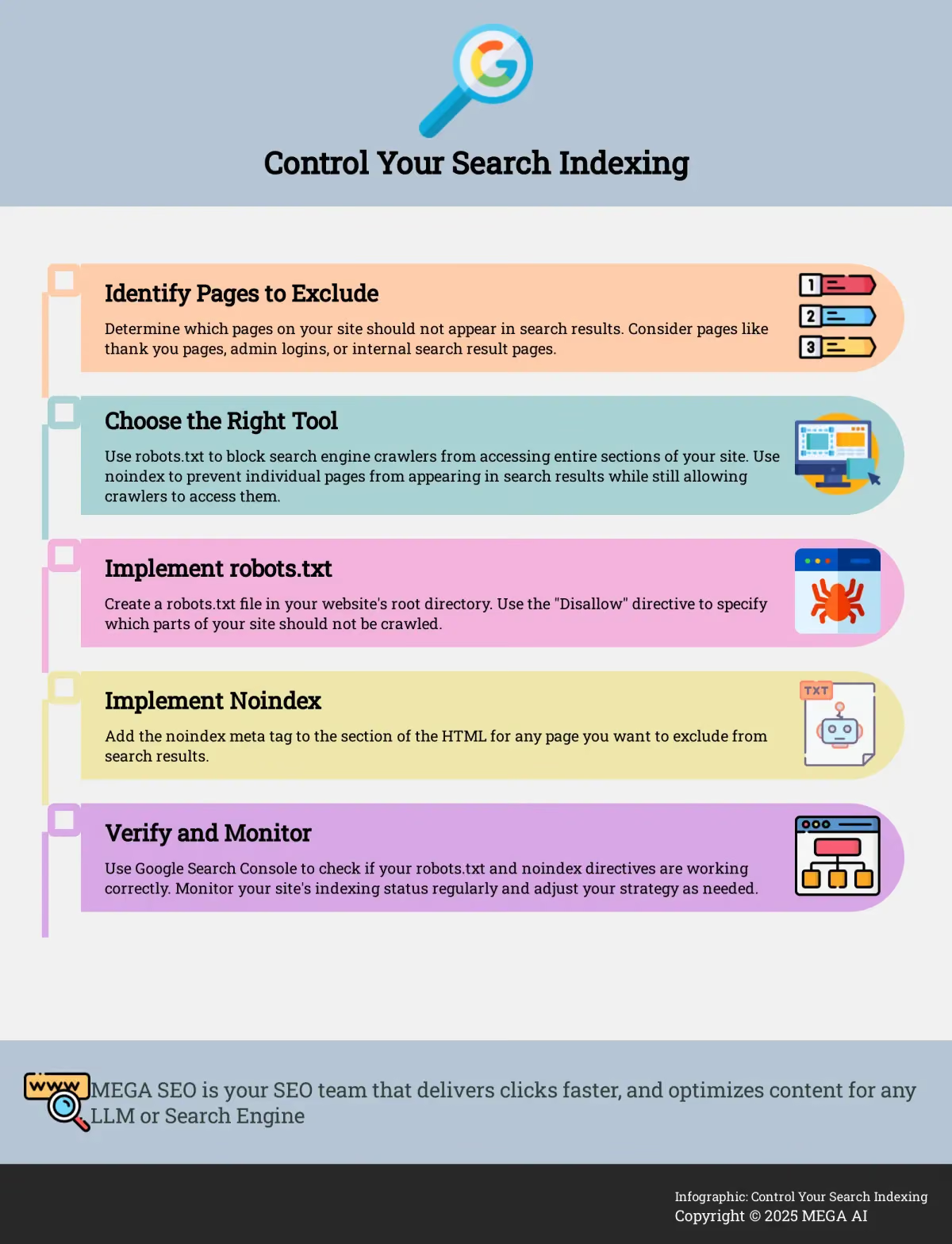
- Know Your Tools: Use robots.txt to guide search engine crawlers away from certain site sections, and apply a noindex tag to instruct search engines not to list a specific page in their results.
- Implement Correctly for Control: Place your robots.txt file in your site's root directory for broad crawler management, and add the noindex meta tag to the HTML of individual pages you want excluded from search.
- Strategize and Monitor: Decide which content (like thank-you pages or internal drafts) doesn't belong in search results and use noindex, then regularly use Google Search Console to verify your settings and refine your approach for better site performance.
Robots.txt vs. Noindex: Your Guide to Controlling Search Indexing
Getting your website seen by the right audience starts with understanding how search engines find and list your content. This process, known as indexing, is fundamental to your site's visibility. However, not every page on your website is meant for public eyes or contributes positively to your search rankings. That's where controlling search engine crawlers and indexing behavior becomes a critical part of your SEO approach. For startups and small businesses, making every page count is essential, and guiding search engines effectively can make a significant difference in how your site performs.
Two primary tools at your disposal for this task are the robots.txt file and the noindex meta tag. While both influence how search engines interact with your site, they function differently and serve distinct purposes. Think of robots.txt as a guide for search engine bots, suggesting which areas of your site they should or shouldn't explore. On the other hand, the noindex tag is a more direct command telling search engines not to include a specific page in their search results. Understanding the nuances between these two is key to preventing common SEO pitfalls, like accidentally hiding important content or allowing low-value pages to dilute your site's authority. A well-thought-out indexing strategy ensures that search engines focus on your most valuable content, which can improve your site’s crawl efficiency and ultimately help your important pages rank higher. This guide will walk you through what each tool does, how to use them effectively, and how to build a smart indexing approach for your website.
What are robots.txt files and noindex tags?
A robots.txt file acts as a set of instructions for search engine web crawlers, often called bots. According to Google Search Central, this simple text file "tells these robots which parts of your website they can and can't look at." It’s your first line of communication with bots like Googlebot, guiding their exploration.
Conversely, the noindex tag is a directive placed directly within a webpage's HTML. As AIOSEO explains, its "sole purpose is to tell search engines not to include that specific page in their search results." This means a page with a noindex tag won't appear when someone searches for related terms. The key difference, highlighted by AIOSEO, is that you should use noindex to prevent a page from appearing in search results while still allowing search engines to crawl it. Use robots.txt to block crawling, but this doesn't guarantee non-indexing if the page is linked from elsewhere. A common myth is that robots.txt is a foolproof way to hide a page; however, Google notes that if other sites link to your page, it might still be found.
How to Use Robots.txt and Noindex Effectively
Implementing robots.txt and noindex tags correctly is crucial for managing how search engines interact with your site. For your robots.txt file, if you're using a website builder, Google Search Central suggests you might not need to edit it directly, as your platform may offer built-in settings. Otherwise, you'll create this text file in your site's root directory.
To add a noindex tag, you'll insert a line of code, , into the section of the specific webpage's HTML, as detailed by Botify. This tells search engines not to include that particular page in their index. For best practices, Rank Math advises using tools like Google's URL Inspection tool to verify your noindex tags are functioning as expected. It's important to avoid implementation mistakes, as Botify warns that misusing 'noindex' can significantly harm your website's search engine ranking and overall visibility.
Using Robots.txt and Noindex Strategically (and Their Limitations)
Understanding the strategic implications and limitations of robots.txt and noindex tags is key to effective SEO. A common question is whether search engines can index pages blocked by robots.txt. Google Search Central clarifies that while Google won't crawl or index the content of a robots.txt-blocked page, it "might still find and index a disallowed URL if it is linked from other places on the web."
Search engines read these directives differently. As Rank Math explains, a page blocked by robots.txt might still appear in search results if linked externally, whereas a page with a noindex tag will not appear, assuming it’s not also blocked by robots.txt (which would prevent the noindex tag from being seen). When choosing between them, Rank Math suggests using noindex for pages you don’t want in search results (like thin content or thank-you pages) and robots.txt to block access to areas like admin panels. Finally, remember to balance your crawl budget; as Codener points out, "If there's an issue with crawling, indexing becomes an issue too."
Optimize Your Indexing Strategy
Fine-tuning your indexing strategy involves regular checks and adjustments. You can use tools like Google Search Console to monitor your implementation. For instance, Traffic Think Tank mentions that "You can check all web pages excluded by the 'no-index' tag in your Google Search Console." This helps you verify that your directives are working as intended.
Google Search Console also offers valuable indexing insights. If you have new or updated content you want indexed quickly, Conductor notes that actively promoting it or submitting it via Search Console can help "speed up the crawling and indexing process." To understand the SEO impact of your choices, Rank Math advises you "Monitor your Google Search Console's Page Indexing report to see which pages have noindex directives applied." Based on this performance data, you can adjust your strategy. If certain pages aren't meant for search results, ensure you consistently use the noindex meta tag to keep them out.