

A technical SEO audit can feel like a vast undertaking, with countless elements to check. But what if you could focus your efforts on the technical aspects that will make the biggest difference to your visibility for valuable keywords? That’s where KWFinder steps in. While primarily known for keyword discovery, its insights are invaluable for a smarter technical audit. This post is designed to show you how to use KWFinder for technical SEO audit tasks, transforming your approach from a broad sweep to a targeted strike. By understanding which keywords offer the best opportunities, you can prioritize technical fixes on pages that matter, analyze competitor strengths from a technical perspective, and ensure your site is primed to rank for terms that convert.
Key Takeaways
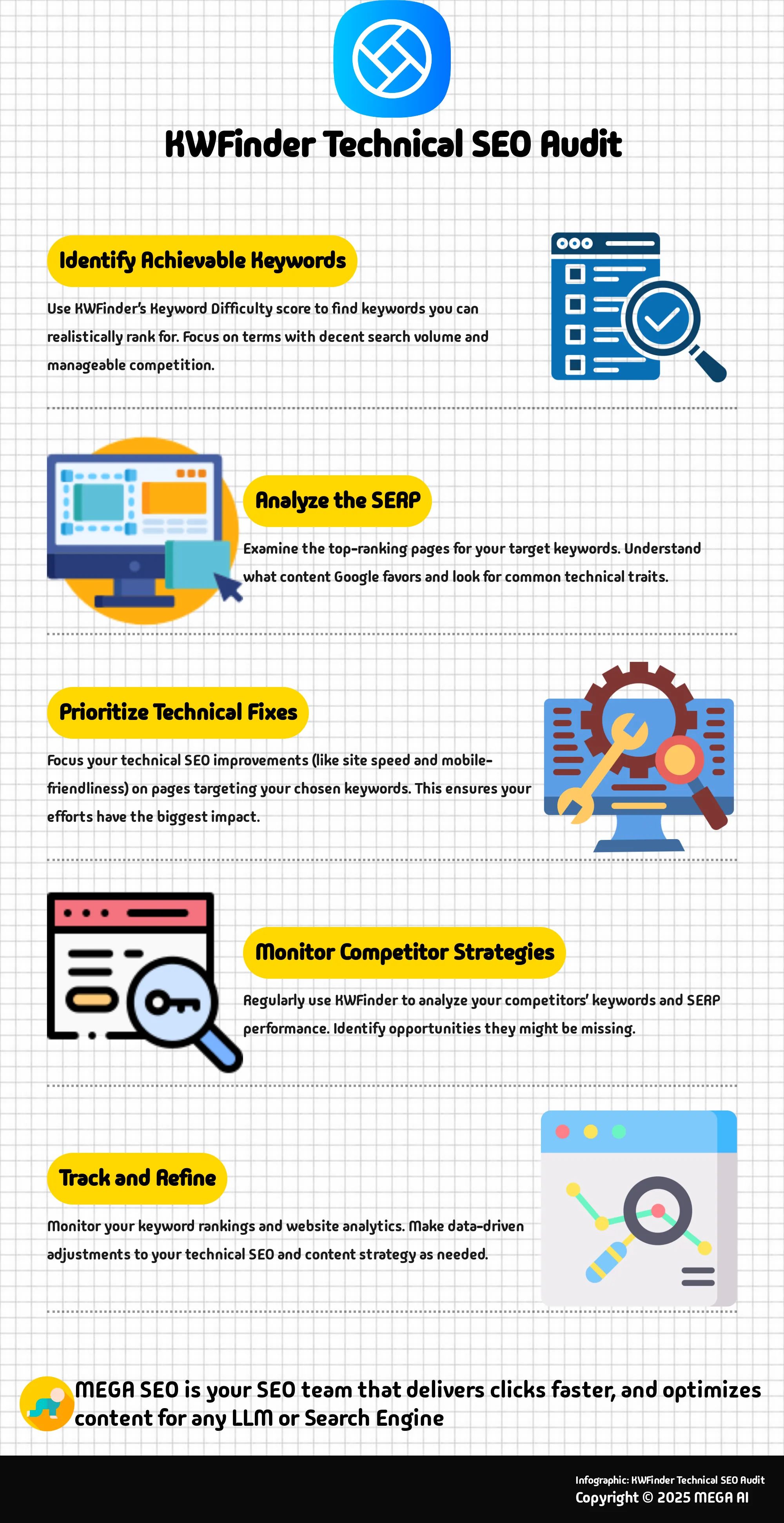
- Pinpoint Achievable Keywords: Use KWFinder’s Keyword Difficulty score and SERP analysis to find terms you can realistically rank for, guiding where to focus your technical SEO improvements.
- Let SERP Insights Drive Technical Choices: Examine KWFinder's SERP data to understand what content Google favors for your target keywords, helping you make informed technical decisions about page structure and optimization.
- Make KWFinder an Ongoing Partner: Regularly revisit KWFinder to analyze competitor strategies and evolving search trends, ensuring your technical SEO and content remain effective and aligned with current opportunities.
What is KWFinder and How Does It Support Technical SEO Audits?
KWFinder is a well-regarded keyword research tool, part of the Mangools suite of SEO products. Its primary function is to help you find keywords that offer a sweet spot: decent search volume combined with manageable competition. This makes it easier for your website to climb the ranks in search engine results. Essentially, it's a fantastic starting point for figuring out the exact terms and phrases your potential customers are typing into search engines.
You might be thinking, "How does a keyword research tool play into a technical SEO audit?" That's a fair question. While KWFinder isn't built to crawl your website and flag technical issues like a dedicated site auditing tool would, the insights it provides are crucial for any solid SEO strategy, including the technical aspects. Knowing which keywords you're aiming for helps you prioritize your technical SEO tasks. For instance, if you uncover some high-value keywords, you'll want to double-check that the pages targeting those terms are technically impeccable—meaning they load quickly, look great on mobile devices, and are easy for search engines to crawl and understand.
KWFinder supports this process by offering features like detailed competitor keyword insights and reliable search volume data. One particularly helpful feature is its SERP analysis tool. This allows you to take a close look at the top-ranking pages for any keyword you're interested in. By examining these leading results, you can see what kind of content Google tends to favor and spot common traits. Some of these traits might be technical, such as the use of rich snippets (which often points to well-implemented structured data) or noticeably fast page load times. This analysis gives you a clearer picture of the competitive environment and guides where you should focus your technical optimization efforts to match or surpass the current top performers. Metrics like Keyword Difficulty (KD) also give you an idea of how much work, including technical fine-tuning, might be involved in competing for a particular term.
Why Keyword Research is Essential for Technical SEO
When we talk about technical SEO, things like site speed, crawlability, and mobile-friendliness often come to mind first. And while those are definitely key pieces of the puzzle, keyword research plays a surprisingly vital role in making sure all that technical effort actually pays off. Think of it this way: technical SEO ensures search engines can find and understand your site, but keyword research tells you what you want them to find and understand you for.
One of the biggest reasons keyword research is so important here is because it helps you understand user intent. Knowing what your audience is searching for and why they're searching for it directly impacts how you should structure your website. For example, if your research shows users are looking for "how-to" guides related to your products, you'll want to ensure your site architecture makes those guides easy to find, and that the pages themselves are technically sound for indexing. This understanding guides technical decisions, ensuring your site is not just technically proficient, but also aligned with what users actually need.
Furthermore, thorough keyword research can uncover opportunities your competitors might be missing. By identifying these less competitive keywords, you can inform your technical SEO strategy. You might decide to build out new sections of your site or optimize existing pages more effectively for these terms, which involves technical considerations like URL structures, internal linking, and ensuring these pages are easily discoverable by search engine crawlers. It’s about making sure your technical foundation is built to support the content that will attract your target audience. Ultimately, keyword insights help ensure your technical optimizations are focused on terms that will actually drive meaningful traffic and engagement.
How to Start Your SEO Audit with KWFinder
Embarking on an SEO audit might seem like a big task, but with the right tools, it becomes much more manageable. KWFinder is a fantastic starting point for the keyword research aspect of your audit, helping you understand what terms your audience is searching for. Let's walk through how to get started.
Set Up Your KWFinder Account
First things first, you'll need to get access to KWFinder. This powerful keyword research tool is part of the Mangools suite of SEO tools. Its main job is to help you discover keywords that have a good balance of high search volume and low competition, which is exactly what you need to improve your website's ranking in search engine results.
Setting up an account is straightforward. You can visit the Mangools website to explore their subscription options and sign up. Once you have your account, you’re ready to begin the initial phase of your SEO audit by diving into keyword discovery. This step is foundational, as the keywords you target will influence your content strategy and on-page optimization efforts.
Explore the KWFinder Interface
Once you're logged in, take a moment to familiarize yourself with the KWFinder interface. It’s known for being quite user-friendly and providing accurate data, which is a huge plus. You'll primarily use two methods to search for keywords: searching by a specific keyword if you already have a topic in mind, or searching by domain, which is incredibly useful for seeing what keywords your competitors are ranking for.
As you start your searches, you'll notice the tool provides a variety of metrics to help you select the most effective keywords. Don't worry about understanding every single metric right away; we'll cover the key ones later. A particularly helpful feature is KWFinder's ability to uncover "long-tail keywords." These are longer, more specific phrases that often have less competition, offering a great opportunity to attract a targeted audience.
How to Find Low-Competition Keywords with KWFinder
Finding the right keywords is a fundamental part of any effective SEO strategy. It’s not just about identifying terms with high search volume; for many businesses, especially startups and small to medium-sized companies, the real advantage comes from discovering low-competition keywords. These are the search terms your ideal customers are using, but which aren't already saturated by larger, more established competitors. This is precisely where a tool like KWFinder can make a significant difference. It's designed to help you uncover these valuable opportunities, making the path to appearing on search engine results pages much more attainable.
By focusing your efforts on keywords that are realistically within your reach, you can make tangible progress in your search rankings without needing an extensive budget or a large content team. This approach allows you to build a strong SEO foundation, gradually increasing your online visibility. Let's walk through how you can use KWFinder to pinpoint these low-competition keywords and use them to inform your content strategy. This process is key to getting your SEO efforts off the ground and seeing real results.
What is the Keyword Difficulty (KD) Score?
One of KWFinder's most practical features for identifying achievable keywords is its Keyword Difficulty (KD) score. You can think of this score as a straightforward indicator, on a scale of 0 to 100, of how challenging it will be to rank for a specific keyword. Simply put, a lower KD score means it's generally easier to rank. For example, a keyword with a KD of 15 will likely be much less competitive than one with a KD of 70. KWFinder is well-regarded for its user-friendly interface and the general accuracy of this metric.
Beyond the standard KD score, KWFinder also provides a Relative Keyword Difficulty (RKD) score. This offers a more personalized assessment because it considers the existing authority and strength of your own website. So, while a keyword might have a moderate general KD, the RKD could indicate it's an easier target for your site, or perhaps more difficult. This tailored insight helps you prioritize keywords that offer the best chance of success based on your specific circumstances.
How to Interpret Search Volume and Trends
Understanding how many people are searching for a keyword and whether that interest is growing or declining is crucial. KWFinder presents clear data on Search Volume, which indicates the average number of times a keyword is searched for each month. You can typically view this data over the past 3, 6, or 12 months, giving you a solid understanding of its consistent popularity or any seasonal variations. This information is vital for determining if a keyword has sufficient interest to be worth your content creation efforts.
The Trend feature complements this by visually showing how the search volume for a keyword has evolved. A small graph will illustrate if a keyword is on an upward trajectory, signaling growing interest, or if its popularity is decreasing. KWFinder even includes a "Keyword Interest Growth" metric, which displays the percentage change in search volume year-over-year. This allows you to spot emerging topics or avoid investing resources in keywords that are losing relevance in your industry.
Use Filters to Refine Your Keyword Research
Manually sifting through extensive lists of potential keywords can be quite time-consuming and inefficient. KWFinder offers a robust set of filters to help you quickly narrow down your options and concentrate on the most promising terms for your business. You can set parameters for minimum search volume, ensuring you only consider keywords that attract a certain baseline level of interest. Importantly, you can also establish a maximum keyword difficulty, which allows you to filter out terms that are likely too competitive for your website's current authority.
Other valuable filters include specifying the number of words in the keyword phrase—longer, more specific phrases often have lower competition—and the ability to include or exclude particular words. For instance, if your business sells artisanal coffee beans, you might include "artisanal" but exclude "machines" if you don't sell them. Always remember to specify your target location and language. This step ensures the search volume and difficulty scores you see are directly relevant to the audience you intend to reach, making your keyword research far more accurate and strategically sound.
Key KWFinder Metrics to Analyze in Your Audit
When you're using KWFinder for a keyword audit, a few key numbers will guide your decisions. These metrics help you understand the competitive landscape and choose where to focus your efforts for the best impact. Getting familiar with these figures will help you refine your SEO strategy and translate KWFinder's data into actionable steps for your website. Think of these metrics as the vital signs of your keyword opportunities; they tell you about the health, strength, and potential of each term you're considering. Let's look at the core metrics KWFinder provides and what they mean for your audit.
Search Volume: What It Means for Your SEO
Search Volume is a core metric indicating the average monthly searches for a keyword. KWFinder displays this for the past 3, 6, or 12 months, which is useful for spotting trends or seasonal interest. Understanding search volume is vital as it helps you gauge the potential traffic a keyword might bring to your site. While high volume is appealing, it's important to balance this with other factors, like keyword difficulty, to find realistic opportunities. This ensures you're targeting terms that can actually drive relevant visitors and contribute to your site's growth.
Keyword Difficulty (KD): Assess Your Competition
Keyword Difficulty (KD) is KWFinder's score from 0 to 100, estimating how hard it is to rank on Google's first page for a specific keyword. A lower KD, often below 30 or 40, generally suggests less competition and an easier path to ranking, especially if your site is newer or still building authority. Conversely, a high KD indicates you're facing strong, established competitors. This metric is crucial for prioritizing your keyword list, allowing you to identify achievable targets that still offer good traffic potential and focus your SEO efforts effectively where they can yield results.
SERP Features: Understand Their Impact on Rankings
KWFinder’s SERP overview details the top-ranking pages for your chosen keyword, along with key data points. This includes Domain Authority (DA) and Page Authority (PA), which indicate the overall strength of a domain and a specific page, respectively. You'll also see metrics like Citation Flow (CF), Trust Flow (TF), the number of external backlinks, and Link Profile Strength (LPS). Analyzing these SERP metrics helps you thoroughly understand the competitive landscape. You can assess the authority of current top pages and get a clearer idea of what it will take to outperform them, guiding your content creation and link-building strategy.
Cost Per Click (CPC): Gauge Commercial Intent
Cost Per Click (CPC) shows the average amount advertisers are willing to pay for each click on their ads for a specific keyword in Google Ads. While this is primarily a paid search metric, it offers valuable insights for your SEO strategy as well. A higher CPC often signals strong commercial intent behind a keyword; this means people searching for these terms are frequently further along in the buying cycle or are actively looking to make a purchase or engage a service. Targeting keywords with a decent CPC organically can attract an audience more ready to convert, making these terms particularly valuable for achieving your business goals.
How to Analyze SERP Results to Inform Your SEO Strategy
Once you've identified a promising list of keywords with KWFinder, the next essential step is to really dig into the Search Engine Results Pages (SERPs) for those terms. Think of SERP analysis as your window into what Google, or any search engine, currently deems most relevant and valuable for a specific query. It’s like getting a sneak peek at the answers before an exam. This process helps you understand the competitive landscape, the actual intent driving user searches, and, importantly, where you can spot opportunities to create content that truly resonates and ranks. KWFinder acts as your reconnaissance tool here, gathering vital intelligence directly from the SERPs. This information then forms the bedrock of a more informed and effective SEO strategy. By thoroughly understanding what’s already performing well, you can make much smarter decisions about your own content—everything from its structure and format to the specific angles and information you include. This detailed analysis is key not just to picking keywords, but to actually achieving strong rankings for them.
Evaluate Top Competitors
Your first action when analyzing the SERP should be a close examination of the pages already ranking at the top. KWFinder's SERP analysis feature is particularly helpful for this; as Sadesign.ai points out, it "provides insight into the search results page for a specific keyword." When you select a keyword you're interested in and look at its SERP overview, focus on those top 10 results. Carefully review their page titles and meta descriptions. What kind of language are they using? What benefits are they highlighting to encourage clicks? Also, take note of the SEO metrics KWFinder displays for these top pages, such as Domain Authority (DA) and Page Authority (PA). These metrics give you a clearer picture of how authoritative these competitors are and the level of domain strength you might be up against. This initial evaluation helps you realistically gauge the effort needed and identify common characteristics among the current top performers.
Understand Search Intent
Grasping why someone is typing a particular keyword into a search engine—their search intent—is absolutely fundamental to good SEO. Are they looking to learn something specific (informational intent), make a purchase (transactional intent), find a particular website (navigational intent), or perhaps compare different options before making a decision (commercial investigation)? The KWFinder guide mentions that the tool "helps find keywords with low SEO difficulty," and often, these less competitive keywords have a very distinct and identifiable user intent. Pay close attention to the types of content that are dominating the first page. Are they primarily blog posts, detailed product pages, videos, or perhaps news articles? The prevailing content format offers strong clues about what users prefer and expect for that specific query. For example, if all the top results are comprehensive, long-form guides, a brief product description page is unlikely to satisfy user intent and therefore unlikely to rank well.
Identify Content Gaps and Opportunities
Once you have a solid understanding of who your competitors are and what users are actually looking for, you can begin the exciting part: identifying content gaps and opportunities. This is where you can truly differentiate your content and find an edge. Are there specific questions related to the keyword that the current top-ranking pages don't fully address or perhaps only touch on superficially? Are there unique perspectives, fresh data, or different angles you could bring to the topic? The Peakview Marketing review highlights that KWFinder's "keyword lookups... [provide] users with a comprehensive overview of keyword opportunities." Use this capability to discover related keywords or more specific long-tail variations that your competitors might be overlooking. Maybe there's an opportunity to create a more thorough resource, a more current piece of content, or even present information in a different, underserved format like an infographic or an interactive tool. This is also where a platform like MEGA AI can be invaluable, helping you efficiently generate new content or enhance your existing articles to expertly fill these identified gaps.
Use Advanced KWFinder Features for Your Technical SEO Audit
Once you've got a handle on the basics of KWFinder, you can start to explore its more advanced capabilities to really deepen your technical SEO audit. These features are designed to give you a sharper edge, helping you uncover nuanced insights that can significantly refine your strategy. Think of it as moving from a general check-up for your website's SEO to a specialist consultation.
Using these advanced tools effectively means you can go beyond surface-level keyword discovery. You'll be able to organize your findings more efficiently, understand your competitive landscape with greater clarity, and even tailor your efforts for specific local markets. This level of detail is often what separates a good SEO strategy from a great one, allowing you to make more informed decisions that drive tangible results. Let's look at how you can leverage these features to get the most out of your technical SEO audit and truly understand what makes your audience tick. This deeper understanding is key to crafting content and technical optimizations that resonate and perform well.
Use the Keyword Lists Feature Effectively
One of the most practical advanced features in KWFinder is the ability to create and manage keyword lists. As the KWFinder guide from Mangools explains, "KWFinder allows users to save keywords for later use and organize them into lists. You can edit, export, or even track their rankings in another Mangools tool (SERPWatcher)." This functionality is incredibly helpful for keeping your research organized, especially when dealing with large volumes of keywords during a comprehensive technical SEO audit.
Instead of juggling spreadsheets or scattered notes, you can create dedicated lists for different aspects of your audit. For instance, you might have lists for "High-Intent Transactional Keywords," "Informational Blog Post Ideas," or "Keywords for Homepage Optimization." This organization allows you to easily revisit, refine, and export your keywords for use in content planning or for tracking their performance over time. It streamlines your workflow, ensuring no valuable keyword gets lost in the shuffle.
Conduct Competitor Keyword Analysis
Understanding what your competitors are doing is a cornerstone of any solid SEO strategy, and KWFinder provides powerful tools for this. By analyzing the keywords your competitors rank for, you can uncover valuable opportunities for your own site. As one Medium article highlights, "KWFinder's robust competitor keyword analysis feature equips users with essential insights for refining their SEO strategy and outmaneuvering competitors within their niche."
During your technical SEO audit, use this feature to identify keywords that your competitors are successfully targeting but that you might have overlooked. This can reveal content gaps on your site or highlight areas where your competitors have a stronger topical authority. You can then use these insights to inform your content creation, on-page optimization, and even your internal linking strategy, aiming to capture some of that traffic for yourself.
Perform Local SEO Research
For businesses that serve specific geographic areas, local SEO is paramount. KWFinder caters to this need by allowing you to refine your keyword research for local markets. If your technical SEO audit includes optimizing for local search, this feature is indispensable. According to a Rankify review, "If you are doing keyword research for a local business, KWFinder can give you the local search volume, which can be extremely useful, and therefore it is a great functionality."
This means you can see how many people are searching for your target keywords in a particular city or region, rather than just relying on national or global search volumes. This data helps you prioritize keywords that are most relevant to your local customer base. You can then tailor your website's content, Google Business Profile, and local citations to align with these localized search trends, making your business more visible to potential customers in your service area.
How to Integrate KWFinder Insights into Your Technical SEO Audit
Once you've gathered a wealth of keyword data using KWFinder, the next crucial step is to weave these insights directly into your technical SEO audit. This integration is where the magic happens, transforming raw data into actionable strategies that ensure your technical fixes and content efforts are laser-focused on terms that truly matter to your audience. Think of it as giving your technically sound website a clear direction, guiding it to attract the right visitors through carefully chosen keywords. By connecting KWFinder's findings with your technical audit, you can more effectively prioritize tasks, build a smarter, more resonant content plan, and make informed on-page SEO decisions that drive results.
This process isn't just about ticking boxes; it's about creating a synergy between the 'what' (keywords people search for) and the 'how' (a technically optimized site that search engines can easily understand and rank). When KWFinder’s intelligence informs your technical audit, you stop guessing and start making data-driven choices. For instance, you might discover that certain high-value keywords are associated with pages that have significant technical issues, like slow load times or poor mobile usability. Your audit, now enriched with keyword insights, immediately highlights these as high-priority areas for improvement. This holistic approach ensures that your efforts to improve site performance are directly tied to your goals of ranking for valuable search terms, making your overall SEO strategy much more efficient and impactful.
Prioritize Keywords for Optimization
KWFinder excels at helping you find keywords with low SEO difficulty. As the team at Mangools points out, "It's known for being easy to use and accurate." This capability is incredibly valuable because it allows you to pinpoint terms that offer a realistic chance of ranking well without an overwhelming competitive battle. During your technical SEO audit, use this information to prioritize which pages and content areas need attention first. If a key service page is currently targeting a highly competitive term, KWFinder might reveal long-tail variations with good search volume and lower difficulty. You can then focus your technical optimization efforts, like improving page speed or internal linking, on pages targeting these more attainable keywords for quicker wins and to build momentum. This strategic prioritization ensures your resources are well spent.
Develop a Content Strategy with KWFinder Data
Your KWFinder research should be a cornerstone of your content strategy. As Peak View Marketing highlights, KWFinder "streamlines the keyword research process, providing users with a comprehensive overview of keyword opportunities and data-driven insights for their SEO strategy." Use these insights to identify themes and topics your audience is actively searching for. This data can reveal gaps in your current content or opportunities to create new, highly relevant articles, blog posts, or service pages. Integrating this into your technical audit means ensuring that any new content is structured correctly, loads quickly, and is easily crawlable from the moment it's published. A strong content strategy built on solid keyword research gives your technically optimized site a clear purpose and a better chance to connect with users.
Align Keyword Research with On-Page SEO
Effectively aligning your keyword research with on-page SEO is where KWFinder’s SERP analysis becomes particularly useful. According to SA Design, "KWFinder's SERP analysis feature provides insight into the search results page for a specific keyword: Select Keyword: Select a keyword you want to analyze and click on the 'SERP Overview' tab." By examining the top-ranking pages for your target keywords, you can understand what type of content ranks, how competitors structure their pages, and which on-page elements (like title tags, headers, and meta descriptions) they emphasize. This information directly informs your technical SEO audit by highlighting specific on-page adjustments needed to compete effectively. For instance, you might discover that top pages for a particular keyword all feature video content, signaling an opportunity for your own on-page optimization efforts to include similar rich media, ensuring it's properly implemented from a technical standpoint.
Address Challenges and Maximize KWFinder's Potential
Even the most intuitive tools can present a learning curve or occasional limitations. Understanding these aspects of KWFinder will help you use it more effectively and integrate its data into a robust SEO strategy. By being aware of potential hurdles and committing to ongoing analysis, you can truly harness KWFinder's capabilities.
Handle Data Limitations and Interpret Metrics
KWFinder is a powerful tool for your SEO toolkit, but like any software, it's helpful to understand its operational aspects. For instance, during very intensive keyword research phases, you might approach usage limits like the SERP Lookups credits some users have noted. It's also wise to remember that data from keyword tools, including historical data points, provides strong estimates to guide your strategy rather than exact, real-time figures. To truly maximize KWFinder, concentrate on interpreting its core offerings: search volume data, keyword difficulty scores, and the detailed SERP analysis. These features are designed to streamline your research process, helping you make well-informed decisions even when considering potential data lags. View these metrics as valuable directional signals for your strategy.
Monitor Keywords and Update Your Strategy Regularly
Think of keyword research not as a one-off task, but as an ongoing cycle vital to your SEO health. The digital landscape, search engine algorithms, and competitor tactics are constantly evolving. Therefore, regularly monitoring your target keywords and keeping an eye on what your competitors are doing is crucial for staying ahead. KWFinder’s competitor analysis features are excellent for this, providing the insights you need to refine your approach and spot new opportunities. Make it a routine to revisit your keyword lists, evaluate their current performance, and be open to adjusting your content and overall SEO plan based on these fresh insights. This proactive stance ensures your strategy remains dynamic and effective.
How to Measure and Optimize Your KWFinder-Driven SEO Strategy
Using KWFinder to identify promising keywords is a great start, but the work continues. To truly maximize your SEO efforts, consistently measure your strategy's performance and make data-backed optimizations. This ongoing process ensures your content effectively meets searcher intent and helps you achieve your SEO goals.
Regularly Review Your Keyword Performance
After implementing your KWFinder-driven strategy, regularly check how your chosen keywords are performing. Are you climbing the ranks for your target terms? While KWFinder provides metrics to help you initially select keywords with good potential, ongoing monitoring often uses dedicated rank tracking tools. By checking your rankings, you can identify which keywords bring in traffic and which might need a revised approach. If certain keywords aren't performing, you might re-evaluate the content's relevance, on-page optimization, or the keyword difficulty relative to your site's authority. This regular review helps you stay agile.
Leverage SERP Analysis for Ongoing Optimization
KWFinder’s SERP analysis is valuable beyond initial research; use it for continuous optimization. Periodically revisit the SERP overview for your target keywords. Are new competitors appearing? Have the types of content ranking changed? KWFinder's SERP analysis feature shows titles, meta descriptions, and SEO metrics of top results. Observing shifts here can signal changes in search intent or new content formats Google favors. Use these insights to refresh your existing content, ensuring it remains competitive and aligned with what’s currently succeeding. This proactive approach keeps your content relevant.
Use Data-Driven Insights for Continuous Improvement
Data from KWFinder and your website analytics provides powerful, data-driven insights for refining your SEO strategy. Look beyond rankings; analyze metrics like click-through rates (CTR), bounce rates, and conversion rates for pages optimized with KWFinder keywords. If a page ranks well but has a low CTR, its meta description or title might need tweaking. If visitors bounce quickly, the content might not match search intent effectively. Consistently using these insights allows you to make informed adjustments, whether updating articles or identifying new content opportunities to better serve your audience and improve organic reach.
Related Articles
- Mastering Technical SEO: A Complete Guide
- Advanced Keyword Research Techniques for Content SEO: Driving Targeted Traffic to Your Blog
- SEO Tech Audit: A Comprehensive Guide for 2024
- Keyword Difficulty: The Ultimate Guide for SEO
- What to Do After Keyword Research? Your Next SEO Steps
Frequently Asked Questions
KWFinder is a keyword tool, so how does it really help with a technical SEO audit? That's a great question. While KWFinder won't crawl your site to pinpoint technical errors like a dedicated site auditor, the keywords it helps you discover are fundamental to guiding your technical SEO efforts. Knowing which terms you want to rank for allows you to prioritize. For instance, if you find a valuable keyword, you'll want to ensure the page targeting it is technically sound—loading quickly, being mobile-friendly, and easily understood by search engines.
Why is the Keyword Difficulty (KD) score important when I'm thinking about technical SEO? The Keyword Difficulty score gives you a clear idea of how challenging it will be to rank for a particular term. This insight is incredibly useful for deciding where to focus your technical optimization energy. If a keyword has a lower KD, you might see results with less intensive technical work. For high KD terms, your technical SEO needs to be exceptionally strong to compete effectively.
Can KWFinder actually help me decide what content to create or improve for my technical SEO goals? Yes, it certainly can. By analyzing the search terms people use and looking at what content already ranks well for those terms (using KWFinder's SERP analysis), you get a strong sense of user intent and the types of content search engines favor. This understanding helps you structure your own content and identify technical elements, like structured data for rich snippets, that could enhance its performance.
I run a small business. How can KWFinder help me compete with bigger companies in search results? KWFinder is particularly helpful for uncovering low-competition keywords. These are search terms your target audience is using but that larger, more established competitors might not be focusing on. By directing your technical SEO and content creation efforts towards these more attainable keywords, you can start gaining traction and building your site's authority without needing a massive budget.
If KWFinder shows a keyword has tons of searches, does that automatically mean I should optimize my site for it? Not always. While high search volume is definitely appealing, it's just one piece of the puzzle. You also need to consider the Keyword Difficulty (KD) and, very importantly, the search intent behind the keyword. If the KD is too high for your website's current authority, or if the user's reason for searching doesn't align with what your page offers, even perfect technical SEO might not yield the desired results. KWFinder helps you weigh these factors together.


