

Gaining an edge in SEO often means looking beyond your own website and understanding what makes your competitors successful. A significant part of that success lies in their backlink profiles. If you're asking how to use KWFinder for backlink analysis?, you're on track to uncovering these valuable insights. KWFinder, while primarily a keyword research tool, provides essential data that informs your backlink strategy. It helps you identify the content and keywords attracting links in your niche, effectively showing you what resonates with your audience and other authoritative websites. This article will show you how to leverage KWFinder to begin this crucial analysis.
Key Takeaways
- Start your backlink research with KWFinder: Use its keyword analysis to understand the competitive landscape and identify content types that earn links before seeking specific backlink opportunities.
- Analyze competitor link profiles for opportunities: After identifying competitors with KWFinder, examine their backlinks using tools like LinkMiner, filtering by authority metrics to pinpoint valuable link prospects for your own site.
- Integrate KWFinder data into your broader SEO work: Apply its keyword insights to inform your content strategy and combine this with dedicated backlink analysis and acquisition for a more complete SEO plan.
What is KWFinder & How It Helps Your Backlink Analysis
KWFinder, a tool from Mangools, is primarily known for its strength in keyword research. It's designed to help you discover and analyze keywords that can improve your website's visibility in search engine results. Many SEO professionals appreciate its user-friendly interface and the accuracy of its data, making it a popular choice for those looking to find low-competition, high-potential keywords.
While KWFinder itself isn't a dedicated, deep-dive backlink analysis tool in the way some others are, its keyword research capabilities play a crucial indirect role in understanding the landscape where backlinks matter most. By identifying the keywords your competitors are ranking for, you gain insights into the content that attracts links and authority. This information is foundational for any effective backlink strategy because it tells you what kind of content resonates with your audience and with other websites likely to link out. Think of it as the reconnaissance phase; before you build your own links, you need to understand the terrain and where valuable links are already pointing. KWFinder helps you map out this terrain by showing you what's working for others, which indirectly informs your backlink acquisition efforts. It helps you find those long-tail keywords with lower competition, making it easier to rank and, consequently, attract organic backlinks over time. Understanding these keyword opportunities is the first step before you even think about which sites to get links from.
Explore KWFinder's Key Features for Backlink Research
KWFinder offers several metrics that, while focused on keywords, are invaluable for informing your backlink strategy. You'll find data like Keyword Difficulty (KD), which estimates how hard it will be to rank for a specific term, alongside search volume and SERP (Search Engine Results Page) metrics. A key feature is the ability to analyze competitor websites to see which keywords they rank for and how well they're performing. This is gold because it shows you the content types and topics that are successfully attracting attention and, likely, backlinks in your niche.
For more direct backlink research within the Mangools suite, you'll turn to its companion tool, LinkMiner. This tool is specifically designed to help you uncover valuable link-building opportunities. By simply entering a competitor's domain, LinkMiner allows you to examine their backlink profile. You can then filter these backlinks using important metrics such as domain authority and page authority, helping you pinpoint high-quality links you might also be able to acquire.
KWFinder vs. Other Tools: A Quick Comparison
When considering KWFinder for backlink analysis, it's helpful to understand its position relative to other SEO tools. While KWFinder excels at keyword research, its direct backlink analysis features, primarily through LinkMiner, might not be as exhaustive as those found in dedicated backlink tools like Ahrefs or SEMrush. For instance, the number of keyword lookups and the depth of competitor backlink analysis can be limited depending on your Mangools subscription plan.
Compared to a powerhouse like Ahrefs, KWFinder's keyword database is smaller. This could mean you might not see the same breadth of keyword suggestions or backlink data. While KWFinder is fantastic for identifying keyword opportunities and getting a solid overview of competitor link profiles via LinkMiner, it doesn't offer the extensive site audit features or the sheer volume of backlink data that more comprehensive SEO tools often include. So, it's about choosing the right tool for your specific needs and budget.
Start Your Backlink Analysis with KWFinder
Understanding your backlink profile and those of your competitors is a fundamental piece of a strong SEO strategy. While KWFinder is widely recognized for its keyword research prowess, it also serves as an excellent starting point for your backlink analysis. Its strength here lies in helping you identify key competitors whose backlink profiles you'll want to examine more closely with dedicated tools. Let's walk through how to get set up with KWFinder and become familiar with its interface for this initial stage of analysis.
Set Up Your KWFinder Account and Project
To begin using KWFinder, it's important to know that it’s part of the Mangools suite of SEO tools. You can't purchase KWFinder as a standalone product; an account with Mangools is necessary. The good news is Mangools often provides a 10-day free trial, giving you a chance to explore KWFinder and its companion tools before committing to a paid plan. This trial is a great way to see if it fits your workflow.
Getting started is straightforward. You'll need to visit kwfinder.com and create your account. Once you're logged in, you can set up your first project. This typically involves entering your primary target keywords. Supplying these keywords helps KWFinder understand your niche, which is crucial for uncovering relevant competitors whose backlink strategies you'll want to analyze later.
Find Your Way Around the KWFinder Interface
KWFinder is well-regarded for its user-friendly design. Many users appreciate its clean and intuitive interface, which makes it easier to get to the data you need without a steep learning curve. The main dashboard allows you to quickly search for keywords, look through suggestions, and sort them using metrics like search volume, cost-per-click, and keyword difficulty. This ease of use is a significant advantage when you're managing various aspects of your SEO.
For the initial phase of backlink analysis, a key feature is the ability to analyze the Search Engine Results Page (SERP) directly within the tool. By looking at the SERP for your target keywords, you can see which domains are ranking prominently. These are likely your main competitors. Identifying these sites is the first step before you dive deeper into their specific backlink profiles using more specialized backlink analysis tools.
Find Competitor Backlinks Using KWFinder
Understanding where your competitors are getting their backlinks is a cornerstone of a strong SEO strategy. It’s like getting a peek into their playbook, revealing the sources that contribute to their search engine rankings. KWFinder, while primarily known for keyword research, also offers valuable features that can help you uncover these competitor backlinks. By analyzing who links to them, you can identify potential link-building opportunities for your own site, helping you build authority and improve your visibility in search results. This process doesn't have to be overly complicated; KWFinder provides the tools to streamline your analysis and pinpoint actionable insights.
This isn't about copying them outright, but rather about understanding the landscape and finding legitimate ways to earn similar high-quality links. Think of it as competitive intelligence for your link-building efforts. Knowing which websites find your competitors' content valuable enough to link to can give you a list of warm prospects for your own outreach.
Furthermore, this analysis can reveal content gaps or types of content that attract links in your niche, informing your future content creation plans. It’s a proactive approach to building a robust backlink profile that supports your overall SEO goals, ultimately driving more organic traffic and improving your site's credibility in the eyes of search engines.
How to Analyze Competitor Domains in KWFinder
Getting started with competitor domain analysis in KWFinder is quite straightforward. You'll typically begin by entering a competitor's domain name into the search bar. KWFinder then gets to work, pulling data that gives you an overview of their online presence. According to MHTHEMES in their KWFinder Tutorial, "KWFinder allows users to analyze competitors' websites to see their ranking keywords and performance. Metrics include Domain Authority (DA), Page Authority (PA), Citation Flow (CF), Trust Flow (TF), backlinks, Facebook shares, Link Profile Strength (LPS), and estimated monthly visits." This initial snapshot is incredibly useful. You're not just seeing a list of keywords; you're getting a broader picture of their site's authority and the overall strength of their link profile. Pay close attention to these top-level metrics as they provide essential context before you dive deeper into individual backlinks, helping you gauge the competitor's overall SEO health.
Interpret Backlink Profiles Effectively
Once KWFinder presents you with a competitor's backlink data, the next step is to make sense of it all. It’s not just about the sheer number of backlinks; the quality and relevance of those links are far more important. KWFinder aids in this by providing metrics associated with the linking domains. While KWFinder's keyword difficulty score, as Kasa Reviews notes in their KWFinder Review, "is based on a complex algorithm that takes into account various factors, such as the number of backlinks and domain authority of the top-ranking pages," this same principle of assessing domain strength applies when you're looking at the sites linking to your competitor. A few links from high-authority, relevant websites are often more valuable than many links from low-quality or irrelevant sources. Look for patterns: Are their links coming from diverse, reputable sites, or are they concentrated in less authoritative places? This interpretation is key to understanding their off-page SEO strength.
Identify High-Value Link Opportunities
The real gold in competitor backlink analysis is finding opportunities you can replicate or even improve upon. As Elegant Themes points out in their KWFinder Review, "You can unveil valuable link-building opportunities by entering a competitor's domain into its search box. Analyze your competitor's backlinks and then skillfully filter your results based on domain authority, page authority, and other essential metrics." This is where your detective work comes in. Sift through the list of your competitor's backlinks. Are there guest posts on industry blogs? Are they listed in reputable directories or resource pages? These could be potential targets for your own outreach. Filtering by metrics like Domain Authority can help you prioritize, focusing on acquiring links from websites that will lend more credibility and SEO value to your own site. The goal is to identify relevant and authoritative sources that are already linking to similar content, giving you a clear path for your link-building efforts.
Key Metrics for Evaluating Backlinks in KWFinder
When you begin your backlink analysis in KWFinder, you'll notice several metrics associated with each potential link. Taking the time to understand these numbers is really important if you want to find backlink opportunities that can genuinely help your website perform better in search results. Think of these metrics as your guide, helping you focus your SEO strategy on quality links rather than just collecting a long list that might not yield much. This way, you can make sure your link-building efforts are as effective as possible, saving you time and resources in the long run.
Each metric KWFinder presents offers a unique piece of information, like different pieces of a puzzle. Some metrics will tell you about the overall strength and authority of an entire website, which is crucial for understanding its general standing. Others focus on the strength of a specific page, which is particularly useful when you're trying to get a link to a particular piece of your content. You'll also find indicators that hint at the trustworthiness of the links pointing to a site – a key factor in how search engines perceive your own site's credibility. By looking at these data points together, you can build a much clearer picture of a competitor's backlink profile. This allows you to identify patterns or specific types of links that contribute to their search engine success, making your own outreach more targeted and impactful. It’s about working smarter, not just harder.
What is Keyword Difficulty (KD)?
Keyword Difficulty, often shown as KD, is a score KWFinder gives to help you gauge how challenging it might be to rank on the first page of Google for a particular keyword. As the team at Kasareviews mentions, "KWFinder's keyword difficulty score is based on a complex algorithm that takes into account various factors, such as the number of backlinks and domain authority of the top-ranking pages." While it's a core metric for keyword research, KD is also very relevant when you're analyzing backlinks.
If you see a keyword with a high KD score, it’s a strong signal that the pages currently ranking for it likely have robust and authoritative backlink profiles. By looking into these high-KD keywords, you can uncover the kinds of backlinks that are common among the top-performing sites in your niche. This information helps you set more realistic goals and understand the level of backlink strength you'll likely need to compete effectively for those valuable search terms.
Assess Domain and Page Authority
When you're sorting through potential websites for backlinks, Domain Authority (DA) and Page Authority (PA) are two metrics you’ll want to keep an eye on. These scores, originally created by Moz, aim to predict how well an entire website (DA) or a single page (PA) might rank in search engine results. KWFinder often includes these or very similar metrics to help you quickly assess the strength of a linking domain or a specific page. As the folks at Elegant Themes suggest, a smart approach is to "Analyze your competitor's backlinks and then skillfully filter your results based on domain authority, page authority, and other essential metrics."
Generally, a backlink from a page with a high PA, located on a website with a high DA, is considered more valuable. It’s like getting a strong endorsement from a well-respected figure in your industry – it simply carries more weight. Focusing your link-building efforts on acquiring links from such authoritative sources can significantly improve your own site's ability to rank.
Analyze Link Profile Strength (LPS)
Link Profile Strength, or LPS, offers a wider perspective on the overall quality of all the backlinks pointing to a specific website or URL. KWFinder often uses metrics like Trust Flow (TF), a concept developed by Majestic, to represent this. According to the Mangools guide, "Trust Flow (TF) - predicts how influential is the URL based on the quality of backlinks. It indicates that backlinks from trustworthy websites will increase the Trust Flow while backlinks from questionable websites will lower the score."
A high Trust Flow score suggests that a website is primarily linked to by other trustworthy and authoritative sites, indicating it's part of a good "neighborhood" on the web. When you're evaluating a site as a potential backlink source, checking its TF can tell you a lot about the company it keeps. Aiming to secure links from sites with strong, clean link profiles is generally much more beneficial for your SEO than getting links from sites with low TF, which might be associated with less reputable linking practices.
Evaluate Estimated Monthly Visits
While it’s not a direct measurement of a backlink's "SEO power," the estimated monthly visits a page or domain receives can be a very insightful indicator. KWFinder often includes this data, and as the team at Bloggers Passion notes, "KWFinder provides a good estimate of how difficult it is to rank for a particular keyword, which can be influenced by the estimated monthly visits to the top-ranking pages." This suggests that pages attracting a good amount of traffic often possess the authority and quality backlinks necessary to rank well.
From a backlink acquisition standpoint, a link from a high-traffic page offers more than just potential SEO benefits; it can also drive valuable referral traffic directly to your website. When you're assessing different link opportunities, consider the potential for a link to not only pass authority but also to introduce your brand to a new, relevant audience. This dual advantage makes high-traffic pages particularly appealing targets for your link-building strategy.
Conduct a Comprehensive Backlink Analysis: Step-by-Step
A thorough backlink analysis is a cornerstone of any successful SEO strategy. It’s about understanding who links to your competitors and why, then using that intelligence to inform your own link-building efforts. KWFinder, along with its sister tools, provides a solid platform for this investigation. Let's walk through the process step by step, so you can turn data into actionable insights for your website.
Select and Prioritize Competitors
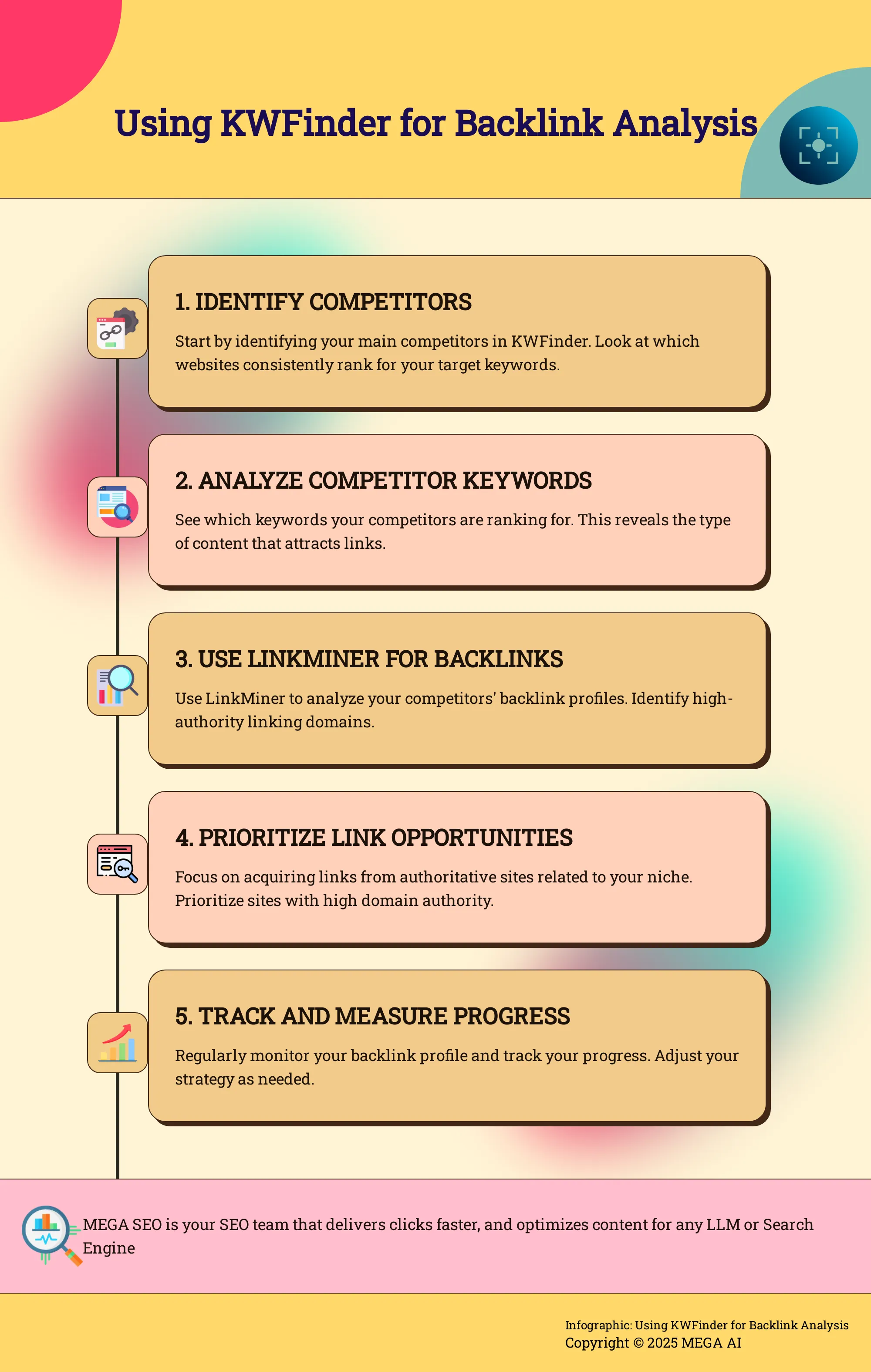
Before diving into backlink data, you need to know whose backlinks you’re actually interested in. Start by identifying your main competitors—those businesses ranking for the keywords you’re targeting. KWFinder allows you to analyze competitor websites to see their ranking keywords and overall performance. Pay attention to metrics like Domain Authority (DA), Page Authority (PA), and the estimated monthly visits. This initial overview helps you prioritize which competitors are worth a deeper dive. Focus on those who are performing well, as their backlink profiles likely hold valuable clues for your own strategy. Choosing 3-5 key competitors is usually a good starting point for a focused analysis, keeping your efforts manageable.
Analyze Backlink Data and Patterns
Once you've pinpointed your competitors, it's time to examine their backlink profiles. Tools like LinkMiner, which works seamlessly with KWFinder, are designed for this. By entering a competitor's domain, you can uncover their backlinks and start looking for patterns. Are they getting links from specific types of websites, like industry blogs or news sites? What kind of content is attracting these links? You can filter the results by metrics such as domain authority and page authority to focus on the most impactful links. Remember, KWFinder's keyword difficulty score itself considers factors like the number of backlinks and domain authority of top-ranking pages, highlighting the importance of quality links in search rankings.
Develop a Targeted Outreach Plan
The insights you gather from analyzing competitor backlinks are the foundation for your outreach strategy. Understanding where your competitors get their links helps you identify potential opportunities for your own site. For instance, if you notice a competitor has several high-quality links from guest posts on authoritative industry blogs, that’s a clear signal to explore guest blogging opportunities yourself. Analyzing backlinks also helps you spot and address potential issues, such as disavowing links from low-quality or spammy sites that could inadvertently be pointing to you. Your goal is to create a list of realistic link prospects and a plan for how you'll approach them effectively.
Export and Further Analyze Backlink Data
While KWFinder and its associated tools offer robust analysis capabilities, sometimes you need to dig even deeper or manipulate data in a specific way. KWFinder allows you to export keyword data as a CSV file. This feature is incredibly useful for organizing backlink information, perhaps by sorting potential outreach targets, tracking your progress, or merging it with data from other SEO tools. Having the raw data in a spreadsheet format gives you the flexibility to conduct custom analyses, create charts, or share specific findings with your team, making your backlink strategy more organized and data-driven. This allows for a more tailored approach to your link-building campaigns.
Use KWFinder Insights to Improve Your Backlink Strategy
Gathering backlink data with KWFinder is a fantastic starting point, but the real magic happens when you strategically apply those insights. It's about moving beyond simple data collection to actively shaping your website's authority and improving its visibility in search results. Think of KWFinder as your reconnaissance tool; it shows you the landscape, identifies competitor strengths, and highlights potential opportunities. Now, it's time to use that intelligence to build a smarter, more effective backlink strategy that contributes directly to your business goals, whether that's increased organic traffic, better lead generation, or enhanced brand recognition.
This means making deliberate choices about which link acquisition efforts to prioritize, ensuring you're not just chasing any link, but the right links that will make a tangible difference. It also involves diligently tracking your progress, understanding how your efforts translate into results, and being agile enough to adjust your approach based on what the data tells you. A well-executed backlink strategy, informed by tools like KWFinder, is a cornerstone of sustainable search engine optimization. Furthermore, KWFinder doesn't operate in a vacuum. By integrating its findings with other specialized SEO tools, you can gain a more holistic understanding and refine your tactics for even greater impact. Let's explore how you can transform KWFinder insights into actionable steps that genuinely strengthen your backlink profile and overall SEO performance.
Prioritize Your Link Acquisition Efforts
A smart backlink strategy is all about focus. Instead of trying to acquire every possible link, KWFinder helps you identify the opportunities that will likely yield the best results with reasonable effort. One effective approach is to target keywords with lower SEO difficulty scores. KWFinder is particularly adept at finding these gems, giving you a clear path to potentially quicker ranking improvements. When you analyze a competitor's domain, KWFinder shows you the keywords they rank for, which can also reveal link-building targets that are within your reach. By prioritizing these more attainable links first, you can build momentum and steadily improve your site's authority, creating a solid foundation for tackling more competitive keywords later on.
Track and Measure Your Progress
Building backlinks is an ongoing process, and KWFinder provides the metrics you need to monitor your success and make necessary adjustments. Regularly checking how your efforts impact your target keywords' rankings and their associated Keyword Difficulty (KD) scores is essential. KWFinder's KD score, as noted by sources like Kasareviews, considers factors like the number and quality of backlinks to top-ranking pages. As you acquire new, relevant backlinks, you should ideally see an improvement in your rankings for those keywords, or at least a strengthening of your position. Tracking changes in your referring domains and the overall strength of your backlink profile over time will show you what’s working and where you might need to refine your outreach or content strategy.
Integrate KWFinder with Other SEO Tools
While KWFinder is a powerful tool for keyword research and initial backlink insights, integrating it with other specialized tools can provide a more comprehensive view of your SEO landscape. KWFinder is part of the Mangools suite, which includes tools like SERPChecker, SiteProfiler, SERPWatcher, and notably, LinkMiner. LinkMiner is specifically designed for in-depth backlink analysis. As Elegant Themes points out, you can use LinkMiner by entering a competitor's domain to uncover their backlinks and then filter these results by metrics like domain authority and page authority. This deeper dive allows you to identify high-quality link-building opportunities that KWFinder might initially surface. Using these tools together helps you build a more robust and effective SEO strategy, moving from keyword discovery to detailed backlink acquisition planning.
Advanced KWFinder Techniques for Backlink Analysis
Once you're comfortable with the basics of KWFinder, you can start exploring some of its more advanced capabilities to really sharpen your backlink analysis. Moving beyond simple competitor lookups can uncover deeper insights and more strategic opportunities for your own site. Think of it as graduating from a general check-up to a specialist consultation; you're now looking for specific, actionable intelligence that can give you a real edge.
These advanced techniques involve a more nuanced use of KWFinder's features, often in combination with a strategic mindset. It’s about not just seeing the data, but understanding the stories it tells about your competitors' successes and how you can replicate or even surpass them. By digging a little deeper, you can refine your link-building strategy from a broad approach to a highly targeted one. This means you'll be able to identify not just any backlink opportunities, but the right ones that will make a tangible difference to your SEO performance. It’s about working smarter, not just harder, with the data KWFinder provides.
Use Filters and Sorting Options Effectively
KWFinder is designed to be user-friendly, but don't let its simplicity fool you; its filtering and sorting options are quite powerful for backlink-related keyword research. When you're looking for keywords, especially those your competitors rank for, filters become your best friend. You can refine your search by metrics like minimum search volume, maximum keyword difficulty (KD), or even the number of words in a keyphrase. This helps you sift through potentially thousands of keywords to find the ones that offer a realistic chance of ranking and are relevant to your backlink strategy.
For instance, if you're analyzing a competitor's domain to see which keywords they get backlinks for, you might filter for keywords with a moderate KD score but decent search volume. This can highlight terms where they've successfully built links, giving you a target list. Sorting these results by KD or search volume can further help you prioritize which keywords—and by extension, which of their backlink sources—are worth investigating first for your own link-building efforts.
Best Practices for Ongoing Backlink Monitoring
Backlink analysis isn't a one-and-done task; it's an ongoing process. Regularly checking your backlink profile, and those of your competitors, is crucial for maintaining and improving your site's authority. Think of it like tending a garden – you need to periodically weed out the bad and nurture the good. Using tools like KWFinder, in conjunction with dedicated backlink analysis tools, can make this monitoring process much more efficient.
The key here is to focus on quality over sheer quantity. A handful of authoritative, relevant backlinks will almost always be more beneficial than hundreds of low-quality or spammy links. In fact, links from disreputable sites can actually harm your rankings. So, as you monitor, pay attention to the source of new backlinks – both yours and your competitors'. This vigilance helps you spot emerging opportunities or potential threats early on.
Combine Keyword Research with Backlink Analysis
One of KWFinder's strengths is its keyword difficulty (KD) score, which inherently considers backlink data. The KD score is calculated using factors like the number of backlinks and the domain authority of pages ranking in the top search results. This means that when you're doing keyword research, you're already getting a glimpse into the backlink landscape for those terms. You can take this a step further by actively integrating these two activities.
Start by identifying keywords you want to rank for. Then, use KWFinder to see who currently ranks for those terms. By entering these competitor domains into KWFinder's "Search by Domain" feature, you can analyze their backlink profiles. Look for patterns: What kind of sites link to them for these specific keywords? Are there high-authority sites you could also approach? Filtering these competitor backlink results by metrics like Domain Authority or Page Authority can help you pinpoint the most valuable link-building opportunities.
Address Common Challenges in KWFinder Backlink Analysis
KWFinder is a fantastic tool for keyword research, and it offers useful insights for backlink analysis too. However, like any tool, it has its nuances, and you might encounter a couple of common hurdles when diving deep into backlink data. Being aware of these potential challenges can help you use KWFinder more effectively and ensure your backlink strategy is built on solid ground.
The key is to understand what KWFinder excels at and where you might need to supplement its data or adjust your workflow. For instance, while it provides valuable metrics, its primary focus remains on keywords. When it comes to the nitty-gritty of extensive backlink profile dissections, especially for multiple competitors, you'll want to approach it strategically. This awareness allows you to leverage KWFinder's strengths while proactively addressing any limitations, perhaps by integrating its findings with a broader SEO toolkit or a more specialized backlink analysis platform.
Avoid Misinterpreting Data
One common pitfall is misinterpreting the backlink data KWFinder presents. It's important to remember that while KWFinder's Keyword Difficulty (KD) score is highly regarded and does factor in backlink data, its backlink analysis capabilities might not be as exhaustive as dedicated backlink tools. Some reports indicate that although KWFinder is quite accurate with its KD score, it may offer a less detailed view of backlinks compared to other specialized software.
KWFinder is one component of the Mangools SEO suite, which includes LinkMiner for more focused backlink analysis. So, for a truly comprehensive understanding, you might consider using KWFinder's backlink insights as a starting point and then dig deeper with LinkMiner or other tools. Understanding that KWFinder’s KD score is a complex algorithm considering factors like backlink numbers and domain authority of top-ranking pages helps, but always cross-reference if a decision heavily relies on granular backlink details.
Manage Large Volumes of Backlink Information
When you're conducting extensive research across multiple competitors, you might find yourself dealing with a significant amount of backlink information. KWFinder, like many tools, has usage limits. For example, if you're performing several hours of intensive keyword research, you could eventually hit the SERP Lookups credits, which can temporarily pause your workflow.
Beyond just credits, sifting through and making sense of hundreds or thousands of backlinks for numerous competitors requires a structured approach. KWFinder provides essential data points, but if your strategy involves very granular analysis of vast backlink profiles, you'll need an efficient way to organize and prioritize this information. This might involve careful filtering within the tool, exporting data for offline analysis, or using complementary tools designed to handle and visualize large backlink datasets more extensively. A clear method to structure your competitive analysis will be beneficial here.
KWFinder Alternatives for Backlink Analysis
While KWFinder offers a user-friendly approach to keyword research and a helpful glance at backlinks, sometimes your strategy calls for a different set of tools or a more specialized focus for backlink analysis. If you find yourself looking beyond KWFinder, several strong alternatives provide robust features. Each platform brings its unique strengths to the table, so the best choice often comes down to your specific project needs and how deeply you want to investigate backlink profiles. Let's explore a few popular options that can complement or replace KWFinder for this aspect of your SEO work.
Ahrefs
Ahrefs is a well-regarded name in the SEO toolkit space, particularly praised for its backlink capabilities. It's "known for its robust backlink analysis capabilities, providing a comprehensive view of your backlink profile." Many digital marketers depend on its extensive index to understand who links to their site and, just as importantly, to their competitors' sites. While Ahrefs offers a wealth of data, it's useful to know that "the backlink analysis feature is not as comprehensive as other dedicated backlink tools, and the number of keyword lookups and competitor analysis is restricted based on the subscription plan." If your team needs a comprehensive SEO tool with strong, though not exclusively focused, backlink features and you can work within its usage limits, Ahrefs is a powerful platform to explore.
SEMrush
SEMrush positions itself as an all-in-one marketing platform, and its backlink analysis tools are a significant component of its comprehensive offering. According to one comparison, "SEMrush offers a comprehensive suite of tools that includes extensive backlink analysis and site audits. These features are more robust compared to KWFinder, making it a strong alternative for users focused on in-depth competitor analysis." If your SEO strategy involves a great deal of competitive intelligence and you're looking for a tool that can manage various facets of SEO, including detailed backlink audits and thorough site health checks, SEMrush provides a broad and deep feature set. It’s particularly beneficial when you aim to understand the full scope of a competitor's online presence and digital strategy.
Moz Pro
Moz Pro is another established player in the SEO software field, offering a suite of tools designed to help you improve your search engine visibility. When it comes to understanding your link profile, "Moz Pro provides a solid backlink analysis tool, but it may not match the depth of data offered by Ahrefs or SEMrush, particularly in terms of competitor analysis." Despite this, it "is still a valuable option for those looking to improve their SEO strategy." Moz is widely recognized for its proprietary metrics like Domain Authority (DA) and Page Authority (PA), which many SEO professionals use as quick gauges for the relative strength of websites and individual pages. If these metrics are integral to your reporting or analysis and you need a reliable tool for general SEO tasks alongside backlink insights, Moz Pro is certainly worth considering.
Majestic
Majestic carves out a distinct niche in the SEO tool market by concentrating heavily on link intelligence. What makes it stand out is that it "is unique in that it provides metrics like Trust Flow and Citation Flow, which are essential for evaluating the quality of backlinks." This specialized focus makes Majestic "a strong alternative for users specifically focused on backlink analysis." If your primary objective is to deeply understand the quality and trustworthiness of the links pointing to your website or your competitors' sites, Majestic’s specialized link metrics offer a clear advantage. It functions less as an all-in-one platform and more as a precision instrument for those who need to get granular with link data and assess link credibility.
Mangools LinkMiner
If you're already working within the Mangools ecosystem, which includes KWFinder, then LinkMiner is a natural and convenient tool to consider for your backlink analysis needs. As noted by users, "LinkMiner is designed to assist you in unveiling valuable link-building opportunities by entering a competitor's domain and analyzing their backlinks." This tool "is particularly useful for those looking to enhance their link-building strategies." LinkMiner aims to simplify the process of finding and evaluating potential links by displaying important metrics directly in its interface, often including a preview of the linking page. This can significantly streamline the task of identifying new link prospects and efficiently building out your outreach and link acquisition plans.
Maximize KWFinder's Potential in Your SEO Strategy
KWFinder is a valuable tool in your SEO toolkit, and understanding how to use its features fully can really make a difference in your results. It’s about more than just discovering keywords; it’s about weaving that data into a complete strategy that covers both content creation and how you acquire backlinks. When you combine KWFinder's strengths with other SEO practices, you build a more solid and effective way to improve your website's visibility and authority online.
Think of KWFinder as your starting block, offering essential insights. These insights then become the fuel for other parts of your SEO work, influencing everything from the article topics you select to the websites you approach for backlinks. This comprehensive view helps ensure your keyword research isn't an isolated task but an active contributor to your wider marketing objectives. Let’s look at how you can get the most out of KWFinder in your regular SEO activities.
Use KWFinder Data to Inform Content Creation
KWFinder shines when it comes to helping you discover keywords that have a low SEO difficulty score, making it an excellent resource for planning your content. Its straightforward interface and reliable data mean you can quickly search for a specific term, such as "artisanal coffee beans," or even look at a competitor's website to see which keywords they are successfully ranking for. This process gives you a clear direction for topics your audience is actively searching for and that you have a good chance of ranking for.
As you assess potential keywords, KWFinder offers several useful metrics. You’ll want to pay close attention to Search Volume, which shows the level of interest in a term, and Keyword Difficulty (KD), which indicates how challenging it might be to rank on the first page. Examining the SERP metrics also provides a quick overview of the current top-ranking content. Use this combined information to select target keywords for new blog posts, update existing articles, or optimize product pages, ensuring your efforts are concentrated on terms that can bring relevant visitors to your site.
Integrate Backlink Analysis into Your SEO Workflow
While KWFinder's main job is keyword research, its data can also guide your backlink strategy, particularly when you pair it with tools like Mangools' LinkMiner. KWFinder typically caches its keyword data for up to 30 days, so it’s a good practice to refresh the data if you need the very latest information. One useful tip is that keywords without a listed KD value can signal unexplored opportunities, as they likely haven't been extensively analyzed by others yet.
To get deeper into backlink specifics, you can use a companion tool such as LinkMiner by inputting a competitor's domain. This action reveals who is linking to them, effectively generating a list of potential outreach targets for your own link-building efforts. You can then sort these prospects using metrics like domain authority or page authority to focus on the most impactful opportunities. Although KWFinder isn't a dedicated backlink analysis tool on its own, using its keyword insights to direct your work in a specialized backlink tool helps create a more rounded SEO workflow. Just remember that access to features like competitor analysis might vary based on your KWFinder subscription plan.
Related Articles
- How to Use SEMrush for Backlink Analysis: Step-by-Step
- Mega Backlink Strategies for Local SEO Domination
- Best SEO Tracking Tools to Boost Your Rankings
- Backlinko Link Building: The Definitive Guide (2024)
Frequently Asked Questions
Is KWFinder mainly for keywords, or can I really use it for backlink analysis? KWFinder's primary strength is indeed keyword research. Think of it as your reconnaissance tool for understanding the competitive landscape. It helps you identify which keywords your competitors are successfully ranking for, and this information is incredibly valuable because it shows you what kind of content attracts attention and, consequently, links. For the detailed work of examining their actual backlink profiles, you'll typically use its companion tool, LinkMiner, which is part of the same Mangools suite.
If I want to understand competitor backlinks, what's the first practical step I should take in KWFinder? A great starting point is to use KWFinder to pinpoint your main online competitors. You can do this by searching for your most important target keywords and noting which websites consistently appear in the top search results. Once you have this list, you can then use KWFinder or LinkMiner to look more closely at these competitor domains. This helps you see which keywords they are strong on, giving you initial clues about their content strategy and where they might be getting their links.
When I'm looking at competitor backlinks, which KWFinder metrics are most important for judging link quality? When you're evaluating websites that link to your competitors, or potential sites you might want a link from, pay close attention to metrics like Domain Authority (DA) and Page Authority (PA). These scores give you a good indication of the overall strength and credibility of the linking website and the specific page the link is on. Also, look for indicators of Link Profile Strength, sometimes represented as Trust Flow, which suggests the linking site itself is linked to by other trustworthy sources. These metrics help you gauge if a link is likely to be valuable.
If KWFinder isn't a dedicated backlink tool, why should I bother using it for this part of my SEO? That's a very practical question. While KWFinder itself isn't designed for exhaustive backlink audits in the way some specialized tools are, its real power for backlink strategy comes from the keyword insights it provides. Understanding which keywords your competitors are ranking for helps you identify the types of content that are successfully earning them links. This foundational knowledge is crucial before you even begin searching for specific link opportunities, as it helps you map out the content landscape and understand what resonates in your particular niche.
Can I rely solely on KWFinder for my backlink analysis, or will I need other tools? KWFinder is an excellent tool to begin with, particularly for understanding the keyword environment and identifying your key competitors. However, for a more comprehensive and in-depth backlink analysis, you'll likely find it most effective when used alongside a tool like LinkMiner, which is also from Mangools, or other dedicated backlink analysis platforms. These specialized tools generally offer more detailed views of backlink profiles, a wider array of link metrics, and more advanced discovery features.


