

Here’s a common mistake many businesses make: they invest heavily in creating keyword-rich content but host it on a slow, clunky website. Or, they build a technically perfect, lightning-fast site with content that misses the mark on user intent. In both cases, the result is the same: wasted resources and poor performance. A truly effective SEO strategy understands that keywords and page speed are two sides of the same coin. Your keyword choices can directly influence how quickly your pages load. So, what are the benefits of keyword targeting for faster page load times? By focusing on specific user queries, you can build leaner, more efficient pages that satisfy both users and search engine algorithms, creating a powerful foundation for growth.
Key Takeaways
- Align Your Keyword and Speed Strategies: Getting a user to click on your link is only half the battle. A slow-loading page can cause them to leave immediately, wasting your keyword optimization efforts and signaling to search engines that your site provides a poor user experience.
- Structure Your Site for Relevance and Speed: Organize content into focused topic clusters and keep pages lean with optimized images and clean code. This approach helps search engines understand your content while ensuring visitors get the information they need without waiting.
- Measure Both Rankings and Load Times: Track your keyword performance alongside metrics like Core Web Vitals to get a complete view of your SEO health. This combined data reveals the true effectiveness of your strategy, showing you where to make adjustments to improve both traffic and user engagement.
What is Keyword Targeting?
Keyword targeting is the process of selecting specific words and phrases to focus on in your website content. Think of it as the foundation of your entire SEO plan. When you target keywords effectively, you send clear signals to search engines about what your content covers, helping them match your pages to relevant user queries. This is how you get your site to appear in front of the right audience—the people who are actively looking for the solutions you provide.
But keyword targeting isn’t just about sprinkling a few terms throughout a blog post. It’s a strategic practice that influences every part of your digital presence, from the content you create to the technical health of your site. A strong keyword strategy ensures your efforts are focused and your resources are well-spent. It also has a direct impact on user experience. When your content aligns with what a user is searching for, they’re more likely to stay on your page. This is where other factors, like page load time, come into play. After all, even the most perfectly targeted content is useless if the page takes too long to load. A truly effective strategy balances relevant keywords with a fast, seamless user experience.
How keywords guide your SEO strategy
Many businesses make the mistake of either skipping keyword research entirely or targeting terms that are too broad or competitive. This is a critical error because without the right keywords, your SEO efforts lack direction. You might create amazing content, but if it’s not optimized for the phrases your ideal customers are using, it won’t attract qualified traffic. A solid SEO strategy begins with understanding your audience and the language they use. Proper keyword research helps you identify opportunities to connect with your target market. It prevents you from wasting time and money creating content that no one is looking for. Instead of guessing, you can base your content plan on data, focusing on terms that are relevant to your business and have a realistic chance of ranking.
How keywords connect to page speed
You can have the most relevant keywords in the world, but they won’t help you rank if your website is slow. Page speed is a critical ranking factor for search engines like Google because a slow-loading page creates a poor user experience. When a user clicks on a search result and has to wait, they’re likely to hit the back button. This action, known as a bounce, signals to Google that your page isn't a good result for that query. This is how keywords and page speed are directly linked. Your keyword strategy gets users to click, but your site’s performance determines if they stay. As you update old content with new keywords, you must also ensure your site is technically sound. By treating keywords and page speed as two sides of the same coin, you can improve user experience and rank higher.
How to Structure Your Site for Keywords and Speed
A well-organized website is the foundation of any successful SEO strategy. Think of your site’s structure as the blueprint for a house. If it’s logical and easy to follow, visitors and search engine crawlers can find what they need without getting lost. A messy, confusing structure does the opposite—it frustrates users and makes it harder for search engines to index your content, which can hurt both your rankings and your page speed.
Structuring your site with keywords and speed in mind from the beginning creates a win-win scenario. You make your content more discoverable for your target audience while simultaneously building a technical foundation that supports fast load times. This approach ensures that when users land on your site, they get a relevant, fast, and satisfying experience. MEGA AI's SEO tools can help you audit your current structure and identify opportunities for improvement, ensuring your site is built for performance.
Group content by keyword clusters
Instead of targeting one-off keywords on random pages, organize your content into topic clusters. A topic cluster is a group of interlinked pages that all cover different aspects of a broader subject. You have a central "pillar" page covering the main topic, with several "cluster" pages that dive into related, more specific keywords. For example, a pillar page on "digital marketing" could link out to cluster pages on "SEO basics," "social media advertising," and "email campaign strategies."
This model makes your site’s authority on a subject clear to search engines. It also improves the user journey by guiding visitors to related content, keeping them on your site longer. By creating pages that specifically answer a user's query, like for "gardening courses online," you directly match their search intent. This focused approach prevents you from bloating a single page with too many unrelated topics, which helps keep it lean and quick to load.
Build a site architecture that loads quickly
Your site’s architecture is the technical hierarchy of your pages. A clean, logical structure not only helps users find information but also makes it easier for search engines to crawl and index your site efficiently. Aim for a shallow architecture, meaning users and crawlers can reach any page in just a few clicks from the homepage. A flat structure reduces crawl budget waste and helps distribute page authority more effectively.
A strong SEO user experience depends on technical elements like mobile-friendliness and load speed. Start by conducting a full site audit to find and fix issues like broken links, redirect chains, and large image files that slow your site down. Ensure your navigation is clear and consistent across all pages. This thoughtful organization reduces server requests and streamlines how content is delivered, leading to faster load times and a better experience for everyone.
How to Optimize Content for Keywords and Speed
Optimizing your content is a two-part process. It’s not just about choosing the right keywords; it’s also about how you present that information on the page. The goal is to create content that’s both valuable for your audience and technically sound for search engines. When your content is easy to read and loads quickly, you send strong signals to search engines that your page offers a great user experience. This balance between relevant keywords and page performance is what helps you rank higher and keep visitors engaged. Let’s look at how to write content that is both keyword-rich and fast.
Write lean content that loads fast
Lean content is efficient content. Every element on your page, from the text and images to the code running in the background, affects how quickly it loads. Since page load time is a critical ranking factor, creating lean content is non-negotiable. A slow page can cause visitors to leave before they even read your first sentence, which hurts both your user experience and your SEO.
To keep your content lean, focus on clear, concise writing that gets straight to the point. Optimize your images by compressing them before you upload them to your site. Be mindful of any plugins or third-party scripts that might be slowing things down. By building pages that load quickly, you improve the user experience, reduce your bounce rate, and show search engines that your site is high-quality and worth ranking.
Balance keyword density with content length
One of the most persistent myths in SEO is that ranking is all about stuffing your target keyword into your text as many times as possible. In reality, search engines are much smarter than that. They prioritize high-quality content that genuinely answers a user's question. Forcing keywords into your writing makes it sound unnatural and can actually harm your rankings. Effective SEO combines strategic keyword use with valuable, well-written content.
Instead of obsessing over keyword density, focus on creating comprehensive content that covers a topic in depth. Use your primary keyword in important places like your title, headers, and introduction, then let it appear naturally throughout the text. You can also use synonyms and related terms to build topical authority. The ultimate goal is to create helpful content for people, not just for algorithms.
How Keywords and Speed Affect User Experience
A great user experience comes down to one simple formula: delivering the right information, fast. In this equation, keywords represent the "right information," and page speed is the "fast." When these two elements work in harmony, users get what they want without friction, and search engines reward you for it. A user's journey begins with a search query, which sets a clear expectation. Your page's job is to meet that expectation the moment they click, confirming their choice was the right one.
If your content is perfectly optimized for a keyword but takes ten seconds to load, you’ve already created a frustrating experience. The user may never even see your brilliant content. This is why a modern SEO strategy must treat keywords and speed as two sides of the same coin. It’s not just about getting the click; it’s about delivering a seamless experience that proves the click was worth it. Search engines like Google pay close attention to user behavior signals like bounce rate and time on page. A slow, frustrating experience sends a clear signal that your page isn't a good match for the query, which can harm your rankings over time. Optimizing for both ensures you attract the right audience and give them every reason to stay.
Keep users engaged with relevant content
When a user clicks on your link from a search results page, they have a specific goal in mind, defined by the keyword they used. Your first job is to confirm they’ve come to the right place. Delivering content that is highly relevant to their search query is the foundation of user engagement. If your page immediately addresses their need, it builds trust and encourages them to explore further.
However, this content needs to appear quickly. A fast-loading page that instantly presents relevant headlines, images, or text reinforces the user's decision to click. By aligning your keyword analysis with your performance goals, you create an experience that satisfies user intent from the very first second, reducing the chance they'll leave before your content even has a chance to shine.
Reduce bounce rates with faster page speeds
A high bounce rate is a clear sign that your page isn't meeting user expectations. Often, the problem isn't the content itself, but the time it takes to access it. Slow page speeds are a major reason users leave a website, which in turn hurts your search engine rankings. The data is compelling: studies show that 53% of mobile site visits are abandoned if a page takes longer than three seconds to load.
You have a very small window to make a good impression. Even a one-second delay can feel like an eternity to an impatient user. Focusing on improving your page speed is one of the most effective ways to lower your bounce rate. A faster site leads to better engagement, higher conversions, and a stronger overall user experience, which are all positive signals to search engines.
How to Do Keyword Research for Better Page Performance
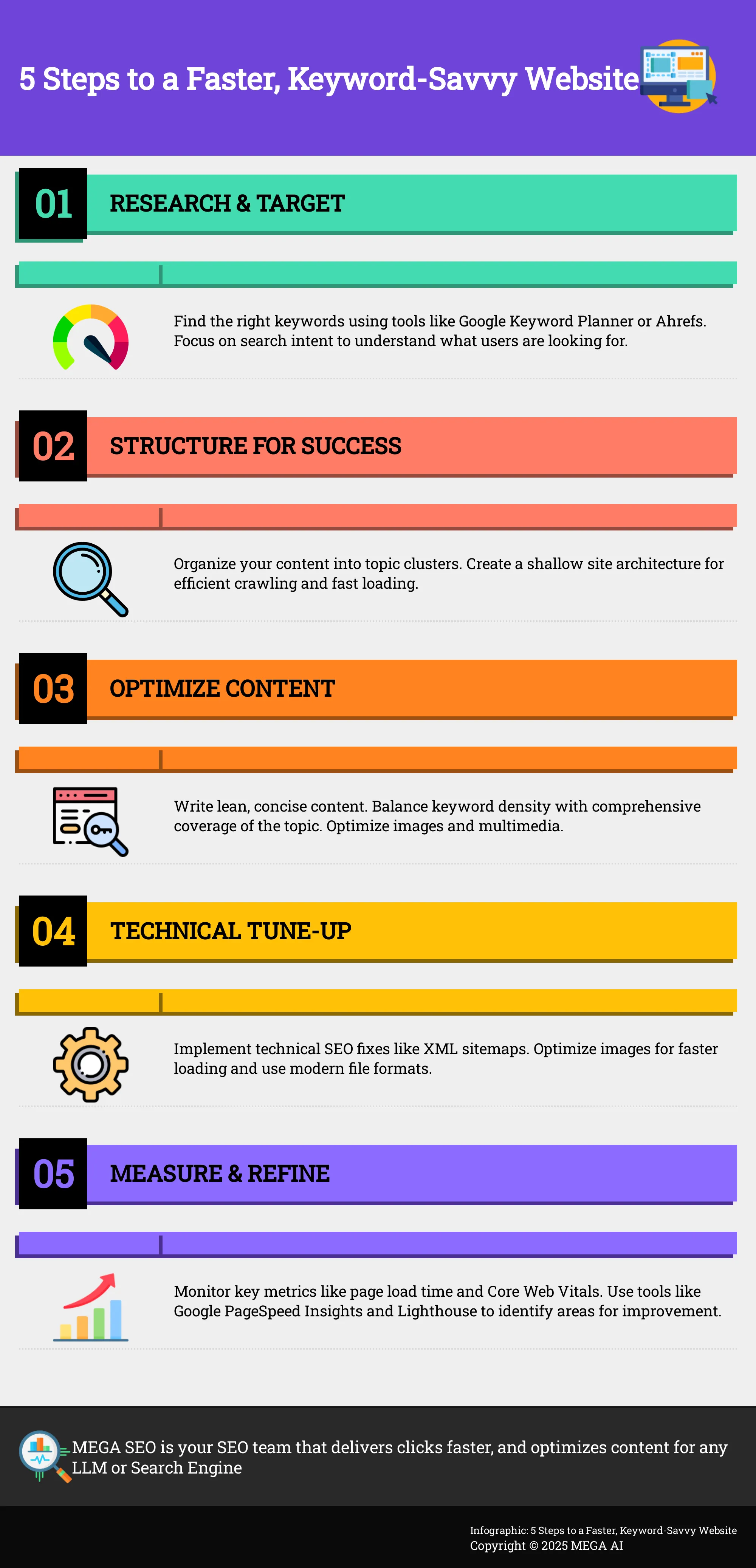
Effective keyword research is about more than just finding popular terms; it’s about understanding your audience so you can create focused content that performs well. When you target the right keywords, you can build leaner, more relevant pages that load quickly and give users exactly what they need. This foundational step ensures you aren't wasting resources—or your user's time—on content that misses the mark. By aligning your content with specific user queries from the start, you create a direct path from search to solution, which is key for both SEO and page speed.
Find the right keywords with these tools
To find the words and phrases your audience uses, you can start with tools like Google Keyword Planner or Ahrefs. The goal is to identify terms with healthy search volume that aren't overly competitive. Analyzing what keywords your competitors rank for can also reveal valuable opportunities. This process helps you understand your target audience's search queries so you can build content around them. For startups and small businesses, automating this process with a platform like MEGA AI’s SEO tools can save significant time, allowing you to discover high-performing keywords without the manual work.
Match search intent for better targeting
Beyond finding keywords, you need to understand the why behind them. This is called search intent. Are users looking for information (e.g., "how to improve page speed"), trying to find a specific site (e.g., "MEGA AI"), or ready to buy (e.g., "best AI SEO software")? Creating content that meets their needs is crucial for ranking well. When your page directly answers the user's query, you can keep your content concise and focused. This avoids adding unnecessary information that can slow down your page, helping you deliver a faster, more satisfying user experience.
On-Page SEO Tips for Faster Load Times
While many on-page SEO factors don't directly affect your server's response time, they have a major impact on user behavior. Search engines interpret positive user signals, like high click-through rates and longer time on page, as indicators of a quality experience—much like they view fast load times. By optimizing these elements, you encourage the kind of engagement that tells search engines your site is a top-tier result worth showing to more people. It’s about creating a seamless journey from the search results page to your content.
Optimize titles, meta descriptions, and headers
Think of your page title and meta description as the welcome mat for your website on a search results page. A compelling title and description encourage users to click. When you improve your click-through rate, you send a strong signal to Google that your page is highly relevant to the search query. This positive user engagement is a critical factor in how search engines perceive your page's quality. Well-structured headers (H1, H2, H3) also make your content easier for both users and search engines to scan and understand, keeping visitors on your page longer. This helps reduce bounce rates and reinforces that your fast-loading page delivered on its promise.
Create clean URLs
A clean, descriptive URL is easier for both people and search engines to understand. Instead of a string of random characters, a well-structured URL gives a clear idea of the page's content before a user even clicks. For example, yourwebsite.com/blog/clean-url-tips is much more effective than yourwebsite.com/p?id=123. This clarity can improve user trust and click-through rates. For search engines, a logical URL structure makes your site easier to crawl and index efficiently. When search engine bots can move through your site without friction, it contributes to a healthier, better-performing site overall. This is a foundational piece of technical SEO that supports both user experience and speed.
Technical SEO Fixes for Page Speed
Beyond the words on the page, the technical health of your website plays a huge role in how quickly your content reaches your audience. Technical SEO is all about optimizing your site’s backend infrastructure to make it easy for search engines to crawl and for users to load. Even the most perfectly targeted content will struggle if it’s on a slow, clunky website. A poor user experience can lead to high bounce rates, signaling to search engines that your page isn’t a good result.
Focusing on a few key technical fixes can make a significant difference in your page load times. These aren't one-time tasks but rather ongoing maintenance that keeps your site running smoothly. By ensuring your site is technically sound, you create a strong foundation that helps your keyword strategy succeed. Let's look at two of the most impactful technical adjustments you can make: creating a clear sitemap and optimizing your media files.
Use XML sitemaps for efficient crawling
Think of an XML sitemap as a blueprint of your website that you hand directly to search engines. This file lists all the important pages on your site, making it incredibly easy for crawlers like Googlebot to find and understand your content. Instead of having to discover every page by following links, the crawler has a clear map to follow.
This process makes crawling much more efficient. When search engines can easily find all your content, they can index it faster and more accurately. While a sitemap doesn't directly speed up a single page's load time, it improves the overall performance and health of your site from a search engine’s perspective. It’s a foundational piece of technical SEO that ensures your keyword-optimized pages don't get lost or overlooked.
Optimize images and multimedia
Large, unoptimized images are one of the most common reasons for slow page load times. Every photo, graphic, and video has to be downloaded by the user's browser, and bigger files simply take longer. Luckily, this is a straightforward issue to fix with a few best practices.
A key part of image optimization is compressing files before you upload them to your site. You should also use modern file formats like WebP, which offer high quality at a much smaller file size than older formats like JPG or PNG. Another powerful technique is lazy loading, which tells the browser to only load images when a user scrolls down to them. This makes the initial page view load much faster, improving the user experience right away.
How to Measure Your Keyword Strategy's Impact on Speed
Once you’ve optimized your site structure and content, you need a way to measure the results. Tracking the right metrics helps you see the connection between your keyword strategy and site performance. This allows you to make data-driven adjustments and continuously refine your approach for both search rankings and user experience.
Key metrics to monitor
To understand how your keyword strategy affects speed, focus on a few core performance indicators. Page load time is a critical metric because it directly impacts user experience and SEO. Since Google uses website speed as a ranking factor, faster pages tend to perform better in search results.
You should also monitor Google's Core Web Vitals. These metrics measure how quickly your content loads and becomes interactive. They include Largest Contentful Paint (LCP), which tracks how long it takes for the main content to appear, and Cumulative Layout Shift (CLS), which measures visual stability. By tracking these, you get a clear picture of the performance users actually experience.
Tools to monitor and improve load times
Several tools can help you track performance and identify areas for improvement. Google PageSpeed Insights and Lighthouse are excellent for analyzing your site’s speed and getting actionable recommendations. These tools can pinpoint specific issues, from large images to inefficient code, that slow down your pages.
For a broader view, analytics tools like Google Analytics and Google Search Console help you track how your site ranks for target keywords and how much traffic they generate. To address speed issues directly, consider implementing a caching solution to store static files and serve them faster to repeat visitors. For a more automated approach, MEGA AI’s SEO platform can handle technical optimizations to keep your site running fast.
Put Your Speed-Focused Keyword Strategy into Action
Turning strategy into results means creating a process where speed and keywords are treated as two sides of the same coin. With a clear plan, you can build and optimize content that satisfies both search engines and users.
Create a content plan that prioritizes speed
A solid content plan does more than map out topics; it integrates technical performance from the start. Page load time is a significant factor that affects your website's SEO performance, directly impacting user experience and rankings. Your strategy should treat speed as a core component, not an afterthought. When planning new content or auditing existing pages, assess both keyword relevance and performance metrics.
This means your content calendar could include columns for target keywords, current page speed scores, and optimization tasks. Fixing technical SEO issues like slow load times should be scheduled right alongside content updates. Using an automated SEO platform can streamline this process by identifying which pages need both a content refresh and a technical tune-up.
Balance your SEO goals with performance metrics
Achieving high search rankings requires a delicate balance. Many common SEO mistakes, from poor keyword research to slow page speeds, can undermine your efforts and harm search visibility. It’s not enough to rank for a term if the page takes too long to load, causing visitors to leave before they see your content. Your goal is to attract qualified leads, and that means delivering a fast, seamless experience.
When you optimize old content with new keywords, also run a performance check. Look for opportunities to compress images or simplify elements without sacrificing the content's value. Success isn't just about traffic; it's about engagement and conversions. By monitoring both your keyword rankings and your page speed metrics, you create a holistic strategy that supports long-term growth.
Related Articles
- Advanced Keyword Research Techniques for Content SEO: Driving Targeted Traffic to Your Blog - MEGA SEO | Blog
- Keyword Strategy Made Easy: Just Follow These 5 Steps
- Mastering Google's Core Web Vitals for Enhanced SEO and Site Speed - MEGA SEO | Blog
- Learn How to Structure Your Website to Improve Search Engine Crawlability and Indexing: Advanced Technical SEO Techniques - MEGA SEO | Blog
- Optimizing Content to Match User Search Intent and Improve Engagement Metrics: Advanced On-Page SEO Techniques - MEGA SEO | Blog
Frequently Asked Questions
Which should I prioritize: keyword targeting or page speed? It’s best to think of them as a team rather than competitors. Your keyword strategy gets the right people to your door, but page speed is what invites them inside. A page that ranks well but loads slowly will still frustrate users and send them away. A fast site with irrelevant content won't attract the right traffic in the first place. For the best results, you should address both simultaneously as part of a single, unified SEO plan.
How can I tell if my website is fast enough for users and search engines? A great starting point is to use free tools like Google PageSpeed Insights. This tool will give you a performance score and provide specific metrics called Core Web Vitals, which measure the real-world user experience of your site. Aiming for a load time under three seconds is a good general rule, but these tools will give you a more detailed analysis and actionable steps to improve your site's performance.
Will adding more content to target more keywords automatically slow down my site? Not necessarily. While adding large, unoptimized elements like high-resolution images or videos can slow a page down, well-written text has a minimal impact on load time. The key is to be strategic. Focus on creating lean, efficient content and optimize all media files before you upload them. A well-structured page that covers a topic comprehensively can perform very well if you follow technical best practices.
What's a simple first step to improve both my keyword strategy and site speed? A great place to start is by optimizing your images. Large image files are one of the most common causes of slow pages. Compressing your images before uploading them can provide an immediate speed improvement. While you're updating those images, you can also review the page's content to ensure it's tightly focused on its target keyword and clearly answers a user's search query. This single task addresses both speed and keyword relevance.
How often should I review my keywords and page performance? SEO is an ongoing process, not a one-time fix. It's a good practice to review your keyword performance and site speed metrics on a quarterly basis. This allows you to see what's working, identify new keyword opportunities, and catch any technical issues that may have slowed your site down. Regular check-ins ensure your strategy remains effective and adapts to changes in search engine algorithms and user behavior.


