

Taking charge of your local online visibility begins with a clear understanding of your current performance, and Google Analytics provides the necessary tools for this. This article will equip you with the knowledge of how to use Google Analytics for local SEO, empowering you to monitor your progress, identify new opportunities, and make well-informed adjustments to your overall strategy. We will cover the essentials of setting it up correctly for your local business, which key metrics to watch, and how to interpret the data effectively to attract more customers from your community, turning website information into real-world local growth.
Key Takeaways
- Build a Solid GA4 Foundation: Correctly install and configure Google Analytics 4 to accurately track how local customers find your business online and interact with your website.
- Focus on Key Local Metrics: Prioritize tracking visitor geography, local traffic sources, on-site engagement, and specific local conversions to understand what truly drives local customer action.
- Iterate and Optimize with Data: Regularly analyze your GA4 insights, use advanced features thoughtfully, and avoid common setup errors to continuously refine your local SEO approach and content for better results.
What is Google Analytics & Why Use It for Local SEO?
If you're looking to understand how people find and use your local business website, Google Analytics is an indispensable tool. Specifically, Google Analytics 4 (GA4) is the current version you'll be working with, as Google has phased out its older analytics platforms. Think of it as a powerful lens that shows you what's happening on your site, providing data that can transform your local marketing strategy. It’s designed to help you see the complete customer journey across your website and apps.
So, why is it so important for local SEO? Google Analytics helps you pinpoint exactly where your website visitors are coming from geographically, how they interact with your content, and ultimately, whether your local SEO efforts are actually bringing in customers. This isn't just about collecting data; it's about gaining actionable insights to make smarter decisions for your local business. You can see which local campaigns are driving traffic and which ones might need a rethink, allowing you to allocate your resources more effectively.
While GA4 is great at tracking website activity, it doesn't automatically know the specifics of all your marketing campaigns. To get the full picture, especially for local initiatives, you'll want to use UTM parameters in your marketing links. These little tags tell GA4 precisely where your traffic originates, like from a local newsletter, a specific social media ad, or your Google Business Profile. GA4 then offers valuable reports, such as the 'Traffic Acquisition' report, which breaks down traffic by marketing channels, and the 'Demographic Details' report, which provides crucial visitor location data – essential for any local business wanting to understand its community better.
By regularly checking key metrics, you can get a clear view of your local SEO performance. This includes understanding sessions by location, which traffic channels are most effective locally (like organic search, local pack referrals, or local directories), how many local conversions you're getting (like form submissions for quotes, calls from local customers, or direction requests), and which landing pages are most popular with your local audience. Analyzing these metrics helps you refine your strategy, optimize your content for local intent, and focus on what truly grows your local presence.
Set Up Google Analytics for Your Local Business
For any local business aiming to thrive online, understanding your audience and how they find you is paramount. This is where Google Analytics comes into play. Think of it as your digital detective, meticulously gathering clues about your website visitors. It’s a powerful, free tool from Google that tracks and reports website traffic, giving you invaluable insights into who your online customers are, how they arrive at your site (be it through local search, social media, or direct visits), and what they do once they're there. Are they browsing your services, looking for your address, or perhaps abandoning their cart at a specific point?
Knowing these details is not just about satisfying curiosity; it's about making data-driven decisions. With Google Analytics, you can pinpoint which local marketing efforts are working and which ones need adjustment. For instance, you can see if your efforts to rank in local search results are driving actual visitors from your target geographic area. This information is crucial for refining your local SEO strategy, optimizing your website content for local keywords, and ultimately attracting more customers from your community. While setting it up might seem a bit technical at first glance, the process is quite straightforward, and the benefits far outweigh the initial effort. By following a few key steps, you can achieve a clearer view of your online performance and pave the way for more effective digital marketing, whether you're focusing on organic growth or planning future paid advertising campaigns. Let's walk through how to get your Google Analytics account set up specifically for your local business needs.
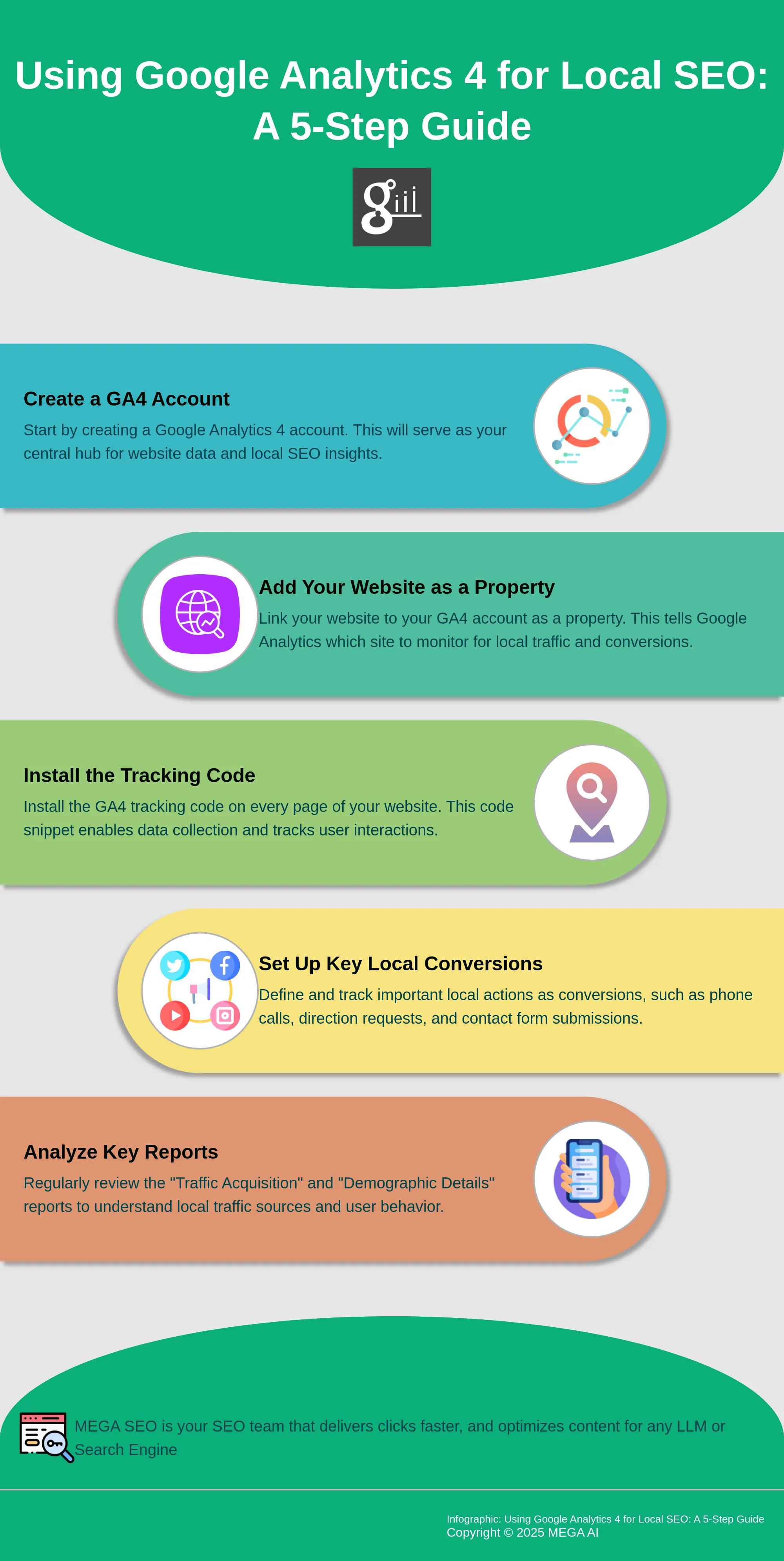
Create a Google Analytics Account
The very first step is to create a Google Analytics account. This will be your central dashboard for all your website data. During this initial setup, Google will ask you to create an 'account,' which typically represents your business. Under this account, you'll then set up a 'property.' For most local businesses, your website will be your primary property. If your business has multiple distinct physical locations, perhaps with their own specific online focuses or separate web pages, you might consider creating a unique property for each. This approach allows for more detailed tracking and analysis of each location's individual online performance, helping you tailor strategies more effectively. However, for a single-location business, one property linked to your main website is usually sufficient to get started.
Add Your Website as a Property
Once your main Google Analytics account is active, your next task is to formally add your website as a property, if this wasn't completed during the initial account creation. This action essentially tells Google Analytics which website it needs to monitor. You'll provide your website's URL and assign a name to your property, something descriptive like 'My Town Florist Website.' Upon completing this, Google Analytics will furnish you with a crucial piece of information: a unique tracking ID (for older Universal Analytics properties) or a Measurement ID along with a global site tag (gtag.js) for Google Analytics 4. This snippet of code is what enables Google Analytics to collect data by tracking visitor interactions on your site, such as which pages they view and how long they stay.
Install the Tracking Code
After you receive your tracking code or Measurement ID, the next critical step is to install it across every single page of your website. This comprehensive installation ensures that Google Analytics can capture a complete picture of user activity. The method for installing this code can differ based on your website's platform. For example, if your site is built on WordPress, numerous plugins are available to simplify this task. If you operate a Shopify store, you'll find a specific area in your admin settings to paste your Google Analytics ID. Once the code is in place, it's wise to check your Analytics account after about 24 to 48 hours to confirm that data is being collected. Google Analytics 4 also offers real-time reporting, allowing for a quicker verification that your tracking is operational.
Key Local SEO Metrics to Track
Once you have Google Analytics set up, the next step is to understand which metrics are most important for your local SEO efforts. It’s easy to feel overwhelmed by all the numbers, but focusing on the right data will clearly show you what's working, what's not, and where you can make improvements to attract more local customers. Think of these metrics as your compass, guiding your strategy toward better local visibility and engagement. Instead of trying to track everything, zeroing in on a few key performance indicators (KPIs) specific to local success will provide actionable insights. This targeted approach helps you refine your marketing messages, optimize your website for local searchers, and ultimately, drive more foot traffic or local online orders. You'll be able to see if your content resonates with nearby residents, if your Google Business Profile is effectively driving traffic, or if specific local campaigns are delivering results. By regularly monitoring these core areas, you can make informed decisions that directly impact your business's growth within your community, ensuring your efforts are truly connecting with the people you want to reach. This focused analysis means you're not just collecting data; you're strategically using it to build a stronger local presence and achieve your business goals.
Geographic Data: Understand Your Local Audience
Knowing where your website visitors are physically located is fundamental for local SEO. In Google Analytics, you can find "Sessions by Location" reports that show you the cities, regions, and even countries your visitors come from. This information is incredibly valuable because it helps you confirm if you're reaching your target local market. If you see a lot of traffic from your service area, that’s a good sign. If not, you might need to adjust your local SEO strategies to better target customers in your desired geographic locations. This data allows you to tailor your content and marketing messages to resonate more effectively with the people nearby, ensuring your efforts are focused where they matter most.
Traffic Sources: Identify Local Search Channels
Understanding how local customers find your website is just as important as knowing where they are. Google Analytics breaks down your traffic into different channels, such as organic search (like Google), direct visits (typing your URL), referrals (links from other local sites), and social media. By analyzing these traffic channels, you can see which ones are bringing in the most local visitors. For instance, if a significant portion of your local traffic comes from organic search, it indicates your SEO efforts are effectively capturing local intent. This insight helps you decide where to invest more of your marketing time and budget for the best local results, optimizing the pathways customers use to discover you.
Behavior Metrics: Analyze User Engagement
Once visitors land on your site, what do they do? Behavior metrics like bounce rate (or its inverse, engagement rate in GA4) tell you how engaging your content is to your local audience. A high bounce rate might mean visitors aren't finding what they expect, while a high engagement rate suggests your content is relevant and keeps them interested. Also, look at metrics like average session duration and pages per session. If users are spending time on your site and viewing multiple pages, it indicates that your website provides a good user experience and valuable information for your local prospects. This helps you refine content to better meet their needs.
Conversion Tracking: Measure Local SEO Success
Ultimately, the goal of local SEO is to drive actions that benefit your business. This is where conversion tracking comes in. You can set up goals in Google Analytics to monitor specific local conversions, such as phone calls initiated from your website, submissions of your contact form, clicks on your map directions, or downloads of a local offer. Tracking these local conversions is crucial because it directly shows you how your local SEO efforts are translating into tangible business outcomes. This data helps you understand the return on your investment and identify which strategies are most effective at turning local searchers into actual customers for your business.
Track Local Traffic and Conversions with Google Analytics
Once you have Google Analytics set up, it's time to dig into the data to see how your local SEO efforts are performing. Understanding where your traffic comes from and what users do on your site is key to refining your strategy. Google Analytics offers powerful tools to track these elements, helping you make informed decisions to attract more local customers. By focusing on specific reports and setting up conversion tracking, you can get a clear picture of what’s working and where you can improve. This isn't just about numbers; it's about understanding the story your data tells about your local audience and their journey with your business. Properly interpreting this information allows you to see the direct impact of your local SEO activities and identify opportunities for growth.
Segment Data by Location
Knowing where your website visitors are physically located is fundamental for local SEO. Google Analytics 4 (GA4) provides reports that help you see this clearly. For instance, the 'Demographic details' report shows you visitor location data, allowing you to confirm if you're reaching your target local audience. You can also explore the 'Traffic acquisition' report to understand which marketing channels are driving users from specific geographic areas. By segmenting your audience data by city or region, you can tailor your marketing messages and offers more effectively, ensuring your efforts resonate with the people most likely to become customers. This helps you understand which marketing efforts are most effective in your specific service areas.
Analyze Mobile vs. Desktop Traffic
Many local searches happen when people are out and about, using their smartphones to find businesses "near me." This makes understanding your mobile traffic crucial. Google Analytics allows you to see the percentage of your website traffic coming from mobile devices versus desktop computers. If you notice a high volume of mobile users, it underscores the importance of a mobile-friendly website and locally optimized content that’s easy to access on smaller screens. Analyzing this split helps you prioritize user experience improvements. For example, if mobile users have a high bounce rate on a particular page, it might indicate that the page isn't rendering well on mobile devices or that the information they need isn't immediately visible.
Monitor Local Keywords and Landing Pages
To truly understand what draws local searchers to your site, you need to monitor which local keywords are bringing them in and which landing pages they visit most. While GA4 has de-emphasized organic keyword reporting directly in the interface, integrating Google Search Console with GA4 provides more insight into the search queries people use to find you. Within Analytics, you can still see which of your website pages attract the most local visitors by analyzing your landing page reports and segmenting by geographic location. This information is invaluable for content strategy, helping you create more of what your local audience is looking for and optimizing existing pages to better match local search intent.
Set Up Goals for Local Conversions
Traffic is great, but conversions are what truly impact your bottom line. For local businesses, conversions can take many forms: a phone call, a contact form submission, a click on your address for directions, or a download of a local offer. It's essential to set up conversion tracking in GA4 for these specific actions. By defining these events as conversions, you can measure how effectively your website turns local visitors into leads or customers. This data directly shows the return on your local SEO investment and highlights which parts of your sales funnel are working well and which might need adjustments to better serve your local clientele.
Advanced Google Analytics Features for Local SEO
Once you have the basics of Google Analytics set up for your local business, you can begin to explore some of its more powerful features. These advanced tools offer deeper insights into your local audience and how they interact with your online presence. Think of them as your next step in understanding customer behavior, allowing you to move beyond simple traffic counts to a more nuanced view of your local SEO performance. By using these capabilities, you can fine-tune your strategies, make data-driven decisions, and ultimately improve your visibility in local search results.
These features are particularly helpful for pinpointing exactly what’s working and what’s not in your local marketing efforts. For instance, you can create customized views of your most important local metrics, keep a log of significant changes to your website or local listings and see their impact, and even combine your website data with search engine performance data for a holistic overview. Let's look at a few key advanced features that can significantly aid your local SEO analysis: custom dashboards, annotations, and the integration of Google Search Console data. Each of these can provide specific, actionable information to help you connect more effectively with your local customers.
Create Custom Dashboards for Local Insights
Google Analytics 4 allows you to build custom dashboards, which are incredibly useful for keeping an eye on your local performance. Instead of sifting through standard reports, you can create a single view that showcases the metrics most critical to your local business goals. This means you can tailor your analytics to display information like user engagement specifically from your target geographic areas, or the conversion rates stemming from local search queries.
Setting up these dashboards helps you monitor trends over time, specifically for your local audience. For example, you might want to track how many users from your city are completing a contact form, or how engagement on your location-specific landing pages is changing. This focused view ensures you're always looking at the data that directly impacts your local success, making it easier to spot opportunities or areas needing improvement without getting lost in broader, less relevant statistics.
Use Annotations to Track Local SEO Changes
Annotations in Google Analytics act like little digital sticky notes on your data charts, marking when significant events occurred. This feature is invaluable for local SEO because it allows you to correlate your marketing actions with changes in website traffic and user behavior. For instance, if you update your Google Business Profile, launch a local promotion, or make significant changes to your website's location pages, you can add an annotation on that date.
Later, when you're reviewing your analytics, these annotations provide context. If you see a spike or dip in local traffic, you can quickly check if it aligns with any of your noted activities. Systematically using annotations to track important actions can clarify cause and effect, helping you understand which of your local SEO efforts are truly making a difference.
Integrate Google Search Console Data
Connecting Google Search Console to your Google Analytics account is a smart move for a comprehensive view of your local SEO performance. Google Search Console provides data on how your site performs in Google Search results, including which queries users searched for to find you, your average ranking for those queries, and your click-through rates. When you integrate this data with Google Analytics, you can see not only how people find you locally but also what they do once they arrive on your site.
This integration allows you to analyze the entire user journey, from the local search query that brought them in, to the pages they visited, and whether they completed a desired action, like calling your business or requesting directions. Understanding this connection helps you refine your local keyword strategy and optimize your website content to better match the intent of local searchers, ultimately improving your local search visibility and conversion rates.
Interpret Google Analytics Data to Improve Local SEO
Once you have Google Analytics set up and tracking data, the next step is to make sense of it all. Think of GA4 as your local business's personal data detective. It gathers clues about who is visiting your site, where they're coming from, and what they do once they arrive. By learning to interpret this information, you can make smarter decisions to attract more local customers. It’s about turning raw numbers into actionable insights that can genuinely shape your local SEO efforts for the better.
Identify Trends and Patterns in Local Traffic
To really understand your local audience, you'll want to become familiar with a couple of key reports in GA4. The 'Traffic Acquisition' report is fantastic because it shows you which marketing channels are bringing people to your site—is it organic search, social media, or perhaps local directories? This helps you see what’s effective.
Then, the 'Demographic Details' report provides valuable insights into your visitors' locations. By regularly reviewing these, you can spot trends, like an increase in visitors from a neighboring town after a targeted ad campaign, or notice if a particular marketing effort isn't performing as expected in your primary service area. This information allows you to understand your audience and refine where you focus your marketing energy.
Use Data to Refine Your Local Content Strategy
Your Google Analytics data is a goldmine for figuring out what kind of content resonates with your local customers. It’s not just about attracting visitors; it’s about attracting the right visitors who will take meaningful actions. This is where setting up conversion tracking in GA4 becomes incredibly useful. You can track specific actions that matter to your local business, such as phone calls initiated from your website, submissions of your contact form, or clicks on the "get directions" button to your physical location.
When you see which pages or content pieces are driving these conversions, you know what’s truly working. This data-driven approach helps you create more content that your local audience finds valuable and acts upon, ensuring your content strategy is directly contributing to your business goals.
Optimize for Local User Behavior
Understanding how local users interact with your website is key to providing them with a better experience and guiding them towards conversion. Regularly reviewing GA4 reports, especially the 'Traffic Acquisition' and 'Demographic Details' reports, helps you monitor your marketing performance and understand your audience's location and how they found you.
Beyond just traffic sources, pay attention to what these local users do. Are they frequently clicking on your phone number, or are they more likely to fill out a contact form? Do many users click on your map integration for directions? Observing these behaviors allows you to optimize your website's design and calls-to-action to better suit their needs. For instance, if many local mobile users are trying to call you, ensuring your phone number is prominently displayed and click-to-call enabled is a smart move.
Best Practices for Continuous Local SEO Analysis
Keeping a close eye on your local SEO performance isn't a one-time task; it's an ongoing commitment that pays dividends in local customer acquisition and business growth. For startups, small businesses, and digital marketing agencies aiming to solidify their community presence, continuous analysis is the cornerstone of a successful local SEO strategy. Think of it as regularly checking the pulse of your local online visibility. This consistent monitoring allows you to understand what’s resonating with your local audience, identify areas for improvement, and adapt to the ever-changing search landscape. Without this diligence, even the best-laid plans can falter as competitor strategies evolve and search engine algorithms update.
Adopting best practices for continuous local SEO analysis means you're always equipped to make data-driven decisions. It’s about moving beyond guesswork and truly understanding the impact of your efforts. Are your Google Business Profile optimizations driving calls? Is your locally-focused content attracting the right kind of traffic? Are you visible for the search terms your local customers are actually using? Regular analysis provides answers to these critical questions. This proactive approach not only helps in refining current strategies but also in uncovering new opportunities for local engagement and conversion. By integrating these practices into your routine, you transform your local SEO from a set-and-forget task into a dynamic, responsive engine for growth. This section will explore key practices to help you maintain this crucial analytical rhythm.
Report and Review Regularly
To truly understand how your local SEO efforts are paying off, you need to make reporting and reviewing a consistent part of your workflow. Think of it as a regular health check for your online visibility within your community. Within Google Analytics 4 (GA4), you can use specific reports like 'Traffic Acquisition' to see precisely where your local visitors are originating and 'Demographic Details' to gain a clearer picture of who these potential customers are. Establishing a routine, perhaps weekly or monthly, to examine this data helps you monitor your marketing performance effectively. This consistent review ensures your strategies remain aligned with your local audience's behavior and search patterns, allowing for timely adjustments.
Compare Performance Across Multiple Locations
If your business serves customers in several different areas or has multiple physical storefronts, it’s a smart move to compare how each location is performing online. For businesses managing distinct service areas, you might even consider setting up separate properties in Google Analytics for each one. This approach allows you to analyze data for each specific location independently. Doing so makes it much easier to tailor your SEO strategies and marketing messages to what works best in each unique community. It’s all about getting granular with your data to make informed decisions, identify high-performing areas, and understand where you might need to adjust your local SEO tactics for better engagement and results across all your operational zones.
Stay Updated with Google Analytics Features
The world of web analytics is always evolving, and Google Analytics is no exception, especially with the full transition to GA4. While getting completely comfortable with GA4 might present a bit of a learning curve, the effort invested is well worth it. Mastering its features can provide significant benefits, particularly when it comes to accurately measuring your marketing return on investment and understanding complex user journeys with greater depth. Make it a point to stay curious and explore new updates or functionalities as Google rolls them out. Subscribing to official Google Analytics communications or following trusted industry publications can help you keep pace, ensuring your local SEO analysis remains sharp, effective, and utilizes the latest capabilities.
Use Google Analytics 4 for Better Local SEO Insights
If you're aiming to truly understand how your local customers discover and engage with your website, Google Analytics 4 (GA4) is a tool you'll want to get familiar with. It’s designed to offer a clearer view of the customer journey, which is incredibly valuable as you refine your local SEO strategy. Think of GA4 as your digital guide, helping you uncover insights about what’s resonating with your local audience and where you can make adjustments to attract more business in your community.
GA4 operates on an event-based model, a shift from the session-based approach of its predecessor, Universal Analytics. This means it focuses on specific user interactions—like clicks, scrolls, and downloads—providing a more detailed picture of engagement. For local businesses, this change allows for more precise tracking of actions that indicate local interest, such as clicks on a phone number, requests for directions, or interaction with content specific to your area. By becoming proficient with GA4, you can access deeper insights into your local audience's behavior. This empowers you to make data-driven decisions that can significantly improve your online presence within your specific service areas. This isn't just about gathering data; it's about using that data to understand your local customers better and then applying those learnings to grow your business. Tools like MEGA AI can further assist you as you automate your SEO efforts based on these valuable insights.
Understand Key Differences: Universal Analytics vs. GA4
The first thing to recognize is that Google Analytics 4 is now the standard analytics platform from Google. If you were using Universal Analytics, it's important to know that Google has replaced older analytics platforms with GA4. Understanding and using it is crucial for tracking website data accurately from this point forward.
The fundamental difference lies in their data models. Universal Analytics was primarily session-based, grouping user interactions within a defined period. GA4, however, is event-based. This means every user interaction, whether it's viewing a page or clicking a button, is treated as an individual event. This approach offers a more flexible and user-centric way to measure engagement, which is especially beneficial for understanding the detailed ways local customers interact with your online content.
Set Up Enhanced Measurement for Local Tracking
A helpful feature within GA4 is Enhanced Measurement, which automatically tracks several common event types without requiring you to add extra code to your website. For local SEO purposes, you'll want to ensure you are capturing actions that clearly indicate local intent. It's important to define what actions on your website are valuable and should be counted as 'conversions.' Examples for a local business might include submissions of a contact form for local service inquiries, clicks on your listed phone number or address, or even how far users scroll on a page containing important local information.
While GA4 automatically tracks many standard events, you also have the flexibility to create custom events. This allows you to capture specific interactions that are unique to your local business operations. For instance, you could set up a custom event to track clicks on a "Get Directions" button or downloads of a menu or local service guide. This level of customization ensures your analytics are tailored to measure what truly matters for your local success.
Use GA4's User Journey Analysis
GA4 provides robust reporting features that are incredibly useful for developing a deep understanding of your local audience. You should make it a practice to regularly review GA4 reports, especially the 'Traffic Acquisition' and 'Demographic Details' reports, to monitor your marketing performance and understand your audience's location. The 'Traffic Acquisition' report, for example, shows you which channels are bringing users to your site—whether it's local organic search results, your Google Business Profile, or local online directories.
The 'Demographic Details' report, along with GA4's built-in geographic reporting, is particularly valuable for local SEO. This functionality shows traffic location by country, region, or city. This allows you to see if your marketing efforts are effectively reaching your target local market. Analyzing this data helps you confirm if your local SEO strategies are successfully attracting users from your desired geographic areas and provides insights into how they behave once they arrive on your website.
Common Mistakes to Avoid with Google Analytics for Local SEO
Google Analytics is a fantastic resource for understanding your local audience, but a few common missteps can lead to inaccurate data and, consequently, misguided strategies. When your data isn't clean or your tracking isn't set up correctly, you might find yourself making decisions that don't actually help your local SEO. Think of it like trying to follow a map with the wrong starting point marked – you simply won't end up where you intend to go.
By being aware of these potential pitfalls, you can ensure your Google Analytics setup is truly working for you, not against you. Accurate data is the bedrock of any effective local SEO strategy, allowing you to genuinely understand customer behavior and optimize your online presence for those valuable local searchers. Let's look at some frequent errors and, more importantly, how you can steer clear of them. This will help you gather meaningful insights that can genuinely inform your efforts to attract more local customers. Remember, the goal here is to make data-driven decisions that improve your visibility and drive real business results in your specific geographic area. For businesses looking to streamline these processes, exploring SEO automation tools can also provide significant advantages in managing and interpreting analytics data effectively.
Filter Out Internal Traffic
One common pitfall is neglecting to filter out your own traffic. When you and your team visit your website, these visits are recorded by Google Analytics just like any other user. This can skew your data, especially for smaller businesses where internal visits might make up a noticeable percentage of total traffic, giving you an inaccurate picture of your website's performance.
It's essential to set up filters in Google Analytics to exclude internal IP addresses. This straightforward step ensures that your analytics reflect genuine user behavior from potential customers, not your own activity or that of your colleagues. Clean data means more reliable insights into how actual local searchers are interacting with your site, which is fundamental for making smart decisions.
Set Up Proper Goals and Conversions
If you don't clearly define what success looks like for your local business within Google Analytics, it becomes very difficult to measure the true impact of your SEO efforts. Setting up goals (or "conversions" as they are primarily known in GA4) is crucial to track important actions like phone calls initiated from your website, contact form submissions, or clicks on the directions to your physical location.
Without properly defined goals, you won't be able to measure the effectiveness of your local SEO efforts or understand which channels are driving valuable customer actions. Take the time to define and configure these conversions so you can clearly see how your website contributes to your business objectives. This helps you understand what's working and where you might need to focus your optimization efforts.
Monitor Mobile Performance Metrics
Mobile traffic is increasingly important for local SEO, as many local searches happen when people are on the go, often looking for businesses "near me." You should regularly track the percentage of your website traffic coming from mobile devices using Google Analytics. A high and increasing percentage of mobile visits generally indicates that your site is effectively reaching local customers who are searching on their phones.
Ignoring mobile performance means you might be missing out on a significant portion of your local audience. Pay close attention to metrics like mobile bounce rate, pages per session on mobile, and mobile conversion rates for your defined goals. This data can highlight if your site offers a good mobile user experience or if improvements are needed to better serve these on-the-move searchers and ensure they can easily find what they need.
How Does Google Analytics Help Improve Your Local SEO Strategy?
Google Analytics offers a wealth of data, and when you apply that data to your local SEO, you can really start to see some traction. Think of it as your behind-the-scenes look at how local customers find and interact with your website. By understanding this, you can make smarter decisions to attract even more local business.
One of the most direct ways Google Analytics helps is by showing you where your website visitors are physically located. GA4's built-in geographic reporting can break down traffic by country, region, or city. This is incredibly useful for confirming that your efforts are reaching your target local audience. You can also track traffic sources to see if people are finding you through local searches, your Google Business Profile, or other local directories. To get the most accurate picture, it's a good idea to use UTM parameters in your marketing links; this tells GA4 exactly where your traffic originates.
Beyond just seeing where people come from, Google Analytics allows you to define and track conversions. These are the key actions you want visitors to take, like filling out a contact form, clicking to call your business, or getting directions to your store. By monitoring these actions, you can measure how effective your local SEO strategy is at turning visitors into potential customers. You can also identify which pages on your site attract the most local visitors, helping you understand what content resonates best with your community. Regularly reviewing GA4 reports, such as the 'Traffic Acquisition' and 'Demographic Details' reports, helps you monitor your marketing performance and make data-driven adjustments to your local SEO approach. This continuous loop of analysis and refinement is key to improving your local search visibility.
Related Articles
- Keyword Research: How to Use Google Analytics
- Harnessing the Power of Google Analytics for Enhanced SEO Strategies - MEGA SEO | Blog
- Local SEO Audit Guide: Drive More Local Customers
- Setting Up Google My Business for Local SEO Success
- Engaging Local Audiences: 6 Strategies for Success
Frequently Asked Questions
What's the main reason a local business should use Google Analytics? Google Analytics helps you understand how people find your website and what they do once they get there. This information is really valuable because it allows you to see if your local marketing efforts are actually attracting customers from your community, so you can make smarter decisions about your strategy.
How does Google Analytics help me understand my local customers specifically? One of the most useful features for local businesses is the ability to see where your website visitors are geographically located. This means you can check if you're reaching people in your target service area. If you see a lot of visitors from your town or region, that's a good sign your local SEO is working.
Is it complicated to get Google Analytics working on my website? While it might seem a bit technical at first, the setup process is generally straightforward. It involves creating an account with Google and then adding a small piece of tracking code to your website. Many website platforms, like WordPress or Shopify, also offer plugins or built-in settings to make this step even easier.
Once I have Google Analytics, what are a couple of simple things I should look at to see if my local SEO is working? A good starting point is to check the geographic location of your visitors to confirm they are local. You can also look at your traffic sources to see how people are finding you – for example, are they coming from Google searches, your Google Business Profile, or local online directories. These insights can tell you a lot about your local visibility.
Why is it important to track actions like phone calls or direction requests in Google Analytics for my local business? Tracking these specific actions, which we call conversions, shows you whether your website is effectively turning visitors into potential leads or customers. For a local business, knowing if people are calling you, asking for directions, or filling out a contact form directly from your site helps you measure the real business impact of your local SEO work.


