

You've put a lot of effort into creating great content, but are your visitors easily finding all the valuable information spread across your site? Internal links are the bridges that connect your content, making it simple for users and search engines to explore. To truly understand the effectiveness of these bridges, you need to see the traffic patterns. That’s precisely why knowing how to use Google Analytics for internal linking? is a game-changer. While GA4 requires a specific setup to monitor these internal journeys, the clarity it provides is indispensable. We'll show you how to implement this tracking, interpret the click data, and use it to refine your site structure for better engagement and SEO.
Key Takeaways
- View Internal Links as Essential Site Guides: These links act like clear signposts, helping your visitors find what they need and showing search engines how your content is organized.
- Configure GA4 Tracking for Click Visibility: You'll need to set up internal link click tracking in Google Analytics 4, using Google Tag Manager or JavaScript, to understand which links your audience uses.
- Use Link Data to Refine User Pathways: Regularly examine the click data in GA4 to see how users move through your site, then apply these findings to improve site structure and the overall user experience.
What is Internal Linking and Why Does It Matter?
Internal linking might sound like a complex SEO term, but it's a foundational element for any website aiming to provide a great user experience and achieve better search engine visibility. Think of internal links as the well-planned pathways within your website. They guide your visitors smoothly from one piece of information to another, much like clear signposts in a building. When implemented thoughtfully, internal links help both your audience and search engines understand your site's content and structure. This clarity is essential for keeping users engaged and for helping your site rank well. Let's look into what internal linking truly involves and why it's so crucial for your online success.
Internal linking: Its definition and purpose
Internal linking is simply the practice of creating hyperlinks from one page on your website to another page on the same website. For instance, if you have a blog post discussing "Tips for Small Business Marketing," you might include a link within that post to another article on your site, such as "Understanding Your Target Audience." This creates a connected network of your own content. The primary purpose is twofold: it helps your visitors easily discover more relevant information, encouraging them to explore your site further. Secondly, it allows search engines to better comprehend the structure of your website and the relationships between different pieces of content, which is vital for effective indexing.
The SEO benefits and impact on user experience
Internal links are incredibly important for your SEO strategy. They serve as routes for search engine crawlers, assisting them in finding and indexing all the pages on your website. When you link to significant pages, you're signaling to search engines that these pages hold value, which can help distribute "link equity" or ranking power across your site. Beyond the technical SEO advantages, a solid internal linking approach significantly enhances the user experience. By offering pertinent links, you guide visitors to additional content they might find useful, making their journey through your site more intuitive and fulfilling. This often leads to lower bounce rates and increased time spent on your site, both of which are positive indicators for search engines.
How internal links shape your website's structure
Consider your website as an interconnected map. Internal links are the roads and junctions that define this map, creating a clear and logical structure. This organization isn't just for aesthetics; it plays a key role in how search engines perceive your site. A well-defined internal linking strategy helps search engines understand the thematic connections between your pages and the overall hierarchy of your information. By strategically linking your content, you can emphasize your most important pages, ensuring that both users and search engine crawlers can efficiently locate the information they need. This ultimately strengthens your website's authority and makes it more user-friendly.
How to Set Up Internal Link Tracking in Google Analytics 4
Seeing how people navigate your website is key to making their experience better and improving your site's performance in search results. Internal links are like the hallways and doors within your site, guiding visitors from one piece of content to another. Tracking clicks on these internal links in Google Analytics 4 (GA4) can give you incredibly useful information. While GA4 comes packed with many powerful analytics capabilities, it doesn’t automatically keep an eye on these internal link clicks. This means you'll need to do a little setup yourself, but trust me, the understanding you'll gain is more than worth the initial effort. It’s like drawing a map of your site and then seeing which paths your visitors actually take.
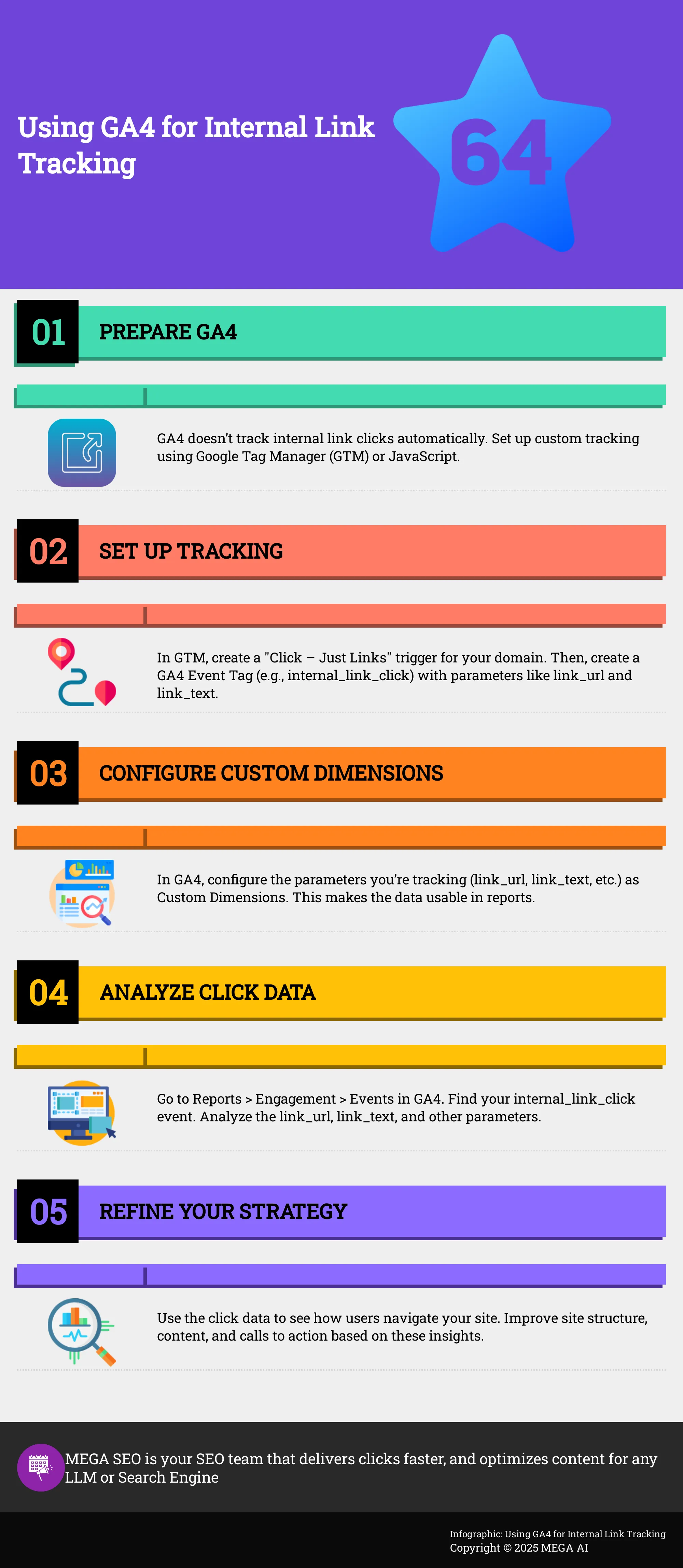
When you set up internal link tracking, you can pinpoint which links get clicked, what content truly grabs attention, and how well your calls to action are working. This data helps you see common navigation routes, find out which pages are popular connection points, and spot places where your site’s layout or prompts could be clearer. For example, you might find out that an important article isn't getting many internal clicks, or that visitors often click on links that take them somewhere unexpected. Whether you choose to use Google Tag Manager for a setup that requires less direct coding, or you're okay with adding a JavaScript snippet for more detailed control, getting this tracking active is a really important step. Next, we’ll go over how to get this tracking configured and then look at the GA4 features that help you make sense of all this click data, so you can turn it into smart changes for your website.
GA4's capabilities for monitoring internal links
Google Analytics 4 is fantastic for getting a grip on user behavior, but it has a particular way of handling internal links—it doesn't track clicks on them straight away. This is a point often noted by analytics resources like Bootstrap Creative. This isn't a flaw; it’s more like GA4 giving you the reins to decide precisely what an 'internal link click' signifies for your website and what specific pieces of information you want to collect about it. Taking the time to set this up manually is really important. It’s how you’ll get to see how people move around your site, which pages serve as key connectors, and how well your calls to action are performing. Without this tailored setup, you won't have a complete picture of the visitor's journey inside your site, making it trickier to refine navigation paths and improve how your content flows together.
A step-by-step guide to set up tracking with Google Tag Manager
If you’re comfortable with Google Tag Manager (GTM), getting internal link tracking configured is pretty direct. You can follow a method similar to what Bootstrap Creative outlines. Your first step is to create a new 'Click – Just Links' trigger in GTM. You’ll want to set this trigger to activate only when a click involves your own website's domain, so you’re specifically tracking internal navigation. After that, you'll create a new GA4 Event Tag. Give this event a clear name, for instance, internal_link_click. Crucially, you’ll add parameters like link_url (to record the link’s destination), link_text (for the actual words clicked), and maybe link_classes if you categorize links with CSS. Before you go live, always use GTM’s Preview Mode to double-check that everything is working as expected and data is being sent correctly.
How to implement tracking without Google Tag Manager (JavaScript method)
If Google Tag Manager isn't your preferred tool, or if you need a more hands-on approach, using JavaScript to track internal links is a reliable option. This technique, which you can find guidance for from sources like Bootstrap Creative, means you'll add a small piece of JavaScript code to your website. This code essentially watches for any clicks on links. When a link is clicked, the script verifies if it’s an internal link (meaning it points to another page on your own site). If it is, the script collects information such as the link’s URL, the text of the link, any associated CSS classes, and even custom data-* attributes. This collected data is then sent to GA4 as a custom event, often called internal_link_click. It’s a potent method, but it does ask for a bit more familiarity with JavaScript than the GTM route.
Key GA4 features for internal link analysis (Event Tracking, Custom Parameters, Custom Dimensions)
After your internal link clicks start appearing in GA4, it's time to use its features to analyze them. The information you set up to track—like the link_url and link_text—comes in as parameters with your custom event (such as internal_link_click). To make this data really work for you in reports, you’ll need to set up these parameters as Custom Dimensions within GA4. This is a key step that experts, like those at Lupa Digital, often recommend. For instance, by making link_text a custom dimension, you can see which specific link phrases are getting the most clicks. Event Tracking will show you the overall number of these clicks, and Custom Dimensions will allow you to break down this data for more detailed understanding, which is invaluable for enhancing both your site's search performance and how users experience it.
How to Analyze Internal Link Data in Google Analytics 4
Once your internal link tracking is active in Google Analytics 4, it's time to explore the data. This information shows how users interact with your site, what content they prefer, and how well your internal links guide them. Understanding this data helps you refine your internal linking strategy, which can improve both user experience and your site's SEO performance. Let's look at how to find and make sense of this information in GA4.
Finding relevant reports and creating custom reports
To start analyzing your internal link clicks, head to the Events report in GA4. You can find this by going to Reports > Engagement > Events. Search for the event name you set up for internal link clicks, which is often internal_link_click. Clicking this event reveals more details. While GA4 offers a good overview, you might want to create custom reports or explorations. This allows for a view tailored to the link parameters most important for your analysis, helping you answer specific questions about your internal linking.
Key metrics to focus on for internal linking insights
When you look at the internal_link_click event, several parameters offer valuable information. Pay close attention to link_url (the destination of the click) and link_text (the anchor text used). If you've configured it, link_classes can also be useful for categorizing links. These metrics help you understand not just that a link was clicked, but which specific link it was and what text encouraged the user to click. Capturing these details is key for figuring out which internal links effectively drive user engagement and move visitors through your site.
How to interpret data for user behavior and content performance
The data from your internal link clicks provides a clear view of user navigation patterns. By seeing which links receive the most clicks, you can identify your most popular or persuasive pathways. For example, a high click count on a link within a blog post that leads to a product page suggests an effective call to action. On the other hand, important links with low engagement might indicate a need to revise the anchor text, placement, or the surrounding content. This analysis helps you evaluate the effectiveness of your calls to action.
Using segments and custom dimensions for deeper analysis
For a more detailed look, consider using segments and custom dimensions. For instance, you can set up the anchor text (link_text) or link URL (link_url) as a custom dimension in GA4. This enables you to build reports that specifically show performance by anchor text or to segment users based on the internal links they've clicked. You could create a segment of users who clicked on links related to a specific service to understand their subsequent actions. This deeper examination can uncover user preferences and highlight opportunities for optimizing content pathways.
How to Get Actionable Insights from Your Internal Link Data
So, you've successfully set up internal link tracking in GA4. That's a great first step. Now, the question is, what do you actually do with all that data? It’s easy to feel overwhelmed by the numbers, but those clicks and pathways are painting a clear picture of how people interact with your website. Understanding these insights is crucial not only for improving your SEO but also for creating a more seamless and intuitive experience for your visitors. Imagine having a map of your customers' preferred routes through your site; once you see their journey and engagement points, you can make informed decisions to guide them more effectively.
This goes beyond simply identifying the most clicked links. It’s about grasping the reasoning behind those clicks. Are users finding the information they seek? Are they discovering your most valuable content? Or are there confusing paths leading to frustration? Your internal link data provides these answers. We'll look at how to convert this raw data into practical strategies. This includes identifying your top-performing content, refining your site’s structure based on actual user behavior, enhancing your content plan, achieving a balance between search engine optimization and user satisfaction, and making data-driven decisions about link placement. Let's begin turning those analytics into tangible results.
Identify popular content and optimize user paths
Your internal link data offers a clear view into the content that genuinely connects with your audience. By observing which internal links receive the most clicks, you can identify your most popular articles, blog posts, or service pages. This information is more than just interesting; it's practical intelligence. Tracking internal links helps you understand user behavior on your website, and this data allows you to refine your site's structure and content to direct visitors towards your most valuable pages. Once you identify your high-traffic content, you can strategically place links within these pieces to guide users toward conversion points, such as a demo request or an important product page. Consider your popular content as key hubs, ensuring your internal links effectively direct traffic.
Improve your site structure based on user interaction patterns
If you've questioned how intuitive your website’s navigation truly is, your internal link data holds the key. Analyzing click patterns reveals how users actually move through your site, often uncovering unexpected behaviors. They might be taking unconventional routes to find information, or perhaps an important page isn't getting the attention it deserves. This information is vital for refining your site's architecture. Tracking internal links helps "to measure the effectiveness of blog posts and website navigation, and to assess the website's internal link structure for SEO." Apply these insights to streamline user journeys, make essential pages more accessible, and establish a logical flow that benefits both users and search engine comprehension of your site.
Enhance your content strategy with internal linking data
Your internal link data provides insights beyond your current content; it can also highlight areas needing new material or updates. If you observe users frequently seeking a topic related to a popular page that you haven't addressed, this indicates a content gap to fill. Likewise, if a valuable page lacks sufficient internal links directing to it, you'll know to create more connections. "Tracking internal links provides valuable data for improving website SEO and user experience," which directly impacts your content creation and upkeep. For example, MEGA AI’s Maintenance Agent uses such insights to find opportunities for adding new information to existing articles or re-optimizing them, helping your content remain current and prominent.
Balance SEO benefits with user experience
Internal linking significantly aids SEO by helping search engines discover and interpret your content. A well-structured website with effective internal linking makes it easier for search engines to crawl and index, which can lead to improved search rankings. However, always remember that links should primarily serve your human visitors. Your GA4 data can assist in finding this equilibrium. If users are not clicking on certain internal links, or if pages with numerous internal links show high bounce rates, it could suggest the links seem unnatural or unhelpful. Strive for links that integrate smoothly with the content and genuinely assist users in finding more information or proceeding to the next relevant step. An effective internal link benefits both search engines and your audience.
Use data to inform link placement decisions
Determining the optimal placement for an internal link should be based on data, not guesswork. Your GA4 data, particularly when used with insights from Google Tag Manager, offers clear guidance. The process of setting up tracking may involve "creating a click trigger and a Google Tag event," and the data gathered will reveal which link placements are most successful. For instance, are links in the introduction clicked more frequently than those in the conclusion? Do users interact more with links embedded naturally within a sentence compared to those in a "related articles" section? By analyzing click-through rates for various link types and placements, you can establish a data-informed strategy for adding future internal links, thereby enhancing their effectiveness for both site navigation and SEO.
How to Implement and Optimize Your Internal Linking Strategies
Once your internal link tracking is active in Google Analytics 4, you're ready to use that data to refine your approach. Implementing and optimizing your internal linking isn't a set-it-and-forget-it task; it’s more of an ongoing conversation with your website's performance. By consistently applying best practices and analyzing your GA4 data, you can make substantial improvements to your site’s search engine visibility and the overall experience for your visitors. Let’s explore how you can make your internal links work harder for you.
Best practices for effective internal link placement
Thoughtful placement of internal links is fundamental to guiding both your audience and search engine crawlers smoothly through your website. Consider the user's journey: where would a link feel most helpful or logical as they engage with your content? Aim for a natural fit within your text, using descriptive anchor text that clearly indicates the linked page's topic. Effective tracking of internal links offers valuable data for enhancing website SEO and user experience. A well-organized site with strong internal linking is simpler for search engines to crawl and index, which often leads to better search rankings. Make it a point to link to your most important content, sometimes called "pillar pages," to underscore their significance. Also, regularly check that your links are working correctly and direct users to relevant, high-quality information.
Set goals and KPIs for internal linking
Before you get deep into optimizing, it’s important to define what success will look like for your internal linking efforts. Establishing clear goals and Key Performance Indicators (KPIs) will help you accurately measure the impact of your strategy. A primary objective might be to measure the effectiveness of your blog posts and website navigation, and to evaluate your site's internal link structure for its SEO value. Useful KPIs could include click-through rates (CTR) on internal links, the average time users spend on pages they arrive at via internal links, reductions in bounce rates, or an increase in the average number of pages viewed per session. You could also track how internal links contribute to specific conversion goals if that aligns with your website's overall objectives.
A/B test internal link strategies using GA4
Instead of relying on assumptions, use data to discover what truly works. Google Analytics 4 can be an excellent tool for A/B testing various internal linking tactics. For instance, you could experiment with different anchor text phrasings, test the placement of links within your content (such as at the beginning versus the end of an article), or even vary the number of internal links on a page. Design your experiments carefully and use GA4 to monitor the performance of each variation. When you review your findings, remember to analyze A/B test results based on meaningful outcomes like user engagement or actual conversions, rather than focusing solely on clicks or impressions. This methodical, data-informed approach will help you fine-tune your strategy for the best possible results.
Common internal linking pitfalls to avoid
While internal linking offers many benefits, a few common missteps can reduce its effectiveness or even create a negative experience. Packing pages with an excessive number of links can overwhelm users and may dilute the perceived importance of each link. Using vague anchor text like "click here" or "read more" offers little contextual value to users or search engines. Another critical error involves incorrect tracking setup; for example, it's important to remember: don't use UTM parameters for your internal links. This practice can distort your referral data and goes against Google Analytics best practices, making it more difficult to get a clear picture of user behavior within your site. Finally, always be vigilant about broken internal links, as these frustrate users and can harm your SEO.
Use GA4 insights for continuous improvement
The data you gather in Google Analytics 4 is a rich resource for the ongoing enhancement of your internal linking. Make it a habit to review your internal link click data to better understand how users move through your site. Consistently tracking these clicks helps website owners see how visitors navigate, which pages draw the most interest, and how effective their calls to action are. If you find that certain important pages aren't receiving many clicks from internal links, you may need to identify more relevant opportunities to link to them. Conversely, if users frequently click links leading to less critical content, take a moment to assess if those links are truly supporting your main objectives. Use these observations to make iterative adjustments, ensuring your internal linking strategy stays aligned with your content and your audience's needs.
Address Challenges and Maximize GA4 for Internal Linking
Google Analytics 4 is a fantastic tool for understanding how users interact with your website, but like any powerful platform, it comes with its own set of challenges, especially when you're trying to get granular with data like internal link clicks. To truly make the most of GA4 for your internal linking strategy, it’s important to be aware of potential hurdles and know how to address them. This way, you can ensure your data is accurate, your strategies are current, and your insights are genuinely actionable.
Think of it like this: GA4 provides the map, but you still need to know how to read it and occasionally adjust your compass. By tackling common issues head-on and staying informed, you can turn GA4 into an even more potent ally for improving your site’s structure, user experience, and ultimately, your SEO performance. Let's look at how you can overcome these challenges and really harness GA4's capabilities.
How to address common data collection and analysis issues
One of the first things to realize is that GA4 operates on an event-based model, which means it doesn't automatically track internal link clicks like its predecessor, Universal Analytics, might have for some setups. This requires a manual configuration, either through Google Tag Manager or by adding custom JavaScript to your site. Taking this step is fundamental because it ensures that every time a user navigates via an internal link, GA4 records that action. This data forms the bedrock for understanding user pathways, pinpointing your most engaging content, and assessing how effectively you’re guiding visitors toward important pages or conversion points.
Adapt to algorithm updates and evolving best practices
The digital marketing world doesn't stand still, and neither do search engine algorithms or analytics best practices. It's really important to stay current with these changes, especially for tracking internal links. For example, a common misstep is using UTM parameters for internal links. While these are invaluable for external campaign tracking, applying them internally can significantly distort your referral traffic data and might even confuse search engine crawlers. Regularly following industry news, official Google updates, and reputable analytics blogs helps you avoid such pitfalls. This diligence ensures your data stays clean, your analysis remains accurate, and your strategies are built on solid, reliable information.
Integrate internal linking data with other GA4 metrics for comprehensive insights
To truly understand the impact of your internal linking, avoid looking at this data in a vacuum. GA4 shines when you integrate various metrics. For instance, details like the specific anchor text of a clicked internal link offer much richer context when set up as a custom dimension in GA4. Imagine combining internal link click data with metrics such as page views, average engagement time, conversion rates for specific goals, or even user segments. This approach allows you to build a multi-dimensional picture of user engagement, helping you see not just which links are popular, but how these clicks contribute to deeper site exploration and your overall business objectives.
Tips for staying current with GA4 features and internal linking trends
GA4 is a robust platform, and both its features and the nuances of internal linking best practices are always evolving. If you're not deeply immersed in analytics daily, keeping pace can feel like a full-time job. There's absolutely no shame in deciding to consult a web developer or a Google Analytics specialist if you find yourself needing a hand with the technical setup, interpreting complex data, or just staying current with the latest trends. Investing in expert guidance can save considerable time and help ensure your internal linking strategy is effective and leverages GA4 to its full potential. Continuous learning, whether through professional help or dedicated self-study, is key.
Related Articles
- Using Internal Links to Improve Site Structure and Boost SEO: Content Optimization Strategies - MEGA SEO | Blog
- Effective Internal Linking: Boost SEO for Category Pages
- Mastering the Art of SEO-Friendly Content: Best Practices for Internal and External Linking - MEGA SEO | Blog
- Deep Linking SEO: A Complete Guide for 2024
- How to Use Google Analytics to Track Blog Performance
Frequently Asked Questions
How often should I review my internal link click data in GA4? It's a good practice to check in on your internal link data at least monthly. This frequency allows you to spot trends, see how new content is being discovered, and identify any potential issues without getting bogged down in daily fluctuations. If you've just launched a new section of your site or made significant content updates, you might want to look a bit more frequently for the first few weeks.
Is there an ideal number of internal links to include on a page? There isn't a magic number for internal links per page. The key is to link naturally and when it genuinely helps your reader find more relevant information. Focus on quality over quantity. A link should make sense in the context of the content and guide the user logically. Too many links can be distracting, while too few might leave users at a dead end.
What's the difference between tracking internal links and external (outbound) links in GA4? Internal links connect pages within your own website, helping users and search engines navigate your content. Tracking these, as we've discussed, often requires a custom setup. External, or outbound, links direct users away from your site to a different domain. GA4 can track outbound link clicks more automatically with its Enhanced Measurement features, though you might still customize this for more detail. The strategic goals for analyzing each are different.
If I update an old blog post, should I also update its internal links? Absolutely. When you refresh older content, take the opportunity to review its internal links. You might find new, relevant content on your site to link to, or perhaps some existing links are no longer the best fit. This ensures your older posts continue to be valuable and well-integrated parts of your site structure, guiding users to your latest and most relevant information.
Beyond tracking, how can I improve my internal linking strategy itself? Tracking data in GA4 gives you insights, but improving the strategy involves using those insights. This means identifying which important pages aren't getting enough internal "link love" and finding natural places to link to them from other relevant content. It also means ensuring your anchor text is descriptive. Tools like MEGA AI can assist by identifying opportunities for new internal links or suggesting improvements to existing ones as part of its content optimization features.


