

Getting traffic to your website is one thing, but ensuring that traffic is valuable is another challenge altogether. When other sites link to you, they send visitors your way, but are these visitors engaging with your content, exploring your offerings, or taking desired actions? Without a clear view, you're essentially flying blind with your link-building efforts. Google Analytics 4 provides the tools to shed light on this. Understanding how to use Google Analytics for backlink analysis? allows you to see beyond just the number of referring domains. It helps you assess the quality of the audience each backlink delivers, enabling you to make smarter decisions about which partnerships to nurture and how to optimize your content for referred users.
Key Takeaways
- Find Your Referring Sites in GA4: Navigate to the Traffic Acquisition report and apply a "referral" filter to see which websites are linking to you and sending traffic.
- Assess Backlink Quality with Engagement Metrics: Analyze how visitors from referring sites interact with your content by checking GA4 for session duration, pages per session, and conversion rates to determine link value.
- Improve Your Backlink Strategy Using GA4 Insights: Regularly review referral data in GA4 to identify high-performing links and content, guiding your efforts to build a stronger backlink profile.
What are Backlinks and How Do They Impact SEO?
If you're aiming to enhance your website's visibility and how it performs in search results, understanding backlinks is essential. Think of them as digital endorsements. When another website links to yours, it’s like they’re giving your content a thumbs-up. Search engines pay close attention to these endorsements, as they heavily influence how your site's authority and relevance are perceived. This network of links is a key component that helps search engines discover and index your pages. Generally, the more credible these "votes" are, the better your chances of moving up in search rankings.
What Are Backlinks?
So, what exactly are backlinks? In simple terms, they are incoming links to your website from another, separate website. Imagine you've crafted an insightful article, and another well-regarded site in your field finds it so useful that they decide to link to it from their own content. That specific link is a backlink. Search engines, such as Google, interpret these links as positive signals—think of them as 'votes' of confidence for your content. The more high-quality backlinks you accumulate pointing to your site, the more search engines are likely to view your content as credible and deserving of a higher spot in search results, which can naturally lead to more organic traffic visiting your website.
Why Backlinks Matter for SEO
Backlinks are a critical piece of any successful SEO puzzle because they directly communicate to search engines that your content is valuable and trustworthy. When authoritative and relevant websites link to your pages, it’s a strong indicator to search engines that your site is a dependable source of information. This can significantly improve your search engine rankings, making it easier for potential customers to find you online.
However, it's important to remember that not all backlinks offer the same value. High-quality backlinks, those coming from sites that are respected and directly related to your industry, carry the most influence. On the flip side, links from low-quality or unrelated sites can sometimes be detrimental, potentially attracting what's known as bot or fake traffic. Therefore, focusing your efforts on acquiring genuine, quality backlinks is fundamental to building a robust online presence and an effective content strategy.
How to Find Your Backlink Data in Google Analytics 4
Google Analytics 4 (GA4) is a fantastic resource for understanding how people discover and use your website. While it doesn't have a specific "backlink report" like some dedicated SEO tools, you can still gather really useful information about your referral traffic. Referral traffic simply means visitors who arrive at your site by clicking a link on another website. By looking at this data, you can see which external sites are sending people your way and how interested those visitors are in what you offer. This helps you gauge how well your link-building efforts are working. Let's walk through how to find and understand this information in GA4.
Find the Traffic Acquisition Report
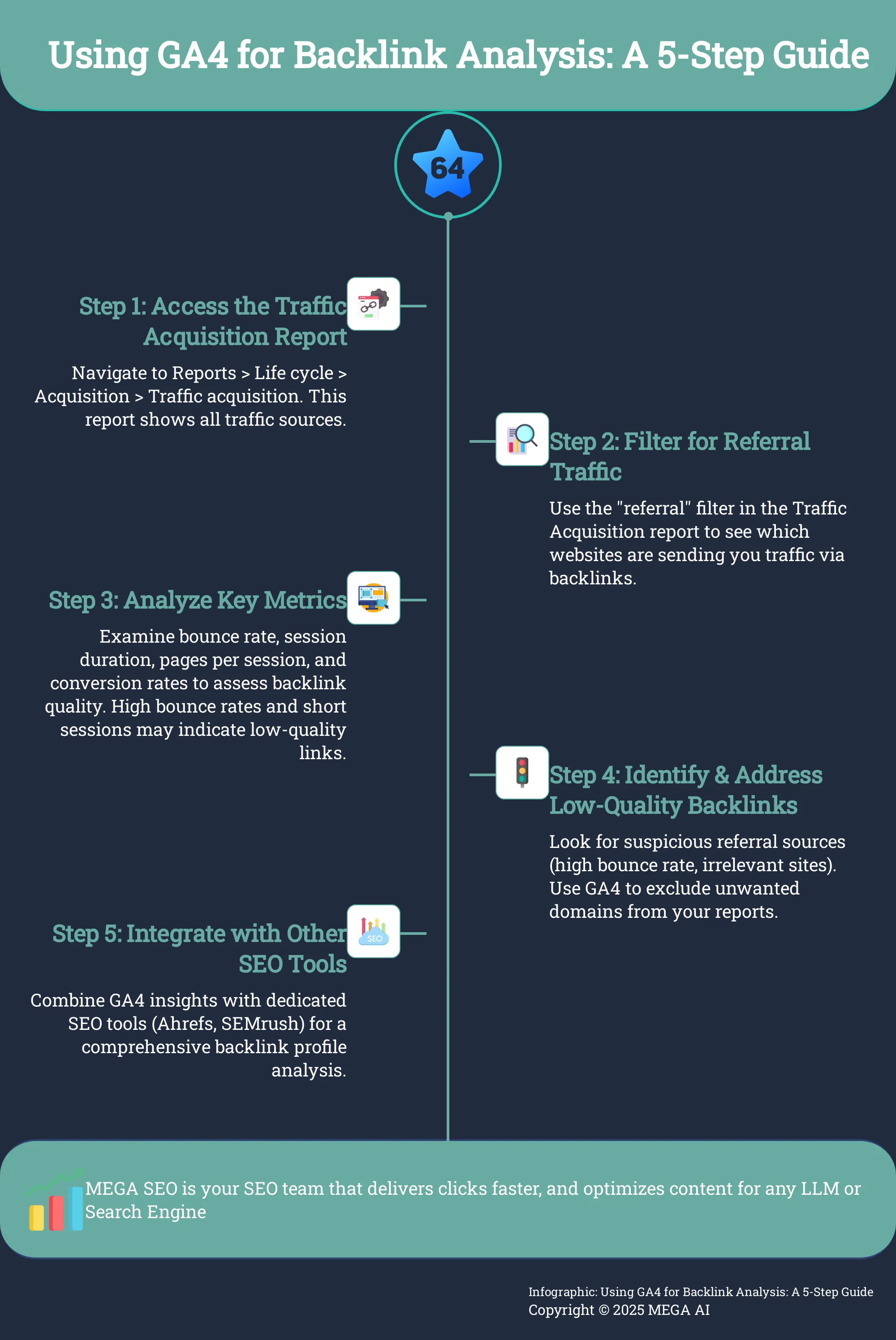
To start looking into your backlink data in GA4, you'll first need to open the Traffic Acquisition report. This report is your main dashboard for seeing where your website visitors come from. Once you're logged into your GA4 property, look at the menu on the left side. Click on 'Reports,' then find the 'Life cycle' section and select 'Acquisition.' From the options that appear, choose 'Traffic acquisition.' This report will initially show you all your traffic sources, like organic search and direct visits. Our goal is to narrow this down to focus on the traffic generated by backlinks.
Filter for Referral Traffic
Now that you're in the Traffic Acquisition report, you'll see a table with different traffic sources. To see only the traffic from backlinks, you need to apply a filter. You can usually find a dimension like 'Session default channel group.' Click on this, or use the search bar just above the data table. Type "referral" into the search bar. This action will adjust the report to show only sessions that started when someone clicked a link on another website to get to yours. This filtered view is where you'll find the information related to your backlinks, showing you the specific websites sending traffic to your site.
Interpret Your Backlink Data
With the Traffic Acquisition report filtered to show referral traffic, you can begin to analyze what you see. The table will list the websites linking to you (referring domains) and several important metrics. Pay close attention to 'Users,' 'Sessions,' 'Engaged sessions,' 'Average engagement time per session,' and 'Conversions.' A high number of users and sessions from a specific referring domain suggests that the backlink is effectively driving traffic. Metrics like average engagement time and the number of engaged sessions help you understand if visitors from that source find your content relevant and useful. If you notice a very low engagement rate for a particular source, it might indicate that the referring site isn't a good match for your audience, or perhaps the landing page isn't quite meeting their expectations.
Evaluate Backlink Quality with Key Metrics
Once you've located your backlink data in Google Analytics 4, the next step is to determine the quality of those links. Not all backlinks are created equal; some can significantly help your SEO, while others might offer little value or even harm your site's ranking. By focusing on specific metrics within GA4, you can get a clearer picture of which referring sites are sending engaged traffic your way. This evaluation is key to refining your link-building strategy and ensuring your efforts are paying off.
Understanding these metrics helps you identify high-performing referral sources and pinpoint areas where your content or user experience might need improvement. It’s about looking beyond the sheer number of backlinks and focusing on the actual impact they have on your website's traffic and user engagement. This careful analysis allows you to make informed decisions about which relationships to nurture and where to direct your future outreach efforts, ultimately strengthening your overall SEO performance.
Understand Bounce Rate and Session Duration
When you're looking at your referral traffic, two of the first metrics to check are bounce rate and session duration. Analyzing the data table is crucial. Pay attention to the bounce rate, which indicates the percentage of visitors who leave after viewing only one page. A high bounce rate from a particular referring site might suggest that the traffic isn't finding what they expected, or that the referring website isn't a good match for your content. It could also point to issues with the link itself or the landing page experience.
Additionally, session duration provides insights into how long visitors are engaging with your content. If visitors from a specific backlink spend a good amount of time on your site, it’s a positive signal. It suggests they find your content relevant and valuable. Conversely, very short session durations might indicate that the content isn't meeting their needs or that the referring link set incorrect expectations. Monitoring user engagement in GA4 can help you understand these patterns better and identify which backlinks bring truly interested visitors.
Examine Pages per Session and Conversion Rates
Beyond how long visitors stay, consider how many pages they view per session. A higher number of pages per session from referred visitors often means they are exploring your site further, which is generally a good sign of engagement and interest. This metric, combined with session duration, paints a fuller picture of how users from specific backlinks interact with your website and the overall stickiness of your content.
To effectively measure referral traffic, utilize GA4's reports to track essential metrics such as users, average engagement time, conversions, and bounce rate for each referral source. Even smaller referral sources can prove to be valuable partners, so it's important to analyze these metrics comprehensively. Pay close attention to conversion rates. If traffic from a particular backlink is leading to desired actions, like sign-ups or purchases, that’s a strong indicator of a high-quality link, regardless of its traffic volume. Setting up conversion tracking in GA4 is essential for this analysis.
Uncover Engagement and User Behavior Insights
Understanding backlinks is essential for evaluating which websites are directing traffic to your site, the quality of that traffic, and the effectiveness of your link-building strategy. This analysis can reveal valuable insights into user behavior and engagement. For instance, you might discover that traffic from a niche blog converts better than traffic from a larger, more general site, guiding your future outreach efforts and helping you focus on partnerships that deliver real results.
GA4 allows you to see how users from different referral sources move through your site. Are they visiting key pages? Are they interacting with calls to action? These behavioral insights help you understand the true value of each backlink. If you notice that traffic from a specific backlink consistently drops off at a certain point, it might highlight an issue with your user journey or the relevance of the referring content. Use these findings to optimize your content and improve the overall user experience for referred visitors, ensuring they find value and are encouraged to convert.
Identify and Address Low-Quality Backlinks
Not all backlinks offer equal value to your SEO efforts. Some links from irrelevant or low-authority sites can even be detrimental. While Google Analytics 4 provides data to find these, careful manual review is essential. Examining your referral traffic helps you identify problematic backlinks and manage their impact. This ensures your backlink profile effectively supports your site's growth.
Analyze Referral Traffic Patterns
Your GA4 referral traffic reports are key for understanding how your backlinks perform. Focus on metrics like the number of users, their average engagement time, and any conversions attributed to each referring source. A high bounce rate from a particular referrer might indicate a mismatch in audience expectations or content relevance. It's also wise not to overlook sources just because they send a small amount of traffic; even a few highly engaged users from a niche site can be incredibly valuable partners. These patterns help you evaluate the quality of the audience each backlink delivers.
Spot Red Flags in Backlink Data
Certain patterns in your referral data can signal low-quality or spammy backlinks. A consistently high bounce rate from a specific referring domain is a common red flag, suggesting visitors aren't finding relevant content or the referring site has issues. Also, be cautious with referring URLs that appear as random characters. Extreme metrics, like a 100% bounce rate combined with zero average session duration, strongly indicate problematic links needing review. Identifying these anomalies is key for maintaining a healthy backlink profile and ensuring your efforts contribute positively to your site's authority.
Filter Out Unwanted Domains
To maintain accurate analytics and focus on meaningful data, GA4 lets you exclude traffic from spammy or irrelevant referring domains. This involves creating a list of these unwanted sources. Once configured, GA4 ignores traffic from these domains in reports, giving you a cleaner view of genuine backlinks. You can typically find this setting under Admin, then Data Streams. Select your domain, then 'Configure tag settings,' and look for 'List unwanted referrals.' This ensures your backlink analysis uses reliable information, helping you make better strategic decisions.
Use GA4 to Improve Your Backlink Profile
Moving beyond simply identifying your existing backlinks, Google Analytics 4 offers valuable insights that can actively help you strengthen your overall backlink profile. It’s not just about seeing who links to you now; it’s about understanding the impact of those links and using that knowledge to acquire more, higher-quality ones. Think of GA4 as a feedback loop for your link-building efforts. By analyzing which referring sites send engaged traffic that converts, you can refine your outreach strategy and focus on acquiring links that truly matter.
Furthermore, understanding which of your content pieces naturally attract referral traffic can guide your future content creation towards topics and formats that are inherently link-worthy. This proactive approach, fueled by data, allows you to systematically improve your site's authority and search engine ranking. The goal is to build a diverse and robust set of backlinks that search engines view favorably, signaling your website's credibility and relevance within your niche. When you consistently produce valuable assets, other sites are more inclined to link to you, effectively endorsing your content. This process isn't just about quantity; the quality and relevance of the linking domains are paramount. GA4 helps you discern which efforts are bearing fruit, allowing for a more targeted and efficient approach to link acquisition. We'll explore how to leverage these insights to create compelling content, learn from your competitors, and implement effective outreach to achieve a healthier backlink profile.
Create High-Quality, Shareable Content
The foundation of a strong backlink profile is exceptional content. As Measureschool notes, search engines often interpret backlinks as "votes" of confidence for your website. Generally, more high-quality backlinks can lead to better rankings and increased organic traffic. The most sustainable way to earn these valuable endorsements is by producing content that people find genuinely useful, informative, or entertaining, making them want to share it or cite it as a resource.
You can use GA4’s “Pages and screens” report, found under Engagement, to see which of your existing pages are most popular and engaging. This data offers clues about the topics and formats that already resonate with your audience and could attract links if promoted effectively. Focus on developing content that provides unique value, thoroughly answers user questions, or presents fresh perspectives within your industry.
Analyze Competitor Backlinks
Understanding where your competitors acquire their backlinks can uncover significant opportunities for your own strategy. According to Analytify, analyzing your competitors' backlinks helps you "identify potential opportunities" and "understand what types of content are attracting links in your niche." While GA4 doesn't directly display your competitors' backlink data, it plays a crucial role when used alongside dedicated SEO tools. Start by identifying your main online competitors. Then, use external tools to analyze their backlink profiles, noting what types of content attract links for them and which websites are linking out.
This analysis guides your content strategy toward assets that have a proven track record of attracting links. For instance, if competitors are earning many links to comprehensive guides or original research, and your GA4 data shows your shorter articles on similar topics have lower engagement or referral traffic, it might signal a need to create more in-depth pieces.
Implement Effective Outreach Techniques
Once you have high-quality, link-worthy content, proactive outreach is key to getting it in front of the right people. This involves connecting with other website owners, bloggers, and influencers in your niche who might find your content valuable enough to link to. As Measureschool highlights, effective strategies include "writing guest posts, contacting similar websites for collaboration, maintaining relationships with existing partners, reaching out to influencers, and analyzing your competitors' link-building strategies."
Consider reaching out to similar websites for potential collaborations on content projects or studies. Building and maintaining genuine relationships with existing partners and relevant influencers can also lead to organic link opportunities over time. When you analyze your competitors' link-building strategies, pay attention to the types of sites linking to them; these could become potential targets for your outreach efforts, especially if your content offers a unique or more comprehensive perspective.
Explore Advanced GA4 Features for Backlink Analysis
Once you're comfortable finding basic backlink data in Google Analytics 4, you can start using some of its more powerful features to get even richer insights. These advanced capabilities allow for a more granular and strategic approach to understanding how your backlinks contribute to your site's performance, helping you refine your SEO strategy effectively.
Get Deeper Insights with Custom Reports
Standard reports are a great starting point, but custom reports in GA4 let you really tailor the data to your specific questions about backlink performance. As experts note, "Creating custom reports and segments in Google Analytics 4 (GA4) allows you to analyze backlinks from various perspectives." Think about what you truly want to know. For instance, you could build a custom report that combines referring domains with the specific landing pages they link to. Then, layer on engagement metrics like average session duration or conversion rates for those referred sessions. This approach helps you see not just where traffic originates, but how valuable that traffic is once it arrives on your site.
Analyze Specific Backlink Groups with Segments
Segments are incredibly useful for isolating and analyzing particular slices of your audience or traffic. When it comes to backlinks, you can use segments to focus on specific groups of referring domains. For example, you might want to analyze backlinks acquired from a recent digital PR campaign separately from your older, organic backlinks. It's important because "GA4 provides the capability to identify and exclude spam or irrelevant referring domains, which helps maintain clean and accurate data." By creating a segment that filters out these unwanted referrals, you ensure your analysis focuses on the backlinks that genuinely matter to your SEO efforts, giving you a cleaner view of your valuable referral sources.
Set Up Goals to Track Backlink Performance
To truly measure the impact of your backlinks, you need to track how they contribute to your website's objectives. In GA4, this is done by setting up conversions, which were previously known as "goals" in Universal Analytics. As it's often highlighted, "Setting up specific goals in GA4 can help you measure the effectiveness of your backlink strategy over time." Consider what actions you want users arriving from backlinks to take – perhaps it's signing up for a newsletter, requesting a demo of your product, or making a purchase. By configuring these as conversions, you can then see which referring domains are driving these valuable actions and understand the true ROI of your link-building efforts.
Integrate GA4 Data with Other SEO Tools
Google Analytics 4 offers a wealth of information about your website's traffic and user engagement. However, to get a truly holistic view of your backlink profile and its impact, it’s wise to combine GA4’s data with insights from specialized SEO tools. This approach allows you to connect the dots between the backlinks pointing to your site and how the referred users actually behave once they arrive. By integrating these different data sources, you can make more informed decisions about your SEO strategy and refine your link-building efforts for better results. This synergy helps you understand not just where your traffic is coming from, but also the quality and value of that traffic.
Combine GA4 Insights with External Backlink Tools
While GA4 excels at showing you user behavior and traffic sources, dedicated backlink analysis tools provide deeper information about the backlinks themselves. Think of GA4 as telling you what happens after a user clicks a link to your site, while tools like Ahrefs or SEMrush tell you about the link's origin, its authority, and the anchor text used.
By combining these insights, you can cross-reference data effectively. For instance, GA4 might show a particular referring domain sends a lot of traffic. An external tool can then tell you the domain authority of that referrer and the specific pages linking to you. This helps you assess if high-authority links are genuinely driving engaged traffic or if some lower-authority links are surprisingly effective. This comprehensive view is crucial for understanding the true effectiveness of your backlinks and how they contribute to your site's performance.
Create a Comprehensive Backlink Strategy
A robust backlink strategy involves more than just acquiring new links; it also requires careful analysis of your existing ones. Using GA4, you can pinpoint which backlinks are driving the most engaged traffic and, importantly, which ones lead to conversions. This information is invaluable because it helps you prioritize your efforts, focusing on acquiring more links similar to those that already perform well for your business.
When you integrate GA4 data with insights from external backlink tools, your strategy becomes much more targeted. For example, if GA4 shows that backlinks from industry blogs lead to high engagement and conversions, you can use external tools to help find more similar blogs for outreach. Understanding these traffic patterns also helps you identify your most valuable content pieces, which you can then further optimize or use as a template for future content designed to attract high-quality links.
Overcome Common Challenges in GA4 Backlink Analysis
Working with Google Analytics 4 for backlink analysis is a smart move, but it’s not always a straightforward path. You might encounter a few bumps along the way, from data gaps to the platform's own evolution. The good news is that these challenges are manageable. By understanding them, you can develop strategies to get the clear insights you need to refine your backlink strategy and improve your SEO performance. Let's look at a couple of common hurdles and how you can approach them.
Address Data Limitations and Dark Traffic
One of the first things to recognize is that GA4 has certain data limitations when it comes to a deep dive into your backlinks. While it’s great for seeing referral traffic, GA4 doesn't automatically flag things like broken links or pinpoint every low-quality backlink pointing to your site. This often "requires manual review and potentially the use of other SEO tools." You'll also want to be aware of "dark traffic"—instances where GA4 can't identify the referral source, which can sometimes obscure the full picture of your backlink performance. Being mindful of these aspects means you can proactively seek out complementary tools and methods to fill in any gaps and ensure your analysis is thorough.
Adapt to GA4 Updates and Changes
Google Analytics 4 is a platform that continues to evolve, which means features and reports can change. Staying adaptable is key. While GA4 offers valuable insights, remember that combining its data with dedicated SEO tools often provides a more complete and professional backlink analysis. For instance, some experts have had to update their reporting templates to maintain compatibility as GA4 has developed. Regularly checking for GA4 updates and exploring how other SEO platforms integrate with or supplement GA4 data will help you maintain a robust backlink analysis process. This proactive approach ensures you're always working with the most effective strategies for understanding your backlink profile.
Maximize GA4 for Ongoing Backlink Optimization
Keeping your backlink profile in top shape isn't something you can set and forget; it’s a continuous effort that pays dividends in your SEO performance. The digital landscape is always shifting, with search engine algorithms evolving and competitors constantly upping their game. This means your backlink strategy needs to be just as dynamic. Regularly revisiting and refining your approach is key to maintaining and improving your search rankings, driving relevant traffic, and ensuring your online authority remains strong. Google Analytics 4 (GA4) is an indispensable ally in this ongoing optimization journey. It provides the data-driven insights you need to understand what’s working, what’s not, and where new opportunities lie.
By making GA4 a regular part of your workflow, you can proactively manage your backlink health. This involves more than just checking numbers; it’s about interpreting trends, understanding user behavior from referred sources, and making informed decisions to steer your strategy. A proactive approach allows you to quickly identify and address potentially harmful links, capitalize on high-performing referral sources, and adapt your content and outreach efforts to align with what the data tells you. For many startups and small businesses, the detailed work of SEO, including the continuous optimization of content and technical aspects, can be demanding. This is where tools like MEGA AI can be incredibly helpful, automating tasks such as content updates and technical SEO improvements. This frees you up to concentrate on the strategic analysis that GA4 enables, ensuring your efforts are always targeted and effective. The following sections will guide you through specific actions you can take within GA4 to keep your backlink strategy sharp.
Set Up Regular Backlink Audits
Think of your backlink profile as needing consistent care to perform its best. It's a good practice to regularly check your backlinks within GA4. Pay close attention to your referral sources in the traffic acquisition reports. This routine examination helps you spot any potentially harmful or low-quality backlinks that could negatively affect your site's authority if left unaddressed. Removing these "bad backlinks" is a crucial step in maintaining a healthy and effective profile that search engines will favor.
GA4 clearly shows you which websites are sending traffic your way through these backlinks. By consistently reviewing this referral traffic, you not only monitor the performance of your existing links but can also uncover new opportunities for growth. Understanding where your most engaged visitors originate can significantly inform your future outreach and content strategies, helping you build more high-value connections and strengthen your overall SEO foundation.
Adapt Your Strategy with GA4 Insights
The data within GA4 provides a wealth of information that can help you fine-tune your backlink strategy for better results. When you analyze your referral data, look beyond just the sheer volume of traffic. It's important to investigate which sources are sending truly valuable visitors—those who spend more time on your site, view multiple pages, and ultimately complete desired actions or conversions. Sometimes, even a referral source sending a modest amount of traffic can be an incredibly valuable partner if those users are highly engaged and align well with your target audience.
Pay close attention to metrics like bounce rate and session duration from specific backlinks. A consistently high bounce rate from a particular referring site, for example, might indicate a mismatch between your content and what users expected, or perhaps the backlink isn't placed effectively on the referring page. These GA4 insights act as signals, guiding you to refine your content, adjust your targeting, or even discuss placement improvements with your referring partners to enhance user experience and link effectiveness.
Stay Updated on GA4 Features and Best Practices
The digital marketing landscape, including the capabilities of GA4 itself, is always evolving. To make the most of GA4 for your backlink optimization efforts, it's important to stay current with its features and the recommended best practices for its use. For instance, GA4 allows you to identify and exclude spam or irrelevant referring domains from your reports. This is a useful feature for keeping your referral data clean and accurate, ensuring that the decisions you make are based on reliable information rather than skewed by noise.
For a more comprehensive understanding of your backlink profile, consider integrating your GA4 data with Google Search Console and specialized third-party backlink analysis tools. This combination provides a fuller, more nuanced picture of how your backlinks are performing and their overall impact on your site's SEO. Staying informed about GA4's capabilities and how they interact with other essential SEO tools will help you maintain an effective, adaptive, and forward-looking backlink strategy.
Related Articles
- Basics of Link Building: How Link Building Affects Search Engine Rankings - MEGA SEO | Blog
- The Enduring Power of Backlinks: Why They Matter for SEO Success in 2024 - MEGA SEO | Blog
- Comprehensive Backlink Audit: A Step-by-Step Guide
- Your Ultimate Guide to Building High-Quality Backlinks
- How Quality Backlinks Contribute to Authoritativeness and Trustworthiness Under the E-A-T Principles - MEGA SEO | Blog
Frequently Asked Questions
Why doesn't Google Analytics 4 have a specific "backlink report" like some other tools? Google Analytics 4 primarily focuses on how users interact with your website and where your traffic originates. While it doesn't offer a dedicated "backlink report" in the way specialized SEO platforms might, it provides valuable insights through its referral traffic data. This shows you which external websites are sending visitors your way, allowing you to understand the impact of those backlinks on user engagement and conversions.
When I look at my backlinks, should I focus more on how many I have or where they're coming from? It's generally more beneficial to focus on the quality and relevance of your backlinks rather than just the sheer number. A single link from a highly respected, industry-relevant website can often be more impactful for your SEO than many links from low-authority or unrelated sites. Search engines tend to view links from credible sources as stronger endorsements of your content.
Beyond just seeing which sites link to me, how can I use GA4 to actually improve my link-building efforts? You can use the insights from GA4 to make your link-building strategy more effective. By examining which referring websites send engaged traffic that leads to conversions, you can identify the characteristics of high-value links. This understanding helps you target similar high-quality sites in your outreach. Additionally, seeing which of your content pieces attract referral traffic can guide you in creating more link-worthy material.
If a website sends a lot of visitors to my site through a backlink, does that automatically mean it's a high-quality link? A high volume of traffic from a backlink is a positive sign, but it doesn't automatically equate to a high-quality link. It's important to also look at how those visitors behave once they arrive on your site. Check metrics in GA4 like average engagement time, pages per session, and conversion rates from that specific referral source. If the traffic is engaged and converting, it’s a strong indicator of a valuable backlink.
What's the first step if I see referral traffic in GA4 from websites that look suspicious or irrelevant? If you notice referral traffic from unfamiliar or seemingly irrelevant websites, the first step is to investigate the quality of that traffic within GA4. Look at metrics like bounce rate and average session duration. If these metrics suggest low engagement or that the traffic isn't a good fit, you can use GA4's feature to list unwanted referrals, which helps keep your analytics data cleaner by excluding traffic from those specified domains in your reports.


