

In the world of online gaming, game servers are the unsung heroes. They power the multiplayer experiences we love, ensuring smooth gameplay and connecting players worldwide. But with so many hosting options available, choosing the right game server can be overwhelming. This guide simplifies the process, breaking down the different types of game servers, the key features to consider when selecting a provider, and how to optimize your server for peak performance. Whether you're a game developer, a seasoned gamer, or just starting your online gaming journey, this guide will help you navigate the world of game servers and create an unforgettable gaming experience.
Key Takeaways
- The right game server is the foundation of a great multiplayer experience. From indie games to large MMOs, your server choice directly impacts performance and player satisfaction. Learn about dedicated, listen, and peer-to-peer servers to make the best decision.
- Renting a game server often simplifies setup and maintenance. While self-hosting offers control, it requires technical expertise and ongoing costs. Renting lets you focus on your game and community, often at a lower overall cost.
- Optimizing server performance is key, whether you rent or self-host. Monitor performance, adjust software settings, and plan for peak times to keep your players happy. Stay up-to-date on server technology and gaming trends to adapt to the evolving online landscape.
What Are Game Servers and Why Do You Need Them?
Game servers are the backbone of any multiplayer gaming experience. They act like a central brain, orchestrating everything that happens in the game world. The game server keeps track of player locations, actions, and the overall game state. It then relays this information to each player's computer (or client) so everyone sees a consistent and updated view of the action. This constant communication is what allows players to interact in real-time, whether they're cooperating on a quest or competing against each other. Without a game server, there's no shared, consistent game world for multiple players.
For businesses venturing into the gaming world, understanding game servers is crucial. A reliable game server ensures a smooth, lag-free, and engaging experience for your players. This is paramount for building a loyal player base and the success of your game. Player disconnections, glitches, or unfair gameplay due to a poor server can spell disaster. Investing in a robust game server solution is an investment in player satisfaction and your business's bottom line. Choosing the right server is a critical decision. It's about providing a seamless and enjoyable experience that keeps players coming back. Whether you're developing a fast-paced shooter, a sprawling MMO, or a cooperative puzzle game, the right game server is the foundation upon which your game's community will thrive. Consider exploring the pros and cons of different hosting options to make an informed decision.
Types of Game Servers: Dedicated, Listen, and Peer-to-Peer
When choosing a game server, understanding the different types is crucial for optimizing the gaming experience. The three main types are dedicated servers, listen servers, and peer-to-peer servers. Each has its own strengths and weaknesses, making them suitable for different situations.
Dedicated Servers
Dedicated servers are standalone machines solely dedicated to running your game. They’re typically housed in professional data centers, offering superior performance and reliability. Since the server isn’t sharing resources with other applications or users, it can handle more players and complex game mechanics without lag. This setup is ideal for large-scale multiplayer games, esports tournaments, or any scenario demanding consistent uptime and low latency.
Listen Servers
Listen servers, unlike dedicated servers, run on a player's personal computer. This means one player acts as both the host and a participant. While listen servers are easier and cheaper to set up than dedicated servers, they come with limitations. The host's internet connection and computer hardware directly impact the game's performance. If the host has a weak connection or a less powerful computer, other players may experience lag or connection issues. This makes listen servers more suitable for smaller, casual games with fewer players.
Peer-to-Peer Servers
Peer-to-peer (P2P) servers distribute the workload across all connected players. Each player's computer acts as both a client and a server, sharing game information directly with other players. This eliminates the need for a central dedicated server, reducing costs. However, P2P servers are susceptible to synchronization problems and performance limitations. A player with a poor internet connection can negatively affect the entire game. Because of these challenges, P2P architecture is less common in modern online gaming that requires precise timing and low latency. You can learn more about the different types of game servers on Wikipedia.
Key Features of Great Game Server Hosting
When searching for a game server host, prioritize these key features to ensure a smooth and enjoyable gaming experience.
Performance and Latency
Performance and latency are critical for online gaming. Lag can ruin the experience, leading to frustration and player churn. Look for hosting providers that offer servers optimized for gaming, featuring high-performance hardware like powerful processors and ample RAM. Many providers use advanced networking technology to ensure a smooth, responsive experience, even during peak hours. Low latency is crucial for fast-paced games where split-second decisions matter. A good host will have data centers strategically located around the world to minimize ping and improve response times. Check if the provider offers performance metrics and guarantees.
Game Compatibility
Different games have different server requirements. It's essential to choose a host compatible with the games you want to run. Some hosts specialize in specific game types, like Minecraft or Counter-Strike, while others offer broader support. Before committing to a provider, double-check that they support your specific game and its version. Also, consider whether you need mod support or other specialized features.
Scalability and Customization
As your player base grows, so will your server needs. Choosing a hosting provider that offers scalability ensures your server can handle a growing player base without performance issues. Look for features like flexible server sizing, allowing you to easily upgrade or downgrade resources as needed. Customization options are also important. You might need to install custom game mods, configure server settings, or access server files directly. A good host will provide the tools and access you need. Some providers even offer pre-built configurations for popular games and mods, simplifying setup. Look for a provider that offers flexibility to ensure a reliable and enjoyable gaming experience.
Security Measures
Security is paramount for game server hosting. Your server stores sensitive player data, and protecting it from unauthorized access and attacks is crucial. A reputable host will have robust security measures, including DDoS protection, firewalls, and regular backups. Look for providers that use secure data centers with physical security measures and redundant power supplies. They should also offer regular security updates and patches. Consider whether they offer two-factor authentication and other features to enhance protection.
Customer Support
Even with the best host, issues can arise. Reliable customer support is essential. Evaluate the provider’s support offerings, including available channels (live chat, email, phone), response times, and expertise. A good host will offer 24/7 support. Look for a knowledgeable team that understands game server hosting and can quickly resolve technical issues. Check for online resources like FAQs and tutorials, which can be helpful for troubleshooting common problems.
Top Game Server Hosting Providers
Finding the right game server hosting provider is crucial for a smooth and enjoyable gaming experience. Here’s a rundown of popular providers and their specialties:
GameServers
GameServers.com offers a wide variety of game and voice server hosting. They host servers for popular games like Minecraft, Rust, and Battlefield 4. Their global network aims to minimize lag, and they emphasize budget-friendly pricing for high-quality servers.
HostHavoc
HostHavoc prioritizes reliability with a 99.9% uptime guarantee and a 72-hour money-back guarantee. They support a diverse selection of over 30 games, and their pricing scales with the number of player slots you need.
ScalaHosting
ScalaCube earns praise for its versatility, including a free plan option for testing, and extensive mod support. This makes it a great option for players who enjoy customizing their game experience. Premium plans are also available for those needing more resources.
Nitrado
Nitrado provides a broad range of game server hosting options. They are known for a user-friendly interface and flexible server management. This makes them a solid choice for both beginners and experienced server administrators.
GTXGaming
GTXGaming is a well-established provider with a long history in the industry. They offer a wide selection of games and international support. They are known for frequent hardware upgrades and accept cryptocurrency payments.
Apex Hosting
Apex Hosting is a popular choice, particularly for Minecraft servers. They are recognized for excellent customer support and high-performance hardware, focusing on a smooth, lag-free gaming experience.
Shockbyte
Shockbyte is considered beginner-friendly due to its easy setup process, good performance, and affordable pricing. They offer a wide variety of games and plugins, making server customization simple.
Low.ms
Low.ms focuses on delivering low latency and high performance. They offer competitive pricing and a variety of game server options, prioritizing a smooth and responsive gaming experience.
Survival Servers
Survival Servers specializes in hosting servers for survival games. They offer tailored solutions and excellent customer support specifically for this genre.
Game Server Pricing: How It Works
Understanding game server pricing is crucial for making informed decisions. This section breaks down the factors influencing costs, how to compare providers, and hidden fees to watch out for.
Factors Affecting Pricing
Several factors influence the cost of a game server. The type of game you're hosting plays a significant role, as more demanding games require more powerful hardware and resources. The number of players you expect to accommodate directly impacts the server size and resources needed. A server for a small group of friends will cost less than one built for a large online community. Server location matters too. Servers located in prime data centers with high-speed connections often command higher prices. Finally, the level of customer support you require can also affect pricing. Some providers offer premium support packages at an additional cost. Choosing a provider that offers scalability ensures your game server can handle a growing player base without performance issues.
Compare Costs Across Providers
When comparing costs, don't just look at the headline price. Consider the value you're getting. One provider might offer a lower monthly fee but lack essential features like DDoS protection or automated backups. Another provider might seem more expensive upfront but include these crucial features. Factor in the long-term costs. While hosting a server at home might seem cheaper initially, the ongoing costs of hardware, electricity, and internet can add up. Renting a server from a cloud provider is sometimes more cost-effective. Data center hosting, while generally more costly, offers unmatched reliability and security, making it suitable for larger gaming communities and public servers.
Hidden Fees to Watch Out For
Be wary of hidden fees that can inflate your overall costs. Some providers charge extra for bandwidth overages, exceeding data transfer limits. Others might have setup fees or software licensing costs that aren't immediately apparent. If you're hosting at home, remember that a server running 24/7 consumes significant power. Consider the electricity costs. Also, factor in the time and effort required for server maintenance. Creating your own server requires technical knowledge and ongoing maintenance. Renting a server offers a hassle-free alternative, freeing you from the technical burdens. Carefully review each provider's pricing and terms of service to uncover any potential hidden costs.
Rent vs. Host a Game Server: Which Is Right for You?
Deciding whether to rent a game server or host one yourself depends on your technical skills, budget, and the size of your gaming community. Let's break down the pros and cons of each option to help you make the best decision.
Advantages of Renting
Renting a game server from a hosting provider offers convenience and speed. Providers handle the technical details, including hardware maintenance, software updates, and security, allowing you to focus on other aspects of your business. Many providers offer servers optimized for gaming, ensuring high performance, low latency, and robust security. You also avoid the recurring costs of electricity, which can be significant for a server running 24/7. For larger gaming communities and public servers, data center hosting offers unmatched reliability, scalability, and security.
Disadvantages of Renting
While renting offers convenience, the costs can add up over time. Colocation, where you own the server hardware but house it in a data center, can sometimes be a more cost-effective choice long term. You’ll still benefit from the data center's infrastructure and support while having more control over your hardware.
Pros of Hosting at Home
Hosting your own game server at home gives you greater control over your hardware and software configuration. This appeals to those with technical expertise who want to fine-tune their server setup. You can customize every aspect to perfectly match the needs of your game and community.
Cons of Hosting at Home
Hosting a game server at home requires significant technical expertise and ongoing maintenance. You're responsible for ensuring optimal performance, security, and uptime. You'll need to invest in hardware, cooling systems, and power backup solutions, plus cover the ongoing costs of electricity and a robust internet connection. A home setup that gains popularity can strain your internet bandwidth and lead to unexpected hardware upgrades. You'll also need to handle all troubleshooting and technical support yourself.
How to Choose the Right Game Server
Picking the right game server is crucial for a smooth and engaging gaming experience. Whether you're a business venturing into the gaming world or an established company looking to upgrade your infrastructure, this section will guide you through the essential steps to make the best decision.
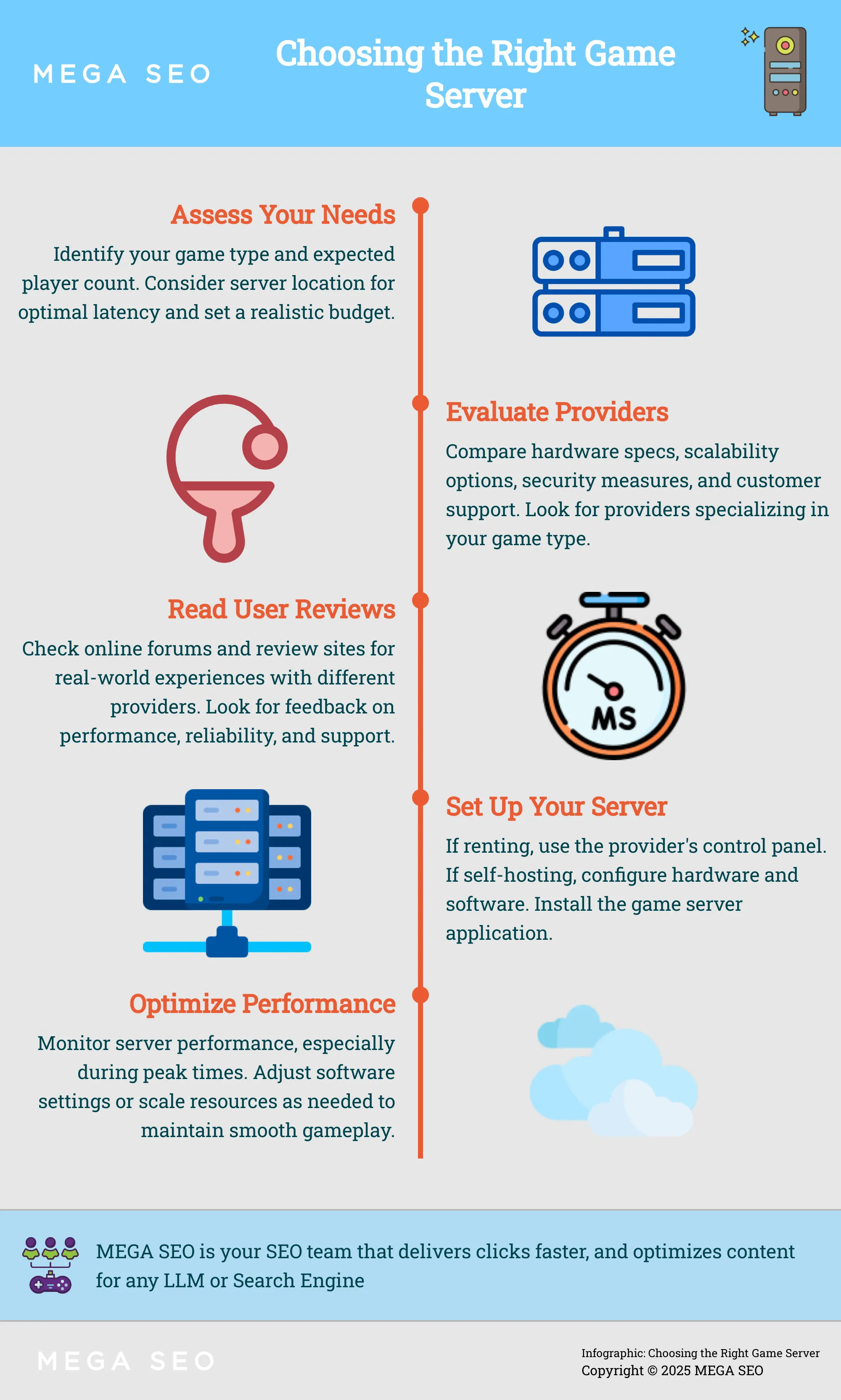
Assess Your Requirements
Before exploring game servers, take the time to assess your specific needs. Consider these factors:
- Game Type: Different games have different server requirements. A simple 2D game needs fewer resources than a complex MMO. Understanding your game's technical demands will help you choose a server that can handle the load.
- Player Base: How many concurrent players do you anticipate? Scalability is essential, so choose a server that can accommodate growth. A hosting provider offering scalability ensures your game can handle a growing player base.
- Server Location: Server location significantly impacts latency. Choose a server geographically close to your target audience to minimize lag. Server performance, reliability, and location are all important factors.
- Budget: Game servers come at various price points. Determine your budget early on to narrow your options and find good value.
Evaluate Provider Offerings
Once you understand your requirements, it's time to evaluate different game server hosting providers. Here's what to look for:
- Hardware Specifications: Examine the server's CPU, RAM, and storage to ensure they meet your game's demands. Reliable servers are crucial for smooth gameplay.
- Scalability Options: Can the provider easily scale your server resources as your player base grows? Providers offering scalability can accommodate fluctuations in player traffic.
- Security Features: Look for providers that offer robust security measures, such as DDoS protection and data encryption.
- Customer Support: A reliable support team is invaluable. Check the provider's support, including available channels and response times.
Read User Reviews and Testimonials
Before making a final decision, read user reviews. Real-world experiences offer valuable insights into a provider's strengths and weaknesses. For example, consider renting versus a home setup: renting allows easy upgrades if your server becomes popular, while a popular home setup might overload your internet. Also, research hosting options, such as the reliability of data center hosting. This research can help you identify potential issues and choose the right provider.
Set Up and Manage Your Game Server
This section covers the practical aspects of setting up and managing your game server, whether you rent or self-host.
Initial Configuration
Your initial server setup depends on whether you rent a server or self-host. Renting a server is generally simpler. Most providers offer user-friendly control panels and pre-configured options, simplifying the process. Self-hosting, in contrast, requires more technical expertise. It involves configuring hardware and software, setting up network connections, and installing the game server application, as explained by this Techipaper article. Choosing between self-hosting and using a data center is a crucial first step, according to DediRock.
Ongoing Maintenance
Maintaining your game server is crucial for a smooth gaming experience. With a rented server, the provider typically handles hardware maintenance, security updates, and backups. Self-hosting, however, places the responsibility of server upkeep squarely on your shoulders. This includes regular hardware maintenance, software updates, security patches, and backups. Sectorlink offers a helpful comparison of self-hosting versus colocation. Remember, as a self-hoster, you're also responsible for the ongoing costs of electricity and internet connectivity, a point often overlooked, as noted in this GameDev Stack Exchange discussion.
Troubleshoot Common Issues
Troubleshooting is part and parcel of game server management. Common issues include lag, connectivity problems, and software bugs. Rented servers often come with support from the provider to help resolve these issues. If your rented server gains popularity, you can easily upgrade it through your provider, as discussed in this Reddit thread. With a home setup, however, a surge in popularity can overload your internet connection. Self-hosting requires you to diagnose and fix problems yourself, which can be time-consuming and complex. For larger communities and public servers, the reliability, scalability, and security offered by data center hosting are invaluable for minimizing and addressing issues, even if the cost is higher, according to DediRock.
Optimize Game Server Performance
Once your game server is up and running, optimizing its performance is the next step to improve the player experience. Whether you rent a server or self-host, small tweaks can make a big difference.
Hardware Considerations
If you host your game server at home, your hardware choices matter. A powerful machine with a fast processor, plenty of RAM, and an SSD will improve load times and gameplay. Running a home-based server also means investing in cooling systems and reliable power backups. Ongoing costs, like electricity and a high-bandwidth internet connection, can add up. As your server gains popularity, your home internet could get bogged down, impacting performance.
Software Tweaks
Optimizing your server’s software is key, whether you rent or self-host. Many hosting providers offer pre-configured game servers, saving you the hassle of manual configuration. If you self-host, research best practices for your game. This might involve tweaking network settings, adjusting server parameters, or installing performance-enhancing plugins. Regularly updating your server software and game files also improves stability and performance.
Monitor and Adjust for Peak Times
Player activity changes throughout the day and week. Monitoring your server during peak hours helps identify bottlenecks. Server monitoring software can track CPU usage, memory consumption, and network traffic. If you see performance dips during peak times, consider upgrading your hardware if you self-host, or scaling your rented server. Some providers offer easy server upgrades for a small monthly fee, giving you flexibility as your player base grows. For home-based servers, colocation in a data center might be a more cost-effective long-term solution for better hardware and bandwidth.
The Future of Game Server Hosting
The world of game server hosting is constantly evolving, driven by emerging technologies and the ever-changing landscape of multiplayer gaming. Understanding these trends is key to making informed decisions about your game server needs, both now and in the future.
Emerging Technologies
As game development becomes more complex and player expectations rise, hosting providers are turning to advanced technologies to deliver seamless online experiences. Data center hosting is becoming increasingly popular, offering unmatched reliability and scalability for larger gaming communities and public servers. These professional data centers provide high-speed internet connections and robust hardware, ensuring a smooth gaming experience. While data center hosting may have a higher price tag, the benefits of enhanced performance, security, and 24/7 support often make it a worthwhile investment. This shift towards professional data centers reflects a growing trend of businesses prioritizing high-quality, hassle-free hosting solutions.
Trends in Multiplayer Gaming
The increasing popularity of multiplayer gaming is shaping the future of game server hosting. More and more gamers are seeking immersive online experiences with friends and communities, driving demand for reliable, high-performance servers. This has led to a shift away from home-based servers toward rented solutions. Setting up a home server might seem appealing, but the long-term costs can be significant. Renting a game server offers a more cost-effective and hassle-free alternative, letting gamers focus on enjoying their games. Plus, the ability to easily upgrade rented servers as your community grows provides flexibility. This contrasts with home setups, where scaling often requires costly hardware upgrades, as discussed on gaming forums.
Frequently Asked Questions
What's the difference between a dedicated server and a listen server? A dedicated server is a separate machine entirely focused on running the game, offering better performance and stability. A listen server, conversely, runs on one player's computer, making them the host. This is simpler to set up but performance depends on the host's computer and internet connection.
What factors should I consider when choosing a game server hosting provider? Key factors include server performance and latency, game compatibility, scalability options, security measures, and the quality of customer support. Think about your specific game's requirements, your expected player count, your budget, and how much technical management you want to handle.
Is it better to rent a game server or host one myself? Renting offers convenience and reliability, especially for those without deep technical expertise. Hosting your own server gives you more control but demands technical skills and comes with ongoing costs and responsibilities. Weigh your technical abilities, budget, and the size of your gaming community to make the best choice.
How can I optimize my game server's performance? If self-hosting, invest in good hardware, including a fast processor, ample RAM, and an SSD. Whether renting or self-hosting, optimize software settings and monitor server performance, especially during peak hours. Be prepared to scale resources as your player base grows.
What are the future trends in game server hosting? The rise of cloud gaming and the increasing demand for high-performance multiplayer experiences are driving innovation in game server hosting. Expect to see continued growth in data center hosting, offering enhanced performance, scalability, and security. Emerging technologies will further optimize game server performance and create even more immersive online gaming experiences.


