

You’ve spent hours creating the perfect blog post or product page, hit publish, and waited for the traffic to roll in. Instead, you get silence. A quick check in Google Search Console reveals the problem: "Discovered - currently not indexed." This means Google found your URL but made a conscious decision not to crawl it just yet. The search engine has to be selective with its resources, and if it suspects a page won't offer much value, it will move on to more promising content. This article will walk you through the most common reasons for this status and provide a clear, step-by-step plan to get your valuable content indexed.
Key Takeaways
- Find the pattern before you act: Use Google Search Console to see which pages are affected. Identifying if the problem is isolated to new blog posts, old pages, or a specific site section will point you to the root cause.
- Show Google your pages are a priority: The "Discovered" status often means Google doesn't see a page as important enough to crawl yet. Fix this by improving your content to be genuinely helpful and strengthening your internal linking structure to guide crawlers to it.
- Focus on long-term site health: Prevent future indexing issues by making technical checks and content audits a regular part of your workflow. A consistently high-quality, well-structured site is more likely to have its new content crawled and indexed quickly.
What Does "Discovered - Currently Not Indexed" Mean?
Seeing an error message in Google Search Console can be frustrating, but this one is more of a waiting game than a red flag. The "Discovered - currently not indexed" status is Google's way of saying it knows your page exists but hasn't scheduled a time to visit, or "crawl," it yet. Your page is in Google's queue, but it hasn't made it to the front of the line. As a result, it won't appear in search results until Google has had a chance to crawl and index its content. This delay can happen for several reasons, from a limited crawl budget to the page not seeming important enough to prioritize.
Defining the Status in Google Search Console
When you see "Discovered - currently not indexed," it means Google found your URL, likely through a link from another page on your site or an external site. However, Google decided that crawling it wasn't a priority at that moment. This can happen if the server was overloaded when Googlebot tried to visit or if Google determined the page wasn't valuable enough to use its resources on right away. Think of it as Google adding your page to a very long to-do list. Your page is on the list, but it's not at the top. The goal is to convince Google that your page is worth moving up the list.
How It Compares to Other Indexing Errors
It's important to distinguish this status from a similar one: "Crawled - currently not indexed." The difference is simple but significant. With "Discovered," Google hasn't visited the page yet. With "Crawled," Google has visited the page but decided the content wasn't good enough to include in its index. "Discovered" often points to issues with site-level authority, a weak internal linking structure, or technical problems that make crawling difficult. In contrast, "Crawled" is almost always a judgment on the page's content quality. Understanding this distinction helps you focus your efforts on the right solution.
Why Isn't Google Indexing Your Pages?
When you see the "Discovered - currently not indexed" status, it means Google knows your page exists but has chosen not to add it to its index just yet. Think of it as Google putting your page in a "to-do" pile that it might not get to. This isn't necessarily a technical error but a deliberate decision. Google's crawlers have a massive job to do, and they have to prioritize which pages are worth their time and resources. If they scan a URL and suspect the page might not offer much value to searchers, they'll move on to more promising content.
The core of the issue often comes down to a few key areas. It could be that the content on the page is thin or doesn't seem unique enough to warrant a spot in the search results. Sometimes, technical roadblocks prevent Google from properly accessing and understanding the page, even if it knows the URL. The way you link to pages within your own site also sends strong signals about their importance. Finally, for larger websites, Google might simply run out of its allocated "crawl budget" before it gets to every single page. Understanding which of these reasons applies to your site is the first step toward solving the problem and getting your content the visibility it deserves.
Low-Quality or Irrelevant Content
One of the most common reasons a page gets left out of the index is that Google's systems deem the content to be low-quality. Google’s main goal is to provide users with helpful, reliable information. If your page offers thin content, duplicates information found elsewhere on your site or the web, or simply doesn't provide unique value, Google may decide it’s not worth indexing. This is a quality control measure to keep the search results clean and useful. To fix this, take an honest look at the page. Does it thoroughly answer a question or solve a problem for your target audience? Is the information original and well-researched? Creating helpful, people-first content is the best way to show Google your page deserves a spot in its index.
Technical SEO Roadblocks
Sometimes, the problem isn't the content itself but a technical issue that stops Google in its tracks. Crawling is how Google discovers your content, and indexing is how it stores and organizes it. A technical roadblock can interrupt this process. For example, your site’s robots.txt file might be accidentally blocking Google from crawling the page, or persistent server errors could make the page unavailable when the crawler tries to visit. While the "Discovered" status means Google found the URL, a subsequent attempt to crawl it might have failed due to one of these issues. You can use the URL Inspection tool in Google Search Console to check for specific crawl errors and see exactly how Googlebot views your page.
A Weak Internal Linking Structure
Internal links act as a roadmap for Google, guiding it through your website and signaling which pages are most important. If a page has very few or no internal links pointing to it, it's often called an "orphan page." From Google's perspective, a lack of internal links suggests the page isn't very valuable or connected to the rest of your site's content. Why would it index a page that you don't even consider important enough to link to? A strong internal linking strategy ensures that your most important content is easy for both users and search engines to find. Make sure your new pages are linked from relevant, high-traffic pages on your site, like your blog homepage, service pages, or popular articles.
Crawl Budget Limitations
Every website has a "crawl budget," which is the number of pages Googlebot will crawl on your site within a given period. For most small to medium-sized websites, this isn't a major concern. However, if your site has thousands of pages—often due to things like faceted navigation in ecommerce, tag pages, or archives—Google has to be selective. It might spend its entire budget crawling low-value pages, leaving no resources for the new, important content you want indexed. To optimize your crawl budget, you can prune low-quality content, block search engines from crawling pages that don't need to rank (like internal search results), and ensure your site structure is efficient.
How to Diagnose the Problem
Before you can fix an indexing problem, you need to play detective. Finding the root cause is the only way to create a lasting solution instead of just applying a temporary patch. Your primary tool for this investigation is Google Search Console (GSC), which provides direct data on how Google interacts with your website. By systematically analyzing the information in GSC, you can move from simply knowing there's a problem to understanding exactly why it's happening and how widespread it is.
Use Google Search Console to Investigate
Your first stop for answers is Google Search Console. This free tool is essential for understanding how Google sees your site. Start with the URL Inspection tool by pasting an affected URL into the search bar at the top of the page. GSC will show you its current status, including whether it has been crawled or indexed. If a page isn't indexed, you can use the "Request Indexing" button right from this screen. This action prompts Google to add the page to its crawl queue, which can sometimes be a quick fix for individual URLs that were simply overlooked.
Find Patterns and Pinpoint Affected Pages
While inspecting URLs one by one is helpful, you need to see the bigger picture. Head to the "Pages" report under the "Indexing" section in GSC. Here, you can click on the "Discovered - currently not indexed" status to see a full list of affected URLs. Look for patterns among these pages. Are they all from a specific subdirectory, like /blog/ or /products/? Are they older posts with thin content? Or are they new pages that lack internal links from more established parts of your site? Identifying these common threads is key to finding the root cause instead of just treating the symptoms.
Determine the Scope of the Issue
Now it's time to assess the scale of the issue. Are you dealing with a handful of unindexed pages or hundreds? If it's just a few, the problem is likely isolated and can be fixed with minor content tweaks or by adding a few internal links. However, if a large portion of your site is affected, it may signal a more significant problem. This could be related to widespread low-quality content, a confusing site structure, or issues with your crawl budget. Understanding the scope helps you prioritize your efforts and decide whether you need a quick fix or a more in-depth site audit.
How to Get Your Pages Indexed
Improve Content Quality and Uniqueness
Google’s main goal is to provide users with the best possible answers to their questions. If your content is thin, unoriginal, or doesn't offer real value, Google is less likely to prioritize it for indexing. High-quality content is informative, well-researched, and unique. Think about what your audience is looking for and create pages that thoroughly address their needs. Systematically addressing content quality issues is a fundamental step toward improving your site's visibility. Instead of just creating new pages, consider enhancing existing ones. Adding fresh, relevant sections to your articles can signal to Google that your content is up-to-date and valuable, encouraging it to recrawl and index your pages.
Strengthen Your Internal Linking
Internal links create a web that connects your pages, guiding both users and search engine crawlers through your site. A page with few or no internal links pointing to it is like an isolated island—hard for Google to discover. A strong internal linking structure helps distribute authority across your site and shows Google how your content is related. When you create links, use descriptive anchor text that gives context about the destination page. This simple practice helps search engines understand your site’s structure and the importance of different pages. By building a logical network of links, you create clear pathways that make it easier for Google to crawl and index your entire website.
Fix Underlying Technical SEO Problems
Sometimes, the reason a page isn't indexed has nothing to do with the content itself. Technical SEO issues can act as roadblocks, preventing Google's crawlers from accessing your pages in the first place. The "Discovered - currently not indexed" status often points to this; Google knows your page exists but hasn't gotten around to crawling it, possibly due to technical hurdles or crawl budget limitations. Common culprits include incorrect robots.txt files that block access, noindex tags left on pages by mistake, or slow page load times. Regularly auditing your site for these technical errors is essential. Fixing them ensures that when Googlebot arrives, it has a clear and easy path to discover and process your content.
Add Structured Data
Structured data, or schema markup, is a standardized format for providing search engines with explicit information about a page's content. Think of it as a way to translate your content into a language Google understands perfectly. By adding structured data, you can tell Google that a page contains a recipe, an article, a product, or an FAQ section. This not only helps Google categorize and understand your content more effectively, but it can also make your pages eligible for special features in search results, like rich snippets. While it doesn't directly force indexing, providing this clarity can make your pages more appealing for Google to process and include in its index. You can add structured data to give Google more guidance and context.
How to Maintain a Healthy Indexing Rate
Fixing existing indexing errors is a reactive process. A proactive, long-term strategy involves maintaining a healthy indexing rate to prevent these issues from happening in the first place. This means creating an environment where search engines can easily find, crawl, and understand your most important pages. By adopting a consistent maintenance routine, you signal to Google that your site is a reliable, high-quality resource worth paying attention to. This isn't about a single fix but about integrating best practices into your regular workflow.
Perform Regular Content Audits
A content audit is a systematic review of all the content on your website. The goal is to identify low-performing, outdated, or thin content that could be hurting your site's overall quality score. By systematically addressing common indexing challenges, you can significantly improve your digital presence. A regular audit helps you decide whether to update, consolidate, or remove pages. This process ensures that Google’s crawl budget is spent on your most valuable content, making it more likely that your key pages will be indexed promptly. Automating this process with a tool like MEGA AI's Maintenance Agent can streamline these audits and keep your content fresh.
Be Proactive with Technical SEO
Technical SEO forms the foundation of your website's relationship with search engines. If Googlebot can't crawl your site efficiently, it won't be able to index it properly. Proactive technical maintenance involves ensuring your XML sitemap is always up-to-date, your robots.txt file isn't accidentally blocking important resources, and your site has a logical structure. You should regularly optimize website crawling and indexing to ensure search engines can access and understand your content. Simple checks on site speed, broken links, and redirect chains can prevent technical problems from escalating into major indexing issues down the line.
Prioritize Quality Over Quantity
In the world of SEO, quality always trumps quantity. Publishing dozens of low-value pages can dilute your site's authority and waste your crawl budget. Google's algorithm places a high value on quality, so crafting informative and original content not only engages your audience but also grabs Google's attention. Each page you publish should have a clear purpose and serve a specific user need. Before creating new content, ask if it adds unique value. Focusing on creating valuable content is a sustainable strategy for earning and maintaining a healthy indexing rate for your most important pages.
Ensure Your Site is Mobile-Friendly
Google primarily uses the mobile version of a site for indexing and ranking, a practice known as mobile-first indexing. If your site offers a poor experience on mobile devices, your indexing can suffer. This goes beyond just responsive design; it includes fast loading times, easy-to-tap buttons, and readable text without zooming. You can check your site's performance with Google's Mobile-Friendly Test. For complex sites, dynamic rendering serves a pre-rendered HTML version to crawlers, ensuring that search engine bots can easily process the content, regardless of the site's complexity.
How to Monitor and Improve Your Indexing
Once you’ve started making changes, you need a reliable way to see if your efforts are paying off. Monitoring your indexing status helps you understand what’s working and where you still need to focus. Consistent tracking is key to turning those "not indexed" pages into assets that attract organic traffic.
Use Google Search Console for Monitoring
Google Search Console (GSC) is your primary source of truth for indexing issues. The "Discovered - currently not indexed" status means Google knows your page exists but has decided not to crawl it yet. This isn't an error, but a signal that Google might have deprioritized the page due to factors like perceived content quality, a weak internal linking profile, or crawl budget constraints.
It’s helpful to remember the two main phases: crawling is the discovery process, and indexing is when Google stores and organizes your content to show in search results. A page must be indexed to rank. By using the Page indexing report in GSC, you can get a clear picture of which pages are stuck in the discovery phase and begin to diagnose the underlying reasons.
Track Progress with SEO Tools
For a small number of affected pages, you can try to expedite the process. Use the URL Inspection tool in GSC to check a specific URL. If it’s not indexed, you can click the "Request Indexing" button. While this can be effective for a few key pages, it isn’t a scalable solution for a site-wide problem.
The real long-term fix involves improving your site’s overall authority and quality. Creating high-quality, relevant content is fundamental. You can also increase site visibility through strategic link building and social media promotion, which encourages Google to crawl and index your content more quickly. As you implement these changes, keep an eye on your GSC reports to track your progress over time.
How MEGA AI Automates Content Optimization
Systematically addressing indexing challenges, from technical errors to content quality, is essential for improving your digital presence. This is where automation can be a game-changer. Optimizing your website’s architecture and content ensures search engine crawlers can efficiently find and index your pages, but doing it manually is time-consuming.
MEGA AI’s SEO tools automate this entire process. Our Maintenance Agent identifies which articles need updates to improve their click-through rate (CTR) and rank. It also finds net-new content to add to existing articles, making them more comprehensive and valuable. By continuously optimizing your content for quality and relevance, MEGA AI helps ensure your pages don’t just get discovered—they get indexed and ranked.
Your Step-by-Step Plan to Get Indexed
Seeing a list of unindexed pages can feel overwhelming, but fixing the issue is manageable with a clear plan. Instead of randomly trying different solutions, a structured approach will save you time and deliver better results. Follow these four steps to diagnose the problem, implement the right fixes, and get your important pages indexed by Google.
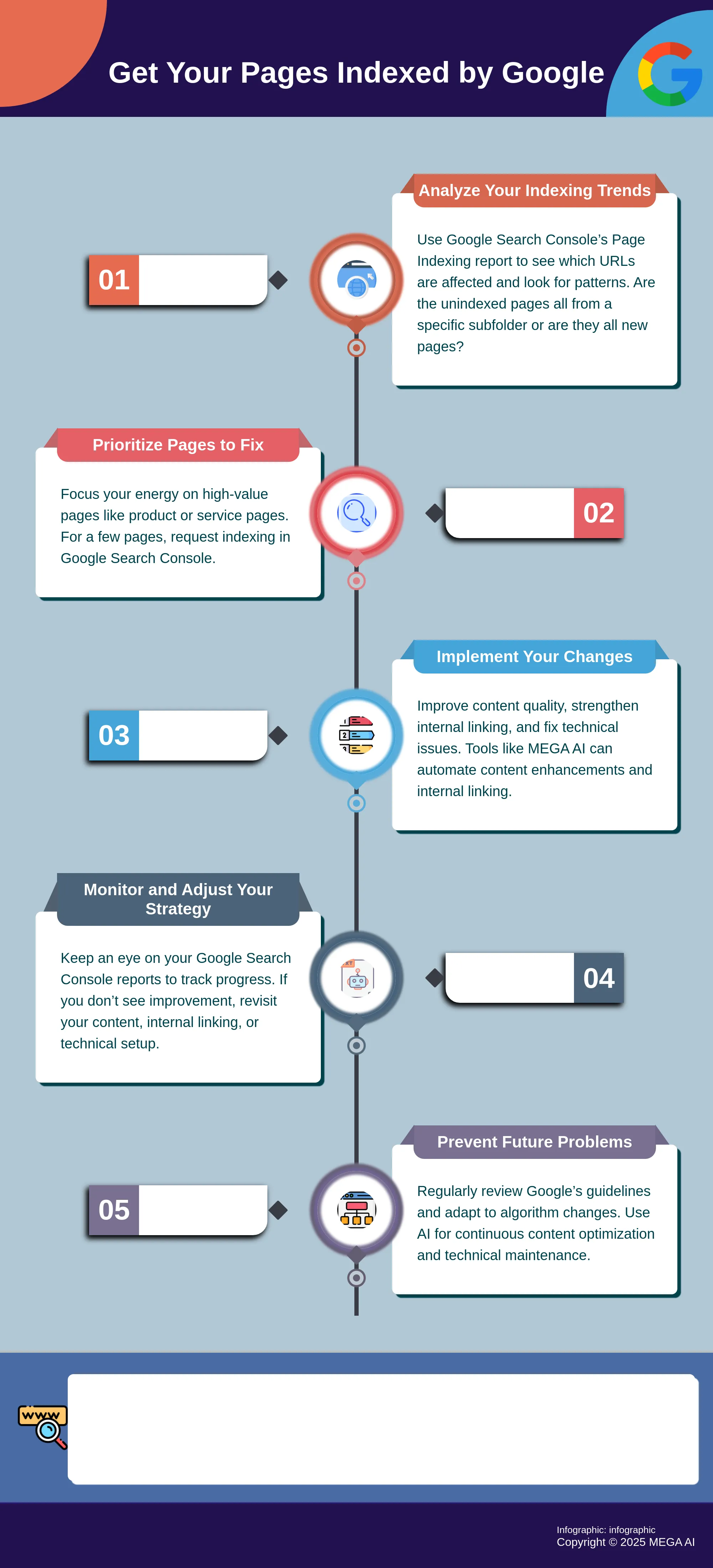
Step 1: Analyze Your Indexing Trends
Before you can fix the problem, you need to understand its scope. Start by digging into your Page Indexing report in Google Search Console to see which URLs are affected. The "Discovered - currently not indexed" status means Google knows your page exists but has decided not to crawl it for now. This often happens when Google’s crawlers are prioritizing other pages on your site or across the web.
By analyzing your indexing trends, you can spot patterns. Are the unindexed pages all from a specific subfolder, like your blog? Are they all new pages, or are older pages also affected? Answering these questions helps you understand the root cause. For example, if only blog posts are affected, you might have a content quality or internal linking issue specific to that section of your site.
Step 2: Prioritize Pages to Fix
Not all unindexed pages are equally important. Your next step is to prioritize which pages to work on first. Focus your energy on the pages that have the most value for your business, such as key product pages, service pages, or cornerstone content that drives traffic and conversions. If you only have a handful of high-value pages with this issue, you can try to request indexing directly in Google Search Console for a potential quick win.
For larger sites with hundreds or thousands of unindexed pages, manual requests aren't practical. In this case, create a priority list based on business impact. A page that’s central to your sales funnel is more critical to fix than an old blog post with outdated information. This targeted approach ensures your efforts have the greatest possible impact on your site’s performance.
Step 3: Implement Your Changes
With your priority list in hand, it’s time to start making changes. The most common reasons for the "Discovered - currently not indexed" status are poor content quality, a weak internal linking structure, and technical issues that waste your crawl budget. You’ll need to address these underlying problems to convince Google your pages are worth crawling and indexing.
Start by improving your content to ensure it’s unique, helpful, and valuable to your audience. From there, strengthen your internal linking by adding links from your high-authority pages to the unindexed ones. This signals to Google that these pages are important. Tools like MEGA AI can automate content enhancements and build a logical internal linking structure, ensuring your pages get the attention they deserve from search engines.
Step 4: Monitor and Adjust Your Strategy
Getting your pages indexed isn’t a one-and-done task. SEO is a continuous process of monitoring, testing, and refining your approach. After implementing your changes, you need to keep a close eye on your Google Search Console reports to see if your pages are moving from "Discovered" to "Indexed." This can take anywhere from a few days to several weeks, so patience is key.
If you don’t see progress, you may need to adjust your strategy. Revisit your content quality, look for more internal linking opportunities, or conduct a deeper technical audit. This is where ongoing content optimization becomes critical. Using an AI-powered platform helps you continuously monitor performance and make data-driven adjustments, ensuring your site maintains a healthy indexing rate over the long term.
How to Prevent Future Indexing Problems
Fixing existing indexing issues is a great first step, but the real goal is to build a site that Google loves to crawl and index from the start. Preventing these problems from recurring saves you time and helps maintain your site's SEO health. A proactive approach focuses on quality, technical soundness, and adapting to the search landscape. By making a few key practices part of your regular workflow, you can keep your pages visible and performing well in search results.
Keep Up with Google's Guidelines
To prevent future indexing problems, it’s helpful to understand what Google is looking for. The "Discovered - currently not indexed" status means Google knows your page exists but has decided not to crawl it yet. This often comes down to the search engine prioritizing its resources for pages it considers higher value. By regularly reviewing and following Google's guidelines, you can signal that your content is worth the crawl. This means consistently producing high-quality content, building a logical internal linking structure, and ensuring your site offers a good user experience. Think of it as building a strong foundation that supports every new page you publish.
Adapt to Algorithm Changes
The world of SEO is not static; Google is constantly refining its systems. Staying informed about major algorithm updates is key to maintaining your site's indexing rate and overall performance. What works today might need adjustments tomorrow. Optimizing for search is an ongoing process of monitoring, testing, and refining your strategy. When you notice a change in your indexing patterns or traffic, check to see if it coincides with a recent update. This allows you to adapt quickly, address any new technical or content-related requirements, and keep your digital presence strong in an ever-evolving landscape.
Use AI for Continuous Content Optimization
Keeping up with Google's guidelines and algorithm changes can feel like a full-time job. This is where AI tools can become a powerful ally in your content strategy. Instead of manually checking every page, you can use AI to continuously analyze your content's performance, identify opportunities for improvement, and ensure your site stays aligned with current SEO best practices. For example, MEGA AI's Maintenance Agent can automatically update articles to improve their click-through rate or add new, relevant sections to keep them fresh. Leveraging technology this way helps you automate continuous optimization and focus on long-term growth.
When Should You Be Concerned?
Seeing the "Discovered - currently not indexed" status can be unsettling, but it’s not always a reason to panic. The key is to understand the context. A few unimportant pages falling into this category is normal for most websites. However, if you notice a growing number of pages with this status, or if your most valuable content isn't making it into Google's index, it’s time to pay closer attention. The real concern arises when this status starts to actively harm your site's visibility and business goals. By assessing the situation methodically, you can determine whether you have a minor issue or a significant problem that needs immediate action.
Assess the Impact on Your SEO Performance
When Google knows a page exists but chooses not to index it, that page is invisible in search results. This directly translates to missed opportunities for traffic, leads, and sales. To gauge the severity, look at the scale of the problem. Is it a handful of pages or a significant percentage of your site? A large number of unindexed pages can signal to Google that your site has widespread quality or technical issues, potentially harming your overall SEO performance. As experts at Onely note, different indexing issues require different solutions, so understanding the impact is the first step toward finding the right fix and maintaining a healthy site.
Identify if Critical Pages Are Affected
The next step is to determine which pages are affected. A blog post from five years ago with outdated information isn't a crisis. But what if it’s your main product page, a newly launched service page, or a cornerstone piece of content designed to attract your ideal customer? If your business-critical pages are not being indexed, you have a high-priority problem. For a few pages, you can try to request indexing directly in Google Search Console. However, if your most important content is consistently being ignored by Google, it points to a deeper issue that this quick fix won't solve.
Know When to Call in an Expert
If you've tried the basic fixes and your critical pages are still unindexed, or if the number of affected pages is overwhelming, it may be time to get help. Indexing issues can be complex, often stemming from subtle technical problems, poor site architecture, or content quality issues that are hard to spot. As Ahrefs points out, the status can result from Google’s own prioritization, meaning it decided other pages were more important to crawl. An SEO expert can perform a deep dive to uncover these root causes. Alternatively, platforms like MEGA AI can automate much of this diagnostic and repair work, helping you optimize content and fix technical issues at scale.
Related Articles
- How Long Does Google Indexing Take in 2024?
- Getting Started with Google Search Console: A 2024 Guide
- How to Check for Noindex: A Complete 2024 Guide
- SEO Blocking Risks: How They Impact Indexing
- Top SEO Index Tools for Faster Google Indexing
Frequently Asked Questions
What's the difference between "Discovered - currently not indexed" and "Crawled - currently not indexed"? Think of it this way: "Discovered" means Google has your page on its to-do list but hasn't visited it yet. This often points to issues with your site's overall authority or technical setup that make Google deprioritize the crawl. "Crawled" means Google visited the page, read the content, and decided it wasn't valuable enough to add to its search results. The first is a queueing problem, while the second is a content quality problem.
Is the "Discovered - currently not indexed" status always a problem? Not necessarily. It's normal for some pages, like old blog tags or archives, to fall into this category. The time to be concerned is when your important, high-value pages are on this list. If your main service pages, product pages, or new cornerstone articles aren't getting indexed, it means you're losing out on potential traffic and business, and you should investigate the root cause.
How long does it take for Google to index my page after I make changes? There's no magic number, and it can range from a few days to several weeks. The speed depends on your site's overall authority and how often Google crawls it. Instead of waiting on a single page, focus on consistently improving your site's quality signals. By regularly publishing valuable content and strengthening your internal linking, you encourage Google to visit and process your pages more frequently over time.
My content is high-quality, so why are my pages still not indexed? This is a common frustration, and it usually points to issues beyond the content itself. Even the best article can be ignored if it's hard for Google to find or access. This often happens when a page has very few internal links pointing to it, making it an "orphan page." It can also be a sign of technical problems that waste Google's crawl budget on less important parts of your site, leaving no resources for your best content.
Can I just use the "Request Indexing" button in Google Search Console to fix this? Using the "Request Indexing" button can be a good move for one or two high-priority pages that you need indexed quickly. However, it's not a scalable solution for a site-wide issue. If you have dozens or hundreds of pages with this status, manually requesting indexing for each one won't fix the underlying problem that's causing the delay in the first place. Your efforts are better spent on improving your site's overall content and technical health.


