

Your website might have a hoarding problem. Over the years, you’ve likely accumulated hundreds of articles, landing pages, and blog posts. While some are star performers, others are likely gathering digital dust in the far corners of your site. These forgotten pages, with their outdated statistics and irrelevant topics, do more than just take up space. They can create a confusing experience for users and send mixed signals to search engines about your site's quality and focus. Content pruning is the methodical process of decluttering your website. It’s about making strategic decisions to clean up your content library so that visitors and search engines can easily find your best, most relevant information.
Key Takeaways
- Treat content pruning as quality control: Systematically review your site's content using analytics to find what's outdated or underperforming. This helps you focus your site's authority on the pages that provide the most value to your audience.
- Decide whether to improve, consolidate, or remove: Not every low-performing page needs to be deleted. Update valuable but outdated articles, combine similar posts into a single resource, and only remove content that is truly irrelevant. Always use 301 redirects for removed pages to preserve link equity.
- Integrate pruning into your regular SEO routine: To maintain a healthy site, schedule content audits periodically. Track your KPIs to measure the results of your efforts and use that data to inform your ongoing content strategy.
What is Content Pruning?
Content pruning is the process of systematically reviewing all the content on your website and deciding what to do with each piece. Think of it like tending a garden—you trim the branches that are no longer healthy to help the entire plant flourish. For your website, this means identifying pages that are outdated, irrelevant, or simply not performing well. The goal is to remove the content that could be weighing down your site's overall SEO performance and user experience.
This process is a critical part of any long-term SEO strategy. By cleaning up your content library, you send strong signals to search engines that your site is a well-maintained, high-quality resource. This can lead to better crawl efficiency, improved site authority, and ultimately, higher rankings for the pages that matter most.
It’s important to know that content pruning doesn't always mean deleting pages. While removing content is one option, it’s often not the only one. The process involves a careful audit to determine the best course of action for each page. You might find that some low-performing articles can be updated with fresh information, combined with other similar pages to create a more comprehensive resource, or simply re-written to better match user intent. The key is to make strategic decisions that improve the overall quality and focus of your website.
Why Prune Your Content for SEO?
Think of your website like a garden. Over time, some plants thrive while others wither or become overgrown with weeds. Content pruning is the process of tending to your digital garden by removing obsolete, low-performing, and irrelevant content that weighs your website down. Just as a well-kept garden is more beautiful and productive, a well-pruned website performs better in search results and provides more value to your visitors. It’s a critical maintenance task that helps you focus your resources on the content that truly matters to your audience and your business goals.
Align with Google's Quality Guidelines
A primary reason to prune your content is to align your website with what search engines value. Google's algorithms are designed to surface high-quality, relevant, and helpful information. Content that is outdated, thin, or no longer serves a purpose can signal to Google that your site is not well-maintained. By systematically removing this low-performing content, you ensure your website better adheres to Google's quality guidelines. Analyzing your site data allows you to make informed decisions about what to cut, ensuring that every piece of content on your site serves a clear purpose and contributes positively to your overall SEO performance.
Improve Site Authority and User Experience
Content pruning directly impacts how both search engines and users perceive your website. Removing outdated and underperforming pages helps you consolidate your site's authority around your strongest content. This process can significantly increase your website's SEO and establish it as a more credible source in your niche. For users, this means a cleaner, more efficient experience. They can find accurate, valuable information without having to sort through irrelevant or confusing pages. This improved user experience builds trust, reduces bounce rates, and encourages repeat visits, all of which are positive signals that further reinforce your site's authority.
How to Identify Content to Prune
Before you can decide what to do with your content, you first need a clear picture of what you have and how it’s performing. This process is less about guesswork and more about a systematic review of your website. Think of it as taking inventory of your digital assets to see which ones are working for you and which are just taking up space. By breaking down the identification process into a few key areas, you can move forward with confidence, knowing your decisions are backed by data and a clear understanding of your content’s purpose. The goal is to pinpoint pages that are underperforming, irrelevant, or redundant. This sets the foundation for your entire pruning strategy, ensuring you focus your efforts where they will have the most impact.
Analyze Traffic and Engagement Metrics
Your first stop should be your website analytics. Data provides an objective look at what is and isn’t resonating with your audience. Look for pages with consistently low traffic over the last six to 12 months, as these are often prime candidates for pruning. Beyond just page views, consider engagement metrics like time on page, bounce rate, and conversion rates. A page might get some traffic, but if visitors leave immediately or never take the desired action, it’s not providing real value. By analyzing your Google Analytics data, you can measure how your content performs and identify which pages are weighing your site down. Create a list of these underperforming assets to review in the next step.
Assess Content Relevance and Quality
Once you have your list of low-traffic pages, it’s time for a qualitative review. Numbers tell part of the story, but you also need to assess each piece from a user’s perspective. Your next step is to conduct a content audit and identify pages that no longer provide SEO value. Ask yourself: Is this information still accurate and relevant to my audience? Does this content align with my current business goals and expertise? Content pruning involves removing outdated, irrelevant, and low-performing content to improve your site’s overall quality. A piece might have been valuable years ago, but if it no longer serves a purpose for your target audience or reflects your brand, it may be time to let it go.
Find Duplicate and Outdated Content
Finally, look for content that is either redundant or obsolete. You may find you have multiple blog posts targeting the exact same keywords. This issue, known as keyword cannibalization, can confuse search engines and dilute your authority, as your own pages end up competing against each other. Consolidating these pieces into a single, comprehensive article is often the best approach. Similarly, you should identify content that contains outdated information, such as old statistics, references to past events, or information about discontinued services. Removing this obsolete content is crucial because it can damage your site’s credibility and user trust. Pruning these pages helps clean up your site and ensures visitors only see your best, most accurate work.
How to Create Your Content Pruning Strategy
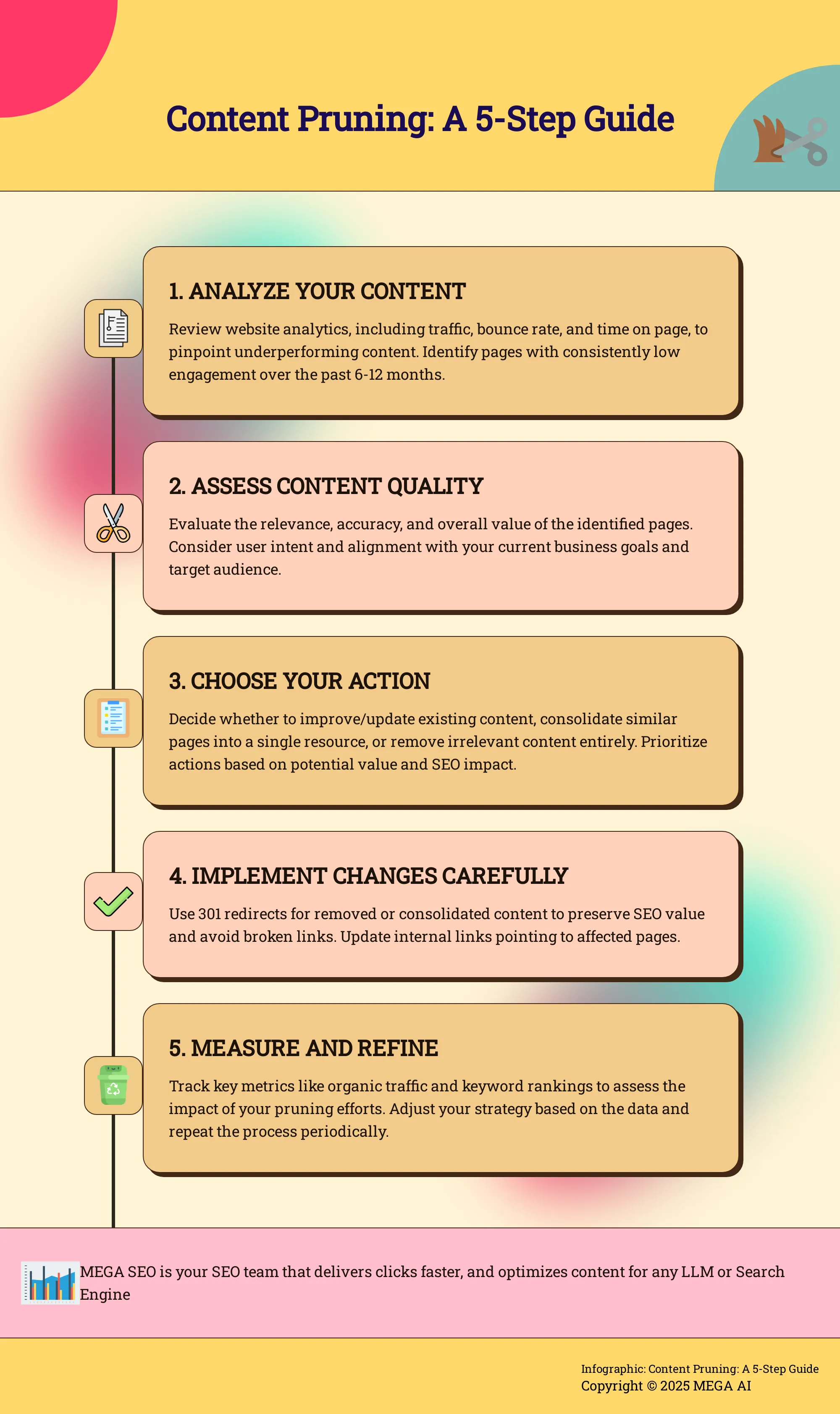
With a list of underperforming pages in hand, you can build a clear strategy. A methodical approach ensures you don't accidentally remove valuable content or harm your site's structure. Your strategy will involve three main steps: auditing your content, deciding on a course of action for each piece, and implementing changes correctly.
Conduct a Content Audit
Your first move is to perform a content audit. This is a systematic review of every piece of content on your site to see how it’s performing. The goal is to identify pages that don't provide any real SEO value. You'll want to gather data on key metrics like organic traffic, bounce rate, time on page, keyword rankings, and backlinks for each URL. Tools like Google Analytics and Google Search Console are essential for this process. A thorough content inventory gives you the data-driven foundation you need to make smart decisions instead of just guessing what to cut.
Decide: Improve, Consolidate, or Remove
Once you have your data, you can sort your content into three buckets. Content pruning doesn't always mean deleting pages. Some low-traffic articles might just need a little help to reach their potential.
- Improve: If a page targets a relevant keyword but is outdated or thin, update it. Add new information, refresh statistics, and optimize it for better user intent. Our automated SEO tools can help identify opportunities to re-optimize existing articles.
- Consolidate: If you have multiple pages competing for the same keywords, merge them into a single, comprehensive article.
- Remove: For content that is truly low-quality, irrelevant to your audience, and has no traffic or backlinks, deletion is often the best option.
Use Redirects Strategically
Never just delete a page and leave a broken link in its place. When you remove or consolidate content, you need to set up a 301 redirect. This tells search engines and users that the page has permanently moved to a new location. You should always redirect the old URL to the most relevant, existing page on your site. This action preserves most of the original page's link authority and ensures a smooth experience for anyone who clicks an old link. Failing to redirect creates 404 errors, which can harm both your user experience and your site's overall SEO health.
Content Pruning Best Practices
A solid strategy is your roadmap, but following best practices ensures you reach your destination. Executing your content pruning plan correctly is just as important as creating it. This involves setting clear goals, protecting your most important assets, and understanding the common pitfalls that can undermine your work. By keeping these principles in mind, you can make sure your pruning efforts lead to positive, measurable results for your website.
Set Clear Objectives and KPIs
Before you change a single page, you need to define what success looks like. Are you trying to increase organic traffic, improve keyword rankings for core topics, or reduce your site’s bounce rate? Establishing clear objectives and key performance indicators (KPIs) is essential. Without proper measurement, it's impossible to know if your pruning has actually improved site performance. These metrics will not only help you track progress after the fact but will also guide your decisions during the audit, helping you determine which content to keep, update, or remove.
Protect Your High-Value Content
Content pruning isn’t about indiscriminately cutting pages. It’s a strategic process to focus your site’s strength. You must identify and protect your high-value content—the pages that attract significant traffic, earn valuable backlinks, or convert visitors into customers. By pruning content that doesn't add value, you ensure your site’s link authority flows only to pages with the most potential. This signals to search engines that your website is a focused, high-quality resource. Always check analytics and backlink profiles to make sure you don't accidentally remove a page that’s quietly working for your business.
Avoid Common Pruning Mistakes
A thoughtful approach can prevent you from making errors that harm your SEO. One major mistake is being overly aggressive; removing too much content at once can shrink your site's perceived authority. Another is failing to implement 301 redirects for removed or consolidated pages, which creates a poor user experience and wastes valuable link equity. Don't make decisions based on a single metric, like low traffic, without considering other factors. Finally, remember to update your internal links that point to pruned pages. Avoiding these mistakes is critical for a successful pruning initiative.
How to Measure the Impact of Content Pruning
Content pruning is a strategic process, not a guessing game. Once you’ve made your changes, you need to measure the results to understand what worked and what didn’t. Without proper measurement, it's impossible to know if your efforts improved site performance or enhanced user engagement. Tracking the right metrics will show you the real impact of your work and guide your future content strategy.
Track Key Performance Indicators
To see if your pruning was successful, you need to monitor the right key performance indicators (KPIs). The best KPIs for content pruning measure both SEO success and user engagement. Before you start pruning, establish a baseline for these metrics so you can compare performance over time. Key metrics to watch include organic traffic, keyword rankings, bounce rate, average time on page, and conversion rates. A lower bounce rate or more time spent on your pages can indicate that users are finding your remaining content more valuable and relevant. These are clear signs that your pruning efforts are paying off by improving the overall user experience.
Analyze Changes in Traffic and Rankings
After pruning, keep a close eye on your analytics. Tools like Google Analytics and Google Search Console are essential for this. You can analyze how content pruning affects user engagement and SEO performance by looking at changes in traffic patterns. Did overall organic traffic increase? Did the rankings for your target keywords improve? It’s also important to see if traffic was redistributed to your higher-quality pages. Sometimes, removing low-performing content can give your best articles the authority they need to rank higher. Tools like MEGA AI's Maintenance Agent can help you monitor these changes and re-optimize your remaining content to improve its rank even further.
Adjust Your Strategy Based on Data
The data you collect will tell you what to do next. Measuring the impact of pruning isn't just about getting a final report card; it's about refining your content strategy. By comparing historical performance data, you can see which types of pruning had the most positive effect. Maybe consolidating articles worked better than outright deletion, or perhaps updating a specific content cluster led to a significant traffic increase. Use these insights to make informed decisions for your next content audit. This iterative process of pruning, measuring, and adjusting is what leads to sustained SEO growth and a healthier, more effective website.
Tools to Help You Audit Your Content
Once you have your strategy in place, you need the right tools to execute your content audit effectively. A combination of analytics platforms, manual checks, and automation will give you a comprehensive view of your content's performance and help you make informed decisions. Using these tools together allows you to build a data-driven process that also accounts for the nuances of your brand and audience.
Use Analytics and SEO Platforms
Start with the data you already have. By analyzing your Google Analytics data, you can measure how different pages affect user engagement and overall site performance. Look for pages with high bounce rates, low time on page, and minimal conversions. These are often the first candidates for your pruning list.
SEO tools like Ahrefs or SEMrush provide another layer of insight. These platforms can help you identify pages with low traffic, few or no backlinks, and poor keyword rankings. The metrics from these tools are essential for determining which content might need pruning. Using this data, you can build a clear, evidence-based list of pages to review.
Add a Manual Review Process
Data and tools give you the "what," but a manual review provides the "why." Your next step is to audit your website content and personally assess the pages your tools have flagged. Look at each piece from a user's perspective. Is it still accurate? Does it align with your current brand messaging and business goals? Does it offer real value?
Content pruning is an ongoing process, not a one-and-done project. You should regularly monitor your site's performance and make these manual reviews a consistent part of your SEO routine. This ensures your website remains a high-quality, relevant resource for your audience over time.
Automate Your Analysis
A manual audit is essential, but it can be incredibly time-consuming, especially for websites with hundreds or thousands of pages. This is where automation can make a significant difference. Automated tools can quickly find and flag outdated, underperforming, and low-quality content, freeing you up to focus on strategy.
Platforms like MEGA AI take this a step further. Our SEO tools can automate the analysis of your existing articles, identifying not just what to prune but also what to improve. The Maintenance Agent can find opportunities to add new information to existing posts or re-optimize them to improve their click-through rate and rankings, turning a simple pruning task into a powerful growth strategy.
How to Optimize Your Site After Pruning
Once you've pruned your content, the work isn't quite done. The next step is to optimize your remaining site structure to make the most of your cleanup efforts. By taking a couple of key actions, you can ensure search engines see the value in your newly streamlined website. This involves redirecting the power that once went to your old pages and making it easier for Google to find your best content.
Refine Your Internal Linking
With low-performing pages gone, you can now focus your site's authority on the content that truly matters. Think of your website as a network of pipes. Previously, some of those pipes led to dead ends. Now, you can redirect that flow. Go through your remaining content and check for any internal links that point to pages you've removed. You'll need to either remove these links or redirect them to a relevant, high-quality page. This process ensures your link authority is concentrated on your strongest articles, giving them a better chance to rank. It’s a critical step to consolidate your site’s SEO power.
Improve Crawl Efficiency
Search engines like Google have a "crawl budget"—a finite amount of resources they allocate to crawling your website. When your site is cluttered with thin or outdated pages, you're making crawlers waste that budget on content that provides no value. By removing this low-performing content, you make your site much easier and more efficient for Google to crawl. This helps them find, index, and rank your most important pages more quickly. A clean, focused site signals quality to search engines and ensures your best work gets the attention it deserves. This improved crawl efficiency is a direct benefit of a well-executed pruning strategy.
Focus on User Intent and Quality
After you’ve pruned your content, the work shifts to maintaining and improving what’s left. Content pruning isn’t just about removing the bad; it’s about making room for the good. The ultimate goal is to build a website that consistently delivers value to your audience. This means focusing on the quality of your content and, most importantly, the intent of the user who is reading it. By aligning your content strategy with what your audience is actually looking for, you create a better user experience and send positive signals to search engines.
Create Helpful, User-Centric Content
Creating helpful content means putting your audience’s needs first. Before you write a single word, ask yourself: What question am I answering? What problem am I solving? Your content should provide a genuine, satisfying answer that demonstrates your expertise and leaves the reader feeling like they found exactly what they needed. According to Google’s guidelines on creating helpful, reliable, people-first content, your goal should be to create content primarily for users, not just for search engines. This means avoiding writing about topics simply because they seem to trend, and instead focusing on what will be genuinely useful to your existing or intended audience.
Update Existing Content to Meet User Needs
Your best-performing articles won't stay on top forever without a little maintenance. User needs change, new information becomes available, and what was a comprehensive guide last year might have gaps today. Regularly updating your existing content is key to keeping it relevant and valuable. This could mean adding new sections, refreshing outdated statistics, or rewriting paragraphs for better clarity. AI-powered tools can streamline this process significantly. For example, MEGA AI’s SEO features can analyze your existing articles and identify opportunities to add new, relevant information, helping you keep your content fresh and aligned with what users are searching for right now.
Make Content Pruning a Part of Your SEO Strategy
Content pruning isn’t a one-and-done task you can check off your list. To see lasting results, you need to integrate it into your ongoing SEO workflow. Think of it like tending a garden; it requires consistent attention to flourish. Making pruning a regular practice ensures your website remains a high-quality, relevant resource for your audience and for search engines. This approach shifts your focus from simply producing more content to maintaining a library of valuable assets that work for your business.
Schedule Regular Content Audits
To maintain your website's performance, you should commit to a regular schedule for pruning your content. This ensures your site remains relevant and aligned with current user needs and search engine algorithms. How often you conduct an audit depends on the size of your site and how frequently you publish. A large site with daily posts might need a quarterly review, while a smaller business blog could manage with a bi-annual or annual audit. The key is to establish a consistent rhythm. A scheduled content audit helps you stay on top of performance issues and prevents low-quality pages from accumulating and dragging down your entire site.
Balance Content Pruning with Content Creation
Content pruning and content creation are two sides of the same coin. The goal isn't just to remove content, but to improve the overall quality of your site. After you prune, you should regularly monitor your site's performance using analytics tools. Look for changes in organic traffic, bounce rate, and user engagement to see if your efforts are paying off. Use the insights from your audit to guide your content calendar. If you find gaps or topics where your content is thin, you can create new, comprehensive articles. This creates a cycle where your SEO strategy is constantly refined by data, ensuring you’re always creating content that your audience needs.
Commit to Continuous Site Improvement
Treating content pruning as part of a larger commitment to site quality is essential. This practice enhances the user experience and signals to search engines that your site is actively maintained and relevant. A well-kept site builds authority and trust over time. Instead of letting content go stale, you can use tools to automatically identify opportunities for improvement. For instance, MEGA AI's Maintenance Agent can find underperforming articles and suggest updates to improve their CTR and search ranking. This commitment to continuous improvement keeps your content library working hard for you long after you hit publish.
Related Articles
- What's in an SEO Audit? A Comprehensive Guide
- SEO Without Backlinks: Rank Higher in 2024
- Master SEO Audits: Key Steps for Optimizing Your Website
- Content Optimization - MEGA SEO | Blog
- Content Decay: What It Is & 5 Ways to Fix It
Frequently Asked Questions
How often should I prune my website's content? The right schedule depends on your site. If you publish content daily or weekly, a quarterly audit is a good rhythm to get into. For smaller sites or businesses that post less frequently, a bi-annual or annual review is often enough. The most important thing is to be consistent so that low-quality content doesn't accumulate over time.
Can content pruning hurt my SEO if I do it wrong? Yes, it can have negative effects if not done carefully. The biggest mistakes are removing too much content at once or deleting pages without redirecting the old URLs. This can lead to broken links and a loss of site authority. The key is to make decisions based on data from your analytics and to always redirect removed pages to the next most relevant page on your site.
Does pruning always mean I have to delete pages? Not at all. Deleting pages is just one possible action and is usually reserved for content that is completely irrelevant and has no traffic or backlinks. Often, the better choice is to improve an underperforming article with fresh information or to consolidate several similar, thin posts into one comprehensive guide.
How do I decide between updating an old post and just removing it? A good rule of thumb is to look at relevance and potential. If a post covers a topic that is still important to your audience but the information is just outdated, it's a prime candidate for an update. If the page has a few valuable backlinks or ranks for some long-tail keywords, it's definitely worth improving. You should only consider removal if the topic is no longer relevant to your business and the page has no traffic or authority signals.
How long does it take to see the results of content pruning? This isn't an overnight fix. You might see some immediate technical benefits, like improved crawl efficiency, as search engines can find your best content more easily. However, more significant changes, such as increased organic traffic and better keyword rankings, can take anywhere from a few weeks to several months to appear as Google re-crawls and re-evaluates the overall quality of your site.


