

Effective advertising is built on a foundation of constant testing and learning. The faster you can launch new ad variations, the quicker you can gather data and find what truly resonates with your audience. The standard, one-by-one ad creation process in Ads Manager actively slows this cycle down. Using a bulk upload to Meta Ads is the key to accelerating your testing velocity. This method allows you to set up and launch dozens of A/B tests for headlines, images, and targeting parameters in a fraction of the time. This guide will show you how to use this powerful feature not just for efficiency, but as a strategic tool to run more sophisticated tests and make data-driven decisions faster.
Key Takeaways
- Prioritize preparation to avoid upload failures: Before you import anything, organize all your ad copy and creative assets. Using Meta's official template and double-checking your formatting is the best way to ensure a smooth, error-free upload.
- Learn the manual process first: Get comfortable with Meta's native bulk upload tool before jumping to automation. Understanding the fundamentals of uploading, previewing, and troubleshooting makes advanced tools much more effective.
- Use bulk uploads for smarter testing: The speed of bulk uploading is perfect for A/B testing. Reinvest the time you save into launching multiple ad variations at once to gather performance data faster and make more informed decisions.
What is Bulk Uploading in Meta Ads?
If you've ever spent hours manually creating ad after ad in Meta Ads Manager, you know how repetitive the process can be. Bulk uploading is the solution to this time-consuming task. Instead of building each campaign, ad set, and ad individually, you can create and launch hundreds of them at once using a single spreadsheet. This method is a game-changer for anyone looking to scale their advertising efforts, test multiple creative variations, or manage large-scale campaigns without getting bogged down in manual data entry.
Think of it as moving from building ads by hand to using an assembly line. It streamlines your workflow, reduces the chance of human error, and frees up your time to focus on more strategic work, like analyzing performance and planning your next move. For digital marketers and agencies managing multiple accounts or complex campaigns, mastering the bulk upload process is a fundamental step toward greater efficiency and better results. It’s a powerful feature built right into the platform that can significantly improve how you manage your paid ads. While tools can further automate this, understanding the native functionality is the first step toward a more sophisticated advertising operation.
How bulk uploading works
The process behind bulk uploading is straightforward. You use a spreadsheet, typically an Excel or CSV file, to input all the necessary information for your campaigns. This includes details at every level: the campaign objective, ad set budget and targeting, and ad-level specifics like headlines, body copy, and creative assets. Meta provides a template you can download and fill out to ensure all your data is in the correct format.
Once your spreadsheet is complete, you import it directly into Meta Ads Manager on your desktop. The system reads the file and automatically generates all the campaigns, ad sets, and ads you've defined. This allows you to create a complex campaign structure in a fraction of the time it would take to do it manually, making it an essential tool for efficient campaign creation.
Key benefits for advertisers
The most significant benefit of bulk uploading is the massive amount of time and effort it saves. Manually setting up dozens of ads with unique targeting or creative is tedious and prone to error. Bulk uploading automates this creation process, allowing you to launch large campaigns quickly and accurately. This efficiency is crucial for scaling your advertising efforts, whether you're expanding into new markets or increasing your ad spend.
Beyond speed, this method promotes consistency across your campaigns. By using a structured template, you ensure that naming conventions, tracking parameters, and other settings are uniform. This organization makes campaign management and reporting much cleaner. It also simplifies the process of A/B testing, as you can easily set up multiple ad variations to test different headlines, images, or calls to action to see what resonates best with your audience.
How it saves time on large campaigns
For large or complex campaigns, the time savings from bulk uploading can be substantial, often adding up to tens of hours. Consider a scenario where you need to test 10 different ad creatives across five different audience segments. Manually, this would involve creating 50 individual ads. With a bulk upload, you can set up all 50 in a single spreadsheet and upload them in minutes.
This reclaimed time can be reinvested in higher-value activities. Instead of clicking through the Ads Manager interface, you can focus on creative strategy, performance analysis, and optimizing your campaigns based on data. It allows you to be more agile, quickly launching new tests and iterating on what works. For agencies and marketing teams, this efficiency means you can manage more clients or campaigns without needing to expand your headcount, directly impacting your bottom line.
How to Prepare for a Bulk Upload
A successful bulk upload starts long before you open Meta Ads Manager. Proper preparation is the key to a smooth, error-free process that saves you time and frustration. Think of it as creating a detailed blueprint for your campaigns. By organizing everything upfront, you ensure all your campaign details are accurate and correctly formatted, which helps your ads run exactly as intended. Let’s walk through the essential steps to get your assets and data ready for a seamless upload.
Organize your ad assets and data
The first step is to gather all your campaign components in one place. To bulk import ads into Meta Ads Manager, you’ll need to compile all your campaign, ad set, and ad information into a single spreadsheet. This feature is only available on a desktop, so make sure you’re not trying to do this from your phone. You can either export your existing ad details to edit or start fresh with a new template. Centralizing your data this way gives you a clear overview of your entire campaign structure, making it easier to spot inconsistencies or missing information before you even begin the upload process.
Use Meta's provided template
Meta offers a specific upload template to streamline this process, and using it is non-negotiable for a successful import. Sticking to the official format prevents a host of potential errors. The template typically includes two main tabs: one with detailed instructions and another for your data. Before you start entering information, take the time to carefully review the instructions tab. It explains exactly what each column requires and how to format your data correctly. Following these guidelines ensures your spreadsheet is compatible with Meta’s system, which is critical for a clean upload without any frustrating kickbacks or error messages.
Follow best practices for file formatting
Once you have the template, paying close attention to file formatting is your next priority. Simple formatting mistakes are one of the most common reasons bulk uploads fail. As you fill out the spreadsheet, double-check that your data aligns with the required format for each column, such as using the correct country codes, ad placement names, and campaign objectives. Ensure there are no extra spaces and that numerical values are formatted as numbers, not text. Using a structured approach within Excel or Google Sheets helps maintain consistency. These small details make a huge difference and prevent you from having to troubleshoot and re-upload your file multiple times.
Avoid common pitfalls
Many advertisers run into the same preventable issues when bulk uploading. Repetitive manual data entry is a major source of errors, from simple typos in ad copy to incorrect budget figures. Overlooking small details can lead to common Meta ad mistakes that waste your budget on ineffective campaigns. Before you upload, do a final review of your spreadsheet to catch any errors. For businesses running many campaigns, automating this process with a Paid Ads tool can ensure consistency and accuracy by handling the creation and formatting for you. This vigilance during the prep phase is essential for launching successful campaigns at scale.
A Step-by-Step Guide to Bulk Uploading in Meta Ads
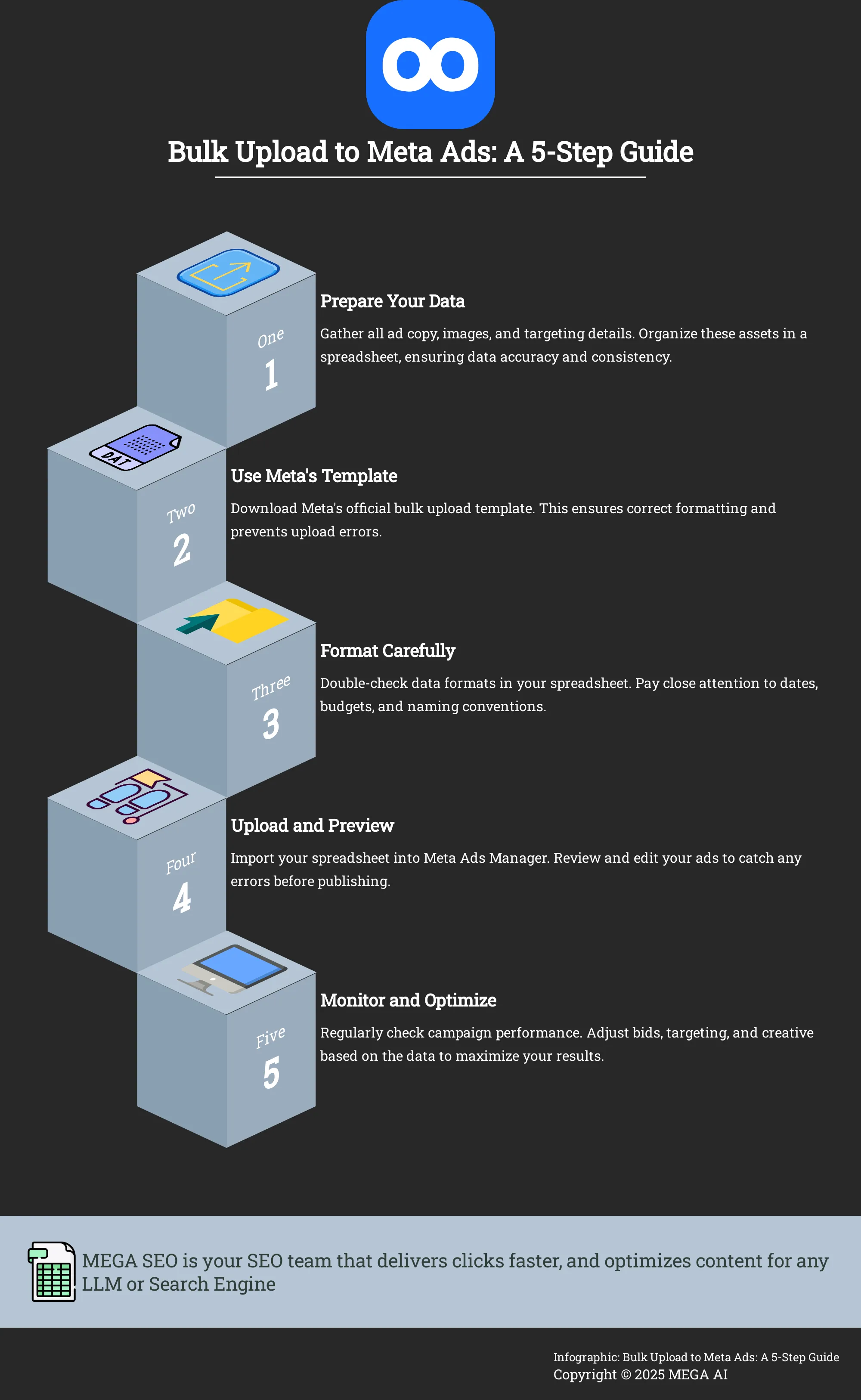
Transitioning from single ad creation to bulk uploads is a game-changer for scaling your Meta ad campaigns. This method lets you launch complex campaigns with numerous ad variations using a single spreadsheet, saving you from hours of repetitive manual work. The process starts with a template from Meta, where you define every detail: campaign objectives, ad set targeting, budgets, and creative assignments. Once your spreadsheet is filled out and your assets are organized, you upload everything directly into Ads Manager.
While the concept is simple, success hinges on meticulous organization. Clear naming conventions and accurate data entry are critical. The initial setup may feel slow, but the efficiency gains are substantial over time. This guide will walk you through the key steps, from using the native uploader to automating the process for maximum efficiency.
Use the Ads Manager bulk upload feature
The most direct way to start is with Meta’s native tool. The Ads Manager bulk upload feature lets you import a completed spreadsheet to create new campaigns, ad sets, and ads simultaneously. This is done on the desktop version of Ads Manager. You can download a blank template to build campaigns from scratch or, for a faster start, export an existing campaign to use its structure as a model. This second option is perfect for replicating a successful setup with new creative. The tool also supports bulk importing of images and videos, simplifying the otherwise tedious task of linking creative assets to the correct ads in your spreadsheet.
Automate with the Marketing API
For advertisers managing a high volume of ads or multiple accounts, automating the upload process is the next logical step. This is done using Meta’s Marketing API, which allows software to communicate directly with the ad platform. Automation helps ensure consistency across campaigns and reduces the risk of human error from repetitive data entry. While working with an API might sound technical, platforms like MEGA AI are built to handle this for you. Our tool simplifies the process, enabling you to upload and remix ad content in bulk across Meta, Google, and LinkedIn without writing a single line of code.
Preview and edit ads after uploading
This step is your final quality check and should never be skipped. After your spreadsheet is successfully uploaded, go through the ads within Ads Manager. Preview how they will appear on different placements, like Feeds, Stories, and Reels, as formatting can vary. Double-check for typos in the copy, ensure the correct images or videos are paired with the right headlines, and click every link to confirm it leads to the correct destination. This is your last chance to catch any common mistakes before your budget is spent. A few minutes of careful review can prevent costly errors and ensure your campaign launches smoothly.
Troubleshoot common errors
Don’t be discouraged if your first few bulk uploads run into errors; it’s a normal part of the learning process. If an upload fails, Meta Ads Manager will provide a downloadable error report. This report is your best tool for debugging, as it highlights the specific rows and columns in your spreadsheet that contain issues. Common problems include incorrect formatting for budgets or dates, broken image links, or invalid targeting parameters. Familiarizing yourself with these frequent ad mistakes can help you avoid them. Carefully read the error messages, fix the problems in your spreadsheet, and then re-upload.
How to Optimize Your Bulk Upload Process
Getting your ads live with a bulk upload is just the beginning. To truly get the most out of this feature, you need to build an efficient process around it. A streamlined workflow will not only save you time but also help you gather data faster, make smarter decisions, and scale your campaigns effectively. Optimizing your process involves making the upload itself quicker, consistently monitoring your campaigns after they launch, and using the speed of bulk uploads to run more effective tests. By refining each of these areas, you can turn bulk uploading from a simple time-saver into a strategic advantage for your advertising efforts.
Tips for a more efficient upload
To make your upload process smoother, start by mastering the tools Meta provides. You can bulk import ads directly into Ads Manager using an Excel spreadsheet, a feature that’s available on the desktop version. Get familiar with this template and consider creating your own pre-filled versions for different campaign types, like lead generation or website conversions. This saves you from starting from scratch every time. Also, establish a clear and consistent naming convention for your campaigns, ad sets, and ads within the spreadsheet. This simple organizational step makes it much easier to track performance and find specific ads later on, especially as you begin to scale your advertising efforts and manage more campaigns simultaneously.
Monitor and adjust your campaigns
Launching a campaign via bulk upload is not a one-and-done task. To ensure your ads perform well over time, you need to commit to regular maintenance. Plan to check in on your campaigns at least weekly to review key performance indicators and make necessary adjustments. This consistent fine-tuning is critical for success on the platform. During your check-ins, identify which ads are performing well and which are falling short. Don’t hesitate to pause underperforming ads and reallocate that budget to your top performers. This active management ensures your ad spend is always working as hard as it can. Platforms with automated budget optimization can handle this for you, shifting funds to ensure your spend is always placed optimally.
Use bulk uploads for A/B testing
The speed of bulk uploading makes it an excellent tool for A/B testing. Instead of creating ad variations one by one, you can quickly generate dozens of ads in a single spreadsheet to test different elements. This approach is incredibly useful for scaling your creative testing and learning what resonates with your audience. For example, you could create a campaign with one ad set and upload 10 different ads, each with a unique image but identical copy and call to action. This allows you to isolate the impact of the visual creative on performance. For even more advanced testing, you can book a demo to see how AI tools can automatically remix your assets into hundreds of ad variations, giving you a deeper level of insight with minimal manual effort.
Tools and resources for advanced users
While Meta’s native tools are powerful, dedicated third-party software can bring even more efficiency to your workflow. Automation tools can help you upload media in bulk, which is a huge time-saver when you’re testing a large volume of images and videos. These tools ensure consistency and accuracy across your campaigns, reducing the chance of human error that can come with manually managing large spreadsheets. For a truly end-to-end solution, platforms like MEGA AI can manage the entire process. You can upload assets in bulk not just to Meta but to Google and LinkedIn simultaneously. The platform can then automatically create hundreds of ad variations and manage your budget across all channels, simplifying your entire paid ads strategy.
Related Articles
- Bulk Upload Ads to LinkedIn: A Step-by-Step Guide
- Best Google Ads Management Tools for 2024
- 10 Best Ad Automation Tools to Boost ROI in 2025
- AdWords Automation: The Ultimate Guide (2024)
- Understanding CPM in Facebook Ads: A 2024 Guide
Frequently Asked Questions
Is bulk uploading only for large agencies or big advertisers? Not at all. While it’s essential for large-scale campaigns, any advertiser can benefit from the efficiency of bulk uploading. If you want to test just a few different headlines or images, or launch a campaign with several targeted ad sets, this method will save you time and help keep your work organized. It’s a skill that scales with your needs.
How is this different from just duplicating campaigns or ad sets in Ads Manager? Duplicating is great for making an exact copy or a few minor variations of an existing ad. Bulk uploading is designed for creating many unique ads from the ground up, all at once. It gives you the power to systematically change every variable—from targeting and budgets to creative and copy—across dozens or hundreds of ads within a single spreadsheet, which is far more scalable than duplicating one by one.
What happens if I upload my spreadsheet and realize I made a mistake? Your ads do not go live the moment you upload the file, so you have a chance to catch any issues. After the import, Ads Manager will show you all the campaigns, ad sets, and ads you created. You can review them, preview how they look, and make any necessary edits before you publish them. If the errors are extensive, you can simply delete the batch and upload a corrected file.
What's the most common reason a bulk upload fails for a first-timer? The most frequent issues are small formatting errors within the spreadsheet. Things like using the wrong date format, adding a currency symbol to a budget column, or having an extra space in a name can cause the upload to fail. Carefully following the instructions in Meta's template and double-checking your data before uploading is the best way to ensure a smooth process.
When should I consider using a tool instead of Meta's native uploader? Meta's uploader is a fantastic starting point for streamlining your work. However, you might consider a dedicated tool when your needs become more complex. If you are managing ads across multiple platforms like Google and LinkedIn, want to automatically generate hundreds of creative variations, or need your budget to shift to the best-performing ads for you, an end-to-end platform can handle that complexity and save you even more time.


