
Want to run your own Arma 3 game server hosting? It's easier than you think. Forget overcrowded public servers and restrictive rules. This guide covers everything you need to know about how to host a server arma 3. We'll walk you through choosing a provider, understanding pricing, optimizing performance, and managing mods. Create the perfect Arma 3 experience for you and your friends. Let's get started.
Key Takeaways
- Reliable Arma 3 server hosting relies on powerful hardware, strong DDoS protection, and an intuitive control panel. Look for features like global server locations and easy mod support to create a customized gaming experience.
- Hosting costs depend on factors like player slots, hardware, server location, and extra features. Longer billing cycles and special offers can often lower the price.
- Responsive customer support is essential. Choose a provider with 24/7 availability, helpful resources, and a supportive community. Look for live chat, knowledge bases, and active forums.
What is Arma 3 Game Server Hosting?
Arma 3 game server hosting lets you run a dedicated server for this popular military simulation game, giving you complete control over the gameplay. Instead of using public servers, you rent server hardware from a hosting provider, allowing you and your friends to play on your own terms. This offers a consistent, reliable experience, often free from the lag and instability of public servers. Plus, you can install and manage mods to create unique gameplay scenarios tailored to your community.
Hosting your own server has become a popular option, especially for games like Arma 3 with extensive multiplayer features. You control everything from player slots and game modes to mods and difficulty. Think of it as owning your own virtual world where you make the rules. With specialized Arma 3 hosting plans available at reasonable monthly prices, it’s more accessible than ever. This means you can enjoy a smoother, more personalized gaming experience without a huge investment.
Self-Hosting vs. Renting an Arma 3 Server
When setting up your own Arma 3 server, you have two main paths: self-hosting or renting. Each option has its own set of advantages and disadvantages, so making the right choice depends on your technical skills, budget, and desired level of control. Renting a server from a provider takes care of the technical heavy lifting, while self-hosting offers greater control but demands more technical expertise.
Hosting Directly Through the Arma 3 Client
The simplest self-hosting method is running a server directly through the Arma 3 client. This is generally easy to set up and works well for casual games with friends on a local network or a small online group. Because this method uses your own computer's resources, it can impact your game performance, especially with more players. It also offers fewer customization options compared to a dedicated server.
If you’re just looking for a quick game with a few friends, hosting through the client is convenient. It requires minimal technical knowledge and gets you playing quickly. However, it's not ideal for larger groups or consistent, high-performance gameplay. For more demanding scenarios, a dedicated server offers a better experience.
Using a Dedicated Server
For a more robust and customizable experience, consider a dedicated server. This means running the server software on a separate computer—either your own or one rented from a game server hosting provider. Setting up a dedicated server requires more technical knowledge, but the advantages are significant. A dedicated server offers better performance and stability, handling more players and complex missions without impacting your own gameplay. It also gives you complete control over server settings, mods, and other customizations, letting you tailor the experience to your preferences.
Setting up a dedicated server involves configuring server software, managing files, and potentially forwarding ports on your router. However, tools like Tophe's Arma Dedicated Server Tool (TADST) can simplify the process, making it more manageable even for those less familiar with server administration. This method is ideal for larger communities, persistent worlds, and those looking for the best possible performance and control.
Simplified Dedicated Server Setup with TADST
TADST streamlines the often complex process of setting up and managing a dedicated Arma 3 server. It provides a user-friendly interface for configuring server parameters, installing mods, and keeping the server software up to date. While Universal Plug and Play (UPnP) can sometimes automatically handle network configuration, manually forwarding ports is generally recommended for a more reliable connection, especially for regular hosting.
TADST and similar tools empower you to manage your dedicated server efficiently, even without deep technical expertise. They automate many of the tedious tasks involved in server administration, freeing you to focus on creating and enjoying the gameplay you want. Whether you're running a small private server or a large public one for your community, these tools are invaluable for maintaining a smooth and optimized Arma 3 server.
Must-Have Arma 3 Server Hosting Features
Reliable Arma 3 server hosting hinges on several key features. Understanding these features helps you make an informed decision when choosing a provider. Let’s break down what to look for:
Why High-Performance Hardware Matters
Arma 3 is a demanding game. A smooth, lag-free experience for your players requires powerful hardware. Look for providers that prioritize high-performance components, such as fast processors like the latest Intel or AMD CPUs. NVMe SSD drives are crucial for quick loading times, and ample RAM keeps things running smoothly. Direct tier-1 network connectivity is also essential for minimizing latency and ensuring a responsive gaming experience.
Recommended Hardware Specifications
To ensure a smooth and enjoyable gaming experience on your Arma 3 server, it's crucial to select a hosting provider that offers high-performance hardware. A slow server can lead to frustrating lag and performance issues, impacting gameplay for everyone. Here’s what to look for:
1. Processor (CPU): Aim for a CPU with at least 3.5GHz and 4 cores. Fast processors, such as the latest Intel or AMD CPUs, are essential for handling the game's complex calculations and AI. A powerful processor ensures your server can keep up with the demands of multiple players, complex missions, and detailed environments. OVHcloud, for example, highlights the importance of CPU power for Arma 3 servers.
2. Memory (RAM): A minimum of 6GB of RAM is recommended to ensure the server can handle multiple players and mods without lag. RAM acts as the server's short-term memory, storing frequently accessed data for quick retrieval. More RAM enhances performance, especially for larger communities and heavily modded servers. The more players and mods you have, the more RAM you'll need. OVHcloud suggests at least 6GB as a starting point.
3. Storage: Opt for NVMe SSD drives, which provide significantly quicker loading times and better overall performance than traditional hard drives. NVMe SSDs excel at handling frequent read/write operations required by Arma 3, resulting in faster map loading and smoother asset streaming. Ensure you have at least 40GB of storage space to accommodate the game, updates, and any mods. OVHcloud recommends SSDs for optimal Arma 3 server performance.
4. Network Connectivity: Direct tier-1 network connectivity is vital for minimizing latency and ensuring a responsive gaming experience. Latency, or ping, represents the delay between a player's action and its effect on the server. High latency can lead to frustrating delays. Look for providers that offer high-speed uplinks, ideally up to 10Gbps, to support smooth gameplay, especially during intense multiplayer battles. Host Havoc, for instance, emphasizes the importance of high-speed network connectivity for Arma 3 servers.
Does It Support My Favorite Arma 3 Mods?
One of Arma 3’s biggest draws is its extensive modding community. A good hosting provider should offer full support for Arma 3 mods and DLCs. Seamless integration with the Steam Workshop simplifies mod management. Look for features like one-click installation and support for Workshop Collections to keep your server up-to-date. Check if the provider supports popular mods like Altis Life, Exile, Antistasi, and CUP.
Modding with Steam Workshop and Collections
Arma 3's thriving modding scene is a huge part of its appeal. Steam Workshop integration makes managing these mods significantly easier, and it's a feature you should prioritize in a game server host. Look for providers offering one-click mod installation directly through the Workshop, saving you the hassle of manual downloads and FTP transfers. This streamlined process simplifies server setup and keeps your mods updated. A good hosting provider understands this and will offer seamless integration.
Workshop Collections take mod management a step further. Collections bundle multiple mods together, ensuring compatibility and simplifying the installation process for complex mod setups. Support for this feature is valuable, especially if you plan on using popular mod packs like Altis Life or CUP. This ensures everyone joins your server with the correct mod configuration, creating a consistent and enjoyable experience. A host with robust Workshop integration, including Collection support, is essential for easy management of a modded Arma 3 server.
Is Your Arma 3 Server Protected from DDoS Attacks?
DDoS attacks can disrupt your server and ruin the fun for everyone. Robust DDoS protection is essential for maintaining server uptime. Look for providers that offer advanced DDoS mitigation measures to protect against malicious attacks and keep your server online, even under attack.
Easy Server Management with a User-Friendly Control Panel
A clear, intuitive control panel simplifies server management. Features like a web console, file manager, and a built-in Steam Workshop installer are invaluable. A good control panel also includes a log viewer and easy data backup and restore options. A well-designed control panel puts you in control, allowing you to manage your server effortlessly.
Server Locations: Where Should You Host Your Arma 3 Server?
Latency can significantly impact gameplay. Choose a provider with global server locations, allowing you to select a server close to your player base. This reduces ping and ensures a smoother, more responsive experience for players worldwide. Look for servers in key regions like North America, Europe, and Asia Pacific.
Essential Networking: Ports and UPnP
Networking can seem intimidating, but understanding a few key concepts ensures your Arma 3 server runs smoothly. Let’s break down port forwarding and UPnP.
Understanding Port Forwarding (Ports UDP 2302-2306)
Think of your router as a gatekeeper. It controls which data enters and leaves your network. Specific UDP ports (2302, 2303, 2304, and 2306) need to be open for your Arma 3 server to communicate correctly. Port forwarding tells your router to direct traffic coming in on these ports to your server's IP address. This allows players to connect.
The process varies depending on your router model, but generally involves accessing your router's settings through a web browser and configuring the port forwarding rules. You'll need to specify the ports (UDP 2302, 2303, 2304, and 2306) and the local IP address of your server machine. For more detailed instructions, consult your router's documentation or search online for tutorials specific to your router model.
UPnP and Alternatives like Hamachi VPN
UPnP (Universal Plug and Play) simplifies port forwarding by allowing your Arma 3 server to automatically open the necessary ports on your router. It’s convenient, but doesn't always work reliably. If UPnP fails, manual port forwarding is your next step. Some routers have UPnP enabled by default, while others require you to activate it in the router settings.
If you're still struggling with port forwarding, a VPN service like Hamachi offers an alternative. Hamachi creates a virtual network, bypassing the need for traditional port forwarding. However, this requires all players to install and use the VPN, which might not be ideal for every gaming group. Consider the pros and cons before implementing a VPN solution.
Best Arma 3 Game Server Hosting Providers
Choosing the right game server hosting is crucial for a smooth Arma 3 experience. Here’s a look at some top providers to help you find the best fit:
Host Havoc
Host Havoc offers Arma 3 server hosting with a focus on flexibility and performance. They support mods and DLCs, offer high-performance hardware, and have multiple server locations worldwide. Their easy-to-use control panel and excellent customer support simplify setup and management. You also get full FTP access for complete control.
Host Havoc's 10% Discount Code
When considering Arma 3 server hosting, Host Havoc stands out for its robust features and affordability. They offer a 10% discount on your first month when you use the code 'WINTER' at checkout. This discount sweetens their competitive pricing structure, which is based on the number of player slots you need. For instance, a 40-slot server costs $20 per month, making it an accessible option for gamers wanting to create a customized experience.
Host Havoc provides high-performance server hardware, including Xeon and Ryzen CPUs, DDR4 & DDR5 memory, and NVMe SSD drives for a smooth gaming experience. Their 24/7 technical support, with an average response time of under 10 minutes, shows their commitment to customer satisfaction. This support, combined with their easy-to-use control panel, makes managing your Arma 3 server straightforward.
Nitrado
Known for its robust network, Nitrado provides a smooth gameplay experience with its high-speed 100GBPS network. They also offer helpful wiki guides for mod setup—a major plus for Arma 3 players who like customizing their servers.
GTX Gaming
If you need a budget-friendly option, GTXGaming offers Arma 3 servers at competitive prices. Their 24-hour refund policy lets you test their service risk-free before committing.
OVHcloud
For those who want dedicated servers, OVHcloud provides options optimized for Arma 3. These servers include anti-DDoS protection and high bandwidth, ensuring a stable and secure gaming environment.
OVHcloud's Target Audience and Flexible Configurations
OVHcloud caters to a wide range of users, from individuals hosting a private server for friends to larger organizations needing robust solutions. Their flexible configurations allow you to tailor your server to your specific needs and budget. This makes OVHcloud a solid option for individuals, resellers hosting multiple servers, publishers hosting official game servers, and even content creators planning LAN events or streaming. This flexibility extends to hardware choices, allowing you to select the resources that best fit your community's size and gameplay style.
Technical Requirements for OVHcloud
Setting up an Arma 3 server on OVHcloud is generally straightforward. You'll need a copy of Arma 3 (available on Steam), and you'll need to install SteamCMD on the server. OVHcloud provides an IPv4 address, a key requirement for hosting. For hardware, a 3.5GHz CPU with 4 cores, 6GB of RAM, and 40GB of storage is recommended. You may need more RAM depending on your player count. Finally, make sure ports UDP 2302, 2303-2304, and 2306 are open. These ports are essential for communication between players and the server.
Apex Hosting
Apex Hosting provides more than just servers; they offer a comprehensive optimization guide for your Arma 3 server. This focus on optimization helps attract and retain players, building a thriving server community.
Apex Hosting's Optimization Guide
Apex Hosting stands out by providing more than just server hardware. They offer a comprehensive optimization guide specifically designed for Arma 3 servers. This focus on optimization is key to attracting and retaining players, ultimately helping you cultivate a thriving online community. A well-optimized server not only enhances the immediate gameplay experience but also plays a significant role in long-term player retention. By providing a lag-free and responsive environment, players are more likely to return and recommend your server to others. Optimizing your Arma 3 server is crucial for a smooth and enjoyable gaming experience. This involves adjusting server settings, effectively managing mods, and ensuring efficient use of hardware resources. The guide includes practical tips on adjusting player slots, managing bandwidth, and configuring mods to ensure your server runs at peak efficiency.
BisectHosting
BisectHosting simplifies Arma 3 server hosting with easy setup and full mod support. Their 24/7 support ensures assistance is always available, and DDoS protection safeguards your server from attacks. They also offer global server locations for optimal performance.
BisectHosting Features and Benefits
When it comes to hosting your own Arma 3 server, BisectHosting stands out as a reliable choice, offering a range of features designed to enhance your gaming experience. Here are some key benefits:
Instant Setup
BisectHosting ensures that your server is ready to go almost immediately after purchase. This quick setup process lets you dive into your customized Arma 3 world without delay, avoiding lengthy configuration processes. You and your friends can start playing right away.
Full Mod Support and Easy Installation
One of the biggest draws of Arma 3 is its extensive modding community. BisectHosting provides full support for all mods and downloadable content (DLC). This makes it easy to tailor your server to your preferences. Their mod installer simplifies the process, allowing for one-click installations and seamless integration with the Steam Workshop.
24/7 Customer Support
BisectHosting demonstrates a commitment to customer service by offering 24/7 support with a fast average response time. This ensures that any issues you encounter can be resolved quickly, minimizing interruptions to your gameplay. This readily-available support can be invaluable when dealing with technical issues or server configuration.
DDoS Protection for a Stable Gaming Environment
Security is paramount in online gaming. BisectHosting includes robust DDoS protection to safeguard your server from attacks. This protection helps prevent disruptive attacks that could otherwise take your server offline, ensuring a stable and secure gaming environment for you and your players.
Global Server Locations for Optimal Performance
To optimize performance and minimize lag, BisectHosting provides server locations across the globe. Choosing the right location is key for a smooth and responsive multiplayer experience. This allows you to choose a server geographically close to your player base, reducing latency.
User-Friendly Control Panel for Easy Management
Managing your server is made easy with BisectHosting's intuitive control panel, TCAdmin. This feature-rich interface allows you to configure settings, manage mods, and monitor server performance effortlessly. The control panel provides a centralized location for all your server management needs.
Affordable Pricing and Fair Use Policy
BisectHosting offers competitive pricing plans, making it accessible for gamers looking to host their own servers. Their fair use policy on storage ensures you have ample space for your server files and modifications, providing flexibility for your Arma 3 experience.
GameServers.com
GameServers.com is known for reliable hosting and competitive pricing. This combination of reliability and affordability makes them a popular choice for gamers seeking a balance between performance and cost.
Low.ms
Low.ms prioritizes low latency and high performance, a good choice for both casual and competitive Arma 3 players. Their performance focus ensures a smooth, responsive gaming experience.
Survival Servers
Survival Servers offers specialized Arma 3 hosting plans focused on performance at reasonable prices. They cater to various server sizes and budgets.
Hostinger
Hostinger is frequently recommended by users for its robust hardware and network capabilities, which contribute to a lag-free gaming experience. Their expertise in hosting Arma 3 servers ensures players can enjoy a seamless and responsive environment. This makes Hostinger a top choice for those looking to create their own customized gaming world. They offer a variety of hosting locations, allowing you to choose a server close to your player base for optimal performance.
Hostinger's Key Features and Community Resources
Hostinger provides an intuitive control panel for easy server management, including features like one-click mod installation and server backups. They also offer robust DDoS protection to keep your server online and stable. While their support documentation is comprehensive, direct community interaction might be limited compared to some other providers. For example, some providers have dedicated forums or Discord servers where users can connect and share tips. However, Hostinger's focus on performance and ease of use makes them a solid choice for Arma 3 server hosting.
Godlike Hosting
Godlike Hosting stands out for its competitive pricing, making it an attractive option for gamers on a budget. Users have noted that the affordability of their services does not compromise the quality, allowing players to enjoy a reliable hosting experience without breaking the bank. They offer a range of server options to accommodate different needs and budgets. You can find more information on their website.
How Much Does Arma 3 Server Hosting Cost?
Getting your own Arma 3 server means understanding the costs. Several factors influence the price, and knowing what they are helps you find the best deal.
Understanding Arma 3 Server Hosting Pricing
Most providers base their pricing on the number of player slots. A basic 10-slot server might start around $12.51 per month, like GTXGaming. Prices go up as you add more slots.
Server Slot Pricing Examples
To give you a clearer picture, let’s look at some real-world pricing examples. Host Havoc, for instance, structures its pricing at $0.50 per player slot per month. This means a 40-slot server costs $20 per month. Other providers, like GTXGaming, offer a basic 10-slot server for around $12.51 per month, with prices increasing as you add more slots. Scalacube offers plans starting at $25 for a 20-player slot, going up to $64 for 100 player slots. Remember, these are just examples, and prices can vary based on the provider and the specific features included in your plan.
You’ll also find that some providers offer unlimited player slots, bundling this feature with higher-tier packages. These packages often include more resources, like RAM and storage, to handle the increased player load. Sitechecker’s research shows that prices for these types of packages can range from $8.70 to $25 per month, depending on the provider and the specific resources included. It’s always a good idea to compare different providers and packages to find the best balance of price and performance for your needs.
Factors That Influence Arma 3 Hosting Costs
Beyond player slots, other factors affect cost. Hardware is a big one. More RAM and a faster processor cost more. Survival Servers balances price and performance, with plans starting at $25 monthly for 20 slots. Server location matters too. Servers in data centers with high-speed connections often cost more. Features like DDoS protection or advanced control panels also add to the monthly fee.
Save Money with Long-Term Hosting
Many providers offer discounts for longer billing cycles. Paying for 3, 6, or 12 months upfront can save you money, sometimes up to 12%, according to Host Havoc. If you’re running your server long-term, these discounts are helpful.
Find the Best Arma 3 Hosting Deals
Look for limited-time promotions. These can be percentage discounts or free months. Host Havoc sometimes offers a 10% lifetime discount with a code. Check a provider’s website or social media before signing up.
Getting Help: Arma 3 Server Hosting Support
When your Arma 3 server crashes at 3 a.m., you need help fast. Reliable customer support is crucial for a smooth hosting experience. Let’s explore the different support avenues available.
24/7 Support: Live Chat and Tickets
Many providers offer 24/7 support through live chat and a ticketing system. Live chat is great for quick questions and immediate assistance, while tickets handle more complex issues requiring in-depth investigation. BisectHosting, for example, prioritizes rapid response times, aiming for an average reply of just 15 minutes. This ensures you’re never left hanging when a problem arises.
Helpful Resources and Tutorials
A comprehensive knowledge base filled with tutorials and FAQs is invaluable. These resources empower you to troubleshoot common issues independently. Host Havoc, for instance, provides helpful resources for managing mods and DLCs, including convenient one-click Steam Workshop integration. This self-service support is perfect for quick fixes and learning how to manage your server.
Community Forums for Arma 3 Hosting
Community forums, like those on Reddit, connect you with other Arma 3 server admins. Sharing experiences and troubleshooting tips within the community can be incredibly helpful. These forums often highlight real-world experiences, offering valuable insights into the quality of support from different providers.
Discord Support for Your Arma 3 Server
Some providers offer support through Discord servers, creating a dedicated space for real-time assistance and community interaction. This direct line of communication with the provider and other users can be beneficial for quick problem-solving. BisectHosting uses Discord to offer another avenue for immediate support and community engagement. This can be particularly helpful for time-sensitive issues or when you need advice from experienced server administrators.
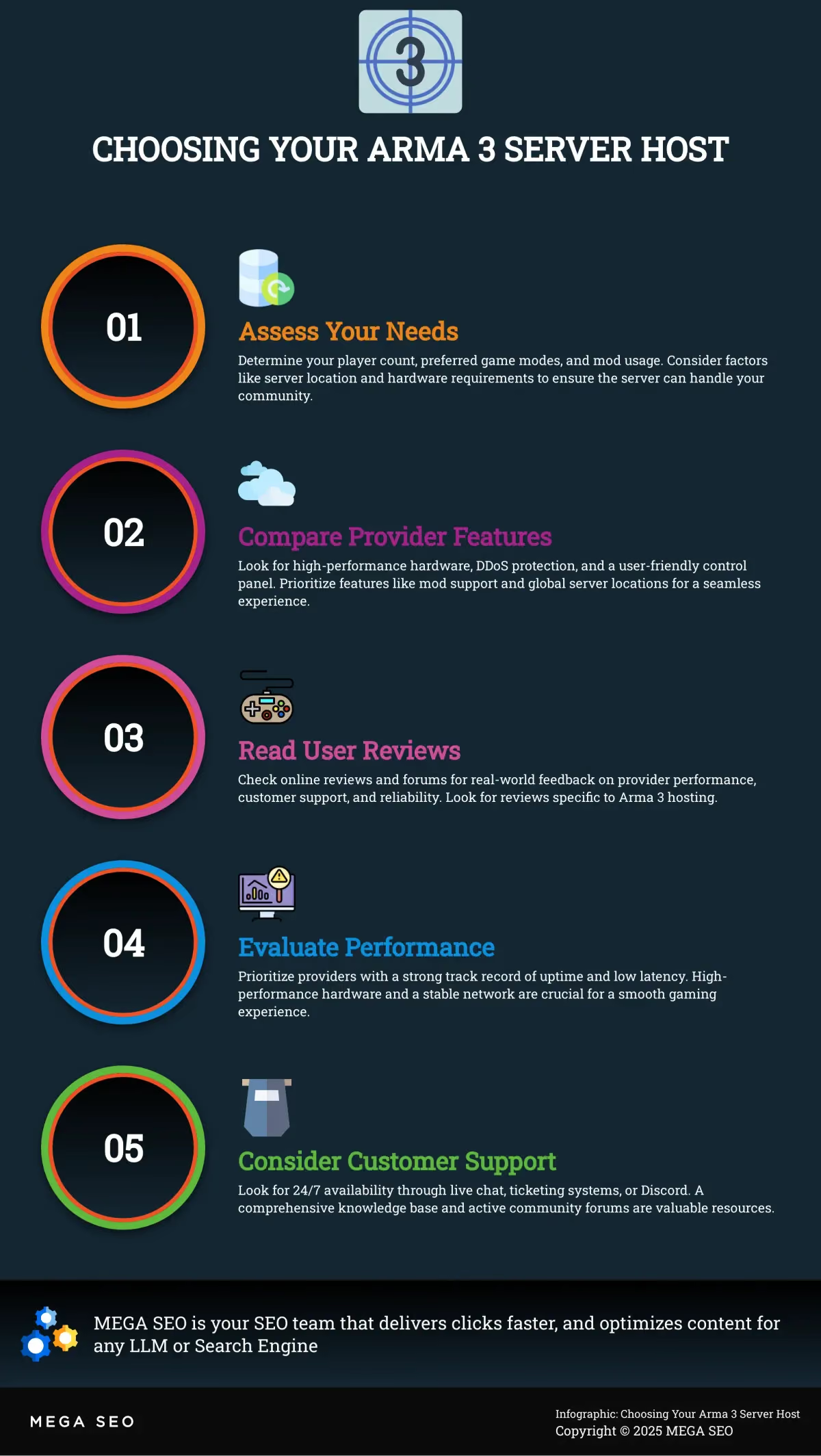
Choosing the Right Arma 3 Hosting Provider
Picking the right Arma 3 hosting provider is crucial for a smooth and enjoyable gaming experience. Here’s how to find the perfect fit:
What Are Your Arma 3 Server Needs?
Before you start browsing providers, take a moment to consider your specific requirements. Think about how many players you’ll typically have, what game modes you’ll be running, and whether you plan on using mods. Hosting your own Arma 3 server gives you complete control over the game, from mission parameters and mod support to player restrictions. Knowing your needs upfront will help you choose a server that meets your specific requirements. Consider factors like player count, game modes, and mod usage to ensure a server that can handle everything you need.
Key Considerations for Choosing a Host
Choosing the right Arma 3 server hosting provider is crucial for a smooth and enjoyable gaming experience. Here’s a breakdown of key factors to consider when selecting an Arma 3 server host:
- Hardware: Arma 3 is demanding. Prioritize providers offering high-performance hardware, including fast processors (like the latest Intel or AMD CPUs), NVMe SSD drives for quick loading, and ample RAM. Direct tier-1 network connectivity minimizes latency.
- Mod Support: Arma 3 thrives on mods. Ensure your provider offers full mod and DLC support, ideally with seamless Steam Workshop integration for easy installation and updates. Check if they support popular mods like Altis Life, Exile, Antistasi, and CUP.
- DDoS Protection: DDoS attacks can cripple your server. Robust DDoS protection is non-negotiable for maintaining uptime. Look for providers with advanced mitigation measures.
- Control Panel: A user-friendly control panel simplifies management. Look for features like a web console, file manager, built-in Steam Workshop installer, log viewer, and easy backup/restore options.
- Server Location: Latency kills gameplay. Choose a provider with global server locations, allowing you to select a server close to your player base for reduced ping.
- Customer Support: 24/7 support is essential. Look for live chat, a comprehensive knowledge base, and perhaps even a Discord community for real-time help. Quick response times are key.
By carefully considering these factors, you can choose a hosting provider that sets you up for a successful Arma 3 server experience.
Compare Hosting Features Side-by-Side
Once you have a good grasp of your needs, start comparing features. Look for essentials like high-performance hardware, DDoS protection, and a user-friendly control panel. Quality Arma hosts optimize their hardware for peak performance and minimal latency using technologies like NVMe SSD drives and powerful CPUs. Also, consider the provider’s server locations. Choosing a server close to your players can significantly reduce lag and improve overall gameplay. Features like high-performance hardware and DDoS protection are essential for a smooth gaming experience.
What Are Other Players Saying?
Don’t just take the hosting provider’s word for it–see what other players are saying. User reviews offer valuable insights into the provider’s actual performance, customer support, and overall reliability. Look for reviews that mention specific experiences with Arma 3 hosting, as this will give you the most relevant information. Sites like Reddit and Trustpilot can be great resources for finding honest feedback from other players.
Performance Requirements for a Smooth Arma 3 Experience
A laggy server can ruin the fun. When evaluating providers, pay close attention to their performance capabilities. Choose a reliable hosting provider that offers high-performance hardware and low-latency network connections. Look for providers that use enterprise-grade hardware and have a strong track record of uptime. A stable and responsive server is essential for a positive Arma 3 experience. A provider with a solid reputation for uptime and reliability will ensure a more consistent and enjoyable gaming experience.
Tips to Optimize Your Arma 3 Server
Once your Arma 3 server is up and running, regular optimization is key for a smooth and engaging player experience. This involves fine-tuning server configurations, monitoring performance, and effectively managing mods and updates.
Configuring Your Arma 3 Server
Start by choosing a reliable hosting provider that offers high-performance hardware and low-latency network connections. Look for features like NVMe SSD drives and cutting-edge CPUs, often highlighted by quality Arma hosts, to ensure peak server performance. Within your server settings, adjust parameters like view distance and AI count. Finding the right balance between these settings ensures optimal performance without sacrificing the gameplay experience. Experiment to find what works best for your server and players.
Monitoring Your Server's Performance
Attracting and retaining players is crucial for any Arma 3 server. Regularly monitor server performance to identify and address potential issues. Keep an eye on key metrics such as CPU usage, memory usage, and network latency. High CPU or memory usage can lead to lag and other performance problems, while high latency can result in frustrating delays for players. Use tools provided by your hosting provider or third-party applications to track these metrics and pinpoint areas for improvement. Consider setting up alerts for critical performance thresholds so you can address issues proactively.
Managing Arma 3 Server Mods and Updates
Arma 3 thrives on its extensive modding community. Simplify mod management with features like one-click mod installers and pre-configured templates, often available from hosts like HostHavoc and GPortal. These tools make adding and updating complex mods significantly easier. Regularly update your server to the latest Arma 3 version to ensure compatibility and access new features and bug fixes. Dedicated server hosting gives you complete control over your game environment, allowing you to customize the experience and tailor it to your community. Clear communication with your players about planned updates and mod changes can help manage expectations and keep them engaged.
Frequently Asked Questions
What are the minimum hardware requirements for running an Arma 3 server?
While specific requirements depend on the number of players and the complexity of your missions and mods, a good starting point is a quad-core CPU, 8GB of RAM, and a fast SSD. More players and complex mods will require more resources. Always check your hosting provider’s recommendations for optimal performance.
How do I install mods on my Arma 3 server?
Most hosting providers offer simplified mod installation through their control panel, often with one-click installs or integration with the Steam Workshop. You can typically upload mods directly or subscribe to them through the Steam Workshop, making the process relatively straightforward. Check your provider’s documentation for specific instructions.
What is DDoS protection, and why do I need it for my Arma 3 server?
DDoS attacks flood your server with traffic, making it unavailable to legitimate players. DDoS protection mitigates these attacks, keeping your server online even under attack. It’s crucial for maintaining a consistent and enjoyable gaming experience for your community.
How much does it cost to host an Arma 3 server?
Pricing varies depending on the hosting provider, the number of player slots, hardware resources (RAM, CPU), server location, and additional features like DDoS protection. Expect to pay anywhere from $10 to $50 per month for a basic server, with prices increasing for larger player capacities and more powerful hardware.
What should I look for in an Arma 3 server hosting provider?
Look for a provider with high-performance hardware (fast CPUs, SSD storage, ample RAM), robust DDoS protection, a user-friendly control panel, global server locations (to minimize latency for your players), and excellent customer support. Full mod support and easy integration with the Steam Workshop are also essential for a good Arma 3 hosting experience.