
Your content can be the best in the world, but it won’t matter if your website has technical problems. Issues like slow servers, broken links, or a confusing site structure can stop your powerful content from ever reaching its full potential. A technical SEO audit is the diagnostic check-up that finds these hidden issues before they hurt your rankings. This guide provides a clear, step-by-step process for using Ahrefs to perform an audit. We'll walk through setting up your first crawl, making sense of the results, and creating an actionable plan to get your site running smoothly.
Key Takeaways
- Conduct a Technical Health Check: An audit is the first step to ensuring search engines can find and rank your site. It moves you from guessing what might be wrong to having a clear, data-backed plan for improvement.
- Focus on High-Impact Manual Fixes: Don't try to fix everything at once. Prioritize critical errors that affect crawlability, site speed, and the mobile experience to see the most significant improvements quickly.
- Automate for Continuous Optimization: A manual audit is a snapshot in time, but technical SEO is an ongoing process. An automated tool can continuously monitor your site's health, freeing up your team to focus on strategy instead of repetitive tasks.
What is a Technical SEO Audit?
Think of a technical SEO audit as a health check-up for your website's foundation. It’s the process of examining the technical aspects of your site to ensure search engines like Google can find, crawl, and index your content without any roadblocks. If search engines can’t properly read your site, even the most brilliant content strategy will fall flat. This audit helps you identify and fix issues that might be hurting your ability to rank in search results, from slow page speeds and broken links to more complex indexation problems.
A technical audit gives you a clear, data-backed picture of your site’s performance from a search engine’s perspective. It moves you from guessing what might be wrong to knowing exactly what needs to be fixed. By systematically reviewing your site’s technical health, you create a solid base upon which all your other SEO efforts—like content creation and link building—can succeed. It’s a fundamental step for anyone serious about improving their organic traffic and online visibility.
What to Look for in a Technical Audit
A thorough technical audit covers several core areas of your website. First is crawlability and indexation, which confirms that search engine bots can access and store your web pages in their database. Next, you’ll look at site speed and performance, because how fast your site loads is a critical ranking factor, especially for mobile users.
Speaking of mobile, ensuring your site is mobile-friendly is non-negotiable. Google uses mobile-first indexing, meaning it primarily evaluates the mobile version of your site for ranking. You’ll also check technical on-page elements like title tags and meta descriptions, and analyze your internal linking structure to see how easily users and bots can move through your site.
Why Bother with a Technical SEO Audit?
Conducting regular technical SEO audits is essential because it helps you proactively find and fix problems that directly impact your search rankings. A website with a clean bill of technical health is more likely to be favored by search engine algorithms. Without a solid technical foundation, your investment in content and other marketing activities may not deliver the expected returns.
Fixing technical issues often results in noticeable performance improvements. By addressing everything from minor on-page errors to major crawlability problems, you can significantly improve how your site performs in search results. Regular audits ensure your site remains optimized as search engines update their algorithms and as you add new content. This consistent maintenance is key to sustaining and growing your organic presence over time.
Understanding Technical Debt
Technical debt is what happens when you choose a quick, easy fix now instead of a better, more sustainable solution that might take longer. Think of it like taking a shortcut when building a house. It might get the job done faster, but it can lead to structural problems down the road. On a website, this could be a temporary code patch or a plugin that solves one problem while creating others. Over time, these shortcuts accumulate, making future updates more difficult and expensive. A technical SEO audit acts as an inspection, identifying these hidden issues so you can address them before they cause bigger problems.
The Impact of Technical SEO on Marketing
The effectiveness of your marketing is directly tied to the technical health of your website. You could run a brilliant ad campaign that drives tons of traffic, but if those visitors land on a page that’s slow to load or broken on mobile, they’ll leave in seconds. That’s wasted marketing spend. A technically sound website ensures the traffic you work hard to get has a good user experience. This leads to higher engagement, better conversion rates, and a stronger return on all your marketing investments, not just SEO. By prioritizing technical SEO, you make every other part of your marketing strategy more effective.
Essential Tools for a Technical SEO Audit
No single tool can give you the complete picture of your website's technical health. A comprehensive audit relies on a small suite of tools, each with its own strengths. By combining data from a primary crawler, Google's own platforms, and specialized speed analyzers, you can build a detailed and actionable report. This approach ensures you're not just finding surface-level errors but are also digging into the core issues that affect how search engines and users experience your site. Think of it as assembling a team of specialists; each one brings a unique perspective to the diagnostic process.
Using Ahrefs for Your Primary Audit
Ahrefs' Site Audit tool is an excellent starting point for your technical review. It acts as your primary diagnostic tool, crawling your entire website just like a search engine would. The audit checks for hundreds of common SEO issues happening in the hidden parts of your site that impact how search engines find and rank your pages. It organizes findings into a clear report, flagging everything from broken links and missing meta descriptions to redirect chains and duplicate content. This gives you a high-level overview of your site’s health and a prioritized list of issues to address first.
Supplementing with Google Search Console
While Ahrefs is great for a general check-up, Google Search Console is your direct line of communication with Google. It’s an essential, free tool that shows you exactly how the search engine sees your website. You can use it to monitor critical information like indexing status, mobile usability, and Core Web Vitals. Most importantly, it reports any crawl errors that Google encounters when trying to access your pages. This data is invaluable because it comes straight from the source, telling you precisely what roadblocks Google is hitting on your site.
Deep Crawling with Screaming Frog SEO Spider
For a more granular analysis, many SEO professionals turn to Screaming Frog SEO Spider. This is a powerful desktop application that crawls your website and provides an incredible amount of data. While tools like Ahrefs are great for scheduled audits and high-level reports, Screaming Frog is perfect for real-time, deep-dive investigations. You can use it to quickly identify specific errors like broken internal links, analyze page titles in bulk, find pages with thin content, and generate XML sitemaps. It’s a bit more hands-on, but its depth of data is unmatched for complex problem-solving.
Analyzing Site Speed with Other Tools
Page speed is a confirmed ranking factor and is critical for user experience. While general audit tools can flag slow pages, specialized speed tools give you the detailed diagnostics needed to fix the underlying problems. Using a dedicated tool helps you understand not just *that* a page is slow, but *why* it's slow, pointing to specific elements like large images, inefficient code, or server response times. This allows you to make targeted improvements that have a real impact on performance.
Google PageSpeed Insights
Google PageSpeed Insights is the go-to tool for measuring your site's performance against Google's Core Web Vitals. You simply enter a URL, and the tool analyzes how quickly the page loads and becomes interactive on both mobile and desktop devices. It provides a performance score from 0 to 100 and offers specific, actionable recommendations to improve your page speed. Since this is Google's own tool, its suggestions are directly aligned with what the search engine wants to see.
GTmetrix
GTmetrix is another excellent tool that provides deep insights into your site's speed and performance. It gives you a detailed report that includes your Core Web Vitals scores and a waterfall chart. This chart visualizes how every single element on your page loads, helping you pinpoint exactly which assets are causing bottlenecks. Using GTmetrix allows you to see how scripts, images, and third-party code impact your load time, giving you the information needed to make precise optimizations.
Combining Data from Other Sources
A technical audit isn't complete without understanding how real users interact with your site and how other search engines perceive it. Technical issues often manifest as poor user engagement metrics. Looking at data from analytics and other webmaster tools provides context to your audit findings, helping you connect technical problems to their impact on your audience and your business goals. This holistic view ensures you're fixing problems that truly matter.
Google Analytics
Google Analytics is crucial for understanding how technical issues affect user behavior. For instance, you might discover a group of pages with an unusually high bounce rate or low time on page. This could signal a technical problem, such as slow load times, poor mobile rendering, or broken internal links on those specific pages. By connecting technical data with user engagement metrics, you can better prioritize your fixes based on what is actively harming the user experience.
Bing Webmaster Tools
While Google holds the largest market share, it's wise not to ignore other search engines. Bing Webmaster Tools offers a suite of diagnostic features similar to Google Search Console, but from Bing's perspective. It can provide additional insights into your site's performance, including crawl information, indexation status, and keyword reports. Setting up your site with Bing Webmaster Tools ensures you have a more complete view of your site's health across the web.
How to Start a Manual Audit in Ahrefs
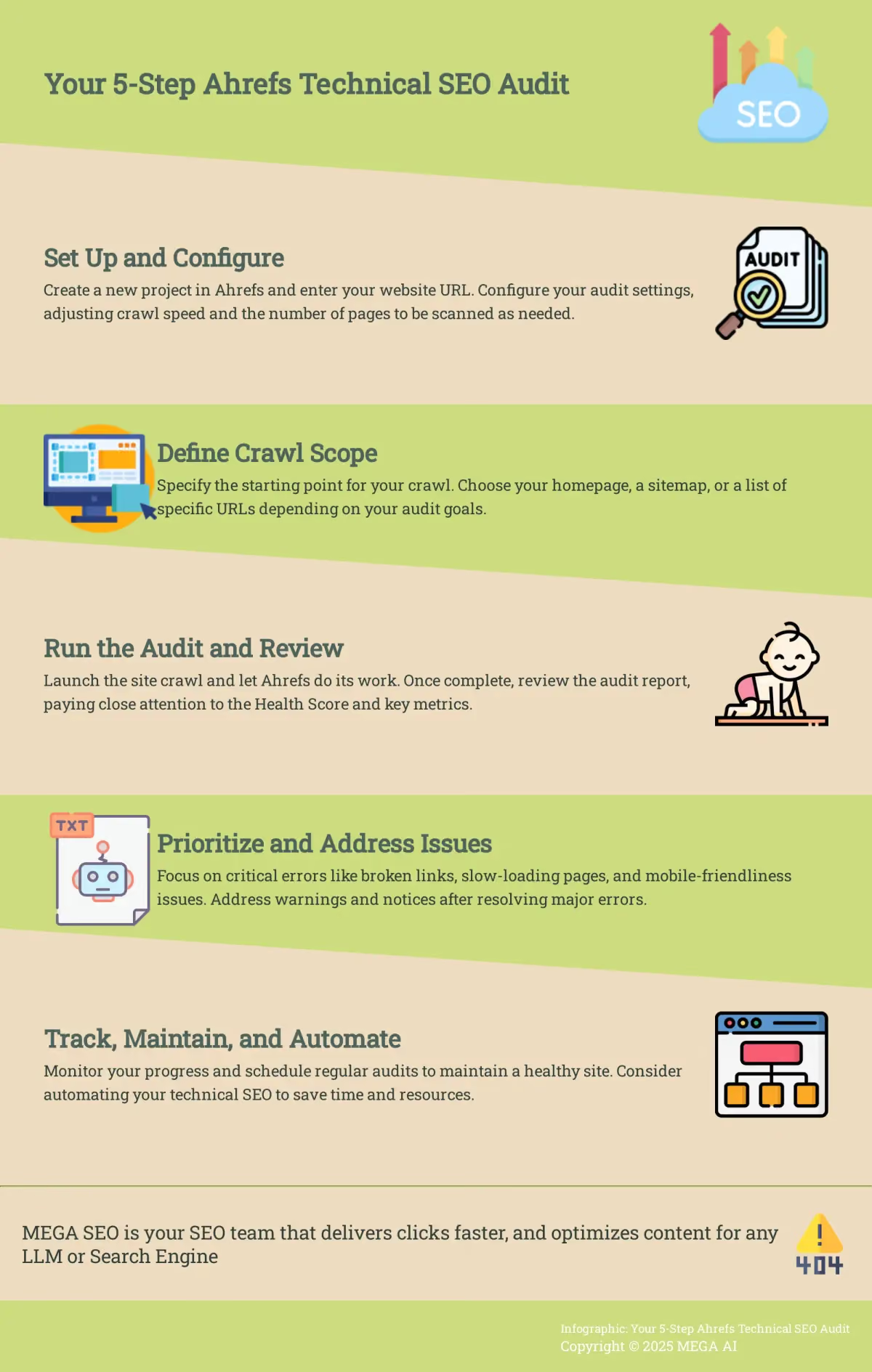
Ahrefs is a go-to tool for many marketers, and its Site Audit feature is a solid starting point for digging into your site’s technical health. Getting the initial setup right is critical for a successful audit. If your settings are off, you might miss key issues or get a report filled with irrelevant data. Let's walk through the first few steps to kick off your manual audit and make sure you’re gathering the right information from the start.
Setting Up Your Project in Ahrefs
First things first, you need to create a project for your website inside Ahrefs. To begin, set up a project by entering your website's URL. This simple step allows you to use the Site Audit tool, which is essential for scanning your entire website for technical issues. Think of this as giving Ahrefs the keys to your site so it can start its inspection. Once the project is created, Ahrefs will have a dedicated space to store all the data it collects about your site, from backlinks to keyword rankings and, most importantly for us, your technical audit results. This keeps everything organized and easy to find later.
Configuring Your Audit Settings
Once your project is ready, it’s time to fine-tune the audit settings. This step ensures the tool crawls your site efficiently without causing problems. When configuring your audit settings, consider adjusting the crawl speed and the number of pages scanned, especially for larger websites. A faster crawl gets you results quicker, but it can also put a strain on your server. For most small to medium sites, the default settings work well. You can also tell Ahrefs to respect your robots.txt file, which is generally a good idea unless you’re specifically trying to find pages that are blocked from crawling.
Defining Your Crawl Scope
After configuring the settings, you need to define your crawl scope. This tells Ahrefs exactly what to analyze. You can start the crawl from your homepage, a sitemap, or even a list of specific URLs. For a comprehensive audit, starting from the homepage and letting Ahrefs discover links from there is a common approach. The Site Audit tool will provide a "health score" for your website and list all identified issues, prioritizing them based on their importance and offering guidance on how to resolve them. This initial report gives you a high-level overview and a clear starting point for your analysis, showing you where the most critical problems lie.
Which Technical SEO Metrics Matter Most in Ahrefs?
Once you run a site audit, Ahrefs presents a dashboard full of data. It can feel like a lot at first, but you can get a clear picture of your site’s technical health by focusing on a few key areas. These metrics will show you where the most critical issues are so you can create a focused plan of action.
What is the Ahrefs Health Score?
The Health Score is your high-level summary of your site's technical SEO. Ahrefs calculates this score by comparing the number of error-free URLs to the total number of URLs crawled. The tool gives you a percentage and lists all the problems it finds, showing how important each one is and how to fix it. Think of it as your starting point. A low score indicates significant issues that need immediate attention, while a high score means you’re on the right track. It’s a simple way to gauge your site’s condition at a glance before you get into the details.
Measuring Crawl Efficiency
If search engines can't crawl your pages efficiently, they won't show up in search results. It’s that simple. Issues with crawlability are critical to fix. The Ahrefs audit will flag problems like broken links, redirect chains, and "noindex" tags on pages you want to rank. You can also check the Google Search Console Coverage report to see which pages are indexed, have warnings, or are excluded. Ensuring Googlebot can easily find and access your important content is a foundational step for any successful SEO strategy.
Analyzing Page Speed and Core Web Vitals
How fast your website loads is a confirmed ranking factor, especially for mobile users. Slow sites create a poor user experience, and Google takes notice. The audit report highlights slow pages, but you should pay close attention to Core Web Vitals. These are specific metrics Google uses to measure site speed and user experience, including Largest Contentful Paint (LCP), Cumulative Layout Shift (CLS), and Interaction to Next Paint (INP). Improving these scores can directly impact your rankings and keep visitors from leaving your site out of frustration.
Key Performance Benchmarks to Meet
When you're reviewing your audit, focus on a few key performance goals. First, ensure your important pages are both crawlable and indexed. This means search engines can find and store your content without running into errors. Next, prioritize site speed. A fast-loading site is essential, and you should aim for good scores on Google's Core Web Vitals—specifically Largest Contentful Paint (LCP), Cumulative Layout Shift (CLS), and Interaction to Next Paint (INP). Finally, your site must be mobile-friendly. Since Google primarily uses the mobile version of your site for ranking, a seamless mobile experience isn't just a nice-to-have; it's a requirement for a successful technical SEO audit.
Is Your Site Truly Mobile-Friendly?
With mobile traffic dominating the web, Google now uses mobile-first indexing. This means it primarily looks at your mobile site to determine rankings. Your site might look great on a desktop but have major issues on a phone. Ahrefs allows you to run a separate audit using a mobile user-agent, which is a great way to find issues that only appear on mobile devices. Common problems include text that’s too small to read, clickable elements that are too close together, and content that’s wider than the screen. Fixing these ensures a good experience for the majority of your users.
How to Run and Analyze Your First Audit
Once your project is set up in Ahrefs, you’re ready to get started. Running the audit and making sense of the data is a three-step process: you’ll start the crawl, review the findings, and then decide what to fix first. This systematic approach helps you turn a long list of potential problems into a clear, actionable to-do list.
Running Your First Site Crawl
To begin, you'll use a tool like Ahrefs' Site Audit to scan your website. The easiest way to connect your site is often through Google Search Console, which gives the tool verified access to start its work. Once connected, you can launch the crawl. The tool will then act like a search engine bot, visiting every page it can find on your site to check for a wide range of technical issues. After the scan is complete, Ahrefs will generate a "health score" for your website. This score gives you a high-level snapshot of your site's technical condition and serves as a benchmark for your optimization efforts.
Making Sense of the Ahrefs Audit Report
After the crawl finishes, you’ll get a comprehensive report. It’s normal to find a lot of issues, so the key is to approach the report methodically. Ahrefs helps by providing priority ratings for every issue it finds. Instead of trying to fix everything at once, take time to understand the layout of the report. You can explore different sections, like "Internal pages" or "Links," to see specific data points. The main dashboard will present the most critical information upfront, giving you a guided path through the findings. This initial review is about understanding the scope of the work ahead, not solving it all in one go.
What to Fix First: Prioritizing Issues
With the report in hand, your next step is to prioritize. Ahrefs makes this easier by categorizing issues into three main levels: errors, warnings, and notices. Think of these as a traffic light system for your site’s health. Errors (the red light) are the most critical problems that can seriously harm your SEO performance, like broken pages or major server issues. You should address these first. Warnings (the yellow light) are significant but less urgent issues that could become bigger problems later. Notices (the blue or green light) are minor issues or opportunities for improvement. By tackling errors first, then warnings, you ensure your efforts have the greatest impact.
Analyzing Key On-Page and Technical Elements
Once your initial crawl is complete, Ahrefs presents a dashboard full of data. The next step is to analyze the specific on-page and technical issues that the audit uncovered. These elements are the foundation of a healthy website, directly impacting how search engines crawl, index, and rank your content. Ahrefs conveniently groups these problems into categories like "Performance," "HTML tags," and "Content quality," which helps you systematically work through them.
Focusing on these core areas ensures that both users and search engine bots can access and understand your site effectively. A clean technical foundation allows your content strategy and link-building efforts to have a much greater impact. We’ll walk through four of the most critical areas to check: your site’s structure, broken links and redirects, duplicate content, and structured data implementation. Addressing these first will often yield the most significant improvements in your site’s performance.
Check Your Site Architecture and Internal Linking
A logical site structure is essential. As one source notes, "A well-organized site helps search engines understand your content and helps users find what they need." In your Ahrefs Site Audit report, go to the Internal pages report and sort by "Depth" to find pages that are buried too many clicks away from your homepage. You should also look for orphan pages—pages with no incoming internal links—as they are difficult for both users and search engines to discover. A strong internal linking strategy not only improves user experience but also distributes link equity to your most important pages, helping them rank better.
Aim for a Flat Site Architecture
A flat site architecture means that your most important pages are only a few clicks away from your homepage. This structure makes your site more intuitive for both visitors and search engine crawlers. As Ahrefs notes, "A well-organized site helps search engines understand your content and helps users find what they need." If a user has to click through five or six pages to find a key product or service, they’re likely to give up. The same goes for search engines. The "Depth" report in your Ahrefs audit will show you how many clicks it takes to reach each page. Aim to keep your essential pages within three clicks of the homepage to improve crawl efficiency and user navigation.
Review Your URL Structure
Your URLs are the addresses for your web pages, and they should be as clear and descriptive as possible. A clean URL helps users and search engines understand a page's content at a glance. According to Semrush, "URLs (web addresses) should be consistent and easy to understand... Avoid underscores, too many tracking codes, or very long URLs." For example, a URL like `yourdomain.com/services/content-marketing` is much more effective than `yourdomain.com/p?id=789`. The Ahrefs audit will flag issues like overly long URLs or those with dynamic parameters. When creating new pages, make it a habit to craft SEO-friendly URLs by using relevant keywords and keeping them concise.
Check for HTTP Status Code Errors
HTTP status codes tell browsers and search engines the status of a page. Errors can create a poor user experience and hurt your SEO. The Ahrefs audit report flags these issues clearly. Look for 4xx errors, like 404 "Not Found" pages, which indicate broken links. These dead ends frustrate users and waste crawl budget. You should also investigate 3xx redirect issues. While a single 301 redirect is fine, long redirect chains can slow down your site and dilute link equity. Fixing these errors ensures a smoother path for both your visitors and search engine crawlers.
Review Meta Tags and Heading Structure
Meta tags and heading structure are the signposts for your website. Your title tag and meta description are often the first things a potential visitor sees in the search results, while headings (H1, H2, H3) organize your content on the page. Getting these elements right is crucial because they help both search engines and users quickly understand what your page is about. The Ahrefs audit will have specific reports for "HTML tags" and "Content quality" that flag issues with these elements, giving you a clear list of what needs to be fixed.
Title Tag and Meta Description Lengths
Your title tag and meta description act as your ad copy on the search engine results page. They need to be unique, descriptive, and the right length to avoid being cut off. Ahrefs will flag any titles or descriptions that are too long, too short, missing, or duplicated across multiple pages. You should craft these elements to accurately reflect the page's content while also being compelling enough to earn a click. Manually optimizing these for every page can be a lot of work, which is why tools that can automatically update content to improve click-through rates are so valuable for maintaining site health over time.
Proper Heading Tag Usage
A logical heading structure makes your content easier for people to read and for search engines to understand. The rule is simple: use only one H1 tag per page, which should be your main title. Then, use H2s for main subheadings and H3s for topics within those sections. This hierarchy creates a clear outline of your content. The Ahrefs audit will point out pages that are missing an H1 tag or have multiple H1s, which can cause confusion. A well-structured page with proper heading tags helps search engines grasp the main topics and can improve your content's relevance for target keywords.
Find and Fix Duplicate Content
Duplicate content happens when identical or very similar content appears on multiple URLs. This can confuse search engines, forcing them to guess which page is the original and should be ranked. Ahrefs’ Content quality report identifies clusters of duplicate and near-duplicate pages for you to review. The most common solution is to implement a canonical tag. This small piece of HTML code tells search engines which URL represents the master copy of a page, consolidating all ranking signals into a single, preferred version and resolving any potential confusion.
Identifying Keyword Cannibalization
Keyword cannibalization is a related but distinct issue where multiple pages on your site compete for the same keyword. This essentially forces your own content to fight against itself in search results. When this happens, you split your authority; backlinks, internal links, and click-through rates get divided among several pages instead of being consolidated into one strong one. This can confuse search engines about which page is the most relevant for a given query. As a result, Google might rank a weaker, less relevant page, or all of your competing pages might rank lower than a single, authoritative page would have.
You can spot potential cannibalization by reviewing your Ahrefs audit for pages with very similar title tags, H1s, and content focus. A more direct method is to check your keyword rankings in a tool like Ahrefs' Site Explorer or Google Search Console. If you see different URLs from your domain ranking for the same keyword, you've found a problem. The fix usually involves a content strategy decision: you can either merge the competing pages into one comprehensive piece, de-optimize one page for the conflicting keyword, or use a canonical tag to tell search engines which page is the master version.
Validate Your Structured Data
Structured data, or schema markup, is code that helps search engines understand the context of your content. This can lead to rich snippets in search results, like star ratings, prices, or FAQ dropdowns, which can significantly improve your click-through rate. Ahrefs will show you which pages have structured data and flag any implementation errors. You can use this report to identify pages that are missing schema or have invalid code. To confirm your fixes, you can use Google’s Rich Results Test to ensure your pages are eligible for these enhanced search features.
Look for Common JavaScript Issues
JavaScript is what makes modern websites interactive and dynamic. However, it can also introduce technical SEO problems if it’s not implemented carefully. Large or uncompressed JavaScript files can slow your site to a crawl, creating a poor user experience that Google takes note of. More critically, if your JavaScript is broken or prevents content from rendering properly, search engines may not be able to see your page's content at all. This can severely impact your ability to rank. In your Ahrefs audit, check the Performance report for slow-loading resources and use Google's guidance on JavaScript SEO to understand how to diagnose rendering issues.
Performing Advanced Technical Checks
Once you’ve handled the foundational elements, you can move on to more advanced technical checks. These areas often require a bit more attention to detail but are critical for building user trust, serving a global audience, and ensuring search engines can efficiently crawl your entire site. Using Ahrefs’ Site Audit tool, you can systematically review your security protocols, international SEO settings, and the health of your XML sitemap. Getting these right helps solidify your technical SEO foundation and prevents complex issues from hurting your performance down the line.
Is Your Site Secure? Checking for HTTPS
A secure website is non-negotiable. It protects your users' data and is a confirmed ranking factor for Google. Your site should use HTTPS to encrypt the connection between a user’s browser and your server. In the Ahrefs Site Audit report, look for any pages that still use HTTP or flag “mixed content” errors. These errors happen when a secure page attempts to load insecure resources, like images or scripts, over an HTTP connection. To fix this, ensure you have a valid SSL certificate installed and update any internal links or resources to use HTTPS instead of HTTP.
Auditing Your International SEO (hreflang)
If your website serves content to users in different languages or regions, hreflang tags are essential. These small code snippets tell search engines which version of a page to show to a user based on their language and location. Incorrect implementation can lead to Google showing the wrong language to users, creating a poor experience. Ahrefs’ Site Audit has a dedicated report for localization that flags common hreflang issues, such as incorrect country or language codes, broken links, and missing return tags. Systematically work through this report to ensure every language version of a page correctly points to all other versions.
Analyzing Your XML Sitemap for Errors
Think of your XML sitemap as a direct line of communication with search engines, providing them with a map of all the important pages on your site. An inaccurate or error-filled sitemap can confuse crawlers and lead to important pages being missed. Run your site through Ahrefs Site Audit and check the sitemap for issues. Common problems include listing pages that are redirected, blocked by robots.txt, or marked with a "noindex" tag. Your XML sitemap should only contain clean, indexable, 200-status-code URLs. Remove any invalid URLs and resubmit your updated sitemap to Google Search Console.
Conducting a Log File Analysis
For a deeper look into how search engines interact with your site, you can perform a log file analysis. This involves examining your server's log files to see exactly how bots like Googlebot are crawling your website. It’s an advanced technique, but it provides valuable insights, especially for larger sites. By analyzing these logs, you can understand if errors are preventing bots from crawling certain areas, which pages are crawled most often, and how efficiently your crawl budget is being used. This data helps you find and fix issues that might otherwise go unnoticed, ensuring search engines can access your most important content.
Auditing Strategies for Large-Scale Websites
While most small businesses don't manage websites with millions of pages, understanding how to approach a large-scale audit is still useful. The core challenge with massive websites is that crawling the entire site at once is often impractical. Standard tools can struggle under the load, and the sheer volume of data can be overwhelming to analyze. Instead of a single, all-encompassing crawl, the strategy shifts to a more focused and segmented approach. This ensures the audit remains manageable and that you can gather actionable data without overloading your tools or your server.
Specialized Tools for Large Sites
When you're dealing with a website that has hundreds of thousands or millions of URLs, you may need more than a standard desktop crawler. For audits of this scale, specialized, cloud-based tools are often the better choice. Platforms like Botify, DeepCrawl (now Lumar), or OnCrawl are designed to handle massive amounts of data without crashing. They can crawl huge sites efficiently and often integrate log file analysis and other data sources to provide a more complete picture of the site's technical health. These are enterprise-level solutions built for the unique challenges that come with large-scale SEO.
How to Approach a Million-Page Audit
The key to auditing a massive website is to break it down into smaller, manageable pieces. Instead of trying to crawl the entire site in one go, focus on specific sections. You can segment your crawl by site folders, subdomains, or page templates, such as all product pages or all blog articles. This approach makes the data much easier to analyze and allows you to identify patterns within specific parts of your site. By tackling the audit in focused sprints, you can create a clear, prioritized list of fixes for each section rather than getting lost in a single, massive report.
Planning Your Audit: Frequency, Costs, and Timelines
A technical SEO audit isn't a one-time task. Think of it as regular maintenance for your website. To get the most out of your efforts, you need a plan. Understanding how often to run an audit, what it might cost, and how long it will take helps you budget your time and resources. This planning phase turns a daunting task into a manageable process, ensuring you can consistently keep your site in good technical health.
How Often Should You Run an Audit?
Because the digital landscape is always changing, a single audit quickly becomes outdated. Websites need regular technical check-ups, with most experts recommending a full audit at least every three months. For sites updated frequently, a monthly scan is ideal to catch new issues before they impact your rankings. While manual audits are a solid baseline, problems can pop up at any time. This is where automation provides a key advantage. An automated SEO platform can monitor your site’s technical health continuously, allowing you to fix problems as they happen.
Understanding the Costs Involved
The cost of a technical SEO audit varies widely. If you perform the audit yourself, your main cost will be for tools, typically ranging from $99 to $300, plus the investment of your time. On the other hand, hiring a professional has its own set of financial considerations; a freelancer can cost $300 to $2,000, while an agency might charge upwards of $2,000 for larger sites. This path saves time and provides expertise, but at a higher price. An automated platform can offer a middle ground, providing expert-level analysis at a more accessible price.
Estimating a Realistic Timeline
The time needed to complete an audit and implement fixes depends on your website's size. The audit itself is just the first step; the real work is in the execution. For a small site (under 500 pages), the audit might take a day, with fixes taking another three to seven days. For a medium site (up to 2,000 pages), expect the audit to take one to three days, followed by one to three weeks of implementation. These timelines are estimates, as the actual duration depends on the issues found and your available resources.
Common Mistakes to Avoid in a Manual Audit
Even with a powerful tool like Ahrefs, it’s easy to miss critical issues during a manual audit. Certain mistakes pop up frequently, especially for small teams or those new to technical SEO. Knowing what these common pitfalls are can help you conduct a more thorough review and ensure you don’t let a simple oversight hurt your search performance. Let's walk through some of the most common errors to watch out for.
Forgetting to Check Crawlability
If search engines can't crawl your pages, they won't show up in search results. It’s a fundamental issue that can completely derail your SEO efforts. A common mistake is accidentally blocking important sections of your site—or even the whole thing—in your robots.txt file. You should also check Google Search Console's 'Coverage' report to see which pages are indexed and which are blocked. Make sure all your key pages are included in your XML sitemap and that it doesn't contain broken links or redirects. A clean, accessible site structure is the foundation of good technical SEO, ensuring crawlers can find and understand all your valuable content without hitting dead ends.
Ignoring Site Speed
How fast your website loads is a confirmed ranking factor, and it heavily influences user experience. Slow sites often have higher bounce rates and lower conversion rates. Google uses metrics known as Core Web Vitals to measure site speed and user experience, including Largest Contentful Paint (LCP) and Cumulative Layout Shift (CLS). It's a mistake to ignore these metrics. Even small improvements in load time can lead to noticeable gains in traffic and clicks, especially for very slow sites. Ahrefs provides speed reports, but you need to analyze the data and identify the root causes of slowness, like large image files or inefficient code.
Missing Redirect Chains and Loops
Redirects are a normal part of website maintenance, but they can cause problems when they aren't managed correctly. A redirect chain happens when one URL redirects to another, which then redirects to a third, and so on. These chains slow down your site for both users and search engine crawlers. They also dilute link equity as it passes through each redirect. During your audit, look for redirect chains and loops. It's also important to use permanent 301 redirects for content that has moved for good, rather than temporary 302s. Fixing these issues helps search engines understand your site structure more efficiently and improves page load times.
Ignoring Mobile Optimization
With mobile devices accounting for a huge portion of web traffic, ignoring your mobile site is a major misstep. Google uses mobile-first indexing, which means it primarily uses the mobile version of your site for indexing and ranking. A site that looks great on a desktop but is broken on a phone will suffer in search results. To avoid this, run a separate audit using a mobile user-agent in Ahrefs. This will help you find issues that only appear on mobile devices, like text that’s too small to read, clickable elements that are too close together, or content that doesn’t render correctly.
Creating Your Technical SEO Action Plan
With your Ahrefs audit report in hand, it’s time to move from analysis to action. A long list of issues can feel daunting, but a structured plan turns that data into measurable improvements. This process involves prioritizing fixes, setting a clear timeline, and consistently tracking your results to ensure your site’s technical health improves over time.
Prioritize Your Fixes
Not all technical issues carry the same weight. Your first step is to organize your to-do list based on impact. Ahrefs’ Site Audit helps by assigning a priority level to each issue it finds, making it easier to see what needs immediate attention. Focus on the critical errors first—the ones that directly harm your site's ability to be crawled and indexed. These often include server errors (5xx), broken pages (404s), and incorrect redirect implementations. By tackling the most severe problems first, you can make the biggest positive impact on your site’s performance with the least amount of initial effort.
Set a Timeline for Implementation
Once you know what to fix, you need to decide when to fix it. Create a realistic timeline that accounts for your team’s resources, whether that involves developers or just you. A good practice is to conduct a full audit quarterly, which gives you a regular cadence for identifying and resolving new issues. Treat this as a project plan: break down the prioritized list into specific tasks and set clear deadlines. An SEO roadmap helps keep everyone aligned and ensures that technical maintenance becomes a consistent part of your marketing strategy, not just a one-time reaction.
Track Your Progress and Schedule Maintenance
Technical SEO is an ongoing effort, not a one-and-done task. After implementing fixes, you need to track your progress to see what’s working. While some major fixes can produce results in days or weeks, broader ranking improvements may take a few months. Monitor your Ahrefs Health Score, keyword rankings for affected pages, and organic traffic. Scheduling regular maintenance is key. Set a recurring calendar reminder to run audits and stay informed about new SEO trends. This consistent performance tracking ensures your website remains optimized, catching small issues before they become big problems.
A More Efficient Way: Automate Your Technical SEO
Manual audits are a great starting point for understanding your website’s health, but they are also time-consuming and require consistent effort to be effective. For small businesses and agencies, dedicating hours to crawling, analyzing, and reporting isn't always practical. An automated approach allows you to find and fix technical issues continuously, freeing up your team to focus on strategy and growth. Instead of periodically checking for problems, you can have a system that works in the background to keep your site optimized around the clock.
Why Manual Audits Fall Short for Small Teams
Regularly performing a technical SEO audit is critical for finding and fixing issues that hurt your site's performance in search results. However, for small teams, the manual process can be a significant resource drain. Manual audits require specialized knowledge to run correctly and interpret the results, and the time spent on these repetitive tasks could be used for higher-impact activities like content creation or building customer relationships. Without a dedicated SEO specialist, critical issues can be missed or deprioritized, leading to a slow decline in traffic and rankings over time. This makes a purely manual approach unsustainable for teams that need to stay lean and agile.
The Role of a Consultant vs. a Tool
Deciding between hiring an SEO consultant and using a tool often comes down to your team's resources and needs. While SEO tools can find problems, a skilled SEO consultant can explain why the problems are happening and create custom solutions. They provide strategic oversight that a simple tool can't replicate. However, a consultant's audit is often a snapshot in time, and their expertise comes at a premium, which can be a challenge for small businesses needing ongoing support. An automated tool, on the other hand, can continuously monitor your site's health, freeing up your team to focus on strategy instead of repetitive tasks. This makes automation a practical solution for maintaining technical SEO hygiene without the high cost of a retainer, ensuring your site stays optimized between major strategic reviews.
How MEGA AI Automates Technical Fixes
MEGA AI is designed to handle the heavy lifting of technical SEO, so you can focus on your business. The platform automates many of the tedious tasks that would otherwise consume your time during a manual audit. It helps you maintain a healthy site structure by using its Link Manager to refresh and optimize internal links, ensuring search engines can crawl your site efficiently. The system also automatically identifies and deduplicates content to prevent common SEO pitfalls. With MEGA AI’s SEO features, you can address technical problems proactively instead of waiting for them to appear in a quarterly audit report.
Set Up Recurring Audits and Automated Alerts
The most effective way to manage technical SEO is to catch problems the moment they happen. Tools like Ahrefs offer a Site Audit feature that can run continuous checks, but an AI-driven platform takes this a step further by not just identifying issues but also helping you resolve them. With an automated system, you can move from a reactive to a proactive stance. Instead of scheduling manual crawls, you can rely on automated alerts to inform you of new issues like broken links, crawl errors, or duplicate content. This "always-on" approach ensures your site remains in top technical condition without constant manual oversight.
Let AI Handle Progress Monitoring and Optimization
Fixing technical issues is only half the battle; you also need to monitor their impact and make ongoing adjustments. Seeing ranking improvements can take weeks or even months, and an AI platform can track this progress for you. MEGA AI’s Maintenance Agent goes beyond initial fixes by continuously re-optimizing your content. If a Google algorithm update occurs, the agent can adjust your pages to align with the new standards. It can even optimize your content for different platforms, like LLMs or other search engines. This ensures your site not only gets healthy but stays competitive over the long term. You can book a demo to see how this works firsthand.