
Instagram is a powerful platform for reaching a massive audience, but knowing the platform’s rules is key to maximizing your impact. A successful strategy involves understanding everything from posting limits to crafting engaging content. One of the most common questions we see is, “How many posts can you post on Instagram?” This guide explores that question in detail, covering daily limits and the ideal posting frequency. We'll equip you with the knowledge to make every single Instagram post count, whether you’re a seasoned marketer or just getting started.
Key Takeaways
- Consistent, high-quality content keeps your audience engaged: Regular posting is important, but prioritize creating content that resonates with your followers. Experiment to find the right balance.
- Instagram’s tools and features are your allies: Leverage built-in editing tools, explore third-party apps for scheduling and creation, and unlock valuable insights with a Business account.
- Know your audience, tailor your content: Understanding your target demographic is crucial. Create content that speaks directly to their interests and preferences for maximum impact.
How to Create Your First Instagram Post
The Basic Steps for Posting
Creating your first Instagram post is a straightforward process that sets the stage for your brand's visual story. To start, open the app and tap the plus icon at the bottom of your screen. This is your entry point for sharing photos and videos with your audience. From here, you can select an image or video from your phone’s library or use the in-app camera to capture something new. This initial step is simple, but it's the foundation of your content strategy on the platform. Getting comfortable with this function is the first move toward building a consistent and recognizable presence.
After selecting your visual, you can use Instagram’s editing tools and filters to refine its look. Adjust brightness, contrast, and saturation, or apply a pre-set filter to create a specific mood. These features help you share your best work and maintain a consistent brand aesthetic. Think beyond single images; formats like multi-image carousels allow you to tell a deeper story or showcase a product from multiple angles. The content that performs best organically is often a great candidate to amplify through paid ad campaigns, helping you reach a much wider audience with proven material.
What Are Instagram’s Posting Limits?
Knowing Instagram’s posting limits is key to maximizing your reach without running afoul of the platform’s rules. While Instagram is relatively generous with its limits, understanding them helps you plan a content strategy that balances visibility and engagement. This section breaks down the specifics, so you can post effectively.
How Many Photos Can You Add to a Single Instagram Post?
Instagram allows you to share up to 20 photos or videos in one post using the carousel feature. This format lets you tell richer stories and showcase more of your products or services. Think of it as a mini-slideshow within your feed. You can use a mix of photos and videos to create dynamic carousels that capture your audience’s attention. MEGA SEO’s Content Generation feature can help you create engaging carousels.
How Often Should You Post on Instagram Each Day?
While Instagram allows a high volume of posts—up to 50 per day—don’t mistake this for a target. Posting too frequently can overwhelm your followers and lead to lower engagement. Focus on quality over quantity. Most social media experts recommend posting one to three times daily to maintain a consistent presence without flooding your audience’s feeds. Experiment to find what works best for your brand and audience. Use MEGA SEO’s Free Tools to analyze your posting frequency.
Using Instagram Carousel Posts to Share More
Carousel posts offer a fantastic way to expand your content and provide more value in a single post. While you can technically include up to 20 photos or videos, best practices suggest sticking to three to five. This keeps your audience engaged without overwhelming them. Use carousels to tell a story, showcase different product features, or share multiple perspectives on a single topic. This variety keeps your content fresh and encourages interaction. You can use MEGA SEO to schedule these posts in advance.
Building a Better Instagram Posting Strategy
A killer Instagram presence involves more than just pretty pictures. You need a strategy. Think about who you’re trying to reach and how to best connect with them. This section covers finding the right posting frequency, the best times to post, and crafting engaging captions.
How to Find Your Perfect Posting Cadence
How often should you grace your followers’ feeds with your presence? Consistency is key on Instagram. The Instagram algorithm favors accounts that post daily. Aim for at least once a day to stay top-of-mind. More than two or three times a day could look spammy, so tread carefully. Experiment to find what works for your audience. MEGA SEO can automate your posting schedule so you can focus on creating great content.
When’s the Best Time to Post on Instagram?
Timing is everything. Instagram is a diverse platform, but it’s particularly popular with younger audiences who are highly engaged and used to seeing fresh content daily. Understanding your target demographic is crucial. If you’re trying to reach Gen Z, your optimal posting times might differ from those targeting millennials or Gen X. Experiment with different posting times and analyze your results to see when your audience is most active. MEGA SEO can help you analyze your Instagram performance and identify the best times to post.
How to Write Captions and Hashtags That Work
Captions are your chance to tell a story, connect with your audience, and drive engagement. Think of them as micro-blog posts. Ask questions, run polls, and encourage comments. Use Instagram’s audience targeting tools to make sure your content resonates with the right people. Tailor your content to different age groups and demographics for maximum impact. Don’t forget about hashtags! They’re essential for discoverability. Research relevant hashtags in your niche and use a mix of popular and niche-specific ones. MEGA SEO’s free tools can help you research and select the best hashtags for your content.
How to Get More Engagement on Your Instagram Posts
Want to boost your Instagram presence and reach more people? It’s not just about how much you post, but how you engage with your audience. Here’s how to make the most of every post:
Getting Your Audience to Interact
Think of your Instagram posts as conversation starters. Ask questions in your captions to encourage comments. Run polls and quizzes in Instagram Stories to pique interest and gather opinions. Host Q&A sessions to directly connect with your followers and build a sense of community. The more interaction your posts generate, the better they’ll perform in the algorithm. User engagement metrics are crucial for ranking in the Instagram algorithm, so focus on both engagement and reach to maximize your impact. Consider using MEGA SEO’s tools to automate responses and further encourage interaction.
Using Stories and Reels to Reach More People
Instagram Reels and Stories are your secret weapons for increased visibility. Reels, in particular, are favored by the algorithm, offering a chance to reach a wider audience beyond your current followers. Use Stories to share behind-the-scenes glimpses, quick updates, and interactive elements. Create engaging Reels with trending audio and eye-catching visuals to capture attention and boost your reach. Using both formats can significantly enhance your content’s reach and engagement. MEGA SEO can help you generate ideas and optimize your Reels and Stories for maximum impact.
Creative Content Formats to Explore
While Reels and Stories are essential for reach, don't neglect your main feed. It’s the core of your brand's visual identity on Instagram. To keep your audience engaged and prevent your content from feeling repetitive, it's smart to mix up your content formats. Moving beyond the classic single-photo post can help you stand out and tell more compelling stories. By exploring formats like infographics and animated posts, you can present information in new and exciting ways. This variety not only captures attention but also caters to different audience preferences, making your profile a more dynamic and interesting place to visit.
Creating Infographics and Visual Stories
Infographics are a fantastic way to break down complex information into a format that’s easy to digest and visually appealing. Think about sharing industry statistics, a step-by-step guide for using your product, or a visual timeline of your company’s journey. These graphic stories help your audience understand and retain information much better than a block of text. You don't need to be a professional designer to make them, either. You can use design elements and templates from various online tools to build beautiful, on-brand infographics. If you're stuck on what information to include, MEGA AI's content generation can help you brainstorm key points and data to feature in your next visual story.
Turning Static Images into Animated Posts
In a fast-scrolling feed, movement catches the eye. Turning a static image into a short, animated video can make your content significantly more engaging. This doesn't have to be a full-blown video production. Simple animations, like text that fades in, a product that gently pulses, or a subtle zoom effect, can transform a standard post into something more dynamic. This technique is perfect for announcing a sale, highlighting a specific feature, or simply making your message more memorable. Many apps and tools can help you add animation to your posts, creating a polished look that encourages viewers to pause and interact with your content.
How Does the Instagram Algorithm Affect Post Reach?
Instagram’s algorithm plays a significant role in determining who sees your posts. Each time you post, the algorithm assigns it a relevancy score, impacting its visibility in users’ feeds. Creating high-quality, engaging content that resonates with your target audience is key. Consistency also matters. Aim for a regular posting schedule—ideally, at least once a day, but avoid overposting, which can come across as spammy. Finding the right balance will keep your audience engaged and your content relevant. Let MEGA SEO manage your posting schedule and optimize your content for the algorithm, so you can focus on creating great content.
Tools and Features to Improve Your Instagram Posts
Making the Most of Instagram's Editing Tools
Instagram offers a range of built-in tools to enhance your photos and videos directly within the app. Experiment with filters, adjust brightness and contrast, and use cropping tools to create visually appealing content. Consider using Instagram’s layout feature to combine multiple photos into a single post. You can share up to 20 photos at once using Instagram’s carousel feature. However, best practices suggest limiting carousels to 3-5 photos for optimal engagement. Don’t forget to explore the various editing options for videos, such as trimming, adding music, and incorporating text overlays. These built-in tools provide a convenient way to polish your content before sharing it with your audience.
Choosing the Right Post Dimensions
Beyond what you post, how it looks matters. Choosing the right dimensions for your Instagram content ensures your images and videos appear exactly as you intended, without awkward cropping or loss of quality. The platform supports several formats, and each one has its own strengths when it comes to grabbing attention and fitting into the feed. Understanding the difference between a square, vertical, or landscape post can have a real impact on how your audience perceives your brand. This section breaks down the standard sizes and offers tips on when to use each one to make your profile look polished and professional.
Square Posts (1080 x 1080 pixels)
The classic square post is Instagram’s signature format. With recommended dimensions of 1080 by 1080 pixels, it maintains a perfect 1:1 aspect ratio. This format is excellent for creating a balanced and uniform look on your profile grid. Because it’s so predictable, it’s a safe bet for most types of content, from product shots to team photos. The square format ensures your image appears consistently in the feed and on your profile, making it a reliable choice for maintaining a cohesive brand aesthetic. It’s the original, and for good reason—it just works.
Landscape Posts (1080 x 566 pixels)
For wider shots, the landscape format is your go-to. Instagram recommends a size of 1080 by 566 pixels, which creates a 1.91:1 aspect ratio. This is perfect for capturing broad scenes, group photos, or panoramic product displays where you need more horizontal space. While it allows you to show more of a wide image, keep in mind that it takes up less vertical space in a user's feed compared to square or vertical posts. This means it might be easier for people to scroll past it. Use it strategically when the horizontal view is essential to your visual story.
Vertical Posts (1080 x 1350 pixels)
If you want to command attention, go vertical. Sized at 1080 by 1350 pixels with a 4:5 aspect ratio, vertical posts take up the most screen real estate on a mobile device. This makes your content more immersive and harder to ignore as users scroll through their feeds. This format is ideal for portraits, fashion shots, and showcasing products in detail. By maximizing your visual footprint, you increase the chances of stopping a user mid-scroll. Given that most users are on mobile, optimizing for vertical viewing is a smart move for improving engagement.
How Your Feed Affects Cropping
Here’s something important to remember: your main profile grid displays all posts as square thumbnails. This means Instagram will automatically crop your vertical and landscape posts to a 1:1 square for that grid view. If key elements of your image are near the top, bottom, or sides, they might get cut off on your profile. To avoid this, always place the most important parts of your visual in the center of the frame. This ensures that even when cropped, your thumbnail still looks great and effectively represents the full post. Planning for this crop helps maintain a polished and professional-looking feed.
Scheduling Your Instagram Posts with Third-Party Apps
While Instagram’s built-in tools are useful, third-party apps can further elevate your content creation and scheduling process. Apps like Canva offer pre-designed templates and graphic design elements to create visually stunning posts. Consider scheduling tools like Later or Buffer to plan and automate your posting schedule, ensuring consistent content delivery. These apps often provide analytics and insights to help you understand your audience better and refine your content strategy. You can also leverage Instagram’s audience targeting tools, such as demographic and interest-based targeting, to tailor content that resonates with specific groups, enhancing engagement and conversion rates. By combining Instagram’s features with the power of third-party apps, you can streamline your workflow and create more impactful content.
Using Templates and Stock Assets
You don’t need to be a professional graphic designer to create eye-catching Instagram posts. Using templates is a smart way to produce high-quality content quickly and consistently. Tools like Adobe Express offer thousands of ready-made templates that you can customize to fit your brand. You can start with a pre-designed layout and simply swap in your own text, colors, and images. This approach saves a significant amount of time compared to starting from a blank canvas. It allows you to focus on your message and strategy rather than getting bogged down in the small details of design, helping you maintain a polished and professional feed with less effort.
Resizing Content for Other Platforms
Creating a great piece of content is only half the battle; you also need to make sure it looks good everywhere you post it. Each social media platform has its own preferred dimensions for images and videos. A square post that looks perfect on your Instagram feed might get awkwardly cropped on Facebook or as an Instagram Story. Instead of creating a new design for each platform from scratch, you can use tools that let you resize your content with a single click. This allows you to easily adapt one design for multiple formats, ensuring your content is always optimized for the best viewing experience across all your channels.
Creating Reusable Designs for Brand Consistency
A consistent visual identity helps your audience recognize your brand instantly. One of the most effective ways to maintain this consistency is by creating your own set of reusable templates. Once you’ve designed a post that perfectly captures your brand’s look and feel, you can save it as a template for future use. This ensures that every post, regardless of who on your team creates it, adheres to your brand guidelines. This practice not only strengthens your brand identity but also streamlines your content creation process. It makes it faster and more efficient to produce on-brand visuals for your feed, which is essential for building a memorable presence.
Using AI to Remix and Scale Your Content
Templates and resizing tools are great for manual content creation, but what if you could automate the process even further? This is especially critical when running paid ad campaigns, where you need a constant stream of fresh creative to avoid ad fatigue and keep performance high. Instead of manually creating dozens of variations, you can use AI to do the heavy lifting. AI-powered platforms can take your existing images, videos, and copy and automatically remix them into hundreds of new ad variations. This allows you to test different combinations at scale to find what truly resonates with your audience, without spending hours on manual design work.
Creating Ad Variations Automatically
For small businesses and agencies running paid campaigns, creating fresh content is a constant challenge. Audiences quickly develop ad fatigue, which means you need a steady supply of new visuals and messages to keep them engaged. This is where AI can make a significant difference. Platforms like MEGA AI integrate directly with Meta's ad platform to automatically remix your existing content, creating hundreds of variations for testing. This simplifies the process of finding which combinations of images, headlines, and calls to action resonate most with your audience on Instagram, helping you optimize your ad spend and improve campaign results without the manual workload.
What Can You Learn from Instagram Analytics?
Switching to an Instagram Business account unlocks valuable data and tools to refine your content strategy. This upgrade is free and gives you access to post insights, audience demographics, and advertising options.
How to Analyze Your Instagram Post Performance
With a Business account, you can see how each post performs. Metrics like reach, impressions, likes, comments, and shares offer a glimpse into what resonates with your audience. Instagram’s algorithm uses AI to understand user engagement and prioritize high-performing content, so analyzing these metrics helps you create posts that get seen. Factors like engagement, user preferences, and posting time all contribute to how the algorithm recommends your content. By understanding these factors, you can start to see patterns and adjust your strategy. For example, if a particular image style consistently gets more engagement, create more posts with a similar look.
Creating Content Your Audience Actually Wants
Instagram offers detailed audience insights within the app, including demographics like age, gender, and location. Understanding these demographics is key to tailoring your content. Different generations interact with content in unique ways, so what works for one group might not work for another. Knowing who your audience is allows you to create more targeted and relevant posts. For example, if your audience is primarily female and between the ages of 25 and 34, create content that speaks directly to their interests. Aligning your content with these demographics can significantly increase engagement and drive business growth. You can also use Instagram’s targeting tools to reach specific groups based on their interests and behaviors, further refining your reach.
Common Instagram Post Mistakes to Avoid
Even with a solid understanding of Instagram’s posting limits, sidestepping common mistakes is crucial for a successful Instagram strategy. Let’s explore some pitfalls to avoid.
Are You Posting Too Much? Quality vs. Quantity
While consistency is key on Instagram, overwhelming your followers with too many posts can be detrimental. If you post too often and your content isn’t interesting, it could turn people away. Focus on creating high-quality, engaging content that resonates with your audience, even if it means posting a little less frequently. A well-crafted post will always outperform a rushed, low-effort one. Remember, it’s about quality over quantity. Test different posting frequencies to find what works best for your specific audience. MEGA SEO can help you create high-quality, engaging content tailored to your target audience. Book a demo to learn more.
Why a Consistent Posting Schedule Matters
Consistency helps keep your audience engaged and signals to Instagram’s algorithm that your account is active and relevant. Experts suggest that posting at least once a day is a good starting point in 2023. More than two or three times a day, however, could be perceived as spammy. A consistent schedule helps your followers know when to expect new content, increasing the likelihood of engagement. Experiment to find a rhythm that suits your content creation capabilities and audience expectations. MEGA SEO can help you maintain a consistent posting schedule with its automated scheduling tools.
How to Listen to What Your Audience Wants
Understanding your target demographic is essential for crafting effective content. Instagram boasts a diverse user base, but different demographics engage with content in unique ways. Consider who you’re trying to reach and tailor your content accordingly. For example, younger audiences might be more receptive to daily posts and interactive content like Stories and Reels, while other demographics might prefer less frequent, more informative posts. Analyze your audience insights and experiment with different content formats to see what resonates best. MEGA SEO can help you tailor your content to different audience segments, ensuring maximum engagement across your target demographics. Contact us to learn more about how MEGA SEO can enhance your Instagram strategy.
Advanced Techniques for Your Next Instagram Post
As you become more comfortable with Instagram, explore advanced techniques to further optimize your posting strategy. These strategies can help you save time, reach a wider audience, and improve your overall results.
How to Automate Instagram Posts with the API
Instagram allows users to post up to 50 pieces of content—posts, Reels, and Stories—per day. Don’t feel pressured to hit this limit; focus on quality over quantity. However, this flexibility can be leveraged through automation tools that utilize Instagram’s API. Scheduling your Instagram content in advance can free up your time and ensure a consistent posting schedule. MEGA SEO offers tools to help you automate your Instagram posting, making it easier to manage your presence on the platform.
How to Cross-Promote Your Instagram Content
Don’t limit your content to just Instagram. Sharing your Instagram posts on other social media platforms like Facebook and Twitter can significantly expand your reach. Think about the different demographics on each platform. Instagram users tend to skew younger, so tailor your cross-promotion strategies accordingly. Use MEGA SEO’s customized posts to easily adapt your content for different platforms, ensuring it resonates with each specific audience. Consider using Instagram’s audience targeting tools to refine your content for specific demographics and interests, maximizing engagement and conversion rates.
How Many Instagram Posts Is Too Many?
While there are technical limits to how many photos and videos you can include in a single Instagram post, figuring out the ideal posting frequency is more nuanced. Posting too much can overwhelm your followers, while posting too little can make your profile seem inactive. Let’s explore how to strike the right balance.
Are There Limits on Your Total Number of Posts?
Technically, there’s no cap on the total number of photos you can share on Instagram. You’ll find accounts with millions of posts, proving there’s no upper limit. However, Instagram does limit how many times you can post in a single day. The platform allows a maximum of 50 posts per day, according to the Buffer Help Center. This includes all content types: photos, videos, carousels, and stories. While it’s unlikely you’ll hit this limit, it’s helpful to know it exists.
Finding the Balance Between Post Frequency and Engagement
Consistency is key for the Instagram algorithm, but quality trumps quantity. Experts recommend daily posting to maintain visibility and stay relevant, especially in a competitive landscape. However, if your content isn’t engaging, frequent posting could backfire and drive followers away. Focus on creating high-quality content that resonates with your audience, even if it means posting less often. Pay attention to how your audience responds to your posting cadence. Experiment to find what works best for your specific niche and followers, as suggested by Shopify. MEGA SEO can help you maintain a consistent posting schedule with high-quality, optimized content, freeing you to engage with your followers and grow your audience. Learn more about how MEGA SEO can transform your Instagram strategy.
Creating Your Personal Instagram Post Strategy
While there are general best practices for posting on Instagram, the most effective approach is one tailored to your specific needs and target audience. This involves understanding your goals, knowing your audience, and creating a sustainable posting plan.
How to Set Goals and Understand Your Audience
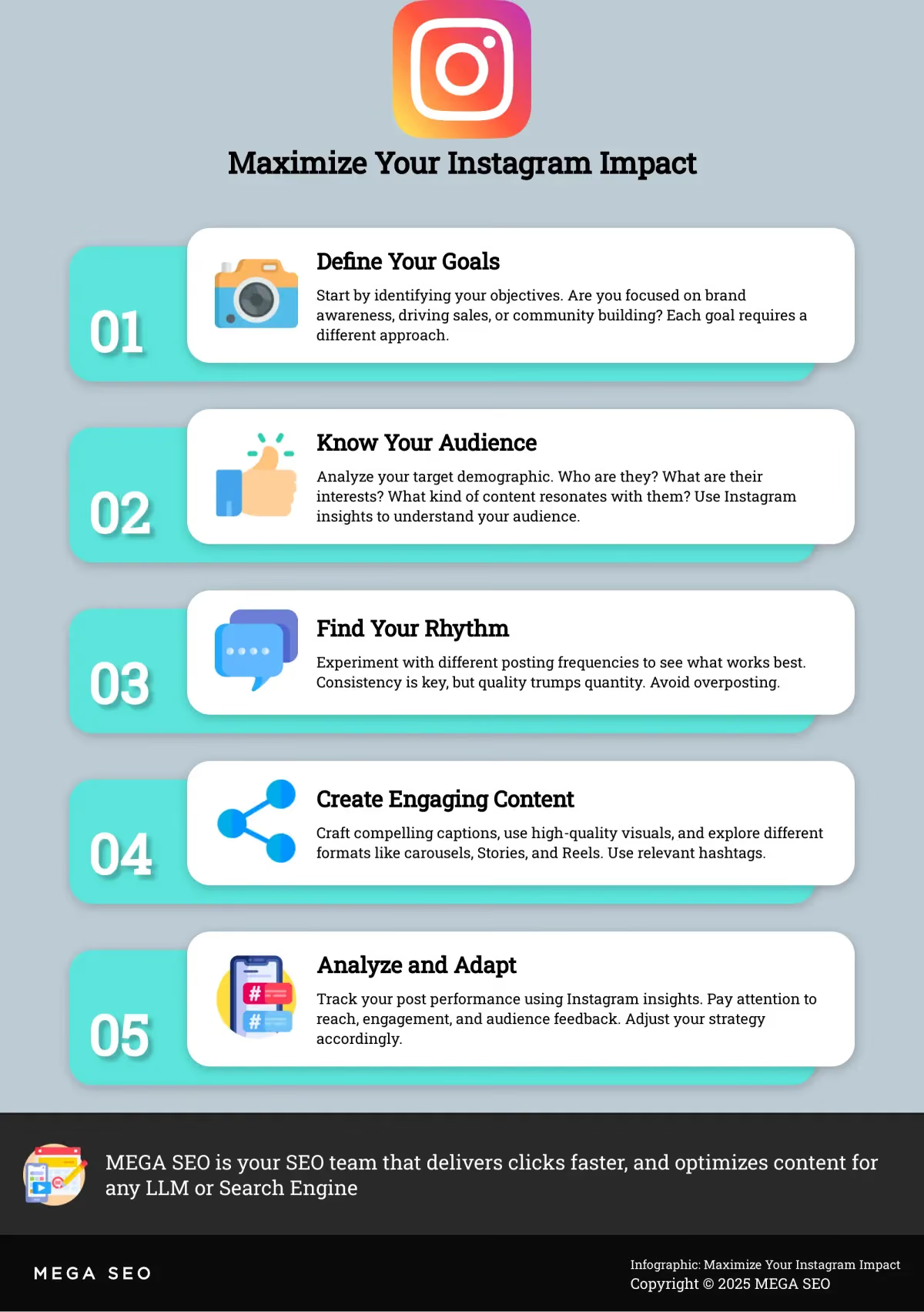
Before crafting your Instagram posting strategy, ask yourself what you aim to achieve. Are you focused on brand awareness, driving sales, or community building? Each objective requires a different approach. Understanding your goals is the first step. Next, analyze your target audience. Who are they? What are their interests and online behaviors? What kind of content resonates with them? Researching Instagram demographics can provide valuable insights. Remember, different demographics engage with content in unique ways, so tailoring your strategy is essential for maximizing impact. Utilizing Instagram’s audience targeting tools, such as demographic and interest-based targeting, can help you refine your content and reach the right people.
Creating a Posting Plan You Can Stick With
Once you’ve defined your goals and audience, create a realistic posting schedule. Consistency is key on Instagram. While you can share up to 50 posts a day (posts, Reels, and Stories combined), focus on quality over quantity. Start with a manageable frequency, perhaps a few times a week, and gradually increase as you refine your process. The Instagram algorithm tends to favor accounts that post regularly, so find a rhythm you can maintain. Consider using a content calendar to plan and schedule your posts in advance. This helps ensure consistent output and allows you to align your content with key events or campaigns. Remember, there’s no overall limit to the number of photos you can post on Instagram; some accounts have millions! Your focus should be on creating engaging content that resonates with your audience and supports your goals.
Frequently Asked Questions
Does posting more frequently on Instagram guarantee more visibility? Not necessarily. While consistency is favored by the algorithm, overposting can overwhelm your followers and lead to lower engagement. Focus on creating high-quality content that resonates with your audience, even if it means posting a little less frequently. Experiment to find the right balance between frequency and engagement.
How can I tell what kind of content my Instagram audience prefers? Switch to an Instagram Business account. It gives you access to valuable insights about your audience demographics and how they interact with your posts. Pay attention to metrics like reach, impressions, likes, comments, and shares to understand what resonates. You can also experiment with different content formats and analyze the results.
What are some good third-party tools to enhance my Instagram posts? Canva is great for creating visually appealing graphics and templates. For scheduling and automating your posts, consider tools like Later or Buffer. These can help you maintain a consistent presence without having to manually post every time.
What’s the best way to use hashtags on Instagram? Research relevant hashtags in your niche and use a mix of popular and niche-specific ones. Don’t overdo it; aim for a relevant and balanced selection. MEGA SEO’s free tools can assist with hashtag research.
How can MEGA SEO help with my Instagram strategy? MEGA SEO offers a range of tools to automate and optimize your Instagram presence. From content generation and scheduling to hashtag research and performance analysis, MEGA SEO can help you streamline your workflow and achieve better results. Book a demo to learn more about how MEGA SEO can transform your Instagram strategy.